首页 文章 精选 留言 我的

精选列表

搜索[android things],共10000篇文章
优秀的个人博客,低调大师

Android系统的开机画面显示过程分析(3)

函数fb_find_logo实现在文件kernel/goldfish/drivers/video/logo/logo.c文件中,如下所示: externconststructlinux_logologo_linux_mono; externconststructlinux_logologo_linux_vga16; externconststructlinux_logologo_linux_clut224; externconststructlinux_logologo_blackfin_vga16; externconststructlinux_logologo_blackfin_clut224; externconststructlinux_logologo_dec_clut224; externconststructlinux_logologo_mac_clut224; externconststructlinux_logologo_parisc_clut224; externconststructlinux_logologo_sgi_clut224; externconststructlinux_logologo_sun_clut224; externconststructlinux_logologo_superh_mono; externconststructlinux_logologo_superh_vga16; externconststructlinux_logologo_superh_clut224; externconststructlinux_logologo_m32r_clut224; staticintnologo; module_param(nologo,bool,0); MODULE_PARM_DESC(nologo,"Disablesstartuplogo"); /*logo'saremarked__initdata.Use__init_refoktotell *modpostthatitisintendedthatthisfunctionusesdata *marked__initdata. */ conststructlinux_logo*__init_refokfb_find_logo(intdepth) { conststructlinux_logo*logo=NULL; if(nologo) returnNULL; if(depth>=1){ #ifdefCONFIG_LOGO_LINUX_MONO /*GenericLinuxlogo*/ logo=&logo_linux_mono; #endif #ifdefCONFIG_LOGO_SUPERH_MONO /*SuperHLinuxlogo*/ logo=&logo_superh_mono; #endif } if(depth>=4){ #ifdefCONFIG_LOGO_LINUX_VGA16 /*GenericLinuxlogo*/ logo=&logo_linux_vga16; #endif #ifdefCONFIG_LOGO_BLACKFIN_VGA16 /*Blackfinprocessorlogo*/ logo=&logo_blackfin_vga16; #endif #ifdefCONFIG_LOGO_SUPERH_VGA16 /*SuperHLinuxlogo*/ logo=&logo_superh_vga16; #endif } if(depth>=8){ #ifdefCONFIG_LOGO_LINUX_CLUT224 /*GenericLinuxlogo*/ logo=&logo_linux_clut224; #endif #ifdefCONFIG_LOGO_BLACKFIN_CLUT224 /*BlackfinLinuxlogo*/ logo=&logo_blackfin_clut224; #endif #ifdefCONFIG_LOGO_DEC_CLUT224 /*DECLinuxlogoonMIPS/MIPS64orALPHA*/ logo=&logo_dec_clut224; #endif #ifdefCONFIG_LOGO_MAC_CLUT224 /*MacintoshLinuxlogoonm68k*/ if(MACH_IS_MAC) logo=&logo_mac_clut224; #endif #ifdefCONFIG_LOGO_PARISC_CLUT224 /*PA-RISCLinuxlogo*/ logo=&logo_parisc_clut224; #endif #ifdefCONFIG_LOGO_SGI_CLUT224 /*SGILinuxlogoonMIPS/MIPS64andVISWS*/ logo=&logo_sgi_clut224; #endif #ifdefCONFIG_LOGO_SUN_CLUT224 /*SunLinuxlogo*/ logo=&logo_sun_clut224; #endif #ifdefCONFIG_LOGO_SUPERH_CLUT224 /*SuperHLinuxlogo*/ logo=&logo_superh_clut224; #endif #ifdefCONFIG_LOGO_M32R_CLUT224 /*M32RLinuxlogo*/ logo=&logo_m32r_clut224; #endif } returnlogo; } EXPORT_SYMBOL_GPL(fb_find_logo); 文件开始声明的一系列linux_logo结构体变量分别用来保存kernel/goldfish/drivers/video/logo目录下的一系列ppm或者pbm文件的内容的。这些ppm或者pbm文件都是用来描述第一个开机画面的。 全局变量nologo是一个类型为布尔变量的模块参数,它的默认值等于0,表示要显示第一个开机画面。在这种情况下,函数fb_find_logo就会根据参数depth的值以及不同的编译选项来选择第一个开机画面的内容,并且保存在变量logo中返回给调用者。 这一步执行完成之后,第一个开机画面的内容就保存在模块fbmem的全局变量fb_logo的成员变量logo中了。这时候控制台的初始化过程也结束了,接下来系统就会执行切换控制台的操作。前面提到,当系统执行切换控制台的操作的时候,模块fbcon中的函数fbcon_switch就会被调用。在调用的过程中,就会执行显示第一个开机画面的操作。 staticintfbcon_switch(structvc_data*vc) { structfb_info*info,*old_info=NULL; structfbcon_ops*ops; structdisplay*p=&fb_display[vc->vc_num]; structfb_var_screeninfovar; inti,prev_console,charcnt=256; ...... if(logo_shown==FBCON_LOGO_DRAW){ logo_shown=fg_console; /*Thisisprotectedabovebyinitmem_freed*/ fb_show_logo(info,ops->rotate); ...... return0; } return1; } 由于前面在准备第一个开机画面的内容的时候,全局变量logo_show的值被设置为FBCON_LOGO_DRAW,因此,接下来就会调用函数fb_show_logo来显示第一个开机画面。在显示之前,这个函数会将全局变量logo_shown的值设置为fg_console,后者表示系统当前可见的控制台的编号。 函数fb_show_logo实现在文件kernel/goldfish/drivers/video/fbmem.c中,如下所示: intfb_show_logo(structfb_info*info,introtate) { inty; y=fb_show_logo_line(info,rotate,fb_logo.logo,0, num_online_cpus()); ...... returny; } 这个函数调用另外一个函数fb_show_logo_line来进一步执行渲染第一个开机画面的操作。 本文转自 Luoshengyang 51CTO博客,原文链接:http://blog.51cto.com/shyluo/967031,如需转载请自行联系原作者

优秀的个人博客,低调大师

Android 机顶盒手势、数据分页演示DEMO

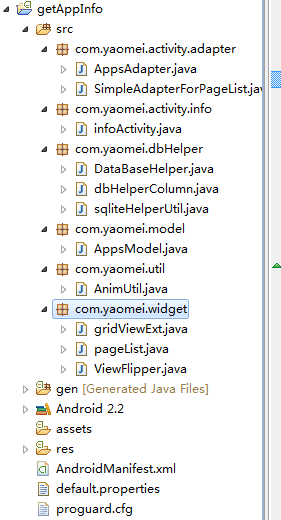
上篇讲了一篇机顶盒的一个封装类《GridView》,利用这个封装的GridView 可以实现一些例如移动、位移图标等基础组件“GridView”无法实现的一些功能。本篇将会提出一部分可供运行的代码演示一个分页、手势换屏的DEMO版本,供大家学习。 DEMO 的工程目录如下: 包名解释: com.yaomei.activity.adapter DEMO使用到的自定义Adapter com.yaomei.activity.info DEMO入口 com.yaomei.dbHelper 数据库帮助类 com.yaomei.model 应用程序JAVA BEAN com.yaomei.util 手势换屏需要用到的动画 com.yaomei.widget DEMO 版里面使用到的封装类,包括一个分页控件、一个列表控件GridView 、一个支持动画效果的ViewFlipper Demo 运行效果如下: 如果你觉得不想用手势,也可以通过点击上面的页码进行定位到哪页,如果你有好几十页的情况效果更好 Tip:本源码为开源DEMO,你可以完全拿去改、或者在此基础上增加功能,请勿作商用。谢谢。运行本源码请使用800*480分辨率 关于GridView 的OnKeyDown 事件,其实应该是放在GridViewExt.java 里面的,下载此源码的朋友可以从Activity 里面将onKeyDown事件的代码放置 在GridView 里面,使其默认支持按键选中功能,然后在Activity里面实现OnkeyDown return Gridview 的OnKeyDown 即可以让其有这个事件。如果你不嫌Activity 里面代码量太多的话,可以不用更改。 源码下载:DEMO 本文转自 terry_龙 51CTO博客,原文链接:http://blog.51cto.com/terryblog/483072,如需转载请自行联系原作者

优秀的个人博客,低调大师

[Android]文本框实现搜索和清空效果

正文 一、实现效果 二、实现代码 监听输入 /** *动态搜索 */ private TextWatchertbxSearch_TextChanged = new TextWatcher(){ // 缓存上一次文本框内是否为空 private boolean isnull = true ; @Override public void afterTextChanged(Editables){ if (TextUtils.isEmpty(s)){ if ( ! isnull){ mSearchView.setCompoundDrawablesWithIntrinsicBounds( null , null ,mIconSearchDefault, null ); isnull = true ; } } else { if (isnull){ mSearchView.setCompoundDrawablesWithIntrinsicBounds( null , null ,mIconSearchClear, null ); isnull = false ; } } } @Override public void beforeTextChanged(CharSequences, int start, int count, int after){ } /** *随着文本框内容改变动态改变列表内容 */ @Override public void onTextChanged(CharSequences, int start, int before, int count){ } }; 触摸事件 private OnTouchListenertxtSearch_OnTouch = new OnTouchListener(){ @Override public boolean onTouch(Viewv,MotionEventevent){ switch (event.getAction()){ case MotionEvent.ACTION_UP: int curX = ( int )event.getX(); if (curX > v.getWidth() - 38 && ! TextUtils.isEmpty(mSearchView.getText())){ mSearchView.setText( "" ); int cacheInputType = mSearchView.getInputType(); // backuptheinputtype mSearchView.setInputType(InputType.TYPE_NULL); // disablesoftinput mSearchView.onTouchEvent(event); // callnativehandler mSearchView.setInputType(cacheInputType); // restoreinputtype return true ; // consumetoucheven } break ; } return false ; } }; 绑定事件 private DrawablemIconSearchDefault; // 搜索文本框默认图标 private DrawablemIconSearchClear; // 搜索文本框清除文本内容图标 @Override protected void onCreate(BundlesavedInstanceState){ super .onCreate(savedInstanceState); setContentView(R.layout.main) final Resourcesres = getResources(); mIconSearchDefault = res.getDrawable(R.drawable.txt_search_default); mIconSearchClear = res.getDrawable(R.drawable.txt_search_clear); mSearchView = (EditText)findViewById(R.id.txtSearch); mSearchView.addTextChangedListener(tbxSearch_TextChanged); mSearchView.setOnTouchListener(txtSearch_OnTouch); } 代码说明: 1. 为输入框绑定触摸事件(模拟点击事件捕捉)。通过监听点击区域判断是否点击清空图片,如果在该区域并且文本框不为空,则清空文本框。 2. 为输入框绑定文本改变事件监听,根据内容改变动态设置图标显示。 3. 维持清空操作后软键盘状态。 三、小图标下载 (右键另存为即可。) 结束 活用好每一个控件的属性、方法和事件能实现很多有意思的效果。欢迎大家交流。 本文转自over140 51CTO博客,原文链接:http://blog.51cto.com/over140/581678,如需转载请自行联系原作者

资源下载

更多资源
优质分享App

优质分享App

近一个月的开发和优化,本站点的第一个app全新上线。该app采用极致压缩,本体才4.36MB。系统里面做了大量数据访问、缓存优化。方便用户在手机上查看文章。后续会推出HarmonyOS的适配版本。

Nacos

Nacos

Nacos /nɑ:kəʊs/ 是 Dynamic Naming and Configuration Service 的首字母简称,一个易于构建 AI Agent 应用的动态服务发现、配置管理和AI智能体管理平台。Nacos 致力于帮助您发现、配置和管理微服务及AI智能体应用。Nacos 提供了一组简单易用的特性集,帮助您快速实现动态服务发现、服务配置、服务元数据、流量管理。Nacos 帮助您更敏捷和容易地构建、交付和管理微服务平台。

Rocky Linux

Rocky Linux

Rocky Linux(中文名:洛基)是由Gregory Kurtzer于2020年12月发起的企业级Linux发行版,作为CentOS稳定版停止维护后与RHEL(Red Hat Enterprise Linux)完全兼容的开源替代方案,由社区拥有并管理,支持x86_64、aarch64等架构。其通过重新编译RHEL源代码提供长期稳定性,采用模块化包装和SELinux安全架构,默认包含GNOME桌面环境及XFS文件系统,支持十年生命周期更新。

Sublime Text

Sublime Text

Sublime Text具有漂亮的用户界面和强大的功能,例如代码缩略图,Python的插件,代码段等。还可自定义键绑定,菜单和工具栏。Sublime Text 的主要功能包括:拼写检查,书签,完整的 Python API , Goto 功能,即时项目切换,多选择,多窗口等等。Sublime Text 是一个跨平台的编辑器,同时支持Windows、Linux、Mac OS X等操作系统。

用户登录
用户注册