Python爬虫(三)——开封市58同城出租房决策树构建
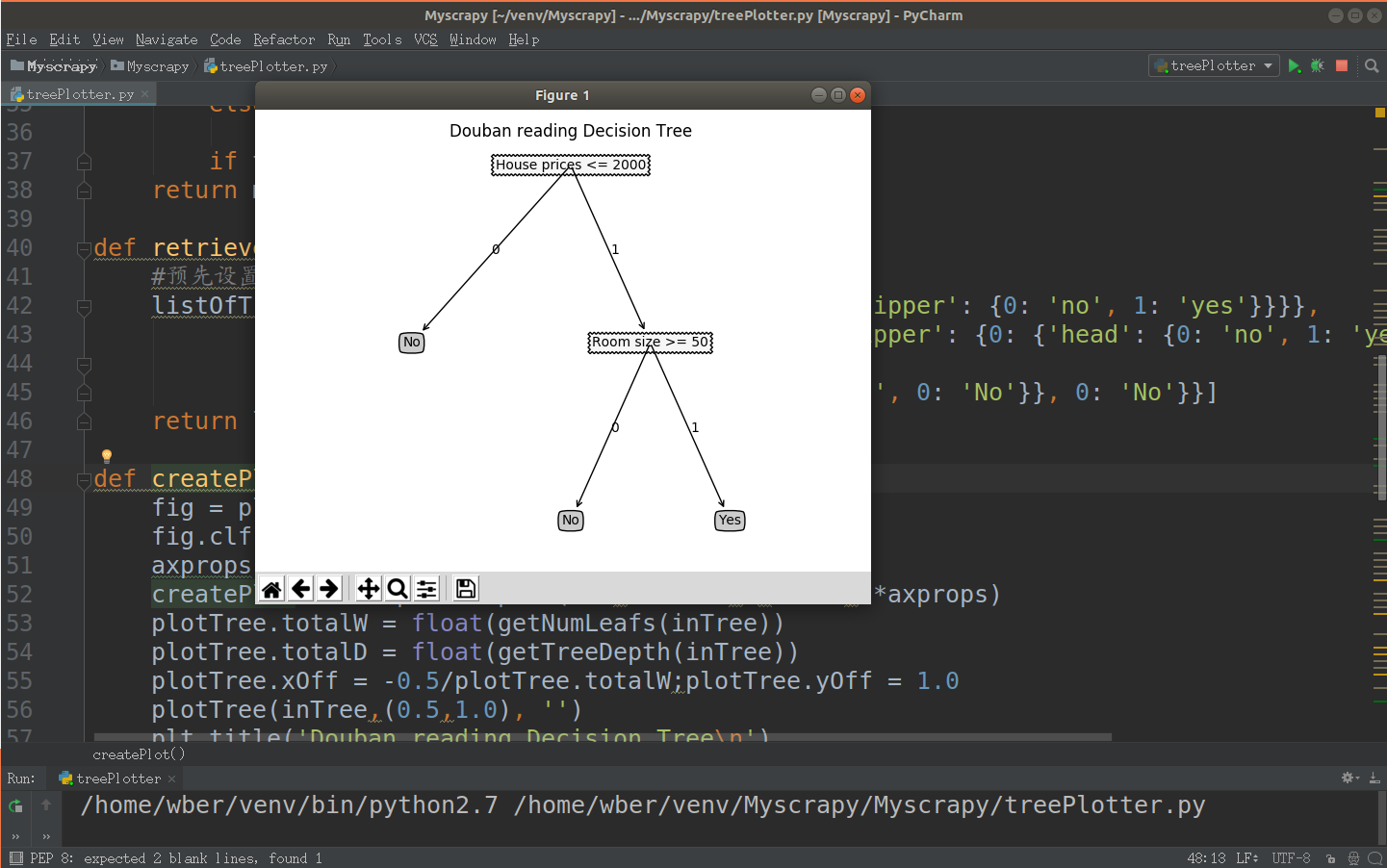
决策树框架: 1 # coding=utf-8 2 import matplotlib.pyplot as plt 3 4 decisionNode = dict(boxstyle='sawtooth', fc='10') 5 leafNode = dict(boxstyle='round4', fc='0.8') 6 arrow_args = dict(arrowstyle='<-') 7 8 9 def plotNode(nodeTxt, centerPt, parentPt, nodeType): 10 createPlot.ax1.annotate(nodeTxt, xy=parentPt, xycoords='axes fraction', \ 11 xytext=centerPt, textcoords='axes fraction', \ 12 va='center', ha='center', bbox=nodeType, arrowprops \ 13 =arrow_args) 14 15 16 def getNumLeafs(myTree): 17 numLeafs = 0 18 firstStr = list(myTree.keys())[0] 19 secondDict = myTree[firstStr] 20 for key in secondDict: 21 if (type(secondDict[key]).__name__ == 'dict'): 22 numLeafs += getNumLeafs(secondDict[key]) 23 else: 24 numLeafs += 1 25 return numLeafs 26 27 28 def getTreeDepth(myTree): 29 maxDepth = 0 30 firstStr = list(myTree.keys())[0] 31 secondDict = myTree[firstStr] 32 for key in secondDict: 33 if (type(secondDict[key]).__name__ == 'dict'): 34 thisDepth = 1 + getTreeDepth((secondDict[key])) 35 else: 36 thisDepth = 1 37 if thisDepth > maxDepth: maxDepth = thisDepth 38 return maxDepth 39 40 41 def retrieveTree(i): 42 # 预先设置树的信息 43 listOfTree = [] 44 return listOfTree[i] 45 46 47 def createPlot(inTree): 48 fig = plt.figure(1, facecolor='white') 49 fig.clf() 50 axprops = dict(xticks=[], yticks=[]) 51 createPlot.ax1 = plt.subplot(111, frameon=False, **axprops) 52 plotTree.totalW = float(getNumLeafs(inTree)) 53 plotTree.totalD = float(getTreeDepth(inTree)) 54 plotTree.xOff = -0.5 / plotTree.totalW; 55 plotTree.yOff = 1.0 56 plotTree(inTree, (0.5, 1.0), '') 57 plt.title('kaifeng.58.com\n') 58 plt.show() 59 60 61 def plotMidText(cntrPt, parentPt, txtString): 62 xMid = (parentPt[0] - cntrPt[0]) / 2.0 + cntrPt[0] 63 yMid = (parentPt[1] - cntrPt[1]) / 2.0 + cntrPt[1] 64 createPlot.ax1.text(xMid, yMid, txtString) 65 66 67 def plotTree(myTree, parentPt, nodeTxt): 68 numLeafs = getNumLeafs(myTree) 69 depth = getTreeDepth(myTree) 70 firstStr = list(myTree.keys())[0] 71 cntrPt = (plotTree.xOff + (1.0 + float(numLeafs)) / 2.0 / plotTree.totalW, \ 72 plotTree.yOff) 73 plotMidText(cntrPt, parentPt, nodeTxt) 74 plotNode(firstStr, cntrPt, parentPt, decisionNode) 75 secondDict = myTree[firstStr] 76 plotTree.yOff = plotTree.yOff - 1.0 / plotTree.totalD 77 for key in secondDict: 78 if type(secondDict[key]).__name__ == 'dict': 79 plotTree(secondDict[key], cntrPt, str(key)) 80 else: 81 plotTree.xOff = plotTree.xOff + 1.0 / plotTree.totalW 82 plotNode(secondDict[key], (plotTree.xOff, plotTree.yOff), \ 83 cntrPt, leafNode) 84 plotMidText((plotTree.xOff, plotTree.yOff), cntrPt, str(key)) 85 plotTree.yOff = plotTree.yOff + 1.0 / plotTree.totalD 86 87 88 if __name__ == '__main__': 89 myTree = retrieveTree(2) 90 createPlot(myTree) 构造信息: 1 [{'no surfacing': {0: 'no', 1: {'flipper': {0: 'no', 1: 'yes'}}}}, 2 {'no surfacing': {0: 'no', 1: {'flipper': {0: {'head': {0: 'no', 1: 'yes'}}, 1: 'no'}}}}, 3 {'House prices <= 2000': { 4 1: {'Room size >= 50': {1: 'Yes', 0: 'No'}}, 0: 'No'}}] 结果: