LFS-从源代码编译自己的操作系统(1)
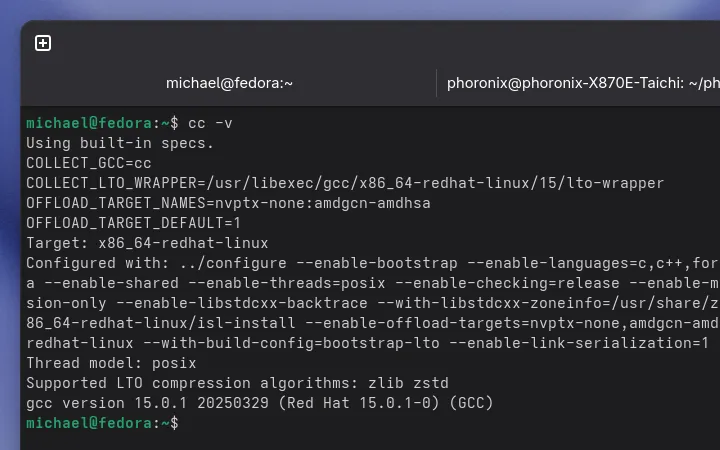
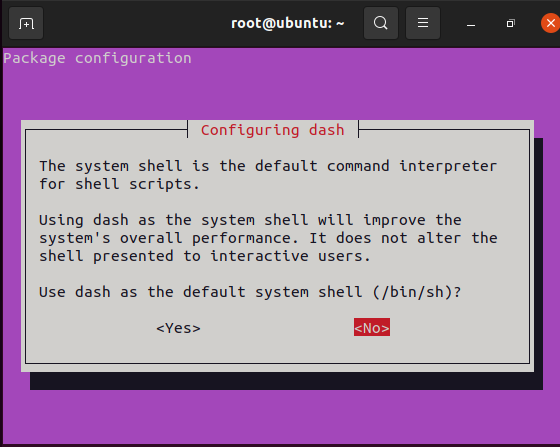
以 ubuntu 系统为宿主机 1 安装宿主机 1.1 使用ubuntu 试用模式 1.1.1 下载ubuntu 镜像下载 1.1.2 安装虚拟机 补充try ubuntu截图 1.1.3 替换镜像源 Ubuntu 的软件源配置文件是 /etc/apt/sources.list。将系统自带的该文件做个备份,将该文件替换为下面内容 # 默认注释了源码镜像以提高 apt update 速度,如有需要可自行取消注释 deb https://mirrors.tuna.tsinghua.edu.cn/ubuntu/ impish main restricted universe multiverse # deb-src https://mirrors.tuna.tsinghua.edu.cn/ubuntu/ impish main restricted universe multiverse deb https://mirrors.tuna.tsinghua.edu.cn/ubuntu/ impish-updates main restricted universe multiverse # deb-src https://mirrors.tuna.tsinghua.edu.cn/ubuntu/ impish-updates main restricted universe multiverse deb https://mirrors.tuna.tsinghua.edu.cn/ubuntu/ impish-backports main restricted universe multiverse # deb-src https://mirrors.tuna.tsinghua.edu.cn/ubuntu/ impish-backports main restricted universe multiverse deb https://mirrors.tuna.tsinghua.edu.cn/ubuntu/ impish-security main restricted universe multiverse # deb-src https://mirrors.tuna.tsinghua.edu.cn/ubuntu/ impish-security main restricted universe multiverse # 预发布软件源,不建议启用 # deb https://mirrors.tuna.tsinghua.edu.cn/ubuntu/ impish-proposed main restricted universe multiverse # deb-src https://mirrors.tuna.tsinghua.edu.cn/ubuntu/ impish-proposed main restricted universe multiverse 1.2 安装依赖 1.2.1 检查依赖 cat > version-check.sh << "EOF" #!/bin/bash # Simple script to list version numbers of critical development tools export LC_ALL=C bash --version | head -n1 | cut -d" " -f2-4 MYSH=$(readlink -f /bin/sh) echo "/bin/sh -> $MYSH" echo $MYSH | grep -q bash || echo "ERROR: /bin/sh does not point to bash" unset MYSH echo -n "Binutils: "; ld --version | head -n1 | cut -d" " -f3- bison --version | head -n1 if [ -h /usr/bin/yacc ]; then echo "/usr/bin/yacc -> `readlink -f /usr/bin/yacc`"; elif [ -x /usr/bin/yacc ]; then echo yacc is `/usr/bin/yacc --version | head -n1` else echo "yacc not found" fi echo -n "Coreutils: "; chown --version | head -n1 | cut -d")" -f2 diff --version | head -n1 find --version | head -n1 gawk --version | head -n1 if [ -h /usr/bin/awk ]; then echo "/usr/bin/awk -> `readlink -f /usr/bin/awk`"; elif [ -x /usr/bin/awk ]; then echo awk is `/usr/bin/awk --version | head -n1` else echo "awk not found" fi gcc --version | head -n1 g++ --version | head -n1 grep --version | head -n1 gzip --version | head -n1 cat /proc/version m4 --version | head -n1 make --version | head -n1 patch --version | head -n1 echo Perl `perl -V:version` python3 --version sed --version | head -n1 tar --version | head -n1 makeinfo --version | head -n1 # texinfo version xz --version | head -n1 echo 'int main(){}' > dummy.c && g++ -o dummy dummy.c if [ -x dummy ] then echo "g++ compilation OK"; else echo "g++ compilation failed"; fi rm -f dummy.c dummy EOF bash version-check.sh 常见结果 bash, version 5.1.8(1)-release /bin/sh -> /usr/bin/dash ERROR: /bin/sh does not point to bash Binutils: version-check.sh: line 10: ld: command not found version-check.sh: line 11: bison: command not found yacc not found Coreutils: 8.32 diff (GNU diffutils) 3.8 find (GNU findutils) 4.8.0 version-check.sh: line 24: gawk: command not found /usr/bin/awk -> /usr/bin/mawk version-check.sh: line 34: gcc: command not found version-check.sh: line 35: g++: command not found grep (GNU grep) 3.7 gzip 1.10 Linux version 5.13.0-19-generic (buildd@lgw01-amd64-013) (gcc (Ubuntu 11.2.0-7ubuntu2) 11.2.0, GNU ld (GNU Binutils for Ubuntu) 2.37) #19-Ubuntu SMP Thu Oct 7 21:58:00 UTC 2021 version-check.sh: line 39: m4: command not found version-check.sh: line 40: make: command not found GNU patch 2.7.6 Perl version='5.32.1'; Python 3.9.7 sed (GNU sed) 4.7 tar (GNU tar) 1.34 version-check.sh: line 46: makeinfo: command not found xz (XZ Utils) 5.2.5 version-check.sh: line 49: g++: command not found g++ compilation failed 1.2.2 安装配置 ERROR: /bin/sh does not point to bash # 调整默认sh指向 dpkg-reconfigure dash 其它软件直接apt安装即可 apt install bison gawk gcc g++ make texinfo 再次检查结果 bash, version 5.1.8(1)-release /bin/sh -> /usr/bin/bash Binutils: (GNU Binutils for Ubuntu) 2.37 bison (GNU Bison) 3.7.6 /usr/bin/yacc -> /usr/bin/bison.yacc Coreutils: 8.32 diff (GNU diffutils) 3.8 find (GNU findutils) 4.8.0 GNU Awk 5.1.0, API: 3.0 (GNU MPFR 4.1.0, GNU MP 6.2.1) /usr/bin/awk -> /usr/bin/gawk gcc (Ubuntu 11.2.0-7ubuntu2) 11.2.0 g++ (Ubuntu 11.2.0-7ubuntu2) 11.2.0 grep (GNU grep) 3.7 gzip 1.10 Linux version 5.13.0-19-generic (buildd@lgw01-amd64-013) (gcc (Ubuntu 11.2.0-7ubuntu2) 11.2.0, GNU ld (GNU Binutils for Ubuntu) 2.37) #19-Ubuntu SMP Thu Oct 7 21:58:00 UTC 2021 m4 (GNU M4) 1.4.18 GNU Make 4.3 GNU patch 2.7.6 Perl version='5.32.1'; Python 3.9.7 sed (GNU sed) 4.7 tar (GNU tar) 1.34 texi2any (GNU texinfo) 6.7 xz (XZ Utils) 5.2.5 g++ compilation OK 2 LFS准备 2.1 设置分区 2.1.1 分区规划 swap 2G / 剩余 2.1.2 使用fdisk分区 fdisk /dev/vda # 以下为交互输入 g # 改磁盘格式为gpt n # 新建分区,后面相同 回车 回车 +2G n 回车 回车 回车 w #保存修改 2.1.3 格式化分区 # swap mkswap /dev/vda1 # / mkfs,ext4 /dev/vda2 2.2 设置工作目录 2.2.1 设置LFS变量 export LFS=/mnt/lfs 2.2.2 后续如果关机重新进入,记得执行检查命令 echo $LFS 2.2.3 挂载分区 # 创建挂载 / 分区 mkdir -pv $LFS mount -v -t ext4 /dev/vda2 $LFS # 启动swap分区 /sbin/swapon -v /dev/vda1 2.3 获取源代码 2.3.1 创建源代码目录 mkdir -v $LFS/sources chmod -v a+wt $LFS/sources 2.3.2 源代码下载地址 ftp://ftp.lfs-matrix.net/pub/lfs/ (Los Angeles, CA, USA, 200Mbps) http://ftp.lfs-matrix.net/pub/lfs/ (Los Angeles, CA, USA, 200Mbps) ftp://ftp.osuosl.org/pub/lfs/ (Corvallis, OR, USA, 100Mbps) http://ftp.osuosl.org/pub/lfs/ (Corvallis, OR, USA, 100Mbps) http://mirror.jaleco.com/lfs/pub/ (Washington, DC, USA, 1 Gbps)