Elasticsearch-2.4.3的单节点安装(多种方式图文详解)
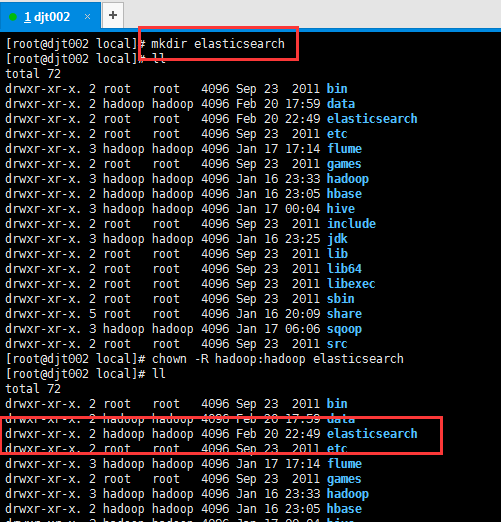
1、新建es安装目录 [root@djt002 local]# mkdir elasticsearch [root@djt002 local]# ll total 72 drwxr-xr-x. 2 root root 4096 Sep 23 2011 bin drwxr-xr-x. 2 hadoop hadoop 4096 Feb 20 17:59 data drwxr-xr-x. 2 root root 4096 Feb 20 22:49 elasticsearch drwxr-xr-x. 2 root root 4096 Sep 23 2011 etc drwxr-xr-x. 3 hadoop hadoop 4096 Jan 17 17:14 flume drwxr-xr-x. 2 root root 4096 Sep 23 2011 games drwxr-xr-x. 3 hadoop hadoop 4096 Jan 16 23:33 hadoop drwxr-xr-x. 2 hadoop hadoop 4096 Jan 16 23:05 hbase drwxr-xr-x. 3 hadoop hadoop 4096 Jan 17 00:04 hive drwxr-xr-x. 2 root root 4096 Sep 23 2011 include drwxr-xr-x. 3 hadoop hadoop 4096 Jan 16 23:25 jdk drwxr-xr-x. 2 root root 4096 Sep 23 2011 lib drwxr-xr-x. 2 root root 4096 Sep 23 2011 lib64 drwxr-xr-x. 2 root root 4096 Sep 23 2011 libexec drwxr-xr-x. 2 root root 4096 Sep 23 2011 sbin drwxr-xr-x. 5 root root 4096 Jan 16 20:09 share drwxr-xr-x. 3 hadoop hadoop 4096 Jan 17 06:06 sqoop drwxr-xr-x. 2 root root 4096 Sep 23 2011 src [root@djt002 local]# chown -R hadoop:hadoop elasticsearch [root@djt002 local]# ll total 72 drwxr-xr-x. 2 root root 4096 Sep 23 2011 bin drwxr-xr-x. 2 hadoop hadoop 4096 Feb 20 17:59 data drwxr-xr-x. 2 hadoop hadoop 4096 Feb 20 22:49 elasticsearch drwxr-xr-x. 2 root root 4096 Sep 23 2011 etc drwxr-xr-x. 3 hadoop hadoop 4096 Jan 17 17:14 flume drwxr-xr-x. 2 root root 4096 Sep 23 2011 games drwxr-xr-x. 3 hadoop hadoop 4096 Jan 16 23:33 hadoop drwxr-xr-x. 2 hadoop hadoop 4096 Jan 16 23:05 hbase drwxr-xr-x. 3 hadoop hadoop 4096 Jan 17 00:04 hive drwxr-xr-x. 2 root root 4096 Sep 23 2011 include drwxr-xr-x. 3 hadoop hadoop 4096 Jan 16 23:25 jdk drwxr-xr-x. 2 root root 4096 Sep 23 2011 lib drwxr-xr-x. 2 root root 4096 Sep 23 2011 lib64 drwxr-xr-x. 2 root root 4096 Sep 23 2011 libexec drwxr-xr-x. 2 root root 4096 Sep 23 2011 sbin drwxr-xr-x. 5 root root 4096 Jan 16 20:09 share drwxr-xr-x. 3 hadoop hadoop 4096 Jan 17 06:06 sqoop drwxr-xr-x. 2 root root 4096 Sep 23 2011 src 2、上传elasticsearch-2.4.3.tar.gz [hadoop@djt002 elasticsearch]$ pwd /usr/local/elasticsearch [hadoop@djt002 elasticsearch]$ rz 3、解压 [hadoop@djt002 elasticsearch]$ ls elasticsearch-2.4.3.tar.gz [hadoop@djt002 elasticsearch]$ tar -zxvf elasticsearch-2.4.3.tar.gz 4、删除压缩包 [hadoop@djt002 elasticsearch]$ rm elasticsearch-2.4.3.tar.gz 5、熟悉下es目录结构 [hadoop@djt002 elasticsearch]$ pwd /usr/local/elasticsearch [hadoop@djt002 elasticsearch]$ ls elasticsearch-2.4.3 [hadoop@djt002 elasticsearch]$ cd elasticsearch-2.4.3/ [hadoop@djt002 elasticsearch-2.4.3]$ pwd /usr/local/elasticsearch/elasticsearch-2.4.3 [hadoop@djt002 elasticsearch-2.4.3]$ ls bin config lib LICENSE.txt modules NOTICE.txt README.textile [hadoop@djt002 elasticsearch-2.4.3]$ ll total 44 drwxrwxr-x. 2 hadoop hadoop 4096 Feb 20 22:54 bin drwxrwxr-x. 2 hadoop hadoop 4096 Feb 20 22:54 config drwxrwxr-x. 2 hadoop hadoop 4096 Feb 20 22:54 lib -rw-rw-r--. 1 hadoop hadoop 11358 Aug 24 00:46 LICENSE.txt drwxrwxr-x. 5 hadoop hadoop 4096 Dec 8 00:41 modules -rw-rw-r--. 1 hadoop hadoop 150 Aug 24 00:46 NOTICE.txt -rw-rw-r--. 1 hadoop hadoop 8700 Aug 24 00:46 README.textile [hadoop@djt002 elasticsearch-2.4.3]$ cd bin [hadoop@djt002 bin]$ ll total 324 -rwxr-xr-x. 1 hadoop hadoop 5551 Aug 24 00:46 elasticsearch -rw-rw-r--. 1 hadoop hadoop 909 Aug 24 00:46 elasticsearch.bat -rw-rw-r--. 1 hadoop hadoop 3351 Sep 23 16:20 elasticsearch.in.bat -rwxr-xr-x. 1 hadoop hadoop 2814 Aug 24 00:46 elasticsearch.in.sh -rw-rw-r--. 1 hadoop hadoop 104448 Jul 27 2016 elasticsearch-service-mgr.exe -rw-rw-r--. 1 hadoop hadoop 103936 Jul 27 2016 elasticsearch-service-x64.exe -rw-rw-r--. 1 hadoop hadoop 80896 Jul 27 2016 elasticsearch-service-x86.exe -rwxr-xr-x. 1 hadoop hadoop 2992 Aug 24 00:46 plugin -rw-rw-r--. 1 hadoop hadoop 1303 Aug 24 00:46 plugin.bat -rw-rw-r--. 1 hadoop hadoop 6872 Aug 24 00:46 service.bat [hadoop@djt002 bin]$ 6、启动es 方式一(不建议,只能在本机访问) 注意:es启动之后啊,会绑定两个端口,9200和9300. bin/elasticsearch 注意: 这样启动只能通过 127.0.0.1:9200 访问 [hadoop@djt002 elasticsearch-2.4.3]$ pwd /usr/local/elasticsearch/elasticsearch-2.4.3 [hadoop@djt002 elasticsearch-2.4.3]$ bin/elasticsearch [2017-02-20 22:59:53,616][WARN ][bootstrap ] unable to install syscall filter: seccomp unavailable: requires kernel 3.5+ with CONFIG_SECCOMP and CONFIG_SECCOMP_FILTER compiled in [2017-02-20 22:59:56,908][INFO ][node ] [Shathra] version[2.4.3], pid[2079], build[d38a34e/2016-12-07T16:28:56Z] [2017-02-20 22:59:56,908][INFO ][node ] [Shathra] initializing ... [2017-02-20 23:00:00,967][INFO ][plugins ] [Shathra] modules [lang-groovy, reindex, lang-expression], plugins [], sites [] [2017-02-20 23:00:01,238][INFO ][env ] [Shathra] using [1] data paths, mounts [[/ (/dev/sda5)]], net usable_space [28.7gb], net total_space [34.7gb], spins? [possibly], types [ext4] [2017-02-20 23:00:01,239][INFO ][env ] [Shathra] heap size [1015.6mb], compressed ordinary object pointers [true] [2017-02-20 23:00:01,242][WARN ][env ] [Shathra] max file descriptors [4096] for elasticsearch process likely too low, consider increasing to at least [65536] [2017-02-20 23:00:13,491][INFO ][node ] [Shathra] initialized [2017-02-20 23:00:13,491][INFO ][node ] [Shathra] starting ... [2017-02-20 23:00:13,744][INFO ][transport ] [Shathra] publish_address {127.0.0.1:9300}, bound_addresses {127.0.0.1:9300}, {[::1]:9300} [2017-02-20 23:00:13,763][INFO ][discovery ] [Shathra] elasticsearch/lxTt6VmIQXuNnytXpNvPyA [2017-02-20 23:00:17,109][INFO ][cluster.service ] [Shathra] new_master {Shathra}{lxTt6VmIQXuNnytXpNvPyA}{127.0.0.1}{127.0.0.1:9300}, reason: zen-disco-join(elected_as_master, [0] joins received) [2017-02-20 23:00:17,235][INFO ][http ] [Shathra] publish_address {127.0.0.1:9200}, bound_addresses {127.0.0.1:9200}, {[::1]:9200} [2017-02-20 23:00:17,238][INFO ][node ] [Shathra] started [2017-02-20 23:00:18,037][INFO ][gateway ] [Shathra] recovered [0] indices into cluster_state ^C[2017-02-20 23:03:35,376][INFO ][node ] [Shathra] stopping ... [2017-02-20 23:03:35,458][INFO ][node ] [Shathra] stopped [2017-02-20 23:03:35,470][INFO ][node ] [Shathra] closing ... [2017-02-20 23:03:35,531][INFO ][node ] [Shathra] closed [hadoop@djt002 elasticsearch-2.4.3]$ 方式二(建议,既能在本机访问,也能在内网访问) 建议修改 es 的配置文件 (一般建议这种) vi config/elasticsearch.yml network.host: 192.168.80.200 这个属性要顶格写, 并且冒号和值之间要有一个空格 bin/elasticsearch 这样再启动, 就可以通过 192.168.80.200:9200 访问 或者可以这样设置 vi config/elasticsearch.yml network.host: 0.0.0.0 这样再启动, 可以通过 127.0.0.1:9200 和 192.168.80.200:9200 访问 [hadoop@djt002 elasticsearch-2.4.3]$ ls bin config data lib LICENSE.txt logs modules NOTICE.txt plugins README.textile [hadoop@djt002 elasticsearch-2.4.3]$ cd config/ [hadoop@djt002 config]$ ll total 12 -rw-rw-r--. 1 hadoop hadoop 3192 Aug 24 00:46 elasticsearch.yml -rw-rw-r--. 1 hadoop hadoop 2571 Aug 24 00:46 logging.yml drwxrwxr-x. 2 hadoop hadoop 4096 Feb 20 22:59 scripts [hadoop@djt002 config]$ pwd /usr/local/elasticsearch/elasticsearch-2.4.3/config [hadoop@djt002 config]$vim elasticsearch.yml [hadoop@djt002 elasticsearch-2.4.3]$ pwd /usr/local/elasticsearch/elasticsearch-2.4.3 [hadoop@djt002 elasticsearch-2.4.3]$bin/elasticsearch 或者 bin/elasticsearch -d (后台运行) [2017-02-20 23:10:43,674][WARN ][bootstrap ] unable to install syscall filter: seccomp unavailable: requires kernel 3.5+ with CONFIG_SECCOMP and CONFIG_SECCOMP_FILTER compiled in [2017-02-20 23:10:45,361][INFO ][node ] [Pisces] version[2.4.3], pid[2182], build[d38a34e/2016-12-07T16:28:56Z] [2017-02-20 23:10:45,372][INFO ][node ] [Pisces] initializing ... [2017-02-20 23:10:48,431][INFO ][plugins ] [Pisces] modules [lang-groovy, reindex, lang-expression], plugins [], sites [] [2017-02-20 23:10:48,629][INFO ][env ] [Pisces] using [1] data paths, mounts [[/ (/dev/sda5)]], net usable_space [28.7gb], net total_space [34.7gb], spins? [possibly], types [ext4] [2017-02-20 23:10:48,629][INFO ][env ] [Pisces] heap size [1015.6mb], compressed ordinary object pointers [true] [2017-02-20 23:10:48,631][WARN ][env ] [Pisces] max file descriptors [4096] for elasticsearch process likely too low, consider increasing to at least [65536] [2017-02-20 23:10:54,940][INFO ][node ] [Pisces] initialized [2017-02-20 23:10:54,940][INFO ][node ] [Pisces] starting ... [2017-02-20 23:10:55,046][INFO ][transport ] [Pisces] publish_address {192.168.80.200:9300}, bound_addresses {192.168.80.200:9300} [2017-02-20 23:10:55,057][INFO ][discovery ] [Pisces] elasticsearch/EEZfZRE4S6GceAe-paQJPQ [2017-02-20 23:10:58,360][INFO ][cluster.service ] [Pisces] new_master {Pisces}{EEZfZRE4S6GceAe-paQJPQ}{192.168.80.200}{192.168.80.200:9300}, reason: zen-disco-join(elected_as_master, [0] joins received) [2017-02-20 23:10:58,536][INFO ][http ] [Pisces] publish_address {192.168.80.200:9200}, bound_addresses {192.168.80.200:9200} [2017-02-20 23:10:58,542][INFO ][node ] [Pisces] started [2017-02-20 23:10:59,072][INFO ][gateway ] [Pisces] recovered [0] indices into cluster_state 7、es的验证 修改方式的总结: 1、修改config/elasticsearch.yml 2、或者在启动es的时候指定参数 (也可以是0.0.0.0,即任何主机) 如bin/elasticsearch -Dnetwork.host=192.168.80.200 (但这样,每次很麻烦!) 3、es 安装注意事项, 以及容易出现问题的地方 (1): 关闭服务器防火墙 service iptables stop chkconfig iptables off (2): network.host 属性需要设置【 如果不设置的话只能通过 127.0.0.1 来进行访问】 network.host: 192.168.80.200 【注 意 : 冒 号 后 面 必 须 要 有 空 格 , 这 样 只 能 通 过192.168.80.200 访问 es】 或者 network.host: 0.0.0.0 【 这样可以通过此服务器的所有 ip 访问 es, 包括 127.0.0.1】 (3): es 的访问端口问题 默认 es 会监听 9200 端口, 可以通过 http 请求进行访问。 但是要注意: 如果在一个节点上连续启动多个 es 实例的话, es 监听的端口号会递增, 9201,9202..... (4): 如果发现 es 启动之后在浏览器无法正常访问 建议查看 es 的启动日志, 确认 es 启动的时候是否报错, 以及绑定的 ip 和端口是多少。 前台方式启动 es 的话, 可以直接在控制台查看 es 的启动日志、 后台方式启动 es 的话, 可以到 ES_HOME/logs/elasticsearch.log 文件中查看日志 [hadoop@djt002 logs]$ pwd/usr/local/elasticsearch/elasticsearch-2.4.3/logs [hadoop@djt002 logs]$ ll total 24 -rw-rw-r--. 1 hadoop hadoop 0 Feb 20 22:59 elasticsearch_deprecation.log -rw-rw-r--. 1 hadoop hadoop 0 Feb 20 22:59 elasticsearch_index_indexing_slowlog.log -rw-rw-r--. 1 hadoop hadoop 0 Feb 20 22:59 elasticsearch_index_search_slowlog.log -rw-rw-r--. 1 hadoop hadoop 11981 Feb 21 22:51 elasticsearch.log -rw-rw-r--. 1 hadoop hadoop 8892 Feb 20 23:48 elasticsearch.log.2017-02-20 [hadoop@djt002 logs]$ 本文转自大数据躺过的坑博客园博客,原文链接:http://www.cnblogs.com/zlslch/p/6419704.html,如需转载请自行联系原作者