首页 文章 精选 留言 我的

精选列表

搜索[并发编程],共10000篇文章
优秀的个人博客,低调大师

Android socket编程

Socket通常也称做”套接字“,用于描述IP地址和端口,它就是网络通信过程中端点的抽象表示。Java在包java.net中提供了两个类Socket和ServerSocket,分别用来表示双向连接的客户端和服务端。 SocketServer类,服务器实现: public class SocketServer { ServerSocket sever; public SocketServer(int port){ try{ sever = new ServerSocket(port); }catch(IOException e){ e.printStackTrace(); } } public void beginListen(){ while(true){ try{ final Socket socket = sever.accept(); new Thread(new Runnable(){ public void run(){ BufferedReader in; try{ in = new BufferedReader(new InputStreamReader(socket.getInputStream(),"UTF-8")); PrintWriter out = new PrintWriter(socket.getOutputStream()); while (!socket.isClosed()){ String str; str = in.readLine(); out.println("Hello!world!! " + str); out.flush(); if (str == null || str.equals("end")) break; System.out.println(str); } socket.close(); }catch(IOException e){ e.printStackTrace(); } } }).start(); }catch(IOException e){ e.printStackTrace(); } } } } public class TestSocketServer { public static void main(String[] argvs){ SocketServer server = new SocketServer(12345); server.beginListen(); } } 客户端实现: public class SocketClientDemo extends Activity implements Runnable { private TextView tv_msg = null; private EditText ed_msg = null; private Button btn_send = null; private static final String HOST = "192.168.1.223"; private static final int PORT = 12345; private Socket socket = null; private BufferedReader in = null; private PrintWriter out = null; private String content = ""; /** Called when the activity is first created. */ @Override public void onCreate(Bundle savedInstanceState) { super.onCreate(savedInstanceState); setContentView(R.layout.main); tv_msg = (TextView) findViewById(R.id.TextView); ed_msg = (EditText) findViewById(R.id.EditText01); btn_send = (Button) findViewById(R.id.Button01); try { socket = new Socket(HOST, PORT); in = new BufferedReader(new InputStreamReader(socket.getInputStream())); out = new PrintWriter(new BufferedWriter(new OutputStreamWriter( socket.getOutputStream())), true); } catch (IOException ex) { ex.printStackTrace(); ShowDialog("login exception" + ex.getMessage()); } btn_send.setOnClickListener(new Button.OnClickListener() { @Override public void onClick(View v) { // TODO Auto-generated method stub String msg = ed_msg.getText().toString(); if (socket.isConnected()) { if (!socket.isOutputShutdown()) { out.println(msg); } } } }); new Thread(SocketDemo.this).start(); } public void run() { try { while (true) { if (socket.isConnected()) { if (!socket.isInputShutdown()) { if ((content = in.readLine()) != null) { content += "\n"; Log.d("socket","socket:"+content); } else { } } } } } catch (Exception e) { e.printStackTrace(); } } } 注意在AndroidManifest.xml中加入对网络的访问权限 <uses-permission android:name="android.permission.INTERNET"></uses-permission> 本文转自xyz_lmn51CTO博客,原文链接:http://blog.51cto.com/xyzlmn/1230758,如需转载请自行联系原作者

优秀的个人博客,低调大师

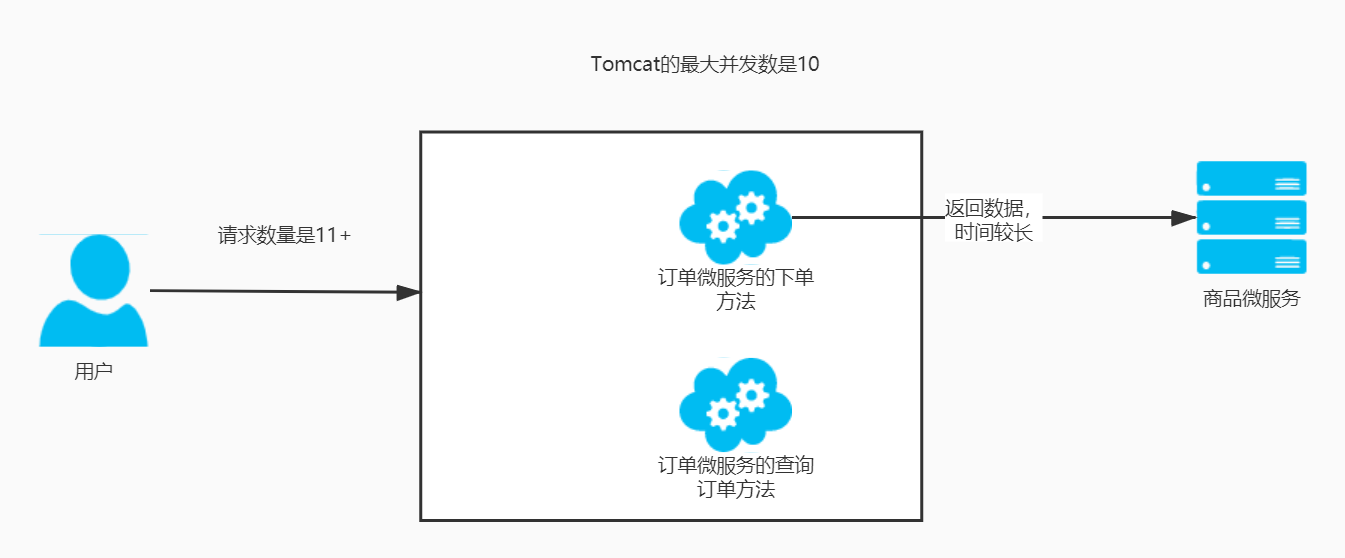
微服务架构的高并发问题

1 准备环境 1.1 准备商品微服务和订单微服务 其中商品微服务的findById()方法设置休眠2秒,用来模拟网络波动等情况: package com.sunxiaping.product.controller; import com.sunxiaping.product.domain.Product; import com.sunxiaping.product.service.ProductService; import org.springframework.beans.factory.annotation.Autowired; import org.springframework.beans.factory.annotation.Value; import org.springframework.web.bind.annotation.*; @RestController @RequestMapping(value = "/product") public class ProductController { @Autowired private ProductService productService; @Value("${server.port}") private String port; @Value("${spring.cloud.client.ip-address}") private String ip; @PostMapping(value = "/save") public String save(@RequestBody Product product) { productService.save(product); return "新增成功"; } @GetMapping(value = "/findById/{id}") public Product findById(@PathVariable(value = "id") Long id) { try { //休眠2秒,用来模拟 网络波动等情况 Thread.sleep(2000); } catch (InterruptedException e) { e.printStackTrace(); } Product product = productService.findById(id); product.setProductName("访问的地址是:" + ip + ":" + port); return product; } } 设置订单微服务的Tomcat的最大线程数是10: server: port: 9002 # 微服务的端口号 tomcat: max-threads: 10 # 最大线程数是10 spring: application: name: service-order # 微服务的名称 datasource: url: jdbc:mysql://192.168.1.57:3306/test?useUnicode=true&characterEncoding=UTF-8&autoReconnect=true&useSSL=false&serverTimezone=GMT%2B8&allowPublicKeyRetrieval=true driver-class-name: com.mysql.cj.jdbc.Driver username: root password: 123456 jpa: generate-ddl: true show-sql: true open-in-view: true database: mysql jmx: unique-names: true # 配置Eureka eureka: instance: # 实例的名称 instance-id: service-order:9002 # 显示IP信息 prefer-ip-address: true lease-renewal-interval-in-seconds: 5 # 发送心跳续约间隔(默认30秒) lease-expiration-duration-in-seconds: 10 # Eureka Client发送心跳给Eureka Server端后,续约到期时间(默认90秒) client: healthcheck: enabled: true service-url: # Eureka Server的地址 # defaultZone: http://localhost:9000/eureka/ defaultZone: http://eureka7001.com:7001/eureka/,http://eureka7002.com:7002/eureka/ # Ribbon的重试机制 service-product: ribbon: # 修改ribbon的负载均衡策略 服务名 - ribbon - NFLoadBalancerRuleClassName :负载均衡策略 # NFLoadBalancerRuleClassName: com.netflix.loadbalancer.RandomRule # 修改ribbon的负载均衡策略为权重策略 # Ribbon的重试机制参数 ConnectTimeout: 250 # Ribbon的连接超时时间 ReadTimeout: 1000 # Ribbon的数据读取超时时间 OkToRetryOnAllOperations: true # 是否对所有操作都进行重试 MaxAutoRetriesNextServer: 50 # 切换实例的重试次数 MaxAutoRetries: 1 # 对当前实例的重试次数 # 微服务info内容详细信息 info: app.name: xxx company.name: xxx build.artifactId: $project.artifactId$ build.version: $project.version$ # 开启日志debug logging: level: root: info 订单微服务中的SpringConfig.java package com.sunxiaping.order.config; import org.springframework.context.annotation.Bean; import org.springframework.context.annotation.Configuration; import org.springframework.web.client.RestTemplate; @Configuration public class SpringConfig { @Bean // @LoadBalanced public RestTemplate restTemplate() { return new RestTemplate(); } } 订单微服务的OrderController.java package com.sunxiaping.order.controller; import com.sunxiaping.order.domain.Product; import org.springframework.beans.factory.annotation.Autowired; import org.springframework.web.bind.annotation.GetMapping; import org.springframework.web.bind.annotation.PathVariable; import org.springframework.web.bind.annotation.RequestMapping; import org.springframework.web.bind.annotation.RestController; import org.springframework.web.client.RestTemplate; @RestController @RequestMapping(value = "/order") public class OrderController { @Autowired private RestTemplate restTemplate; /** * @param id * @return */ @GetMapping(value = "/buy/{id}") public Product buy(@PathVariable(value = "id") Long id) { Product product = restTemplate.getForObject("http://localhost:9001/product/findById/" + id, Product.class); return product; } @GetMapping(value = "/findOrder") public String findOrder() { return "商品查询到了"; } } 2 使用Jmeter测试接口 使用JMeter性能测试工具以50个线程每个线程循环50次测试:http://localhost:9002/order/buy/1接口,然后通过浏览器调用http://localhost:9002/order/findOrder接口,发现特别慢。 3 系统负载过高存在的问题 3.1 问题分析 在微服务架构中,我们将业务拆成一个个的服务,服务和服务之间可以相互调用,由于网络原因或者自身的原因,服务并不能保证100%可用,如果单个服务出现问题,调用这个服务就会出现网络延迟,此时如果有大量的网络请求涌入,会形成任务累计,导致服务瘫痪。 换句话说,Tomcat等容器会以线程池的方式对所有的请求进行统一的管理,如果某个方法可能存着耗时问题,随着外面积压的请求越来越多,势必会造成系统的崩溃、瘫痪等。 为了不影响其他接口的正常访问:对多个服务之间进行隔离。 服务隔离的方式: :one:线程池隔离。 :two:信号量隔离(计数器,就是对某个方法进行设置阈值,如果超过了阈值,直接报错)。 4 线程池隔离的方式处理积压问题 4.1 在订单微服务中引入相关jar包的Maven坐标 <dependency> <groupId>com.netflix.hystrix</groupId> <artifactId>hystrix-metrics-event-stream</artifactId> <version>1.5.12</version> </dependency> <dependency> <groupId>com.netflix.hystrix</groupId> <artifactId>hystrix-javanica</artifactId> <version>1.5.12</version> </dependency> 4.2 配置线程池 配置HystrixCommand接口的实现类,在实现类中可以对线程池进行配置: package com.sunxiaping.order.command; import com.netflix.hystrix.*; import com.sunxiaping.order.domain.Product; import org.springframework.web.client.RestTemplate; public class OrderCommand extends HystrixCommand<Product> { private RestTemplate restTemplate; private Long id; public OrderCommand(RestTemplate restTemplate, Long id) { super(setter()); this.restTemplate = restTemplate; this.id = id; } private static Setter setter() { // 服务分组 HystrixCommandGroupKey groupKey = HystrixCommandGroupKey.Factory.asKey("order_product"); // 服务标识 HystrixCommandKey commandKey = HystrixCommandKey.Factory.asKey("product"); // 线程池名称 HystrixThreadPoolKey threadPoolKey = HystrixThreadPoolKey.Factory.asKey("order_product_pool"); /** * 线程池配置 * withCoreSize : 线程池大小为10 * withKeepAliveTimeMinutes: 线程存活时间15秒 * withQueueSizeRejectionThreshold :队列等待的阈值为100,超过100执行拒绝策略 */ HystrixThreadPoolProperties.Setter threadPoolProperties = HystrixThreadPoolProperties.Setter().withCoreSize(50) .withKeepAliveTimeMinutes(15).withQueueSizeRejectionThreshold(100); // 命令属性配置Hystrix 开启超时 HystrixCommandProperties.Setter commandProperties = HystrixCommandProperties.Setter() // 采用线程池方式实现服务隔离 .withExecutionIsolationStrategy(HystrixCommandProperties.ExecutionIsolationStrategy.THREAD) // 禁止 .withExecutionTimeoutEnabled(false); return Setter.withGroupKey(groupKey).andCommandKey(commandKey).andThreadPoolKey(threadPoolKey) .andThreadPoolPropertiesDefaults(threadPoolProperties).andCommandPropertiesDefaults(commandProperties); } @Override protected Product run() throws Exception { System.out.println(Thread.currentThread().getName()); return restTemplate.getForObject("http://localhost:9001/product/findById/" + id, Product.class); } /** * 服务降级 * * @return */ @Override protected Product getFallback() { Product product = new Product(); product.setProductName("不好意思,出错了"); return product; } } 4.3 修改Controller package com.sunxiaping.order.controller; import com.sunxiaping.order.command.OrderCommand; import com.sunxiaping.order.domain.Product; import org.springframework.beans.factory.annotation.Autowired; import org.springframework.web.bind.annotation.GetMapping; import org.springframework.web.bind.annotation.PathVariable; import org.springframework.web.bind.annotation.RequestMapping; import org.springframework.web.bind.annotation.RestController; import org.springframework.web.client.RestTemplate; @RestController @RequestMapping(value = "/order") public class OrderController { @Autowired private RestTemplate restTemplate; /** * 使用OrderCommand调用远程远程服务 * * @param id * @return */ @GetMapping(value = "/buy/{id}") public Product buy(@PathVariable(value = "id") Long id) { return new OrderCommand(restTemplate, id).execute(); } @GetMapping(value = "/findOrder") public String findOrder() { System.out.println(Thread.currentThread().getName()); return "商品查询到了"; } }

资源下载

更多资源
Mario

Mario

马里奥是站在游戏界顶峰的超人气多面角色。马里奥靠吃蘑菇成长,特征是大鼻子、头戴帽子、身穿背带裤,还留着胡子。与他的双胞胎兄弟路易基一起,长年担任任天堂的招牌角色。

Nacos

Nacos

Nacos /nɑ:kəʊs/ 是 Dynamic Naming and Configuration Service 的首字母简称,一个易于构建 AI Agent 应用的动态服务发现、配置管理和AI智能体管理平台。Nacos 致力于帮助您发现、配置和管理微服务及AI智能体应用。Nacos 提供了一组简单易用的特性集,帮助您快速实现动态服务发现、服务配置、服务元数据、流量管理。Nacos 帮助您更敏捷和容易地构建、交付和管理微服务平台。

Spring

Spring

Spring框架(Spring Framework)是由Rod Johnson于2002年提出的开源Java企业级应用框架,旨在通过使用JavaBean替代传统EJB实现方式降低企业级编程开发的复杂性。该框架基于简单性、可测试性和松耦合性设计理念,提供核心容器、应用上下文、数据访问集成等模块,支持整合Hibernate、Struts等第三方框架,其适用范围不仅限于服务器端开发,绝大多数Java应用均可从中受益。

Sublime Text

Sublime Text

Sublime Text具有漂亮的用户界面和强大的功能,例如代码缩略图,Python的插件,代码段等。还可自定义键绑定,菜单和工具栏。Sublime Text 的主要功能包括:拼写检查,书签,完整的 Python API , Goto 功能,即时项目切换,多选择,多窗口等等。Sublime Text 是一个跨平台的编辑器,同时支持Windows、Linux、Mac OS X等操作系统。


用户登录
用户注册