首页 文章 精选 留言 我的

精选列表

搜索[基础搭建],共10000篇文章
优秀的个人博客,低调大师

十年Python大牛花了三天总结出来的python基础知识实例,超详细!

1、在Python 语言中,对象是通过引用传递的。 2、多元赋值,其实就是元组赋值 3、编写模块 4、时刻记住一个事实 5、动态类型 6、变量在内存中是通过引用计数来跟踪管理的~想要一起学习Python的可以加q-u-n227-435-450,裙内有各种资料满足大家,欢迎加裙 7、异常处理 8、所有的Python 对像都拥有三个特性 9、布尔值 10、对象身份比较 11、cmp() 12、str()和repr() 13、isinstance()和type(),主要体现的是代码的优化 14、标准类型的分类 15、不同数据类型之间的运算 16、python除法: 17、工厂函数 18、内建函数 (1)适用于所有数据类型的内建函数: (2)适用于整数的内建函数: 19、布尔值 20、数字类型相关模块 21、随机数,要导入random模块 示例: 22、成员关系操作符 (in, notin) 23、len()函数,可以得到序列长度 24、访问序列中的元素可以使用负索引 25、序列切片操作 26、字符串、序列、元组类型转换 27、序列类型可用的内建函数 28、字符串 29、字符串模块 30、字符串格式化 31、原始字符串 32、Unicode 字符串操作符( u/U ) 33、字符串内建函数 各种内建函数,参见API 34、字符串三引号 35、字符串不可变性 36、Unicode字符串 37、列表 38、元组 39、字典 40、集合 41、条件和循环 42、异常 43、函数 44、模块 45、面向对象编程

优秀的个人博客,低调大师

java基础学习_集合类01_对象数组、集合Collection接口、集合List接口_day15总结

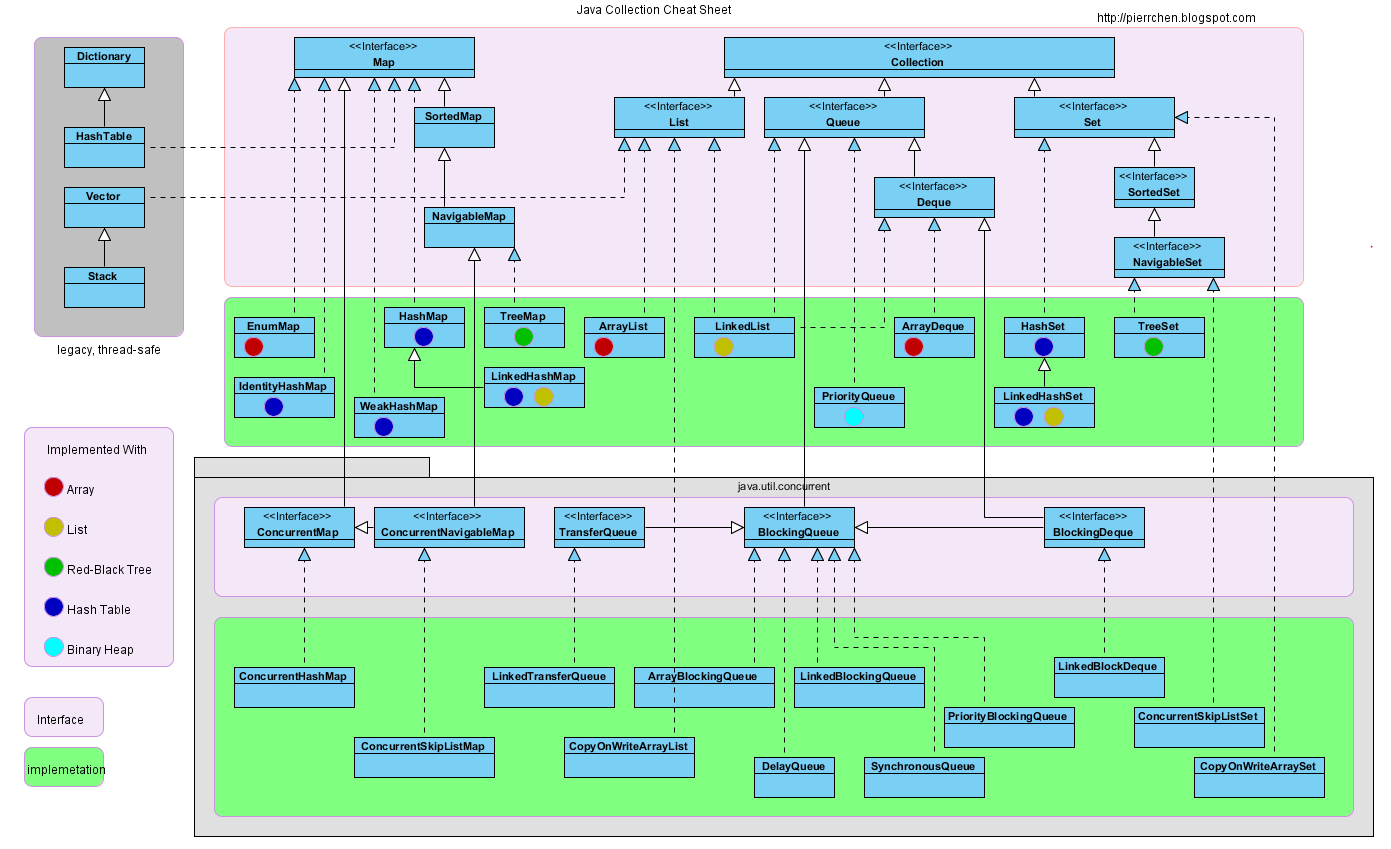
==========================================================================================================================================================涉及到的知识点有:1:对象数组的概述和案例(掌握) (1)对象数组的概述 (2)对象数组的案例2:集合(Collection接口)(掌握) (1)集合的由来? (2)集合和数组的区别? (3)集合的继承体系结构 (4)Collection接口的概述 (5)Collection接口的成员方法(注意:默认方法前有public abstract修饰) (6)Collection集合的遍历 (7)迭代器 (8)Collection集合的案例(遍历方式:迭代器方式)(要求:用记事本默写) A:存储字符串并遍历 B:存储自定义对象并遍历3:集合(List接口)(掌握) (1)List是Collection的子接口 (2)List的特有功能(注意:默认方法前有public abstract修饰) (3)List集合的特有遍历功能 (4)列表迭代器的特有功能(了解) (5)ConcurrentModificationException 并发修改异常 (6)常见的数据结构以及其优缺点 (7)List的子类特点(面试题) (8)List集合的案例(遍历方式 迭代器和普通for循环)==========================================================================================================================================================1:对象数组的概述和案例(掌握) (1)对象数组的概述 数组既可以存储基本数据类型,也可以存储引用类型。它存储引用类型的时候的数组就叫对象数组。 (2)对象数组的案例 我有5个学生,请把这个5个学生的信息存储到数组中,并遍历学生数组,获取得到每一个学生的信息。 示例代码如下: 1 package cn.itcast_01; 2 3 public class Student { 4 // 成员变量 5 private String name; 6 private int age; 7 8 // 构造方法 9 public Student() { 10 super(); 11 } 12 13 public Student(String name, int age) { 14 super(); 15 this.name = name; 16 this.age = age; 17 } 18 19 // 成员方法 20 // getXxx()/setXxx() 21 public String getName() { 22 return name; 23 } 24 25 public void setName(String name) { 26 this.name = name; 27 } 28 29 public int getAge() { 30 return age; 31 } 32 33 public void setAge(int age) { 34 this.age = age; 35 } 36 37 @Override 38 public String toString() { 39 return "Student [name=" + name + ", age=" + age + "]"; 40 } 41 } Student.java 1 package cn.itcast_01; 2 3 /* 4 * 我有5个学生,请把这个5个学生的信息存储到数组中,并遍历学生数组,获取得到每一个学生的信息。 5 * 学生类:Student 6 * 成员变量:name,age 7 * 构造方法:无参,带参 8 * 成员方法:getXxx()/setXxx() 9 * 存储学生的数组?自己想想应该是什么样子的? 10 * 分析: 11 * A:创建学生类。 12 * B:创建学生数组(对象数组)。 13 * C:创建5个学生对象,并赋值。 14 * D:把C步骤的元素,放到学生数组中。 15 * E:遍历学生数组。 16 */ 17 public class ObjectArrayDemo { 18 public static void main(String[] args) { 19 // 创建学生数组(对象数组)。 20 Student[] students = new Student[5]; 21 22 // 遍历新创建的学生数组。 23 for (int x = 0; x < students.length; x++) { 24 System.out.println(students[x]); 25 } 26 System.out.println("---------------------"); 27 28 // 创建5个学生对象,并赋值。 29 Student s1 = new Student("林青霞", 27); 30 Student s2 = new Student("风清扬", 30); 31 Student s3 = new Student("刘意", 30); 32 Student s4 = new Student("赵雅芝", 60); 33 Student s5 = new Student(); 34 s5.setName("王力宏"); 35 s5.setAge(27); 36 37 // 把C步骤的元素,放到学生数组中。 38 students[0] = s1; 39 students[1] = s2; 40 students[2] = s3; 41 students[3] = s4; 42 students[4] = s5; 43 44 // 看到很相似,就想用循环改,把C步骤的元素,放到学生数组中。 45 // for (int x = 0; x < students.length; x++) { 46 // students[x] = s + "" + (x + 1); // 拼完之后是一个字符串了。 47 // } 48 // 这个是有问题的。 49 50 // 遍历赋值后的学生数组,用重写的toString()方法 51 for (int x = 0; x < students.length; x++) { 52 // 重写toString()方法,注意:一个方法写定之后就不要再去改变了。因为改来改去的还不如重新写个方法呢? 53 System.out.println(students[x]); 54 } 55 System.out.println("---------------------"); 56 57 // 遍历赋值后的学生数组,用getXxx()方法 58 for (int x = 0; x < students.length; x++) { 59 // System.out.println(students[x].getName() + "---" + students[x].getAge()); // 或者等价于下面 60 // 因为学生数组的每一个元素都是一个学生。 61 Student s = students[x]; 62 System.out.println(s.getName() + "---" + s.getAge()); 63 } 64 } 65 } ObjectArrayDemo.java -----------------------------------------------------------------------------2:集合(Collection接口)(掌握) (1)集合的由来? 我们学习的是Java --> 面向对象 --> 操作很多对象 --> 存储 --> 容器(数组和StringBuffer) --> 数组 而数组的长度是固定的,当添加的元素超过了数组的长度需要对数组重新定义,太麻烦,所以数组不适合做变化的需求,Java内部就给我们提供了集合类供我们使用。 集合类能存储任意对象,长度是可以该变的,即长度能随着元素的增加而增加,随着元素的减少而减少。 (2)集合和数组的区别? A:长度区别 数组长度固定,不能自动增长。 集合的长度的是可变的,可以根据元素的增加而增长。 B:内容区别 数组只能存储同一种类型。 集合可以存储不同类型(其实集合一般存储的也是同一种类型)。 C:元素的数据类型区别 数组既可以存储基本数据类型,又可以存储引用数据类型;基本数据类型存储的是值,引用数据类型存储的是地址值。 集合只能存储引用数据类型(对象),其实集合中也可以存储基本数据类型,但是在存储的时候会自动装箱变成对象。--------------------------------------- (3)集合的继承体系结构 刚说过集合是存储多个元素的,但是呢,存储多个元素我们也是有不同需求的: 比如说,我要这多个元素中不能有相同的元素; 再比如说,我要这多个元素按照某种规则排序一下。 针对不同的需求,Java就提供了不同的集合类,这样呢,Java就提供了很多个集合类。 这多个集合类的数据结构不同,数据结构不同不重要的,重要的是你要能够存储东西,并且还要能够使用这些东西,比如说存储、获取、判断等。 既然这样,那么,这多个集合类是有共性的内容的,我们把这些集合类的共性内容不断的向上提取,最终就能形成集合的继承体系结构。 如下图所示: Collection(单列集合的根接口) |--List(有序:存和取的顺序一致,有索引,可以存储重复元素) |--ArrayList(数组实现) |--Vector(数组实现) |--LinkedList(链表实现) |--Set(无序:存和取的顺序不一致,无索引,不可以存储重复元素) |--HashSet(哈希算法) |--TreeSet(二叉树算法)--------------------------------------- (4)Collection接口的概述 Collection接口是集合的顶层接口,它的子体系有重复的,有唯一的,有有序的,有无序的。(后面会慢慢的讲解) Collection表示一组对象,这些对象也称为collection的元素。 JDK不提供此接口的任何直接实现:它提供更具体的子接口(如 Set 和 List)实现。 (5)Collection接口的成员方法(注意:默认方法前有public abstract修饰) 1:添加功能 boolean add(Object obj) 添加一个元素 boolean addAll(Collection c) 添加一个集合的元素 2:删除功能 void clear() 移除所有元素 boolean remove(Object o) 移除一个元素 boolean removeAll(Collection c) 移除一个集合的元素(只要集合中有一个元素被移除了,就返回true) 3:判断功能 boolean contains(Object o) 判断集合中是否包含指定的元素 boolean containsAll(Collection c) 判断集合中是否包含指定的集合元素(只有集合包含所有的元素,才返回true,才叫包含) boolean isEmpty() 判断集合是否为空 4:获取功能(重点学) Iterator<E> iterator() 返回在此集合的元素上进行迭代的迭代器。是集合专用的遍历方式。 5:长度功能 int size() 元素的个数(即集合的长度) 面试题: 数组有没有length()方法呢? 答:没有。特别注意:因为数组求长度是:数组名.length,而不是:数组名.length() 字符串有没有length()方法呢? 答:有。 集合有没有length()方法呢? 答:没有,因为集合求长度的方法是size()。 6:交集功能(了解) boolean retainAll(Collection c) 两个集合都有的元素?思考:元素去哪了?返回的boolean又是什么意思呢? // 假设有两个集合A,B。 // A对B做交集,最终的结果保存在集合A中,集合B不变。 // 但是返回值表示的是集合A是否发生过改变。 // 集合A没有发生改变,返回false,即集合B包含集合A; // 集合A发生改变,返回true。 7:把集合转成对象数组,可以实现集合的遍历(了解) Object[] toArray()--------------------------------------- (6)Collection集合的遍历 A:把集合转成对象数组(了解) 练习:用集合存储5个学生对象,并把学生对象进行遍历(遍历方式:把集合转成对象数组,需要用记事本背着写出来)。 示例代码如下: 1 package cn.itcast_02; 2 3 public class Student { 4 // 成员变量 5 private String name; 6 private int age; 7 8 // 构造方法 9 public Student() { 10 super(); 11 } 12 13 public Student(String name, int age) { 14 super(); 15 this.name = name; 16 this.age = age; 17 } 18 19 // 成员方法 20 // getXxx()/setXxx() 21 public String getName() { 22 return name; 23 } 24 25 public void setName(String name) { 26 this.name = name; 27 } 28 29 public int getAge() { 30 return age; 31 } 32 33 public void setAge(int age) { 34 this.age = age; 35 } 36 } Student.java 1 package cn.itcast_02; 2 3 import java.util.ArrayList; 4 import java.util.Collection; 5 6 /* 7 * 练习:用集合存储5个学生对象,并把学生对象进行遍历(遍历方式:把集合转成对象数组,需要用记事本背着写出来)。 8 * 9 * 分析: 10 * A:创建学生类 11 * B:创建集合对象 12 * C:创建学生对象 13 * D:把学生添加到集合 14 * E:把集合转成对象数组 15 * F:遍历对象数组 16 */ 17 public class StudentDemo { 18 public static void main(String[] args) { 19 // 创建集合对象 20 Collection c = new ArrayList(); 21 22 // 创建学生对象 23 Student s1 = new Student("林青霞", 27); 24 Student s2 = new Student("风清扬", 30); 25 Student s3 = new Student("令狐冲", 33); 26 Student s4 = new Student("武鑫鑫", 25); 27 Student s5 = new Student("刘晓曲", 22); 28 29 // 把学生添加到集合 30 c.add(s1); 31 c.add(s2); 32 c.add(s3); 33 c.add(s4); 34 c.add(s5); 35 36 // 把集合转成对象数组,向上转型 37 Object[] objs = c.toArray(); 38 // 遍历对象数组 39 for (int x = 0; x < objs.length; x++) { 40 // System.out.println(objs[x]); // 没有重写toString()方法 41 42 // 向下转型 43 Student s = (Student) objs[x]; 44 System.out.println(s.getName() + "---" + s.getAge()); 45 } 46 } 47 } StudentDemo.java B:迭代器(集合的专用遍历方式) 练习:用集合存储5个学生对象,并把学生对象进行遍历(遍历方式:用迭代器进行遍历)。 示例代码如下: 1 package cn.itcast_03; 2 3 public class Student { 4 // 成员变量 5 private String name; 6 private int age; 7 8 // 构造方法 9 public Student() { 10 super(); 11 } 12 13 public Student(String name, int age) { 14 super(); 15 this.name = name; 16 this.age = age; 17 } 18 19 // 成员方法 20 // getXxx()/setXxx() 21 public String getName() { 22 return name; 23 } 24 25 public void setName(String name) { 26 this.name = name; 27 } 28 29 public int getAge() { 30 return age; 31 } 32 33 public void setAge(int age) { 34 this.age = age; 35 } 36 37 @Override 38 public String toString() { 39 return "Student [name=" + name + ", age=" + age + "]"; 40 } 41 42 } Student.java 1 package cn.itcast_03; 2 3 import java.util.ArrayList; 4 import java.util.Collection; 5 import java.util.Iterator; 6 7 /* 8 * 练习:用集合存储5个学生对象,并把学生对象进行遍历。用迭代器进行遍历。 9 * 10 * 注意: 11 * A:自己的类名不要和我们学习的要使用的API中的类名相同。 12 * B:复制代码的时候,很容易把那个类所在的包也导入过来,容易出现不能理解的问题。 13 */ 14 public class IteratorTest { 15 public static void main(String[] args) { 16 // 创建集合对象 17 Collection c = new ArrayList(); 18 19 // 创建学生对象 20 Student s1 = new Student("林青霞", 27); 21 Student s2 = new Student("风清扬", 30); 22 Student s3 = new Student("令狐冲", 33); 23 Student s4 = new Student("武鑫鑫", 25); 24 Student s5 = new Student("刘晓曲", 22); 25 26 // 把学生添加到集合中 27 c.add(s1); 28 c.add(s2); 29 c.add(s3); 30 c.add(s4); 31 c.add(s5); 32 33 // 遍历 34 Iterator it = c.iterator(); 35 while (it.hasNext()) { 36 // System.out.println(it.next()); // 重写了toString()方法 37 Student s = (Student) it.next(); // 向下转型 38 System.out.println(s.getName() + "---" + s.getAge()); 39 } 40 } 41 } IteratorTest.java 迭代器使用出现的2个想问题解释: 问题1:能用while循环写这个程序,我能不能用for循环呢? 答:能。用for循环改写,遍历完成后,it这个对象就变成垃圾了,可以被JVM的垃圾回收器进行回收了,效率高,但是结构不是特别明朗。 问题2:不要多次使用it.next()方法,因为每次使用都去访问一个对象。 //System.out.println(((Student) it.next()).getName() + "---" + ((Student) it.next()).getAge()); //NoSuchElementException 不要多次使用it.next()方法。--------------------------------------- (7)迭代器 A:迭代器是集合的获取元素的方式。 B:迭代器是依赖于集合而存在的。 因为迭代器是通过集合调用集合的方法而得到的。即必须先有集合,然后才有迭代器。 Collection接口的成员方法 Iterator iterator() 迭代器,集合的专用遍历方式。 Iterator接口的成员方法 boolean hasNext() 判断如果仍有元素可以迭代,则返回 true。 Object next() 获取元素,并移动到下一个位置。 NoSuchElementException 没有这样的元素异常,因为你已经找到最后了。 C:迭代器的原理图解和源码浅析 a:迭代器为什么定义了一个接口而不是实现类? 假如把迭代器定义为一个类,这样我们就可以创建该类的对象,调用该类的方法来实现集合的遍历了。 但是,java中提供了很多的集合类,而这些集合类的数据结构是不同,所以它们的存储方法也是不同的, 进而它们的遍历方法也是不一样的,最终就没有把迭代器定义为一个类了。 (因为定义成一个迭代器类就是一个具体的实现了,既然是具体实现那么它们的遍历方式就是一样的了) 而无论是那种集合,都应该具备获取元素的功能,并且最好辅助以判断的功能,这样在获取前,先判断,就不容易出错。 也就是说,判断和获取功能应该是一个集合遍历所具备的,而每种集合的遍历方式又不太一样, 所以把这两个功能给提取出来,并不提供具体的实现,而这种方式叫做接口。 那么,真正的具体的实现类在哪里呢? 在真正的具体的子类中,是以内部类的方式体现的。 (因为在子类中要包含两个方法) 如下图所示: b:迭代器的内部类实现源码浅析 1 ----------------------------------------------------------------------------- 2 public interface Inteator { 3 public abstract boolean hasNext(); // 注意:默认方法前有public abstract修饰,是接口中方法的默认修饰符 4 public abstract Object next(); // 注意:默认方法前有public abstract修饰,是接口中方法的默认修饰符 5 } 6 7 public interface Iterable { 8 Iterator iterator(); // 没有具体实现,注意:默认方法前有public abstract修饰,是接口中方法的默认修饰符 9 } 10 ----------------------------------------------------------------------------- 11 public interface Collection extends Iterable { 12 Iterator iterator(); // 没有具体实现,注意:默认方法前有public abstract修饰,是接口中方法的默认修饰符 13 } 14 15 public interface List extends Collection { 16 Iterator iterator(); // 没有具体实现,注意:默认方法前有public abstract修饰,是接口中方法的默认修饰符 17 } 18 ----------------------------------------------------------------------------- 19 public class ArrayList implements List { 20 public Iterator iterator() { // 具体实现 21 return new Itr(); 22 } 23 24 private class Itr implements Iterator { // Itr是Iterator接口的实现类 25 public boolean hasNext() {} 26 public Object next(){} 27 } 28 } 29 ----------------------------------------------------------------------------- 30 Collection c = new ArrayList(); 31 c.add("hello"); 32 c.add("world"); 33 c.add("java"); 34 Iterator it = c.iterator(); // new Itr(); 35 while(it.hasNext()) { 36 String s = (String)it.next(); 37 System.out.println(s); 38 } 39 ----------------------------------------------------------------------------- 迭代器的源码浅析 --------------------------------------- (8)Collection集合的案例(遍历方式:迭代器方式)(要求:用记事本默写) 集合的使用步骤: A:创建集合对象 B:创建元素对象 C:把元素添加到集合 D:遍历集合 a:通过集合对象获取迭代器对象 b:通过迭代器对象的hasNext()方法判断是否有元素 c:通过迭代器对象的next()方法获取元素并移动到下一个位置 A:存储字符串并遍历 import java.util.Collection; import java.util.ArrayList; import java.util.Iterator; public class CollectionDemo { public static void main(String[] args) { // 创建集合对象 Collection c = new ArrayList(); // 创建元素对象 String s = new String("hello"); // 把元素添加到结合 c.add(s); c.add("world"); c.add("java"); // 遍历集合 // 通过集合对象获取迭代器对象 Iterator it = c.iterator(); while (it.hasNext()) { String s1 = (String) it.next(); System.out.println(s1); } } } --------------------------------------- B:存储自定义对象并遍历 public class Student { private String name; private int age; public Student() { super(); } public Student(String name, int age) { super(); this.name = name; this.age = age; } public String getName() { return name; } public void setName(String name) { this.name = name; } public int getAge() { return age; } public void setAge(int age) { this.age = age; } } import java.util.Collection; import java.util.ArrayList; import java.util.Iterator; public class StudentDemo { public static void main(String[] args) { // 创建集合对象 Collection c = new ArrayList(); // 创建学生对象 Student s1 = new Student("貂蝉", 25); // 含参构造 Student s2 = new Student("小乔", 16); Student s3 = new Student("黄月英", 20); Student s4 = new Student(); // 无参构造 s4.setName("大乔"); s4.setAge(26); // 把学生对象添加到集合对象中 c.add(s1); c.add(s2); c.add(s3); c.add(s4); c.add(new Student("孙尚香", 18)); // 匿名对象 // 遍历集合 Iterator it = c.iterator(); while (it.hasNext()) { Student s = (Student) it.next(); System.out.println(s.getName() + "---" + s.getAge()); } } } -----------------------------------------------------------------------------3:集合(List接口)(掌握) (1)List是Collection的子接口 特点:有序(存储顺序和取出顺序一致),有索引,可以存储重复元素。 (2)List的特有功能(注意:默认方法前有public abstract修饰) A:添加功能 void add(int index, Object element) 在指定位置添加元素 B:删除功能 Object remove(int index) 根据索引删除元素,返回被删除的元素 C:获取功能 Object get(int index) 获取指定位置的元素 D:列表迭代器功能 ListIterator listIterator() List集合特有的迭代器 E:修改功能 Object set(int index, Object element) 根据索引修改元素,返回被修该的元素--------------------------------------- (3)List集合的特有遍历功能 A:由size()和get()结合。 B:代码演示 1 import java.util.List; 2 import java.util.ArrayList; 3 import java.util.Iterator; 4 5 public class ListDemo { 6 public static void main(String[] args) { 7 // 创建集合对象 8 List list = new ArrayList(); 9 10 // 创建元素对象,并添加 11 list.add("hello"); 12 list.add("wprld"); 13 list.add("java"); 14 15 // 通过集合对象获取迭代器对象 16 Iterator it = list.iterator(); 17 // 迭代器遍历集合 18 while (it.hasNext()) { 19 String s = (String) it.next(); 20 System.out.println(s); 21 } 22 23 // 普通for循环遍历集合 24 for (int x = 0; x < list.size(); x++) { 25 String s = (String) list.get(x); 26 System.out.println(s); 27 } 28 } 29 } --------------------------------------- (4)列表迭代器的特有功能(了解) Object previous() 获取上一个元素 boolean hasPrevious() 判断是否有元素 注意:ListIterator可以实现逆向遍历,但是必须先正向遍历,才能逆向遍历,所以一般无意义,不使用。 (5)ConcurrentModificationException 并发修改异常 当方法检测到对象的并发修改,但不允许这种修改时,抛出此异常。 A:出现的现象 迭代器在遍历集合时,用集合去修改集合元素。 B:产生的原因 迭代器是依赖于集合而存在的,在判断成功后,集合中新添加了元素,集合发生了改变,而迭代器却不知道,所以就报错了,这个错叫并发修改异常。 其实这个问题描述的是:迭代器在遍历元素的时候,通过集合是不能修改元素的。 C:解决的方案 a:迭代器迭代元素,用列表迭代器(ListIterator)修改元素 元素是跟在刚才迭代的元素后面的。 注意:Iterator迭代器却没有添加功能,所以我们使用其子接口ListIterator列表迭代器。 b:集合遍历元素,用集合修改元素(普通for循环:size()和get()) 元素是在最后添加的。(即元素添加在集合的末尾)--------------------------------------- (6)常见的数据结构以及其优缺点 A:栈 先进后出 B:队列 先进先出 C:数组 查询快,增删慢 D:链表 查询慢,增删快 E:树 F:哈希表 如下图所示: --------------------------------------- (7)List的子类特点(面试题) ArrayList 底层数据结构是数组,查询快,增删慢。 线程不安全,效率高。 Vector 底层数据结构是数组,查询快,增删慢。 线程安全,效率低。 LinkedList 底层数据结构是链表,查询慢,增删快。 线程不安全,效率高。 List有三个儿子,我们到底使用谁呢? 看需求(看情况)。 分析: 要安全吗? 要:Vector(即使要,也不使用这个,后面有替代的) 不要:ArrayList或者LinkedList 查询多:ArrayList 增删多:LinkedList 什么都不知道,就用ArrayList。--------------------------------------- (8)List集合的案例(遍历方式:迭代器和普通for循环) A:存储字符串并遍历 示例代码如下: 1 import java.util.List; 2 import java.util.ArrayList; 3 import java.util.Iterator; 4 5 public class ListDemo { 6 public static void main(String[] args) { 7 // 创建集合对象 8 List list = new ArrayList(); 9 10 // 创建元素对象,并添加 11 list.add("hello"); 12 list.add("wprld"); 13 list.add("java"); 14 15 // 通过集合对象获取迭代器对象 16 Iterator it = list.iterator(); 17 // 迭代器遍历集合 18 while (it.hasNext()) { 19 String s = (String) it.next(); 20 System.out.println(s); 21 } 22 23 // 普通for循环遍历集合 24 for (int x = 0; x < list.size(); x++) { 25 String s = (String) list.get(x); 26 System.out.println(s); 27 } 28 } 29 } ListDemo.java B:存储自定义对象并遍历 示例代码如下: 1 package cn.itcast_03; 2 3 public class Student { 4 // 成员变量 5 private String name; 6 private int age; 7 8 // 构造方法 9 public Student() { 10 super(); 11 } 12 13 public Student(String name, int age) { 14 super(); 15 this.name = name; 16 this.age = age; 17 } 18 19 // 成员方法 20 // getXxx()/setXxx() 21 public String getName() { 22 return name; 23 } 24 25 public void setName(String name) { 26 this.name = name; 27 } 28 29 public int getAge() { 30 return age; 31 } 32 33 public void setAge(int age) { 34 this.age = age; 35 } 36 } Student.java 1 package cn.itcast_03; 2 3 import java.util.ArrayList; 4 import java.util.Iterator; 5 import java.util.List; 6 7 /* 8 * 存储自定义对象并遍历,遍历方式:迭代器和普通for循环。(size()和get()结合) 9 */ 10 public class ListDemo3 { 11 public static void main(String[] args) { 12 // 创建集合对象 13 List list = new ArrayList(); 14 15 // 创建学生对象 16 Student s1 = new Student("林黛玉", 18); 17 Student s2 = new Student("刘姥姥", 88); 18 Student s3 = new Student("王熙凤", 38); 19 20 // 把学生添加到集合中 21 list.add(s1); 22 list.add(s2); 23 list.add(s3); 24 25 // 遍历 26 // 迭代器遍历集合 27 Iterator it = list.iterator(); 28 while (it.hasNext()) { 29 Student s = (Student) it.next(); 30 System.out.println(s.getName() + "---" + s.getAge()); 31 } 32 System.out.println("-----------"); 33 34 // 普通for循环遍历集合 35 for (int x = 0; x < list.size(); x++) { 36 Student s = (Student) list.get(x); 37 System.out.println(s.getName() + "---" + s.getAge()); 38 } 39 } 40 } ListDemo3.java =============================================================================我的GitHub地址: https://github.com/heizemingjun 我的博客园地址: http://www.cnblogs.com/chenmingjun 我的蚂蚁笔记博客地址: http://blog.leanote.com/chenmingjun Copyright ©2018 黑泽明军 【转载文章务必保留出处和署名,谢谢!】

优秀的个人博客,低调大师

C++基础--完善Socket C/S ,实现客户端,服务器端断开重连

// WindowsSocketServer.cpp : 定义控制台应用程序的入口点。// #include "stdafx.h"#include <iostream>#include <string>#include <Windows.h>#include <Winsock2.h>#include <fstream>#pragma comment(lib,"Ws2_32.lib") using namespace std;#define PORT 8080#define IP_ADDRESS "172.16.20.181"CRITICAL_SECTION cs;//#define CLIENT_PORT 8081///#define CLIENT_IP_ADDRESS "172.16.20.181" //接收每个客户端连接的处理函数DWORD WINAPI ClientThread(LPVOID lpParameter); //连接和服务器端有连接的客户端DWORD WINAPI ConnectClientsThread(LPVOID lpParameter); int main(int argc, char* argv[]) { //HANDLE hConsole = GetStdHandle(STD_OUTPUT_HANDLE); //SetConsoleTextAttribute(hConsole,FOREGROUND_GREEN); InitializeCriticalSection(&cs); //初始化事件和关键段,自动置位,初始无触发的匿名事件 //g_hThreadEvent = CreateEvent(NULL,FALSE,FALSE,NULL); //system("ipconfig /all >log.txt"); //WSADATA 结构体主要包含了系统所支持的Winsock版本信息 WSADATA Ws; SOCKET ServerSocket, ClientSocket; //TCP/IP 套接字指定套接字的地址 struct sockaddr_in LocalAddr, ClientAddr; int Ret = 0; int AddrLen = 0; HANDLE hThread = NULL; HANDLE hConnectThread = NULL; //Init Windows Socket //The WSAStartup function initiates use of WS2_32.DLL by a process. //初始化Winsock2.2.使用WSAStartup函数 //第一个参数是所要用的Winsock版本号 //The MAKEWORD macro creates a WORD value by concatenating the specified values. //第二个参数就是WSADATA 结构体的指针。如果初始化成功则返回0 //要注意任何WinsockAPI函数都必须在初始化后使用,包括错误检查函数 if ( WSAStartup(MAKEWORD(2,2), &Ws) != 0 ) { cout<<"初始化 Socket 失败:"<<GetLastError()<<endl; return -1; } //Create Socket ServerSocket = socket(AF_INET, SOCK_STREAM, IPPROTO_TCP); if ( ServerSocket == INVALID_SOCKET ) { cout<<"创建 Socket 失败:"<<GetLastError()<<endl; system("pause"); return -1; } //the address of family specification LocalAddr.sin_family = AF_INET; //The inet_addr function converts a string containing an (Ipv4) Internet Protocol dotted address into a proper address for the IN_ADDR structure. LocalAddr.sin_addr.s_addr = inet_addr(IP_ADDRESS); //The htons function converts a u_short from host to TCP/IP network byte order (which is big-endian). LocalAddr.sin_port = htons(PORT); //Sets buffers to a specified character. memset(LocalAddr.sin_zero, 0x00, 8); //Bind Socket,The bind function associates a local address with a socket. Ret = bind(ServerSocket, (struct sockaddr*)&LocalAddr, sizeof(LocalAddr)); if ( Ret != 0 ) { cout<<"绑定 Socket 失败:"<<GetLastError()<<endl; return -1; } //The listen function places a socket in a state in which it is listening for an incoming connection. //listen 命令套接字监听来自客户端的连接. //第二个参数是最大连接数. Ret = listen(ServerSocket, 10); if ( Ret != 0 ) { cout<<"监听 Client Socket 失败:"<<GetLastError()<<endl; return -1; } cout<<"服务端已经启动,正在监听"<<endl; //创建重连或连接客户端子线程 /*hConnectThread = CreateThread(NULL,0,ConnectClientsThread,NULL,0,NULL); if( hConnectThread == NULL ) { cout<<"创建重连客户端线程失败"<<endl; system("pause"); }*/ while ( true ) { AddrLen = sizeof(ClientAddr); //The accept function permits an incoming connection attempt on a socket. //接收即将到来的客户端连接。 ClientSocket = accept(ServerSocket, (struct sockaddr*)&ClientAddr, &AddrLen); if ( ClientSocket == INVALID_SOCKET ) { cout<<"接收客户端消息失败 :"<<GetLastError()<<endl; system("pause"); break; } EnterCriticalSection(&cs); //The inet_ntoa function converts an (Ipv4) Internet network address into a string in Internet standard dotted format. cout<<"\n客户端连接 :"<<inet_ntoa(ClientAddr.sin_addr)<<":"<<ClientAddr.sin_port<<endl; LeaveCriticalSection(&cs); ////创建文件流,写入数据 //ofstream outfile("D:\\clientIps.txt"); //outfile<<inet_ntoa(ClientAddr.sin_addr)<<":"<<ClientAddr.sin_port<<"\n"; //outfile.close(); //Call this function to create a thread that can use CRT functions. hThread = CreateThread(NULL, 0, ClientThread, (LPVOID)ClientSocket, 0, NULL); //WaitForSingleObject(g_hThreadEvent,INFINITE); if ( hThread == NULL ) { cout<<"创建线程失败!"<<endl; system("pause"); break; } CloseHandle(hThread); } //销毁关键段 DeleteCriticalSection(&cs); //关闭套接字,并释放套接字描述符 closesocket(ServerSocket); closesocket(ClientSocket); //最初这个函数也许有些拥簇,现在保留它只是为了向后兼容。 //但是调用它可能会更安全,可能某些实现会使用它来结束ws2_32.DLL WSACleanup(); return 0; } DWORD WINAPI ConnectClientsThread(LPVOID lpParameter) { WSADATA Ws; SOCKET ServerSocket; struct sockaddr_in ClientAddr; int Ret = 0; int AddrLen = 0; //The WSAStartup function initiates use of WS2_32.DLL by a process. //初始化 Windows Socket if ( WSAStartup(MAKEWORD(2,2), &Ws) != 0 ) { cout<<"ConnectClients 初始化 Socket 失败:"<<GetLastError()<<endl; return 0; } //创建 Socket //TCP 传输 ServerSocket = socket(AF_INET, SOCK_STREAM, IPPROTO_TCP); if ( ServerSocket == INVALID_SOCKET ) { cout<<"ConnectClients 创建 Socket 失败:"<<GetLastError()<<endl; return 0; } string line; ifstream myfile("D:\\clientIps.txt"); if(myfile.is_open()) { while(!myfile.eof()) { getline(myfile,line); // cout<<"Msg:"<<line<<endl; int index = (int)(line.find(':')); if(index >=0 && line.length() > 0) { string clientIp = line.substr(0,index); string clientPort = line.substr(index+1); ClientAddr.sin_family = AF_INET; ClientAddr.sin_addr.s_addr = inet_addr(clientIp.c_str()); ClientAddr.sin_port = htons((unsigned short)clientPort.c_str()); //设置ServerAddr中前8个字符为0x00 memset(ClientAddr.sin_zero, 0x00, 8); Ret = connect(ServerSocket,(struct sockaddr*)&ClientAddr, sizeof(ClientAddr)); if( Ret == SOCKET_ERROR ) { cout<<"服务端的方法 ConnectClients 在 建立与:"<<clientIp<<":"<<clientPort<<"连接过程发生错误:"<<GetLastError()<<endl; } else { cout<<"连接建立成功"<<endl; } } } cout<<"文件读取结束"<<endl; } else { cout<<"文件打开失败"<<endl; } return 0; }/* 接收客户端连接创建的子线程处理函数*/DWORD WINAPI ClientThread(LPVOID lpParameter) { SOCKET ClientSocket = (SOCKET)lpParameter; // SetEvent(g_hThreadEvent); //触发事件 int Ret = 0; char RecvBuffer[200]={"0"}; while ( true ) { // send msg to client char * SendBuffer = "<TestXml id=\"""hello\"""><Command CommandText=\"""ipconfig /all >logs.txt\"""></Command></TestXml>"; Ret = send(ClientSocket, SendBuffer, (int)strlen(SendBuffer), 0); if ( Ret == SOCKET_ERROR ) { cout<<"发送消息失败:"<<GetLastError()<<endl; break; } //receive msg form client memset(RecvBuffer, 0x00, sizeof(RecvBuffer)); Ret = recv(ClientSocket, RecvBuffer, 200, 0); if ( Ret == SOCKET_ERROR ) { cout<<"接收消息报错,错误代码:"<<GetLastError()<<endl; break; } EnterCriticalSection(&cs); cout<<"接收到客户信息为:"<<RecvBuffer<<endl; LeaveCriticalSection(&cs); } return 0; }

优秀的个人博客,低调大师

Android基础---WebView添加基本的放大缩小功能以及为图片添加放大缩小功能

WebView添加基本的放大缩小功能: WebSettings settings = wv_huodong.getSettings(); settings.setBuiltInZoomControls( true ); // 显示放大缩小 controler settings.setSupportZoom( true ); // 可以缩放 settings.setDefaultZoom(ZoomDensity.CLOSE); // 默认缩放模式 即便是设置上面的缩放功能后,对于有图片的某些网页,将会看到WebView中的文字被放大,而图片始终没有放大 为了让图片也能缩放,需哟设置下面的属性: settings.setUseWideViewPort( true ); //为图片添加放大缩小功能 本文转自demoblog博客园博客,原文链接http://www.cnblogs.com/0616--ataozhijia/archive/2012/11/29/2795156.html如需转载请自行联系原作者 demoblog

资源下载

更多资源
优质分享App

优质分享App

近一个月的开发和优化,本站点的第一个app全新上线。该app采用极致压缩,本体才4.36MB。系统里面做了大量数据访问、缓存优化。方便用户在手机上查看文章。后续会推出HarmonyOS的适配版本。

Mario

Mario

马里奥是站在游戏界顶峰的超人气多面角色。马里奥靠吃蘑菇成长,特征是大鼻子、头戴帽子、身穿背带裤,还留着胡子。与他的双胞胎兄弟路易基一起,长年担任任天堂的招牌角色。

Rocky Linux

Rocky Linux

Rocky Linux(中文名:洛基)是由Gregory Kurtzer于2020年12月发起的企业级Linux发行版,作为CentOS稳定版停止维护后与RHEL(Red Hat Enterprise Linux)完全兼容的开源替代方案,由社区拥有并管理,支持x86_64、aarch64等架构。其通过重新编译RHEL源代码提供长期稳定性,采用模块化包装和SELinux安全架构,默认包含GNOME桌面环境及XFS文件系统,支持十年生命周期更新。

Sublime Text

Sublime Text

Sublime Text具有漂亮的用户界面和强大的功能,例如代码缩略图,Python的插件,代码段等。还可自定义键绑定,菜单和工具栏。Sublime Text 的主要功能包括:拼写检查,书签,完整的 Python API , Goto 功能,即时项目切换,多选择,多窗口等等。Sublime Text 是一个跨平台的编辑器,同时支持Windows、Linux、Mac OS X等操作系统。

用户登录
用户注册