首页 文章 精选 留言 我的

精选列表

搜索[数据库应用],共10000篇文章
优秀的个人博客,低调大师

Android应用程序组件Content Provider应用实例(4)

程序使用到的界面文件定义在res/layout目录下,其中,main.xml文件定义MainActivity的界面,它的内容如下所示: <?xmlversion="1.0"encoding="utf-8"?> <LinearLayoutxmlns:android="http://schemas.android.com/apk/res/android" android:orientation="vertical" android:layout_width="fill_parent" android:layout_height="fill_parent" android:gravity="bottom"> <ListView android:id="@+id/listview_article" android:layout_width="fill_parent" android:layout_height="wrap_content" android:layout_weight="1" android:background="@drawable/border" android:choiceMode="singleChoice"> </ListView> <LinearLayout android:orientation="horizontal" android:layout_height="wrap_content" android:layout_width="match_parent" android:gravity="center" android:layout_marginTop="10dp"> <Button android:id="@+id/button_add" android:layout_width="wrap_content" android:layout_height="wrap_content" android:paddingLeft="15dp" android:paddingRight="15dp" android:text="@string/add"> </Button> </LinearLayout> </LinearLayout> item.xml文件定义了ListView中每一个文章信息条目的显示界面,它的内容如下所示: <?xmlversion="1.0"encoding="utf-8"?> <LinearLayout xmlns:android="http://schemas.android.com/apk/res/android" android:orientation="vertical" android:layout_width="fill_parent" android:layout_height="wrap_content"> <TextView android:id="@+id/textview_article_title" android:layout_width="fill_parent" android:layout_height="wrap_content"> </TextView> <TextView android:id="@+id/textview_article_abstract" android:layout_width="fill_parent" android:layout_height="wrap_content"> </TextView> <TextView android:id="@+id/textview_article_url" android:layout_width="fill_parent" android:layout_height="wrap_content" android:layout_marginBottom="10dp"> </TextView> </LinearLayout> article.xml文件定义了ArticleActivity的界面,它的内容如下所示: <?xmlversion="1.0"encoding="utf-8"?> <LinearLayoutxmlns:android="http://schemas.android.com/apk/res/android" android:orientation="vertical" android:layout_width="fill_parent" android:layout_height="fill_parent" android:gravity="center"> <LinearLayout android:orientation="horizontal" android:layout_height="wrap_content" android:layout_width="fill_parent"> <TextView android:layout_width="wrap_content" android:layout_height="wrap_content" android:layout_marginRight="24dp" android:text="@string/title"> </TextView> <EditText android:id="@+id/edit_article_title" android:layout_width="fill_parent" android:layout_height="wrap_content"> </EditText> </LinearLayout> <LinearLayout android:orientation="horizontal" android:layout_height="wrap_content" android:layout_width="fill_parent"> <TextView android:layout_width="wrap_content" android:layout_height="wrap_content" android:text="@string/abs"> </TextView> <EditText android:id="@+id/edit_article_abstract" android:layout_width="fill_parent" android:layout_height="wrap_content"> </EditText> </LinearLayout> <LinearLayout android:orientation="horizontal" android:layout_height="wrap_content" android:layout_width="fill_parent"> <TextView android:layout_width="wrap_content" android:layout_height="wrap_content" android:layout_marginRight="27dp" android:text="@string/url"> </TextView> <EditText android:id="@+id/edit_article_url" android:layout_width="fill_parent" android:layout_height="wrap_content"> </EditText> </LinearLayout> <LinearLayout android:orientation="horizontal" android:layout_height="wrap_content" android:layout_width="match_parent" android:gravity="center" android:layout_marginTop="10dp"> <Button android:id="@+id/button_modify" android:layout_width="wrap_content" android:layout_height="wrap_content" android:text="@string/modify"> </Button> <Button android:id="@+id/button_delete" android:layout_width="wrap_content" android:layout_height="wrap_content" android:text="@string/delete"> </Button> <Button android:id="@+id/button_add_article" android:layout_width="wrap_content" android:layout_height="wrap_content" android:paddingLeft="16dp" android:paddingRight="16dp" android:text="@string/add"> </Button> <Button android:id="@+id/button_cancel" android:layout_width="wrap_content" android:layout_height="wrap_content" android:text="@string/cancel"> </Button> </LinearLayout> </LinearLayout> 在res/drawable目录下,有一个border.xml文件定义了MainActivity界面上的ListView的背景,它的内容如下所示: <?xmlversion="1.0"encoding="utf-8"?> <shapexmlns:android="http://schemas.android.com/apk/res/android" android:shape="rectangle"> <solidandroid:color="#ff0000ff"/> <strokeandroid:width="1dp" android:color="#000000"> </stroke> <paddingandroid:left="7dp" android:top="7dp" android:right="7dp" android:bottom="7dp"> </padding> <cornersandroid:radius="10dp"/> </shape> 程序使用到的字符串资源文件定义在res/values/strings.xml文件中,它的内容如下所示: <?xmlversion="1.0"encoding="utf-8"?> <resources> <stringname="app_name">Article</string> <stringname="article">Article</string> <stringname="add">Add</string> <stringname="modify">Modify</string> <stringname="delete">Delete</string> <stringname="title">Title:</string> <stringname="abs">Abstract:</string> <stringname="url">URL:</string> <stringname="ok">OK</string> <stringname="cancel">Cancel</string> </resources> 本文转自 Luoshengyang 51CTO博客,原文链接:http://blog.51cto.com/shyluo/966944,如需转载请自行联系原作者

优秀的个人博客,低调大师

Docker应用部署

mysql 部署1)拉取mysql镜像 docker pull centos/mysql-57-centos 2)创建容器 docker run -id --name=mysql -p 33306:3306 -e MYSQL_ROOT_PASSWORD=123456 centos/mysql-57-centos -p 代表端口映射,宿主机端口:容器运行端口-e 添加环境变量MYSQL_ROOT_PASSWORD 是root的登录密码3)远程连接mysql宿主机端口(192.168.154.201:33306) root 123456tomcat部署1)拉取镜像 docker pull tomcat 2)创建容器-p创建地址映射 docker run -id --name=mytomcat -p 9000:8080 -v /usr/local/webapps:/usr/local/tomcat/webapps tomcat 3)在/usr/local/webapps 创建1.html hello world 4)访问192.168.154.201:9000/1.htmlNginx部署1)拉取镜像 docker pull nginx 2)创建Nginx容器 docker run -id --name=myNginx -p 80:80 nginx redis部署1)拉取镜像 docker pull redis 2)创建容器 docker run -id --name=myredis -p 6379:6379 redis

优秀的个人博客,低调大师

zyUpload的应用

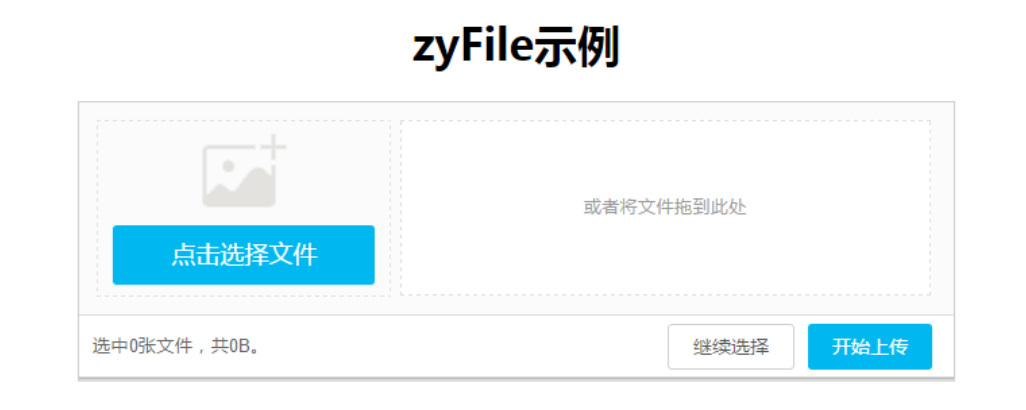
zyUpload 是一个界面绝佳、体验超棒的 HTML5 上传插件,在网上随便就可以下载到。 使用zyupload插件的时候,只需要注意替换js中的 URL 路径,就是后台给的接口地址。 同时要把代码放在后台的路径中,这样才能运行。 1、首先下载demo(点击下载) 2、确保php环境在5.3以上。 3、将下载的文件解压后,将demo文件夹移动到主机目录localhost文件夹下面。 4、打开浏览器输入(http://localhost/demo/demo.html) 5、如果出现如下界面说明成功。 6、配置zyUpload.js zyUpload文件中含有该插件显示在页面的html和图片上传的逻辑。 在zyUpload.js文件中做文件的各种限制 文件大小 文件大小格式等等 7.操作面板配置。 8、上传后的图片在demo/uploads下面。

优秀的个人博客,低调大师

go Flag应用

仿nginx命令行 go语言些命令行程序是不错的选择,所以它可以轻松达到如上图类似nginx命令行的效果 例子 package main import ( "flag" "fmt" "os" ) // var ( h bool v,V bool t,T bool q *bool s string p string c string g string n int64 ) func init(){ flag.BoolVar(&h,"h",false,"this help") flag.BoolVar(&v,"v",false,"show version and exit") flag.BoolVar(&V,"V",false,"show version and configure options then exit") flag.BoolVar(&t,"t",false,"test configuration and exit") flag.BoolVar(&T,"T",false,"test configuration,dump it and exit") //另一中绑定方式 q = flag.Bool("q",false,"suppress non-error messages during configuration testing") //注意’signal‘,默认是 -S string 有了`signal`之后,变为-s signal flag.StringVar(&s,"s","","send `signal` to a master") flag.StringVar(&p,"p","/usr/local/nginx","set configuration `file`") flag.StringVar(&c,"c","conf/nginx.conf","set confiruration `file`") flag.StringVar(&g,"g","conf/nginx.conf","set global `directives` out of configuraton file") flag.Int64Var(&n,"n",0,"set `number`") //改变默认的usage flag.Usage=Usage } func main() { flag.Parse() if h { flag.Usage() } if len(s)!=0{ fmt.Println(s) } if n !=0{ fmt.Println(n) } } func Usage() { fmt.Fprintf(os.Stderr,`nginx version: nginx/1.10.0 Usage:nginx [-hvVtTq] [-n number] [-s signal] [-c filename] [-p prefix] [-g directives] Options: `) flag.PrintDefaults() } 先执行go build或go install 编译代码 执行FlagPrac -h 命令就可以输出帮助信息了 执行FlagPrac -s wang 执行FlagPrac -s wang Flag 概述 参考:标准库—命令行参数解析FLAG 两种定义Flag方式 Flag.Xxx() 其中Xxx可以是Int,String等;返回一个相应类型的指针,如: q = flag.Bool("q",false,"suppress non-error messages during configuration testing") Flag.XxxVar() 将flag绑定到一个变量上,如: flag.BoolVar(&h,"h",false,"this help") 另外还可以创建自定义flag,只要实现flag.Value接口即可 Flag解析 在所有的flag定义完成之后,可以通过调用flag.Prarse()进行解析,命令行flag的语法有如下三种方式: flag //只支持bool类型 flag=x flag x //只支持非bool类型 int类型可以是十进制、十六进制、八进制甚至是负数;bool类型可以是1, 0, t, f, true, false, TRUE, FALSE, True, False。Duration可以接受任何time.ParseDuration能解析的类型 类型和函数 ErrHelp:该错误类型用于当命令行指定了-help参数但没有定义时。 Usage:这是一个函数,用于输出所有定义了的命令行参数和帮助信息(usage message)。一般,当命令行参数解析出错时,该函数会被调用。我们可以指定自己的Usage函数,即:flag.Usage = func(){}


资源下载

更多资源
Spring

Spring

Spring框架(Spring Framework)是由Rod Johnson于2002年提出的开源Java企业级应用框架,旨在通过使用JavaBean替代传统EJB实现方式降低企业级编程开发的复杂性。该框架基于简单性、可测试性和松耦合性设计理念,提供核心容器、应用上下文、数据访问集成等模块,支持整合Hibernate、Struts等第三方框架,其适用范围不仅限于服务器端开发,绝大多数Java应用均可从中受益。

Rocky Linux

Rocky Linux

Rocky Linux(中文名:洛基)是由Gregory Kurtzer于2020年12月发起的企业级Linux发行版,作为CentOS稳定版停止维护后与RHEL(Red Hat Enterprise Linux)完全兼容的开源替代方案,由社区拥有并管理,支持x86_64、aarch64等架构。其通过重新编译RHEL源代码提供长期稳定性,采用模块化包装和SELinux安全架构,默认包含GNOME桌面环境及XFS文件系统,支持十年生命周期更新。

Sublime Text

Sublime Text

Sublime Text具有漂亮的用户界面和强大的功能,例如代码缩略图,Python的插件,代码段等。还可自定义键绑定,菜单和工具栏。Sublime Text 的主要功能包括:拼写检查,书签,完整的 Python API , Goto 功能,即时项目切换,多选择,多窗口等等。Sublime Text 是一个跨平台的编辑器,同时支持Windows、Linux、Mac OS X等操作系统。

WebStorm

WebStorm

WebStorm 是jetbrains公司旗下一款JavaScript 开发工具。目前已经被广大中国JS开发者誉为“Web前端开发神器”、“最强大的HTML5编辑器”、“最智能的JavaScript IDE”等。与IntelliJ IDEA同源,继承了IntelliJ IDEA强大的JS部分的功能。

用户登录
用户注册