(10)学习笔记 ) ASP.NET CORE微服务 Micro-Service ---- Ocelot+Identity Server
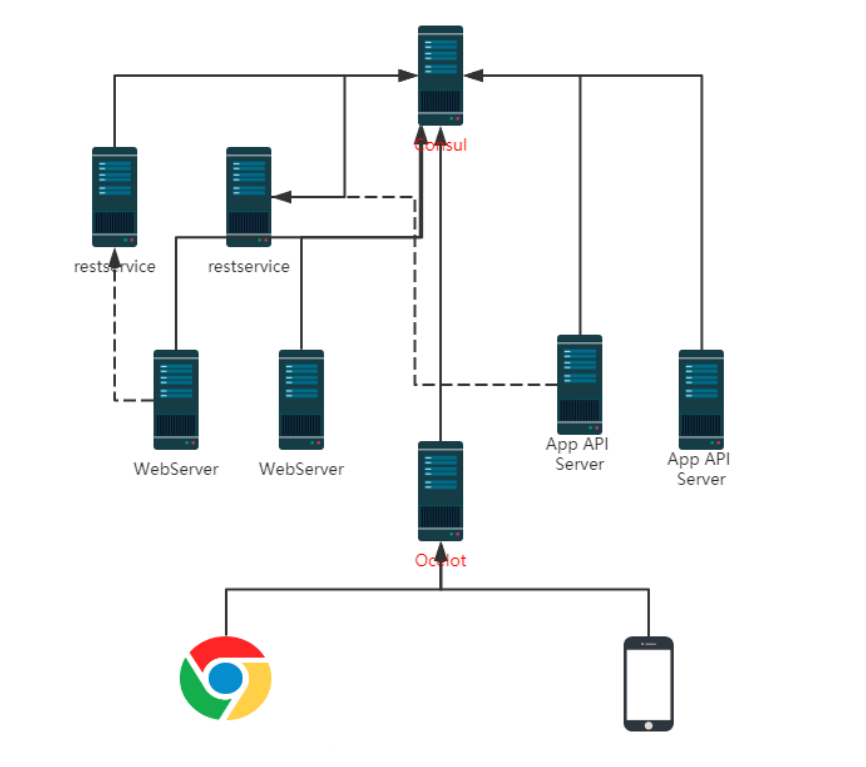
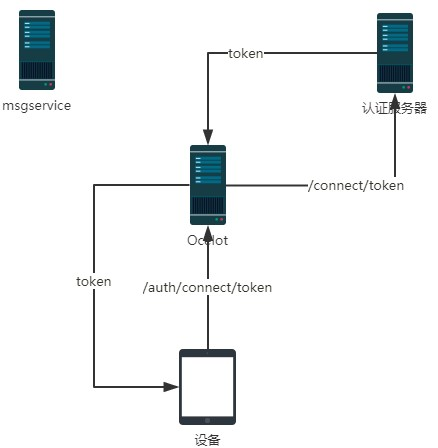
用 JWT 机制实现验证的原理如下图: 认证服务器负责颁发 Token(相当于 JWT 值)和校验 Token 的合法性。 一、 相关概念 API 资源(API Resource):微博服务器接口、斗鱼弹幕服务器接口、斗鱼直播接口就是API 资源。 客户端(Client):Client 就是官方微博 android 客户端、官方微博 ios 客户端、第三方微博客户端、微博助手等。 身份资源(Identity Resource):就是用户。 一个用户可能使用多个客户端访问服务器;一个客户端也可能服务多个用户。封禁了一个客户端,所有用户都不能使用这个这个客户端访问服务器,但是可以使用其他客户端访问;封禁了一个用户,这个用户在所有设备上都不能访问,但是不影响其他用户。 二、 搭建 identity server 认证服务器 新建一个空的 web 项目 ID4.IdServer Nuget - 》 Install-Package IdentityServer4 首先编写一个提供应用列表、账号列表的 Config 类 using IdentityServer4.Models; using System.Collections.Generic; namespace ID4.IdServer { public class Config { /// <summary> /// 返回应用列表 /// </summary> /// <returns></returns> public static IEnumerable<ApiResource> GetApiResources() { List<ApiResource> resources = new List<ApiResource>(); //ApiResource第一个参数是应用的名字,第二个参数是描述 resources.Add(new ApiResource("MsgAPI", "消息服务API")); resources.Add(new ApiResource("ProductAPI", "产品API")); return resources; } /// <summary> /// 返回账号列表 /// </summary> /// <returns></returns> public static IEnumerable<Client> GetClients() { List<Client> clients = new List<Client>(); clients.Add(new Client { ClientId = "clientPC1",//API账号、客户端Id AllowedGrantTypes = GrantTypes.ClientCredentials, ClientSecrets = { new Secret("123321".Sha256())//秘钥 }, AllowedScopes = { "MsgAPI", "ProductAPI" }//这个账号支持访问哪些应用 }); return clients; } } } 如果允许在数据库中配置账号等信息,那么可以从数据库中读取然后返回这些内容。疑问待解。 修改Startup.cs public void ConfigureServices(IServiceCollection services) { services.AddIdentityServer() .AddDeveloperSigningCredential() .AddInMemoryApiResources(Config.GetApiResources()) .AddInMemoryClients(Config.GetClients()); } public void Configure(IApplicationBuilder app, IHostingEnvironment env) { app.UseIdentityServer(); } 然后在 9500 端口启动 在 postman 里发出请求,获取 token http://localhost:9500/connect/token,发 Post 请求,表单请求内容(注意不是报文头): client_id=clientPC1 client_secret=123321 grant_type=client_credentials 把返回的 access_token 留下来后面用(注意有有效期)。 注意,其实不应该让客户端直接去申请 token,这只是咱演示,后面讲解正确做法。 三、搭建 Ocelot 服务器项目 空 Web 项目,项目名 ID4.Ocelot1 nuget 安装 IdentityServer4、Ocelot 编写配置文件 Ocelot.json(注意设置【如果较新则】) { "ReRoutes": [ { "DownstreamPathTemplate": "/api/{url}", "DownstreamScheme": "http", "UpstreamPathTemplate": "/MsgService/{url}", "UpstreamHttpMethod": ["Get", "Post"], "ServiceName": "MsgService", "LoadBalancerOptions": { "Type": "RoundRobin" }, "UseServiceDiscovery": true, "AuthenticationOptions": { "AuthenticationProviderKey": "MsgKey", "AllowedScopes": [] } }, { "DownstreamPathTemplate": "/api/{url}", "DownstreamScheme": "http", "UpstreamPathTemplate": "/ProductService/{url}", "UpstreamHttpMethod": ["Get", "Post"], "ServiceName": "ProductService", "LoadBalancerOptions": { "Type": "RoundRobin" }, "UseServiceDiscovery": true, "AuthenticationOptions": { "AuthenticationProviderKey": "ProductKey", "AllowedScopes": [] } } ], "GlobalConfiguration": { "ServiceDiscoveryProvider": { "Host": "localhost", "Port": 8500 } } } 把/MsgService 访问的都转给消息后端服务器(使用Consul进行服务发现)。也可以把Identity Server配置到Ocelot,但是我们不做,后边会讲为什么不放。 Program.cs 的 CreateWebHostBuilder 中加载 Ocelot.json .ConfigureAppConfiguration((hostingContext, builder) => { builder.AddJsonFile("Ocelot.json",false, true); }) 修改 Startup.cs 让 Ocelot 能够访问 Identity Server 进行 Token 的验证 using System; using IdentityServer4.AccessTokenValidation; using Microsoft.AspNetCore.Builder; using Microsoft.AspNetCore.Hosting; using Microsoft.Extensions.DependencyInjection; using Ocelot.DependencyInjection; using Ocelot.Middleware; namespace ID4.Ocelot1 { public class Startup { public void ConfigureServices(IServiceCollection services) { //指定Identity Server的信息 Action<IdentityServerAuthenticationOptions> isaOptMsg = o => { o.Authority = "http://localhost:9500"; o.ApiName = "MsgAPI";//要连接的应用的名字 o.RequireHttpsMetadata = false; o.SupportedTokens = SupportedTokens.Both; o.ApiSecret = "123321";//秘钥 }; Action<IdentityServerAuthenticationOptions> isaOptProduct = o => { o.Authority = "http://localhost:9500"; o.ApiName = "ProductAPI";//要连接的应用的名字 o.RequireHttpsMetadata = false; o.SupportedTokens = SupportedTokens.Both; o.ApiSecret = "123321";//秘钥 }; services.AddAuthentication() //对配置文件中使用ChatKey配置了AuthenticationProviderKey=MsgKey //的路由规则使用如下的验证方式 .AddIdentityServerAuthentication("MsgKey", isaOptMsg).AddIdentityServerAuthentication("ProductKey", isaOptProduct); services.AddOcelot(); } // This method gets called by the runtime. Use this method to configure the HTTP request pipeline. public void Configure(IApplicationBuilder app, IHostingEnvironment env) { if (env.IsDevelopment()) { app.UseDeveloperExceptionPage(); } app.UseOcelot().Wait(); } } } 很显然我们可以让不同的服务采用不同的Identity Server。 启动 Ocelot 服务器,然后向 ocelot 请求/MsgService/SMS/Send_MI(报文体还是要传 json 数据),在请求头(不是报文体)里加上: Authorization="Bearer "+上面 identityserver 返回的 accesstoken 如果返回 401,那就是认证错误。 Ocelot 会把 Authorization 值传递给后端服务器,这样在后端服务器可以用 IJwtDecoder 的这个不传递 key 的重载方法 IDictionary<string, object> DecodeToObject(string token),就可以在不验证的情况下获取 client_id 等信息。 也可以把 Identity Server 通过 Consul 进行服务治理。 Ocelot+Identity Server 实现了接口的权限验证,各个业务系统不需要再去做验证。 四、不能让客户端请求 token 上面是让客户端去请求 token,如果项目中这么搞的话,就把 client_id 特别是 secret 泄露给普通用户的。 正确的做法应该是,开发一个 token 服务,由这个服务来向 identity Server 请求 token,客户端向 token 服务发请求,把 client_id、secret 藏到这个 token 服务器上。当然这个服务器也要经过 Ocelot 转发。 五、用户名密码登录 如果 Api 和用户名、密码无关(比如系统内部之间 API 的调用),那么上面那样做就可以了,但是有时候需要用户身份验证的(比如 Android 客户端)。也就是在请求 token 的时候还要验证用户名密码,在服务中还可以获取登录用户信息。 修改的地方: 1、 ID4.IdServer 项目中增加类 ProfileService.cs using IdentityServer4.Models; using IdentityServer4.Services; using System.Linq; using System.Threading.Tasks; namespace ID4.IdServer { public class ProfileService : IProfileService { public async Task GetProfileDataAsync(ProfileDataRequestContext context) { var claims = context.Subject.Claims.ToList(); context.IssuedClaims = claims.ToList(); } public async Task IsActiveAsync(IsActiveContext context) { context.IsActive = true; } } } 增加类 ResourceOwnerPasswordValidator.cs using IdentityServer4.Models; using IdentityServer4.Validation; using System.Security.Claims; using System.Threading.Tasks; namespace ID4.IdServer { public class ResourceOwnerPasswordValidator : IResourceOwnerPasswordValidator { public async Task ValidateAsync(ResourceOwnerPasswordValidationContext context) { //根据context.UserName和context.Password与数据库的数据做校验,判断是否合法 if (context.UserName == "yzk" && context.Password == "123") { context.Result = new GrantValidationResult( subject: context.UserName, authenticationMethod: "custom", claims: new Claim[] { new Claim("Name", context.UserName), new Claim("UserId", "111"), new Claim("RealName", "名字"), new Claim("Email", "qq@qq.com") }); } else { //验证失败 context.Result = new GrantValidationResult(TokenRequestErrors.InvalidGrant, "invalid custom credential"); } } } } 当然这里的用户名密码是写死的,可以在项目中连接自己的用户数据库进行验证。claims 中可以放入多组用户的信息,这些信息都可以在业务系统中获取到。 Config.cs 修改一下,主要是把GetClients中的AllowedGrantTypes属性值改为GrantTypes.ResourceOwnerPassword, 并且在AllowedScopes中加入 IdentityServerConstants.StandardScopes.OpenId, //必须要添加,否则报forbidden错误 IdentityServerConstants.StandardScopes.Profile 修改后的 Config.cs using System.Collections.Generic; using IdentityServer4; using IdentityServer4.Models; namespace ID4.IdServer { public class Config { /// <summary> /// 返回应用列表 /// </summary> /// <returns></returns> public static IEnumerable<ApiResource> GetApiResources() { List<ApiResource> resources = new List<ApiResource>(); //ApiResource第一个参数是应用的名字,第二个参数是描述 resources.Add(new ApiResource("MsgAPI", "消息服务API")); resources.Add(new ApiResource("ProductAPI", "产品API")); return resources; } /// <summary> /// 返回客户端账号列表 /// </summary> /// <returns></returns> public static IEnumerable<Client> GetClients() { List<Client> clients = new List<Client>(); clients.Add(new Client { ClientId = "clientPC1",//API账号、客户端Id AllowedGrantTypes = GrantTypes.ResourceOwnerPassword, ClientSecrets = { new Secret("123321".Sha256())//秘钥 }, AllowedScopes = { "MsgAPI","ProductAPI",IdentityServerConstants.StandardScopes.OpenId, //必须要添加,否则报forbidden错误 IdentityServerConstants.StandardScopes.Profile }//这个账号支持访问哪些应用 }); return clients; } } } Startup.cs 的 ConfigureServices 修改为 public void ConfigureServices(IServiceCollection services) { var idResources = new List<IdentityResource> { new IdentityResources.OpenId(), //必须要添加,否则报无效的 scope 错误 new IdentityResources.Profile() }; services.AddIdentityServer() .AddDeveloperSigningCredential() .AddInMemoryIdentityResources(idResources) .AddInMemoryApiResources(Config.GetApiResources()) .AddInMemoryClients(Config.GetClients())// .AddResourceOwnerValidator<ResourceOwnerPasswordValidator>() .AddProfileService<ProfileService>(); } 主要是增加了 AddInMemoryIdentityResources 、 AddResourceOwnerValidator 、AddProfileService 2、 修改业务系统 以 MsgService 为例 Nuget -> Install-Package IdentityServer4.AccessTokenValidation 然后 Startup.cs 的 ConfigureServices 中增加 services.AddAuthentication("Bearer") .AddIdentityServerAuthentication(options => { options.Authority = "http://localhost:9500";//identity server 地址 options.RequireHttpsMetadata = false; }); Startup.cs 的 Configure 中增加 app.UseAuthentication(); 3、 请求 token 把报文头中的 grant_type 值改为 password,报文头增加 username、password 为用户名、密码。 像之前一样用返回的 access_token传递给请求的Authorization 中,在业务系统的 User中就可以获取到 ResourceOwnerPasswordValidator 中为用户设置的 claims 等信息了。 public void Send_MI(dynamic model) { string name = this.User.Identity.Name;//读取的就是"Name"这个特殊的 Claims 的值 string userId = this.User.FindFirst("UserId").Value; string realName = this.User.FindFirst("RealName").Value; string email = this.User.FindFirst("Email").Value; Console.WriteLine($"name={name},userId={userId},realName={realName},email={email}"); Console.WriteLine($"通过小米短信接口向{model.phoneNum}发送短信{model.msg}"); } 4、 独立登录服务器解决上面提到的“不能让客户端接触到 client_id、secret 的问题” 开发一个服务应用 LoginService public class RequestTokenParam { public string username { get; set; } public string password { get; set; } } using System.Collections.Generic; using System.Net.Http; using System.Threading.Tasks; using Microsoft.AspNetCore.Mvc; namespace LoginService.Controllers { [Route("api/[controller]")] [ApiController] public class LoginController : ControllerBase { [HttpPost] public async Task<ActionResult> RequestToken(RequestTokenParam model) { Dictionary<string, string> dict = new Dictionary<string, string>(); dict["client_id"] = "clientPC1"; dict["client_secret"] = "123321"; dict["grant_type"] = "password"; dict["username"] = model.username; dict["password"] = model.password; //由登录服务器向IdentityServer发请求获取Token using (HttpClient http = new HttpClient()) using (var content = new FormUrlEncodedContent(dict)) { var msg = await http.PostAsync("http://localhost:9500/connect/token", content); string result = await msg.Content.ReadAsStringAsync(); return Content(result, "application/json"); } } } } 这样客户端只要向 LoginService 的 /api/Login/ 发请求带上 json 报文体 {username:"yzk",password:"123"}即可。客户端就不知道 client_secret 这些机密信息了。 把 LoginService 配置到 Ocelot 中。 参考文章:https://www.cnblogs.com/jaycewu/p/7791102.html 注:此文章是我看杨中科老师的.Net Core微服务第二版和.Net Core微服务第二版课件整理出来的 现在的努力只是为了更好的将来,将来你一定不会后悔你现在的努力。一起加油吧!!! C#/.NetCore技术交流群:608188505欢迎加群交流 如果您认为这篇文章还不错或者有所收获,您可以点击右下角的【推荐】按钮精神支持,因为这种支持是我继续写作,分享的最大动力!