JVM Profiler CpuAndMemoryProfiler
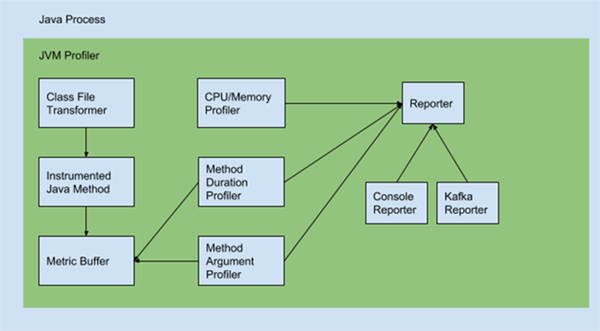
开篇 CpuAndMemoryProfiler主要用来采集cpu和memory相关的信息,采集核心方法都是由ManagementFactory提供的接口: getClassLoadingMXBean() 返回 Java 虚拟机的类加载系统的管理 Bean。 getCompilationMXBean() 返回 Java 虚拟机的编译系统的管理 Bean。 getGarbageCollectorMXBeans() 返回 Java 虚拟机中的 GarbageCollectorMXBean 对象列表。 getMemoryManagerMXBeans() 返回 Java 虚拟机中的 MemoryManagerMXBean 对象列表。 getMemoryMXBean() 返回 Java 虚拟机的内存系统的管理 Bean。 getMemoryPoolMXBeans() 返回 Java 虚拟机中的 MemoryPoolMXBean 对象列表。 getOperatingSystemMXBean() 返回运行 Java 虚拟机的操作系统的管理 Bean。 getPlatformMBeanServer() 返回平台 MBeanServer。 getRuntimeMXBean() 返回 Java 虚拟机的运行时系统的管理 Bean。 getThreadMXBean() 返回 Java 虚拟机的线程系统的管理 Bean。 源码分析 采集器核心对象的初始化 通过ManagementFactory.getPlatformMBeanServer初始化platformMBeanServer。 通过ObjectName.getInstance()初始化operatingSystemObjectName。 public class CpuAndMemoryProfiler extends ProcessInfoBase implements Profiler { public final static String PROFILER_NAME = "CpuAndMemory"; private static final AgentLogger logger = AgentLogger.getLogger(CpuAndMemoryProfiler.class.getName()); private static final String ATTRIBUTE_NAME_ProcessCpuLoad = "ProcessCpuLoad"; private static final int ATTRIBUTE_INDEX_ProcessCpuLoad = 0; private static final String ATTRIBUTE_NAME_SystemCpuLoad = "SystemCpuLoad"; private static final int ATTRIBUTE_INDEX_SystemCpuLoad = 1; private static final String ATTRIBUTE_NAME_ProcessCpuTime = "ProcessCpuTime"; private static final int ATTRIBUTE_INDEX_ProcessCpuTime = 2; private long intervalMillis = Constants.DEFAULT_METRIC_INTERVAL; private MBeanServer platformMBeanServer; private ObjectName operatingSystemObjectName; private MemoryMXBean memoryMXBean; private Reporter reporter; public CpuAndMemoryProfiler(Reporter reporter) { setReporter(reporter); init(); } private void init() { try { platformMBeanServer = ManagementFactory.getPlatformMBeanServer(); operatingSystemObjectName = ObjectName.getInstance("java.lang:type=OperatingSystem"); } catch (Throwable ex) { logger.warn("Failed to get Operation System MBean", ex); } try { memoryMXBean = ManagementFactory.getMemoryMXBean(); } catch (Throwable ex) { logger.warn("Failed to get Memory MBean", ex); } } 属性采集过程 ManagementFactory.getPlatformMBeanServer().getAttributes()获取cpu属性 ManagementFactory.getMemoryMXBean().getHeapMemoryUsage()获取堆使用属性。 ManagementFactory.getMemoryMXBean().getNonHeapMemoryUsage()获取非堆的使用属性。 ManagementFactory.getGarbageCollectorMXBeans()获取内存使用属性。 ManagementFactory.getPlatformMXBeans()回去实例对象的属性。 通过读取/proc/self/status文件来获取进程状态属性。 组装所有参数上报。 public synchronized void profile() { Double processCpuLoad = null; Double systemCpuLoad = null; Long processCpuTime = null; // 获取cpu属性 getCpuAttributes,通过platformMBeanServer对象来获取 AttributeList cpuAttributes = getCpuAttributes(); if (cpuAttributes != null && cpuAttributes.size() > 0) { Attribute att = (Attribute) cpuAttributes.get(ATTRIBUTE_INDEX_ProcessCpuLoad); processCpuLoad = (Double) att.getValue(); if (processCpuLoad == Double.NaN) { processCpuLoad = null; } att = (Attribute) cpuAttributes.get(ATTRIBUTE_INDEX_SystemCpuLoad); systemCpuLoad = (Double) att.getValue(); if (systemCpuLoad == Double.NaN) { systemCpuLoad = null; } att = (Attribute) cpuAttributes.get(ATTRIBUTE_INDEX_ProcessCpuTime); processCpuTime = (Long) att.getValue(); } // 获取memory属性,通过memoryMXBean对象来获取 Double heapMemoryTotalUsed = null; Double heapMemoryCommitted = null; Double nonHeapMemoryTotalUsed = null; Double nonHeapMemoryCommitted = null; if (memoryMXBean != null) { MemoryUsage memoryUsage = memoryMXBean.getHeapMemoryUsage(); heapMemoryTotalUsed = new Double(memoryUsage.getUsed()); heapMemoryCommitted = new Double(memoryUsage.getCommitted()); memoryUsage = memoryMXBean.getNonHeapMemoryUsage(); nonHeapMemoryTotalUsed = new Double(memoryUsage.getUsed()); nonHeapMemoryCommitted = new Double(memoryUsage.getCommitted()); } List<Map<String, Object>> gcMetrics = new ArrayList<>(); // 获取垃圾回收对象,通过ManagementFactory.getGarbageCollectorMXBeans()来实现 List<GarbageCollectorMXBean> gcMXBeans = ManagementFactory.getGarbageCollectorMXBeans(); if (gcMXBeans != null) { for (GarbageCollectorMXBean gcMXBean : gcMXBeans) { Map<String, Object> gcMap = new HashMap<>(); gcMap.put("name", gcMXBean.getName()); gcMap.put("collectionCount", new Long(gcMXBean.getCollectionCount())); gcMap.put("collectionTime", new Long(gcMXBean.getCollectionTime())); gcMetrics.add(gcMap); } } // 获取memoryPoolsMetrics指标,通过ManagementFactory.getMemoryPoolMXBeans())来实现 List<Map<String, Object>> memoryPoolsMetrics = new ArrayList<>(); for (MemoryPoolMXBean pool : ManagementFactory.getMemoryPoolMXBeans()) { Map<String, Object> memoryPoolMap = new HashMap<>(); memoryPoolMap.put("name", pool.getName()); memoryPoolMap.put("type", pool.getType().toString()); memoryPoolMap.put("usageCommitted", pool.getUsage().getCommitted()); memoryPoolMap.put("usageMax", pool.getUsage().getMax()); memoryPoolMap.put("usageUsed", pool.getUsage().getUsed()); memoryPoolMap.put("peakUsageCommitted", pool.getPeakUsage().getCommitted()); memoryPoolMap.put("peakUsageMax", pool.getPeakUsage().getMax()); memoryPoolMap.put("peakUsageUsed", pool.getPeakUsage().getUsed()); memoryPoolsMetrics.add(memoryPoolMap); } // 获取bufferPoolsMetrics指标,通过ManagementFactory.getPlatformMXBeans()来实现 List<Map<String, Object>> bufferPoolsMetrics = new ArrayList<>(); List<BufferPoolMXBean> bufferPools = ManagementFactory.getPlatformMXBeans(BufferPoolMXBean.class); if (bufferPools != null) { for (BufferPoolMXBean pool : bufferPools) { Map<String, Object> bufferPoolMap = new HashMap<>(); bufferPoolMap.put("name", pool.getName()); bufferPoolMap.put("count", new Long(pool.getCount())); bufferPoolMap.put("memoryUsed", new Long(pool.getMemoryUsed())); bufferPoolMap.put("totalCapacity", new Long(pool.getTotalCapacity())); bufferPoolsMetrics.add(bufferPoolMap); } } // 获取procStatus指标,通过ProcFileUtils.getProcStatus()来实现 Map<String, String> procStatus = ProcFileUtils.getProcStatus(); Long procStatusVmRSS = ProcFileUtils.getBytesValue(procStatus, "VmRSS"); Long procStatusVmHWM = ProcFileUtils.getBytesValue(procStatus, "VmHWM"); // 组装所有采集结果进行上报 Map<String, Object> map = new HashMap<String, Object>(); map.put("epochMillis", System.currentTimeMillis()); map.put("name", getProcessName()); map.put("host", getHostName()); map.put("processUuid", getProcessUuid()); map.put("appId", getAppId()); if (getTag() != null) { map.put("tag", getTag()); } if (getCluster() != null) { map.put("cluster", getCluster()); } if (getRole() != null) { map.put("role", getRole()); } map.put("processCpuLoad", processCpuLoad); map.put("systemCpuLoad", systemCpuLoad); map.put("processCpuTime", processCpuTime); map.put("heapMemoryTotalUsed", heapMemoryTotalUsed); map.put("heapMemoryCommitted", heapMemoryCommitted); map.put("nonHeapMemoryTotalUsed", nonHeapMemoryTotalUsed); map.put("nonHeapMemoryCommitted", nonHeapMemoryCommitted); map.put("gc", gcMetrics); map.put("memoryPools", memoryPoolsMetrics); map.put("bufferPools", bufferPoolsMetrics); if (procStatusVmRSS != null) { map.put("vmRSS", procStatusVmRSS); } if (procStatusVmHWM != null) { map.put("vmHWM", procStatusVmHWM); } if (reporter != null) { reporter.report(PROFILER_NAME, map); } } cpu属性的获取过程 platformMBeanServer.getAttributes()方法用来获取cpu的信息。 private AttributeList getCpuAttributes() { try { String[] names = new String[]{ATTRIBUTE_NAME_ProcessCpuLoad, ATTRIBUTE_NAME_SystemCpuLoad, ATTRIBUTE_NAME_ProcessCpuTime}; AttributeList list = platformMBeanServer.getAttributes(operatingSystemObjectName, names); if (list.size() != names.length) { logger.warn("Failed to get all attributes"); return new AttributeList(); } return list; } catch (Throwable ex) { logger.warn("Failed to get CPU MBean attributes", ex); return null; } } } 进程状态获取 通过读取/proc/self/status文件来获取进程信息。 private static final String PROC_SELF_STATUS_FILE = "/proc/self/status"; public static Map<String, String> getProcStatus() { return getProcFileAsMap(PROC_SELF_STATUS_FILE); } public static Map<String, String> getProcFileAsMap(String filePath) { try { File file = new File(filePath); if (!file.exists() || file.isDirectory() || !file.canRead()) { return Collections.emptyMap(); } Map<String, String> result = new HashMap<>(); List<String> lines = Files.readAllLines(file.toPath(), StandardCharsets.UTF_8); for (String line : lines) { int index = line.indexOf(VALUE_SEPARATOR); if (index <= 0 || index >= line.length() - 1) { continue; } String key = line.substring(0, index).trim(); String value = line.substring(index + 1).trim(); result.put(key, value); } return result; } catch (Throwable ex) { logger.warn("Failed to read file " + filePath, ex); return Collections.emptyMap(); } } 参考文章 ManagementFactory api