首页 文章 精选 留言 我的

精选列表

搜索[from],共10009篇文章
优秀的个人博客,低调大师

Citrix Universal Printer Server - From Citrix 廖天云

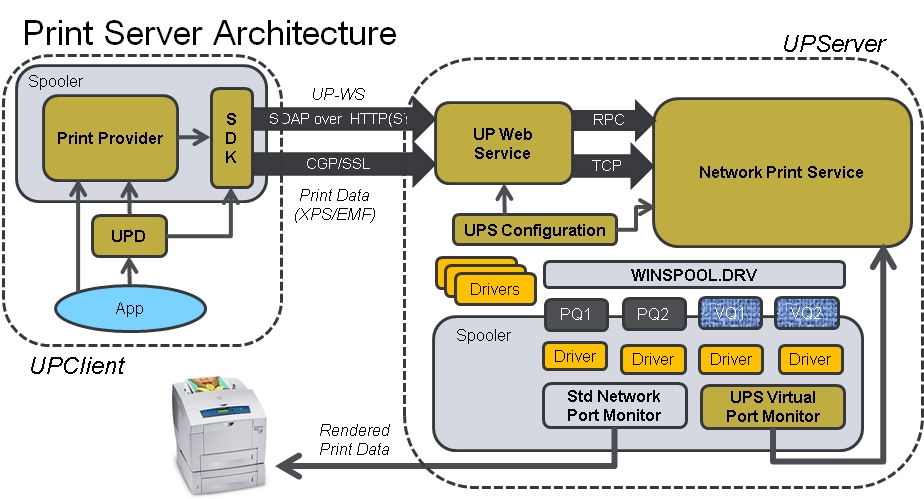
Citrix Universal Printer Server 源自:思杰技术文章作者廖天云 概述 Universal Printer Server(以下简称UPS)是一个XenApp和XenDesktop环境中的一个组件,它有助力提高用户在打印方面的体验。如果您的客户使用的打印服务器或网络打印机,一直被困扰,经常需要安装和更新打印机驱动、打印速度太慢、分支机构打印消耗的带宽过高,那么UPS解决方案就是您一个不错的选择。 到底哪些挑战需要使用UPS,我们可以从以下几个角度出发: Windows打印服务器没有办法对图像、字体进行缓存、高级压缩、打印优化以及QoS支持,而这正是UPS所在行的。 打印机存在不同的驱动,因此用户在连接打印机后,不同的厂商所提供的打印属性页是不同的,而UPS可以提供统一的打印机设置页面。 新的打印机加入公司的网络打印机序列中或连接到新部署的打印服务器时,管理员需要对现有的XenApp和XenDesktop环境进行更新打印驱动用以支持这些打印机,而UPS可以避免这些工作,实现无驱动(万能驱动)部署。 技术架构 UPS的技术架构主要由三部分构成(理论上是两个),一个是UP Server即接收打印任务,默认将使用TCP端口8080和7229,UPServer将会把接收到的打印任务发送到打印池中然后发送给打印机。具体可以参考下图: 第二个组件就是UP Client,UPClient它将处理用户打印的任务,然后将打印任务通过网络发送给UPServer。 UP Client通过SOAP使用HTTPS TCP 8080端口将打印任务发出。 UP Client使用XPS/EMF格式通过CGP/SSL的TCP 7229端口将打印流的数据发送给UP Server。 参考以下图: 第三个组件就是Citrix Policy,管理员可以通过使用XenApp和DesktopDelivery Controller的控制台直接配置。 部署 UP Server的部署 UP Server需要部署在每一台打印服务器中,UP Server不能与XenApp服务器安装在同一台服务器中。 支持的系统:Win 2008 32Bit,Win 2008R2 64Bit,Win2008 R2 64Bit SP1。 安装前需要安装“打印和文档服务角色”。 Virtual C++ 2005 SP1和2008 SP1 Runtime libraries。 .NET 3.0 SP1。 安装:在Citrix安装介质中找到“CitrixUniversalPrintSolution.zip”,解压缩后安装“CitrixUPServer_SelfExtractor.exe”。 UP Client的部署 UP Client部署在每一台XenApp服务器和XenDesktop VDA中。 支持的系统:XenApp 6.5以上、XenDesktop 5.5以上。 安装:在Citrix安装介质中找到“CitrixUniversalPrintSolution.zip”,解压缩后安装“CitrixUPClient_SelfExtractor.exe”。 Citrix策略 配置以下XenDesktop和XenApp策略: 通用打印机配置: Universal Print Server enable:“Enabled withfallback to Windows native remote printing” 您可以通过“Universal PrintServer print stream input bandwidth limit (kbps)”来限制打印带宽。 在“通用打印”中还可以设置,压缩、优化、修改HTTP/SOAP/CGP的端口等设置。 必须的配置三个策略: Session Printer(会话打印机):添加打印服务器的地址。 Client printer redirection, Auto-create clientprinters:启用这条策略,用户将自动看到UPS的会话打印机。 Direct connections to print server:连接到的打印服务器将会使用UPS打印驱动。 本文转自sesame.qian 51CTO博客,原文链接http://blog.51cto.com/kaiqian/1653403:,如需转载请自行联系原作者

优秀的个人博客,低调大师

How to Moving SSL Certificate(HTTPS)from IIS to Nginx

因为业务需要,需将将一原IIS下的https站点迁移到nginx前端反向代理的架构中。 具体步骤为: 在IIS所在的Windows服务器上导出证书. 1) 【开始】--->【运行】--->MMC 2) 【添加】--->【证书】--->添加 3) 选择【计算机账号】--->NEXT 4) 选择【本地计算机】--->OK 5) 【关闭】--->【确定】 6) 依次展开【证书】--->【个人证书】 7) 右键选择你想导出的证书 8) 【所有任务】--->【导出】 9) 按照提示导出一个pfx文件比如 sslcert.pfx 把pfx文件上传到nginx所在的linux服务器上, 1) 导出Private key openssl pkcs12 -in [sslcert].pfx -nocerts -out key.pem 2) 从私有key中将密码remove(在1.9中导出pfx的时候会提示输入一个密码来保护这个pfx) openssl rsa -in key.pem -out server.key 3) 导出证书 openssl pkcs12 -in [sslcert].pfx -clcerts -nokeys -out cert.pem 将上述得到的cert.pem;server.key复制到需要的目录中,比如/etc/nginx/conf.d/ssl/中 编辑test.com.conf(nginx的server的conf) 1 2 3 4 5 6 7 8 9 10 11 12 server{ listen443; server_namewww. test .com; sslon; ssl_certificate /etc/nginx/conf .d /ssl/ cert.pem; ssl_certificate_key /etc/nginx/conf .d /ssl/server .key; location/{ proxy_passhttp: //test .com_server_pool; } } 本文转自天山三害 51CTO博客,原文链接:,http://blog.51cto.com/skybug/1610877如需转载请自行联系原作者

优秀的个人博客,低调大师

Keep the Screen from Locking(阻止屏幕自动上锁)

在ios设备中,如果ios设备一段时间中没收到touch事件,ios设备就会自动锁定,但是在玩游戏时候可能会某段时间不触发touch时间,这时候就会锁定,而这并不是我们所想要的,那么我们可以设置 [[UIApplication sharedApplication] setIdleTimerDisabled: YES]; // Or for those who prefer dot syntax: [UIApplication sharedApplication].idleTimerDisabled = YES; swift // 保持常亮 UIApplication.shared.isIdleTimerDisabled = true

优秀的个人博客,低调大师

SONIC from microsoft&Azure,one project of OCP

github:https://github.com/Azure/SONiC 支持硬件列表:https://github.com/Azure/SONiC/wiki/Supported-Devices-and-Platforms 架构介绍:https://github.com/Azure/SONiC/wiki/Architecture Switch Hardware Switch hardware refers to all the physical components inside the network switch enclosure (chassis). This includes fans, power supplies, status LEDs and network transceivers. In SONiC terminology, these are called “system devices”. Switch Abstraction Interface (SAI) The switch abstraction interface is a standardized C API to the switching ASIC. This API is normally implemented by an SDK specific to the Switch ASIC. More information on SAI is available at theSAI GitHubrepository. SAI Host Adapter The SAI Host Adapter’s role is to provide a mechanism for storing and synchronizing network switch data with the Switch ASIC. This includes initialization, configuration and current status of the switch ASIC. Network Applications Network applications, such as a BGP routing protocol, use the Object Libraries API’s to get and set the state of the SONiC SAI Host Adapter.

优秀的个人博客,低调大师

[Android Pro] 使用CursorLoader异步加载数据 from 3.0

Android 3.0引入了CursorLoader实现异步加载数据,为了避免同步查询数据库时阻塞UI线程的问题。在API 11之前可以通过下载支持库,来使之前的系统支持此功能,下载页面为 http://developer.android.com/tools/extras/support-library.html。 下面是一个例子: public class ListViewLoader extends ListActivity implements LoaderManager.LoaderCallbacks<Cursor> { // This is the Adapter being used to display the list's data SimpleCursorAdapter mAdapter; // These are the Contacts rows that we will retrieve static final String[] PROJECTION = new String[] {ContactsContract.Data._ID, ContactsContract.Data.DISPLAY_NAME}; // This is the select criteria static final String SELECTION = "((" + ContactsContract.Data.DISPLAY_NAME + " NOTNULL) AND (" + ContactsContract.Data.DISPLAY_NAME + " != '' ))"; @Override protected void onCreate(Bundle savedInstanceState) { super.onCreate(savedInstanceState); // Create a progress bar to display while the list loads ProgressBar progressBar = new ProgressBar(this); progressBar.setLayoutParams(new LayoutParams(LayoutParams.WRAP_CONTENT, LayoutParams.WRAP_CONTENT, Gravity.CENTER)); progressBar.setIndeterminate(true); getListView().setEmptyView(progressBar); // Must add the progress bar to the root of the layout ViewGroup root = (ViewGroup) findViewById(android.R.id.content); root.addView(progressBar); // For the cursor adapter, specify which columns go into which views String[] fromColumns = {ContactsContract.Data.DISPLAY_NAME}; int[] toViews = {android.R.id.text1}; // The TextView in simple_list_item_1 // Create an empty adapter we will use to display the loaded data. // We pass null for the cursor, then update it in onLoadFinished() mAdapter = new SimpleCursorAdapter(this, android.R.layout.simple_list_item_1, null, fromColumns, toViews, 0); setListAdapter(mAdapter); // Prepare the loader. Either re-connect with an existing one, // or start a new one. getLoaderManager().initLoader(0, null, this); } // Called when a new Loader needs to be created public Loader<Cursor> onCreateLoader(int id, Bundle args) { // Now create and return a CursorLoader that will take care of // creating a Cursor for the data being displayed. return new CursorLoader(this, ContactsContract.Data.CONTENT_URI, PROJECTION, SELECTION, null, null); } // Called when a previously created loader has finished loading public void onLoadFinished(Loader<Cursor> loader, Cursor data) { // Swap the new cursor in. (The framework will take care of closing the // old cursor once we return.) mAdapter.swapCursor(data); } // Called when a previously created loader is reset, making the data unavailable public void onLoaderReset(Loader<Cursor> loader) { // This is called when the last Cursor provided to onLoadFinished() // above is about to be closed. We need to make sure we are no // longer using it. mAdapter.swapCursor(null); } @Override public void onListItemClick(ListView l, View v, int position, long id) { // Do something when a list item is clicked } } 分类: Android Pro 本文转自demoblog博客园博客,原文链接http://www.cnblogs.com/0616--ataozhijia/p/3968170.html如需转载请自行联系原作者 demoblog


优秀的个人博客,低调大师

android:Error inflating fragment from layout androidsupportv4

在3.0之前写fragment是要引进extras/android/compatibility/v4/android-support-v4.jar包 并且要注意,实现的Activity必须是继承:FragmentActivity。 而3.0不需要,因为3.0将比如getFragmentManager()方法已经加入到Activity中了。 而3.0以前版本要通过继承FragmentActivity获得类似功能。 负责会出现错误:Error inflating class fragment 本文转自老Zhan博客园博客,原文链接:http://www.cnblogs.com/mybkn/archive/2012/04/22/2464895.html,如需转载请自行联系原作者

优秀的个人博客,低调大师

ERROR 1415: Not allowed to return a result set from a trigger

触发器中不允许返回结果集,解决方法是顶一个变量,然后将返回值返回给变量。 DROP TRIGGER IF EXISTS `test`.`demo_AFTER_INSERT`; DELIMITER $$ USE `test`$$ CREATE DEFINER=`root`@`%` TRIGGER `test`.`demo_AFTER_INSERT` AFTER INSERT ON `demo` FOR EACH ROW BEGIN set @rev = ""; SELECT OUT2FILE('/tmp/demo.log', CONCAT_WS(',', NEW.id, NEW.name, NEW.sex, NEW.address)) INTO @rev; END$$ DELIMITER ; Please enable JavaScript to view the <a href="https://disqus.com/?ref_noscript">comments powered by Disqus.</a> 原文出处:Netkiller 系列 手札 本文作者:陈景峯 转载请与作者联系,同时请务必标明文章原始出处和作者信息及本声明。

资源下载

更多资源
Nacos

Nacos

Nacos /nɑ:kəʊs/ 是 Dynamic Naming and Configuration Service 的首字母简称,一个易于构建 AI Agent 应用的动态服务发现、配置管理和AI智能体管理平台。Nacos 致力于帮助您发现、配置和管理微服务及AI智能体应用。Nacos 提供了一组简单易用的特性集,帮助您快速实现动态服务发现、服务配置、服务元数据、流量管理。Nacos 帮助您更敏捷和容易地构建、交付和管理微服务平台。

Spring

Spring

Spring框架(Spring Framework)是由Rod Johnson于2002年提出的开源Java企业级应用框架,旨在通过使用JavaBean替代传统EJB实现方式降低企业级编程开发的复杂性。该框架基于简单性、可测试性和松耦合性设计理念,提供核心容器、应用上下文、数据访问集成等模块,支持整合Hibernate、Struts等第三方框架,其适用范围不仅限于服务器端开发,绝大多数Java应用均可从中受益。

Rocky Linux

Rocky Linux

Rocky Linux(中文名:洛基)是由Gregory Kurtzer于2020年12月发起的企业级Linux发行版,作为CentOS稳定版停止维护后与RHEL(Red Hat Enterprise Linux)完全兼容的开源替代方案,由社区拥有并管理,支持x86_64、aarch64等架构。其通过重新编译RHEL源代码提供长期稳定性,采用模块化包装和SELinux安全架构,默认包含GNOME桌面环境及XFS文件系统,支持十年生命周期更新。

Sublime Text

Sublime Text

Sublime Text具有漂亮的用户界面和强大的功能,例如代码缩略图,Python的插件,代码段等。还可自定义键绑定,菜单和工具栏。Sublime Text 的主要功能包括:拼写检查,书签,完整的 Python API , Goto 功能,即时项目切换,多选择,多窗口等等。Sublime Text 是一个跨平台的编辑器,同时支持Windows、Linux、Mac OS X等操作系统。

用户登录
用户注册