首页 文章 精选 留言 我的

精选列表

搜索[3D效果],共10005篇文章
优秀的个人博客,低调大师

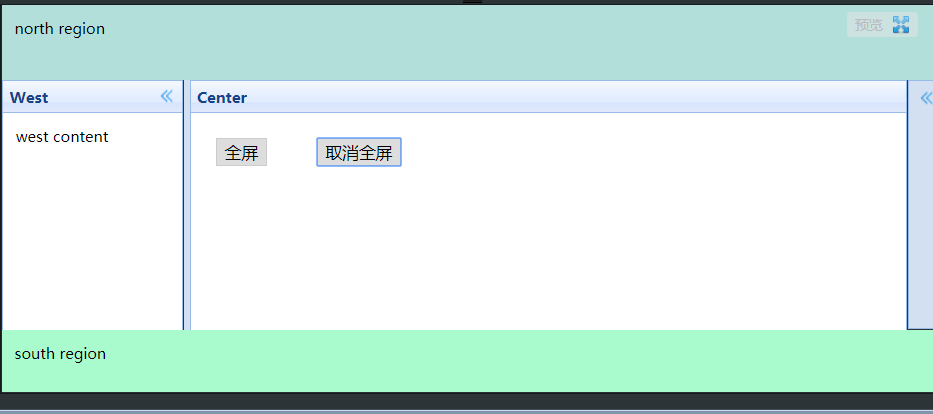
Easyui layout设置满屏效果

html文件: <!DOCTYPE html> <html> <head> <meta http-equiv="Content-Type" content="text/html; charset=UTF-8"> <title>Easyui Layout全屏</title> <link id="others_jquery_easyui_131" rel="stylesheet" type="text/css" class="library" href="/js/sandbox/jquery-easyui/themes/default/easyui.css"> <script id="jquery_183" type="text/javascript" class="library" src="/js/sandbox/jquery/jquery-1.8.3.min.js"></script> <script id="others_jquery_easyui_131" type="text/javascript" class="library" src="/js/sandbox/jquery-easyui/jquery.easyui.min.js"></script> </head> <body class="easyui-layout"> <div data-options="region:'north',border:false" style="height:60px;background:#B3DFDA;padding:10px">north region</div> <div data-options="region:'west',split:true,title:'West'" style="width:150px;padding:10px;">west content</div> <div data-options="region:'east',split:true,collapsed:true,title:'East'" style="width:100px;padding:10px;">east region</div> <div data-options="region:'south',border:false" style="height:50px;background:#A9FACD;padding:10px;">south region</div> <div data-options="region:'center',title:'Center'" id="center"> <button onclick="full()">全屏</button><button onclick="unFull()">取消全屏</button> </div> </body> </html> js文件: $.extend($.fn.layout.methods, { full : function (jq) { return jq.each(function () { var layout = $(this); var center = layout.layout('panel', 'center'); center.panel('maximize'); center.parent().css('z-index', 10); $(window).on('resize.full', function () { layout.layout('unFull').layout('resize'); }); }); }, unFull : function (jq) { return jq.each(function () { var center = $(this).layout('panel', 'center'); center.parent().css('z-index', 'inherit'); center.panel('restore'); $(window).off('resize.full'); }); } }); function full() { $("body").layout("full"); } function unFull() { $("body").layout("unFull"); } 普通 满屏 转载于:http://runjs.cn/code/2fjkfkuo

优秀的个人博客,低调大师

android 动态渐变 字符效果

public class GradientView extends View { private String TAG = " GradientView " ; private Handler mTimeTickHandler; private int mIndex = 190 ; private Shader mShader; private Bitmap mBitmapBg; private Bitmap mBitmapWord; private int mMinWidth = 190 ; private int mMaxWidth ; private int mUpdateStep = 20 ; private Paint mPaint = new Paint(); public GradientView(Context context) { super (context); } public GradientView(Context context, AttributeSet attrs) { super (context, attrs); mTimeTickHandler = new Handler(); setFocusable( true ); InputStream is = context.getResources().openRawResource(R.drawable.sliding_channel_background); mBitmapBg = BitmapFactory.decodeStream(is); mMaxWidth = mBitmapBg.getWidth(); mBitmapWord = Bitmap.createBitmap(mBitmapBg.getWidth(), mBitmapBg.getHeight(), Bitmap.Config.ALPHA_8); drawIntoBitmap(mBitmapWord, context); mTimeTickHandler.post(mTimeTickRunnable); } private void drawIntoBitmap(Bitmap bm, Context context) { float x = bm.getWidth(); float y = bm.getHeight(); Canvas c = new Canvas(bm); Paint p = new Paint(); p.setAntiAlias( true ); p.setColor(Color.WHITE); p.setTextSize( 45 ); p.setTextAlign(Paint.Align.CENTER); c.drawText(context.getResources().getString(R.string.slide_unlock), x / 2 + 10 , y / 2 , p); } @Override protected void onDraw(Canvas canvas) { // canvas.drawBitmap(mBitmapBg, 0, 0, p); mPaint.setShader(mShader); canvas.drawBitmap(mBitmapWord, 50 , 13 , mPaint); } public void removeHandlerGradient(){ mTimeTickHandler.removeCallbacks(mTimeTickRunnable); } private Runnable mTimeTickRunnable = new Runnable(){ public void run() { mIndex += mUpdateStep; if (mIndex >= mMaxWidth){ mIndex = mMinWidth; } mShader = new LinearGradient( 0 , 150 , mIndex, 150 , new int [] { Color.GRAY,Color.GRAY,Color.GRAY, Color.GRAY, Color.WHITE }, null , Shader.TileMode.MIRROR); postInvalidate(); mTimeTickHandler.postDelayed(mTimeTickRunnable, 100 ); } }; } 本文转自wanqi博客园博客,原文链接: http://www.cnblogs.com/wanqieddy/archive/2011/07/11/2103301.html 如需转载请自行联系原作者


资源下载

更多资源
Spring

Spring

Spring框架(Spring Framework)是由Rod Johnson于2002年提出的开源Java企业级应用框架,旨在通过使用JavaBean替代传统EJB实现方式降低企业级编程开发的复杂性。该框架基于简单性、可测试性和松耦合性设计理念,提供核心容器、应用上下文、数据访问集成等模块,支持整合Hibernate、Struts等第三方框架,其适用范围不仅限于服务器端开发,绝大多数Java应用均可从中受益。

Rocky Linux

Rocky Linux

Rocky Linux(中文名:洛基)是由Gregory Kurtzer于2020年12月发起的企业级Linux发行版,作为CentOS稳定版停止维护后与RHEL(Red Hat Enterprise Linux)完全兼容的开源替代方案,由社区拥有并管理,支持x86_64、aarch64等架构。其通过重新编译RHEL源代码提供长期稳定性,采用模块化包装和SELinux安全架构,默认包含GNOME桌面环境及XFS文件系统,支持十年生命周期更新。

Sublime Text

Sublime Text

Sublime Text具有漂亮的用户界面和强大的功能,例如代码缩略图,Python的插件,代码段等。还可自定义键绑定,菜单和工具栏。Sublime Text 的主要功能包括:拼写检查,书签,完整的 Python API , Goto 功能,即时项目切换,多选择,多窗口等等。Sublime Text 是一个跨平台的编辑器,同时支持Windows、Linux、Mac OS X等操作系统。

WebStorm

WebStorm

WebStorm 是jetbrains公司旗下一款JavaScript 开发工具。目前已经被广大中国JS开发者誉为“Web前端开发神器”、“最强大的HTML5编辑器”、“最智能的JavaScript IDE”等。与IntelliJ IDEA同源,继承了IntelliJ IDEA强大的JS部分的功能。

用户登录
用户注册