Netty实践
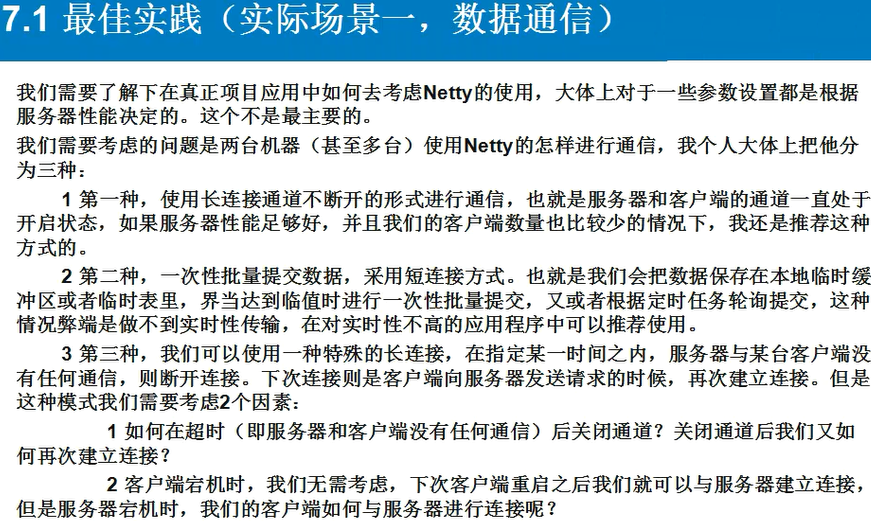
数据通信 数据通信整体的类如下,MarshallingCodeCFactory可以省去,这个只是代替java的序列化的功能,因为java的序列化功能效率低: Client.java package bhz.netty.runtime; import io.netty.bootstrap.Bootstrap; import io.netty.channel.ChannelFuture; import io.netty.channel.ChannelInitializer; import io.netty.channel.EventLoopGroup; import io.netty.channel.nio.NioEventLoopGroup; import io.netty.channel.socket.SocketChannel; import io.netty.channel.socket.nio.NioSocketChannel; import io.netty.handler.logging.LogLevel; import io.netty.handler.logging.LoggingHandler; import io.netty.handler.timeout.ReadTimeoutHandler; import java.util.concurrent.TimeUnit; /** * Best Do It */ public class Client { private static class SingletonHolder { static final Client instance = new Client(); } public static Client getInstance(){ return SingletonHolder.instance; } private EventLoopGroup group; private Bootstrap b; private ChannelFuture cf ; private Client(){ group = new NioEventLoopGroup(); b = new Bootstrap(); b.group(group) .channel(NioSocketChannel.class) .handler(new LoggingHandler(LogLevel.INFO)) .handler(new ChannelInitializer<SocketChannel>() { @Override protected void initChannel(SocketChannel sc) throws Exception { sc.pipeline().addLast(MarshallingCodeCFactory.buildMarshallingDecoder()); sc.pipeline().addLast(MarshallingCodeCFactory.buildMarshallingEncoder()); //超时handler(当服务器端与客户端在指定时间以上没有任何进行通信,则会关闭响应的通道,主要为减小服务端资源占用) sc.pipeline().addLast(new ReadTimeoutHandler(5)); sc.pipeline().addLast(new ClientHandler()); } }); } public void connect(){ try { this.cf = b.connect("127.0.0.1", 8765).sync(); System.out.println("远程服务器已经连接, 可以进行数据交换.."); } catch (Exception e) { e.printStackTrace(); } } public ChannelFuture getChannelFuture(){ if(this.cf == null){ this.connect(); } if(!this.cf.channel().isActive()){ this.connect(); } return this.cf; } public static void main(String[] args) throws Exception{ final Client c = Client.getInstance(); //c.connect(); ChannelFuture cf = c.getChannelFuture(); for(int i = 1; i <= 3; i++ ){ Request request = new Request(); request.setId("" + i); request.setName("pro" + i); request.setRequestMessage("数据信息" + i); cf.channel().writeAndFlush(request); TimeUnit.SECONDS.sleep(4); } cf.channel().closeFuture().sync(); //前面的主线程已经断开了连接,现在创建一个子线程继续建立连接 new Thread(new Runnable() { @Override public void run() { try { System.out.println("进入子线程..."); ChannelFuture cf = c.getChannelFuture(); System.out.println(cf.channel().isActive()); System.out.println(cf.channel().isOpen()); //再次发送数据 Request request = new Request(); request.setId("" + 4); request.setName("pro" + 4); request.setRequestMessage("数据信息" + 4); cf.channel().writeAndFlush(request); cf.channel().closeFuture().sync(); System.out.println("子线程结束."); } catch (InterruptedException e) { e.printStackTrace(); } } }).start(); System.out.println("断开连接,主线程结束.."); } } ClientHandler.java package bhz.netty.runtime; import io.netty.channel.ChannelHandlerAdapter; import io.netty.channel.ChannelHandlerContext; import io.netty.util.ReferenceCountUtil; public class ClientHandler extends ChannelHandlerAdapter{ @Override public void channelActive(ChannelHandlerContext ctx) throws Exception { } @Override public void channelRead(ChannelHandlerContext ctx, Object msg) throws Exception { try { Response resp = (Response)msg; System.out.println("Client : " + resp.getId() + ", " + resp.getName() + ", " + resp.getResponseMessage()); } finally { ReferenceCountUtil.release(msg); } } @Override public void channelReadComplete(ChannelHandlerContext ctx) throws Exception { } @Override public void exceptionCaught(ChannelHandlerContext ctx, Throwable cause) throws Exception { ctx.close(); } } Server.java package bhz.netty.runtime; import io.netty.bootstrap.ServerBootstrap; import io.netty.channel.ChannelFuture; import io.netty.channel.ChannelInitializer; import io.netty.channel.ChannelOption; import io.netty.channel.EventLoopGroup; import io.netty.channel.nio.NioEventLoopGroup; import io.netty.channel.socket.SocketChannel; import io.netty.channel.socket.nio.NioServerSocketChannel; import io.netty.handler.logging.LogLevel; import io.netty.handler.logging.LoggingHandler; import io.netty.handler.timeout.ReadTimeoutHandler; public class Server { public static void main(String[] args) throws Exception{ EventLoopGroup pGroup = new NioEventLoopGroup(); EventLoopGroup cGroup = new NioEventLoopGroup(); ServerBootstrap b = new ServerBootstrap(); b.group(pGroup, cGroup) .channel(NioServerSocketChannel.class) .option(ChannelOption.SO_BACKLOG, 1024) //设置日志 .handler(new LoggingHandler(LogLevel.INFO)) .childHandler(new ChannelInitializer<SocketChannel>() { protected void initChannel(SocketChannel sc) throws Exception { sc.pipeline().addLast(MarshallingCodeCFactory.buildMarshallingDecoder()); sc.pipeline().addLast(MarshallingCodeCFactory.buildMarshallingEncoder()); sc.pipeline().addLast(new ReadTimeoutHandler(5)); sc.pipeline().addLast(new ServerHandler()); } }); ChannelFuture cf = b.bind(8765).sync(); cf.channel().closeFuture().sync(); pGroup.shutdownGracefully(); cGroup.shutdownGracefully(); } } ServerHandler.java package bhz.netty.runtime; import io.netty.channel.ChannelHandlerAdapter; import io.netty.channel.ChannelHandlerContext; public class ServerHandler extends ChannelHandlerAdapter{ @Override public void channelActive(ChannelHandlerContext ctx) throws Exception { } @Override public void channelRead(ChannelHandlerContext ctx, Object msg) throws Exception { Request request = (Request)msg; System.out.println("Server : " + request.getId() + ", " + request.getName() + ", " + request.getRequestMessage()); Response response = new Response(); response.setId(request.getId()); response.setName("response" + request.getId()); response.setResponseMessage("响应内容" + request.getId()); ctx.writeAndFlush(response);//.addListener(ChannelFutureListener.CLOSE); } @Override public void channelReadComplete(ChannelHandlerContext ctx) throws Exception { } @Override public void exceptionCaught(ChannelHandlerContext ctx, Throwable cause) throws Exception { ctx.close(); } } Request.java package bhz.netty.runtime; import java.io.Serializable; public class Request implements Serializable{ private static final long SerialVersionUID = 1L; private String id ; private String name ; private String requestMessage ; public String getId() { return id; } public void setId(String id) { this.id = id; } public String getName() { return name; } public void setName(String name) { this.name = name; } public String getRequestMessage() { return requestMessage; } public void setRequestMessage(String requestMessage) { this.requestMessage = requestMessage; } } Response.java package bhz.netty.runtime; import java.io.Serializable; public class Response implements Serializable{ private static final long serialVersionUID = 1L; private String id; private String name; private String responseMessage; public String getId() { return id; } public void setId(String id) { this.id = id; } public String getName() { return name; } public void setName(String name) { this.name = name; } public String getResponseMessage() { return responseMessage; } public void setResponseMessage(String responseMessage) { this.responseMessage = responseMessage; } } 心跳检测 心跳检测需要用到sigar.jar(它能读取内存或者cpu等等一些信息),还要用到队列线程池。总的代码如下: Client.java和Server.java几乎没变什么(体现了netty将业务分离的好处),主要是他们两个handler的变化。 ClienHeartBeattHandler.java package bhz.netty.heartBeat; import io.netty.channel.ChannelHandlerAdapter; import io.netty.channel.ChannelHandlerContext; import io.netty.util.ReferenceCountUtil; import java.net.InetAddress; import java.net.UnknownHostException; import java.util.HashMap; import java.util.Map; import java.util.concurrent.Executors; import java.util.concurrent.ScheduledExecutorService; import java.util.concurrent.ScheduledFuture; import java.util.concurrent.TimeUnit; import org.hyperic.sigar.CpuPerc; import org.hyperic.sigar.Mem; import org.hyperic.sigar.Sigar; import org.hyperic.sigar.Swap; public class ClienHeartBeattHandler extends ChannelHandlerAdapter { private ScheduledExecutorService scheduler = Executors.newScheduledThreadPool(1); private ScheduledFuture<?> heartBeat; //主动向服务器发送认证信息 private InetAddress addr ; private static final String SUCCESS_KEY = "auth_success_key"; @Override public void channelActive(ChannelHandlerContext ctx) throws Exception { addr = InetAddress.getLocalHost(); String ip = addr.getHostAddress(); String key = "1234"; //证书 String auth = ip + "," + key; ctx.writeAndFlush(auth); } @Override public void channelRead(ChannelHandlerContext ctx, Object msg) throws Exception { try { if(msg instanceof String){ String ret = (String)msg; if(SUCCESS_KEY.equals(ret)){ // 握手成功,主动发送心跳消息 this.heartBeat = this.scheduler.scheduleWithFixedDelay(new HeartBeatTask(ctx), 0, 2, TimeUnit.SECONDS); System.out.println(msg); } else { System.out.println(msg); } } } finally { ReferenceCountUtil.release(msg); } } private class HeartBeatTask implements Runnable { private final ChannelHandlerContext ctx; public HeartBeatTask(final ChannelHandlerContext ctx) { this.ctx = ctx; } @Override public void run() { try { RequestInfo info = new RequestInfo(); //ip info.setIp(addr.getHostAddress()); Sigar sigar = new Sigar(); //cpu prec CpuPerc cpuPerc = sigar.getCpuPerc(); HashMap<String, Object> cpuPercMap = new HashMap<String, Object>(); cpuPercMap.put("combined", cpuPerc.getCombined()); cpuPercMap.put("user", cpuPerc.getUser()); cpuPercMap.put("sys", cpuPerc.getSys()); cpuPercMap.put("wait", cpuPerc.getWait()); cpuPercMap.put("idle", cpuPerc.getIdle()); // memory Mem mem = sigar.getMem(); HashMap<String, Object> memoryMap = new HashMap<String, Object>(); memoryMap.put("total", mem.getTotal() / 1024L); memoryMap.put("used", mem.getUsed() / 1024L); memoryMap.put("free", mem.getFree() / 1024L); info.setCpuPercMap(cpuPercMap); info.setMemoryMap(memoryMap); ctx.writeAndFlush(info); } catch (Exception e) { e.printStackTrace(); } } public void exceptionCaught(ChannelHandlerContext ctx, Throwable cause) throws Exception { cause.printStackTrace(); if (heartBeat != null) { heartBeat.cancel(true); heartBeat = null; } ctx.fireExceptionCaught(cause); } } } ServerHeartBeatHandler.java package bhz.netty.heartBeat; import io.netty.channel.ChannelFutureListener; import io.netty.channel.ChannelHandlerAdapter; import io.netty.channel.ChannelHandlerContext; import java.util.HashMap; public class ServerHeartBeatHandler extends ChannelHandlerAdapter { /** key:ip value:auth */ private static HashMap<String, String> AUTH_IP_MAP = new HashMap<String, String>(); private static final String SUCCESS_KEY = "auth_success_key"; static { AUTH_IP_MAP.put("192.168.1.200", "1234"); } private boolean auth(ChannelHandlerContext ctx, Object msg){ //System.out.println(msg); String [] ret = ((String) msg).split(","); String auth = AUTH_IP_MAP.get(ret[0]); if(auth != null && auth.equals(ret[1])){ ctx.writeAndFlush(SUCCESS_KEY); return true; } else { ctx.writeAndFlush("auth failure !").addListener(ChannelFutureListener.CLOSE); return false; } } @Override public void channelRead(ChannelHandlerContext ctx, Object msg) throws Exception { if(msg instanceof String){ auth(ctx, msg); } else if (msg instanceof RequestInfo) { RequestInfo info = (RequestInfo) msg; System.out.println("--------------------------------------------"); System.out.println("当前主机ip为: " + info.getIp()); System.out.println("当前主机cpu情况: "); HashMap<String, Object> cpu = info.getCpuPercMap(); System.out.println("总使用率: " + cpu.get("combined")); System.out.println("用户使用率: " + cpu.get("user")); System.out.println("系统使用率: " + cpu.get("sys")); System.out.println("等待率: " + cpu.get("wait")); System.out.println("空闲率: " + cpu.get("idle")); System.out.println("当前主机memory情况: "); HashMap<String, Object> memory = info.getMemoryMap(); System.out.println("内存总量: " + memory.get("total")); System.out.println("当前内存使用量: " + memory.get("used")); System.out.println("当前内存剩余量: " + memory.get("free")); System.out.println("--------------------------------------------"); ctx.writeAndFlush("info received!"); } else { ctx.writeAndFlush("connect failure!").addListener(ChannelFutureListener.CLOSE); } } } RequestInfo.java package bhz.netty.heartBeat; import java.io.Serializable; import java.util.HashMap; public class RequestInfo implements Serializable { private String ip ; private HashMap<String, Object> cpuPercMap ; private HashMap<String, Object> memoryMap; //.. other field public String getIp() { return ip; } public void setIp(String ip) { this.ip = ip; } public HashMap<String, Object> getCpuPercMap() { return cpuPercMap; } public void setCpuPercMap(HashMap<String, Object> cpuPercMap) { this.cpuPercMap = cpuPercMap; } public HashMap<String, Object> getMemoryMap() { return memoryMap; } public void setMemoryMap(HashMap<String, Object> memoryMap) { this.memoryMap = memoryMap; } } 文件服务器 先略了,貌似用处不大。。。