首页 文章 精选 留言 我的

精选列表

搜索[快速入门],共10000篇文章
优秀的个人博客,低调大师

一个快速找到Spring框架是在哪里找到XML配置文件并解析Beans定义的小技巧

We can define bean configuration in xml and then can get instantiated bean instance with help of all kinds of containers for example ClassPathXmlApplicationContext as displayed below: The content of Beans.xml: <?xml version="1.0" encoding="UTF-8"?> <!-- http://stackoverflow.com/questions/18802982/no-declaration-can-be-found-for-element-contextannotation-config --> <beans xmlns="http://www.springframework.org/schema/beans" xmlns:xsi="http://www.w3.org/2001/XMLSchema-instance" xmlns:context="http://www.springframework.org/schema/context" xsi:schemaLocation="http://www.springframework.org/schema/beans http://www.springframework.org/schema/beans/spring-beans-3.0.xsd http://www.springframework.org/schema/context http://www.springframework.org/schema/context/spring-context.xsd"> <bean id="helloWorld" class="main.java.com.sap.HelloWorld"> <property name="message" value="sss"/> <property name="testMin" value="2"/> <property name="phone" value="1"/> </bean> </beans> Where can we set breakpoint to start? No hint. Here is a tip: we can make the Beans.xml invalid by deliberately changing te tag bean to beana, and relaunch application. Now exception is raised as expected: Click the hyperlink XmlBeanDefinitionReader.java:399, The line 399 where exception is raised will be automatically located. The core logic to load xml file is just near the exception raise position: line 391. So we can set breakpoint in line 391 now: Change the tag from beana back to bean, and start application via debug mode. The code below is the core logic of Bean configuration file parse in Spring framework. The logic consists of two main steps: parse XML as a dom structure in memory ( line 391 ) extract bean information contained in dom structure and generate BeanDefinition structure ( line 392 ) from screenshot below we can find out the xml is parsed via SAX parser: My “helloWorld” bean is parsed here: 本文来自云栖社区合作伙伴“汪子熙”,了解相关信息可以关注微信公众号"汪子熙"。

优秀的个人博客,低调大师

18、 Python快速开发分布式搜索引擎Scrapy精讲—Scrapy启动文件的配置—xpath表达式

【http://www.bdyss.cn】 【http://www.swpan.cn】 我们自定义一个main.py来作为启动文件 main.py #!/usr/bin/envpython #-*-coding:utf8-*- fromscrapy.cmdlineimportexecute#导入执行scrapy命令方法 importsys importos sys.path.append(os.path.join(os.getcwd()))#给Python解释器,添加模块新路径,将main.py文件所在目录添加到Python解释器 execute(['scrapy','crawl','pach','--nolog'])#执行scrapy命令 爬虫文件 #-*-coding:utf-8-*- importscrapy fromscrapy.httpimportRequest importurllib.response fromlxmlimportetree importre classPachSpider(scrapy.Spider): name='pach' allowed_domains=['blog.jobbole.com'] start_urls=['http://blog.jobbole.com/all-posts/'] defparse(self,response): pass xpath表达式 1、 2、 3、 基本使用 allowed_domains设置爬虫起始域名start_urls设置爬虫起始url地址parse(response)默认爬虫回调函数,response返回的是爬虫获取到的html信息对象,里面封装了一些关于htnl信息的方法和属性 responsehtml信息对象下的方法和属性response.url获取抓取的rulresponse.body获取网页内容response.body_as_unicode()获取网站内容unicode编码xpath()方法,用xpath表达式过滤节点extract()方法,获取过滤后的数据,返回列表 #-*-coding:utf-8-*- importscrapy classPachSpider(scrapy.Spider): name='pach' allowed_domains=['blog.jobbole.com'] start_urls=['http://blog.jobbole.com/all-posts/'] defparse(self,response): leir=response.xpath('//a[@class="archive-title"]/text()').extract()#获取指定标题 leir2=response.xpath('//a[@class="archive-title"]/@href').extract()#获取指定url print(response.url)#获取抓取的rul print(response.body)#获取网页内容 print(response.body_as_unicode())#获取网站内容unicode编码 foriinleir: print(i) foriinleir2: print(i) 【转载自:http://www.lqkweb.com】

优秀的个人博客,低调大师

阿里云峰会·上海·开发者大会开源大数据前沿趋势与最佳实践即将重磅来袭,快速报名通道已开启

7月24日,阿里云峰会 · 上海开发者大会将在上海世博中心盛大启程,与未来世界的开发者们分享开源大数据、IT 基础设施云化、数据库、云原生、物联网等领域的技术干货。 本次开源大数据专场重磅邀请 AI 领域顶尖华人科学家、阿里巴巴集团副总裁贾扬清分享开源大数据生态前瞻,了解开源大数据生态的发展趋势、AI 及机器学习的最新应用以及大型企业的数据中台实践案例,除此之外,现场还将发布大数据生态重磅信息。 7月24日,来现场见大神、听分享,聊未来! 开源大数据专场亮点 1.现场听 AI 领域顶尖华人科学家,阿里巴巴集团副总裁贾扬清分享开源大数据生态前瞻;2.了解 AI 在大规模图神经网络、大数据分析的最新应用实践;3.看大数据开源生态百花齐放;4.分享大数据及数据中台在大型企业的实践经验;5.获取大数据生态圈最新动态; 开源大数据专场议程 时间:7月2

优秀的个人博客,低调大师

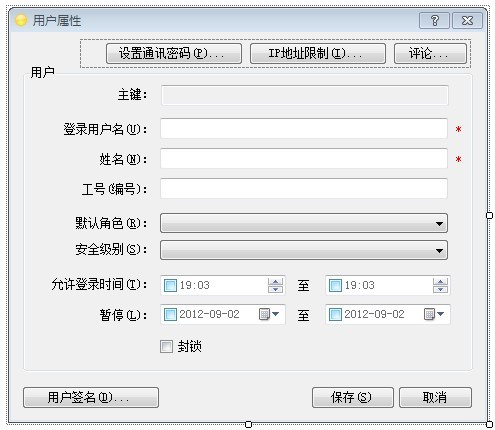
简单快速开发C\S架构程序用最简单的不分层最快的效率达到功能要求的例子程序FrmUserEdit

这个页面进行评论的功能也进行了优化,当没有评论时,直接显示添加页面,有评论时显示评论列表页面,这样用户操作起来会非常方便,有时候可以会少操作1次,提高软件的有善性。 1 private voidbtnComment_Click( objectsender, EventArgs e) 2 { 3 boolcommnets = false; 4 List<KeyValuePair< string, object>> parameters = newList<KeyValuePair< string, object>>(); 5 parameters.Add( newKeyValuePair< string, object>(BaseCommentEntity.FieldCategoryCode, this.Name)); 6 parameters.Add( newKeyValuePair< string, object>(BaseCommentEntity.FieldObjectId, this.EntityId)); 7 parameters.Add( newKeyValuePair< string, object>(BaseCommentEntity.FieldDeletionStateCode, 0)); 8 commnets = DbLogic.Exists( this.UserCenterDbHelper, BaseCommentEntity.TableName, parameters); 9 // 若有记录显示列表页面,若没记录直接显示添加页面 10 if(commnets) 11 { 12 FrmCommnets frmCommnets = newFrmCommnets( this.Name, this.EntityId); 13 frmCommnets.ShowDialog(); 14 } 15 else 16 { 17 FrmCommentAdd frmCommentAdd = newFrmCommentAdd( this.Name, this.EntityId); 18 frmCommentAdd.ShowDialog(); 19 } 20 } 本文转自 jirigala 51CTO博客,原文链接:http://blog.51cto.com/2347979/1196203,如需转载请自行联系原作者

优秀的个人博客,低调大师

阿里云共享标准型S6云服务器新一代入门级实例

阿里云共享标准型S6云服务器是新一代的共享标准型实例,S6实例无论是从CPU、内存、网络还是应用方面性能均有明显提升,共享标准型S6实例有1核1G、1核2G、1核4G、2核4G、2核8G、4核8G、4核16G、8核16G和8核32G等配置,云服务器吧分享共享标准型S6的配置规格表: 共享标准型S6云服务器配置 阿里云共享标准型S6实例支持多种CPU内存配比(1:1、1:2、1:4),目前S6实例的配置有1核1G、1核2G、1核4G、2核4G、2核8G、4核8G、4核16G、8核16G和8核32G。详细云服务器规格参考下表: 实例规格 vCPU 内存(GiB) 本地存储(GiB) 网络基准带宽能力(出/入)(Gbit/s) 网络收发包能力(出/入)(万PPS) 支持IPv6 多队列 弹性网卡(包括一块主网卡) 单块弹性网卡的私有IP ecs.s6-c1m1.small 1 1.0 无 0.1 15 是 1 1 2 ecs.s6-c1m2.small 1 2.0 无 0.1 15 是 1 1 2 ecs.s6-c1m4.small 1 4.0 无 0.1 15 是 1 1 2 ecs.s6-c1m2.large 2 4.0 无 0.2 20 是 1 1 2 ecs.s6-c1m4.large 2 8.0 无 0.4 20 是 1 1 2 ecs.s6-c1m2.xlarge 4 8.0 无 0.4 30 是 1 2 6 ecs.s6-c1m4.xlarge 4 16.0 无 0.8 30 是 1 2 6 ecs.s6-c1m2.2xlarge 8 16.0 无 0.8 60 是 1 2 6 ecs.s6-c1m4.2xlarge 8 32.0 无 1.2 60 是 1 2 6 目前S6实例只有在华北2(北京)地域有售,随着时间推移,后续S6实例会在更多地域部署,敬请期待。 更多关于共享标准型S6实例规格详细说明,请参考官方文档:ECS云服务器实例规格族详解 - 阿里云

资源下载

更多资源
腾讯云软件源

腾讯云软件源

为解决软件依赖安装时官方源访问速度慢的问题,腾讯云为一些软件搭建了缓存服务。您可以通过使用腾讯云软件源站来提升依赖包的安装速度。为了方便用户自由搭建服务架构,目前腾讯云软件源站支持公网访问和内网访问。

Nacos

Nacos

Nacos /nɑ:kəʊs/ 是 Dynamic Naming and Configuration Service 的首字母简称,一个易于构建 AI Agent 应用的动态服务发现、配置管理和AI智能体管理平台。Nacos 致力于帮助您发现、配置和管理微服务及AI智能体应用。Nacos 提供了一组简单易用的特性集,帮助您快速实现动态服务发现、服务配置、服务元数据、流量管理。Nacos 帮助您更敏捷和容易地构建、交付和管理微服务平台。

Spring

Spring

Spring框架(Spring Framework)是由Rod Johnson于2002年提出的开源Java企业级应用框架,旨在通过使用JavaBean替代传统EJB实现方式降低企业级编程开发的复杂性。该框架基于简单性、可测试性和松耦合性设计理念,提供核心容器、应用上下文、数据访问集成等模块,支持整合Hibernate、Struts等第三方框架,其适用范围不仅限于服务器端开发,绝大多数Java应用均可从中受益。

Rocky Linux

Rocky Linux

Rocky Linux(中文名:洛基)是由Gregory Kurtzer于2020年12月发起的企业级Linux发行版,作为CentOS稳定版停止维护后与RHEL(Red Hat Enterprise Linux)完全兼容的开源替代方案,由社区拥有并管理,支持x86_64、aarch64等架构。其通过重新编译RHEL源代码提供长期稳定性,采用模块化包装和SELinux安全架构,默认包含GNOME桌面环境及XFS文件系统,支持十年生命周期更新。

用户登录
用户注册