首页 文章 精选 留言 我的

精选列表

搜索[设置],共10000篇文章
优秀的个人博客,低调大师

环境搭建-CentOS服务器之间设置免密码登录

在做大数据项目分布式开发时会用到Hadoop组件,Hadoop集群由Namenode节点和Datanode节点组成,在运行启动集群操作时,需要从Namenode节点登录到Datanode节点,执行相关启动脚本,因此需要配置免密码登录。 1.使用root账户修改shhd_config配置文件 执行命令【vi /etc/ssh/sshd_config】 修改shhd_config配置文件.png 去掉RSAAuthention yes前面的# 去掉PubkeyAuthentication yes前面的# shhd_config.png 然后运行命令【service sshd restart】生效配置 2.使用rsa非对称加密生成密钥 进入用户目录,运行命令【ssh-keygen -t rsa】生成密钥 生成密钥.png 进入【.ssh】目录,会发现生成了如下几个文件: ssh目录.png authorized_keys:存放远程免密登录的公钥,主要通过这个文件记录多台机器的公钥 id_rsa:私钥文件 id_rsa.pub:公钥文件 3.将公钥添加到需要远程登录机器的authorized_keys文件中 在添加之前先做一个测试,现在通过【ssh localhost】命令试试本机有没有免密码登录 测试.png 出现需要输入密码界面,证明还没有免密,需要将公钥添加到authorized_keys中,运行文件追加命令【cat id_rsa.pub >> authorized_keys】。 再通过【ssh localhost】命令试试本机有没有免密码登录: image.png 测试通过,现在就可以将公钥添加到需要远程登录机器的authorized_keys文件中,然后就实现了Namenode节点到Datanode节点的免密码登录。

优秀的个人博客,低调大师

java加密工具类,可设置对应的加解密key

public class AesEncryptUtil { //使用AES-128-CBC加密模式,key需要为16位,key和iv可以相同! private static String KEY ="whshenke20180606"; private static String IV ="whshenke20180606"; /** * 加密方法 * @param data 要加密的数据 * @param key 加密key * @param iv 加密iv * @return 加密的结果 * @throws Exception */ public static String encrypt(String data, String key, String iv) throws Exception { try { Cipher cipher = Cipher.getInstance("AES/CBC/NoPadding");//"算法/模式/补码方式" int blockSize = cipher.getBlockSize(); byte[] dataBytes = data.getBytes(); int plaintextLength = dataBytes.length; if (plaintextLength % blockSize != 0) { plaintextLength = plaintextLength + (blockSize - (plaintextLength % blockSize)); } byte[] plaintext = new byte[plaintextLength]; System.arraycopy(dataBytes, 0, plaintext, 0, dataBytes.length); SecretKeySpec keyspec = new SecretKeySpec(key.getBytes("UTF-8"), "AES"); IvParameterSpec ivspec = new IvParameterSpec(iv.getBytes()); cipher.init(Cipher.ENCRYPT_MODE, keyspec, ivspec); byte[] encrypted = cipher.doFinal(plaintext); return Base64Util.encode(encrypted); } catch (Exception e) { e.printStackTrace(); return null; } } /** * 解密方法 * @param data 要解密的数据 * @param key 解密key * @param iv 解密iv * @return 解密的结果 * @throws Exception whshenke20180606 */ public static String desEncrypt(String data, String key, String iv) { try { byte[] encrypted1 = Base64Util.decode(data); Cipher cipher = Cipher.getInstance("AES/CBC/NoPadding"); SecretKeySpec keyspec = new SecretKeySpec(key.getBytes(), "AES"); IvParameterSpec ivspec = new IvParameterSpec(iv.getBytes()); cipher.init(Cipher.DECRYPT_MODE, keyspec, ivspec); byte[] original = cipher.doFinal(encrypted1); String originalString = new String(original, "UTF-8"); return originalString; } catch (Exception e) { //e.printStackTrace(); return null; } } /** * 使用默认的key和iv加密 * @param data * @return * @throws Exception */ public static String encrypt(String data) throws Exception { return encrypt(data, KEY, IV); } /** * 使用默认的key和iv解密 * @param data * @return * @throws Exception */ public static String desEncrypt(String data){ return desEncrypt(data, KEY, IV); } /** * 测试 */ public static void main(String args[]) throws Exception { //KNnAbiCvFxispeG+wS01jA== //KNnAbiCvFxispeG+wS01jA== //KNnAbiCvFxispeG+wS01jA== String test = "测试"; String data = null; String key = "dufy20170329java"; String iv = "dufy20170329java"; // data = encrypt(test, key, iv); //KNnAbiCvFxispeG+wS01jA== System.out.println(data); System.out.println(desEncrypt("8XguKV2aprVwg4UqEie7f9gkr7xDaSKrGZZD7x1J3uISWkvQAtpq8hpkskwi V+8bJmRcmQWIZ4sRom37GB7w7O4AH+HjH5ixViJ7k6bx+oEFVWSmIqKEj4e5 lMcyXgcXpTB8IGnt1WKS2p7Qnn+cjA==", key, iv)); } }

优秀的个人博客,低调大师

图片设置level-list,根据不同状态显示不同图片

前言:工作需求,wifi图标根据不同的强度,显示不同的状态.于是想到用图层的方法 bg.xml <?xml version="1.0" encoding="utf-8"?> <level-list xmlns:android="http://schemas.android.com/apk/res/android" > <item android:maxLevel="0" android:drawable="@drawable/icon_stop_n"></item> <item android:maxLevel="1" android:drawable="@drawable/icon_pause"></item> </level-list> note:android:maxLevel 必须从0递增,顺序错误后只会显示第一张图片 布局文件 <Button android:id="@+id/bt_pause_bt" android:layout_width="wrap_content" android:layout_height="wrap_content" android:layout_marginLeft="115px" android:background="@drawable/bg" android:tag="play" /> 代码中使用 LevelListDrawable pauseDrawable = (LevelListDrawable) yourwiget .getBackground(); pauseDrawable.setLevel(1);//根据业务需要,对应图片等级

优秀的个人博客,低调大师

设置Centos7使用阿里云镜像的yum源

1. 备份原来的yum源 mv /etc/yum.repos.d/CentOS-Base.repo /etc/yum.repos.d/CentOS-Base.repo.backup 2.下载阿里云的CentOS-Base.repo 到/etc/yum.repos.d/ wget -O /etc/yum.repos.d/CentOS-Base.repo http://mirrors.aliyun.com/repo/Centos-7.repo 或者 curl -o /etc/yum.repos.d/CentOS-Base.repo http://mirrors.aliyun.com/repo/Centos-7.repo 执行结果如下图: 3. 清理缓存 sudo yum clean all 执行结果: 4. 生成新的缓存 sudo yum makecache 执行结果:

优秀的个人博客,低调大师

ES BM25 TF-IDF相似度算法设置——

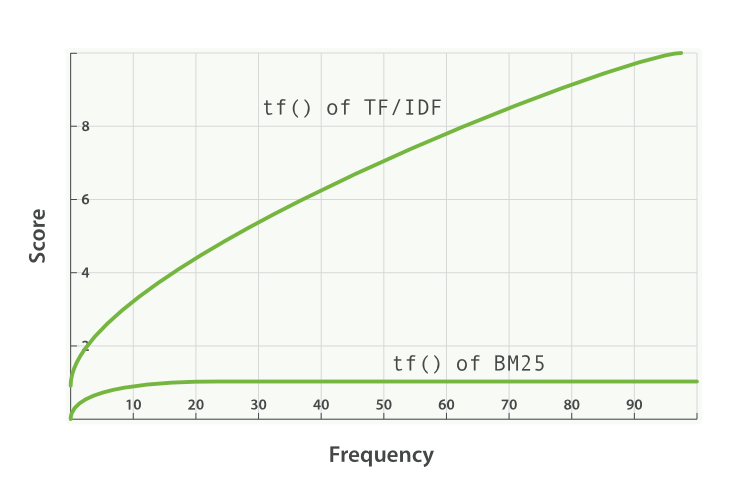
Pluggable Similarity Algorithms Before we move on from relevance and scoring, we will finish this chapter with a more advanced subject: pluggable similarity algorithms.While Elasticsearch uses theLucene’s Practical Scoring Functionas its default similarity algorithm, it supports other algorithms out of the box, which are listed in theSimilarity Modulesdocumentation. Okapi BM25 The most interesting competitor to TF/IDF and the vector space model is calledOkapi BM25, which is considered to be astate-of-the-artranking function.BM25 originates from theprobabilistic relevance model, rather than the vector space model, yetthe algorithm has a lot in common with Lucene’s practical scoring function. Both use term frequency, inverse document frequency, and field-length normalization, but the definition of each of these factors is a little different. Rather than explaining the BM25 formula in detail, we will focus on the practical advantages that BM25 offers. Term-frequency saturation Both TF/IDF and BM25 useinverse document frequencyto distinguish between common (low value) words and uncommon (high value) words.Both also recognize (seeTerm frequency) that the more often a word appears in a document, the more likely is it that the document is relevant for that word. However, common words occur commonly.The fact that a common word appears many times in one document is offset by the fact that the word appears many times inalldocuments. However, TF/IDF was designed in an era when it was standard practice to remove themostcommon words (orstopwords, seeStopwords: Performance Versus Precision) from the index altogether.The algorithm didn’t need to worry about an upper limit for term frequency because the most frequent terms had already been removed. In Elasticsearch, thestandardanalyzer—the default forstringfields—doesn’t remove stopwordsbecause, even though they are words of little value, they do still have some value. The result is that, for very long documents, the sheer number of occurrences of words liketheandandcan artificially boost their weight. BM25, on the other hand, does have an upper limit. Terms that appear 5 to 10 times in a document have a significantly larger impact on relevance than terms that appear just once or twice. However, as can be seen inFigure34, “Term frequency saturation for TF/IDF and BM25”, terms that appear 20 times in a document have almost the same impact as terms that appear a thousand times or more. This is known asnonlinear term-frequency saturation. Figure34.Term frequency saturation for TF/IDF and BM25 Field-length normalization InField-length norm, we said that Lucene considers shorter fields to have more weight than longer fields: the frequency of a term in a field is offset by the length of the field. However, the practical scoring function treats all fields in the same way.It will treat alltitlefields (because they are short) as more important than allbodyfields (because they are long). BM25 also considers shorter fields to have more weight than longer fields, but it considers each field separately by taking the average length of the field into account. It can distinguish between a shorttitlefield and alongtitle field. InQuery-Time Boosting, we said that thetitlefield has anaturalboost over thebodyfield because of its length. This natural boost disappears with BM25 as differences in field length apply only within a single field. 摘自:https://www.elastic.co/guide/en/elasticsearch/guide/current/pluggable-similarites.html 本文转自张昺华-sky博客园博客,原文链接:http://www.cnblogs.com/bonelee/p/6472820.html ,如需转载请自行联系原作者

资源下载

更多资源
优质分享App

优质分享App

近一个月的开发和优化,本站点的第一个app全新上线。该app采用极致压缩,本体才4.36MB。系统里面做了大量数据访问、缓存优化。方便用户在手机上查看文章。后续会推出HarmonyOS的适配版本。

Mario

Mario

马里奥是站在游戏界顶峰的超人气多面角色。马里奥靠吃蘑菇成长,特征是大鼻子、头戴帽子、身穿背带裤,还留着胡子。与他的双胞胎兄弟路易基一起,长年担任任天堂的招牌角色。

Nacos

Nacos

Nacos /nɑ:kəʊs/ 是 Dynamic Naming and Configuration Service 的首字母简称,一个易于构建 AI Agent 应用的动态服务发现、配置管理和AI智能体管理平台。Nacos 致力于帮助您发现、配置和管理微服务及AI智能体应用。Nacos 提供了一组简单易用的特性集,帮助您快速实现动态服务发现、服务配置、服务元数据、流量管理。Nacos 帮助您更敏捷和容易地构建、交付和管理微服务平台。

Sublime Text

Sublime Text

Sublime Text具有漂亮的用户界面和强大的功能,例如代码缩略图,Python的插件,代码段等。还可自定义键绑定,菜单和工具栏。Sublime Text 的主要功能包括:拼写检查,书签,完整的 Python API , Goto 功能,即时项目切换,多选择,多窗口等等。Sublime Text 是一个跨平台的编辑器,同时支持Windows、Linux、Mac OS X等操作系统。

用户登录
用户注册
修改密码
忘记密码