keepalived 实现web应用的高可用
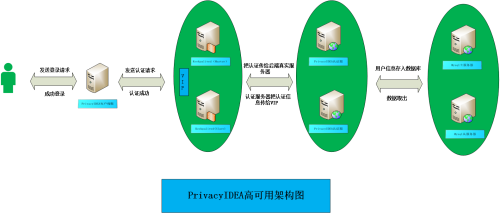
项目需求:公司需要我做privacyIDEA认证服务器的高可用,我的思路是在两台服务器上搭两套应用程序,后端存储公用一个mysql数据库,没有mysql数据库可以主备的形式,然后再做一下数据库的异地备份。基本思路就是这样的。 我主要介绍一下使用keepalived实现高可用。 本次实现使用两台机器master:10.236.44.62 ,slave:10.236.45.91 一、安装需要的软件(master和slave都操作) yum install keepalived -y yum install -y httpd 二、配置 master机器的/etc/keepalived/keepalived.conf !ConfigurationFileforkeepalived global_defs{#全局定义段 notification_email{ acassen@firewall.loc failover@firewall.loc sysadmin@firewall.loc } notification_email_fromAlexandre.Cassen@firewall.loc smtp_server127.0.0.1 smtp_connect_timeout30 router_idLVS_DEVEL } vrrp_scriptcheck_running{ script"/usr/local/bin/check_running" interval3 weight10 } vrrp_instanceVI_1{#实例名称 stateMASTER#当前节点为主节点 interfaceeno16777736#指定网卡 virtual_router_id132#虚拟路由ID,默认为51 priority100#优先级,主节点要数字要大于从节点 advert_int1 authentication{ auth_typePASS auth_pass111111 } virtual_ipaddress{#虚拟IP地址 10.236.44.77 } track_script{ check_runningweight20 } } 三、配置 slave机器的/etc/keepalived/keepalived.conf !ConfigurationFileforkeepalived global_defs{#全局定义段 notification_email{ acassen@firewall.loc failover@firewall.loc sysadmin@firewall.loc } notification_email_fromAlexandre.Cassen@firewall.loc smtp_server127.0.0.1 smtp_connect_timeout30 router_idLVS_DEVEL } vrrp_scriptcheck_running{ script"/usr/local/bin/check_running" interval1 weight10 } vrrp_instanceVI_1{#实例名称 stateBACKUP#当前节点为主节点 interfaceeno16777736#指定网卡 virtual_router_id132#虚拟路由ID,默认为51 priority99#优先级,主节点要数字要大于从节点 advert_int1 authentication{ auth_typePASS auth_pass111111 } virtual_ipaddress{#虚拟IP地址 10.236.44.77 } track_script{ check_runningweight20 } } 四、编辑脚本文件:/usr/local/bin/check_running (master和slave都一样) #!/bin/bash systemctlstatushttpd|greprunning if[$?-ne0] then systemctlrestarthttpd.service sleep1 systemctlstatushttpd|greprunning if[$?-ne0] then systemctlstopkeepalived.service fi fi 给文件可执行权限 chmod +x/usr/local/bin/check_running 五、把httpd和keeplaived都启起来。(主和从上都操作) systemctl restart httpd.service systemctl restart keepalived.service 六、测试 编辑/var/www/html/index.html master机器文件内容:master 机器 slave机器文件内容:slave 机器 ①:访问vip:10.236.44.77 ②:把master的http停掉,然后再访问vip:10.236.44.77 systemctl stop httpd 这是因为我的脚本里会做判断,如果httpd停了,就把它启起来。 ③:随便修改一下httpd的配置文件,让它不能正常启动,这个时候我们再把它停掉 systemctl stop httpd.service 这个时候先看下主的ip show 再看下从的ip show 这个时候访问一下vip:10.236.44.77