首页 文章 精选 留言 我的

精选列表

搜索[本地大模型],共10000篇文章
优秀的个人博客,低调大师

开源企业微信 Java 开发包 wecom-sdk 发布 1.0.14版本

wecom-sdk 是开源的企业微信开放 API 的 Java 实现。经过近三年的迭代,目前已经实现了企业微信通讯录管理、上下游、客户管理、微信客服、素材管理、消息推送 、企微机器人、 身份验证 、 应用管理 、OA 办公相关接口,开发人员不需要很高的学习成本就能快速优雅地接入企业微信。本次更新主要实现了模块化,借助于rxjava3引入了响应式流编程风格(实验特性),完善客服等功能。 仓库地址 gitee: https://gitee.com/felord/wecom-sdk github: https://github.com/NotFound403/wecom-sdk 特性 支持多企业微信同时配置作业 目前实现企业微信接口 200 多个,能满足大部分场景的需求 全参数封装,入参、出参高度语义化封装,再也不担心组织参数、解析参数的问题 实现统一回调,所有回调事件可集中异步处理,开发者只需要关心业务逻辑的处理 由 SDK 接管 AccessToken 生命周期,开发者无需关心 Token 的管理。 Maven 中央仓库坐标 普通版本 <dependency> <groupId>cn.felord</groupId> <artifactId>wecom-sdk</artifactId> <version>1.0.14</version> </dependency> 响应式版本(实验) <dependency> <groupId>cn.felord</groupId> <artifactId>rx-wecom-sdk</artifactId> <version>1.0.14</version> </dependency> 采用技术栈 Spring RestTemplate retrofit2 rxjava3 okhttp4 lombok jackson2 xstream 1.0.14更新 回调解析增加签名返回作为唯一性校验依据 增加Token失效重试功能 客服模块增加客服消息接收与回调API相关实现 客服模块增加升级客户服务API相关实现 客服模块增加客服统计API相关实现 完善审批API的实现 抽取公共模块以支持模块化 (试验)增加响应式模块rx-wecom-sdk,基于retrofit2、rxjava3实现 (试验) 增加开启HTTP调用日志能力,以方便调试 增加发送应用消息示例 其它一些底层优化

优秀的个人博客,低调大师

.NET 7 Preview 7 发布,下一版本进入 RC 阶段

.NET 7 发布了最后一个预览版 Preview 7,在此之后将会进入 RC 阶段。 此版本主要变化包括对 System.LINQ、Unix 文件权限、底层结构、p/Invoke 源代码生成、代码生成和 websocket 的改进。 优化System.LINQ System.Linq现在包含Order和OrderDescending方法,它们可以根据T对IEnumerable进行排序。IQueryable现在也同样提供对此的支持。 用法 此前需要通过引用自身的值来调用OrderBy/OrderByDescending var data = new[] { 2, 1, 3 }; var sorted = data.OrderBy(static e => e); var sortedDesc = data.OrderByDescending(static e => e); 现在支持直接写成: var data = new[] { 2, 1, 3 }; var sorted = data.Order(); var sortedDesc = data.OrderByDescending(); 支持 Unix 文件模式 此前 .NET 没有内置支持获取和设置 Unix 文件权限,这些权限用于控制哪些用户可以读取、写入和执行文件以及目录。而且 P/Invoking 手动调用 syscalls 并不容易,因为有些 syscalls 在不同的发行版上有不同的公开方式。例如,在 Ubuntu 上,你可能要对__xstat进行 Pinvoke,在 Red Hat 上对stat进行 Pinvoke,诸如此类。为此,Preview 7 引入了一个新的枚举: public enum UnixFileMode { None, OtherExecute, OtherWrite, OtherRead, GroupExecute, GroupWrite, GroupRead, UserExecute, UserWrite, UserRead, ... } 用法 // Create a new directory with specific permissions Directory.CreateDirectory("myDirectory", UnixFileMode.UserRead | UnixFileMode.UserWrite | UnixFileMode.UserExecute); // Create a new file with specific permissions FileStreamOptions options = new() { Access = FileAccess.Write, Mode = FileMode.Create, UnixCreateMode = UnixFileMode.UserRead | UnixFileMode.UserWrite, }; using FileStream myFile = new FileStream("myFile", options); // Get the mode of an existing file UnixFileMode mode = File.GetUnixFileMode("myFile"); // Set the mode of an existing file File.SetUnixFileMode("myFile", UnixFileMode.UserRead | UnixFileMode.UserWrite | UnixFileMode.UserExecute); 优化底层struct:支持ref字段 .NET 7 运行时环境现在完全支持ByRefLike类型中的ref字段(即ref struct)。此功能背后包含大量的语言设计,例如改进底层结构。借助此功能,以前需要在运行时环境中进行专门处理的类型(例如Span<T>和ReadOnlySpan<T>),现在可以在 C# 中完全实现。 详情查看发布公告。

优秀的个人博客,低调大师

go-charts 0.0. 3版本发布,兼容更多的 echarts 配置

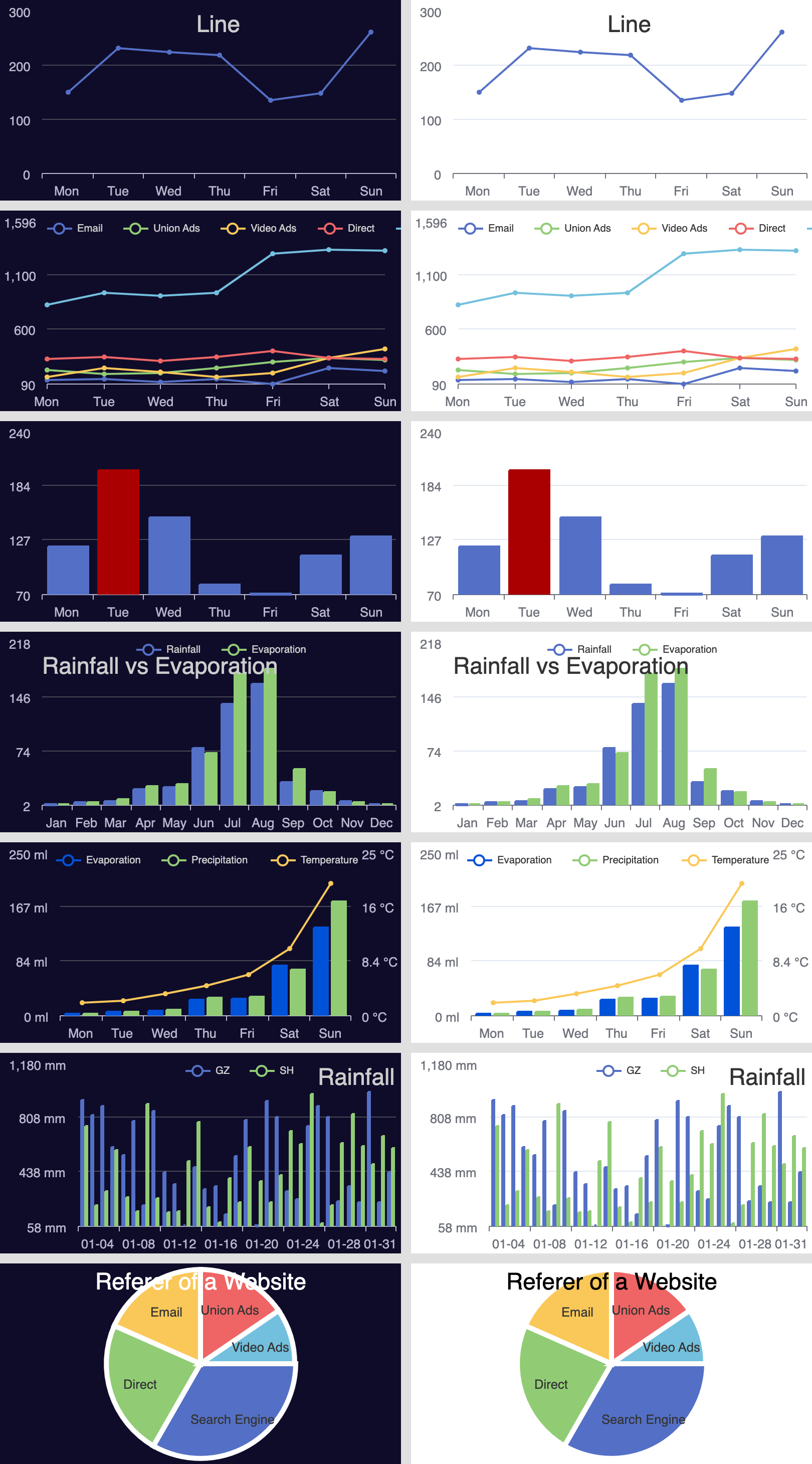
go-charts基于go-chart生成数据图表,无其它模块的依赖纯golang的实现,支持svg与png的输出,Apache ECharts在前端开发中得到众多开发者的认可,go-charts兼容Apache ECharts的配置参数,简单快捷的生成相似的图表(svg或png),方便插入至Email或分享使用。下面为常用的几种图表截图(两种模式): 支持图表类型 暂仅支持三种的图表类型:line,bar以及pie 示例 go-charts兼容了echarts的参数配置,可简单的使用json形式的配置字符串则可快速生成图表。 package main import ( "os" charts "github.com/vicanso/go-charts" ) func main() { buf, err := charts.RenderEChartsToPNG(`{ "title": { "text": "Line" }, "xAxis": { "type": "category", "data": ["Mon", "Tue", "Wed", "Thu", "Fri", "Sat", "Sun"] }, "series": [ { "data": [150, 230, 224, 218, 135, 147, 260] } ] }`) if err != nil { panic(err) } os.WriteFile("output.png", buf, 0600) } 参数说明 theme颜色主题,支持dark与light模式,默认为light padding图表的内边距,单位px。支持以下几种模式的设置 padding: 5设置内边距为5 padding: [5, 10]设置上下的内边距为 5,左右的内边距为 10 padding:[5, 10, 5, 10]分别设置上右下左边距 title图表标题,包括标题内容、高度、颜色等 title.text标题内容 title.left标题与容器左侧的距离,可设置为left,right,center,20%以及20这样的具体数值 title.top标题与容器顶部的距离,暂仅支持具体数值,如20 title.textStyle.color标题文字颜色 title.textStyle.fontSize标题文字字体大小 title.textStyle.height标题高度 title.textStyle.fontFamily标题文字的字体系列,需要注意此配置是会影响整个图表的字体 xAxis直角坐标系grid中的x轴,由于go-charts仅支持单一个x轴,因此若参数为数组多个x轴,只使用第一个配置 xAxis.boundaryGap坐标轴两边留白策略,仅支持三种设置方式null,true或者false。null或true时则数据点展示在两个刻度中间 xAxis.splitNumber坐标轴的分割段数,需要注意的是这个分割段数只是个预估值,最后实际显示的段数会在这个基础上根据分割后坐标轴刻度显示的易读程度作调整 xAxis.datax轴的展示文案,暂只支持字符串数组,如["Mon", "Tue"],其数量需要与展示点一致 yAxis直角坐标系grid中的y轴,最多支持两个y轴 yAxis.min坐标轴刻度最小值,若不设置则自动计算 yAxis.max坐标轴刻度最大值,若不设置则自动计算 yAxis.axisLabel.formatter刻度标签的内容格式器,如"formatter": "{value} kg" legend图表中不同系列的标记 legend.data图例的数据数组,为字符串数组,如["Email", "Video Ads"] legend.align图例标记和文本的对齐,默认为标记靠左left legend.paddinglegend的padding,配置方式与图表的padding一致 legend.leftlegend离容器左侧的距离,其值可以为具体的像素值(20)或百分比(20%) legend.rightlegend离容器右侧的距离,其值可以为具体的像素值(20)或百分比(20%) series图表的数据项列表 series.type图表的展示类型,暂支持line,bar以及pie,需要注意pie只能单独使用 series.yAxisIndex该数据项使用的y轴,默认为0,对yAxis的配置对应 series.itemStyle.color该数据项展示时使用的颜色 series.data数据项对应的数据数组,支持以下形式的数据: 数值常用形式,数组数据为浮点数组,如[1.1, 2,3, 5.2] 结构体pie图表或bar图表中指定样式使用,如[{"value": 1048, "name": "Search Engine"},{"value": 735,"name": "Direct"}] 性能 简单的图表生成PNG在20ms左右,而SVG的性能则更快,性能上比起使用chrome headless加载echarts图表展示页面再截图生成的方式大幅度提升,满足简单的图表生成需求。 goos: darwin goarch: amd64 pkg: github.com/vicanso/go-charts cpu: Intel(R) Core(TM) i5-8257U CPU @ 1.40GHz BenchmarkEChartsRenderPNG-8 60 17765045 ns/op 2492854 B/op 1007 allocs/op BenchmarkEChartsRenderSVG-8 282 4303042 ns/op 32622688 B/op 2983 allocs/op 中文字符 默认使用的字符为Roboto为英文字体库,因此如果需要显示中文字符需要增加中文字体库,InstallFont函数可添加对应的字体库,成功添加之后则指定title.textStyle.fontFamily即可。 在浏览器中使用svg时,如果指定的fontFamily不支持中文字符,展示的中文并不会乱码,但是会导致在计算字符宽度等错误。


优秀的个人博客,低调大师

再添新功能,DiskGenius更新v5.1.0版本支持热备份

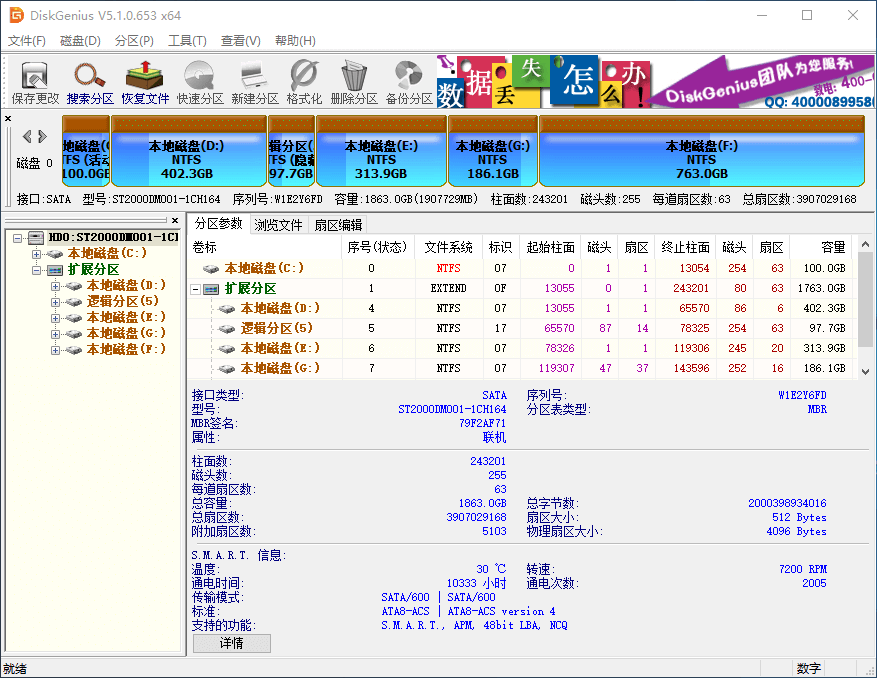
DiskGenius v5.1.0 更新开始增加了对热备份的支持 以前版本的 DiskGenius,涉及到到系统分区的备份操作,比如备份、克隆系统分区或克隆系统分区所在的硬盘等,通常需要重新启动电脑,进入 DOS 或 PE 模式下进行备份操作。 从 DiskGenius v5.1.0 开始,DiskGenius 开始支持热备份。涉及到系统分区的备份操作,用户既可以选择按原来的方法,重启电脑,进入DOS或PE模式下进行备份操作;也可以选择热备方式,不需要重新启动电脑,仍然正常操作电脑的情况下,完成备份操作。 有了对热备份的支持,使用DiskGenius备份分区或硬盘,更加方便了。 使用热备方式备份时,操作上同原来的备份没有什么不同,只是在备份选项中,选择“热备份”,如下图所示: 备份操作涉及系统分区时,DiskGenius会让用户选择是采用热备份方式,还是重启到WinPE的备份方式 对热备份技术有一定了解的用户,可能会对DiskGenius热备份的实现方式感兴趣,想了解DiskGenius的热备份是不是足够安全可靠,能否保证数据的一致性。 事实上,DiskGenius开发团队很严谨,DiskGenius热备功能,使用了微软的Vss(volumn shadow service)卷影服务技术。Vss技术是微软成熟的备份解决方案,安全、高效且方便快捷。 DiskGenius使用Vss实现热备份功能,能够较大程度的保证备份操作的安全性,及数据的一致性。 新的热备功能,让用户使用DiskGenius备份硬盘或分区,更加方便了。您现在就可以下载DiskGenius,无需关机重启,边工作边备份您的系统了!

优秀的个人博客,低调大师

iPhone 12成本突遭曝光,仅2400多元,利润竟然这么大

作为高端手机品牌,苹果一直走高价策略,定价普遍高于国产智能手机,一台顶级旗舰,放在国内顶天就六七千元,但对苹果而言,这样价格仅够标准版的起售价,就是这样有底气。 iPhone 12拆解 今年旗舰新机iPhone 12也已经开售,价格依旧美丽,6299元。这次iPhone 12取消了充电头和耳机,但用户期待的5G,OLED 屏幕,A14旗舰内芯都有安排,系统上也进行优化升级,涨价也似乎情有可原。 当然,每台高端旗舰上市后,拆解成本评估总是逃不掉的,最近Fomalhaut机构就对iPhone 12进行拆解,成本推算: 不出所料,最贵的还是屏幕,OLED屏成本高达70美元,因为混用三星LG屏,所以是大概预估,其次是A14旗舰内芯,考虑到支持5G,成本相比上代芯片要高些,是40美元,其他还有SK海力士内存约12.8美元,三星提供的ROM19.2美元,索尼CMOS7.4-7.9美元,预计iPhone 12的总物料成本在374美元左右,约合人民币2458元。 iPhone 利润相当可观 这份物料成本评估一出,网友纷纷议论,这也太便宜了吧,成本不到售价三分之一,简直暴利。但其实苹果成本还包含研发,运输,生产,门店等等,这些也体现在最终售价里,所以不能单纯用售价减去物料成本,不过即便如此,苹果的利润也非常可观。 有数据统计,iPhone手机每年利润基本占全球智能机行业的60%以上,去年第三季度,iPhone 11系列独占行业利润66%,其次是三星,占据17%利润,而国产华为,小米以及其他厂商则共分余下的17%,差距不可谓不大。 对此,你有什么不同见解,欢迎前来讨论。

优秀的个人博客,低调大师

centos7系统源码编译安装PHP7.3.5版本详细步骤

新增系统用户组和用户: [root@localhost ~]# groupadd webg [root@localhost ~]# useradd -g webg webu 下载 PHP7.3.5 [root@localhost ~]# mkdir devdir [root@localhost ~]# cd devdir/ [root@localhost devdir]# wget https://www.php.net/distributions/php-7.3.5.tar.gz -bash: wget: 未找到命令 [root@localhost devdir]# rpm -qa|grep wget [root@localhost devdir]# yum -y install wget [root@localhost devdir]# rpm -qa|grep wget wget-1.14-18.el7.x86_64 下载PHP7 解压 编译 wget -chttps://downloads.php.net/~cmb/php-7.3.4.tar.gz 编译参数解释 --with-fpm-user=webu--with-fpm-group=webg 添加PHP运行用户和用户组 ./configure --prefix=/usr/local/php --with-fpm-user=webu --with-fpm-group=webg --with-freetype-dir --with-gd --with-gettext --with-iconv-dir --with-kerberos --with-libdir=lib64 --with-libxml-dir --with-mysqli --with-openssl --with-pcre-regex --with-pdo-mysql --with-pdo-sqlite --with-pear --with-png-dir --with-jpeg-dir --with-xmlrpc --with-xsl --with-bz2 --with-mhash --enable-fpm --enable-bcmath --enable-libxml --enable-inline-optimization --enable-mbregex --enable-mbstring --enable-opcache --enable-pcntl --enable-shmop --enable-soap --enable-sockets --enable-sysvsem --enable-sysvshm --enable-xml --enable-fpm 配置信息出错: configure: error: in `/root/devdir/php-7.3.4': configure: error: no acceptable C compiler found in $PATH See `config.log' for more details [root@localhost php-7.3.4]# vim config.log 下载gcc软件编译器 yum install -y gcc configure: error: libxml2 not found. Please check your libxml2 installation. checking for pkg-config... /usr/bin/pkg-config configure: error: libxml2 not found. Please check your libxml2 installation. [root@localhost php-7.3.4]# rpm -qa|grep libxml2 libxml2-2.9.1-6.el7_2.3.x86_64 [root@localhost php-7.3.4]# [root@localhost php-7.3.4]# yum install -y libxml2-devel checking for pkg-config... /usr/bin/pkg-config configure: error: Cannot find OpenSSL's <evp.h> [root@localhost php-7.3.4]# rpm -qa|grep openssl openssl-1.0.2k-16.el7.x86_64 openssl-libs-1.0.2k-16.el7.x86_64 [root@localhost php-7.3.4]# yum install -y openssl-devel 已加载插件:fastestmirror Loading mirror speeds from cached hostfile * base: mirrors.nwsuaf.edu.cn * extras: mirror.lzu.edu.cn checking for BZip2 in default path... not found configure: error: Please reinstall the BZip2 distribution [root@localhost php-7.3.4]# yum install -y bzip2-devel 已加载插件:fastestmirror Loading mirror speeds from cached hostfile * base: mirrors.cn99.com * extras: mirrors.163.com checking for cURL 7.15.5 or greater... configure: error: cURL version 7.15.5 or later is required to compile php with cURL support [root@localhost php-7.3.4]# rpm -qa|grep curl curl-7.29.0-51.el7.x86_64 libcurl-7.29.0-51.el7.x86_64 python-pycurl-7.19.0-19.el7.x86_64 [root@localhost php-7.3.4]# yum install -y curl-devel 已加载插件:fastestmirror Loading mirror speeds from cached hostfile * base: mirrors.nwsuaf.edu.cn * extras: mirrors.cn99.com checking whether to enable JIS-mapped Japanese font support in GD... no If configure fails try --with-webp-dir=<DIR> configure: error: jpeglib.h not found. [root@localhost php-7.3.4]# yum install -y libjpeg-devel 已加载插件:fastestmirror Loading mirror speeds from cached hostfile * base: mirrors.nwsuaf.edu.cn configure: error: png.h not found. [root@localhost php-7.3.4]# yum install -y libpng-devel 已加载插件:fastestmirror If configure fails try --with-xpm-dir=<DIR> configure: error: freetype-config not found. [root@localhost php-7.3.4]# yum install -y freetype-devel 已加载插件:fastestmirror configure: error: xslt-config not found. Please reinstall the libxslt >= 1.1.0 distribution [root@localhost php-7.3.4]# yum install -y libxslt-devel 已加载插件:fastestmirror configure: error: Please reinstall the libzip distribution [root@localhost php-7.3.4]# rpm -qa|grep libzip [root@localhost php-7.3.4]# yum install -y libzip 已加载插件:fastestmirror [root@localhost php-7.3.4]# rpm -qa|grep libzip libzip-0.10.1-8.el7.x86_64 [root@localhost php-7.3.4]# yum install -y libzip-devel 已加载插件:fastestmirror checking for libzip... configure: error: system libzip must be upgraded to version >= 0.11 [root@localhost php-7.3.4]# 下载libzip-1.5.2.tar.gz https://libzip.org/download/libzip-1.5.2.tar.gz [root@localhost devdir]# pwd /root/devdir [root@localhost devdir]# wget -c https://libzip.org/download/libzip-1.5.2.tar.gz--2019-05-09 15:02:31-- https://libzip.org/download/libzip-1.5.2.tar.gz 正在解析主机 libzip.org (libzip.org)... 5.2.73.210, 2a04:52c0:101:2e6::de6c 正在连接 libzip.org (libzip.org)|5.2.73.210|:443... 已连接。 已发出 HTTP 请求,正在等待回应... 200 OK 长度:1203524 (1.1M) [application/x-gzip] 正在保存至: “libzip-1.5.2.tar.gz” 100%[======================================>] 1,203,524 44.8KB/s 用时 36s 2019-05-09 15:03:14 (32.8 KB/s) - 已保存 “libzip-1.5.2.tar.gz” [1203524/1203524]) [root@localhost devdir]# tar zxvf libzip-1.5.2.tar.gz libzip-1.5.2/ [root@localhost libzip-1.5.2]# ls API-CHANGES.md CMakeLists.txt INSTALL.md man src appveyor.yml cmake-zipconf.h.in lib NEWS.md THANKS AUTHORS examples libzip.pc.in README.md TODO.md cmake-config.h.in FindNettle.cmake LICENSE regress [root@localhost libzip-1.5.2]# mkdir build && cd build [root@localhost build]# cmake -DCMAKE_INSTALL_PREFIX=/usr/local/libzip .. -bash: cmake: 未找到命令 [root@localhost build]# yum install -y cmake 【版本太低所以安装cmake最新版】 [root@localhost build]# rm -f CMakeCache.txt [root@localhost build]# cmake -DCMAKE_INSTALL_PREFIX=/usr/local/libzip .. CMake Error at CMakeLists.txt:4 (CMAKE_MINIMUM_REQUIRED): CMake 3.0.2 or higher is required. You are running version 2.8.12.2 -- Configuring incomplete, errors occurred! [root@localhost build]# yum remove -y cmake 已加载插件:fastestmirror [root@localhost devdir]# wget -c https://github.com/Kitware/CMake/releases/download/v3.14.3/cmake-3.14.3.tar.gz [root@localhost devdir]# tar -zxvf cmake-3.14.3.tar.gz [root@localhost devdir]# cd cmake-3.14.3 [root@localhost cmake-3.14.3]# ./configure --------------------------------------------- CMake 3.14.3, Copyright 2000-2019 Kitware, Inc. and Contributors C compiler on this system is: cc --------------------------------------------- Error when bootstrapping CMake: Cannot find a C++ compiler that supports both C++11 and the specified C++ flags. Please specify one using environment variable CXX. [root@localhost cmake-3.14.3]# yum install -y gcc-c++ 【安装gcc-c++编译环境】 [root@localhost cmake-3.14.3]# ./bootstrap [root@localhost cmake-3.14.3]# gmake &&gmake install [root@localhost cmake-3.14.3]# which cmake /usr/local/bin/cmake [root@localhost cmake-3.14.3]# cmake --version -bash: /usr/bin/cmake: 没有那个文件或目录 [root@localhost cmake-3.14.3]# cmake -bash: /usr/bin/cmake: 没有那个文件或目录 [root@localhost cmake-3.14.3]# vim /etc/profile 文件末尾 PATH="$PATH=/usr/local/bin" export PATH [root@localhost cmake-3.14.3]# source /etc/profile [root@localhost cmake-3.14.3]# cmake --version cmake version 3.14.3 CMake suite maintained and supported by Kitware (kitware.com/cmake). [root@localhost cmake-3.14.3]# 解决libzip 和cmake版本问题 重新配置PHP7编译环境参数 checking for libzip... not found configure: error: Please reinstall the libzip distribution [root@localhost php-7.3.4]# yum -y install libzip-devel checking for pkg-config... (cached) /usr/bin/pkg-config checking for libzip... configure: error: system libzip must be upgraded to version >= 0.11 [root@localhost php-7.3.4]# which libzip /usr/bin/which: no libzip in (/usr/local/sbin:/usr/local/bin:/usr/sbin:/usr/bin:/usr/local/bin:/root/bin) [root@localhost php-7.3.4]# ll /usr/local/lib lib/ lib64/ libexec/ libzip/ [root@localhost php-7.3.4]# ll /usr/local/libzip/ bin/ include/ lib64/ share/ [root@localhost php-7.3.4]# ll /usr/local/libzip/bin/zip zipcmp zipmerge ziptool [root@localhost php-7.3.4]# ll /usr/local/libzip/bin 总用量 80 -rwxr-xr-x. 1 root root 24392 5月 9 16:04 zipcmp -rwxr-xr-x. 1 root root 18880 5月 9 16:04 zipmerge -rwxr-xr-x. 1 root root 34928 5月 9 16:04 ziptool [root@localhost php-7.3.4]# vim /etc/profile unset i PATH="$PATH:/usr/local/bin:/usr/local/libzip/bin" export PATH [root@localhost php-7.3.4]# source /etc/profile [root@localhost php-7.3.4]# libzip-1.5.2 无法安装,已经取消了。 /root/devdir/libzip-1.5.2/build [root@localhost build]# cd ../../ [root@localhost devdir]# wget -c https://nih.at/libzip/libzip-1.2.0.tar.gz [root@localhost devdir]# tar -zxvf libzip-1.2.0.tar.gz [root@localhost devdir]# cd libzip-1.2.0 [root@localhost libzip-1.2.0]# ls aclocal.m4 config.sub libzip-uninstalled.pc.in README.md API-CHANGES configure LICENSE regress AUTHORS configure.ac ltmain.sh src cmake-config.h.in depcomp m4 test-driver CMakeLists.txt examples Makefile.am THANKS cmake-zipconf.h.in INSTALL Makefile.in TODO.md compile install-sh man xcode config.guess lib missing config.h.in libzip.pc.in NEWS.md [root@localhost libzip-1.2.0]# ./configure [root@localhost libzip-1.2.0]# make -j4 &&make install 【最终解决方案】 cp ../libzip-1.5.2/build/lib/libzip.so /lib64/ 提示off_t类型没有定义 undefind,解决方法: [root@localhost ~]# cd devdir/php-7.3.4 [root@localhost php-7.3.4]# vim /etc/ld.so.conf ld.so.conf ld.so.conf.d/ [root@localhost php-7.3.4]# vim /etc/ld.so.conf [root@localhost php-7.3.4]# vim /usr/lib64/ Display all 588 possibilities? (y or n) [root@localhost php-7.3.4]# vim /usr/lib64/l Display all 538 possibilities? (y or n) [root@localhost php-7.3.4]# vim /usr/lib64/lib Display all 535 possibilities? (y or n) [root@localhost php-7.3.4]# vim /etc/ld.so.conf include ld.so.conf.d/*.conf /usr/local/lib64 /usr/local/lib /usr/lib /usr/lib64 [root@localhost php-7.3.4]# ldconfig -v ldconfig: 多次给出路径“/lib” 编译安装 In file included from /root/devdir/php-7.3.4/ext/zip/php_zip.h:31:0, from /root/devdir/php-7.3.4/ext/zip/php_zip.c:36: /usr/local/include/zip.h:59:21: 致命错误:zipconf.h:没有那个文件或目录 #include <zipconf.h> ^ 编译中断。 make: *** [ext/zip/php_zip.lo] 错误 1 解决方案: cp /usr/local/lib/libzip/include/zipconf.h /usr/local/include/zipconf.h [root@localhost php-7.3.4]# cp /usr/local/lib/libzip/include/zipconf.h /usr/local/include/ 测试PHP是否安装成功 Installing PEAR environment: /usr/local/php/lib/php/ [PEAR] Archive_Tar - installed: 1.4.5 [PEAR] Console_Getopt - installed: 1.4.2 [PEAR] Structures_Graph- installed: 1.1.1 [PEAR] XML_Util - installed: 1.4.3 [PEAR] PEAR - installed: 1.10.9 Wrote PEAR system config file at: /usr/local/php/etc/pear.conf You may want to add: /usr/local/php/lib/php to your php.ini include_path /root/devdir/php-7.3.4/build/shtool install -c ext/phar/phar.phar /usr/local/php/bin ln -s -f phar.phar /usr/local/php/bin/phar Installing PDO headers: /usr/local/php/include/php/ext/pdo/ [root@localhost php-7.3.4]# php -v -bash: php: 未找到命令 [root@localhost php-7.3.4]# ll /usr/local/php/ bin/ etc/ include/ lib/ php/ sbin/ var/ [root@localhost php-7.3.4]# ll /usr/local/php/bin/p pear pecl phar.phar php-cgi phpdbg peardev phar php php-config phpize [root@localhost php-7.3.4]# vim /etc/profile [root@localhost php-7.3.4]# source /etc/profile [root@localhost php-7.3.4]# php -v PHP 7.3.4 (cli) (built: May 9 2019 17:39:42) ( NTS ) Copyright (c) 1997-2018 The PHP Group Zend Engine v3.3.4, Copyright (c) 1998-2018 Zend Technologies [root@localhost php-7.3.4]#

优秀的个人博客,低调大师

1.2版本发布,或将统一江湖

在去年 MWC 大展上发布首个 Beta 版后,Flutter 1.0 正式版于 2018 年 12 月召开的 Flutter Live 2018 上正式发布。今天在巴塞罗那召开的 MWC 发布会上,Google 正式发布了 Flutter 跨平台 UI 框架的 1.2 版本。新版本最大的改变就是引入了对 Android App Bundles 的支持,可有效打包 Android APP 并创建即时应用的最新技术。此外该框架还帮助开发者接受应用内支付奠定了基础,并添加了很多基于 Web 的工具。 以下是Flutter 1.2的一些更新,包括: 改进的Material和Cupertino小部件集 该团队一直致力于改进Material和Cupertino小部件集。现在,开发人员在使用Material小部件时会有更大的灵活性。对于Cupertino小部件,他们增加了对iOS上浮动光标文本添加的支持。这可以通过用力按键盘或长按空格键来触发。 支持Android App Bundles Flutter 1.2支持Android App Bundles,这是一种新的上传格式,包含应用程序的所有编译代码和资源。这种格式有助于缩小应用程序的大小,并支持Android应用程序的动态交付等新功能。 支持Dart 2.2 SDK 此版本包括Dart 2.2 SDK,该SDK也于昨天发布。 Dart 2.2具有显着的性能改进,可以更快地进行提前编译,并且可以用于初始化集合的文字语言。它还引入了Dart Common Front End(CFE),它解析Dart代码,执行类型推断,并将Dart转换为较低级别的中间语言。 Flutter 1.2 更新包括了大量常规稳定性和性能更新,包括最新的 Dart 2.2 SDK(默认情况下,Flutter 应用程序是用 Google 的 Dart 语言编写的),此外团队还表示正积极改善对 iOS 的支持,支持浮动光标文本编辑等等。 虽然 Flutter 一直专注于移动,但该团队最近也开始讨论使用该框架构建桌面应用程序。为此,在 1.2 版本中引入了全新的键盘事件和鼠标悬停支持。Project Hummingbird(将 Flutter 推广网页版)的技术预览版也将会未来几个月上线。 对于新的工具,值得注意的是,Google 已经在 Android Studio 中构建了 Flutter 支持,并为微软日益流行的Visual StudioCode 添加了工具。现在,它还在构建新的基于 Web 的编程工具 Dart DevTools。它们在本地运行,包括小部件检查器,时间轴视图,源级调试器和日志记录视图。 其他的更新 Flutter 1.2还支持更广泛的动画缓动功能,这些功能的灵感受到Robert Penner工作的启发。该团队已经通过添加新的键盘事件和鼠标悬停支持为桌面级操作系统做好准备。 Flutter的插件团队为Flutter 1.2添加了一些更改,可以很好地支持In App Purchases插件。除了这些更新,他们还为视频播放器,webview和地图修复了一些错误。 除了Flutter 1.2,团队还发布了Dart DevTools的预览版,这是一套用于Dart和Flutter的性能工具。这个套件中的一些工具,包括web inspector、timeline视图和其他工具,现在可以安装了。 现在开始玩Flutter的好处呢, 我认为有如下几点: 如果我们以后想在Google的新系统上跑程序的话, 用Flutter来编写是一定没错的. 当然最近的报导显示, Fuschia原生支持ART, 因此Android程序应该也可以. 不过直接上Flutter我认为更好. Flutter用Dart, 学习Flutter的同时会使我们掌握一门新的语言. 买一送一. Flutter天生支持iOS风格的控件, 称为Cupertino, 这样我们可以一套设计, 一套code跑在两个系统上. 学习Flutter的过程会改变手机端app开发的思维. 毕竟这个亲只有一个activity. 全程跟个游戏引擎一样. 60帧每秒绘图. Hot reload. 极大地加速了我们的开发效率. 试过了, 绝对会爱上它. Flutter提供method channel给Android和iOS. 其实我们可以只用Flutter来开发UI. 其他底层逻辑可以封装Android和iOS分别的lib package. 然后直接Rx封装写回method channel. 也是一种新的开发模式. 性能更好, 兼容性更好, 开发起来更有乐趣, 这才是程序员的人生. 而Flutter都能满足. 阅读更多 资本寒冬下的android面经,面试必备 Flutter基础-环境搭建及demo运行 一份完整的Android Studio搭建Flutter教程 相信自己,没有做不到的,只有想不到的 在这里获得的不仅仅是技术!

资源下载

更多资源
Mario

Mario

马里奥是站在游戏界顶峰的超人气多面角色。马里奥靠吃蘑菇成长,特征是大鼻子、头戴帽子、身穿背带裤,还留着胡子。与他的双胞胎兄弟路易基一起,长年担任任天堂的招牌角色。

腾讯云软件源

腾讯云软件源

为解决软件依赖安装时官方源访问速度慢的问题,腾讯云为一些软件搭建了缓存服务。您可以通过使用腾讯云软件源站来提升依赖包的安装速度。为了方便用户自由搭建服务架构,目前腾讯云软件源站支持公网访问和内网访问。

Rocky Linux

Rocky Linux

Rocky Linux(中文名:洛基)是由Gregory Kurtzer于2020年12月发起的企业级Linux发行版,作为CentOS稳定版停止维护后与RHEL(Red Hat Enterprise Linux)完全兼容的开源替代方案,由社区拥有并管理,支持x86_64、aarch64等架构。其通过重新编译RHEL源代码提供长期稳定性,采用模块化包装和SELinux安全架构,默认包含GNOME桌面环境及XFS文件系统,支持十年生命周期更新。

WebStorm

WebStorm

WebStorm 是jetbrains公司旗下一款JavaScript 开发工具。目前已经被广大中国JS开发者誉为“Web前端开发神器”、“最强大的HTML5编辑器”、“最智能的JavaScript IDE”等。与IntelliJ IDEA同源,继承了IntelliJ IDEA强大的JS部分的功能。

用户登录
用户注册