首页 文章 精选 留言 我的

精选列表

搜索[webpack入门],共10000篇文章
优秀的个人博客,低调大师

hadoop安装入门

1.jdk安装和配置 1.1下载最新jdk文件 http://www.oracle.com/technetwork/java/javase/downloads/jdk7-downloads-1880260.html 1.2配置环境变量 vi /etc/profile 在文件末尾加入如下内容 JAVA_HOME=/usr/local/jdk JAVA_CLASSPATH=$JAVA_HOME/lib PATH=$JAVA_HOME/bin:$PATH export JAVA_HOME JAVA_CLASSPATH PATH 并使上面文件生效 source /etc/profile java -version 2.hadoop安装 首先需要配置运行环境,在etc/hadoop/hadoop-env.sh文件中增加 export JAVA_HOME=/usr/local/hadoop 一、配置core-site.xml /usr/local/hadoop/etc/hadoop/core-site.xml 包含了hadoop启动时的配置信息。 编辑器中打开此文件 sudo gedit /usr/local/hadoop/etc/hadoop/core-site.xml 在该文件的<configuration></configuration>之间增加如下内容: <property> <name>fs.default.name</name> <value>hdfs://localhost:9000</value> </property> 保存、关闭编辑窗口。 最终修改后的文件内容如下: 二、配置yarn-site.xml /usr/local/hadoop/etc/hadoop/yarn-site.xml包含了MapReduce启动时的配置信息。 编辑器中打开此文件 sudo gedit yarn-site.xml 在该文件的<configuration></configuration>之间增加如下内容: <property> <name>yarn.nodemanager.aux-services</name> <value>mapreduce_shuffle</value> </property> <property> <name>yarn.nodemanager.aux-services.mapreduce.shuffle.class</name> <value>org.apache.hadoop.mapred.ShuffleHandler</value> </property> 保存、关闭编辑窗口 最终修改后的文件内容如下 三、创建和配置mapred-site.xml 默认情况下,/usr/local/hadoop/etc/hadoop/文件夹下有mapred.xml.template文件,我们要复制该文件,并命名为mapred.xml,该文件用于指定MapReduce使用的框架。 复制并重命名 cp mapred-site.xml.template mapred-site.xml 编辑器打开此新建文件 sudo gedit mapred-site.xml 在该文件的<configuration></configuration>之间增加如下内容: <property> <name>mapreduce.framework.name</name> <value>yarn</value> </property> 保存、关闭编辑窗口 最终修改后的文件内容如下 四、配置hdfs-site.xml /usr/local/hadoop/etc/hadoop/hdfs-site.xml用来配置集群中每台主机都可用,指定主机上作为namenode和datanode的目录。 创建文件夹,如下图所示 你也可以在别的路径下创建上图的文件夹,名称也可以与上图不同,但是需要和hdfs-site.xml中的配置一致。 编辑器打开hdfs-site.xml 在该文件的<configuration></configuration>之间增加如下内容: <property> <name>dfs.replication</name> <value>1</value> </property> <property> <name>dfs.namenode.name.dir</name> <value>file:/usr/local/hadoop/hdfs/name</value> </property> <property> <name>dfs.datanode.data.dir</name> <value>file:/usr/local/hadoop/hdfs/data</value> </property> 保存、关闭编辑窗口 最终修改后的文件内容如下: 五、格式化hdfs hdfs namenode -format 只需要执行一次即可,如果在hadoop已经使用后再次执行,会清除掉hdfs上的所有数据。 六、启动Hadoop 经过上文所描述配置和操作后,下面就可以启动这个单节点的集群 执行启动命令: sbin/start-dfs.sh 执行该命令时,如果有yes /no提示,输入yes,回车即可。 接下来,执行: sbin/start-yarn.sh 执行完这两个命令后,Hadoop会启动并运行 执行 jps命令,会看到Hadoop相关的进程,如下图: 浏览器打开 http://localhost:50070/,会看到hdfs管理页面 浏览器打开http://localhost:8088,会看到hadoop进程管理页面 七、WordCount验证 dfs上创建input目录 bin/hadoop fs -mkdir -p input 把hadoop目录下的README.txt拷贝到dfs新建的input里 hadoop fs -copyFromLocal README.txt input 运行WordCount hadoop jar share/hadoop/mapreduce/sources/hadoop-mapreduce-examples-2.4.0-sources.jar org.apache.hadoop.examples.WordCount input output 可以看到执行过程 运行完毕后,查看单词统计结果 hadoop fs -cat output/* 分类: 大数据 本文转自快乐就好博客园博客,原文链接:http://www.cnblogs.com/happyday56/p/4369853.html,如需转载请自行联系原作者

优秀的个人博客,低调大师

Kubernates集群入门(1)

一、K8s安装准备 1.至少两台主机,一台作为master,一台作为node。两台主机需要关闭防火墙。 #centos6 service stop firewalld && service disable firewalld #centos7 systemctl stop iptables && systemctl disable iptables; 2.两台机器需要各自编辑/etc/hosts文件,互相添加hostname,然后相互ping通,以下为例 echo "192.168.18.128 centos-master 192.168.18.130 centos-minion " >> /etc/hosts 二、K8s的安装 1.两台主机都需要安装docker,kubernetes,如有docker版本冲突需要卸载重新安装docker. yum -y install docker kubernetes 2.master节点需要安装etcd数据库服务,etcd作为kubernetes的数据库 yum -y install etcd 3.每个节点,master及minion节点都需要修改kubernetes配置文件 vim /etc/kubernetes/config # How the controller-manager, scheduler, and proxy find the apiserver KUBE_MASTER="--master=http://centos-master:8080" #master节点关于指向etcd的ip可能需要改成127.0.0.1:2379,改成主机名的话kube-controller-manager可能会启动失败,不知原因 KUBE_ETCD_SERVERS="--etcd_servers=http://centos-master:2379" 示例master 下config # kubernetes system config # # The following values are used to configure various aspects of all # kubernetes services, including # # kube-apiserver.service # kube-controller-manager.service # kube-scheduler.service # kubelet.service # kube-proxy.service # logging to stderr means we get it in the systemd journal KUBE_LOGTOSTDERR="--logtostderr=true" # journal message level, 0 is debug KUBE_LOG_LEVEL="--v=0" # Should this cluster be allowed to run privileged docker containers KUBE_ALLOW_PRIV="--allow-privileged=false" # How the controller-manager, scheduler, and proxy find the apiserver KUBE_MASTER="--master=http://kube01:8080" KUBE_ETCD_SERVERS="--etcd-servers=http://kube01:2379" 4.master节点上,配置api服务给node vim /etc/kubernetes/apiserver # The address on the local server to listen to. #这个地址好像只能用0.0.0.0 KUBE_API_ADDRESS="--address=0.0.0.0" KUBE_API_PORT="--port=8080" # Comma separated list of nodes in the etcd cluster #KUBE_ETCD_SERVERS="--etcd_servers=http://127.0.0.1:2379" ##ServiceAccount这个参数删掉,会影响docker拉去镜像 # default admission control policies KUBE_ADMISSION_CONTROL="--admission-control=NamespaceLifecycle,NamespaceExists,LimitRanger,SecurityContextDeny,ServiceAccount,ResourceQuota" 示例:master节点apiserver: # kubernetes system config # # The following values are used to configure the kube-apiserver # # The address on the local server to listen to. KUBE_API_ADDRESS="--insecure-bind-address=0.0.0.0" # The port on the local server to listen on. KUBE_API_PORT="--port=8080" # Port minions listen on # KUBELET_PORT="--kubelet-port=10250" # Comma separated list of nodes in the etcd cluster KUBE_ETCD_SERVERS="--etcd-servers=http://127.0.0.1:2379" # Address range to use for services KUBE_SERVICE_ADDRESSES="--service-cluster-ip-range=10.254.0.0/16" # default admission control policies KUBE_ADMISSION_CONTROL="--admission-control=NamespaceLifecycle,NamespaceExists,LimitRanger,SecurityContextDeny,ResourceQuota" # Add your own! KUBE_API_ARGS="" 5.master节点上编写启动相关kubernetes服务的脚本 vim k8s-server.sh #!/bin/bash OPT=$1 case $1 in -s) for SERVICES in etcd kube-apiserver kube-controller-manager kube-scheduler; do systemctl restart $SERVICES systemctl enable $SERVICES systemctl status $SERVICES done ;; -k) for SERVICES in etcd kube-apiserver kube-controller-manager kube-scheduler ; do systemctl stop $SERVICES done ;; -stat) for SERVICES in etcd kube-apiserver kube-controller-manager kube-scheduler; do systemctl status $SERVICES done ;; *) echo "useage:./k8s-server.sh <-s|-k|-stat>---- '-s' is start Servers\n--- '-k' is stop Servers\n'-stat' is watch the status " ;; esac 6.node节点修改/etc/kubernetes/kubelet,配置与master的连接 ### # kubernetes kubelet (minion) config KUBELET_ADDRESS="--address=0.0.0.0" KUBELET_PORT="--port=10250" KUBELET_HOSTNAME="--hostname_override=centos-minion" KUBELET_API_SERVER="--api_servers=http://centos-master:8080“ # Add your own! KUBELET_ARGS="" minion节点 config示例 ### # kubernetes system config # # The following values are used to configure various aspects of all # kubernetes services, including # # kube-apiserver.service # kube-controller-manager.service # kube-scheduler.service # kubelet.service # kube-proxy.service # logging to stderr means we get it in the systemd journal KUBE_LOGTOSTDERR="--logtostderr=true" # journal message level, 0 is debug KUBE_LOG_LEVEL="--v=0" # Should this cluster be allowed to run privileged docker containers KUBE_ALLOW_PRIV="--allow-privileged=false" # How the controller-manager, scheduler, and proxy find the apiserver KUBE_MASTER="--master=http://kube01:8080" minion节点kubelet示例 ### # kubernetes kubelet (minion) config # The address for the info server to serve on (set to 0.0.0.0 or "" for all interfaces) KUBELET_ADDRESS="--address=0.0.0.0" # The port for the info server to serve on #KUBELET_PORT="--port=10250" # You may leave this blank to use the actual hostname KUBELET_HOSTNAME="--hostname-override=kube02" # location of the api-server KUBELET_API_SERVER="--api-servers=http://kube01:8080" # pod infrastructure container KUBELET_POD_INFRA_CONTAINER="--pod-infra-container-image=registry.access.redhat.com/rhel7/pod-infrastructure:latest" # Add your own! KUBELET_ARGS="" 7.node节点编写启动和查看服务脚本 #!/bin/bash OPT=$1 case $1 in -s) for SERVICES in kube-proxy kubelet docker; do systemctl restart $SERVICES systemctl enable $SERVICES systemctl status $SERVICES done ;; -k) for SERVICES in kube-proxy kubelet docker; do systemctl stop $SERVICES done ;; -stat) for SERVICES in kube-proxy kubelet docker; do systemctl status $SERVICES done ;; *) echo "useage:./k8s.sh <-s|-k|-stat>---- '-s' is start Servers\n--- '-k' is stop Servers\n'-stat' is watch the status " ;; esac 8.node节点查看是否成功注册到master节点,如果没关闭防火墙会报错 tail -f /var/log/messages |grep kube 9.master节点查看刚才注册的节点,节点status为ready为正常 kubectl get nodes 10.kubectl是master端的交互工具,可以通过子命令查看节点等信息 kubectl get nodes #获取节点列表 kubectl cluster-info #查看节点信息 下一节演示一个简单的kubernetes实例,master节点通过yaml文件,让node节点自动pull镜像并运行。** 如果启动docker报错,如下 当前docker版本1.13.1 执行启动命令: systemctl start docker ,报下面错误: Error starting daemon: SELinux is not supported with the overlay2 graph driver on this kernel. Either boot into a newer kernel or disable selinux in docker (--selinux-enabled=false) 重新编辑docker配置文件: vi /etc/sysconfig/docker # /etc/sysconfig/docker # Modify these options if you want to change the way the docker daemon runs OPTIONS='--selinux-enabled=false --log-driver=journald --signature-verification=false' if [ -z "${DOCKER_CERT_PATH}" ]; then DOCKER_CERT_PATH=/etc/docker fi :wq systemctl restart docker

优秀的个人博客,低调大师

Storm入门之附录A

本文翻译自《Getting Started With Storm》译者:吴京润 编辑:郭蕾 方腾飞 安装Storm客户端 Storm客户端能让我们使用命令管理集群中的拓扑。按照以下步骤安装Storm客户端: 从Storm站点下载最新的稳定版本(https://github.com/nathanmarz/storm/downloads)当前最新版本是storm-0.8.1。(译者注:原文是storm-0.6.2,不过翻译的时候已经是storm-0.8.1了) 把下载的文件解压缩到/usr/local/bin/storm的Storm共享目录。 把Storm目录加入PATH环境变量,这样就不用每次都输入全路径执行Storm了。如果我们使用了/usr/local/bin/storm,执行export PATH=$PATH:/usr/local/bin/storm。 最后,创建Storm本地配置文件:~/.storm/storm.yaml,在配置文件中按如下格式加入nimbus主机: nimbus.host:"我们的nimbus主机" 现在,你可以管理你的Storm集群中的拓扑了。 NOTE:Storm客户端包含运行一个Storm集群所需的所有Storm命令,但是要运行它你需要安装一些其它的工具并做一些配置。详见附录B。 有许多简单且有用的命令可以用来管理拓扑,它们可以提交、杀死、禁用、再平衡拓扑。 jar命令负责把拓扑提交到集群,并执行它,通过StormSubmitter执行主类。 1 storm jar path-to-topology-jar class-with-the-main arg1 arg2 argN path-to-topology-jar是拓扑jar文件的全路径,它包含拓扑代码和依赖的库。class-with-the-main是包含main方法的类,这个类将由StormSubmitter执行,其余的参数作为main方法的参数。 我们能够挂起或停用运行中的拓扑。当停用拓扑时,所有已分发的元组都会得到处理,但是spouts的nextTuple方法不会被调用。 停用拓扑: 1 storm deactivte topology-name 启动一个停用的拓扑: 1 storm activate topology-name 销毁一个拓扑,可以使用kill命令。它会以一种安全的方式销毁一个拓扑,首先停用拓扑,在等待拓扑消息的时间段内允许拓扑完成当前的数据流。 杀死一个拓扑: 查看源代码 打印 帮助 1 stormkilltopology-name NOTE:执行kill命令时可以通过-w [等待秒数]指定拓扑停用以后的等待时间。 再平衡使你重分配集群任务。这是个很强大的命令。比如,你向一个运行中的集群增加了节点。再平衡命令将会停用拓扑,然后在相应超时时间之后重分配工人,并重启拓扑。 再平衡拓扑: 1 storm rebalance topology-name NOTE:执行不带参数的Storm客户端可以列出所有的Storm命令。完整的命令描述请见:https://github.com/nathanmarz/storm/wiki/Command-line-client。 文章转自并发编程网-ifeve.com

优秀的个人博客,低调大师

elk之elasticsearch 入门

一、概述: 1、查看elasticsearch集群的健康状况: 1 [root@node115 kibana]# curl -X GET http://192.168.39.115:9200/_cat/health?v 2 epoch timestamp cluster status node.total node.data shards pri relo init unassign pending_tasks max_task_wait_time active_shards_percent 3 1487146452 16:14:12 elasticsearch green 2 2 42 21 0 0 0 0 - 100.0% 2、查看elasticsearch集群的节点信息: 1 [root@node115 kibana]# curl -X GET http://192.168.39.115:9200/_cat/nodes?v 2 ip heap.percent ram.percent cpu load_1m load_5m load_15m node.role master name 3 192.168.39.115 30 24 1 0.43 0.20 0.22 mdi * node-1 4 192.168.39.175 43 100 1 0.53 0.42 0.39 mdi - node-2 3、查看index信息: 1 [root@node115 kibana]# curl -X GET http://192.168.39.115:9200/_cat/indices?v 2 health status index uuid pri rep docs.count docs.deleted store.size pri.store.size 3 green open .kibana e1EFtVxJSeS1jLxeX7kLSg 1 1 2 0 21.4kb 10.7kb 4 green open logstash-2017.02.15 i2rSKoflRtiEZoj9CmgEOA 5 1 6916294 0 4.3gb 2.1gb 5 green open logstash-2017.02.14 zMnftdmDQRShH86XsmwWlw 5 1 6127 0 4.8mb 2.4mb 6 green open filebeat-2017.02.15 alVH725IQgmwZiYvuW3Dsg 5 1 6922434 0 3.8gb 1.9gb 7 green open filebeat-2017.02.14 E2v3vgcPQz6jrDhxZMprOw 5 1 6127 0 4mb 2mb 4、创建index 1 PUT /customer?pretty #创建名为customer的index 5、查看index的详细信息: 1 curl -X GET http://192.168.39.115:9200/logstash-2017.02.15?pretty 6、删除index: 1 DELETE /customer?pretty #删除index (customer) 7、查看index上设置信息: 1 [root@node115 kibana]# curl -X GET http://192.168.39.115:9200/logstash-2017.02.16/_settings 2 { 3 "logstash-2017.02.16":{ 4 "settings":{ 5 "index":{ 6 "refresh_interval":"5s", 7 "number_of_shards":"5", 8 "provided_name":"logstash-2017.02.16", 9 "creation_date":"1487203204821", 10 "number_of_replicas":"1", 11 "uuid":"-Bwpq-5TT8mzLMJeU7PQ7A", 12 "version":{ 13 "created":"5020099" 14 } 15 } 16 } 17 } 18 } 8、修改index上的配置信息: 二、kafka相关: 查看topic bin/kafka-topics.sh --list --zookeeper localhost:2181

优秀的个人博客,低调大师

Docker入门(基于CentOS)

一 安装 Install with yum 查看当前Linux内核 uname -r 更新yum sudo yum update 添加yum仓库 sudo tee /etc/yum.repos.d/docker.repo <<-'EOF'[dockerrepo]name=Docker Repositorybaseurl=https://yum.dockerproject.org/repo/main/centos/7/enabled=1gpgcheck=1gpgkey=https://yum.dockerproject.org/gpgEOF 安装docker yum install docker-engine 查看docker版本 docker -v 开启docker服务 systemctl enable docker.service 启动docker systemctl start docker 查看docker进程 ps -aux | grep docker 查看docker docker ps -a

优秀的个人博客,低调大师

SparkStreaming入门及例子

看书大概了解了下Streaming的原理,但是木有动过手啊。。。万事开头难啊,一个wordcount 2小时怎么都运行不出结果。是我太蠢了,好了言归正传。 SparkStreaming是一个批处理的流式计算框架,适合处理实时数据与历史数据混合处理的场景(比如,你用streaming将实时数据读入处理,再使用sparkSQL提取历史数据,与之关联处理)。Spark Streaming将数据流以时间片为单位分割形成RDD,使用RDD操作处理每一块数据,没块数据都会生成一个spark JOB进行处理,最终以批处理方式处理每个时间片的数据。(多的就不解释了,百度就好了~) 首先确保你安装了hadoop和spark,在IDEA中也已入来了相应jar包。 写吧- - 新手要注意红框部分,spark官网上给的例子是调用socketFileStream方法,这是通过socket连接远程的,倘若只在本机上测试学习,就用textFileStream读取本地文件路径,没错是路径不是文件,因为sparkStreaming是处理实时数据的,倘若直接指定一个文件,输出后是无法得到结果的。所以新建了个路径,在这里设置了Seconds(20)每20秒读取一次。随后run一下。 启动后,将准备好的文件cp到这个路径下,20秒过后结果就出来了,模拟了下实时数据。结束。

优秀的个人博客,低调大师

Docker入门者手册

Docker - Beginner's tutorial Docker is a relatively new and rapidly growing project that allows to create very light “virtual machines”. The quotation marks here are important, what Docker allows you to create are not really virtual machines, they’re more akin to chroots on steroids, a lot of steroids. Before we continue, let me clear something up. As of right now (4th of January of 2015)Docker works only on Linux, it cannot function natively on Windows or OSX. I’ll be talking about the architecture of Docker later on and the reason will become obvious. So if you want Docker on a platform that is not Linux, you’ll need to run Linux on a VM. This tutorialhas three objectives:explainingwhat problem it solves, explaininghow it solves itat a high level, andexplainingwhat technologies does it useto solve it. This is not a step-by-step tutorial,there arealreadymany goodstep-by-steptutorialson Docker,including an online interactive one from the authors of Docker. That said, there is a little step-by-step at the end, it's just there to connect all of the theory I present during the post with a clearcut realworld example, but is by no means exhaustive. What can Docker can do for you? Docker solves many of the same problem that a VM solves, plus some other that VMs could solve if they didn’t were so resource intensive. Hereare some of the things that Docker can deal with: Isolating an application dependencies Creating an application image and replicating it Creating ready to start applications that are easily distributable Allowing easy and fast scalation of instances Testing out applications and disposing them afterwards The idea behind Docker is to createportablelightweightcontainers for software applicationsthat can be run on any machine with Docker installed, regardless of the underlying OS, akin to the cargo containers used on ships. Pretty ambitious, and they’re succeeding. What does Docker do exactly? In this section I will not be explaining what technologies Docker uses to do what it does, or what specific commands are available, that’s on the last section, here I’ll explain the resources and abstractions that Docker offers. The two most important entities in Docker areimagesandcontainers. Aside from those,linksandvolumesare also important. Let’s start with images. Images Images on Docker are like thesnapshot of a virtual machine, but way more lightweight, way way way more lightweight (more on the next section). There are several ways to create an image on Docker, most of them rely on creating an new image based on an already existing image, and since there are public images to pretty much everything you need, including for all the major linux distributions, it’s not likely that you will not find one that suit your needs. If you however feel the need to build andimage from scratch,thereareways. To create an image you take one image and modify it to create a child image. This can be done either through a file that specifies a base image and the modifications that are to be done, or live by “running” an image, modifying it and committing it. There are advantages to each method, but generally you’ll want to use a file to specify the changes. Images have an unique ID, and an unique human-readable name andtag pair. Images can be called, for example, ubuntu:latest, ubuntu:precise, django:1.6, django:1.7, etc. Containers Now onto containers. From images you can create containers, this is the equivalent of creating a VM from a snapshot, but way more lightweight. Containers are the ones that run stuff. Let use an example, you could download an image of ubuntu (there is a public repository of images called thedocker registry), modify it by installing Gunicornand your Django app with all its dependencies, and then create a container from that image that runs your app when it starts. Containers, like VMs, are isolated (with one little caveat that I’ll discuss later). They also have an unique ID and a unique human-readablename. It’s necessary for containers to expose services, so Docker allows you to expose specific ports of a container. Containers have two main differences that separate them from VMs. The first one is that they are designed torun a single process, they don’t simulate well a complete environment (if that’s what you need check outLXC). You may be temptedto run a runitor supervisord instance and get several processes up,but it’s reallynot necessary(in my humble opinion). The whole single process vs multiple processes issomewhat ofan outstandingdebate. You should know that the Docker designers heavily promote the"one process per container approach", and that the only case where you really have no other option but to run more than one process is to run something like ssh, to access the container while it is running for debugging purposes, however the commanddocker execsolves that problem. The second big difference between containers and VMsis that when you stop a VM, no files are erased besides maybe some temporary files, when you stop a Docker container allchangesdone to the initialstate(the state of the image from which the container was created) arelost. This is one of the biggest changes in mindset that one must make when working with Docker:containers are ephemeral and disposable. Volumes So if your ecommerce website had just received payments for 30000$ that were already charged to the clients and you get a kernel panic, all changes to the database are lost...not very good publicity, for you or Docker, but fear not. Docker allows you to definevolumes, spaces inside the container that can hold persistent data. Docker forces you to define what parts are yourapplicationand what parts are yourdata, and demands that you keep themseparated. Volumes are specific to each container, you can create several containers from a single image and define different volumes for each. Volumes are stored in the filesystem of the host running Docker, you can specify the directory where a volume will be stored, or let Docker store them in a default location. Whatever is not a volume is stored in other type of filesystem, but more on that later. Links Linksare another very important part of Docker. Whenever a container is started, a random private IP is assigned to it, other containers can use this IP address to communicate with it. This is important for 2 reasons: first it provides a way for containers to talk to each other, second containers share a local network. I had a problem once when I started two elasticsearch containers for two clients on the same machine, but left the cluster name to the default setting, the two elasticsearch servers promptly made an unsolicited cluster. To allow intercontainer communicationDocker allows you to reference other existing containers when spinning up a new one, those referenced containers receive an alias (that you specify) inside the container you just created. We say that the two containers arelinked. So if my DB container is already running, I can create my webserver container and reference the DB container upon creation, giving it analias,dbappfor example. When inside my newly created webserver container I can use the hostnamedbappto communicate with my DB container at any time. Docker takes it one step further, requiring you to state which ports a container will make available to other containers when it is linked, otherwise no ports will be available. Portability of Docker images There is one caveat when creating images. Docker allows you specify volumes and ports in an image. Containers created from that image inherit those settings. However, Docker doesn’t allow you to specify anything on an image that is not portable. For example, you can define volumes in an image, just as long as they’re stored on the default location that Docker uses. This is because if you were to specifya certain directory within the host filesystem to store the volume, there is no guarantee that that directory will exists on every other host where thatimage might be used. You can define exposed ports, but only those ports that are exposed to other containers when links are created, you can’t specify ports exposed to the host, since you don't know wich ports will be available on the hosts that might use thatimage. You can’t define links on an image either. Making a link requires you to reference another container by name, and you can't know beforehand how will the containers be named on every host that might use the image. Images must be completely portable, Docker doesn’t allow otherwise. So those are the primary moving parts, you create images, use those to create containers that expose ports and have volumes if needed, and connect several containers together with links. How can this all work with little to no overhead? How does Docker do what it needs to be done? Two words:cgroupsandunion filesystems. Docker uses cgroups to provide container isolation, and union filesystem to store the images and make containers ephemeral. Cgroups This is a Linux kernel feature that makes two things possible: Limit resource utilization (RAM, CPU) for Linuxprocess groups Make PID, UTS, IPC, Network, User and mount namespaces for process groups The keyword here is namespace. APID namespace, for example, permits processes in it to use PIDs isolated and independent of the main PID namespace, so you could have your own init process with a PID of 1 within a PID namespace. Analogous for all the other namespaces. You can then use cgroups to create an environment where processes can be executed isolated from the rest of your OS, but the key here is that the processes on this environmentuse your already loaded and running kernel, so the overhead is pretty much the same as running another process. Chroot is to cgroups whatIamtoThe Hulk,BaneandVenomcombined. Union filesystems An union filesystem allows a layered accumulation of changes through an union mount. In an union filesystem several filesystems can be mounted on top of each other, the result is a layered collection of changes. Each filesystem mounted represents a collection of changes to the previous filesystem, like a diff. When you download an image, modify it, and store your new version, you’ve just made a new union filesystem to be mounted on top of the initial layers that conformed your base image. This makes Docker images very light, for example: your DB, Nginx and Syslog images can all share the same Ubuntu base, each one storing only the changes from this base that they need to function. As of January 4th2015, Docker allows to use eitheraufs,btrfsordevice mapperfor union filesystems. Images Let me show you an image of postgresql: [{ "AppArmorProfile": "", "Args": [ "postgres" ], "Config": { "AttachStderr": true, "AttachStdin": false, "AttachStdout": true, "Cmd": [ "postgres" ], "CpuShares": 0, "Cpuset": "", "Domainname": "", "Entrypoint": [ "/docker-entrypoint.sh" ], "Env": [ "PATH=/usr/lib/postgresql/9.3/bin:/usr/local/sbin:/usr/local/bin:/usr/sbin:/usr/bin:/sbin:/bin", "LANG=en_US.utf8", "PG_MAJOR=9.3", "PG_VERSION=9.3.5-1.pgdg70+1", "PGDATA=/var/lib/postgresql/data" ], "ExposedPorts": { "5432/tcp": {} }, "Hostname": "6334a2022f21", "Image": "postgres", "MacAddress": "", "Memory": 0, "MemorySwap": 0, "NetworkDisabled": false, "OnBuild": null, "OpenStdin": false, "PortSpecs": null, "StdinOnce": false, "Tty": false, "User": "", "Volumes": { "/var/lib/postgresql/data": {} }, "WorkingDir": "" }, "Created": "2015-01-03T23:56:12.354896658Z", "Driver": "devicemapper", "ExecDriver": "native-0.2", "HostConfig": { "Binds": null, "CapAdd": null, "CapDrop": null, "ContainerIDFile": "", "Devices": null, "Dns": null, "DnsSearch": null, "ExtraHosts": null, "IpcMode": "", "Links": null, "LxcConf": null, "NetworkMode": "", "PortBindings": null, "Privileged": false, "PublishAllPorts": false, "RestartPolicy": { "MaximumRetryCount": 0, "Name": "" }, "SecurityOpt": null, "VolumesFrom": [ "bestwebappever.dev.db-data" ] }, "HostnamePath": "/mnt/docker/containers/6334a2022f213f9534b45df33c64437081a38d50c7f462692b019185b8cbc6da/hostname", "HostsPath": "/mnt/docker/containers/6334a2022f213f9534b45df33c64437081a38d50c7f462692b019185b8cbc6da/hosts", "Id": "6334a2022f213f9534b45df33c64437081a38d50c7f462692b019185b8cbc6da", "Image": "aaab661c1e3e8da2d9fc6872986cbd7b9ec835dcd3886d37722f1133baa3d2db", "MountLabel": "", "Name": "/bestwebappever.dev.db", "NetworkSettings": { "Bridge": "docker0", "Gateway": "172.17.42.1", "IPAddress": "172.17.0.176", "IPPrefixLen": 16, "MacAddress": "02:42:ac:11:00:b0", "PortMapping": null, "Ports": { "5432/tcp": null } }, "Path": "/docker-entrypoint.sh", "ProcessLabel": "", "ResolvConfPath": "/mnt/docker/containers/6334a2022f213f9534b45df33c64437081a38d50c7f462692b019185b8cbc6da/resolv.conf", "State": { "Error": "", "ExitCode": 0, "FinishedAt": "0001-01-01T00:00:00Z", "OOMKilled": false, "Paused": false, "Pid": 21654, "Restarting": false, "Running": true, "StartedAt": "2015-01-03T23:56:42.003405983Z" }, "Volumes": { "/var/lib/postgresql/data": "/mnt/docker/vfs/dir/5ac73c52ca86600a82e61279346dac0cb3e173b067ba9b219ea044023ca67561", "postgresql_data": "/mnt/docker/vfs/dir/abace588b890e9f4adb604f633c280b9b5bed7d20285aac9cc81a84a2f556034" }, "VolumesRW": { "/var/lib/postgresql/data": true, "postgresql_data": true } } ] Thats it, images are just a json that specifies the characteristic of the containers that will be run from that image, where the union mount is stored, what ports are exposed, etc. Each image is associated with one union filesystem, each union filesystem on Docker has a parent, so images have a hierarchy. Several Docker images can be created from a same base, but each image may only haveone parent, just like a computer science tree (unlike some other trees that have a bigger family group).Don't worry if it looks daunting or some things don't quite add up, you'll not be handling these files directly, this is for educational purposes only. Containers The reason containers are ephemeral is that, when you create a container from an image, Docker creates a blank union filesystem to be mounted on top of the union filesystem associated to that image. Since the union filesystem is blank it means no changes are applied to the image's filesystem, when youcreate some change it gets reflected, but when the container is stopped the union filesystem of that container is discarded, leaving you with the original image'sfilesystem you started with. Unless you create a new image, or make a volume, your changes will always disappear on container stop. What volumes do is to specify a directory within the container that will be stored it outside the union filesystem. Here is a container for thebestwebappever: [{ "AppArmorProfile": "", "Args": [], "Config": { "AttachStderr": true, "AttachStdin": false, "AttachStdout": true, "Cmd": [ "/sbin/my_init" ], "CpuShares": 0, "Cpuset": "", "Domainname": "", "Entrypoint": null, "Env": [ "DJANGO_CONFIGURATION=Local", "HOME=/root", "PATH=/usr/local/sbin:/usr/local/bin:/usr/sbin:/usr/bin:/sbin:/bin", "TALPOR_ENVIRONMENT=local", "TALPOR_DIR=/opt/bestwebappever" ], "ExposedPorts": { "80/tcp": {} }, "Hostname": "44a87fdaf870", "Image": "talpor/bestwebappever:dev", "MacAddress": "", "Memory": 0, "MemorySwap": 0, "NetworkDisabled": false, "OnBuild": null, "OpenStdin": false, "PortSpecs": null, "StdinOnce": false, "Tty": false, "User": "", "Volumes": { "/opt/bestwebappever": {} }, "WorkingDir": "/opt/bestwebappever" }, "Created": "2015-01-03T23:56:15.378511619Z", "Driver": "devicemapper", "ExecDriver": "native-0.2", "HostConfig": { "Binds": [ "/home/german/bestwebappever/:/opt/bestwebappever:rw" ], "CapAdd": null, "CapDrop": null, "ContainerIDFile": "", "Devices": null, "Dns": null, "DnsSearch": null, "ExtraHosts": null, "IpcMode": "", "Links": [ "/bestwebappever.dev.db:/bestwebappever.dev.app/db", "/bestwebappever.dev.redis:/bestwebappever.dev.app/redis" ], "LxcConf": null, "NetworkMode": "", "PortBindings": { "80/tcp": [ { "HostIp": "", "HostPort": "8887" } ] }, "Privileged": false, "PublishAllPorts": false, "RestartPolicy": { "MaximumRetryCount": 0, "Name": "" }, "SecurityOpt": null, "VolumesFrom": [ "bestwebappever.dev.requirements-data" ] }, "HostnamePath": "/mnt/docker/containers/44a87fdaf870281e86160e9e844b8987cfefd771448887675fed99460de491c4/hostname", "HostsPath": "/mnt/docker/containers/44a87fdaf870281e86160e9e844b8987cfefd771448887675fed99460de491c4/hosts", "Id": "44a87fdaf870281e86160e9e844b8987cfefd771448887675fed99460de491c4", "Image": "b84804fac17b61fe8f344359285186f1a63cd8c0017930897a078cd09d61bb60", "MountLabel": "", "Name": "/bestwebappever.dev.app", "NetworkSettings": { "Bridge": "docker0", "Gateway": "172.17.42.1", "IPAddress": "172.17.0.179", "IPPrefixLen": 16, "MacAddress": "02:42:ac:11:00:b3", "PortMapping": null, "Ports": { "80/tcp": [ { "HostIp": "0.0.0.0", "HostPort": "8887" } ] } }, "Path": "/sbin/my_init", "ProcessLabel": "", "ResolvConfPath": "/mnt/docker/containers/44a87fdaf870281e86160e9e844b8987cfefd771448887675fed99460de491c4/resolv.conf", "State": { "Error": "", "ExitCode": 0, "FinishedAt": "0001-01-01T00:00:00Z", "OOMKilled": false, "Paused": false, "Pid": 21796, "Restarting": false, "Running": true, "StartedAt": "2015-01-03T23:56:47.537259546Z" }, "Volumes": { "/opt/bestwebappever": "/home/german/bestwebappever", "requirements_data": "/mnt/docker/vfs/dir/bc14bec26ca311d5ed9f2a83eebef872a879c9e2f1d932470e0fd853fe8be336" }, "VolumesRW": { "/opt/bestwebappever": true, "requirements_data": true } } ] Basically the same as an image, but now some exported ports to the host are also specified, where volumes are located on the host is also stated, the container state is present towards the end, etc. As before, don't worry if it looks daunting, you will not be handling these jsondirectly. Tiny and small and puny step-by-step So, step 1.Install Docker. The Docker cmd utilitiesneedroot permissions to work. You may include your user in the docker group to avoid having to sudo everything. Step two, lets download an image from thepublic registryusing the following command: $> docker pull ubuntu:latest ubuntu:latest: The image you are pulling has been verified 3b363fd9d7da: Pull complete .....<bunch of downloading-stuff output>..... 8eaa4ff06b53: Pull complete Status: Downloaded newer image for ubuntu:latest $> There are images for pretty much everything you may need on this public registry: Ubuntu, Fedora, Postgresql, MySQL, Jenkins, Elasticsearch, Redis, etc. The Docker developers maintain several images in the public registry, but the bulk of what you can pull from itcome from users that publishtheir own creations. There may be come a time when you need/want a private registry (for containers for developing apps and such),you should read this first.Now,there arewaysto setupyour ownprivateregistry.You could alsojust pay for one. Step three, list your images: $> docker images REPOSITORY TAG IMAGE ID CREATED VIRTUAL SIZE ubuntu latest 8eaa4ff06b53 4 days ago 192.7 MB Step four, create a container from that image. $> docker run --rm -ti ubuntu /bin/bash root@4638a40c2fbb:/# ls bin boot dev etc home lib lib64 media mnt opt proc root...... root@4638a40c2fbb:/# exit Quick rundown of what youdid on that last command: --rm: tells Docker to remove the container as soon as the process is running exits. Good for making tests and avoiding clutter -ti: tell Docker to allocate a pseudo tty and put me on interactive mode. This is for entering the container and is good for rapid prototyping and playing around, but for production containers you will not be turning these flags on ubuntu: this is the image we're basing the container on /bin/bash: the command to run, and since we started on interactive mode, it gives us a prompt to the container On the run command you specify your links, volumes, ports, name of the container (Docker assings default name if you do not provide one) etc. Now let's run a container on the background: $> docker run -d ubuntu ping 8.8.8.8 31c68e9c09a0d632caae40debe13da3d6e612364198e2ef21f842762df4f987f $> The output is the assigned ID, yours will vary as it is random. Let's check out what our container is up to: $> docker ps CONTAINER ID IMAGE COMMAND CREATED STATUS PORTS NAMES 31c68e9c09a0 ubuntu:latest "ping 8.8.8.8" 2 minutes ago Up 2 minutes loving_mcclintock There he is, his automated assigned human-readable name is loving_mcclintock. Now lets check inside the container to see what's happening: $> docker exec -ti loving_mcclintock /bin/bash root@31c68e9c09a0:/# ps -aux|grep ping root 1 0.0 0.0 6504 636 ? Ss 20:46 0:00 ping 8.8.8.8 root@31c68e9c09a0:/# exit What we just did is to execute a programinside the container, in this case the program was /bin/bash. The flags -ti servesthe same purpose as in docker run, so it just placed us inside a shell in the container. Wrap up This about wraps it up. There is so much more to cover, but that's beyond the scope of this blogpost. I'll however leave you with some links and further reading material that Ibelieveis important/interesting Docker basic structure: https://docs.docker.com/introduction/understanding-docker/ http://blog.docker.com/2014/03/docker-0-9-introducing-execution-drivers-and-libcontainer/ Further reading: Dockerfiles: These allow you to define an image using a text file, they are really important Did I mentioned thatdockerfilesare very important? You really should check outdockerfiles docker build: you need this to build yourdockerfiles docker push/docker pull docker create/docker run docker rm/docker rmi docker start/docker stop docker exec docker inspect docker tag Links Volumes Interesting links: ANNOUNCING DOCKER MACHINE, SWARM, AND COMPOSE FOR ORCHESTRATING DISTRIBUTED APPS Docker at Shopify: How we built containers that power over 100,000 online shops Why CoreOS is a game-changer in the data center and cloud Docker Misconceptions Microservices - Not a Free Lunch! Feature Preview: Docker-Based Development Environments How to compile Docker on Windows(thanks tocomputermedicon reddit for the link) Useful projects and links Phusion Docker baseimage Shipyard DockerUI CoreOS Decking Docker-py Docker-map Docker-fabric

优秀的个人博客,低调大师

语音朗读入门

利用微软自带的TTS,能够做到一个简单的语音朗读功能 using System.Speech.Synthesis; //用于语音朗读 using System.Speech.Recognition;//用于识别语音 namespace ConsoleApplication1 { class Program { static void Main(string[] args) { while (true) { Console.WriteLine("请输入英文:"); string s = Console.ReadLine(); SpeechSynthesizer synth = new SpeechSynthesizer(); //选择不同的发音 synth.SelectVoice("Microsoft Anna");//美式发音,但只能读英文 //synth.SelectVoice("Microsoft Lili");//能读中英文 synth.Speak(s); } //语音识别 //SpeechRecognitionEngine sre = new SpeechRecognitionEngine(); } } }

优秀的个人博客,低调大师

《Java从入门到放弃》JavaSE入门篇:程序结构

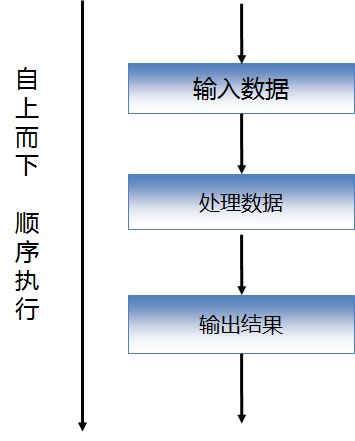
程序的结构一般分为三种: 顺序结构。 选择结构。 循环结构。 一、顺序结构:这个不用多说吧,跟我们平时写文章的顺序一样,从上往下。 二、选择结构:从名字就能看出,要选择嘛,到底是要漂亮滴妹子,还是要有钱滴妹子呢!当然,如果是个吊丝码农滴话,那你就不要多想了,还是老老实实码代码吧··· 三、循环结构:循环啊,就是一直转啊转啊转啊,转到出意外为止。 接下来还是老规矩,通过小示例来学习语法吧。 顺序结构: 一、输入姓名和年龄,输出自我介绍。 publicstaticvoidmain(String[]args){ //创建输入数据的对象,具体什么叫对象···,先不用管吧 Scannerinput=newScanner(System.in); Stringname;//姓名 intage;//年龄 System.out.print("请输入姓名:"); name=input.next(); System.out.print("请输入年龄:"); age=input.nextInt(); System.out.println("大家好,我叫"+name+",今年"+age+"岁,请多关照。"); } 注意: 这就是一个标准的顺序结构,代码会从上往下执行,如果你把int age;这句话放到最后,那就会在age = input.nextInt();这一行报语法错误了。 结果: 选择结构: 选择结构的语法有四种,我们通过下面的案例来了解。 一、输入你的存款,如果大于5000则加上“壕”的头衔。 publicstaticvoidmain(String[]args){ //创建输入数据的对象,具体什么叫对象···,先不用管吧 Scannerinput=newScanner(System.in); Stringname;//姓名 intdeposit;//存款 System.out.print("请输入姓名:"); name=input.next(); System.out.print("请输入存款:"); deposit=input.nextInt(); System.out.print("大家好,我叫"+name); if(deposit>5000){ System.out.print("(壕)"); } System.out.println("。"); } 语法: if( 条件 ){ 要执行的代码 } 注意: 条件成立时会执行{}中的所有代码。 结果: 二、输入你的存款,如果大于5000则加上“壕”的头衔,否则加上“穷13”的头衔。 if(deposit>5000){ System.out.print("(壕)"); } else{ System.out.print("(穷13)"); } 注意:别的代码不用动,只需要在if(){}结构上加上else{}就OK了,else{}表示条件不成立时的执行代码。 结果: 三、输入你的存款,如果大于50000,则加上“神壕”的头衔,否则如果大于30000,则加上“金壕”的头衔,否则如果大于10000,则加上“壕”的头衔,否则加上“穷13”的头衔。 if(deposit>50000){ System.out.print("(神壕)"); } elseif(deposit>30000){ System.out.print("(金壕)"); } elseif(deposit>10000){ System.out.print("(壕)"); } else{ System.out.print("(穷13)"); } 注意:这种语法叫多分支选择结构(一般用于选择情况大于2的场合,比如演唱会门票的级别、你的女神的胸肌是A还是BCDEF等)。 结果就不展示了。 四、查询余额请按1,套餐更改请按2,宽带业务请按3,企业业务请按4,人工服务请按5,其它业务请瞎按. publicstaticvoidmain(String[]args){ //创建输入数据的对象,具体什么叫对象···,先不用管吧 Scannerinput=newScanner(System.in); intnum; System.out.print("1.查询余额请按1," +"\n2.套餐更改请按2" +"\n3.宽带业务请按3" +"\n4.企业业务请按4" +"\n5.人工服务请按5" +"\n6.其它业务请瞎按" +"\n请选择:"); num=input.nextInt(); switch(num){ case1: System.out.println("您的余额为0。");break; case2: System.out.println("改完了,请回吧。");break; case3: System.out.println("宽带装好了,请交钱1998¥。");break; case4: System.out.println("请上传企业注册资料。");break; case5: System.out.println("我们正在招聘服务人员,请稍等...");break; default: System.out.println("乱按好玩吧...");break; } } 注意: switch语法一般用于数值类型和布尔类型等值判断的场合,最新版的JDK支持String类型了。小伙伴们可以自己试试。 每个case后的语句执行完后都有个小尾巴(break;),表示从这儿退出switch结构,大家可以把这个小尾巴去掉看看结果有什么不一样。 结果: 循环结构: 循环结构常用的有四种:while、do...while、for、foreach(后面讲集合时再介绍)。 对应的语法都很简单,我们通过求100以内的奇数和来了解一下,后面再来分析一个经典案例。 publicstaticvoidmain(String[]args){ //求100以内的奇数和 //1.while循环 inti=1;//循环的初值 ints=0;//保存和 while(i<=100){//循环的条件 s+=i;//循环的内容 i+=2;//循环的步长(也就是循环变量的值如何变化) } System.out.println("while循环结果:"+s); //变量值还原 i=1; s=0; //2.do...while循环 do{ s+=i; i+=2; }while(i<=100); System.out.println("do...while循环结果:"+s); //变量值还原 s=0; //3.for循环 for(i=1;i<=100;i+=2){ s+=i; } System.out.println("for循环结果:"+s); } 执行结果: 从上面的语法应该可以看出,循环主要有四个点:初值、条件、步长、循环体(内容)。那么这三种循环的语法有什么区别呢? while循环:侧重于不确定循环次数的场合,先判断,如果条件成立则进入循环。 do...while循环:侧重于不确定循环次数的场合,先执行一次,之后如果条件成立则时入循环。 for循环:侧重于确定循环次数的场合。 与循环配合使用的还有两个关键字:continue和break; 他们的作用,看代码和结果吧: publicstaticvoidmain(String[]args){ for(inti=0;i<10;i++){ if(i==5){ continue; } System.out.print(i+","); } System.out.println("\n======================="); for(inti=0;i<10;i++){ if(i==5){ break; } System.out.print(i+","); } } 结果: 注意到两个的区别了吧 运行continue后,就不再执行循环里面continue后面的代码,直接运行i++去了。 而运行break后,则直接跳出了循环,后面的都不执行了。 经典案例:登录功能,如果账号密码输入正确则登录成功,否则请再次输入密码。 分析: 登录时要输入几次账号密码?很明显不知道啊!!!所以for循环被排除了。 然后再判断,是要先输入账号密码后判断,还是先判断后再输入账号密码呢? 这也很明显,要先输入了才需要判断啊!!!所以while循环也被排除了。 最后就剩下do...while循环了。代码如下: publicstaticvoidmain(String[]args){ //模拟登录功能 //分析过程: //1.定义保存账号和密码的变量 Scannerinput=newScanner(System.in); StringinLoginID; StringinLoginPWD; //2.因为还没学习数据库,所以定义两个变量保存正确的账号和密码 StringloginID="liergou"; StringloginPWD="haha250"; //3.输入账号和密码 do{ System.out.print("请输入账号:"); inLoginID=input.next(); System.out.print("请输入密码:"); inLoginPWD=input.next(); //4.判断输入的账号和密码与正确的是否相同(判断字符串是否相等使用equals方法), //如果相同等提示登录成功,循环结束,否则提示重新输入 if(inLoginID.equals(loginID)&&inLoginPWD.equals(loginPWD)){ System.out.println("登录成功!"); break; } else{ System.out.println("账号和密码不匹配,请重新输入!"); } }while(true); } 如果你非要使用while和for,那··············当然也是可以滴,只不过代码复杂度会上升,特别是使用for来写的话会很奇怪,大伙可以看看: 这是使用while的写法 publicstaticvoidmain(String[]args){ //模拟登录功能 //分析过程: //1.定义保存账号和密码的变量 Scannerinput=newScanner(System.in); StringinLoginID; StringinLoginPWD; //2.因为还没学习数据库,所以定义两个变量保存正确的账号和密码 StringloginID="liergou"; StringloginPWD="haha250"; //3.输入账号和密码 System.out.print("请输入账号:"); inLoginID=input.next(); System.out.print("请输入密码:"); inLoginPWD=input.next(); while(true){ //4.判断输入的账号和密码与正确的是否相同(判断字符串是否相等使用equals方法), //如果相同等提示登录成功,循环结束,否则提示重新输入 if(inLoginID.equals(loginID)&&inLoginPWD.equals(loginPWD)){ System.out.println("登录成功!"); break; } else{ System.out.println("账号和密码不匹配,请重新输入!"); //下面的代码重复了 System.out.print("请输入账号:"); inLoginID=input.next(); System.out.print("请输入密码:"); inLoginPWD=input.next(); } } } 下面是使用for的写法 for(;true;){ //4.判断输入的账号和密码与正确的是否相同(判断字符串是否相等使用equals方法), //如果相同等提示登录成功,循环结束,否则提示重新输入 if(inLoginID.equals(loginID)&&inLoginPWD.equals(loginPWD)){ System.out.println("登录成功!"); break; } else{ System.out.println("账号和密码不匹配,请重新输入!"); //下面的代码重复了 System.out.print("请输入账号:"); inLoginID=input.next(); System.out.print("请输入密码:"); inLoginPWD=input.next(); } } 最后,再布置几个练习,各位看官自己分析并练习练习吧,看具体使用哪种循环最好。 1.打印出所有的"水仙花数",所谓"水仙花数"是指一个三位数,其各位数字立方和等于该数本身。例如:153是一个"水仙花数",因为153=1的三次方+5的三次方+3的三次方。 2.将一个正整数分解质因数。例如:输入90,打印出90=2*3*3*5。 3. 球从100M高度自由落下,每次落地后反跳回原高度的一半,再落下,求它在第10次落地时,共经过多少M?第10次反弹多高? 4. 任意输入一个整数(小于6位),求它的位数询问 5. “我爱你,嫁给我吧?”,选择“你喜欢我吗?(y/n):",如果输入为y则打印”我们形影不离“,若输入为n,则继续询问 如果有不确定答案的练习,就在评论里讨论吧··· “软件思维”博客地址:51CTO感兴趣的小伙伴可以去看相关的其它博文。

优秀的个人博客,低调大师

【Arthas技术专题】「快速入门指南」安装入门及基础指令介绍

Arthas特性介绍 Arthas是Alibaba开源的Java诊断工具,深受开发者喜爱。在线排查问题,无需重启;动态跟踪Java代码;实时监控JVM状态。 Arthas支持JDK 6+,支持Linux/Mac/Windows,采用命令行交互模式,同时提供丰富的Tab自动补全功能,进一步方便进行问题的定位和诊断。 Arthas解决范畴 这个类从哪个 jar 包加载的?为什么会报各种类相关的 Exception? 我改的代码为什么没有执行到?难道是我没 commit?分支搞错了? 遇到问题无法在线上 debug,难道只能通过加日志再重新发布吗? 线上遇到某个用户的数据处理有问题,但线上同样无法 debug,线下无法重现! 是否有一个全局视角来查看系统的运行状况? 有什么办法可以监控到JVM的实时运行状态? 怎么快速定位应用的热点,生成火焰图? 怎样直接从JVM内查找某个类的实例? Arthas快速开始 使用arthas-boot(推荐) 下载arthas-boot.jar,然后用java -jar的方式启动: 下载文件 curl -O https://arthas.aliyun.com/arthas-boot.jar wget https://alibaba.github.io/arthas/arthas-boot.jar 执行命令 java -jar arthas-boot.jar 打印帮助信息: java -jar arthas-boot.jar -h 如果下载速度比较慢,可以使用aliyun的镜像: java -jar arthas-boot.jar --repo-mirror aliyun --use-http 使用as.sh Arthas 支持在 Linux/Unix/Mac 等平台上一键安装: curl -L https://arthas.aliyun.com/install.sh | sh 下载启动脚本文件 as.sh 到当前目录,你可以放在任何地方或将其加入到 $PATH 中。 直接在shell下面执行./as.sh,就会进入交互界面。 也可以执行./as.sh -h来获取更多参数信息。 Arthas基础指令 dashboard 在Arthas的命令行界面,输入dashboard,会实时展示当前JVM应用服务的多线程状态、JVM各内存区域、GC情况等信息。 参数信息 数据说明 ID: Java级别的线程ID,注意这个ID不能跟jstack中的nativeID一一对应。 NAME: 线程名 GROUP: 线程组名 PRIORITY: 线程优先级, 1~10之间的数字,越大表示优先级越高 STATE: 线程的状态 CPU%: 线程的cpu使用率。 比如采样间隔1000ms,某个线程的增量cpu时间为100ms,则cpu使用率=100/1000=10% DELTA_TIME: 上次采样之后线程运行增量CPU时间,数据格式为秒 TIME: 线程运行总CPU时间,数据格式为分:秒 INTERRUPTED: 线程当前的中断位状态 DAEMON: 是否是daemon线程 JVM内部线程 **Java8之后支持获取JVM内部线程CPU时间,这些线程只有名称和CPU时间,没有ID及状态等信息(显示ID为-1)。 ** 内部线程观测到JVM活动,如GC、JIT编译等占用CPU情况,方便了解JVM整体运行状况。 当JVM堆(heap)/元数据(metaspace)空间不足或OOM时,可以看到GC线程的CPU占用率明显高于其他的线程。 当执行trace/watch/tt/redefine等命令后,可以看到JIT线程活动变得更频繁。因为JVM热更新class字节码时清除了此class相关的JIT编译结果,需要重新编译。 JVM内部线程包括下面几种: JIT编译线程: 如 C1 CompilerThread0, C2 CompilerThread0 GC线程: 如GC Thread0, G1 Young RemSet Sampling 其它内部线程: 如VM Periodic Task Thread, VM Thread, Service Thread thread 查看当前线程信息,查看线程的堆栈。 参数说明 cpu使用率是如何统计出来的? cpu使用率与linux 命令top -H -p <pid> 的线程%CPU类似,一段采样间隔时间内,当前JVM里各个线程的增量cpu时间与采样间隔时间的比例。 实际案例 输入thread会显示所有线程的状态信息 输入thread -n 3会显示当前最忙的3个线程,可以用来排查线程CPU消耗 输入thread -b 会显示当前处于BLOCKED状态的线程,可以排查线程锁的问题 工作原理说明: 首先第一次采样,获取所有线程的CPU时间 java.lang.management.ThreadMXBean#getThreadCpuTime() sun.management.HotspotThreadMBean.getInternalThreadCpuTimes() 然后睡眠等待一个间隔时间(默认为200ms,可以通过 -i 指定间隔时间) 再次第二次采样,获取所有线程的CPU时间,对比两次采样数据,计算出每个线程的增量CPU时间 线程CPU使用率 = 线程增量CPU时间 / 采样间隔时间 * 100% 注意: 这个统计也会产生一定的开销(JDK这个接口本身开销比较大),因此会看到as的线程占用一定的百分比,为了降低统计自身的开销带来的影响,可以把采样间隔拉长一些,比如5000毫秒。 最忙的前N个线程并打印堆栈: 没有线程ID,包含[Internal]表示为JVM内部线程,参考dashboard命令的介绍。 cpuUsage为采样间隔时间内线程的CPU使用率,与dashboard命令的数据一致。 deltaTime为采样间隔时间内线程的增量CPU时间,小于1ms时被取整显示为0ms。 time 线程运行总CPU时间。 输出所有相关的线程的明细: thread -all 查看某个线程号对应的堆栈: thread pid 查看指定状态的线程 thread –state <thread state> jvm 输入jvm,查看jvm详细的性能数据 Runtime Memory/OperationSystem/Thread jad 对类进行反编译: getstatic 推荐直接使用ognl命令,更加灵活。 通过getstatic命令可以方便的查看类的静态属性。使用方法为getstatic class_name field_name sc 查看JVM已加载的类信息。 “Search-Class” 的简写,这个命令能搜索出所有已经加载到 JVM 中的 Class 信息,这个命令支持的参数有 [d]、[E]、[f] 和 [x:]。 mc Memory Compiler/内存编译器,编译.java文件生成.class。 mc /tmp/TestSample.java trace 通常说一个接口性能不好,其实就是接口响应时间比较长造成的,具体代码中哪个函数耗时比较长呢?可以使用trace功能来监控一下 解释: -j 参数可以过滤掉jdk自身的函数 sc 查找JVM中已经加载的类 $ sc -d org.springframework.web.context.support.XmlWebApplicationContext class-info org.springframework.web.context.support.XmlWebApplicationContext code-source /Users/xxx/work/test/WEB-INF/lib/spring-web-3.2.11.RELEASE.jar name org.springframework.web.context.support.XmlWebApplicationContext isInterface false isAnnotation false isEnum false isAnonymousClass false isArray false isLocalClass false isMemberClass false isPrimitive false isSynthetic false simple-name XmlWebApplicationContext modifier public annotation interfaces super-class +-org.springframework.web.context.support.AbstractRefreshableWebApplicationContext +-org.springframework.context.support.AbstractRefreshableConfigApplicationContext +-org.springframework.context.support.AbstractRefreshableApplicationContext +-org.springframework.context.support.AbstractApplicationContext +-org.springframework.core.io.DefaultResourceLoader +-java.lang.Object class-loader +-org.apache.catalina.loader.ParallelWebappClassLoader +-java.net.URLClassLoader@6108b2d7 +-sun.misc.Launcher$AppClassLoader@18b4aac2 +-sun.misc.Launcher$ExtClassLoader@1ddf84b8 classLoaderHash 25131501 sm 查看已加载类的方法信息 “Search-Method” 的简写,这个命令能搜索出所有已经加载了 Class 信息的方法信息。 sm 命令只能看到由当前类所声明 (declaring) 的方法,父类则无法看到。 $ sm java.lang.String java.lang.String-><init> java.lang.String->equals java.lang.String->toString java.lang.String->hashCode java.lang.String->compareTo java.lang.String->indexOf java.lang.String->valueOf java.lang.String->checkBounds java.lang.String->length java.lang.String->isEmpty java.lang.String->charAt java.lang.String->codePointAt java.lang.String->codePointBefore java.lang.String->codePointCount java.lang.String->offsetByCodePoints java.lang.String->getChars java.lang.String->getBytes java.lang.String->contentEquals java.lang.String->nonSyncContentEquals java.lang.String->equalsIgnoreCase java.lang.String->compareToIgnoreCase java.lang.String->regionMatches java.lang.String->startsWith java.lang.String->endsWith java.lang.String->indexOfSupplementary java.lang.String->lastIndexOf java.lang.String->lastIndexOfSupplementary java.lang.String->substring java.lang.String->subSequence java.lang.String->concat java.lang.String->replace java.lang.String->matches java.lang.String->contains java.lang.String->replaceFirst java.lang.String->replaceAll java.lang.String->split java.lang.String->join java.lang.String->toLowerCase java.lang.String->toUpperCase java.lang.String->trim java.lang.String->toCharArray java.lang.String->format java.lang.String->copyValueOf java.lang.String->intern stack 查看方法 test.arthas.TestSample#execute 的调用堆栈: $ stack test.arthas.TestSample execute Press Ctrl+C to abort. Affect(class-cnt:1 , method-cnt:1) cost in 286 ms. ts=2018-09-18 10:11:45;thread_name=http-bio-8080-exec-10;id=d9;is_daemon=true;priority=5;TCCL=org.apache.catalina.loader.ParallelWebappClassLoader@25131501 @test.arthas.TestSample.execute() at javax.servlet.http.HttpServlet.service(HttpServlet.java:624) at javax.servlet.http.HttpServlet.service(HttpServlet.java:731) at org.apache.catalina.core.ApplicationFilterChain.internalDoFilter(ApplicationFilterChain.java:303) at org.apache.catalina.core.ApplicationFilterChain.doFilter(ApplicationFilterChain.java:208) at org.apache.tomcat.websocket.server.WsFilter.doFilter(WsFilter.java:52) at org.apache.catalina.core.ApplicationFilterChain.internalDoFilter(ApplicationFilterChain.java:241) at org.apache.catalina.core.ApplicationFilterChain.doFilter(ApplicationFilterChain.java:208) at org.apache.catalina.core.ApplicationFilterChain.internalDoFilter(ApplicationFilterChain.java:241) at org.apache.catalina.core.ApplicationFilterChain.doFilter(ApplicationFilterChain.java:208) at org.apache.catalina.core.StandardWrapperValve.invoke(StandardWrapperValve.java:220) at org.apache.catalina.core.StandardContextValve.invoke(StandardContextValve.java:110) ... at org.apache.catalina.core.StandardHostValve.invoke(StandardHostValve.java:169) at org.apache.catalina.valves.ErrorReportValve.invoke(ErrorReportValve.java:103) at org.apache.catalina.core.StandardEngineValve.invoke(StandardEngineValve.java:116) at org.apache.catalina.connector.CoyoteAdapter.service(CoyoteAdapter.java:451) at org.apache.coyote.http11.AbstractHttp11Processor.process(AbstractHttp11Processor.java:1121) at org.apache.coyote.AbstractProtocol$AbstractConnectionHandler.process(AbstractProtocol.java:637) at org.apache.tomcat.util.net.JIoEndpoint$SocketProcessor.run(JIoEndpoint.java:316) at java.util.concurrent.ThreadPoolExecutor.runWorker(ThreadPoolExecutor.java:1142) at java.util.concurrent.ThreadPoolExecutor$Worker.run(ThreadPoolExecutor.java:617) at org.apache.tomcat.util.threads.TaskThread$WrappingRunnable.run(TaskThread.java:61) at java.lang.Thread.run(Thread.java:745) retransform 加载外部的.class文件,retransform 热更新jvm已加载的类。 retransform /tmp/TestSample.class retransform -c 327a647b /tmp/TestSample.class /tmp/Test\$Inner.class retransform指定的 .class 文件 $ retransform /tmp/TestSample.class retransform success, size: 1, classes: com.TestSample 加载指定的 .class 文件,然后解析出class name,再retransform jvm中已加载的对应的类。每加载一个 .class 文件,则会记录一个 retransform entry。 如果多次执行 retransform 加载同一个 class 文件,则会有多条 retransform entry. 查看 retransform entry $ retransform -l Id ClassName TransformCount LoaderHash LoaderClassName 1 com.TestSample 1 null null TransformCount 统计在 ClassFileTransformer#transform 函数里尝试返回 entry对应的 .class文件的次数,但并不表明transform一定成功。 删除指定 retransform entry 需要指定 id: retransform -d 1 删除所有 retransform entry retransform --deleteAll 显式触发 retransform $ retransform --classPattern com.TestSample retransform success, size: 1, classes: com.TestSample 注意:对于同一个类,当存在多个 retransform entry时,如果显式触发 retransform ,则最后添加的entry生效(id最大的)。 消除 retransform 的影响 如果对某个类执行 retransform 之后,想消除影响,则需要: 删除这个类对应的 retransform entry 重新触发retransform 如果不清除掉所有的 retransform entry,并重新触发 retransform ,则arthas stop时,retransform过的类仍然生效。

优秀的个人博客,低调大师

InheritableThreadLocal从入门到放弃

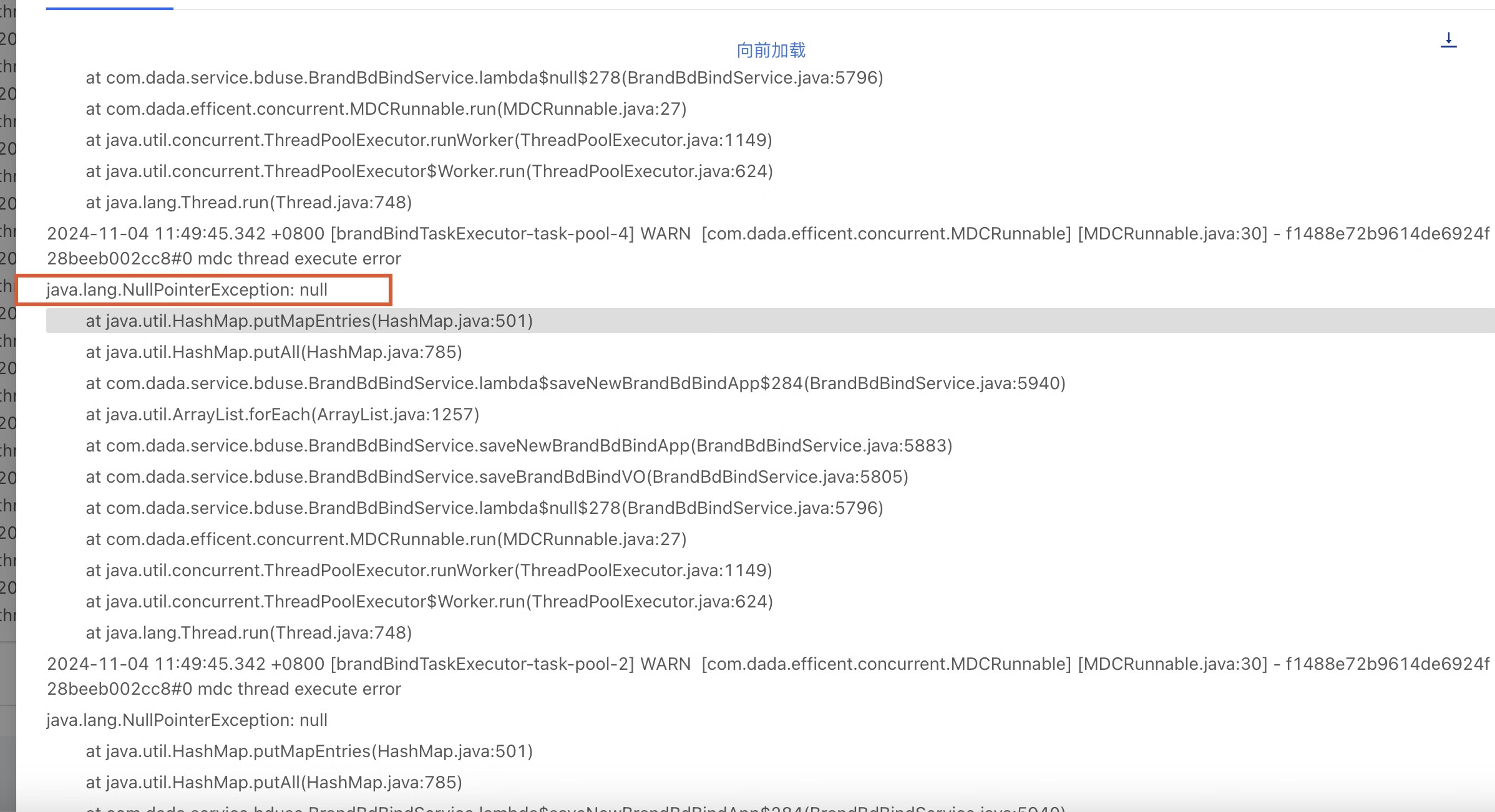
背景: 一个上线了很久但是请求量很低(平均每天一两次)的历史功能突然出现空指针报错:    我们翻开代码定位到对应的报错代码:    结合堆栈和代码可以确定是由于bdIdJobMap的值为null导致往bdIdEmployeeJobMap这个map中putAll的时候空指针了。 而bdIdJobMap又取自employeeJobMapThread.get(); 那么这个employeeJobMapThread又是何物?    哦豁,employeeJobMapThread居然是个InheritableThreadLocal。 梳理一下报错代码的上下文逻辑如下: 1. 首先在当前主线程中对InheritableThreadLocal类型变量employeeJobMapThread进行赋值 2. 把耗时操作提交到线程池中异步执行,在异步任务中去获取employeeJobMapThread的值(其中线程池配置的coreSize/maxSize均为4,queue大小为3000) 3. 在主线程中执行employeeJobMapThread.remove(),在异步任务完成之后没有执行employeeJobMapThread.remove() 4. 最后在异步任务中通过employeeJobMapThread获取到的值为null导致后续操作空指针  是否和最近的上线有关? 相信大家都有这样的共识:线上出现报错,首先怀疑是否和最近的上线有关系。 我们做的第一件事情也是排查了近期的上线功能,从上线的功能点和相关代码上来看都和这次报错的代码没什么关系, 因此初步排除了这个原因。所以接下来只能进一步了解代码来排查原因了。 要搞清楚当前报错的根因,毫无疑问肯定是要翻过InheritableThreadLocal这座小山啦。  简单聊下InheritableThreadLocal: 提起ThreadLocal,大家应该相对都比较熟悉了,比如存放登录用户信息到ThreadLocal变量中,然后在接口层可以比较方便的获取登录用户,帮助开发提效。 但是对于InheritableThreadLocal,有不少同学都不太了解。 挑重点来说,InheritableThreadLocal相比ThreadLocal多一个能力:在创建子线程Thread时,子线程Thread会自动继承父线程的InheritableThreadLocal信息到子线程中,进而实现在在子线程获取父线程的InheritableThreadLocal值的目的。 举个简单的栗子对比下InheritableThreadLocal和ThreadLocal: public class InheritableThreadLocalTest { private static final ThreadLocal<String> threadLocal = new ThreadLocal<>(); private static final InheritableThreadLocal<String> inheritableThreadLocal = new InheritableThreadLocal<>(); public static void main(String[] args) { testThreadLocal(); testInheritableThreadLocal(); } /** * threadLocal测试 */ public static void testThreadLocal() { // 在主线程中设置值到threadLocal threadLocal.set("我是父线程threadLocal的值"); // 创建一个新线程并启动 new Thread(() -> { // 在子线程里面无法获取到父线程设置的threadLocal,结果为null System.out.println("从子线程获取到threadLocal的值: " + threadLocal.get()); }).start(); } /** * inheritableThreadLocal测试 */ public static void testInheritableThreadLocal() { // 在主线程中设置一个值到inheritableThreadLocal inheritableThreadLocal.set("我是父线程inheritableThreadLocal的值"); // 创建一个新线程并启动 new Thread(() -> { // 在子线程里面可以自动获取到父线程设置的inheritableThreadLocal System.out.println("从子线程获取到inheritableThreadLocal的值: " + inheritableThreadLocal.get()); }).start(); } } 执行结果:    可以看到子线程中可以获取到父线程设置的inheritableThreadLocal值,但不能获取到父线程设置的threadLocal值。 为什么InheritableThreadLocal能够做到这点呢? 是因为在父线程创建子线程Thread的时候,Thread的构造器内部会自动继承父线程的InheritableThreadLocal到子线程。 Thread源码这两处地方解释了原因:    init方法内部实现:     通过这个简单的介绍可以帮助对于InheritableThreadLocal不了解的同学有一个初步的了解,本文不是专门介绍InheritableThreadLocal的深入原理,所以就不展开聊了,大家感兴趣可以自己进一步探索。 验证InheritableThreadLocal+线程池: 前面介绍了InheritableThreadLocal可以自动把父线程的InheritableThreadLocal信息继承到子线程Thread中。 但是在业务项目中真正需要用到子线程的时候正经人谁自己new Thread,咱可是用线程池的。 当然了,就像文章开头说明的,这次报错的代码里面也用线程池来执行异步任务。 那么InheritableThreadLocal+线程池的组合会摩擦出什么样的火花呢? 我把这次报错的代码精简之后得到下面的示例(实际代码中往InheritableThreadLocal赋的值类型不是字符串,后面会提到): package com.dada.bd.data.service; import java.util.concurrent.LinkedBlockingQueue; import java.util.concurrent.ThreadPoolExecutor; import java.util.concurrent.TimeUnit; public class InheritableThreadLocalWithThreadPoolTest { private static final InheritableThreadLocal<String> inheritableThreadLocal = new InheritableThreadLocal<>(); private static final ThreadPoolExecutor threadPoolExecutor = new ThreadPoolExecutor( 2, 2, 0L, TimeUnit.MILLISECONDS, new LinkedBlockingQueue<Runnable>(3000), new ThreadPoolExecutor.CallerRunsPolicy() ); public static void main(String[] args) { testInheritableThreadLocalWithThreadPool(); threadPoolExecutor.shutdown(); } /** * inheritableThreadLocal+线程池测试 */ public static void testInheritableThreadLocalWithThreadPool() { // 1. 在主线程中设置一个值到inheritableThreadLocal inheritableThreadLocal.set("我是父线程inheritableThreadLocal的值"); // 2. 提交异步任务到线程池 threadPoolExecutor.execute(() -> { // 3. 在线程池-子线程里面可以获取到父线程设置的inheritableThreadLocal吗? System.out.println("从线程池-子线程获取到inheritableThreadLocal的值: " + inheritableThreadLocal.get()); }); // 4. 清除inheritableThreadLocal inheritableThreadLocal.remove(); } }    执行结果如图所示,可以看到在线程池里面也可以获取到父线程设置的inheritableThreadLocal值。 接下来我们来分析下InheritableThreadLocal+线程池的执行过程:   也就说只有在以下这两个场景下才会继承父线程的InheritableThreadLocal: 1.线程池当前线程数 < 核心线程数 2.线程池当前线程数 >= 核心线程数 && 队列已满 && 线程数 < 最大线程数(本次线上报错的代码使用的线程池设置的coreSize和maxSize一致,所以走不到该场景) 其他情况都是在复用线程池现有的Thread,自然也就不会继承父线程的InheritableThreadLocal。 我们提交多个异步任务到线程池来验证下: package com.dada.bd.data.service; import java.util.concurrent.LinkedBlockingQueue; import java.util.concurrent.ThreadPoolExecutor; import java.util.concurrent.TimeUnit; public class InheritableThreadLocalWithThreadPoolTest { private static final InheritableThreadLocal<String> inheritableThreadLocal = new InheritableThreadLocal<>(); private static final ThreadPoolExecutor threadPoolExecutor = new ThreadPoolExecutor( 2, 2, 0L, TimeUnit.MILLISECONDS, new LinkedBlockingQueue<Runnable>(3000), new ThreadPoolExecutor.CallerRunsPolicy() ); public static void main(String[] args) { testInheritableThreadLocalWithThreadPool("张三"); testInheritableThreadLocalWithThreadPool("李四"); testInheritableThreadLocalWithThreadPool("王五"); testInheritableThreadLocalWithThreadPool("赵六"); testInheritableThreadLocalWithThreadPool("孙七"); threadPoolExecutor.shutdown(); } /** * inheritableThreadLocal+线程池测试 */ public static void testInheritableThreadLocalWithThreadPool(String param) { // 1. 在主线程中设置一个值到inheritableThreadLocal inheritableThreadLocal.set(param); // 2. 提交异步任务到线程池 threadPoolExecutor.execute(() -> { // 3. 在线程池-子线程里面可以获取到父线程设置的inheritableThreadLocal吗? System.out.println("线程名: " + Thread.currentThread().getName() + ", 父线程设置的inheritableThreadLocal值: " + param + ", 子线程获取到inheritableThreadLocal的值: " + inheritableThreadLocal.get()); }); // 4. 清除inheritableThreadLocal inheritableThreadLocal.remove(); } }   执行结果用表格形式展示如下: 步骤 使用线程池 结果解释说明 提交第一个异步任务值为【张三】 创建Thread:pool-1-thread-1 自动继承父线程的InheritableThreadLocal值【张三】到pool-1-thread-1 提交第二个异步任务值为【李四】 创建Thread:pool-1-thread-2 自动继承父线程的InheritableThreadLocal值【李四】到pool-1-thread-2 提交第三个异步任务值为【王五】 复用Thread:pool-1-thread-1 没有自动继承父线程的InheritableThreadLocal值【王五】,所以拿到了第一个任务提交时Thread继承下来的值【张三】 提交第四个异步任务值为【赵六】 复用Thread:pool-1-thread-2 没有自动继承父线程的InheritableThreadLocal值【赵六】,所以拿到了第一个任务提交时Thread继承下来的值【李四】 可以看到InheritableThreadLocal+线程池的组合,会面临InheritableThreadLocal污染的问题,即异步任务可能取到其他父线程设置的InheritableThreadLocal值。 有同学会提到我们不是在代码里面加了inheritableThreadLocal.remove()来清除inheritableThreadLocal的吗?为什么没有清除掉呢? 这是因为此时我们清除的只是父线程的inheritableThreadLocal,而没有清除子线程的inheritableThreadLocal的缘故。  为什么InheritableThreadLocal污染对线上没有产生影响? 既然InheritableThreadLocal+线程池的组合,会存在InheritableThreadLocal污染的问题,那岂不是线上报错的这段代码也存在这个问题? 再次检查代码,确认历史代码的确存在这个问题, 但是,这个代码上线2年多为啥一直稳定运行且没有用户反馈过功能有问题?只有最近突然出现报错?一时之间脑袋懵懵的。    仔细检代码之后发现: 这段代码在父子线程之间通过InheritableThreadLocal类型变量employeeJobMapThread传递的值是【全量的<人员Id, 该人员基本信息>结构的map】,可以近乎看做是一个不变的常量,所以虽然异步任务会拿到污染的数据,也是正常可以用的,没有产生业务影响。 这种感觉怎么说呢,只能说感叹前人的智慧,把几乎不可能做到了可能~ 好了,到这里我们解释了为什么这段代码上线这么久一直没问题,因为代码确实有InheritableThreadLocal污染问题,但被污染了也不影响使用。。。所以从最终结果来看确实可以正常运行。     什么原因导致子线程获取到的InheritableThreadLocal值是null? 但是。。。说了这么多,还是不能解释为什么线上代码获取到的inheritableThreadLocal值会是null。 1.难道父线程设置的inheritableThreadLocal值可能会是null? 检查代码发现父线程设置的inheritableThreadLocal不可能为null,顶多会是空集合:     2.难道是线程池创建之后通过prestartAllCoreThreads初始化了核心线程,在执行异步任务的时候,都是复用的已有线程导致的? 检查了对应线程池的初始化代码,发现并没有初始化核心线程,也排除了这个可能。而且如果真的是该原因22年上线之后功能一定是有问题的,前面说过,该功能上线之后没人反馈过异常,所以也可以排除该原因。  • 该功能22年上线之间2年多一直没人反馈,大概率该功能之前很长时间是正常的,近期由于某个原因导致功能异常 • 虽然历史代码的用法存在子任务中获取到的InheritableThreadLocal被污染的问题,但是被污染的值也能用,不影响正确性 • 只要线程池中的线程初始化的时候继承了正确的InheritableThreadLocal值,后续就不会被清除掉,也就可以正常运行功能 从这些已知的信息来推断,可以推断出这段历史代码写法虽然有隐患,但是不是引发当前空指针的的原因。 3.剩下的只有一种可能:存在线程池的共用。 在执行这个报错的异步任务的时候,复用了某个已有的线程A,并且当时创建该线程A的时候,没有继承InheritableThreadLocal,进而导致后面复用该线程的时候,从InheritableThreadLocal获取到的值为null。 而只要是通过这段历史代码创建的线程一定是没问题的,所以一定是存在其他业务共用了这个线程池,并且这个业务优先执行进而初始化了线程池的线程,导致线程池的线程没有继承InheritableThreadLocal。 如下代码示例: package com.dada.bd.data.service; import java.util.concurrent.LinkedBlockingQueue; import java.util.concurrent.ThreadPoolExecutor; import java.util.concurrent.TimeUnit; public class InheritableThreadLocalWithThreadPoolTest { private static final InheritableThreadLocal<String> inheritableThreadLocal = new InheritableThreadLocal<>(); // 这里线程池core/max数量都只有2 private static final ThreadPoolExecutor threadPoolExecutor = new ThreadPoolExecutor( 2, 2, 0L, TimeUnit.MILLISECONDS, new LinkedBlockingQueue<Runnable>(3000), new ThreadPoolExecutor.CallerRunsPolicy() ); public static void main(String[] args) { // 先执行了不涉及InheritableThreadLocal的子任务初始化线程池线程 testAnotherFunction(); testAnotherFunction(); // 后执行了本次的历史代码,其涉及InheritableThreadLocal testInheritableThreadLocalWithThreadPool("张三"); testInheritableThreadLocalWithThreadPool("李四"); threadPoolExecutor.shutdown(); } /** * inheritableThreadLocal+线程池测试 */ public static void testInheritableThreadLocalWithThreadPool(String param) { // 1. 在主线程中设置一个值到inheritableThreadLocal inheritableThreadLocal.set(param); // 2. 提交异步任务到线程池 threadPoolExecutor.execute(() -> { // 3. 在线程池-子线程里面可以获取到父线程设置的inheritableThreadLocal吗? System.out.println("线程名: " + Thread.currentThread().getName() + ", 父线程设置的inheritableThreadLocal值: " + param + ", 子线程获取到inheritableThreadLocal的值: " + inheritableThreadLocal.get()); }); // 4. 清除inheritableThreadLocal inheritableThreadLocal.remove(); } /** * 模拟另一个独立的功能 */ public static void testAnotherFunction() { // 提交异步任务到线程池 threadPoolExecutor.execute(() -> { // 在线程池-子线程里面可以获取到父线程设置的inheritableThreadLocal吗? System.out.println("线程名: " + Thread.currentThread().getName() + ", 线程池-子线程摸个鱼"); }); } } 执行结果:    在项目里面搜一下看看,果真如此,有2出地方在用这个线程池,并且另外的一处代码中提交的异步任务不涉及inheritableThreadLocal:    示意图如下: 逻辑执行顺序为:创建线程池 - 执行功能A - 执行功能A - 执行功能B 其中: 功能A全流程均不涉及InheritableThreadLocal 功能B对应报错的代码,主线程设置InheritableThreadLocal并且在子线程使用    至此,线上报错的根因确定了:就是因为InheritableThreadLocal + 线程池共用导致。  扩展一下: 假如执行顺序是这样呢:创建线程池 - 执行功能B - 执行功能B - 执行功能A    结局居然是一切安好。  假如执行顺序是这样呢:创建线程池 - 执行功能B - 执行功能A - 执行功能B    发现了吗?如果应用启动之后功能B先执行并且初始化了线程池所有核心线程,那么一切正常,否则就可能报错。 也就是说功能B是否正常还看运气的,运气好就正常执行,运气不好就报空指针的错。  这你敢信?    小插曲: 这个问题的排查当中还遇到了2个小插曲: 插曲1: 最初怀疑是线程池复用导致的,但是在IDEA里面搜代码的时候粗心大意没有看到其他地方在复用线程池。 因此期间一度自我怀疑见鬼了,导致本来可以一两个小时确定根因的,结果饶了弯路多花了两个小时才确定根因。 所以说排查问题的时候每一步都要保持细心,得出的每一个结论都应该是证据确凿,理由充分, 否则会让自己兜兜转转浪费宝贵的时间。  插曲2: 排查代码的时候发现异步任务代码没有做任何的异常处理,这其实是很坑的。 有经验的同学应该知道,线程池里面提交异步任务如果没有做异常处理,出现异常的话不会有任何的日志信息。 本地运行的时候会打印到控制台,但是线上控制台的信息可不会记录到日志里面。 所以经常遇到异步任务执行结果不符合预期,但是线上没有任何相关日志就是这个原因。 我们这里有日志是因为使用的线程池是二次封装过的,里面对异步任务做了兜底的异常记录。  总结: 前面分析到了导致空指针的原因是线程池共用导致的老代码报错,而共用这个线程池的代码是新上线的功能引入的。 这就打脸了开头我们检查了上线的功能与此无关,实则有关。 只是我们评估复用线程池的影响时,很难想到会有这样的影响,通常我们会考虑: 1. 是否会影响共用该线程池的老功能响应时间边长 2. 是否存在父子任务共用线程池导致可能产生死锁 针对InheritableThreadLocal,我个人的建议是: 1. InheritableThreadLocal(其实ThreadLocal也一样)不适合应用于业务代码中,因为他们都是隐式的参数传递,而业务系统中好维护的代码应当是显式的参数传递(我们这个线上问题就采用该方式) 2. 框架类代码才是InheritableThreadLocal和ThreadLocal主要发光发热的地方,因为对应的研发水平通常较高,且代码经过严格测试验证,并且较少变动。而业务系统研发水平参差不齐,且经常会发生同步操作变异步等 3. 虽然InheritableThreadLocal不建议在业务代码中使用,但是我们还是需要掌握它,不为别的,只有掌握它的优缺点才能告诉自己和他人为什么应该在业务代码中放弃使用它  针对如何有效的应对业务研发遇到的一些“疑难杂症”,我的建议是: 1. 大胆提出合理的假设,小心谨慎进行验证 2. 没有充足理由,不要轻易下结论 3. 没有头绪时,休息一下,或找合适的人一起探讨,给自己打开新的思路  最后,愿天下没有故障,没有线上问题,没有bug。

优秀的个人博客,低调大师

Apache Doris 入门 10 问

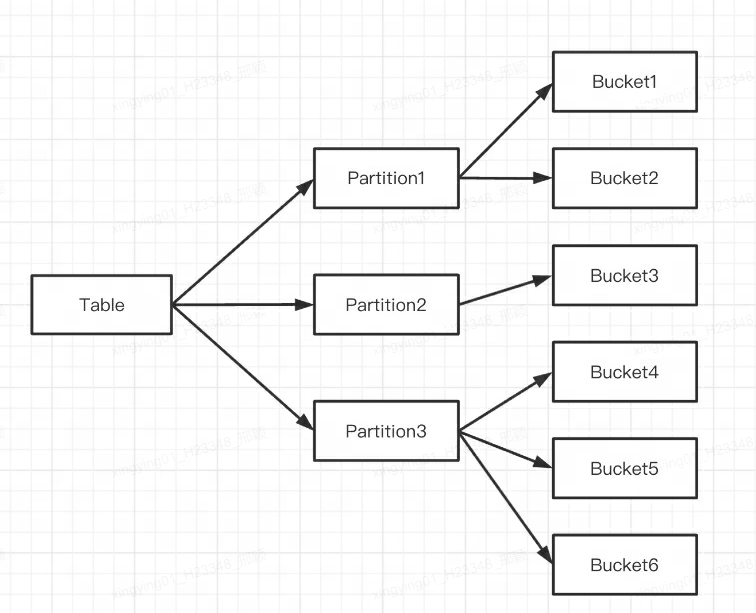
基于 Apache Doris 在读写流程、副本一致性机制、 存储机制、高可用机制等方面的常见疑问点进行梳理,并以问答形式进行解答。在开始之前,我们先对本文相关的名词进行解释: FE:Frontend,即 Doris 的前端节点。主要负责接收和返回客户端请求、元数据以及集群管理、查询计划生成等工作。 BE:Backend,即 Doris 的后端节点。主要负责数据存储与管理、查询计划执行等工作。 BDBJE:Oracle Berkeley DB Java Edition, 在 Doris 中,使用 BDBJE 完成元数据操作日志的持久化、FE 高可用等功能。 Tablet:Tablet 是一张表实际的物理存储单元,一张表按照分区和分桶后在 BE 构成分布式存储层中以 Tablet 为单位进行存储,每个 Tablet 包括元信息及若干个连续的 RowSet。 RowSet:RowSet 是 Tablet 中一次数据变更的数据集合,数据变更包括了数据导入、删除、更新等。RowSet 按版本信息进行记录。每次变更会生成一个版本。 Version:由 Start、End 两个属性构成,维护数据变更的记录信息。通常用来表示 RowSet 的版本范围,在一次新导入后生成一个 Start、End 相等的 RowSet,在 Compaction 后生成一个带范围的 RowSet 版本。 Segment:表示 RowSet 中的数据分段,多个 Segment 构成一个 RowSet。 Compaction:连续版本的 RowSet 合并的过程成称为 Compaction,合并过程中会对数据进行压缩操作。 Key 列、Value 列:在 Doris 中,数据以表(Table)的形式进行逻辑上的描述。一张表包括行(Row)和列(Column),Row 即用户的一行数据,Column 用于描述一行数据中不同的字段。Column 可以分为两大类:Key 和 Value。从业务角度看,Key 和 Value 可以分别对应维度列和指标列。Doris 的 Key 列是建表语句中指定的列,建表语句中的关键字 unique key 或 aggregate key 或 duplicate key 后面的列就是 Key 列,除了 Key 列剩下的就是 Value 列。 数据模型:Doris 的数据模型主要分为 3 类:Aggregate、Unique、Duplicate。 Base 表:在 Doris 中,我们将用户通过建表语句创建出来的表称为 Base 表(Base Table),Base 表中保存着按用户建表语句指定方式存储的基础数据。 ROLLUP 表:在 Base 表之上,用户可以创建任意多个 ROLLUP 表。这些 ROLLUP 的数据是基于 Base 表产生的,并且在物理上是独立存储的。ROLLUP 表的基本作用,在于在 Base 表的基础上,获得更粗粒度的聚合数据,类似于物化视图。 Q1:Doris 分区跟分桶有什么区别? Doris 支持两层数据划分: 第一层是 Partition(分区),支持 Range 和 List 的划分方式(类似于 MySQL 的分区表的概念)。若干个 Partition 组成一个 Table,Partition 可以视为是逻辑上最小的管理单元。数据的导入与删除,仅能针对一个 Partition 进行。 第二层是 Bucket(Tablet 也称为分桶),支持 Hash 和 Random 的划分方式。每个 Tablet 包含若干数据行,各个 Tablet 之间的数据没有交集,并且在物理上是独立存储的。Tablet 是数据移动、复制等操作的最小物理存储单元。 也可以仅使用一层分区,建表时如果不写分区的语句即可,此时 Doris 会生成一个默认的分区,对用户是透明的。 示意如下: 多个 Tablet 在逻辑上归属于不同的分区(Partition),一个 Tablet 只属于一个 Partition,而一个 Partition 包含若干个 Tablet。因为 Tablet 在物理上是独立存储的,所以可以视为 Partition 在物理上也是独立。 从逻辑上来讲,分区和分桶最大的区别就是分桶随机分割数据库,分区是非随机分割数据库。 怎么保证数据多副本的? 为了提高保存数据的可靠性和计算时的性能,Doris 对每个表复制多份进行存储。数据的每份复制就叫做一个副本。Doris 按 Tablet 为基本单元对数据进行副本存储,默认一个分片有 3 个副本。建表时可在 PROPERTIES 中设置副本的数量: PROPERTIES ( "replication_num" = "3" ); 下图示例,有两个表分别导入 Doris,表 1 导入后按 3 副本存储,表 2 导入后按 2 副本存储。数据分布如下: Q2:为什么需要分桶? 为了分桶裁剪,并且避免数据倾斜,同时也为了分散读 IO,提升查询性能,可以将 Tablet 的不同副本分散在不同机器上,查询时可以充分发挥不同机器的 IO 性能。 Q3:物理文件的存储结构及格式是怎样的? Doris 的每次导入可视为一个事务,会生成一个 RowSet 。而 RowSet 又包括多个 Segment,即 Tablet-->Rowset-->Segment 。那 BE 是如何存储这些文件的呢? Doris 的存储结构 Doris 通过 storage_root_path 进行存储路径配置,Segment 文件存放在 tablet_id 目录下按 SchemaHash 管理。Segment 文件可以有多个,一般按照大小进行分割,默认为 256MB。存储目录以及 Segment 文件命名规则为: ${storage_root_path}/data/${shard}/${tablet_id}/${schema_hash}/${rowset_id}_${segment_id}.dat 进入 storage_root_path 目录,可以看到如下存储结构: ${shard}:即上图中的 0、1。是存储目录下 BE 自动创建的,是随机的。会随着数据的增多而增多。 ${tablet_id}:即上图中的 15123、27003 等,即上面提到的 Bucket 的 ID。 ${schema_hash}:即上图中的 727041558、1102328406 等。因为一个表的结构可能会被变更,所以对每个 Schema 的版本生成一个 SchemaHash,来标识该版本下的数据。 ${segment_id}.dat:其中前面的为 rowset_id,即上图中的 02000000000000e3ba4924368a21695d8cc3cf8525f80789;${segment_id} 为当前 RowSet 的 segment_id,从 0 开始递增。 Segment 文件的存储格式 Segment 整体的文件格式分为数据区域,索引区域和 Footer 三个部分,如下图所示: Data Region: 用于存储各个列的数据信息,这里的数据是按需分 Page 加载的,其中 Page 中包含了列的数据,每个 Page 为 64k。 Index Region:Doris 中将各个列的 Index 数据统一存储在 Index Region,这里的数据会按照列粒度进行加载,所以跟列的数据信息分开存储。 Footer 信息:包含文件的元数据信息、内容的 Checksum 等。 Q4:Doris 的不同表模型在 DML 方面有什么限制? Update:Update 语句目前仅支持 UNIQUE KEY 模型,并且只支持更新 Value 列。 Delete:1)如果是使用聚合类的表模型(AGGREGATE、UNIQUE),Delete 操作只能指定 Key 列上的条件;2)该操作会同时删除和此 Base Index 相关的 Rollup Index 的数据。 Insert:所有数据模型均可 Insert。 Insert 怎么实现?数据插入后如何被查询到? AGGREGATE 模型:Insert 阶段将增量的数据按照 Append 的方式写到 RowSet,查询阶段采用 Merge on Read 的方式进行进行合并。也就是说数据在导入时先写入一个新的 RowSet,写入后并不会执行去重,只有在发起查询时才会做多路并发排序,在进行多路归并排序时,会将重复的 Key 排在一起,并进行聚合操作。其中高版本 Key 的会覆盖低版本的 Key,最终只返回给用户版本最高的那一条记录。 DUPLICATE 模型:该模型写入与上述类似,读取阶段不会有任何聚合操作。 UNIQUE 模型:在 1.2 版本之前,该模型本质上是聚合模型的一个特例,行为与 AGGREGATE 模型一致。由于聚合模型的实现方式是读时合并(Merge on Read),因此在一些聚合查询上性能不佳。Doris 在 1.2 版本后引入了 Unique 模型新的实现方式,写时合并(Merge on Write),通过在写入时将被覆盖和被更新的数据进行标记删除,在查询的时候,所有被标记删除的数据都会在文件级别被过滤掉,读取出来的数据就都是最新的数据,消除掉了读时合并中的数据聚合过程,并且能够在很多情况下支持多种谓词的下推。 简单来讲,Merge on Write 的处理流程是: 对于每一条 Key,查找它在 Base 数据中的位置(RowSetid + Segmentid + 行号)【内存中维护了 Segment 级别的主键区间树,加速查询】 如果 Key 存在,则将该行数据标记删除。标记删除的信息记录在 Delete Bitmap 中,其中每个 Segment 都有一个对应的 Delete Bitmap。 将更新的数据写入新的 RowSet 中,完成事务,让新数据可见,即能够被用户查询到。 查询时,读取 Delete Bitmap,将被标记删除的行过滤掉,只返回有效的数据【对于命中的所有 Segment,按照版本从高到低进行查询】 下面介绍一下写入流程和读取流程的实现。 写入流程:写入数据时会先创建每个 Segment 的主键索引,再更新 Delete Bitmap。 读取流程:Bitmap 的读取流程如下图所示,从图片中我们可知: 一个请求了版本 7 的 Query,只会看到版本 7 对应的数据 读取 RowSet5 的数据时,会将 V6 和 V7 对它的修改产生的 Bitmap 合并在一起,得到 Version7 对应的完整 DeleteBitmap,用来过滤数据 在上图的示例中,版本 8 的导入覆盖了 RowSet1 的 Segment2 一条数据,但请求版本 7 的 Query 仍然能读到该条数据 Update 怎么实现的? UNIQUE 模型 Update 过程本质上是 Select+Insert。 Update 利用查询引擎自身的 Where 过滤逻辑,从待更新表中筛选出需要被更新的行,基于此维护 Delete Bitmap 以及生成新插入的数据。 接着再执行 Insert 逻辑,具体流程跟上述的 UNIQUE 模型写入逻辑类似。 Q5:Doris 的 Delete 是怎么实现的?也是会生成一个 RowSet?如何删除对应的数据? Doris 的 Delete 也是会生成一个 RowSet,DELETE 模式下没有对数据进行实际删除操作,而是对数据删除条件进行了记录。存储在 Meta 信息中。当执行 Base Compaction 时删除条件会一起被合入到 Base 版本中。 Doris 在 UNIQUE KEY 模型下也支持了 LOAD_DELETE ,实现了通过批量导入要删除的 key 对数据进行删除,能够支持大量数据删除能力。整体思路是在数据记录中加入删除状态标识,在 Compaction 流程中会对删除的 Key 进行压缩。Compaction 主要负责将多个 RowSet 版本进行合并。 Q6:Doris 有哪些索引? 目前 Doris 主要支持两类索引: 内建的智能索引,包括前缀索引和 ZoneMap 索引。 用户手动创建的二级索引,包括倒排索引、 Bloomfilter 索引、 Ngram Bloomfilter 索引 和 Bitmap 索引。 其中 ZoneMap 索引是在列存格式上,对每一列自动维护的索引信息,包括 Min/Max,Null 值个数等等。这种索引对用户透明。 索引是什么级别? 现在 Doris 里所有索引都是 BE 级别 Local 的,例如:倒排索引、 Bloomfilter 索引、 Ngram Bloomfilter 索引 和 Bitmap 索引、前缀索引和 ZoneMap 索引等 Doris 没有 Global Index。广义理解上,分区间+分桶键 这些也能算是 Global 的,但是比较粗粒度。 索引的存储格式是怎样的? Doris 中将各个列的 Index 数据统一存储在 Segment 文件的 Index Region,这里的数据会按照列粒度进行加载,所以跟列的数据信息分开存储。这里以 Short Key Index 前缀索引为例进行介绍。 Short Key Index 前缀索引,是在 Key(AGGREGATE KEY、UNIQ KEY 和 DUPLICATE KEY)排序的基础上,实现的一种根据给定前缀列,快速查询数据的索引方式。这里 Short Key Index 索引也采用了稀疏索引结构,在数据写入过程中,每隔一定行数,会生成一个索引项。这个行数为索引粒度默认为 1024 行,可配置。该过程如下图所示: 其中,KeyBytes 中存放了索引项数据,OffsetBytes 存放了索引项在 KeyBytes 中的偏移。 Short Key Index 采用了前 36 个字节,作为这行数据的前缀索引。当遇到 VARCHAR 类型时,前缀索引会直接截断。 Short Key Index 采用了前 36 个字节,作为这行数据的前缀索引。当遇到 VARCHAR 类型时,前缀索引会直接截断。 读的过程如何命中索引? 在查询一个 Segment 中的数据时,根据执行的查询条件,会对首先根据字段加索引的情况对数据进行过滤。然后在进行读取数据,整体的查询流程如下: 首先,会按照 Segment 的行数构建一个 row_bitmap,表示记录哪些数据需要进行读取。没有使用任何索引的情况下,需要读取所有数据。 当查询条件中按前缀索引规则使用到了 Key 时,会先进行 ShortKey Index 的过滤,可以在 ShortKey Index 中匹配到的 Oordinal 行号范围,合入到 row_bitmap 中。 当查询条件中列字段存在 BitMap Index 索引时,会按照 BitMap 索引直接查出符合条件的 Ordinal 行号,与 row_bitmap 求交过滤。这里的过滤是精确的,之后去掉该查询条件,这个字段就不会再进行后面索引的过滤。 当查询条件中列字段存在 BloomFilter 索引并且条件为等值(eq,in,is)时,会按 BloomFilter 索引过滤,这里会走完所有索引,过滤每一个 Page 的 BloomFilter,找出查询条件能命中的所有 Page。将索引信息中的 Ordinal 行号范围与 row_bitmap 求交过滤。 当查询条件中列字段存在 ZoneMap 索引时,会按 ZoneMap 索引过滤,这里同样会走完所有索引,找出查询条件能与 ZoneMap 有交集的所有 Page。将索引信息中的 Ordinal 行号范围与 row_bitmap 求交过滤。 生成好 row_bitmap 之后,批量通过每个 Column 的 OrdinalIndex 找到到具体的 Data Page。 批量读取每一列的 Column Data Page 的数据。在读取时,对于有 Null 值的 Page,根据 Null 值位图判断当前行是否是 Null,如果为 Null 进行直接填充即可。 Q7:Doris 如何进行 Compaction 的? Doris 通过 Compaction 将增量聚合 RowSet 文件提升性能,RowSet 的版本信息中设计了有两个字段 Start、End 来表示 Rowset 合并后的版本范围。未合并的 Cumulative RowSet 的版本 Start 和 End 相等。Compaction 时相邻的 RowSet 会进行合并,生成一个新的 RowSet,版本信息的 Start、End 也会进行合并,变成一个更大范围的版本。另一方面,Compaction 流程大大减少 RowSet 文件数量,提升查询效率。 如上图所示,Compaction 任务分为两种,Base Compaction 和 Cumulative Compaction。cumulative_point 是分割两种策略关键。 可以这样理解: cumulative_point 右边是从未合并过的增量 RowSet,其每个 RowSet 的 Start 与 End 版本相等; cumulative_point 左边是合并过的 RowSet,Start 版本与 End 版本不等。 Base Compaction 和 Cumulative Compaction 任务流程基本一致,差异仅在选取要合并的 InputRowSet 逻辑有所不同。 Compaction 是按照什么 Key 来的? 在一个 Segment 中,数据始终按照 Key(AGGREGATE KEY、UNIQ KEY 和 DUPLICATE KEY)排序顺序进行存储,即 Key 的排序决定了数据存储的物理结构,确定了列数据的物理结构顺序。 所以 Doris Compaction 过程是基于 AGGREGATE KEY、UNIQ KEY 和 DUPLICATE KEY 来进行的。 Q8:Doris 怎么实现跨集群数据复制功能? 为了实现跨集群数据复制功能,Doris 引入了 Binlog 机制。通过 Binlog 机制自动记录数据修改记录和操作,以实现数据的可追溯性,同时还可以基于 Binlog 回放机制来实现数据的重放和恢复。 Binlog 怎么记录的? 在开启 Binlog 属性后,FE 和 BE 会将 DDL/DML 操作的修改记录持久化成 Meta Binlog 和 Data Binlog。 Meta Binlog:Doris 对 EditLog 的实现进行了增强,以确保日志的有序性。通过构建一个递增序列的 LogID,对每个操作进行准确记录,并按顺序持久化。这种有序的持久化机制有助于保证数据的一致性。 Data Binlog:在 FE 发起 Publish Transaction 的时候,BE 会执行对应的 Publish 操作,BE 会将这次 Transaction 涉及 RowSet 的元数据信息写入以 rowset_meta 为前缀的 KV 中,并持久化到 Meta 存储中,提交后会把导入的 Segment Files 链接到 Binlog 文件夹下。 Binlog 生成: BInlog 数据回放: Q9:Doris 的表是多副本的,写入阶段怎么保证多副本的,是否有主从概念?需要 Majority 后再返回写入成功吗? Doris BE 的 3 副本没有主从的概念,采用 Quorum 算法保证多副本写入。 在写入过程中,FE 会判断每一个 Tablet 成功写入数据的副本数量是否超过了 Tablet 副本总数的一半,如果每一个 Tablet 成功写入数据的副本数量都超过 Tablet 副本总数的一半(多数成功),则 Commit Transaction 成功,并将事务状态设置为 COMMITTED;COMMITTED 状态表示数据已经成功写入,但是数据还不可见,需要继续执行 Publish Version 任务,此后,事务不可被回滚。 FE 会有一个单独的线程对 Commit 成功的 Transaction 执行 Publish Version,FE 执行 Publish Version 时会通过 Thrift RPC 向 Transaction 相关的所有 Executor BE 节点下发 Publish Version 请求,Publish Version 任务在各个 Executor BE 节点异步执行,将数据导入生成的 RowSet 变为可见的数据版本。 为什么会有 Publish 机制:类似于 MVCC,如果没有 Publish 机制,用户可能读到还没有提交的数据。 如果表为 3 副本,只写入成功 1 个副本会怎样:这个时候事务会 ABORTED 如果表为 3 副本,只写入成功 2 副本会怎样:这个时候事务会 COMMITTED,Doris FE 会定期执行 Tablet 监控巡检,如果发现 Tablet 副本异常,会生成 Clone 任务,Clone 一个新的副本。 为什么用户执行完 Insert Into,立即执行查询,结果可能为空呢:原因是事务还没有 Publish Q10:Doris 的 FE 怎么保证高可用的? 元数据层面,Doris 采用 Paxos 协议以及 Memory + Checkpoint + Journal 的机制来确保元数据的高性能及高可靠。 元数据的数据流具体过程如下: 只有 Leader FE 可以对元数据进行写操作。写操作在修改 Leader 的内存后,会序列化为一条 Log,按照 key-value 的形式写入 BDBJE。其中 Key 为连续的整型,作为 log id,Value 即为序列化后的操作日志。 日志写入 BDBJE 后,BDBJE 会根据策略(写多数/全写),将日志复制到其他 Non-Leader 的 FE 节点。Non-Leader FE 节点通过对日志回放,修改自身的元数据内存镜像,完成与 Leader 节点的元数据同步。 Leader 节点的日志条数达到阈值(默认 10w 条)并且满足 Checkpoint 线程执行周期(默认六十秒)。Checkpoint 会读取已有的 Image 文件,和其之后的日志,重新在内存中回放出一份新的元数据镜像副本。然后将该副本写入到磁盘,形成一个新的 Image。之所以是重新生成一份镜像副本,而不是将已有镜像写成 Image,主要是考虑写 Image 加读锁期间,会阻塞写操作。所以每次 Checkpoint 会占用双倍内存空间。 Image 文件生成后,Leader 节点会通知其他 Non-Leader 节点新的 Image 已生成。Non-Leader 主动通过 HTTP 拉取最新的 Image 文件,来更换本地的旧文件。 BDBJE 中的日志,在 Image 做完后,会定期删除旧的日志。 解释: 元数据的每次更新,都首先写入到磁盘的日志文件中,然后再写到内存中,最后定期 Checkpoint 到本地磁盘上。 相当于是一个纯内存的一个结构,也就是说所有的元数据都会缓存在内存之中,从而保证 FE 在宕机后能够快速恢复元数据,而且不丢失元数据。 Leader、Follower 和 Observer 它们三个构成一个可靠的服务,单机的节点故障的时候其实基本上三个就够了,因为 FE 节点毕竟它只存了一份元数据,它的压力不大,所以如果 FE 太多的时候它会去消耗机器资源,所以多数情况下三个就足够了,可以达到一个很高可用的元数据服务。 用户可以使用 MySQL 连接任意一个 FE 节点进行元数据的读写访问。如果连接的是 Non-Leader 节点,则该节点会将写操作转发给 Leader 节点。 作者介绍 隐形(邢颖) 网易资深数据库内核工程师,毕业至今一直从事数据库内核开发工作,目前主要参与 MySQL 与 Apache Doris 的开发维护和业务支持工作。作为 MySQL 内核贡献者,为 MySQL 上报了 50 多个 Bug 及优化项,多个提交被合入 MySQL 8.0 版本。从 2023 年起加入 Apache Doris 社区,Apache Doris Active Contributor,已为社区提交并合入数十个 Commits。

优秀的个人博客,低调大师

OpenAI 函数调用 功能入门

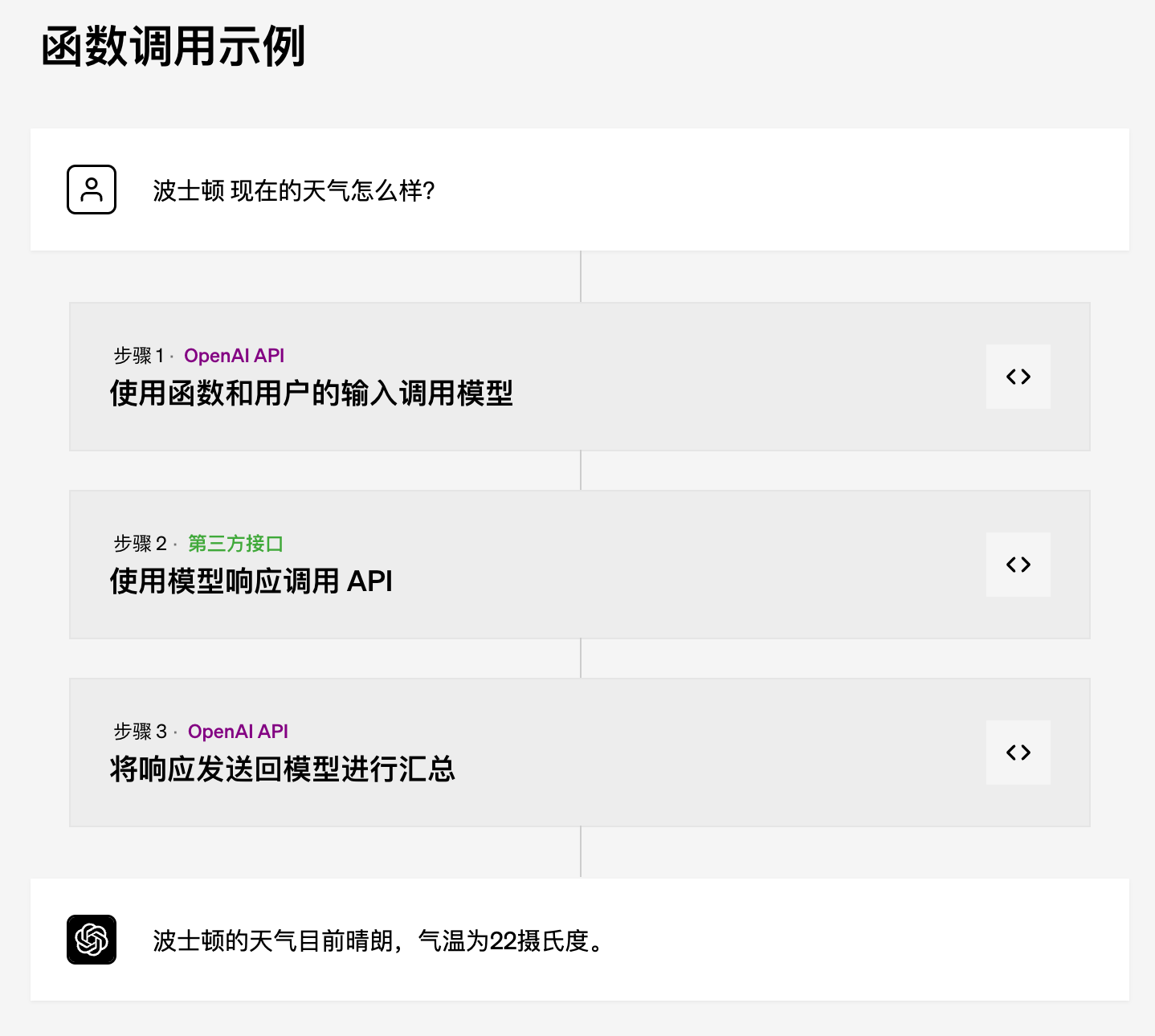
作者:AI小火箭的HB 我是AI小火箭的HB,我探索和写作人工智能和语言交叉点的所有事物,范围从LLM,聊天机器人,语音机器人,开发框架,以数据为中心的潜在空间等。 范例 初步体验 OpenAI新增了“函数调用”功能,这是什么呢? 我们先调用API来体验下。 下面是发送到模型的 JSON 文档。此调用的目的是生成一个 JSON 文件,该文件可用于发送到发送电子邮件的 API。 您可以看到函数名称为 send_email,并定义了三个参数, to_address , subject 和 body ,即电子邮件正文。 用户请求为: Send Cobus from humanfirst ai an email asking for the monthly report? curl --location 'https://api.openai.com/v1/chat/completions' \ --header 'Content-Type: application/json' \ --header 'Authorization: Bearer sk-xxxx' \ --data '{ "model": "gpt-3.5-turbo-0613", "messages": [ {"role": "user", "content": "Send Cobus from humanfirst ai an email asking for the monthly report?"} ], "functions": [ { "name": "send_email", "description": "Please send an email.", "parameters": { "type": "object", "properties": { "to_address": { "type": "string", "description": "To address for email" }, "subject": { "type": "string", "description": "subject of the email" }, "body": { "type": "string", "description": "Body of the email" } } } } ] }' 下面是返回的 JSON { "id": "chatcmpl-7TQuwzJpQAY470saQM2RPfxwF6DDE", "object": "chat.completion", "created": 1687249338, "model": "gpt-3.5-turbo-0613", "choices": [ { "index": 0, "message": { "role": "assistant", "content": null, "function_call": { "name": "send_email", "arguments": "{\n \"to_address\": \"cobus@humanfirst.ai\",\n \"subject\": \"Request for Monthly Report\",\n \"body\": \"Hi Cobus,\\n\\nI hope you're doing well. Could you please share the monthly report with me? It would be great to have it before the end of the week.\\n\\nThanks,\\n[Your Name]\"\n}" } }, "finish_reason": "function_call" } ], "usage": { "prompt_tokens": 86, "completion_tokens": 82, "total_tokens": 168 } } GPT模型会返回需要调用的函数名 send_email和对应的参数(放在arguments字段)。 { "to_address": "cobus@humanfirst.ai", "subject": "Request for Monthly Report", "body": "Hi Cobus,\n\nI hope you're doing well. Could you please share the monthly report with me? It would be great to have it before the end of the week.\n\nThanks,\n[Your Name]" } 这就非常有用,第三方的应用可以提供多个函数/服务(类似插件),GPT模型可以根据用户的指令自动选择不同的函数/服务。 现在再来看示例,就比较清晰了。 用途 根据官网文档,函数调用允许您更可靠地从模型中获取结构化数据。例如,您可以: 创建聊天机器人,通过调用外部 API 来回答问题(例如 ChatGPT 插件) 例如,定义像 send_email(to: string, body: string) 或 get_current_weather(location: string, unit: 'celsius' | 'fahrenheit') 这样的函数 将自然语言转换为 API 调用 例如,将“谁是我的顶级客户?”转换为 get_customers(min_revenue: int, created_before: string, limit: int) 并调用您的内部 API 从文本中提取结构化数据 例如,定义一个名为 extract_data(name: string, birthday: string) 或 sql_query(query: string) 的函数 函数调用的基本步骤顺序如下: 使用用户查询和函数参数中定义的一组函数调用模型。 模型可以选择调用函数;如果是这样,内容将是符合自定义架构的字符串化 JSON 对象(注意:模型可能会生成无效的 JSON 或幻觉参数)。 在代码中将字符串解析为 JSON,并使用提供的参数调用函数(如果存在)。 通过将函数响应追加为新消息来再次调用模型,并让模型将结果汇总回给用户。 AI小火箭 AI小火箭已经支持函数调用和gpt-3.5-turbo-16k、gpt-3.5-turbo-0613、gpt-3.5-turbo-16k-0613,大家可以去体验下。

资源下载

更多资源
腾讯云软件源

腾讯云软件源

为解决软件依赖安装时官方源访问速度慢的问题,腾讯云为一些软件搭建了缓存服务。您可以通过使用腾讯云软件源站来提升依赖包的安装速度。为了方便用户自由搭建服务架构,目前腾讯云软件源站支持公网访问和内网访问。

Nacos

Nacos

Nacos /nɑ:kəʊs/ 是 Dynamic Naming and Configuration Service 的首字母简称,一个易于构建 AI Agent 应用的动态服务发现、配置管理和AI智能体管理平台。Nacos 致力于帮助您发现、配置和管理微服务及AI智能体应用。Nacos 提供了一组简单易用的特性集,帮助您快速实现动态服务发现、服务配置、服务元数据、流量管理。Nacos 帮助您更敏捷和容易地构建、交付和管理微服务平台。

Spring

Spring

Spring框架(Spring Framework)是由Rod Johnson于2002年提出的开源Java企业级应用框架,旨在通过使用JavaBean替代传统EJB实现方式降低企业级编程开发的复杂性。该框架基于简单性、可测试性和松耦合性设计理念,提供核心容器、应用上下文、数据访问集成等模块,支持整合Hibernate、Struts等第三方框架,其适用范围不仅限于服务器端开发,绝大多数Java应用均可从中受益。

Sublime Text

Sublime Text

Sublime Text具有漂亮的用户界面和强大的功能,例如代码缩略图,Python的插件,代码段等。还可自定义键绑定,菜单和工具栏。Sublime Text 的主要功能包括:拼写检查,书签,完整的 Python API , Goto 功能,即时项目切换,多选择,多窗口等等。Sublime Text 是一个跨平台的编辑器,同时支持Windows、Linux、Mac OS X等操作系统。

用户登录
用户注册