首页 文章 精选 留言 我的

精选列表

搜索[错误检测],共10000篇文章
优秀的个人博客,低调大师

执行 Selenium WebDriver脚本抛出 StaleElementReferenceException错误的原因

from selenium import webdriver import time browser = webdriver.Chrome() browser.get('https://www.taobao.com') input = browser.find_element_by_id('q') input.send_keys('iphone') time.sleep(1) input.clear() input.send_keys('ipad') button = browser.find_element_by_class_name('btn-search') button.click() input.clear() input2 = browser.find_element_by_id('q') input2.send_keys('huaweiP10') button2 = browser.find_element_by_class_name('icon-btn-search') button2.click() 在执行脚本时,有时候引用一些元素对象会抛出如下异常 org.openqa.selenium.StaleElementReferenceException: stale element reference: element is not attached to the page document 按字面表达的意思大概是,所引用的元素已过时,不再依附于当前页面。通常情况下,这是因为页面进行了刷新或跳转,解决方法是,重新使用findElement 或 findElements 方法进行元素定位即可。

优秀的个人博客,低调大师

【Android错误集锦】AppBarLayout is overlapping the RecyclerView in one of my...

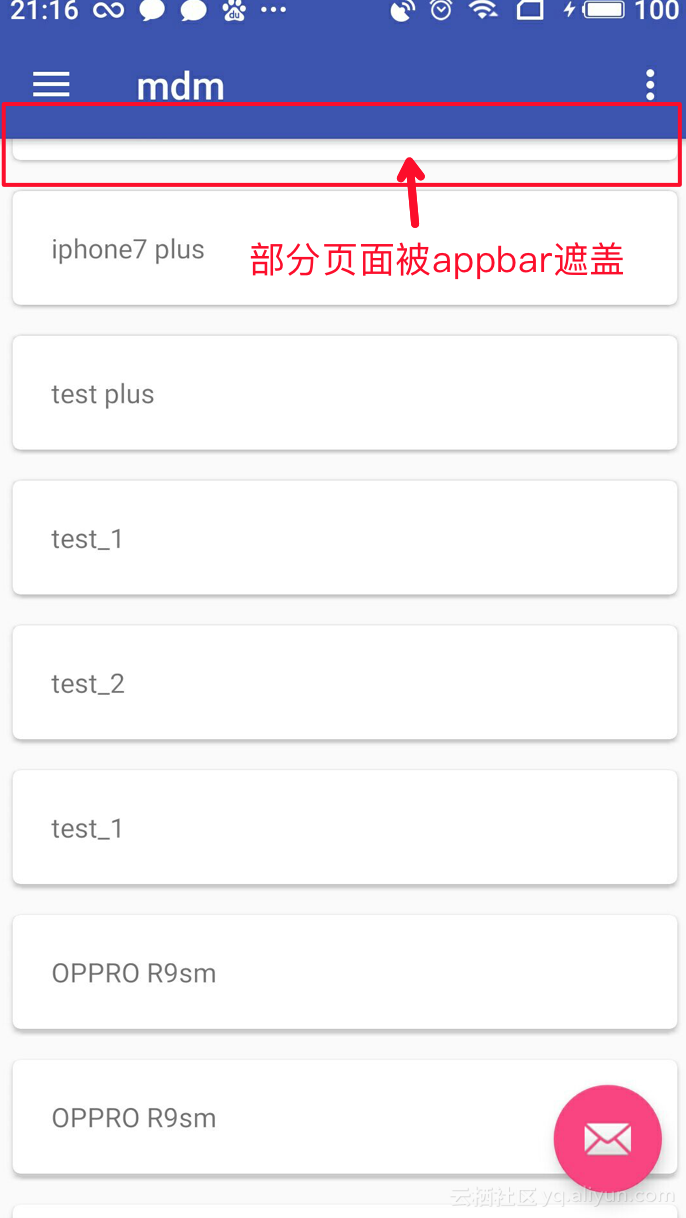
问题现象:recyclerview 中的顶部数据被appbar遮盖,如下图红框所示 解决方法: 在activity_main.xml里面CoordinatorLayout布局下 即与AppBarLayout布局并列下加上 如下代码 <!--app:layout_behavior="@string/appbar_scrolling_view_behavior"--> <!--在RecyclerView或者其他支持嵌套滚动的view中如果添加以上属性将和AppBarLayout绑定--> <?xml version="1.0" encoding="utf-8"?><android.support.design.widget.CoordinatorLayout xmlns:android="http://schemas.android.com/apk/res/android" xmlns:app="http://schemas.android.com/apk/res-auto" xmlns:tools="http://schemas.android.com/tools" android:layout_width="match_parent" android:layout_height="match_parent" tools:context="com.iwm.qa.mdm.view.MainActivity"> <android.support.design.widget.AppBarLayout android:layout_width="match_parent" android:layout_height="wrap_content" android:theme="@style/AppTheme.AppBarOverlay"> <android.support.v7.widget.Toolbar android:id="@+id/toolbar" android:layout_width="match_parent" android:layout_height="?attr/actionBarSize" android:background="?attr/colorPrimary" app:popupTheme="@style/AppTheme.PopupOverlay" /> </android.support.design.widget.AppBarLayout> <android.support.v7.widget.RecyclerView xmlns:android="http://schemas.android.com/apk/res/android" android:layout_width="match_parent" android:layout_height="match_parent" android:layout_below="@id/toolbar" android:id="@+id/recycler_view" android:layout_centerVertical="true" android:layout_centerHorizontal="true" app:layout_behavior="@string/appbar_scrolling_view_behavior" /> <android.support.design.widget.FloatingActionButton android:id="@+id/fab" android:layout_width="wrap_content" android:layout_height="wrap_content" android:layout_gravity="bottom|end" android:layout_margin="@dimen/fab_margin" app:srcCompat="@android:drawable/ic_dialog_email" /> </android.support.design.widget.CoordinatorLayout> When you are usingCoordinatorLayoutandAppBarLayout, you are setting up for that coordinated scrolling where the toolbar pushes out of the way first. But in order to get that, you need to give the view below the toolbar the appbar scrolling view behavior. This not only sets up the coordinated scroll, but tells theCoordinatorLayoutto layout the lower view so that it appears beneath the toolbar. If you don't want the coordinated toolbar scrolling, replaceCoordinatorLayoutwith a verticalLinearLayout. 附参考博客: https://stackoverflow.com/questions/38601099/appbarlayout-overlaps-recyclerview

优秀的个人博客,低调大师

camera多次调用出现错误解决方法

因为项目中有用到相机拍照功能,所以研究了下camera。 在实践的过程中发现两个问题: 1、用模拟器启动不了camera,提示:java.lang.runtimeException:setparameters failed..... 因为parameters.setPictureSize(320, 480)(设置分辨率)的参数有误, 如果不清楚分辨率可以却掉这句话,再运行就OK 了。 如果真的想看分辨率可以看logcat日志上面有写:getParameters(....)里面就是一些相关的参数。 2、连续两次以上的拍照,会出现异常:java.lang.RuntimeException:fail to connect to camera service。 因为没有对camera进行释放,或者说系统有自动释放功能但是还没有被处理。可以通过手动释放: /** * 停止预览 */ @Override public void surfaceDestroyed(SurfaceHolder holder) { // TODO Auto-generated method stub mCamera.stopPreview(); mCamera.release();//加上这句,就OK! mCamera=null; } 分类: android solve 本文转自wanqi博客园博客,原文链接:http://www.cnblogs.com/wanqieddy/archive/2011/08/18/2144635.html 如需转载请自行联系原作者

优秀的个人博客,低调大师

Jni 读写sd卡报异常错误Permission denied

场景 红米Android5.0系统测试结果发现不支持写sd卡,因此通过Jni的方式访问sd卡的内容,在写数据的时候会出错。暂时没有解决方案,不过却可以在存储卡中进行读写。测试代码 #include <errno.h> #include <stdlib.h> #include <string.h> errno = 0; char szFileName[256] = "/storage/sdcard1/android/data/test.txt"; FILE* fileHandle= fopen(szFileName, "rb+"); if (NULL == fileHandle) { char* errMsg = NULL; if (errno !=0) { errMsg = strerror(errno); } } else { fseek(fileHandle,0L,SEEK_END); int flen=ftell(fileHandle); } 本文转自fengyuzaitu 51CTO博客,原文链接:http://blog.51cto.com/fengyuzaitu/1601648,如需转载请自行联系原作者

资源下载

更多资源
腾讯云软件源

腾讯云软件源

为解决软件依赖安装时官方源访问速度慢的问题,腾讯云为一些软件搭建了缓存服务。您可以通过使用腾讯云软件源站来提升依赖包的安装速度。为了方便用户自由搭建服务架构,目前腾讯云软件源站支持公网访问和内网访问。

Spring

Spring

Spring框架(Spring Framework)是由Rod Johnson于2002年提出的开源Java企业级应用框架,旨在通过使用JavaBean替代传统EJB实现方式降低企业级编程开发的复杂性。该框架基于简单性、可测试性和松耦合性设计理念,提供核心容器、应用上下文、数据访问集成等模块,支持整合Hibernate、Struts等第三方框架,其适用范围不仅限于服务器端开发,绝大多数Java应用均可从中受益。

Sublime Text

Sublime Text

Sublime Text具有漂亮的用户界面和强大的功能,例如代码缩略图,Python的插件,代码段等。还可自定义键绑定,菜单和工具栏。Sublime Text 的主要功能包括:拼写检查,书签,完整的 Python API , Goto 功能,即时项目切换,多选择,多窗口等等。Sublime Text 是一个跨平台的编辑器,同时支持Windows、Linux、Mac OS X等操作系统。

WebStorm

WebStorm

WebStorm 是jetbrains公司旗下一款JavaScript 开发工具。目前已经被广大中国JS开发者誉为“Web前端开发神器”、“最强大的HTML5编辑器”、“最智能的JavaScript IDE”等。与IntelliJ IDEA同源,继承了IntelliJ IDEA强大的JS部分的功能。


用户登录
用户注册