uni-app自定义Modal弹窗|alert对话框|Toast提示
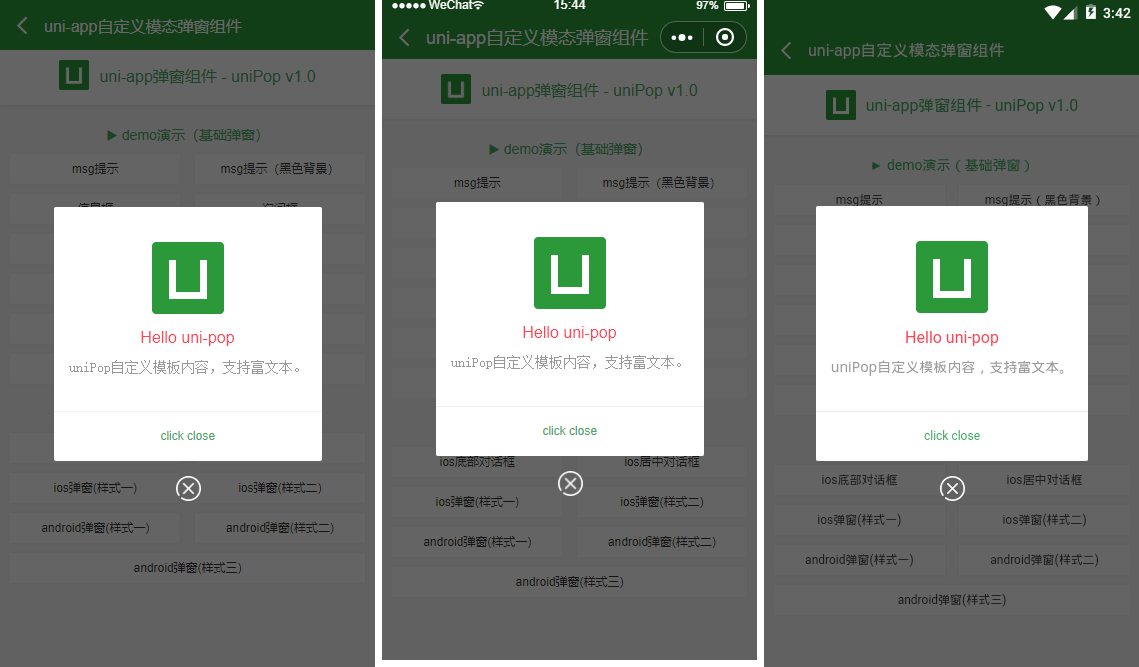
uniApp自定义模态弹窗模板uniPop,实现了uniapp仿微信、android、ios弹窗效果,msg信息框/confirm确认框 uniPop内置多种动画效果、可供选择类型ios/android、可以自定义弹窗样式/自定义多按钮及事件/弹窗显示位置、自动关闭秒数、遮罩层透明度及点击遮罩是否关闭 如下图:H5/小程序/App三端效果兼容性一致。(后续大图均展示App端) 引入方式uniPop.vue弹窗组件两种引入方式:1、在main.js里引入全局组件import uniPop from './components/uniPop/uniPop.vue'Vue.component('uni-pop', uniPop)2、在页面引入组件 <template> <view class="container"> ... <!-- 弹窗模板 --> <uni-pop ref="uniPop"></uni-pop> </view> </template> <script> import uniPop from './components/uniPop/uniPop.vue' export default { data() { return { ... } }, components:{ uniPop }, ... } </script> 调用方式 this.$refs.uniPop.show({ content: 'msg消息提示框(5s后窗口关闭)', shade: true, shadeClose: false, time: 5, anim: 'fadeIn', }) this.$refs.uniPop.show({ skin: 'toast', content: 'loading', icon: 'loading', //success | info | error | loading shade: false, time: 3 }) /** * @tpl uni-app自定义弹窗组件 - uniPop.vue * @author andy by 2019-09-20 */ <template> <view v-if="opts.isVisible" class="uniPop" :class="opts.isCloseCls"> <view class="unipop__ui_panel"> <view v-if="opts.shade" class="unipop__ui_mask" @tap="shadeTaped"></view> <view class="unipop__ui_main"> <view class="unipop__ui_child" :style="opts.style"> <!-- 标题 --> <view v-if="opts.title" class="unipop__ui_tit">{{opts.title}}</view> <!-- 内容 --> <view v-if="opts.content" class="unipop__ui_cnt" :style="opts.contentStyle"> {{opts.content}} </view> <view v-if="opts.btns" class="unipop__ui_btns"> <text v-for="(item,index) in opts.btns" :key="index" class="btn" :style="item.style" @tap="btnTaped(item)">{{item.text}}</text> </view> </view> <!-- xclose --> <view v-if="opts.xclose" class="unipop__xclose" @tap="close"></view> </view> </view> </view> </template> data() { return { defaultOptions: { isVisible: false, //是否显示弹窗 title: '', //标题 content: '', //内容 contentStyle: '', //内容样式 style: null, //自定义弹窗样式 skin: '', //弹窗风格 icon: '', //弹窗图标 xclose: false, //自定义关闭按钮 shade: true, //遮罩层 shadeClose: true, //点击遮罩关闭 opacity: '', //遮罩透明度 time: 0, //自动关闭秒数 end: null, //销毁弹窗回调函数 anim: 'scaleIn', //弹窗动画 scaleIn(默认) | fadeIn | shake | top | right | bottom | left position: '', //弹窗位置 top | right | bottom | left btns: null, //弹窗按钮 }, opts: {}, timer: null } },