MapReduce实现协同过滤中每个用户看过的项目集合
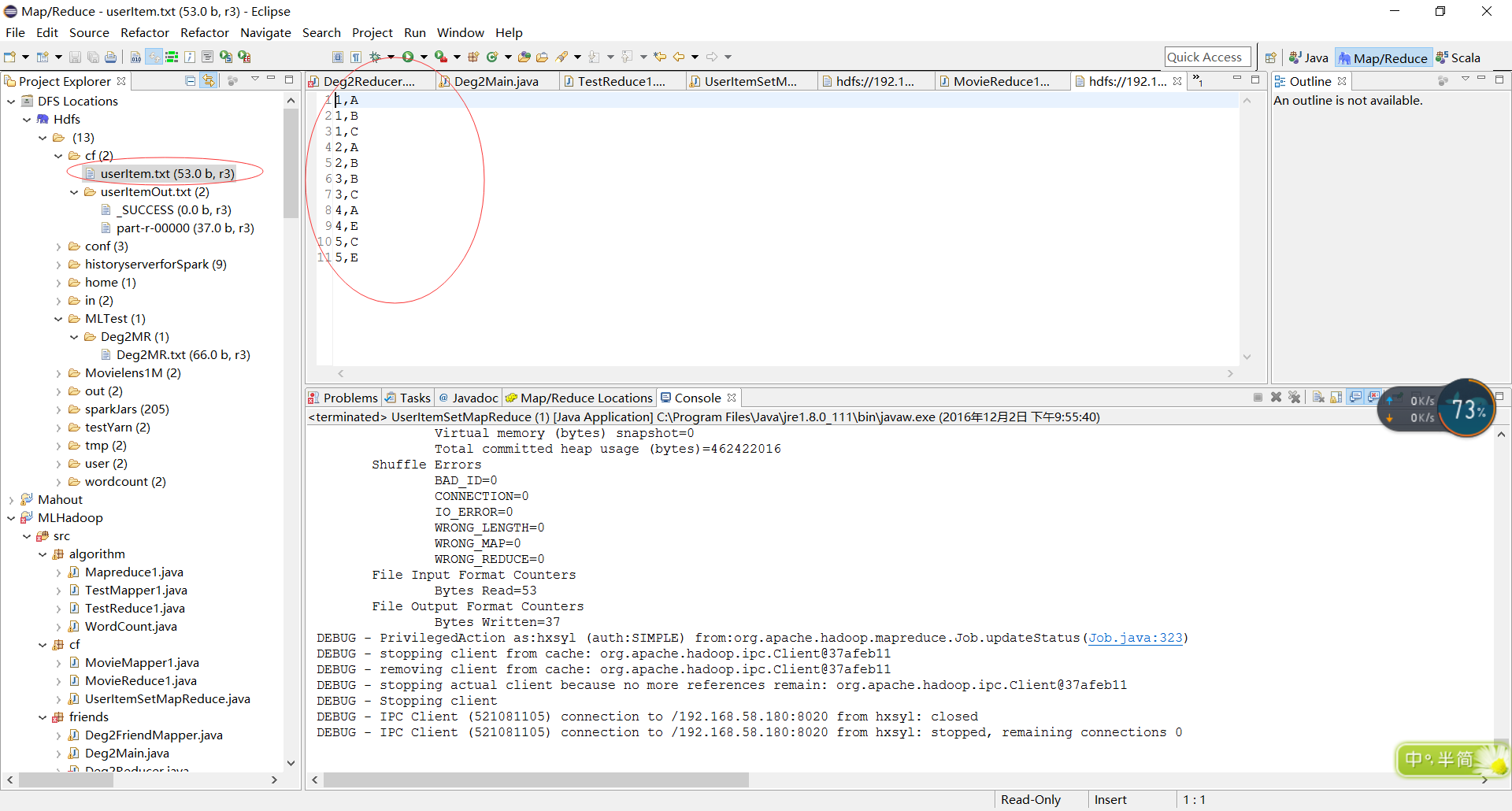
一、知识准备 hadoop自带的例子在 D:\HADOOP_HOME\hadoop-2.6.4\share\hadoop\mapreduce\sources\hadoop-mapreduce-examples 2.6.0-source.jar 我记得当年面试的时候就问中位数的问题不过是数据流下的中位数,一问便知是否搞过hadoop。 二、代码实现 2.1 Mapper package cf; import java.io.IOException; import org.apache.hadoop.io.LongWritable; import org.apache.hadoop.io.Text; import org.apache.hadoop.mapreduce.Mapper; public class MovieMapper1 extends Mapper<LongWritable, Text, Text, Text> { public void map(LongWritable ikey, Text ivalue, Context context) throws IOException, InterruptedException { String[] values = ivalue.toString().split(","); if (values.length!=2) { return ; } String userID = values[0]; String itemID = values[1]; context.write(new Text(userID), new Text(itemID)); } } 2.2 Reducer package cf; import java.io.IOException; import org.apache.hadoop.io.Text; import org.apache.hadoop.mapreduce.Reducer; public class MovieReduce1 extends Reducer<Text, Text, Text, Text> { public void reduce(Text _key, Iterable<Text> values, Context context) throws IOException, InterruptedException { // process values StringBuffer sb = new StringBuffer(); for (Text val : values) { sb.append(val.toString()); sb.append(","); } //value不能直接用StringBuffer 必须转换为String context.write(_key,new Text(sb.toString())); } } 2.3 Main package cf; import java.io.IOException; import org.apache.hadoop.conf.Configuration; import org.apache.hadoop.fs.Path; import org.apache.hadoop.io.IntWritable; import org.apache.hadoop.io.Text; import org.apache.hadoop.mapreduce.Job; import org.apache.hadoop.mapreduce.lib.input.FileInputFormat; import org.apache.hadoop.mapreduce.lib.output.FileOutputFormat; public class UserItemSetMapReduce { public static void main(String[] args) throws Exception{ Configuration conf = new Configuration(); Job job = new Job(conf, "CFItemSet"); job.setJarByClass(UserItemSetMapReduce.class); job.setMapperClass(MovieMapper1.class); //job.setCombinerClass(cls); // job.setCombinerClass(MovieReduce1.class); job.setReducerClass(MovieReduce1.class); job.setOutputKeyClass(Text.class); job.setOutputValueClass(Text.class); FileInputFormat.addInputPath(job,new Path("hdfs://192.168.58.180:8020/cf/userItem.txt")); //InputPath(job, new Path(otherArgs[0])); //直接写到cf会提示已存在cf,我写成uIO.ttx,以为内容会写入到txt,然没有,默认他是文件夹 FileOutputFormat.setOutputPath(job,new Path("hdfs://192.168.58.180:8020/cf/userItemOut.txt")); System.exit(job.waitForCompletion(true) ? 0 : 1); } } 三、结果分析 3.1 输入 3.2 输出 查看结果发现输出文件的分隔符默认是tab,‘\t’,同时相对于输入文件来说输出结果是逆着的,类似沾,莫非context就是这样的先进后出、 3.3日志分析 只列出了主要部分的日志 DEBUG - PrivilegedAction as:hxsyl (auth:SIMPLE) from:org.apache.hadoop.mapreduce.Job.getCounters(Job.java:765) INFO - Counters: 38 File System Counters FILE: Number of bytes read=538 FILE: Number of bytes written=509366 FILE: Number of read operations=0 FILE: Number of large read operations=0 FILE: Number of write operations=0 HDFS: Number of bytes read=106 HDFS: Number of bytes written=37 HDFS: Number of read operations=13 HDFS: Number of large read operations=0 HDFS: Number of write operations=4 Map-Reduce Framework Map input records=11 Map output records=11 Map output bytes=44 Map output materialized bytes=72 Input split bytes=107 Combine input records=0 Combine output records=0 Reduce input groups=5 Reduce shuffle bytes=72 Reduce input records=11 Reduce output records=5 Spilled Records=22 Shuffled Maps =1 Failed Shuffles=0 Merged Map outputs=1 GC time elapsed (ms)=3 CPU time spent (ms)=0 Physical memory (bytes) snapshot=0 Virtual memory (bytes) snapshot=0 Total committed heap usage (bytes)=462422016 Shuffle Errors BAD_ID=0 CONNECTION=0 IO_ERROR=0 WRONG_LENGTH=0 WRONG_MAP=0 WRONG_REDUCE=0 File Input Format Counters Bytes Read=53 File Output Format Counters Bytes Written=37 DEBUG - PrivilegedAction as:hxsyl (auth:SIMPLE) from:org.apache.hadoop.mapreduce.Job.updateStatus(Job.java:323) DEBUG - stopping client from cache: org.apache.hadoop.ipc.Client@37afeb11 DEBUG - removing client from cache: org.apache.hadoop.ipc.Client@37afeb11 DEBUG - stopping actual client because no more references remain: org.apache.hadoop.ipc.Client@37afeb11 DEBUG - Stopping client DEBUG - IPC Client (521081105) connection to /192.168.58.180:8020 from hxsyl: closed DEBUG - IPC Client (521081105) connection to /192.168.58.180:8020 from hxsyl: stopped, remaining connections 0 大神分析一下如何执行的,看着日志....Map如何输入的,执行几次等。