首页 文章 精选 留言 我的

精选列表

搜索[快速入门],共10000篇文章
优秀的个人博客,低调大师

每日一博 | 如何快速安全地插入千万条数据

前言 最近有个需求解析一个订单文件,并且说明文件可达到千万条数据,每条数据大概在20个字段左右,每个字段使用逗号分隔,需要尽量在半小时内入库。 思路 1.估算文件大小 因为告诉文件有千万条,同时每条记录大概在20个字段左右,所以可以大致估算一下整个订单文件的大小,方法也很简单使用FileWriter往文件中插入一千万条数据,查看文件大小,经测试大概在1.5G左右; 2.如何批量插入 由上可知文件比较大,一次性读取内存肯定不行,方法是每次从当前订单文件中截取一部分数据,然后进行批量插入,如何批次插入可以使用insert(...)values(...),(...)的方式,经测试这种方式效率还是挺高的; 3.数据的完整性 截取数据的时候需要注意,需要保证数据的完整性,每条记录最后都是一个换行符,需要根据这个标识保证每次截取都是整条数,不要出现半条数据这种情况; 4.数据库是否支持批次数据 因为需要进行批次数据的插入,数据库是否支持大量数据写入,比如这边使用的mysql,可以通过设置max_allowed_packet来保证批次提交的数据量; 5.中途出错的情况 因为是大文件解析,如果中途出现错误,比如数据刚好插入到900w的时候,数据库连接失败,这种情况不可能重新来插一遍,所有需要记录每次插入数据的位置,并且需要保证和批次插入的数据在同一个事务中,这样恢复之后可以从记录的位置开始继续插入。 实现 1.准备数据表 这里需要准备两张表分别是:订单状态位置信息表,订单表; CREATE TABLE `file_analysis` ( `id` bigint(20) NOT NULL AUTO_INCREMENT, `file_type` varchar(255) NOT NULL COMMENT '文件类型 01:类型1,02:类型2', `file_name` varchar(255) NOT NULL COMMENT '文件名称', `file_path` varchar(255) NOT NULL COMMENT '文件路径', `status` varchar(255) NOT NULL COMMENT '文件状态 0初始化;1成功;2失败:3处理中', `position` bigint(20) NOT NULL COMMENT '上一次处理完成的位置', `crt_time` datetime NOT NULL COMMENT '创建时间', `upd_time` datetime NOT NULL COMMENT '更新时间', PRIMARY KEY (`id`) ) ENGINE=InnoDB AUTO_INCREMENT=2 DEFAULT CHARSET=utf8 CREATE TABLE `file_order` ( `id` bigint(20) NOT NULL AUTO_INCREMENT, `file_id` bigint(20) DEFAULT NULL, `field1` varchar(255) DEFAULT NULL, `field2` varchar(255) DEFAULT NULL, `field3` varchar(255) DEFAULT NULL, `field4` varchar(255) DEFAULT NULL, `field5` varchar(255) DEFAULT NULL, `field6` varchar(255) DEFAULT NULL, `field7` varchar(255) DEFAULT NULL, `field8` varchar(255) DEFAULT NULL, `field9` varchar(255) DEFAULT NULL, `field10` varchar(255) DEFAULT NULL, `field11` varchar(255) DEFAULT NULL, `field12` varchar(255) DEFAULT NULL, `field13` varchar(255) DEFAULT NULL, `field14` varchar(255) DEFAULT NULL, `field15` varchar(255) DEFAULT NULL, `field16` varchar(255) DEFAULT NULL, `field17` varchar(255) DEFAULT NULL, `field18` varchar(255) DEFAULT NULL, `crt_time` datetime NOT NULL COMMENT '创建时间', `upd_time` datetime NOT NULL COMMENT '更新时间', PRIMARY KEY (`id`) ) ENGINE=InnoDB AUTO_INCREMENT=10000024 DEFAULT CHARSET=utf8 2.配置数据库包大小 mysql> show VARIABLES like '%max_allowed_packet%'; +--------------------------+------------+ | Variable_name | Value | +--------------------------+------------+ | max_allowed_packet | 1048576 | | slave_max_allowed_packet | 1073741824 | +--------------------------+------------+ 2 rows in set mysql> set global max_allowed_packet = 1024*1024*10; Query OK, 0 rows affected 通过设置max_allowed_packet,保证数据库能够接收批次插入的数据包大小;不然会出现如下错误: Caused by: com.mysql.jdbc.PacketTooBigException: Packet for query is too large (4980577 > 1048576). You can change this value on the server by setting the max_allowed_packet' variable. at com.mysql.jdbc.MysqlIO.send(MysqlIO.java:3915) at com.mysql.jdbc.MysqlIO.sendCommand(MysqlIO.java:2598) at com.mysql.jdbc.MysqlIO.sqlQueryDirect(MysqlIO.java:2778) at com.mysql.jdbc.ConnectionImpl.execSQL(ConnectionImpl.java:2834) 3.准备测试数据 public static void main(String[] args) throws IOException { FileWriter out = new FileWriter(new File("D://xxxxxxx//orders.txt")); for (int i = 0; i < 10000000; i++) { out.write( "vaule1,vaule2,vaule3,vaule4,vaule5,vaule6,vaule7,vaule8,vaule9,vaule10,vaule11,vaule12,vaule13,vaule14,vaule15,vaule16,vaule17,vaule18"); out.write(System.getProperty("line.separator")); } out.close(); } 使用FileWriter遍历往一个文件里插入1000w条数据即可,这个速度还是很快的,不要忘了在每条数据的后面添加换行符(\n\r); 4.截取数据的完整性 除了需要设置每次读取文件的大小,同时还需要设置一个参数,用来每次获取一小部分数据,从这小部分数据中获取换行符(\n\r),如果获取不到一直累加直接获取为止,这个值设置大小大致同每条数据的大小差不多合适,部分实现如下: ByteBuffer byteBuffer = ByteBuffer.allocate(buffSize); // 申请一个缓存区 long endPosition = batchFileSize + startPosition - buffSize;// 子文件结束位置 long startTime, endTime; for (int i = 0; i < count; i++) { startTime = System.currentTimeMillis(); if (i + 1 != count) { int read = inputChannel.read(byteBuffer, endPosition);// 读取数据 readW: while (read != -1) { byteBuffer.flip();// 切换读模式 byte[] array = byteBuffer.array(); for (int j = 0; j < array.length; j++) { byte b = array[j]; if (b == 10 || b == 13) { // 判断\n\r endPosition += j; break readW; } } endPosition += buffSize; byteBuffer.clear(); // 重置缓存块指针 read = inputChannel.read(byteBuffer, endPosition); } } else { endPosition = fileSize; // 最后一个文件直接指向文件末尾 } ...省略,更多可以查看Github完整代码... } 如上代码所示开辟了一个缓冲区,根据每行数据大小来定大概在200字节左右,然后通过遍历查找换行符(\n\r),找到以后将当前的位置加到之前的结束位置上,保证了数据的完整性; 5.批次插入数据 通过insert(...)values(...),(...)的方式批次插入数据,部分代码如下: // 保存订单和解析位置保证在一个事务中 SqlSession session = sqlSessionFactory.openSession(); try { long startTime = System.currentTimeMillis(); FielAnalysisMapper fielAnalysisMapper = session.getMapper(FielAnalysisMapper.class); FileOrderMapper fileOrderMapper = session.getMapper(FileOrderMapper.class); fileOrderMapper.batchInsert(orderList); // 更新上次解析到的位置,同时指定更新时间 fileAnalysis.setPosition(endPosition + 1); fileAnalysis.setStatus("3"); fileAnalysis.setUpdTime(new Date()); fielAnalysisMapper.updateFileAnalysis(fileAnalysis); session.commit(); long endTime = System.currentTimeMillis(); System.out.println("===插入数据花费:" + (endTime - startTime) + "ms==="); } catch (Exception e) { session.rollback(); } finally { session.close(); } ...省略,更多可以查看Github完整代码... 如上代码在一个事务中同时保存批次订单数据和文件解析位置信息,batchInsert通过使用mybatis的<foreach>标签来遍历订单列表,生成values数据; 总结 以上展示了部分代码,完整的代码可以查看Github地址中的batchInsert模块,本地设置每次截取的文件大小为2M,经测试1000w条数据(大小1.5G左右)插入mysql数据库中,大概花费时间在20分钟左右,当然可以通过设置截取的文件大小,花费的时间也会相应的改变。 完整代码 Github

优秀的个人博客,低调大师

5分钟快速安装ASP.NET Core 网站运行环境

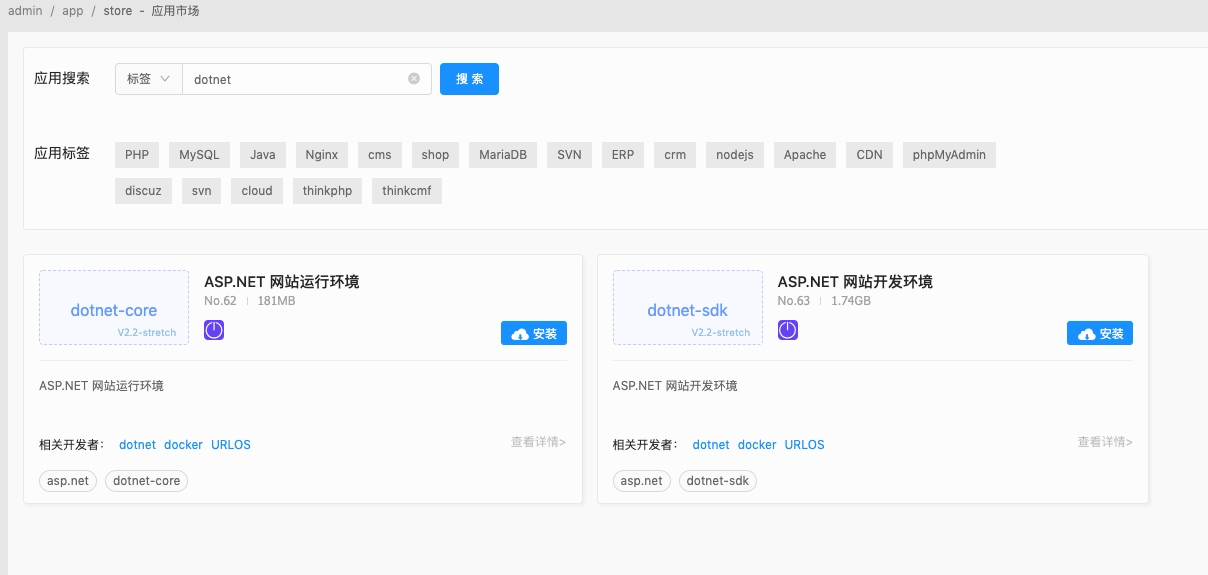
简介 ASP.NET Core 是新一代的 ASP.NET,早期称为 ASP.NET vNext,并且在推出初期命名为 ASP.NET 5,但随着 .NET Core 的成熟,以及 ASP.NET 5 的命名会使得外界将它视为 ASP.NET 的升级版,但它其实是新一代从头开始打造的 ASP.NET 核心功能,因此微软宣布将它改为与 .NET Core 同步的名称,即 ASP.NET Core。 ASP.NET Core 可运行于 Windows 平台以及非 Windows 平台,如 Mac OSX 以及 Ubuntu Linux 操作系统,是 Microsoft 第一个具有跨平台能力的 Web 开发框架。 安装 为了方便部署和解决环境兼容性等问题,采用docker来部署安装ASP.NET Core。 首先安装Docker容器管理面板URLOS,请参考官方文档:https://www.URLOS.com/center-home-index-detail-10-22-y.html。 登录URLOS:http://ip:9968(其中的IP是你的服务器的IP,登录的默认用户名和密码均为urlos) 在应用市场中搜索“ASP.NET”并安装,如下图: 这里有两个搜索结果,一个是“网站运行环境”也就是runtime,一个是“网站开发环境”也就是sdk,sdk里面也包含runtime。如果是生产环境,部署到带有runtime的环境就行了。所以我们选择“ASP.NET 网站运行环境”。 安装流程如下: 1. 填写服务名称、服务端口、选择运行节点、选择智能部署 2. 填写域名:www.aaa.com(这里填写自己的域名)、项目名称(跟你的ASP.NET Core项目名称一致) 3.设置SFTP 选择“上传与下载”选项卡,开启SFTP上传下载并填写SFTP端口、SFTP密码; 然后点击“提交”按钮,等待部署完成; 4.上传网站代码 用sftp或者ssh客户端登录。网站根目录是:/mounts/aspdotnet001/data/www(由于本次教程的服务名称为aspdotnet001,实际操作中根据你填写的服务名称自动创建) 把 ASP.NET Core的项目publish后的文件,上传到网站根目录例如: 这里的项目名称是“myWebApp”,跟我们在安装流程第2步的时候已经填写了项目名称一致。 然后,重新部署,如下图: 重新部署完成后,网站已经成功跑起来了! tips:更新网站的话,上传网站文件到网站根目录后,像这样重新部署一下就好了。

优秀的个人博客,低调大师

如何快速构建数据库智能化运维平台(一)

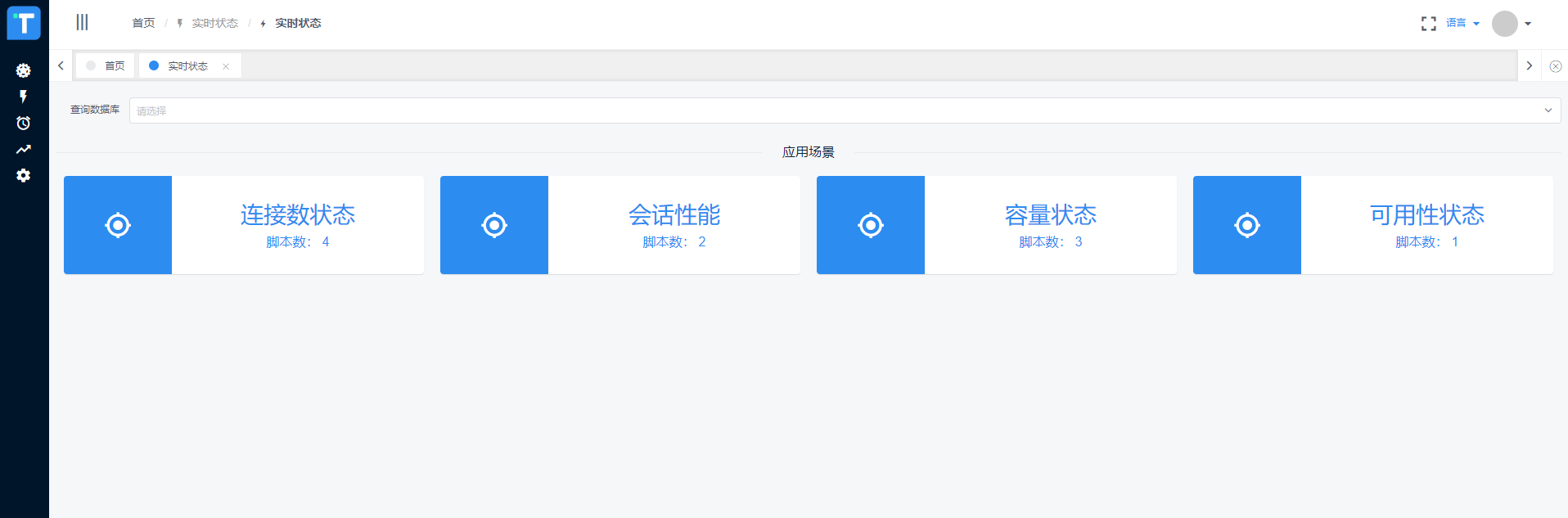
简介 本人出身DBA,主业Oracle,副业PostgreSQL,由于生性懒惰,遂沉迷于自动化运维与智能化运维不能自拔,实现过数据库自动化运维平台、容灾一键切换平台,目前正在坚定地向智能化迈进。从后台管理来说,数据库运维管理是极其重要的组成部分,对业务系统、生产稳定的影响不言而喻。随着业务规模的不断扩大,原有的人肉运维方式已经越来越难以满足运维需求,因此,自动化运维平台、智能化运维平台应运而生。本系列为作者原创,将多年对自动化运维的思考沉淀下来,以平台构建的形式展示给大家,希望对大家有所帮助,欢迎大家批评指正! 写在动手之前 1.目标范围 顾名思义,自动化是将手工操作变革为机器自动操作。但是,许多人在平台建设初期往往会进入一个误区:要穷举可能用到的所有场景,把所有的运维工作都做成自动化,彻底解放人工。想法固然是好,但是由于数据库运维的复杂性,在实际建设过程中会举步维艰,难以为继。我所理解的自动化,是要解决DBA的痛点,而且是最痛的点,把DBA从繁琐的、周期性的、价值低的重复工作中解放出来,注意,我强调的是痛点,而不是全部。这一点非常重要! 2.构建基础 数据库自动化的实现,离不开数据库管理的基础,包括常规化操作的固化、管理的规范等。从数据库参数配置、安装手册、用户管理、资源容量管理等维度都具有一定的标准。这是实现自动化的前提,当然,我构建的平台是支持动态发展的,不会因为脚本更新了平台就运行不下去,那为什么说标准化是前提呢?因为标准化是从更高一层规范了数据库管理,从人、对象、操作都具有一定的合规性和稳定性之后,自动化和智能化的实现会事半功倍。 啰嗦半天,先上几张效果图尝尝鲜1.数据库实时状态 2.数据库批量操作执行情况 3.数据库操作任务执行树 4.任务执行详细数据5.数据库性能指标智能分析 以上为做这件事的一些思考以及效果图,下一篇开始动手!

优秀的个人博客,低调大师

如何快速打造一款高清又极速的短视频APP?

整个短视频的市场规模一直在增长,网络数据显示2018年已经突破100亿大关,在2019年预测将超过200亿。纵观行业,在生活资讯、美食、搞笑、游戏、美妆等领域,短视频流量巨大但竞争激烈,但是在教育、财经、军事、旅游等行业还存在较大的机会。那么在这些垂直行业里,我们如何结合短视频能力,实现业务突破? 近期的云栖TechDay音视频技术专场中,阿里云视频云高级技术专家王海华现场分享了《高清极速-全面提升短视频应用体验》议题。他表示,作为短视频SDK服务提供方,视频云一直和客户同样关注如何把短视频的产品和体验做得更极致。本次分享讲从端到云再到端,探讨如何进行思考与优化,实现视频体验的全面提升。 短视频的业务特征 短视频可以随时随地进行拍摄、分享与浏览,所以它存在着海量的上传和播放 用户在移动端消费短视频的机型和网络情况十分复杂 用户对短视频体验的

优秀的个人博客,低调大师

SpringBoot中oauth2.0学习之服务端配置快速上手

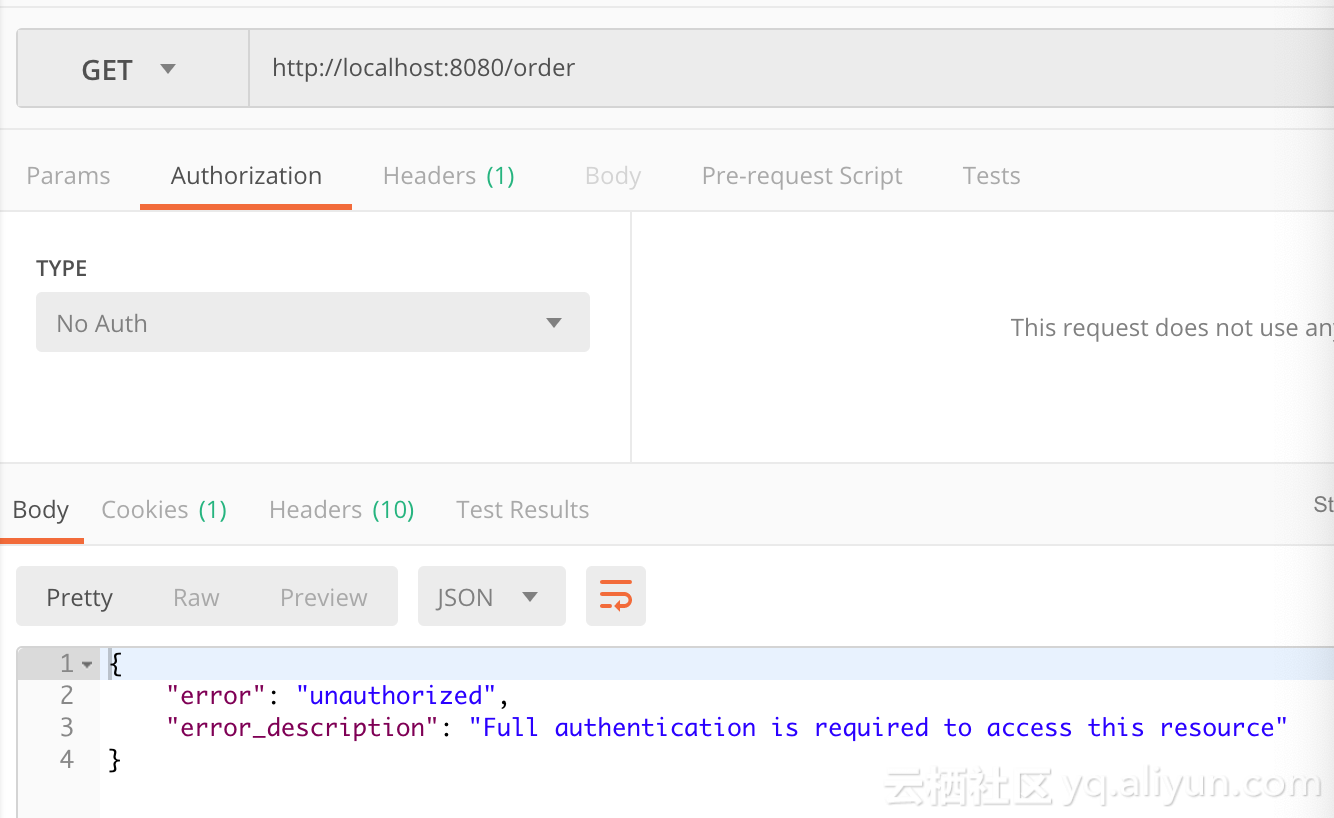
现在第三方登录的例子数见不鲜。其实在这种示例当中,oauth2.0是使用比较多的一种授权登录的标准。oauth2.0也是从oauth1.0升级过来的。那么关于oauth2.0相关的概念及其原理,大家可以参考这篇文章,这篇文章中会有更详细的解释,下来我们直接进入正题。 1.1、gradle依赖 compile('org.springframework.cloud:spring-cloud-starter-oauth2') compile('org.springframework.cloud:spring-cloud-starter-security') 在这里我直接引入的是spring-cloud的依赖项,这种依赖的jar包更全面一些,这里面的核心基础还是spring-security。这里SpringBoot的版本为2.0.6.REALEASE 1.2、@EnableAuthorizationServer 在这里我着重强调一下这个注解:@EnableAuthorizationServer,这个注解源代码如下: @Target(ElementType.TYPE) @Retention(RetentionPolicy.RUNTIME) @Documented @Import({AuthorizationServerEndpointsConfiguration.class, AuthorizationServerSecurityConfiguration.class}) public @interface EnableAuthorizationServer { } 这个注解主要是导入两个配置类,分别是: AuthorizationServerEndpointsConfiguration,这个配置类主要配置授权端点,获取token的端点。大家就把对应的端点想象成controller即可,在这个controller下开放了若干个@RequestMapping,比如常见的有:/oauth/authorize(授权路径),/oauth/token(获取token)等 AuthorizationServerSecurityConfiguration,主要是做spring-security的安全配置,我们可以看一下相关代码: public class AuthorizationServerSecurityConfiguration extends WebSecurityConfigurerAdapter { @Autowired private List<AuthorizationServerConfigurer> configurers = Collections.emptyList(); @Autowired private ClientDetailsService clientDetailsService; @Autowired private AuthorizationServerEndpointsConfiguration endpoints; @Autowired public void configure(ClientDetailsServiceConfigurer clientDetails) throws Exception { for (AuthorizationServerConfigurer configurer : configurers) { configurer.configure(clientDetails); } } @Override protected void configure(AuthenticationManagerBuilder auth) throws Exception { // Over-riding to make sure this.disableLocalConfigureAuthenticationBldr = false // This will ensure that when this configurer builds the AuthenticationManager it will not attempt // to find another 'Global' AuthenticationManager in the ApplicationContext (if available), // and set that as the parent of this 'Local' AuthenticationManager. // This AuthenticationManager should only be wired up with an AuthenticationProvider // composed of the ClientDetailsService (wired in this configuration) for authenticating 'clients' only. } @Override protected void configure(HttpSecurity http) throws Exception { //....省略部分代码 String tokenEndpointPath = handlerMapping.getServletPath("/oauth/token"); String tokenKeyPath = handlerMapping.getServletPath("/oauth/token_key"); String checkTokenPath = handlerMapping.getServletPath("/oauth/check_token"); if (!endpoints.getEndpointsConfigurer().isUserDetailsServiceOverride()) { UserDetailsService userDetailsService = http.getSharedObject(UserDetailsService.class); endpoints.getEndpointsConfigurer().userDetailsService(userDetailsService); } // @formatter:off //上述节点的请求需要授权验证 http .authorizeRequests() .antMatchers(tokenEndpointPath).fullyAuthenticated() .antMatchers(tokenKeyPath).access(configurer.getTokenKeyAccess()) .antMatchers(checkTokenPath).access(configurer.getCheckTokenAccess()) .and() .requestMatchers() .antMatchers(tokenEndpointPath, tokenKeyPath, checkTokenPath) .and() .sessionManagement().sessionCreationPolicy(SessionCreationPolicy.NEVER); // @formatter:on http.setSharedObject(ClientDetailsService.class, clientDetailsService); } protected void configure(AuthorizationServerSecurityConfigurer oauthServer) throws Exception { for (AuthorizationServerConfigurer configurer : configurers) { configurer.configure(oauthServer); } } } 1.2.1、AuthorizationServerConfigurer 这个接口是认证授权配置的核心接口,不过既然是SpringBoot我们就先来看看它怎么帮我们装配的,我们可以在org.springframework.boot.autoconfigure.security.oauth2.authserver这个包下面找到对应配置的Bean: @Configuration @ConditionalOnClass(EnableAuthorizationServer.class) @ConditionalOnMissingBean(AuthorizationServerConfigurer.class) @ConditionalOnBean(AuthorizationServerEndpointsConfiguration.class) @EnableConfigurationProperties(AuthorizationServerProperties.class) public class OAuth2AuthorizationServerConfiguration extends AuthorizationServerConfigurerAdapter { //.... @Override public void configure(ClientDetailsServiceConfigurer clients) throws Exception { //默认基于内存创建ClientDetails ClientDetailsServiceBuilder<InMemoryClientDetailsServiceBuilder>.ClientBuilder builder = clients .inMemory().withClient(this.details.getClientId()); builder.secret(this.details.getClientSecret()) .resourceIds(this.details.getResourceIds().toArray(new String[0])) .authorizedGrantTypes( this.details.getAuthorizedGrantTypes().toArray(new String[0])) .authorities( AuthorityUtils.authorityListToSet(this.details.getAuthorities()) .toArray(new String[0])) .scopes(this.details.getScope().toArray(new String[0])); if (this.details.getAutoApproveScopes() != null) { builder.autoApprove( this.details.getAutoApproveScopes().toArray(new String[0])); } if (this.details.getAccessTokenValiditySeconds() != null) { builder.accessTokenValiditySeconds( this.details.getAccessTokenValiditySeconds()); } if (this.details.getRefreshTokenValiditySeconds() != null) { builder.refreshTokenValiditySeconds( this.details.getRefreshTokenValiditySeconds()); } if (this.details.getRegisteredRedirectUri() != null) { builder.redirectUris( this.details.getRegisteredRedirectUri().toArray(new String[0])); } } @Override public void configure(AuthorizationServerEndpointsConfigurer endpoints) throws Exception { if (this.tokenConverter != null) { endpoints.accessTokenConverter(this.tokenConverter); } if (this.tokenStore != null) { endpoints.tokenStore(this.tokenStore); } if (this.details.getAuthorizedGrantTypes().contains("password")) { endpoints.authenticationManager(this.authenticationManager); } } @Override public void configure(AuthorizationServerSecurityConfigurer security) throws Exception { security.passwordEncoder(NoOpPasswordEncoder.getInstance()); if (this.properties.getCheckTokenAccess() != null) { security.checkTokenAccess(this.properties.getCheckTokenAccess()); } if (this.properties.getTokenKeyAccess() != null) { security.tokenKeyAccess(this.properties.getTokenKeyAccess()); } if (this.properties.getRealm() != null) { security.realm(this.properties.getRealm()); } } @Configuration @ConditionalOnMissingBean(BaseClientDetails.class) protected static class BaseClientDetailsConfiguration { private final OAuth2ClientProperties client; protected BaseClientDetailsConfiguration(OAuth2ClientProperties client) { this.client = client; } /** 由此可知它会寻找security.oauth2.client的配置 */ @Bean @ConfigurationProperties(prefix = "security.oauth2.client") public BaseClientDetails oauth2ClientDetails() { BaseClientDetails details = new BaseClientDetails(); if (this.client.getClientId() == null) { this.client.setClientId(UUID.randomUUID().toString()); } details.setClientId(this.client.getClientId()); details.setClientSecret(this.client.getClientSecret()); details.setAuthorizedGrantTypes(Arrays.asList("authorization_code", "password", "client_credentials", "implicit", "refresh_token")); details.setAuthorities( AuthorityUtils.commaSeparatedStringToAuthorityList("ROLE_USER")); details.setRegisteredRedirectUri(Collections.<String>emptySet()); return details; } } } 如果没有用spring-boot的用户,可以也可以参考上述的配置方法,自行配置 1.3、application.yml的配置 根据上述代码我们可以知道,springboot通过外部化配置的security.oauth2.client的前缀来配置客户端。那么因此我们不妨在外部化配置文件里做如下配置: server: port: 8080 security: oauth2: client: client-id: root client-secret: root scope: - email - username - face spring: security: user: name: root password: root roles: ADMIN 这里先做最基本的配置,配置client-id,client-secret,scope。特别注意oauth2.0一定要先经过springsecurity的auth认证,因此需要在这里配置一个内存用户名与密码为root与root 1.4、配置资源服务器 通过资源服务器来保护我们指定的资源,必须在获取授权认证的时候才能访问。在SpringBoot当中,我们可以通过@EnableResourceServer注解来开启此功能。该注解定义如下: @Target(ElementType.TYPE) @Retention(RetentionPolicy.RUNTIME) @Documented @Import(ResourceServerConfiguration.class) public @interface EnableResourceServer { } 我们可以看到这个注解导入了默认的资源配置信息:ResourceServerConfiguration,它的源代码如下: @Configuration public class ResourceServerConfiguration extends WebSecurityConfigurerAdapter implements Ordered { //.... @Override protected void configure(HttpSecurity http) throws Exception { ResourceServerSecurityConfigurer resources = new ResourceServerSecurityConfigurer(); ResourceServerTokenServices services = resolveTokenServices(); if (services != null) { resources.tokenServices(services); } else { if (tokenStore != null) { resources.tokenStore(tokenStore); } else if (endpoints != null) { resources.tokenStore(endpoints.getEndpointsConfigurer().getTokenStore()); } } if (eventPublisher != null) { resources.eventPublisher(eventPublisher); } //配置资源 for (ResourceServerConfigurer configurer : configurers) { configurer.configure(resources); } // @formatter:off http.authenticationProvider(new AnonymousAuthenticationProvider("default")) // N.B. exceptionHandling is duplicated in resources.configure() so that // it works .exceptionHandling() .accessDeniedHandler(resources.getAccessDeniedHandler()).and() .sessionManagement() .sessionCreationPolicy(SessionCreationPolicy.STATELESS).and() .csrf().disable(); // @formatter:on http.apply(resources); if (endpoints != null) { // Assume we are in an Authorization Server http.requestMatcher(new NotOAuthRequestMatcher(endpoints.oauth2EndpointHandlerMapping())); } for (ResourceServerConfigurer configurer : configurers) { // Delegates can add authorizeRequests() here configurer.configure(http); } //如果没有任何配置资源,则所有请求保护 if (configurers.isEmpty()) { // Add anyRequest() last as a fall back. Spring Security would // replace an existing anyRequest() matcher with this one, so to // avoid that we only add it if the user hasn't configured anything. http.authorizeRequests().anyRequest().authenticated(); } } //.... } 在这里主要是配置资源服务器的配置,我们可以得到如下几点信息: 资源配置的核心ResourceServerConfigurer,在这里如果没有任何配置,则所有请求都要进行token认证 TokenStore 主要定义了对token的增删改查操作,用于持久化token ResourceServerTokenServices 资源服务的service(服务层),这里主要还是根据token来拿到OAuth2Authentication与OAuth2AccessToken 1.5、完整示例 1.5.1、资源认证配置 @Configuration @EnableResourceServer public class ResourceConfigure extends ResourceServerConfigurerAdapter { @Override public void configure(HttpSecurity http) throws Exception { http.csrf().disable().sessionManagement().sessionCreationPolicy(SessionCreationPolicy.IF_REQUIRED) .and().authorizeRequests().antMatchers("/free/**").permitAll().and() .authorizeRequests().anyRequest().authenticated() .and().formLogin().permitAll();//必须认证过后才可以访问 } } 在这里如果以/free/**请求路径的,都允许直接访问。否则,都必须携带access_token才能访问。 1.5.2 、授权认证配置 @Configuration public class WebSecurityConfig extends WebSecurityConfigurerAdapter { @Override protected void configure(HttpSecurity http) throws Exception { http.csrf().disable().requestMatchers().anyRequest().and().authorizeRequests() .antMatchers("/oauth/*").authenticated().and().formLogin().permitAll(); } } 根据上文所述,AuthorizationServerEndpoint与TokenEndpoint会开放/oauth/authorize与/oauth/token端点,因此我们必须保证访问端点进行授权认证前,通过springsecurity的用户认证,因此在这里配置了/oauth/* 1.5.3、启动类 @SpringBootApplication @EnableAuthorizationServer @Controller public class AuthorizationServer { @GetMapping("/order") public ResponseEntity<String> order() { ResponseEntity<String> responseEntity = new ResponseEntity("order", HttpStatus.OK); return responseEntity; } @GetMapping("/free/test") public ResponseEntity<String> test() { ResponseEntity<String> responseEntity = new ResponseEntity("free", HttpStatus.OK); return responseEntity; } public static void main(String[] args) { SpringApplication.run(AuthorizationServer.class, args); } } 1.5.4、访问请求 首先我们通过postman 访问http://localhost:8080/order会得到如下界面: 此时我们明显可以看到对应的资源需要携带有效的token才可以访问,那么我们此时要在postman的Authorization进行oauth2.0配置认证。截图如下: 在这里点击Get New Access Token 来从认证服务器获取token,点击后配置如下: ` scope配置对应application.yml中的配置信息,这里面可以放置用户的属性信息,比如说昵称 头像 电话等等 State代表状态码,设置一个State标志 回调地址这里必须配置,通过这个地址当同意授权后会返回一个认证的code给我们,我们根据这个code请求token 认证地址与获取token的地址请填写,相关Endpoint生成的地址 当经过一连串认证后,我们即可拿到token: 当我们获取到最新的token以后,我们即可访问到对应的请求资源:

优秀的个人博客,低调大师

使用 Python 30分钟 教你快速搭建一个博客

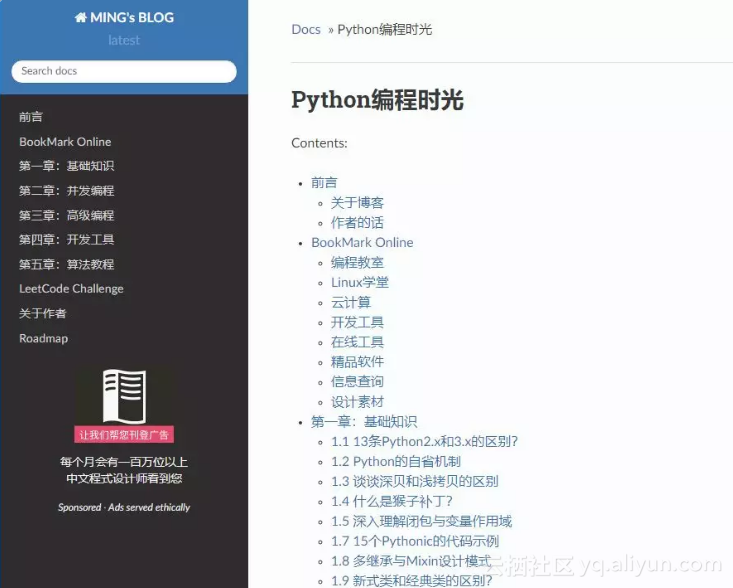
10个优秀的程序员里,有9个人都有写博客的习惯。这是非常好的习惯,它使得知识得以提炼,转输出为输入,在提升自己的同时,还能利用互联网易传播的特性,将知识分享给每一个热爱学习的人。这是值得每个程序员,投入时间和精力去坚持做下去的事。 博客既然是自己的一个知识宝库,那么索引将变得极为重要。通过自己的探索,小明发现了一个能够很好地满足这个需求的 Python 框架 Sphnix。 实现的大体的思路如下: Markdown:书写文档Pandoc:格式转化Sphinx:生成网页GitHub:托管项目ReadtheDocs:发布网页 接下来,就来看看到底是如何实现的? 成品展示 以我的博客为例,先给大家展示一下。 这是首页。显示了你所有的文章索引。 这是我的导航栏。是不是结构很清晰,很方便索引。 点击文章后,还可以很方便查看标题,跳转。 体验下搜索功能,速度很快

资源下载

更多资源
Mario

Mario

马里奥是站在游戏界顶峰的超人气多面角色。马里奥靠吃蘑菇成长,特征是大鼻子、头戴帽子、身穿背带裤,还留着胡子。与他的双胞胎兄弟路易基一起,长年担任任天堂的招牌角色。

Nacos

Nacos

Nacos /nɑ:kəʊs/ 是 Dynamic Naming and Configuration Service 的首字母简称,一个易于构建 AI Agent 应用的动态服务发现、配置管理和AI智能体管理平台。Nacos 致力于帮助您发现、配置和管理微服务及AI智能体应用。Nacos 提供了一组简单易用的特性集,帮助您快速实现动态服务发现、服务配置、服务元数据、流量管理。Nacos 帮助您更敏捷和容易地构建、交付和管理微服务平台。

Sublime Text

Sublime Text

Sublime Text具有漂亮的用户界面和强大的功能,例如代码缩略图,Python的插件,代码段等。还可自定义键绑定,菜单和工具栏。Sublime Text 的主要功能包括:拼写检查,书签,完整的 Python API , Goto 功能,即时项目切换,多选择,多窗口等等。Sublime Text 是一个跨平台的编辑器,同时支持Windows、Linux、Mac OS X等操作系统。

WebStorm

WebStorm

WebStorm 是jetbrains公司旗下一款JavaScript 开发工具。目前已经被广大中国JS开发者誉为“Web前端开发神器”、“最强大的HTML5编辑器”、“最智能的JavaScript IDE”等。与IntelliJ IDEA同源,继承了IntelliJ IDEA强大的JS部分的功能。

用户登录
用户注册