iOS SAX解析XML
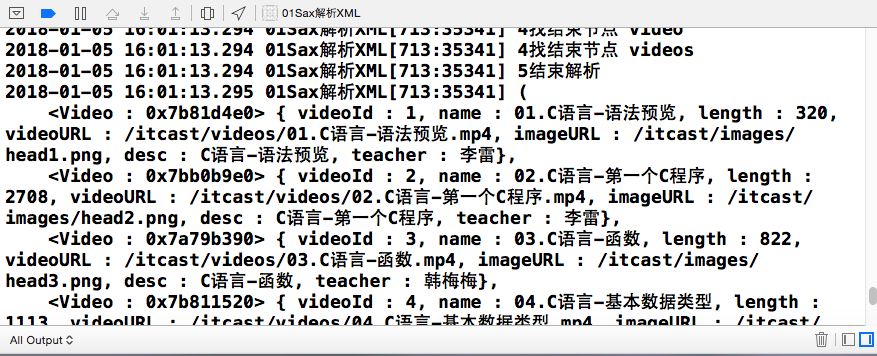
先从网络获取XML文件 NSURL *url = [NSURL URLWithString:@"https://127.0.0.1/videos.xml"]; NSURLRequest *request = [NSURLRequest requestWithURL:url]; [NSURLConnection sendAsynchronousRequest:request queue:[NSOperationQueue mainQueue] completionHandler: ^(NSURLResponse * _Nullable response, NSData * _Nullable data, NSError * _Nullable connectionError) { if (connectionError) { NSLog(@"连接错误 %@", connectionError); return; } NSHTTPURLResponse *httpResponse = (NSHTTPURLResponse *)response; if (httpResponse.statusCode == 200 || httpResponse.statusCode == 304) { // 解析数据 } else { NSLog(@"服务器内部错误"); } }]; 在注释为解析数据处开始解析网络获取的数据 // 给ViewController添加代理 @interface ViewController () <NSXMLParserDelegate> @end // 解析数据 NSXMLParser *parser = [[NSXMLParser alloc] initWithData:data]; // 设置代理 parser.delegate = self; // 开始执行代理方法 [parser parse]; 实现代理方法 // 1. 开始解析文档 - (void)parserDidStartDocument:(NSXMLParser *)parser { NSLog(@"1开始解析"); } // 2. 找开始节点 - (void)parser:(NSXMLParser *)parser didStartElement:(NSString *)elementName namespaceURI:(NSString *)namespaceURI qualifiedName:(NSString *)qName attributes:(NSDictionary<NSString *,NSString *> *)attributeDict { NSLog(@"2找开始节点 %@--%@", elementName, attributeDict); } // 3. 找节点之间的内容 - (void)parser:(NSXMLParser *)parser foundCharacters:(NSString *)string { NSLog(@"3找节点之间的内容 %@", string); } // 4. 找结束节点 - (void)parser:(NSXMLParser *)parser didEndElement:(NSString *)elementName namespaceURI:(NSString *)namespaceURI qualifiedName:(NSString *)qName { NSLog(@"4找结束节点 %@", elementName); } // 5. 结束解析文档 - (void)parserDidEndDocument:(NSXMLParser *)parser { NSLog(@"5结束解析"); } // 6. 解析出错 - (void) parser:(NSXMLParser *)parser parseErrorOccurred:(NSError *)parseError { NSLog(@"解析出错"); } 构建实体类 Video.h #import <Foundation/Foundation.h> @interface Video : NSObject @property (nonatomic, strong) NSNumber *videoId; @property (nonatomic, copy) NSString *name; @property (nonatomic, copy) NSNumber *length; @property (nonatomic, copy) NSString *videoURL; @property (nonatomic, copy) NSString *imageURL; @property (nonatomic, copy) NSString *desc; @property (nonatomic, copy) NSString *teacher; @property (nonatomic, readonly) NSString *time; - (instancetype)initWithDict:(NSDictionary *)dict; + (instancetype)videoWithDict:(NSDictionary *)dict; @end video.m #import "Video.h" @implementation Video - (instancetype)initWithDict:(NSDictionary *)dict { if (self = [super init]) { [self setValuesForKeysWithDictionary:dict]; } return self; } + (instancetype)videoWithDict:(NSDictionary *)dict { return [[self alloc] initWithDict:dict]; } - (NSString *)time { int len = self.length.intValue; return [NSString stringWithFormat:@"%02d:%02d:%02d:", len / 3600, (len %3600) / 60, (len % 60) ]; } - (NSString *)description { return [NSString stringWithFormat:@"<%@ : %p> { videoId : %@, name : %@, length : %@, videoURL : %@, imageURL : %@, desc : %@, teacher : %@}", [self class], self, self.videoId, self.name, self.length, self.videoURL, self.imageURL, self.desc, self.teacher]; } @end XML解析成对象 @interface ViewController () <NSXMLParserDelegate> // 保存XML数据 @property (nonatomic, strong) NSMutableArray *videos; // 当前创建的video对象 @property (nonatomic, strong) Video *video; // 保存当前节点内容 @property (nonatomic, copy) NSMutableString *string; @end @implementation ViewController // 懒加载 - (NSMutableArray *)videos { if (_videos == nil) { _videos = [NSMutableArray arrayWithCapacity:10]; } return _videos; } - (NSMutableString *)string { if (_string == nil) { _string = [NSMutableString string]; } return _string; } @end 在video节点时创建Video对象 // 2. 找开始节点 - (void)parser:(NSXMLParser *)parser didStartElement:(NSString *)elementName namespaceURI:(NSString *)namespaceURI qualifiedName:(NSString *)qName attributes:(NSDictionary<NSString *,NSString *> *)attributeDict { NSLog(@"2找开始节点 %@--%@", elementName, attributeDict); // 如果是video标签,创建video对象 if ([elementName isEqualToString:@"video"]) { self.video = [[Video alloc] init]; self.video.videoId = @([attributeDict[@"videoId"] intValue]); // 添加到数组中 [self.videos addObject:self.video]; } } 拼接保存每个节点中的内容 // 3. 找节点之间的内容 - (void)parser:(NSXMLParser *)parser foundCharacters:(NSString *)string { NSLog(@"3找节点之间的内容 %@", string); [self.string appendString:string]; } 将内容与对应的节点赋值,并将string对象置空 // 4. 找结束节点 - (void)parser:(NSXMLParser *)parser didEndElement:(NSString *)elementName namespaceURI:(NSString *)namespaceURI qualifiedName:(NSString *)qName { NSLog(@"4找结束节点 %@", elementName); // 判断标签是否有对应的属性 if (![elementName isEqualToString:@"video"] && ![elementName isEqualToString:@"videos"]) { // 为节点赋值 [self.video setValue:self.string forKey:elementName]; } // 清空字符串 [self.string setString:@""]; } 打印查看结果 结果.png videos.xml内容 <videos> <video videoId="1"> <name>01.C语言-语法预览</name> <length>320</length> <videoURL>/itcast/videos/01.C语言-语法预览.mp4</videoURL> <imageURL>/itcast/images/head1.png</imageURL> <desc>C语言-语法预览</desc> <teacher>李雷</teacher> </video> <video videoId="2"> <name>02.C语言-第一个C程序</name> <length>2708</length> <videoURL>/itcast/videos/02.C语言-第一个C程序.mp4</videoURL> <imageURL>/itcast/images/head2.png</imageURL> <desc>C语言-第一个C程序</desc> <teacher>李雷</teacher> </video> <video videoId="3"> <name>03.C语言-函数</name> <length>822</length> <videoURL>/itcast/videos/03.C语言-函数.mp4</videoURL> <imageURL>/itcast/images/head3.png</imageURL> <desc>C语言-函数</desc> <teacher>韩梅梅</teacher> </video> <video videoId="4"> <name>04.C语言-基本数据类型</name> <length>1113</length> <videoURL>/itcast/videos/04.C语言-基本数据类型.mp4</videoURL> <imageURL>/itcast/images/head4.png</imageURL> <desc>C语言-基本数据类型</desc> <teacher>韩梅梅</teacher> </video> <video videoId="5"> <name>05.C语言-基本运算</name> <length>594</length> <videoURL>/itcast/videos/05.C语言-基本运算.mp4</videoURL> <imageURL>/itcast/images/head5.png</imageURL> <desc>C语言-基本运算</desc> <teacher>韩梅梅</teacher> </video> <video videoId="6"> <name>06.C语言-数组</name> <length>923</length> <videoURL>/itcast/videos/06.C语言-数组.mp4</videoURL> <imageURL>/itcast/images/head6.png</imageURL> <desc>C语言-数组</desc> <teacher>韩梅梅</teacher> </video> <video videoId="7"> <name>07.C语言-字符串</name> <length>848</length> <videoURL>/itcast/videos/07.C语言-字符串.mp4</videoURL> <imageURL>/itcast/images/head7.png</imageURL> <desc>C语言-字符串</desc> <teacher>韩梅梅</teacher> </video> <video videoId="8"> <name>08.C语言-指针</name> <length>502</length> <videoURL>/itcast/videos/08.C语言-指针.mp4</videoURL> <imageURL>/itcast/images/head8.png</imageURL> <desc>C语言-指针</desc> <teacher>韩梅梅</teacher> </video> <video videoId="9"> <name>09.C语言-指针用例</name> <length>558</length> <videoURL>/itcast/videos/09.C语言-指针用例.mp4</videoURL> <imageURL>/itcast/images/head1.png</imageURL> <desc>C语言-指针用例</desc> <teacher>韩梅梅</teacher> </video> <video videoId="10"> <name>10.C语言-指针与数组</name> <length>1682</length> <videoURL>/itcast/videos/10.C语言-指针与数组.mp4</videoURL> <imageURL>/itcast/images/head2.png</imageURL> <desc>C语言-指针与数组</desc> <teacher>韩梅梅</teacher> </video> <video videoId="11"> <name>11.C语言-指针与字符串</name> <length>1092</length> <videoURL>/itcast/videos/11.C语言-指针与字符串.mp4</videoURL> <imageURL>/itcast/images/head3.png</imageURL> <desc>C语言-指针与字符串</desc> <teacher>韩梅梅</teacher> </video> </videos>