首页 文章 精选 留言 我的

精选列表

搜索[请求重写],共10000篇文章
优秀的个人博客,低调大师

CentOS 7.1.1503 varnish动静分离反代用户请求

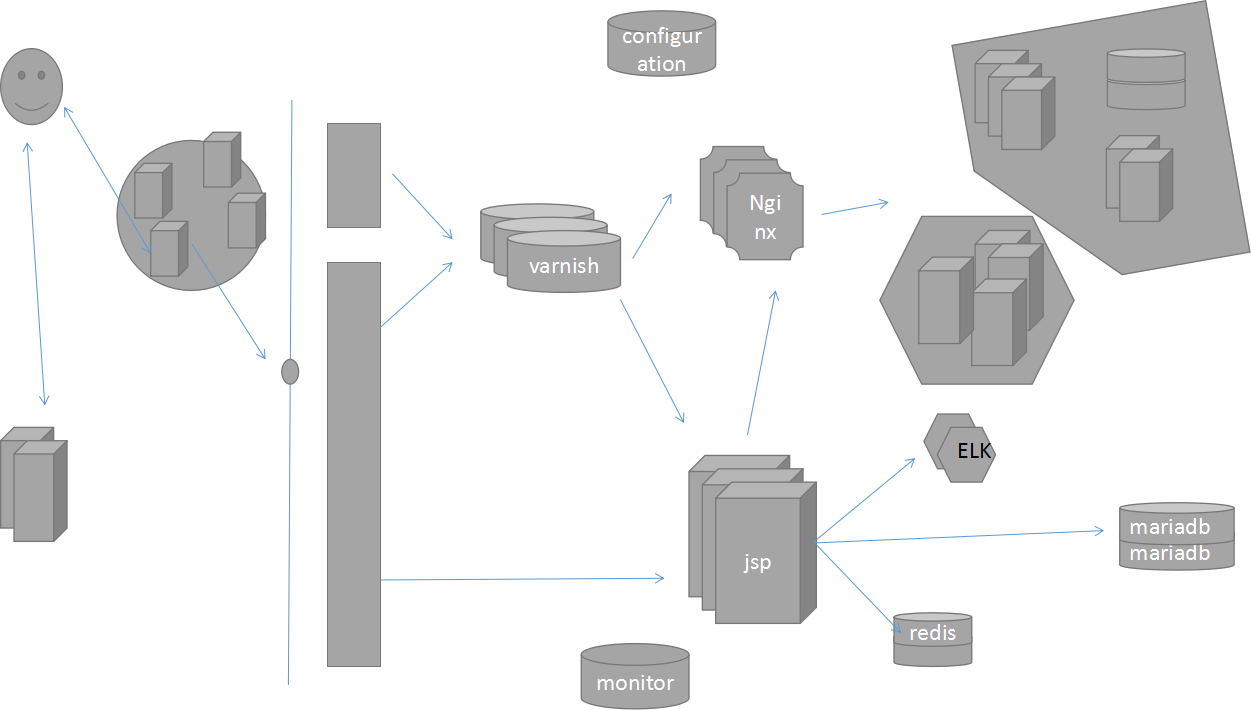
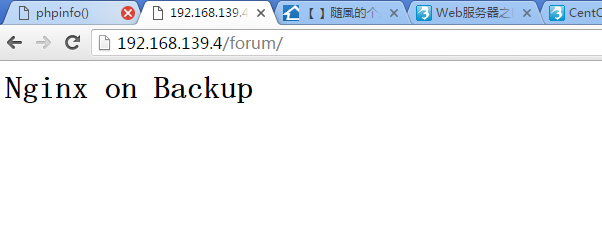
前言 <> 非常感谢Kason老师,您是我们成功的蜡烛,燃烧着自己,照亮我们前进的道路。 varnish配置动静分离时,这些问题困扰了两周: 环境:varnish做为反代,你们都知道的:varnish,nginx, haproxy都可以做为反代服务器,varnish比较擅长缓存。后端主机一个提供动态资源及变化的资源(php, css, js),一个提供静态资源(images) 每次访问varnish的6081端口,phpinfo.php和php-mysql.php都可以正常访问,肯定没有问题,但访问wodpress时,要么是NOT FOUND要么是直接将目录索引显示出来。 > 总结: >对中小型站点的整个架构没有一个完整、清晰的认识。 >我只是将老师的配置粘贴进去,从不去想真正的含义。 > * 学到puppet时,越觉得前面的东西是多么重要,了解一个个架构,才能更好的驾驶运维工具本身。 站点架构 在接入层将动静分离,一般varnish不会做动静分离 varnish接收到图片和js,css文件后,将其反代到不同的主机。图片至分布式文件系统,js,css文件反代至业务层。 所以如果在varnish动静分离,首先要确保各个资源都代理至正确的主机,而后将所有的资源全部代理至动态服务器。 环境 配置前提 所有节点时间同步。 关闭防火墙、SELinux。 yum源:EPEL、Base。 ~]# ntpdate 0.centos.pool.ntp.org ~]# iptables -F ~]# setenforce 0 配置静态服务器 安装程序包 ~]# yum -y install httpd 启动服务 ~]# systemctl start httpd.service 测试访问 http://172.16.0.68/ Testing 123.. 配置动态服务器 安装程序包 ~]# yum -y install httpd php php-mysql mariadb-server php-mbstring php-mcrypt 启动httpd服务 ~]# systemctl start httpd.service 测试访问httpd服务 http://172.16.0.69/ Testing 123.. 配置mariadb-server ~]# vim /etc/my.cnf.d/server.cnf [mysqld] skip_name_resolve = ON innodb_file_per_table = ON 启动mariadb服务 ~]# systemctl start mariadb.service ~]# netstat -tnl Active Internet connections (only servers) Proto Recv-Q Send-Q Local Address Foreign Address State tcp 0 0 0.0.0.0:3306 0.0.0.0:* LISTEN tcp 0 0 0.0.0.0:22 0.0.0.0:* LISTEN tcp 0 0 127.0.0.1:25 0.0.0.0:* LISTEN tcp6 0 0 :::80 :::* LISTEN tcp6 0 0 :::22 :::* LISTEN tcp6 0 0 ::1:25 :::* LISTEN 授权用户,供wordpress使用 [root@localhost ~]# mysql MariaDB [(none)]> CREATE DATABASE wordpress; Query OK, 1 row affected (0.00 sec) MariaDB [(none)]> GRANT ALL ON wordpress.* TO 'wpuser'@'172.16.0.%' IDENTIFIED BY 'wppass'; Query OK, 0 rows affected (0.00 sec) MariaDB [(none)]> FLUSH PRIVILEGES; Query OK, 0 rows affected (0.00 sec) 测试连接mysql ~]# mysql -uwpuser -pwppass -h172.16.0.69 提供开源php资源 ~]# cp wordpress-4.9.1-zh_CN.tar.gz /var/www/html/ 展开php程序,为其链接 ~]# tar xf wordpress-4.9.1-zh_CN.tar.gz ~]# ln -sv wordpress wp ~]# ll total 9912 -rw-------. 1 root root 1637 Dec 6 02:45 anaconda-ks.cfg -rw-r--r--. 1 root root 1556 Jan 14 14:58 genaral_test.sh drwxr-xr-x. 1 nobody nfsnobody 498 Nov 30 20:20 wordpress -rw-r--r--. 1 root root 10130710 Dec 1 18:57 wordpress-4.9.1-zh_CN.tar.gz lrwxrwxrwx. 1 root root 9 Jan 14 15:41 wp -> wordpress -rw-r--r--. 1 root root 832 Jan 14 14:58 yum.sh 提供连接mariadb-server的配置 /** WordPress数据库的名称 */ define('DB_NAME', 'wordpress'); /** MySQL数据库用户名 */ define('DB_USER', 'wpuser'); /** MySQL数据库密码 */ define('DB_PASSWORD', 'wppass'); /** MySQL主机 */ define('DB_HOST', '172.16.0.69'); 提供测试页面 web测试页面 ~]# cat /var/www/html/index.html <h1>172.16.0.69</h1> php环境测试 ~]# cat /var/www/html/phpinfo.php <html> <title>Test Page</title> <body> <h1>172.16.0.69</h1> <?php phpinfo(); ?> </body> </html> php-mysql测试页面 ~]# cat /var/www/html/php-mysql.php <?php $conn = mysql_connect('172.16.0.69','wpuser','wppass'); if ($conn) echo "connect 172.16.0.69 success"; else echo "connect 172.16.0.69 failure"; ?> 测试连接 给静态服务器一份php程序 ~]# scp -r /var/www/html/{wordpress,wp} 172.16.0.68:/var/www/html 配置varnish缓存服务器 安装varnish ~]# yum -y install varnish 配置varnish ~]# vim /etc/varnish/varnish.params ‘VARNISH_LISTEN_PORT=80 VARNISH_STORAGE="file,/data/varnish/cache,1g" ~]# vim /etc/varnish/default.vcl backend default { .host = "172.16.0.68"; .port = "80"; } backend appsrv { .host = "172.16.0.69"; .port = "80"; } sub vcl_recv { if (req.url ~ "(?i)\.(php|jsp|do)$") { set req.backend_hint = appsrv; } if (req.url ~ "(?i)\.(css|js)$") { set req.backend_hint = appsrv; } if (req.url ~ "(?i)\.(jpg|jpeg|png|gif)$") { set req.backend_hint = default; } else { set req.backend_hint = appsrv; } } 准备目录 ~]# install -d -v -o varnish -g varnish /data/varnish/cache 启动varnish ~]# systemctl start varnish.service ~]# netstat -tnl Active Internet connections (only servers) Proto Recv-Q Send-Q Local Address Foreign Address State tcp 0 0 127.0.0.1:6082 0.0.0.0:* LISTEN tcp 0 0 0.0.0.0:80 0.0.0.0:* LISTEN 测试访问 查看是否动静分离 172.16.0.68静态服务器上查看 172.16.0.69动态服务器上查看 本文转自 lccnx 51CTO博客,原文链接:http://blog.51cto.com/sonlich/2060785,如需转载请自行联系原作者


优秀的个人博客,低调大师

AI 模型 GameGAN 重写《吃豆人》,目标:看视频就能学习的 AI

英伟达称稍后会放出一个使用 AI 模型 GameGAN 复刻的《吃豆人》游戏,以致敬诞生40周年的街机版《吃豆人》。 根据英伟达发布的研究报告,GameGAN 目标是用神经网络取代游戏引擎。 它不同于以往用 AI 做游戏的例子。之前的谷歌 DeepMind 和 Open AI 还是在现有游戏框架中,被用来“玩游戏”,相当于是智能生成一个游戏对手。比如 OpenAI 被用来在 Dota2 5v5中对战人类,OpenAI 2018年通过学习人类演示,在蒙特祖玛的复仇游戏中刷出了74500分的高分。 GameGAN 则被用来“创作”游戏,是对现有游戏代码的取代。它在训练过程中摄入大量游戏剧本和键盘动作,通过观察场景和玩家的操作动作,预测下一帧游戏画面,而不访问底层游戏逻辑或引擎。 “当玩家按下左键的时候,这个 AI 会猜测画面的变化,并且生成一个“看起来是角色在往左走”的图像。中间发生的事情,全部都在 AI 的黑盒中。没人知道 AI 是怎么理解玩家操作的,得到的只有最终的输出结果。” 除了生成下一帧游戏画面,GameGAN 还学习环境的内在动力学,“我们有兴趣训练一个游戏模拟器,它可以模拟环境的确定性和随机性”。 GameGAN包括动力引擎;记忆模块;渲染引擎;对抗性损失、循环损失训练和培训计划。 首先GameGAN要学习环境会如何跟随用户操作变化而改变,这涉及一些基本的规则,比如不能穿过墙壁。同时还要通过访问历史,产生一致性模拟。场景中的长期一致性实现通过记忆模块实现,GameGAN使用内存模块,记住生成的静态元素,如背景,并在需要的时候适当检索。神经渲染引擎负责渲染模拟图像。此外,对抗训练用来完成图像和视频的合成任务,GameGAN用对抗性训练学习环境动力学,并产生真实的时间相关模拟。 这次复刻《吃豆人》,主要训练的细节包括吃豆人的速度和移动能力;鬼魂的运作方式;吃豆人吃下大力丸后的变化;鬼魂与吃豆人相遇的场景。据了解,GameGAN基于PyTorch开发,模型研发已经进行了8个月,关于复刻《吃豆人》只用了4天。 游戏开发商万代南宫梦为此次训练提供了总计几百万帧、50000集的《吃豆人》剧本。该公司的 Koichiro Tsutsumi 表示:“在看到这个结果时,我们都感到震惊,大家都无法相信可以在没有游戏引擎的情况下再现了南梦宫的经典游戏《吃豆人》。这项研究将帮助游戏开发人员加快新关卡、角色甚至游戏的开发。一想到这一点,我们就感到十分兴奋。” 不过,复刻游戏只是开始,英伟达的目标是扩展模型来捕捉更复杂的现实世界环境。英伟达多伦多研究实验室主任 Sanja Fidler 表示:“我们最终将训练出一个 AI,其只需通过观看视频和观察目标在环境中所采取的行动,就能模仿驾驶规则或物理定律。” 而 GameGAN 只是第一步。 Nvidia GameGAN Research: https://cdn.arstechnica.net/wp-content/uploads/2020/05/Nvidia_GameGAN_Research.pdf

优秀的个人博客,低调大师

使用InputStreamReader读入,使用OutputStreamWriter写出,将一首诗按行重写?

https://www.processon.com/view/link/5b1a3880e4b00490ac8f5f40 改善后: (可将不管一行有几个字时的不规律的文本,按行倒写) package 换行诗; import java.io.FileInputStream; import java.io.FileOutputStream; import java.io.IOException; import java.io.InputStream; import java.io.InputStreamReader; import java.io.OutputStream; import java.io.OutputStreamWriter; import java.util.ArrayList; public class Poem{ public static void main(String[] args) { InputStream is = null; OutputStream os = null; OutputStreamWriter osw = null; InputStreamReader isr = null; try { is = new FileInputStream("test1.txt"); os = new FileOutputStream("test2.txt"); isr = new InputStreamReader(is, "UTF-8"); osw = new OutputStreamWriter(os, "UTF-8"); ArrayList<String> one = getDataInt(isr); ArrayList<String> two = getList(one); for (String x : two) { System.out.print(x); osw.write(x); } } catch (Exception e) { e.printStackTrace(); } finally { { try { if (osw != null) osw.close(); } catch (IOException e) { e.printStackTrace(); } try { if (isr != null) isr.close(); } catch (Exception e) { e.printStackTrace(); } try { if (os != null) os.close(); } catch (Exception e) { e.printStackTrace(); } try { if (is != null) { is.close(); } } catch (Exception e) { e.printStackTrace(); } } } } //////////////////////////////////////////////////////////// public static ArrayList<String> getDataInt(InputStreamReader isr) { ArrayList<String> dataStrList = new ArrayList<>(); int data = 0; String dataStr = ""; char c; String chineseLine = ""; try { while ((data = isr.read()) != -1) { dataStr += data + ""; c = (char) data; chineseLine += c; if (dataStr.endsWith("1310")) { dataStrList.add(chineseLine); dataStr = ""; chineseLine = ""; } } // while_END chineseLine += "\n"; dataStrList.add(chineseLine); // 如果诗和词是一整行 或者 遇到最后一行没有回车换行表示,就存入 } catch ( IOException e) { e.printStackTrace(); } finally { try { if (isr != null) isr.close(); } catch (IOException e) { e.printStackTrace(); } } return dataStrList; } /////////////////////////////////////////////////////////////// public static ArrayList<String> getList(ArrayList<String> one) { int w; String poem = null; ArrayList<String> cutes = new ArrayList<>(); int dataIndex = one.size() - 1; for (w = dataIndex; w >= 0; w--) { poem = one.get(w); cutes.add(poem); } return cutes; } } 初版(只能针对五言绝句) package 换行诗; import java.io.FileInputStream; import java.io.FileOutputStream; import java.io.IOException; import java.io.InputStream; import java.io.InputStreamReader; import java.io.OutputStream; import java.io.OutputStreamWriter; import java.util.ArrayList; public class Test9 implements Runnable { public static void main(String[] args) { Runnable r1 = new Test9(); Thread t1 = new Thread(r1);// t1线程 Test9 test = new Test9(); // t1.start(); InputStream is = null; OutputStream os = null; OutputStreamWriter osw = null; InputStreamReader isr = null; try { is = new FileInputStream("test1.txt"); os = new FileOutputStream("test2.txt"); isr = new InputStreamReader(is, "UTF-8"); osw = new OutputStreamWriter(os, "UTF-8"); ArrayList<Integer> one = test.getDataInt(isr); ArrayList<Integer> two = test.getList(one); final String ANTI_POEM = test.getAntiPoem(two); System.out.println(ANTI_POEM); osw.write(ANTI_POEM); } catch (Exception e) { e.printStackTrace(); } finally { { try { if (osw != null) osw.close(); } catch (IOException e) { e.printStackTrace(); } try { if (isr != null) isr.close(); } catch (Exception e) { e.printStackTrace(); } try { if(os != null) os.close(); }catch (Exception e) { e.printStackTrace(); } try { if(is != null) { is.close(); } }catch (Exception e) { e.printStackTrace(); } } } } ///////////////////////////////////////////////////// private String getAntiPoem(ArrayList<Integer> two) { String poems = ""; // 换行计数 int _1310 = 5; int _count = 0; int strAnd_n = 0; for (int e = 0; e < two.size(); e++) { poems += String.valueOf((char) ((int) (two.get(e)))); if (poems.length() == _1310) { poems += "\n";// 假设为6 _count++; if (_count == 1) { strAnd_n = poems.length(); } if (_count < 3) { _1310 += strAnd_n; } } } return poems; } //////////////////////////////////////////////////////////// public ArrayList<Integer> getDataInt(InputStreamReader isr) { ArrayList<Integer> dataInt = new ArrayList<>(); int data = 0; String dataStr = ""; try { while ((data = isr.read()) != -1) { dataStr = data + ""; if (dataStr.length() == 5) { dataInt.add(data); } } } catch (IOException e) { e.printStackTrace(); } finally { try { if (isr != null) isr.close(); } catch (IOException e) { e.printStackTrace(); } } return dataInt; } /////////////////////////////////////////////////////////////// public ArrayList<Integer> getList(ArrayList<Integer> dataInt) { int w; int index; int dataIndex = dataInt.size() - 1; ArrayList<Integer> cutes = new ArrayList<>(); for (w = dataIndex; w >= 4; w--) { for (int l = 0; l < 5; l++) { index = (w - 4 + l); cutes.add(dataInt.get(index)); } w -= 4; } return cutes; } InputStream inThread = null; OutputStream outThread = null; InputStreamReader isrThread = null; OutputStreamWriter oswThread = null; @Override public void run() { try { inThread = new FileInputStream("hello.txt"); outThread = new FileOutputStream("hello1.txt"); isrThread = new InputStreamReader(inThread, "utf-8"); oswThread = new OutputStreamWriter(outThread, "utf-8"); final String ANTI_POEM = getAntiPoem(getList(getDataInt(isrThread))); oswThread.write(ANTI_POEM); System.out.println(ANTI_POEM); } catch (Exception e) { e.printStackTrace(); } finally { try { if (oswThread != null) oswThread.close(); } catch (Exception e) { e.printStackTrace(); } try { if (isrThread != null) isrThread.close(); } catch (Exception e) { e.printStackTrace(); } try { if (outThread != null) outThread.close(); } catch (Exception e) { e.printStackTrace(); } try { if (inThread != null) inThread.close(); } catch (IOException e) { e.printStackTrace(); } } } } 将编程看作是一门艺术,而不单单是个技术。 敲打的英文字符是我的黑白琴键, 思维图纸画出的是我编写的五线谱。 当美妙的华章响起,现实通往二进制的大门即将被打开。

资源下载

更多资源
腾讯云软件源

腾讯云软件源

为解决软件依赖安装时官方源访问速度慢的问题,腾讯云为一些软件搭建了缓存服务。您可以通过使用腾讯云软件源站来提升依赖包的安装速度。为了方便用户自由搭建服务架构,目前腾讯云软件源站支持公网访问和内网访问。

Nacos

Nacos

Nacos /nɑ:kəʊs/ 是 Dynamic Naming and Configuration Service 的首字母简称,一个易于构建 AI Agent 应用的动态服务发现、配置管理和AI智能体管理平台。Nacos 致力于帮助您发现、配置和管理微服务及AI智能体应用。Nacos 提供了一组简单易用的特性集,帮助您快速实现动态服务发现、服务配置、服务元数据、流量管理。Nacos 帮助您更敏捷和容易地构建、交付和管理微服务平台。

Spring

Spring

Spring框架(Spring Framework)是由Rod Johnson于2002年提出的开源Java企业级应用框架,旨在通过使用JavaBean替代传统EJB实现方式降低企业级编程开发的复杂性。该框架基于简单性、可测试性和松耦合性设计理念,提供核心容器、应用上下文、数据访问集成等模块,支持整合Hibernate、Struts等第三方框架,其适用范围不仅限于服务器端开发,绝大多数Java应用均可从中受益。

Rocky Linux

Rocky Linux

Rocky Linux(中文名:洛基)是由Gregory Kurtzer于2020年12月发起的企业级Linux发行版,作为CentOS稳定版停止维护后与RHEL(Red Hat Enterprise Linux)完全兼容的开源替代方案,由社区拥有并管理,支持x86_64、aarch64等架构。其通过重新编译RHEL源代码提供长期稳定性,采用模块化包装和SELinux安全架构,默认包含GNOME桌面环境及XFS文件系统,支持十年生命周期更新。

用户登录
用户注册