首页 文章 精选 留言 我的

精选列表

搜索[爬虫系统],共10000篇文章
优秀的个人博客,低调大师

Python爬虫(应朋友之邀)-功能实现版

环境:win10 py37 工具:pyCharm anaconda 主要包:BeautifulSoup,re 代码: #!/usr/bin/python # -*- coding: UTF-8 -*- import re from urllib import request from bs4 import BeautifulSoup html = request.urlopen("http://data.eastmoney.com/report/20181101/APPISWTR4upPASearchReport.html") bs = BeautifulSoup(html, "html.parser") print("title") print(bs.title) print("meta") links = bs.find_all("meta") count = 0 for link in links: count = count + 1 print(count) attrs = link.attrs if "name" in attrs.keys(): print("name:", attrs['name']) if "http-equiv" in attrs.keys(): print("httpEquiv:", attrs['http-equiv']) if "content" in attrs.keys(): print("content:", attrs['content']) print("p") ps = bs.find_all("p") index = -1 for p in ps: contents = p.contents if len(contents) > 0: content = contents[0] if str(content).__contains__("盈利预测"): index = ps.index(p) break needContent = "" if index != -1: index = index + 2 needContent = str(ps[index]) print(needContent) match1 = re.search(r'[\u4e00-\u9fa5]{4}20[0-9]{2}[\u4e00-\u9fa5]-20[0-9]{2}[\u4e00-\u9fa5]', needContent) match2 = re.search(r'EPS为.*元', needContent) match3 = re.search(r'([\u4e00-\u9fa5]{4}“).*”[\u4e00-\u9fa5]{2}', needContent) print(match1.group()) print(match2.group()) print(match3.group())

优秀的个人博客,低调大师

爬虫入门之绘图matplotlib与词云(七)

1 绘制条形图 import matplotlib # 数据可视化 from matplotlib import pyplot as plt # 配置字体 matplotlib.rcParams["font.sans-serif"] = ["simhei"] # 黑体 matplotlib.rcParams["font.family"] = "sans-serif" ''' left, x轴 height, y轴 width=0.8 ,轴宽 ''' # .bar(x轴, y轴, label=u"标签名", color="颜色") plt.bar([1], [123], label="广州", color="r") plt.bar([2], [141], label=u"北京") plt.bar([3], [11], label=u"上海") plt.bar([4], [41], label=u"深圳") plt.bar([5], [181], label=u"香港") plt.legend() # 绘图 # plt.show() plt.savefig("1.jpg") # 保存图片 2 绘制智联招聘职位岗位数量图 import urllib.request import urllib.parse import re import matplotlib import matplotlib.pyplot as plt # 数据可视化 matplotlib.rcParams["font.sans-serif"] = ["simhei"] # 配置字体 matplotlib.rcParams["font.family"] = "sans-serif" header = { "User-Agent": "Mozilla/5.0 (Windows NT 10.0; Win64; x64) AppleWebKit/537.36 (KHTML, like Gecko) Chrome/65.0.3325.181 Safari/537.36"} def getnumberbyname(searchname): searchname = {"kw": searchname} searchname = urllib.parse.urlencode(searchname) url = "http://sou.zhaopin.com/jobs/searchresult.ashx?jl=%E6%B7%B1%E5%9C%B3&" + searchname + "&p=1&isadv=0" print(url, '==========') req = urllib.request.Request(url, headers=header) pagesource = urllib.request.urlopen(req).read().decode('utf-8', 'ignore') restr = "<em>(\\d+)</em>" # 正则表达式,()只要括号内的数据 regex = re.compile(restr, re.IGNORECASE) mylist = regex.findall(pagesource) return mylist[0] # 岗位列表 pythonlist = ["python", "python 运维", "python 测试", "python 数据", "python web"] num = 0 for pystr in pythonlist: num += 1 print(pystr, eval(getnumberbyname(pystr))) # 绘制柱状图 plt.bar([num], eval(getnumberbyname(pystr)), label=pystr) plt.legend() # 绘制 plt.show() # 显示 3 词云 “词云”这个概念由美国西北大学新闻学副教授、新媒体专业主任里奇·戈登(Rich Gordon)提出。“词云”就是对网络文本中出现频率较高的“关键词”予以视觉上的突出,形成“关键词云层”或“关键词渲染”,从而过滤掉大量的文本信息,使浏览网页者只要一眼扫过文本就可以领略文本的主旨。 词频 分词 语句切割 import jieba mystr = "小姐姐,我看你挺能睡的,睡我还不好" wordsplitList = jieba.cut(mystr, cut_all=True) # 切割, 全部切割 print(wordsplitList) # 返回一个生成器对象 print('/'.join(wordsplitList)) wordsplitListforSearch = jieba.cut_for_search(mystr) # 按搜索方式切割 print(wordsplitListforSearch) print('/'.join(wordsplitListforSearch)) 制作python岗位需求词云 import wordcloud 导入词云 from wordcloud import STOPWORDS # 停止词 import jieba import numpy as np # 科学计算 import matplotlib # 数据可视化 from matplotlib import pyplot as plt from PIL import Image # 图片处理 # 读取文本 pythonInfo = open('pythonworkinfo.txt', 'r', encoding='utf-8', errors='ignore').read() # print(pythonInfo) # 切割 pythonCut = jieba.cut(pythonInfo, cut_all=True) pythonInfoList = ' '.join(pythonCut) # 返回一个生成器对象 print(pythonInfoList) backgroud = np.array(Image.open('pig.jpg')) # 将图片格式化成RBG数组 myCloudword = wordcloud.WordCloud(font_path='simkai.ttf', # 字体路径 width=400, height=200, mask=backgroud, # 字体颜色 scale=1, # 比例 max_words=200, # 最大字数 min_font_size=4, # 最小字体 stopwords=STOPWORDS, # 默认停止词 random_state=50, # 随机角度 background_color='black', # 背景颜色 max_font_size=100 # 最大字体 ).generate(pythonInfoList) #plt.imshow(myCloudword) #plt.show() 图片展示 plt.figimage(mywordCloud) #绘制图片 plt.imsave('python.png',mywordCloud) #保存图片 精简生成词云 import matplotlib.pyplot as plt from wordcloud import WordCloud import jieba text_from_file_with_apath = open('pythonworkinfo.txt',encoding='utf-8',errors='ignore').read() print(text_from_file_with_apath) wordlist_after_jieba = jieba.cut(text_from_file_with_apath, cut_all=True) wl_space_split = " ".join(wordlist_after_jieba) my_wordcloud = WordCloud().generate(wl_space_split) plt.imshow(my_wordcloud) plt.axis("off") plt.show() #注:碰到utf-8的编码问题时候,可以去源码wordcloud.py文件中新增路径,前提下好中文字体库simkai.ttf FONT_PATH = os.environ.get("FONT_PATH", os.path.join(os.path.dirname(__file__), "simkai.ttf")) 覆盖掉默认的DroidSansMono.ttf 4 Matplotlib 绘图 1 多个subplot # subplot.py import matplotlib.pyplot as plt import numpy as np data = np.arange(100, 201) plt.subplot(2, 1, 1) plt.plot(data) data2 = np.arange(200, 301) plt.subplot(2, 1, 2) plt.plot(data2) plt.show() 2 线形图 # plot.py import matplotlib.pyplot as plt plt.plot([1, 2, 3], [3, 6, 9], '-r') plt.plot([1, 2, 3], [2, 4, 9], ':g') plt.show() 这段代码说明如下: plot函数的第一个数组是横轴的值,第二个数组是纵轴的值,所以它们一个是直线,一个是折线; 最后一个参数是由两个字符构成的,分别是线条的样式和颜色。前者是红色的直线,后者是绿色的点线。 3 散点图 # scatter.py import matplotlib.pyplot as plt import numpy as np N = 20 plt.scatter(np.random.rand(N) * 100, np.random.rand(N) * 100, c='r', s=100, alpha=0.5) plt.scatter(np.random.rand(N) * 100, np.random.rand(N) * 100, c='g', s=200, alpha=0.5) plt.scatter(np.random.rand(N) * 100, np.random.rand(N) * 100, c='b', s=300, alpha=0.5) plt.show() 这段代码说明如下: 这幅图包含了三组数据,每组数据都包含了20个随机坐标的位置 参数c表示点的颜色,s是点的大小,alpha是透明度 4 饼状图 # pie.py import matplotlib.pyplot as plt import numpy as np labels = ['Mon', 'Tue', 'Wed', 'Thu', 'Fri', 'Sat', 'Sun'] data = np.random.rand(7) * 100 plt.pie(data, labels=labels, autopct='%1.1f%%') plt.axis('equal') plt.legend() plt.show() 这段代码说明如下: data是一组包含7个数据的随机数值 图中的标签通过labels来指定 autopct指定了数值的精度格式 plt.axis('equal')设置了坐标轴大小一致 plt.legend()指明要绘制图例(见下图的右上角) 5 条形图 # bar.py import matplotlib.pyplot as plt import numpy as np N = 7 x = np.arange(N) data = np.random.randint(low=0, high=100, size=N) colors = np.random.rand(N * 3).reshape(N, -1) labels = ['Mon', 'Tue', 'Wed', 'Thu', 'Fri', 'Sat', 'Sun'] plt.title("Weekday Data") plt.bar(x, data, alpha=0.8, color=colors, tick_label=labels) plt.show() 这段代码说明如下: 这幅图展示了一组包含7个随机数值的结果,每个数值是[0, 100]的随机数 它们的颜色也是通过随机数生成的。np.random.rand(N * 3).reshape(N, -1)表示先生成21(N x 3)个随机数,然后将它们组装成7行,那么每行就是三个数,这对应了颜色的三个组成部分。如果不理解这行代码,请先学习一下Python 机器学习库 NumPy 教程 title指定了图形的标题,labels指定了标签,alpha是透明度 6 直方图 # hist.py import matplotlib.pyplot as plt import numpy as np data = [np.random.randint(0, n, n) for n in [3000, 4000, 5000]] labels = ['3K', '4K', '5K'] bins = [0, 100, 500, 1000, 2000, 3000, 4000, 5000] plt.hist(data, bins=bins, label=labels) plt.legend() plt.show() 上面这段代码中,[np.random.randint(0, n, n) for n in [3000, 4000, 5000]]生成了包含了三个数组的数组,这其中: 第一个数组包含了3000个随机数,这些随机数的范围是 [0, 3000) 第二个数组包含了4000个随机数,这些随机数的范围是 [0, 4000) 第三个数组包含了5000个随机数,这些随机数的范围是 [0, 5000)


优秀的个人博客,低调大师

Python爬虫——你们要的王者荣耀高清图

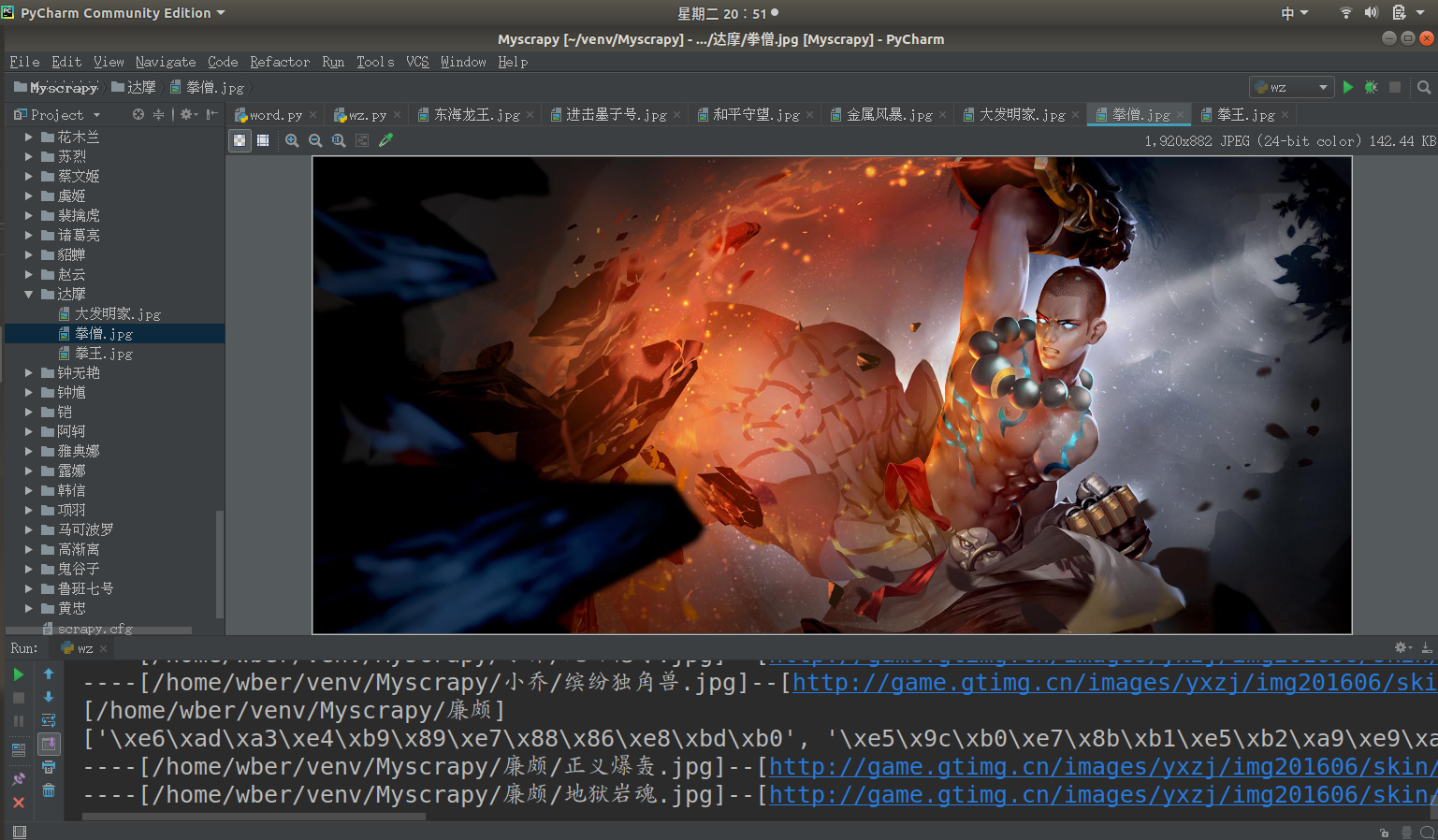
曾经144区的王者 学了计算机后 头发逐渐从李白变成了达摩 秀发有何用,变秃亦变强 (emmm徒弟说李白比达摩强,变秃不一定变强) 前言 前几天开了农药的安装包,发现农药是.Net实现的游戏 虽然游戏用的语言和排位一样让人恼火 但感觉图片美工还是可以的 比如: 不知...不知道你们是不是和我一样喜欢 玩阴阳师呢,我可是Ssr只有两只狗子的非酋呢 正文 在http://pvp.qq.com/web201605/herolist.shtml可以看到全英雄列表。 按F12查看元素 看到下面这一堆<li></li>标签了吗 里面的href就是每个英雄的详情地址 图片就在这个链接中 拿到selector body > div.wrapper > div > div > div.herolist-box > div.herolist-content > ul > li > a 英雄列表获取源码: 1 def getHeroList(): 2 '''取所以英雄存入list中''' 3 hero = {} 4 res = requests.get(mainurl) 5 sp = BeautifulSoup(res.content, "html.parser") 6 lists = sp.select('body > div.wrapper > div > div > div.herolist-box > div.herolist-content > ul > li') 7 for li in lists: 8 oj = li.select('a')[0]; 9 hero['url'] = oj['href'] 10 hero['name'] = oj.text 11 # 正则表达式取ename编号 12 ename = re.findall('herodetail/(\d+)\.shtml', oj['href'])[0] 13 hero['ename'] = ename 14 herolist.append(hero) 15 hero = {} 16 return herolist 进入英雄详情之后 可以发现,要保存图片的地址也在<li></li>中 他的selector是: body > div.wrapper > div.zk-con1.zk-con > div > div > div.pic-pf > ul > li > i > img 只需要将这个图片保存下来就可以了 代码: 1 def saveImg(filepath, imgUrl): 2 '''下载图片并保存''' 3 r = requests.get(imgUrl, stream=True) 4 with open(filepath, 'wb') as f: 5 for chunk in r.iter_content(chunk_size=1024): 6 if chunk: 7 f.write(chunk) 8 f.flush() 9 f.close() 全部代码: 1 # -*- coding: utf-8 -*- 2 3 import os 4 import re 5 import requests 6 from bs4 import BeautifulSoup 7 8 import sys 9 reload(sys) 10 sys.setdefaultencoding('utf-8') 11 12 baseurl = 'http://pvp.qq.com/web201605' 13 mainurl = 'http://pvp.qq.com/web201605/herolist.shtml' 14 herolist = [] 15 16 17 def getHeroList(): 18 '''取所以英雄存入list中''' 19 hero = {} 20 res = requests.get(mainurl) 21 sp = BeautifulSoup(res.content, "html.parser") 22 lists = sp.select('body > div.wrapper > div > div > div.herolist-box > div.herolist-content > ul > li') 23 for li in lists: 24 oj = li.select('a')[0]; 25 hero['url'] = oj['href'] 26 hero['name'] = oj.text 27 # 正则表达式取ename编号 28 ename = re.findall('herodetail/(\d+)\.shtml', oj['href'])[0] 29 hero['ename'] = ename 30 herolist.append(hero) 31 hero = {} 32 return herolist 33 34 35 def saveImg(filepath, imgUrl): 36 '''下载图片并保存''' 37 r = requests.get(imgUrl, stream=True) 38 with open(filepath, 'wb') as f: 39 for chunk in r.iter_content(chunk_size=1024): 40 if chunk: 41 f.write(chunk) 42 f.flush() 43 f.close() 44 45 46 if __name__ == '__main__': 47 hlist = getHeroList() 48 for hero in herolist: 49 herodir = os.path.join(os.getcwd(), hero['name']) 50 heropage = baseurl + '/' + hero['url'] 51 print('[%s]' % (herodir)) 52 res = requests.get(heropage) 53 sop = BeautifulSoup(res.content, "html.parser") 54 li = sop.select('body > div.wrapper > div.zk-con1.zk-con > div > div > div.pic-pf > ul ')[0]['data-imgname'] 55 li = str(li).split('|') 56 print(li) 57 # 遍历所有皮肤 58 for i in range(len(li)): 59 imgurl = 'http://game.gtimg.cn/images/yxzj/img201606/skin/hero-info/' \ 60 + hero['ename'] + '/' + hero['ename'] + '-bigskin-' + str(i + 1) + '.jpg' 61 imgname = os.path.join(herodir, li[i] + ".jpg") 62 print('----[%s]--[%s]---' % (imgname, imgurl)) 63 # 创建英雄目录 64 if os.path.exists(herodir) == False: 65 os.mkdir(herodir) 66 saveImg(imgname, imgurl) 图片生成在同级目录

优秀的个人博客,低调大师

Python爬虫(二)——豆瓣图书决策树构建

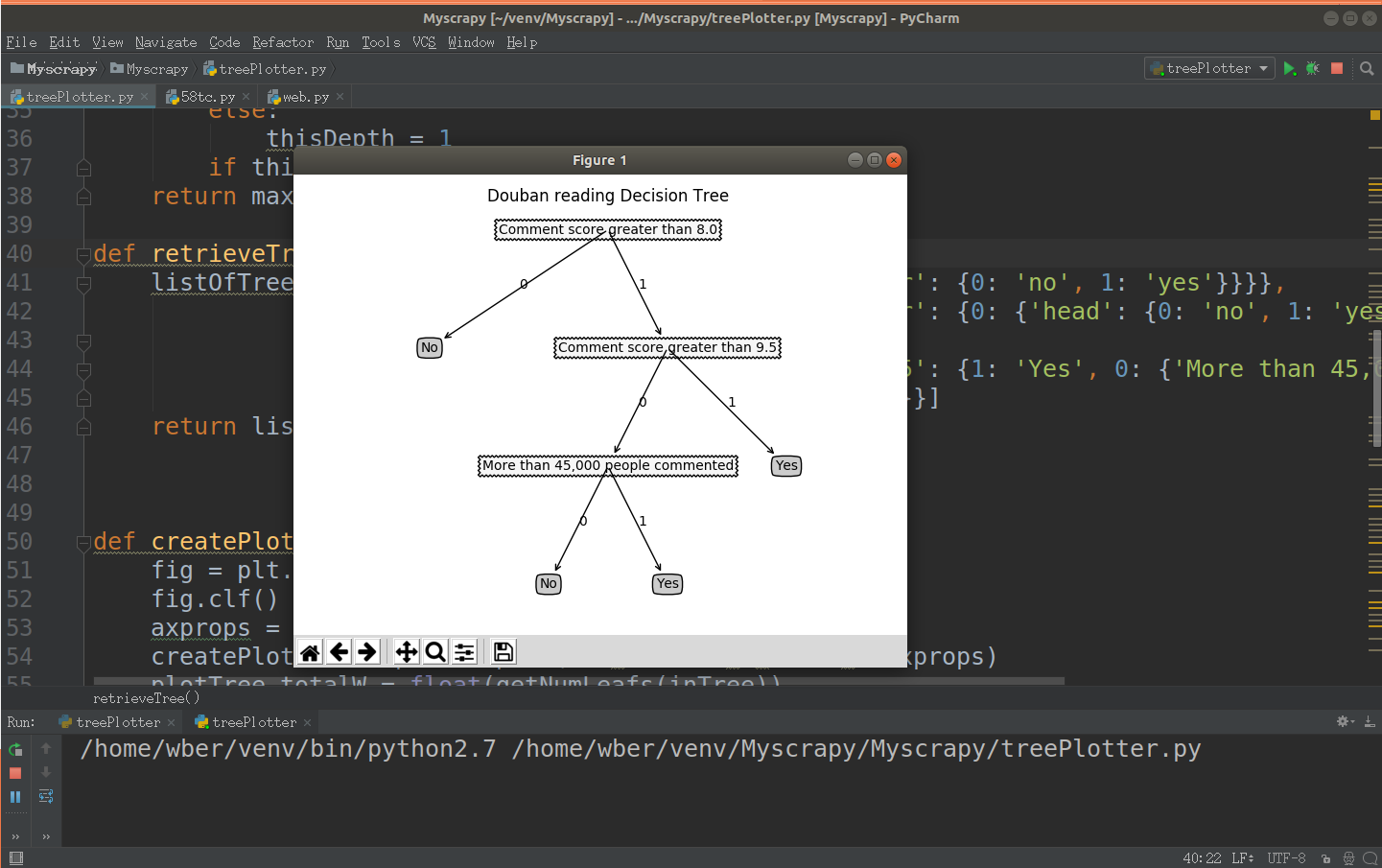
前文参考:https://www.cnblogs.com/LexMoon/p/douban1.html Matplotlib绘制决策树代码: 1 # coding=utf-8 2 import matplotlib.pyplot as plt 3 4 decisionNode = dict(boxstyle='sawtooth', fc='10') 5 leafNode = dict(boxstyle='round4',fc='0.8') 6 arrow_args = dict(arrowstyle='<-') 7 8 9 10 def plotNode(nodeTxt, centerPt, parentPt, nodeType): 11 createPlot.ax1.annotate(nodeTxt, xy=parentPt, xycoords='axes fraction',\ 12 xytext=centerPt,textcoords='axes fraction',\ 13 va='center', ha='center',bbox=nodeType,arrowprops\ 14 =arrow_args) 15 16 17 def getNumLeafs(myTree): 18 numLeafs = 0 19 firstStr = list(myTree.keys())[0] 20 secondDict = myTree[firstStr] 21 for key in secondDict: 22 if(type(secondDict[key]).__name__ == 'dict'): 23 numLeafs += getNumLeafs(secondDict[key]) 24 else: 25 numLeafs += 1 26 return numLeafs 27 28 def getTreeDepth(myTree): 29 maxDepth = 0 30 firstStr = list(myTree.keys())[0] 31 secondDict = myTree[firstStr] 32 for key in secondDict: 33 if(type(secondDict[key]).__name__ == 'dict'): 34 thisDepth = 1+getTreeDepth((secondDict[key])) 35 else: 36 thisDepth = 1 37 if thisDepth > maxDepth: maxDepth = thisDepth 38 return maxDepth 39 40 def retrieveTree(i): 41 #预先设置树的信息 42 listOfTree = [{'no surfacing':{0:'no',1:{'flipper':{0:'no',1:'yes'}}}}, 43 {'no surfacing':{0:'no',1:{'flipper':{0:{'head':{0:'no',1:'yes'}},1:'no'}}}}, 44 {'Comment score greater than 8.0':{0:{'Comment score greater than 9.5':{0:'Yes',1:{'More than 45,000 people commented': { 45 0: 'Yes',1: 'No'}}}},1:'No'}}] 46 return listOfTree[i] 47 48 def createPlot(inTree): 49 fig = plt.figure(1,facecolor='white') 50 fig.clf() 51 axprops = dict(xticks = [], yticks=[]) 52 createPlot.ax1 = plt.subplot(111,frameon = False,**axprops) 53 plotTree.totalW = float(getNumLeafs(inTree)) 54 plotTree.totalD = float(getTreeDepth(inTree)) 55 plotTree.xOff = -0.5/plotTree.totalW;plotTree.yOff = 1.0 56 plotTree(inTree,(0.5,1.0), '') 57 plt.title('Douban reading Decision Tree\n') 58 plt.show() 59 60 def plotMidText(cntrPt, parentPt,txtString): 61 xMid = (parentPt[0]-cntrPt[0])/2.0 + cntrPt[0] 62 yMid = (parentPt[1] - cntrPt[1])/2.0 + cntrPt[1] 63 createPlot.ax1.text(xMid, yMid, txtString) 64 65 def plotTree(myTree, parentPt, nodeTxt): 66 numLeafs = getNumLeafs(myTree) 67 depth = getTreeDepth(myTree) 68 firstStr = list(myTree.keys())[0] 69 cntrPt = (plotTree.xOff+(1.0+float(numLeafs))/2.0/plotTree.totalW,\ 70 plotTree.yOff) 71 plotMidText(cntrPt,parentPt,nodeTxt) 72 plotNode(firstStr,cntrPt,parentPt,decisionNode) 73 secondDict = myTree[firstStr] 74 plotTree.yOff = plotTree.yOff - 1.0/plotTree.totalD 75 for key in secondDict: 76 if type(secondDict[key]).__name__ == 'dict': 77 plotTree(secondDict[key],cntrPt,str(key)) 78 else: 79 plotTree.xOff = plotTree.xOff + 1.0/plotTree.totalW 80 plotNode(secondDict[key],(plotTree.xOff,plotTree.yOff),\ 81 cntrPt,leafNode) 82 plotMidText((plotTree.xOff,plotTree.yOff),cntrPt,str(key)) 83 plotTree.yOff = plotTree.yOff + 1.0/plotTree.totalD 84 85 if __name__ == '__main__': 86 myTree = retrieveTree(2) 87 createPlot(myTree) 运行结果:

优秀的个人博客,低调大师

Python爬虫爬取网易云音乐全部评论

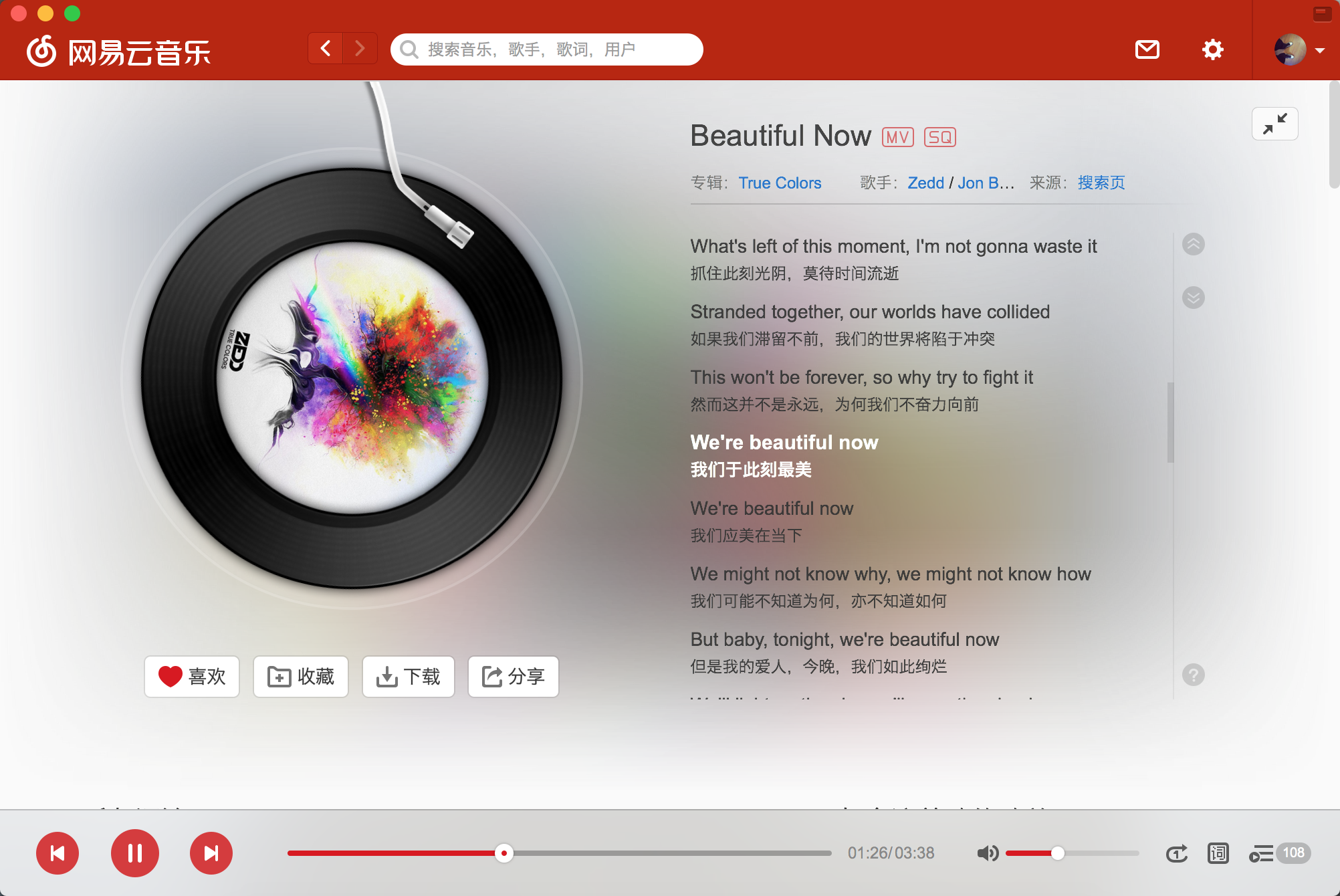
beautiful now.png 思路整理 访问网易云音乐单曲播放界面,我们可以看到当我们翻页的时候网址是没有变化的,这时候我们大致可以确定评论是通过post形式加载的; . 2.接下来就打开控制台找我们要的评论藏在哪里就好了。 我们在http://music.163.com/weapi/v1/resource/comments/R_SO_4_32019002?csrf_token=发现了我们要的评论,包括热门评论,我们注意看下R_SO_4_后面的数字,其实就是每首歌的id,如果我们想一次性爬取多首歌曲的评论的话,可以通过每次传入歌曲id来实现; image.png 我们接下来看下需要post的数据,有两个值params和encSecKey,本以为就是页码之类的,看到这两个值我其实是懵逼的,很显然是加密过了的,不过我不知道他是怎么加密的,后面在知乎上找到了解决方法,各位可以去知乎看看,我就不赘述了,因为我也没看明白……; image.png 代码部分 加密 前文说了,这部分参考了知乎的一位答主,各位可以去知乎看看,我这边只是稍微改了下就拿来用了,点这里跳转; first_param = '{rid:"", offset:"0", total:"true", limit:"20", csrf_token:""}' second_param = "010001" third_param = "00e0b509f6259df8642dbc35662901477df22677ec152b5ff68ace615bb7b725152b3ab17a876aea8a5aa76d2e417629ec4ee341f56135fccf695280104e0312ecbda92557c93870114af6c9d05c4f7f0c3685b7a46bee255932575cce10b424d813cfe4875d3e82047b97ddef52741d546b8e289dc6935b3ece0462db0a22b8e7" forth_param = "0CoJUm6Qyw8W8jud" def get_params(i): if i == 0: first_param = '{rid:"", offset:"0", total:"true", limit:"20", csrf_token:""}' else: offset =str(i*20) first_param = '{rid:"", offset:"%s", total:"%s", limit:"20", csrf_token:""}'%(offset,'flase') iv = "0102030405060708" first_key = forth_param second_key = 16 * 'F' h_encText = AES_encrypt(first_param, first_key, iv) h_encText = AES_encrypt(h_encText, second_key, iv) return h_encText def get_encSecKey(): encSecKey = "257348aecb5e556c066de214e531faadd1c55d814f9be95fd06d6bff9f4c7a41f831f6394d5a3fd2e3881736d94a02ca919d952872e7d0a50ebfa1769a7a62d512f5f1ca21aec60bc3819a9c3ffca5eca9a0dba6d6f7249b06f5965ecfff3695b54e1c28f3f624750ed39e7de08fc8493242e26dbc4484a01c76f739e135637c" return encSecKey def AES_encrypt(text, key, iv): pad = 16 - len(text) % 16 text = text + pad * chr(pad) encryptor = AES.new(key, AES.MODE_CBC, iv) encrypt_text = encryptor.encrypt(text) encrypt_text = base64.b64encode(encrypt_text) return encrypt_text 获取页码以及评论 获取页码数是为了加入循环获取每页的评论,代码如下; def get_json(url, params, encSecKey): data = { "params": params, "encSecKey": encSecKey } response = requests.post(url, headers=headers, data=data,proxies = proxies) return response.content def get_page(url): params = get_params(0); encSecKey = get_encSecKey(); json_text = get_json(url, params, encSecKey) json_dict = json.loads(json_text) total_comment = json_dict['total'] page=(total_comment/20)+1 print '***查询到评论共计%d条,%d页***'%(total_comment,page) return page 最后就是把json数据按照你想要的保存下来就好了,如果只想要热门评论的话,把comments改成hotcomments就好了。 完整代码如下: #coding = utf-8 from Crypto.Cipher import AES import base64 import requests import json import time import pandas as pd import random headers = { 'Referer': 'http://music.163.com/song?id=531051217', 'User-Agent':'Mozilla/5.0 (Windows NT 6.1; Win64; x64) AppleWebKit/537.36 (KHTML, like Gecko) Chrome/58.0.3029.110 Safari/537.36', 'Cookie': 'JSESSIONID-WYYY=%5CuiUi%5C%2FYs%2FcJcoQ5xd3cBhaHw0rEfHkss1s%2FCfr92IKyg2hJOrJquv3fiG2%2Fn9GZS%2FuDH8PY81zGquF4GIAVB9eYSdKJM1W6E2i1KFg9%5CuZ4xU6VdPCGwp4KOUZQQiWSlRT%2F1r07OmIBn7yYVYN%2BM2MAalUQnoYcyskaXN%5CPo1AOyVVV%3A1516866368046; _iuqxldmzr_=32; _ntes_nnid=7e2e27f69781e78f2c610fa92434946b,1516864568068; _ntes_nuid=7e2e27f69781e78f2c610fa92434946b; __utma=94650624.470888446.1516864569.1516864569.1516864569.1; __utmc=94650624; __utmz=94650624.1516864569.1.1.utmcsr=baidu|utmccn=(organic)|utmcmd=organic; __utmb=94650624.8.10.1516864569' } proxies = {'http':'http://221.200.107.118','https':'http://116.2.25.251'} first_param = '{rid:"", offset:"0", total:"true", limit:"20", csrf_token:""}' second_param = "010001" third_param = "00e0b509f6259df8642dbc35662901477df22677ec152b5ff68ace615bb7b725152b3ab17a876aea8a5aa76d2e417629ec4ee341f56135fccf695280104e0312ecbda92557c93870114af6c9d05c4f7f0c3685b7a46bee255932575cce10b424d813cfe4875d3e82047b97ddef52741d546b8e289dc6935b3ece0462db0a22b8e7" forth_param = "0CoJUm6Qyw8W8jud" def get_params(i): if i == 0: first_param = '{rid:"", offset:"0", total:"true", limit:"20", csrf_token:""}' else: offset =str(i*20) first_param = '{rid:"", offset:"%s", total:"%s", limit:"20", csrf_token:""}'%(offset,'flase') iv = "0102030405060708" first_key = forth_param second_key = 16 * 'F' h_encText = AES_encrypt(first_param, first_key, iv) h_encText = AES_encrypt(h_encText, second_key, iv) return h_encText def get_encSecKey(): encSecKey = "257348aecb5e556c066de214e531faadd1c55d814f9be95fd06d6bff9f4c7a41f831f6394d5a3fd2e3881736d94a02ca919d952872e7d0a50ebfa1769a7a62d512f5f1ca21aec60bc3819a9c3ffca5eca9a0dba6d6f7249b06f5965ecfff3695b54e1c28f3f624750ed39e7de08fc8493242e26dbc4484a01c76f739e135637c" return encSecKey def AES_encrypt(text, key, iv): pad = 16 - len(text) % 16 text = text + pad * chr(pad) encryptor = AES.new(key, AES.MODE_CBC, iv) encrypt_text = encryptor.encrypt(text) encrypt_text = base64.b64encode(encrypt_text) return encrypt_text def get_json(url, params, encSecKey): data = { "params": params, "encSecKey": encSecKey } response = requests.post(url, headers=headers, data=data,proxies = proxies) return response.content def get_page(url): params = get_params(0); encSecKey = get_encSecKey(); json_text = get_json(url, params, encSecKey) json_dict = json.loads(json_text) total_comment = json_dict['total'] page=(total_comment/20)+1 print '***查询到评论共计%d条,%d页***'%(total_comment,page) return page if __name__ == "__main__": start_time = time.time() url = "http://music.163.com/weapi/v1/resource/comments/R_SO_4_32019002?csrf_token=" page = get_page(url) for i in range(page): params = get_params(i); encSecKey = get_encSecKey(); json_text = get_json(url, params, encSecKey) json_dict = json.loads(str(json_text))['comments'] for t in list(range(len(json_dict))): if t == 0: rdata=pd.DataFrame(pd.Series(data=json_dict[t])).T else: rdata=pd.concat([rdata,pd.DataFrame(pd.Series(data=json_dict[t])).T]) if i == 0: commentdata=rdata else: commentdata=pd.concat([commentdata,rdata]) print('***正在保存第%d页***'%(i+1)) time.sleep(random.uniform(0.2,0.5)) commentdata.to_excel('NetEase_Music_Spider.xls',sheet_name='sheet1') end_time = time.time() print "程序耗时%f秒." % (end_time - start_time) print '***NetEase_Music_Spider@Awesome_Tang***' 本次爬的是最近一直循环的<beautiful now--Zedd/Jon Bellion>,评论共计37429条,1872页,程序耗时1036.046966秒,接近20分钟。 Notes 各位爬的时候一定要使用代理IP,我后面准备爬周董最近的新歌<等你下课>的评论的,爬到5000多页也就是差不多10W条的时候,被封IP了,导致我们整个公司的网络都一段时间内不能访问网易云音乐的评论,包括手机连Wi-Fi... image.png Peace~

资源下载

更多资源
Mario

Mario

马里奥是站在游戏界顶峰的超人气多面角色。马里奥靠吃蘑菇成长,特征是大鼻子、头戴帽子、身穿背带裤,还留着胡子。与他的双胞胎兄弟路易基一起,长年担任任天堂的招牌角色。

Nacos

Nacos

Nacos /nɑ:kəʊs/ 是 Dynamic Naming and Configuration Service 的首字母简称,一个易于构建 AI Agent 应用的动态服务发现、配置管理和AI智能体管理平台。Nacos 致力于帮助您发现、配置和管理微服务及AI智能体应用。Nacos 提供了一组简单易用的特性集,帮助您快速实现动态服务发现、服务配置、服务元数据、流量管理。Nacos 帮助您更敏捷和容易地构建、交付和管理微服务平台。

Spring

Spring

Spring框架(Spring Framework)是由Rod Johnson于2002年提出的开源Java企业级应用框架,旨在通过使用JavaBean替代传统EJB实现方式降低企业级编程开发的复杂性。该框架基于简单性、可测试性和松耦合性设计理念,提供核心容器、应用上下文、数据访问集成等模块,支持整合Hibernate、Struts等第三方框架,其适用范围不仅限于服务器端开发,绝大多数Java应用均可从中受益。

WebStorm

WebStorm

WebStorm 是jetbrains公司旗下一款JavaScript 开发工具。目前已经被广大中国JS开发者誉为“Web前端开发神器”、“最强大的HTML5编辑器”、“最智能的JavaScript IDE”等。与IntelliJ IDEA同源,继承了IntelliJ IDEA强大的JS部分的功能。

用户登录
用户注册