将数据保存发送到电子邮件中备份,首要前提应该先在模拟器中设置好电子邮件帐户,设置如下:
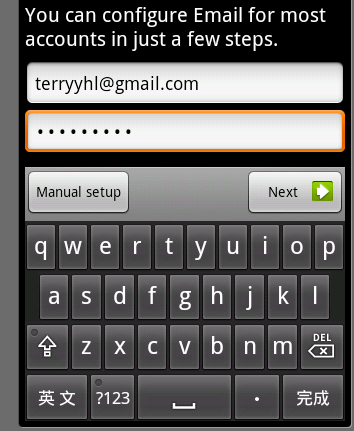
- 第一步,启动模拟器,打开“菜单”,选择“电子邮件”项,填写相应帐号和密码。
![]()
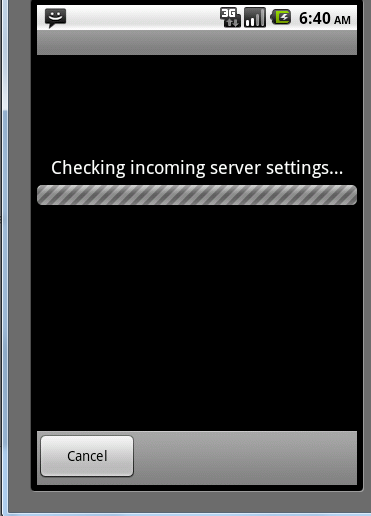
- 第二步,点击NEXT,程序自动配置电子邮件相关信息。
![]()
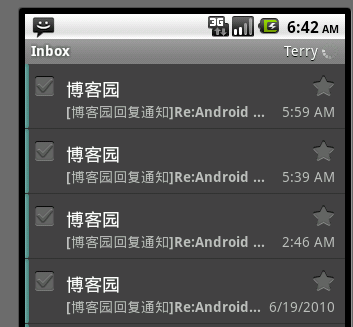
- 第三步,配置完成后,输入相应的名称信息,即可设置完成,接下来程序会默认帮你导入你输入邮箱帐号的相关信息
![]()
业务逻辑如下:示例中有一个文本框用来模拟用户的信息,当程序退出的时候保存文本档的信息,并转到发送邮件的页面,让用户把信息保存到邮箱 里面。具体代码参考如下:
![ExpandedBlockStart.gif]() 发送信息保存到邮箱
发送信息保存到邮箱
package
com.terry;
import
android.app.Activity;
import
android.content.Intent;
import
android.net.Uri;
import
android.os.Bundle;
import
android.view.KeyEvent;
import
android.widget.EditText;
public
class
networkActivity
extends
Activity {
private
EditText myEditText;
/**
Called when the activity is first created.
*/
@Override
public
void
onCreate(Bundle savedInstanceState) {
super
.onCreate(savedInstanceState);
setContentView(R.layout.main);
myEditText
=
(EditText)findViewById(R.id.myEditText4);
}
@Override
public
boolean
onKeyDown(
int
keyCode, KeyEvent event) {
//
TODO Auto-generated method stub
if
(keyCode
==
KeyEvent.KEYCODE_BACK)
{
//
发送邮件地址
Uri uri
=
Uri.parse(
"
mailto:285735942@qq.com
"
);
//
创建intent
Intent it
=
new
Intent(Intent.ACTION_SENDTO,uri);
it.putExtra(android.content.Intent.EXTRA_SUBJECT,
"
网络存储
"
);
it.putExtra(android.content.Intent.EXTRA_TEXT, myEditText.getText());
startActivity(it);
this
.finish();
return
true
;
}
return
super
.onKeyDown(keyCode, event);
}
}![]()
扩展
既然发送数据保存到网络上,当然也可以获得网络上的数据,下面我们通过一个小例子来实现从网路上加载一个txt文件的小说程序 。如图:
逻辑代码如下:首先创建一个我们要访问的URL地址,然后取链接的文件,循环把数据读取出来。具体代码参考如下:
![ExpandedBlockStart.gif]() 读取XML代码参考
读取XML代码参考
package
com.terry;
import
java.io.BufferedInputStream;
import
java.io.InputStream;
import
java.net.URL;
import
java.net.URLConnection;
import
org.apache.http.util.ByteArrayBuffer;
import
android.app.Activity;
import
android.os.Bundle;
import
android.widget.TextView;
public
class
readxmlActivity
extends
Activity {
@Override
protected
void
onCreate(Bundle savedInstanceState) {
//
TODO Auto-generated method stub
super
.onCreate(savedInstanceState);
setContentView(R.layout.readxml);
TextView tv
=
(TextView)findViewById(R.id.TextView01);
String msg
=
""
;
try
{
URL url
=
new
URL(
"
http://www.az1314.com/txt/00.txt
"
);
//
要访问的数据文件
URLConnection con
=
url.openConnection();
InputStream is
=
con.getInputStream();
BufferedInputStream bis
=
new
BufferedInputStream(is);
ByteArrayBuffer baf
=
new
ByteArrayBuffer(
100
);
int
current
=
0
;
while
((current
=
bis.read())
!=
-
1
) {
baf.append((
byte
)current);
}
msg
=
new
String(baf.toByteArray());
}
catch
(Exception e) {
//
TODO: handle exception
msg
=
e.getMessage();
}
tv.setText(msg);
}
}
方法讲解:
URL共有六种构造方法,分别如下:
- URL(String spec)
通过传进来的字符串分析,创建一个新的URL实例。
- URL(URL context, String spec)
通过传进来的字符串分析,创建一个新的URL实例。需要一个URL的参数
- URL(URL context, String spec, URLStreamHandler handler)
通过传进来的字符串分析,创建一个新的URL实例
- URL(String protocol, String host, String file)
使用给定的参数创建一个URL实例,需要指定协议,主机文件名
- URL(String protocol, String host, int port, String file)
使用给定的参数创建一个URL实例,需要指定协议,主机,端口和文件名
- URL(String protocol, String host, int port, String file, URLStreamHandler handler)
使用给定的参数创建一个URL实例,需要指定协议,主机,端口、文件名和处理程序
URLConnection介绍:
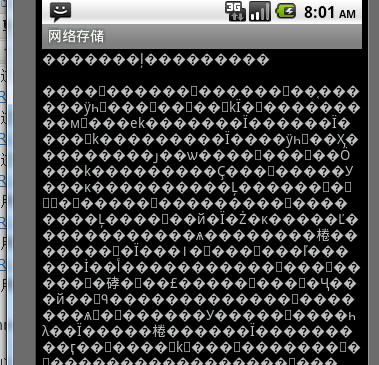
在此不多介绍URLConnection此类,感兴趣的朋友可以查看一下SDK。代码如上,运行效果图:
因为在模拟器运行。 出现乱码了,如果你有真机不妨在真机上试试。
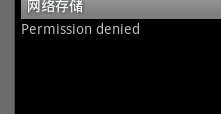
Tip: 访问外部网络需要在配置文件中给予权限,如果你没有权限将会出现如下界面:
权限代码如下:
android:versionCode="1"
android:versionName="1.0">
<
application
android:icon
="@drawable/icon"
android:label
="@string/app_name"
>
<
activity
android:name
=".networkActivity"
android:label
="@string/app_name"
>
</
activity
>
<
activity
android:name
=".readxmlActivity"
><
intent-filter
>
<
action
android:name
="android.intent.action.MAIN"
/>
<
category
android:name
="android.intent.category.LAUNCHER"
/>
</
intent-filter
></
activity
>
</
application
>
<
uses-permission
android:name
="android.permission.INTERNET"
/>
至此四种数据存储完结。
本文转自 terry_龙 51CTO博客,原文链接:http://blog.51cto.com/terryblog/336756,如需转载请自行联系原作者