1. 本地模式
本地模式下调试hadoop:下载winutils.exe和hadoop.dll hadoop.lib等windows的hadoop依赖文件放在D:\proc\hadoop\bin目录下
并设置环境变量:HADOOP_HOME=D:\proc\hadoop
添加PATH=%HADOOP_HOME%\bin
D:\proc\hadoop 是一个空目录就可以.
机器是32位的请下载,机器是64位的请下载;
关闭eclipse再重新启动来获取新的环境变量。
然后创建WorldCount.java:
![复制代码]()
package cn.zenith.mr;

import java.io.IOException;
import java.util.StringTokenizer;

import org.apache.hadoop.conf.Configuration;
import org.apache.hadoop.fs.Path;
import org.apache.hadoop.io.IntWritable;
import org.apache.hadoop.io.Text;
import org.apache.hadoop.mapreduce.Job;
import org.apache.hadoop.mapreduce.Mapper;
import org.apache.hadoop.mapreduce.Reducer;
import org.apache.hadoop.mapreduce.lib.input.FileInputFormat;
import org.apache.hadoop.mapreduce.lib.output.FileOutputFormat;
import org.apache.hadoop.util.GenericOptionsParser;

publicclass WordCount {

publicstaticclass TokenizerMapper
extends Mapper<Object, Text, Text, IntWritable>{

privatefinalstatic IntWritable one = new IntWritable(1);
private Text word = new Text();

publicvoid map(Object key, Text value, Context context
                    ) throws IOException, InterruptedException {
      StringTokenizer itr = new StringTokenizer(value.toString());
while (itr.hasMoreTokens()) {
word.set(itr.nextToken());
context.write(word, one);
      }
    }
  }

publicstaticclass IntSumReducer
extends Reducer<Text,IntWritable,Text,IntWritable> {
private IntWritable result = new IntWritable();

publicvoid reduce(Text key, Iterable<IntWritable>values,
                       Context context
                       ) throws IOException, InterruptedException {
intsum = 0;
for (IntWritable val : values) {
sum += val.get();
      }
result.set(sum);
context.write(key, result);
    }
  }

publicstaticvoid main(String[] args) throws Exception {
    Configuration conf = new Configuration();
    String[] otherArgs = new GenericOptionsParser(conf, args).getRemainingArgs();
if (otherArgs.length< 2) {
      System.err.println("Usage: wordcount <in> [<in>...] <out>");
      System.exit(2);
    }
    Job job = Job.getInstance(conf, "word count");
job.setJarByClass(WordCount.class);
job.setMapperClass(TokenizerMapper.class);
job.setCombinerClass(IntSumReducer.class);
job.setReducerClass(IntSumReducer.class);
job.setOutputKeyClass(Text.class);
job.setOutputValueClass(IntWritable.class);
for (inti = 0; i<otherArgs.length - 1; ++i) {
      FileInputFormat.addInputPath(job, new Path(otherArgs[i]));
    }
    FileOutputFormat.setOutputPath(job,
new Path(otherArgs[otherArgs.length - 1]));
    System.exit(job.waitForCompletion(true) ? 0 : 1);
  }
}
![复制代码]()
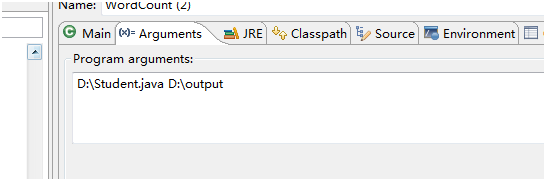
运行时:可以指定
运行时候指定本地的路径:如图:
![]()
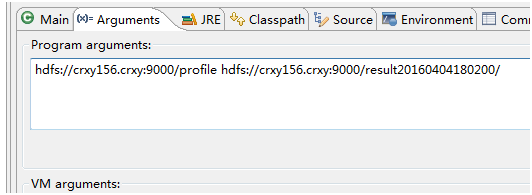
或者远程目录:
![]()
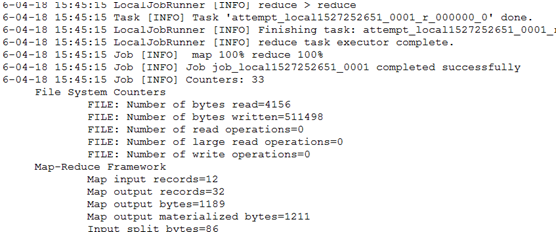
Debug或者run下结果:
![]()
2. 集群模式
集群模式是本地向集群提交作业。
1、将集群中的配置文件core-site.xml,hdfs-site.xml,mapred-site.xml,yarn-site.xml文件放在项目的resources目录下
2、在mapred-site.xml中添加:
<property>
<name>mapreduce.app-submission.cross-platform</name>
<value>true</value>
</property>
<property>
<name>mapred.jar</name>
<value>D:\\works\\cr_teach\\target\\teach-1.0-SNAPSHOT-jar-with-dependencies.jar</value>
</property>
Mapred.jar目录根据你自己的包名字来定。
3、Maven 打包 mvn clean install
4、运行。
如果提示:
Permission denied: user=zenith, access=EXECUTE, inode="/tmp/hadoop-yarn":root:supergroup:drwx------
给文件增加执行权限 hdfs dfs -chmod -R a+x /tmp
本文转自SummerChill博客园博客,原文链接:http://www.cnblogs.com/DreamDrive/p/6885585.html,如需转载请自行联系原作者