Java模板引擎之FreeMarker
ava工程中使用freemarker例子 Java之利用Freemarker模板引擎实现代码生成器,提高效率 Java模版引擎:jsp、freemarker、velocity区别 Java模版引擎之Freemarker篇 Java 模板引擎总结
MyBatis 是一款优秀的、开源的持久层框架,它支持定制化 SQL、存储过程以及高级映射。MyBatis 避免了几乎所有的 JDBC 代码和手动设置参数以及获取结果集。MyBatis 可以使用简单的 XML 或注解来配置和映射原生信息,将接口和 Java 的 POJOs(Plain Old Java Objects,普通的 Java对象)映射成数据库中的记录。
这就表明,MyBatis是SQL映射框架(SQL mapping framework),和Hibernate工作原理并不相同,因为Hibernate是ORM 框架。
MyBatis社区已经为Spring Boot提供了starter依赖,因为我们可以在Spring Boot中愉快地使用MyBatis.
本次介绍将不使用MyBatis XML来执行数据库查询,而是使用基于注释的mappers(annotation-based mappers).
因为本次演示的是如何在Spring Boot中使用MyBatis操作MySQL,进行数据库的增删改查。所以,我们需要对MySQL数据库做一些准备工作。具体说来,就说在MySQL的test数据库下新建表格person,其中的字段为id,name,age,city,id为自增长的主键。
use test

create table person(
id int primary key auto_increment,
name varchar(20),
age int,
city varchar(20)
);
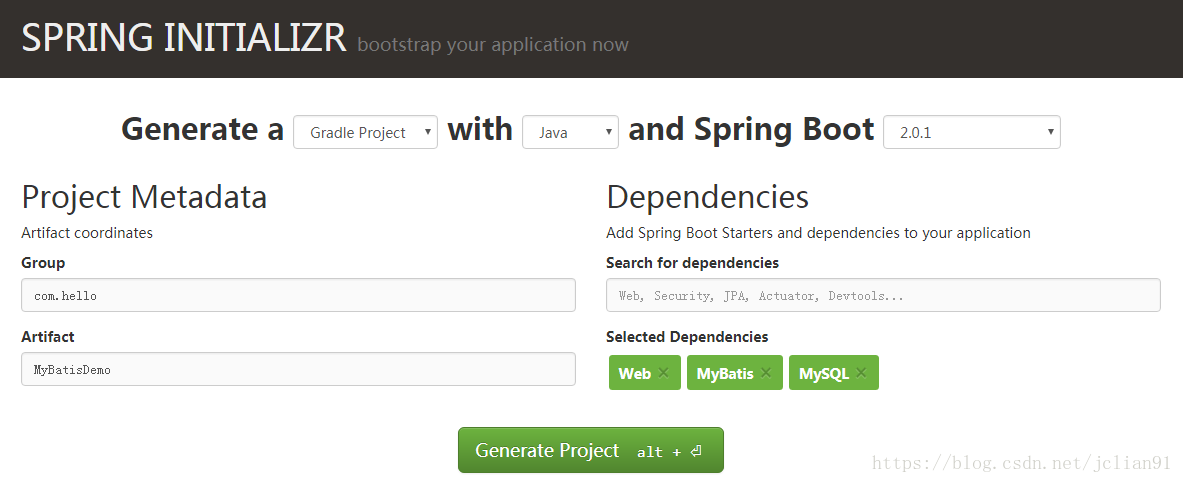
接着在 http://start.spring.io/ 中创建Spring Boot项目,加入Web, MyBatis, MySQL起始依赖,如下图:
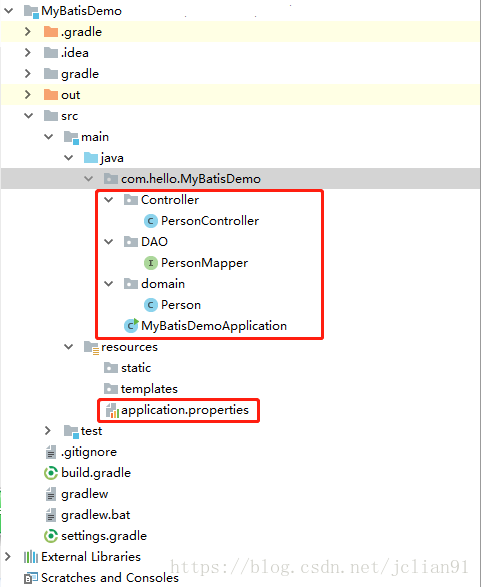
整个项目的结构如下图:
package com.hello.MyBatisDemo.domain;

public class Person{

    private Integer id;
    private String name;
    private Integer age;
    private String city;

    public Integer getId() {
        return id;
    }

    public void setId(Integer id) {
        this.id = id;
    }

    public String getName() {
        return name;
    }

    public void setName(String name) {
        this.name = name;
    }

    public Integer getAge() {
        return age;
    }

    public void setAge(Integer age) {
        this.age = age;
    }

    public String getCity() {
        return city;
    }

    public void setCity(String city) {
        this.city = city;
    }

}
接着是基于注释的mappers文件PersonMapper.java,其代码如下:
package com.hello.MyBatisDemo.DAO;

import com.hello.MyBatisDemo.domain.Person;
import org.apache.ibatis.annotations.*;
import java.util.List;

@Mapper
public interface PersonMapper {

    /**
     * 添加操作,返回新增元素的 ID
     * @param person
     */
    @Insert("insert into person(id,name,age,city) values(#{id},#{name},#{age},#{city})")
    @Options(useGeneratedKeys = true, keyColumn = "id", keyProperty = "id")
    void insert(Person person);

    /**
     * 更新操作
     * @param person
     * @return 受影响的行数
     */
    @Update("update person set name=#{name},age=#{age},city=#{city} where id=#{id}")
    Integer update(Person person);

    /**
     * 删除操作
     * @param id
     * @return 受影响的行数
     */
    @Delete("delete from person where id=#{id}")
    Integer delete(@Param("id") Integer id);

    /**
     * 查询所有
     * @return
     */
    @Select("select id,name,age,city from person")
    List<Person> selectAll();

    /**
     * 根据主键查询单个
     * @param id
     * @return
     */
    @Select("select id,name,age,city from person where id=#{id}")
    Person selectById(@Param("id") Integer id);

}
下一步是控制文件PersonController.java,其代码如下:
package com.hello.MyBatisDemo.Controller;

import com.hello.MyBatisDemo.DAO.PersonMapper;
import com.hello.MyBatisDemo.domain.Person;
import org.springframework.beans.factory.annotation.Autowired;
import org.springframework.web.bind.annotation.RequestMapping;
import org.springframework.web.bind.annotation.RequestParam;
import org.springframework.web.bind.annotation.RestController;
import java.util.List;

@RestController
public class PersonController {

    @Autowired
    private PersonMapper personMapper;

    @RequestMapping("/insert")
    public String insert(@RequestParam String name,
                         @RequestParam String city,
                         @RequestParam Integer age) {
        Person person = new Person();
        person.setName(name);
        person.setAge(age);
        person.setCity(city);
        personMapper.insert(person);
        return "第"+person.getId()+"条记录插入成功!";
    }

    @RequestMapping("/update")
    public String update(@RequestParam Integer id,
                          @RequestParam String name,
                          @RequestParam String city,
                          @RequestParam Integer age) {
        Person person = new Person();
        person.setId(id);
        person.setName(name);
        person.setAge(age);
        person.setCity(city);
        return personMapper.update(person)+"条记录更新成功!";
    }

    @RequestMapping("/delete")
    public String delete(@RequestParam Integer id) {
        return personMapper.delete(id)+"条记录删除成功!";
    }

    @RequestMapping("/selectById")
    public Person selectById(@RequestParam Integer id) {
        return personMapper.selectById(id);
    }

    @RequestMapping("/selectAll")
    public List<Person> selectAll() {
        return personMapper.selectAll();
    }

}
最后一步是整个项目的配置文件application.properies,主要是MySQL数据库的连接设置,其代码如下:
spring.datasource.url=jdbc:mysql://localhost:33061/test?useUnicode=true&characterEncoding=UTF-8
spring.datasource.username=root
spring.datasource.password=147369
spring.datasource.driver-class-name=com.mysql.jdbc.Driver

server.port=8100
整个项目的结构及代码介绍完毕。
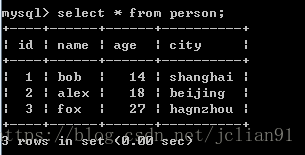
启动Spring Boot项目,在浏览器中输入: http://localhost:8100/insert?name=bob&age=14&city=shanghai 即可插入一条新的记录。如此类似地插入以下三条记录:

微信关注我们
转载内容版权归作者及来源网站所有!
低调大师中文资讯倾力打造互联网数据资讯、行业资源、电子商务、移动互联网、网络营销平台。持续更新报道IT业界、互联网、市场资讯、驱动更新,是最及时权威的产业资讯及硬件资讯报道平台。
马里奥是站在游戏界顶峰的超人气多面角色。马里奥靠吃蘑菇成长,特征是大鼻子、头戴帽子、身穿背带裤,还留着胡子。与他的双胞胎兄弟路易基一起,长年担任任天堂的招牌角色。
Nacos /nɑ:kəʊs/ 是 Dynamic Naming and Configuration Service 的首字母简称,一个易于构建 AI Agent 应用的动态服务发现、配置管理和AI智能体管理平台。Nacos 致力于帮助您发现、配置和管理微服务及AI智能体应用。Nacos 提供了一组简单易用的特性集,帮助您快速实现动态服务发现、服务配置、服务元数据、流量管理。Nacos 帮助您更敏捷和容易地构建、交付和管理微服务平台。
Spring框架(Spring Framework)是由Rod Johnson于2002年提出的开源Java企业级应用框架,旨在通过使用JavaBean替代传统EJB实现方式降低企业级编程开发的复杂性。该框架基于简单性、可测试性和松耦合性设计理念,提供核心容器、应用上下文、数据访问集成等模块,支持整合Hibernate、Struts等第三方框架,其适用范围不仅限于服务器端开发,绝大多数Java应用均可从中受益。
Sublime Text具有漂亮的用户界面和强大的功能,例如代码缩略图,Python的插件,代码段等。还可自定义键绑定,菜单和工具栏。Sublime Text 的主要功能包括:拼写检查,书签,完整的 Python API , Goto 功能,即时项目切换,多选择,多窗口等等。Sublime Text 是一个跨平台的编辑器,同时支持Windows、Linux、Mac OS X等操作系统。
扫码在手机上查看文章
扫描二维码,手机阅读更方便




有任何问题或合作意向欢迎联系我们
Email: 99873273@qq.com
QQ: 99873273