opencv
pip3 install opencv--python import cv2 print(cv2.__version__) 3.4.0
Follow @ServiceStack or join the Google+ Community for updates, or StackOverflow or the Customer Forums for support.
ServiceStack's C# Redis Client is a simple, high-performance and feature-rich C# Client for Redis with native support and high-level abstractions for serializing POCOs and Complex Types.
There are a number of different APIs available with the RedisClient implementing the following interfaces:
For most cases if you require access to Redis specific functionality you would want to bind to the interface below:
IRedisClient.As<T>() - it returns a 'strongly-typed client' that provides a typed-interface for all redis value operations that works against any C#/.NET POCO type.The interfaces works cleanly with any IOC and allows your app logic to bind to implementation-free interfaces which can easily be mocked and substituted.
An overview of class hierarchy for the C# Redis clients looks like:
RedisTypedClient (POCO) > RedisClient (string) > RedisNativeClient (raw byte[])
With each client providing different layers of abstraction:
byte[] apis and does no marshalling and passes all values directly to redis.string values and simply converts strings to UTF8 bytes before sending to RedisRedis Connection strings have been expanded to support the more versatile URI format which is now able to capture most of Redis Client settings in a single connection string (akin to DB Connection strings).
Redis Connection Strings supports multiple URI-like formats, from a simple hostname or IP Address and port pair to a fully-qualified URI with multiple options specified on the QueryString.
Some examples of supported formats:
localhost
127.0.0.1:6379
redis://localhost:6379
password@localhost:6379
clientid:password@localhost:6379
redis://clientid:password@localhost:6380?ssl=true&db=1
More examples can be seen in ConfigTests.cs
Any additional configuration can be specified as QueryString parameters. The full list of options that can be specified include:
| Ssl | bool | If this is an SSL connection |
| Db | int | The Redis DB this connection should be set to |
| Client | string | A text alias to specify for this connection for analytic purposes |
| Password | string | UrlEncoded version of the Password for this connection |
| ConnectTimeout | int | Timeout in ms for making a TCP Socket connection |
| SendTimeout | int | Timeout in ms for making a synchronous TCP Socket Send |
| ReceiveTimeout | int | Timeout in ms for waiting for a synchronous TCP Socket Receive |
| IdleTimeOutSecs | int | Timeout in Seconds for an Idle connection to be considered active |
| NamespacePrefix | string | Use a custom prefix for ServiceStack.Redis internal index colletions |
PM> Install-Package ServiceStack.Redis
Latest v4+ on NuGet is a commercial release with free quotas.
ServiceStack.Redis has great support AWS's ElastiCache Redis solution, follow this guide to help getting up and running quickly:
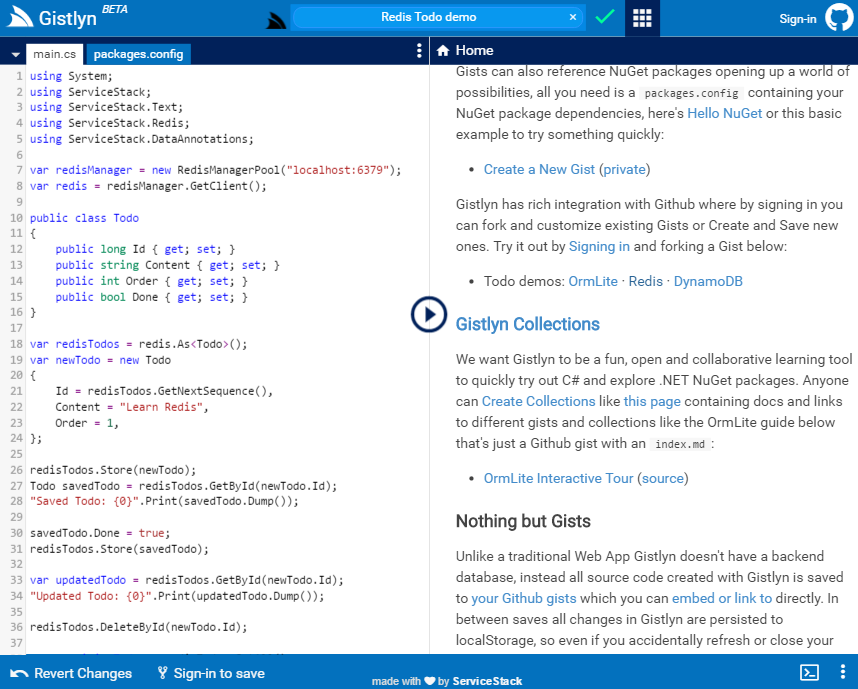
A great way to try out ServiceStack.Redis is on gistlyn.com which lets you immediately run and explore Redis features from the comfort of your browser with zero software install:
The recommended way to access RedisClient instances is to use one of the available Thread-Safe Client Managers below. Client Managers are connection factories which is ideally registered as a Singleton either in your IOC or static classes.
With the enhanced Redis URI Connection Strings we've been able to simplify and streamline the existing PooledRedisClientManager implementation and have extracted it out into a new clients manager called RedisManagerPool.
In addition to removing all above options on the Client Manager itself, readonly connection strings have also been removed so the configuration ends up much simpler and more aligned with the common use-case:
container.Register<IRedisClientsManager>(c =>
    new RedisManagerPool(redisConnectionString));
Pooling Behavior
Any connections required after the maximum Pool size has been reached will be created and disposed outside of the Pool. By not being restricted to a maximum pool size, the pooling behavior in RedisManagerPool can maintain a smaller connection pool size at the cost of potentially having a higher opened/closed connection count.
If you prefer to define options on the Client Manager itself or you want to provide separate Read/Write and ReadOnly (i.e. Master and Slave) redis-servers, use the PooledRedisClientManager instead:
container.Register<IRedisClientsManager>(c =>
    new PooledRedisClientManager(redisReadWriteHosts, redisReadOnlyHosts) {
        ConnectTimeout = 100,
        //...
    });
Pooling Behavior
The PooledRedisClientManager imposes a maximum connection limit and when its maximum pool size has been reached will instead block on any new connection requests until the next RedisClient is released back into the pool. If no client became available within PoolTimeout, a Pool TimeoutException will be thrown.
If don't want to use connection pooling (i.e. your accessing a local redis-server instance) you can use a basic (non-pooled) Clients Manager which creates a new RedisClient instance each time:
container.Register<IRedisClientsManager>(c =>
    new BasicRedisClientManager(redisConnectionString));
Once registered, accessing the RedisClient is the same in all Client Managers, e.g:
var clientsManager = container.Resolve<IRedisClientsManager>();
using (IRedisClient redis = clientsManager.GetClient())
{
    redis.IncrementValue("counter");
    List<string> days = redis.GetAllItemsFromList("days");

    //Access Typed API
    var redisTodos = redis.As<Todo>();

    redisTodos.Store(new Todo {
        Id = redisTodos.GetNextSequence(),
        Content = "Learn Redis",
    });

    var todo = redisTodos.GetById(1);

    //Access Native Client
    var redisNative = (IRedisNativeClient)redis;

    redisNative.Incr("counter");
    List<string> days = redisNative.LRange("days", 0, -1);
}
A more detailed list of the available RedisClient APIs used in the example can be seen in the C# interfaces below:
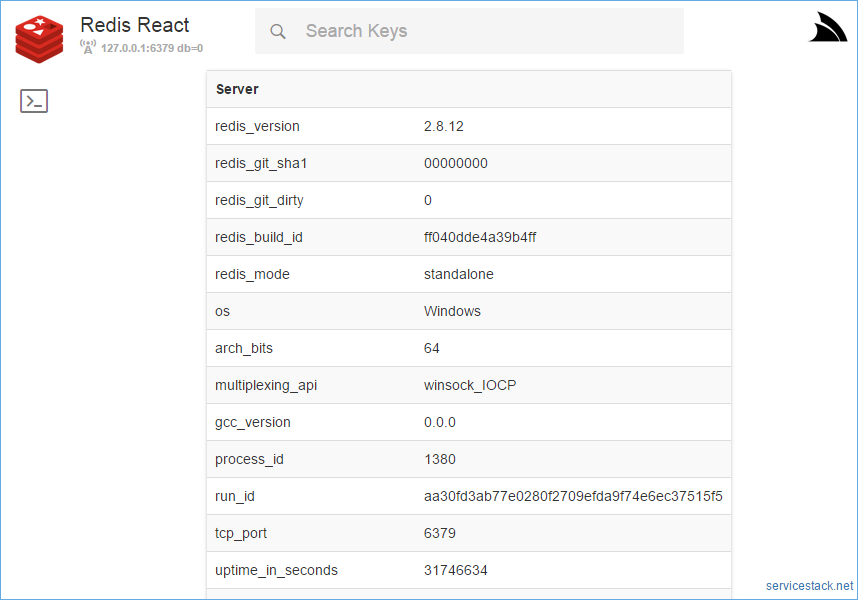
Redis React is a simple user-friendly UI for browsing data in Redis servers which takes advantages of the complex type conventions built in the ServiceStack.Redis Client to provide a rich, human-friendly UI for navigating related datasets, enabling a fast and fluid browsing experience for your Redis servers.
To use the new Sentinel support, instead of populating the Redis Client Managers with the connection string of the master and slave instances you would create a single RedisSentinel instance configured with the connection string of the running Redis Sentinels:
var sentinelHosts = new[]{ "sentinel1", "sentinel2:6390", "sentinel3" };
var sentinel = new RedisSentinel(sentinelHosts, masterName: "mymaster");
This configues a RedisSentinel with 3 sentinel hosts looking at mymaster group. As the default port for sentinels when unspecified is 26379 and how RedisSentinel is able to auto-discover other sentinels, the minimum configuration required is with a single Sentinel host:
var sentinel = new RedisSentinel("sentinel1");
The host the RedisSentinel is configured with only applies to that Sentinel Host, to use the flexibility of Redis Connection Strings to apply configuration on individual Redis Clients you need to register a custom HostFilter:
sentinel.HostFilter = host => "{0}?db=1&RetryTimeout=5000".Fmt(host);
An alternative to using connection strings for configuring clients is to modify default configuration on RedisConfig.
By default RedisSentinel uses a PooledRedisClientManager, this can be changed to use the newer RedisManagerPool with:
sentinel.RedisManagerFactory = (master,slaves) => new RedisManagerPool(master);
Once configured, you can start monitoring the Redis Sentinel servers and access the pre-configured client manager with:
IRedisClientsManager redisManager = sentinel.Start();
Which as before, can be registered in your preferred IOC as a singleton instance:
container.Register<IRedisClientsManager>(c => sentinel.Start());
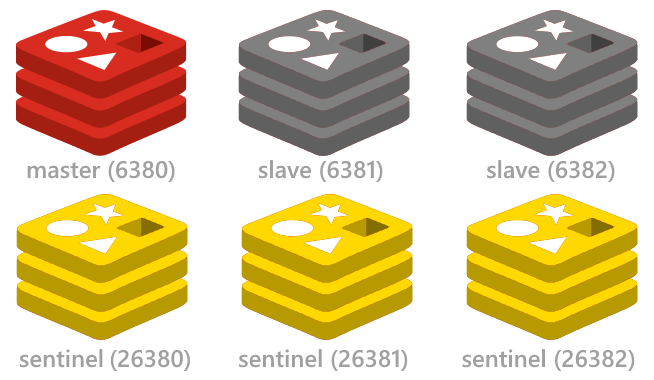
See the redis config project for a quick way to setup up the minimal highly available Redis Sentinel configuration including start/stop scripts for instantly running multiple redis instances on a single (or multiple) Windows, OSX or Linux servers.
You can use the RedisStats class for visibility and introspection into your running instances. The Redis Stats wiki lists the stats available.
To improve the resilience of client connections, RedisClient will transparently retry failed Redis operations due to Socket and I/O Exceptions in an exponential backoff starting from 10ms up until the RetryTimeout of 10000ms. These defaults can be tweaked with:
RedisConfig.DefaultRetryTimeout = 10000;
RedisConfig.BackOffMultiplier = 10;
ServiceStack.Redis now supporting SSL connections making it suitable for accessing remote Redis server instances over asecure SSL connection.

As connecting to Azure Redis Cache via SSL was the primary use-case for this feature, we've added a new Getting connected to Azure Redis via SSL to help you get started.
The release of Redis 3.2.0 brings it exciting new GEO capabilities which will let you store Lat/Long coordinates in Redis and query locations within a specified radius. To demonstrate this functionality we've created a new Redis GEO Live Demo which lets you click on anywhere in the U.S. to find the list of nearest cities within a given radius, Live Demo at: http://redisgeo.servicestack.net
Most of the time when waiting to use a new Redis Command you'll need to wait for an updated version of ServiceStack.Redisto add support for the new commands likewise there are times when the Redis Client doesn't offer every permutation that redis-server supports.
With the new Custom and RawCommand APIs on IRedisClient and IRedisNativeClient you can now use the RedisClient to send your own custom commands that can call adhoc Redis commands:
public interface IRedisClient
{
    ...
    RedisText Custom(params object[] cmdWithArgs);
}

public interface IRedisNativeClient
{
    ...
    RedisData RawCommand(params object[] cmdWithArgs);
    RedisData RawCommand(params byte[][] cmdWithBinaryArgs);
}
These Custom APIs take a flexible object[] arguments which accepts any serializable value e.g. byte[], string, int as well as any user-defined Complex Types which are transparently serialized as JSON and send across the wire as UTF-8 bytes.
var ret = Redis.Custom("SET", "foo", 1);          // ret.Text = "OK"

byte[] cmdSet = Commands.Set;
ret = Redis.Custom(cmdSet, "bar", "b");           // ret.Text = "OK"

ret = Redis.Custom("GET", "foo");                 // ret.Text = "1"
There are also convenient extension methods on RedisData and RedisText that make it easy to access structured data, e.g:
var ret = Redis.Custom(Commands.Keys, "*");
var keys = ret.GetResults();                      // keys = ["foo", "bar"]

ret = Redis.Custom(Commands.MGet, "foo", "bar");
var values = ret.GetResults();                    // values = ["1", "b"]

Enum.GetNames(typeof(DayOfWeek)).ToList()
    .ForEach(x => Redis.Custom(Commands.RPush, "DaysOfWeek", x));
ret = Redis.Custom(Commands.LRange, "DaysOfWeek", 1, -2);
var weekDays = ret.GetResults();

weekDays.PrintDump(); // ["Monday", "Tuesday", "Wednesday", "Thursday", "Friday"]
and some more examples using Complex Types with the Custom APIs:
var ret = Redis.Custom(Commands.Set, "foo", new Poco { Name = "Bar" }); // ret.Text = "OK"

ret = Redis.Custom(Commands.Get, "foo");          // ret.Text =  {"Name":"Bar"}
Poco dto = ret.GetResult<Poco>();

dto.Name.Print(); // Bar
This API is used in most of Redis React UI's redis.js JavaScript client library where Redis server commands are made available via the single ServiceStack Service:
public object Any(CallRedis request)
{
    var args = request.Args.ToArray();
    var response = new CallRedisResponse { Result = Redis.Custom(args) };
    return response;
}
The Pub/Sub engine powering Redis ServerEvents and Redis MQ has been extracted and encapsulated it into a re-usable class that can be used independently for handling messages published to specific Redis Pub/Sub channels.
RedisPubSubServer processes messages in a managed background thread that automatically reconnects when the redis-server connection fails and works like an independent background Service that can be stopped and started on command.
The public API is captured in the IRedisPubSubServer interface:
public interface IRedisPubSubServer : IDisposable
{
    IRedisClientsManager ClientsManager { get; }
    // What Channels it's subscribed to
    string[] Channels { get; }

    // Run once on initial StartUp
    Action OnInit { get; set; }
    // Called each time a new Connection is Started
    Action OnStart { get; set; }
    // Invoked when Connection is broken or Stopped
    Action OnStop { get; set; }
    // Invoked after Dispose()
    Action OnDispose { get; set; }

    // Fired when each message is received
    Action<string, string> OnMessage { get; set; }
    // Fired after successfully subscribing to the specified channels
    Action<string> OnUnSubscribe { get; set; }
    // Called when an exception occurs
    Action<Exception> OnError { get; set; }
    // Called before attempting to Failover to a new redis master
    Action<IRedisPubSubServer> OnFailover { get; set; }

    int? KeepAliveRetryAfterMs { get; set; }
    // The Current Time for RedisServer
    DateTime CurrentServerTime { get; }

    // Current Status: Starting, Started, Stopping, Stopped, Disposed
    string GetStatus();
    // Different life-cycle stats
    string GetStatsDescription();

    // Subscribe to specified Channels and listening for new messages
    IRedisPubSubServer Start();
    // Close active Connection and stop running background thread
    void Stop();
    // Stop than Start
    void Restart();
}
To use RedisPubSubServer, initialize it with the channels you want to subscribe to and assign handlers for each of the events you want to handle. At a minimum you'll want to handle OnMessage:
var clientsManager = new PooledRedisClientManager();
var redisPubSub = new RedisPubSubServer(clientsManager, "channel-1", "channel-2") {
        OnMessage = (channel, msg) => "Received '{0}' from '{1}'".Print(msg, channel)
    }.Start();
Calling Start() after it's initialized will get it to start listening and processing any messages published to the subscribed channels.
The new ZRANGEBYLEX sorted set operations allowing you to query a sorted set lexically have been added. A good showcase for this is available on autocomplete.redis.io.
These new operations are available as a 1:1 mapping with redis-server on IRedisNativeClient:
public interface IRedisNativeClient
{
    ...
    byte[][] ZRangeByLex(string setId, string min, string max, int? skip, int? take);
    long ZLexCount(string setId, string min, string max);
    long ZRemRangeByLex(string setId, string min, string max);
}
And the more user-friendly APIs under IRedisClient:
public interface IRedisClient
{
    ...
    List<string> SearchSortedSet(string setId, string start=null, string end=null);
    long SearchSortedSetCount(string setId, string start=null, string end=null);
    long RemoveRangeFromSortedSetBySearch(string setId, string start=null, string end=null);
}
Just like NuGet version matchers, Redis uses [ char to express inclusiveness and ( char for exclusiveness. Since the IRedisClient APIs defaults to inclusive searches, these two APIs are the same:
Redis.SearchSortedSetCount("zset", "a", "c")
Redis.SearchSortedSetCount("zset", "[a", "[c")
Alternatively you can specify one or both bounds to be exclusive by using the ( prefix, e.g:
Redis.SearchSortedSetCount("zset", "a", "(c")
Redis.SearchSortedSetCount("zset", "(a", "(c")
More API examples are available in LexTests.cs.
The development branch of Redis server (available when v3.0 is released) includes an ingenious algorithm to approximate the unique elements in a set with maximum space and time efficiency. For details about how it works see Redis's creator Salvatore's blog who explains it in great detail. Essentially it lets you maintain an efficient way to count and merge unique elements in a set without having to store its elements. A Simple example of it in action:
redis.AddToHyperLog("set1", "a", "b", "c");
redis.AddToHyperLog("set1", "c", "d");
var count = redis.CountHyperLog("set1"); //4

redis.AddToHyperLog("set2", "c", "d", "e", "f");

redis.MergeHyperLogs("mergedset", "set1", "set2");

var mergeCount = redis.CountHyperLog("mergedset"); //6
Redis v2.8 introduced a beautiful new SCAN operation that provides an optimal strategy for traversing a redis instance entire keyset in managable-size chunks utilizing only a client-side cursor and without introducing any server state. It's a higher performance alternative and should be used instead of KEYS in application code. SCAN and its related operations for traversing members of Sets, Sorted Sets and Hashes are now available in the Redis Client in the following APIs:
public interface IRedisClient
{
    ...
    IEnumerable<string> ScanAllKeys(string pattern = null, int pageSize = 1000);
    IEnumerable<string> ScanAllSetItems(string setId, string pattern = null, int pageSize = 1000);
    IEnumerable<KeyValuePair<string, double>> ScanAllSortedSetItems(string setId, string pattern = null, int pageSize = 1000);
    IEnumerable<KeyValuePair<string, string>> ScanAllHashEntries(string hashId, string pattern = null, int pageSize = 1000);
}

//Low-level API
public interface IRedisNativeClient
{
    ...
    ScanResult Scan(ulong cursor, int count = 10, string match = null);
    ScanResult SScan(string setId, ulong cursor, int count = 10, string match = null);
    ScanResult ZScan(string setId, ulong cursor, int count = 10, string match = null);
    ScanResult HScan(string hashId, ulong cursor, int count = 10, string match = null);
}
The IRedisClient provides a higher-level API that abstracts away the client cursor to expose a lazy Enumerable sequence to provide an optimal way to stream scanned results that integrates nicely with LINQ, e.g:
var scanUsers = Redis.ScanAllKeys("urn:User:*");
var sampleUsers = scanUsers.Take(10000).ToList(); //Stop after retrieving 10000 user keys
The C# API below returns the first 10 results matching the key:* pattern:
var keys = Redis.ScanAllKeys(pattern: "key:*", pageSize: 10)
    .Take(10).ToList();
However the C# Streaming API above requires an unknown number of Redis Operations (bounded to the number of keys in Redis) to complete the request. The number of SCAN calls can be reduced by choosing a higher pageSize to tell Redis to scan more keys each time the SCAN operation is called.
As the number of API calls has the potential to result in a large number of Redis Operations, it can end up yielding an unacceptable delay due to the latency of multiple dependent remote network calls. An easy solution is to instead have the multiple SCAN calls performed in-process on the Redis Server, eliminating the network latency of multiple SCAN calls, e.g:
const string FastScanScript = @"
local limit = tonumber(ARGV[2])
local pattern = ARGV[1]
local cursor = 0
local len = 0
local results = {}
repeat
    local r = redis.call('scan', cursor, 'MATCH', pattern, 'COUNT', limit)
    cursor = tonumber(r[1])
    for k,v in ipairs(r[2]) do
        table.insert(results, v)
        len = len + 1
        if len == limit then break end
    end
until cursor == 0 or len == limit
return results";

RedisText r = redis.ExecLua(FastScanScript, "key:*", "10");
r.Children.Count.Print() //= 10
The ExecLua API returns this complex LUA table response in the Children collection of the RedisText Response.
Another way to return complex data structures in a LUA operation is to serialize the result as JSON
return cjson.encode(results)
Which you can access as raw JSON by parsing the response as a String with:
string json = redis.ExecLuaAsString(FastScanScript, "key:*", "10");
This is also the approach used in Redis React's RedisServices.
ExecCachedLua is a convenient high-level API that eliminates the bookkeeping required for executing high-performance server LUA Scripts which suffers from many of the problems that RDBMS stored procedures have which depends on pre-existing state in the RDBMS that needs to be updated with the latest version of the Stored Procedure.
With Redis LUA you either have the option to send, parse, load then execute the entire LUA script each time it's called or alternatively you could pre-load the LUA Script into Redis once on StartUp and then execute it using the Script's SHA1 hash. The issue with this is that if the Redis server is accidentally flushed you're left with a broken application relying on a pre-existing script that's no longer there. The new ExecCachedLua API provides the best of both worlds where it will always execute the compiled SHA1 script, saving bandwidth and CPU but will also re-create the LUA Script if it no longer exists.
You can instead execute the compiled LUA script above by its SHA1 identifier, which continues to work regardless if it never existed or was removed at runtime, e.g:
// #1: Loads LUA script and caches SHA1 hash in Redis Client
r = redis.ExecCachedLua(FastScanScript, sha1 =>
    redis.ExecLuaSha(sha1, "key:*", "10"));

// #2: Executes using cached SHA1 hash
r = redis.ExecCachedLua(FastScanScript, sha1 =>
    redis.ExecLuaSha(sha1, "key:*", "10"));

// Deletes all existing compiled LUA scripts
redis.ScriptFlush();

// #3: Executes using cached SHA1 hash, gets NOSCRIPT Error,
//     re-creates then re-executes the LUA script using its SHA1 hash
r = redis.ExecCachedLua(FastScanScript, sha1 =>
    redis.ExecLuaSha(sha1, "key:*", "10"));
The IRedisClient APIs for redis server-side LUA support have been re-factored into the more user-friendly APIs below:
public interface IRedisClient
{
    //Eval/Lua operations
    T ExecCachedLua<T>(string scriptBody, Func<string, T> scriptSha1);

    RedisText ExecLua(string body, params string[] args);
    RedisText ExecLua(string luaBody, string[] keys, string[] args);
    RedisText ExecLuaSha(string sha1, params string[] args);
    RedisText ExecLuaSha(string sha1, string[] keys, string[] args);

    string ExecLuaAsString(string luaBody, params string[] args);
    string ExecLuaAsString(string luaBody, string[] keys, string[] args);
    string ExecLuaShaAsString(string sha1, params string[] args);
    string ExecLuaShaAsString(string sha1, string[] keys, string[] args);

    int ExecLuaAsInt(string luaBody, params string[] args);
    int ExecLuaAsInt(string luaBody, string[] keys, string[] args);
    int ExecLuaShaAsInt(string sha1, params string[] args);
    int ExecLuaShaAsInt(string sha1, string[] keys, string[] args);

    List<string> ExecLuaAsList(string luaBody, params string[] args);
    List<string> ExecLuaAsList(string luaBody, string[] keys, string[] args);
    List<string> ExecLuaShaAsList(string sha1, params string[] args);
    List<string> ExecLuaShaAsList(string sha1, string[] keys, string[] args);

    string CalculateSha1(string luaBody);

    bool HasLuaScript(string sha1Ref);
    Dictionary<string, bool> WhichLuaScriptsExists(params string[] sha1Refs);
    void RemoveAllLuaScripts();
    void KillRunningLuaScript();
    string LoadLuaScript(string body);
}
Here's how you can implement a ZPOP in Lua to remove the items with the lowest rank from a sorted set:
var luaBody = @"
    local val = redis.call('zrange', KEYS[1], 0, ARGV[1]-1)
    if val then redis.call('zremrangebyrank', KEYS[1], 0, ARGV[1]-1) end
    return val";

var i = 0;
var alphabet = 26.Times(c => ((char)('A' + c)).ToString());
alphabet.ForEach(x => Redis.AddItemToSortedSet("zalphabet", x, i++));

//Remove the letters with the lowest rank from the sorted set 'zalphabet'
var letters = Redis.ExecLuaAsList(luaBody, keys: new[] { "zalphabet" }, args: new[] { "3" });
letters.PrintDump(); //[A, B, C]
And how to implement ZREVPOP to remove items with the highest rank from a sorted set:
var luaBody = @"
    local val = redis.call('zrange', KEYS[1], -ARGV[1], -1)
    if val then redis.call('zremrangebyrank', KEYS[1], -ARGV[1], -1) end
    return val";

var i = 0;
var alphabet = 26.Times(c => ((char)('A' + c)).ToString());
alphabet.ForEach(x => Redis.AddItemToSortedSet("zalphabet", x, i++));

//Remove the letters with the highest rank from the sorted set 'zalphabet'
List<string> letters = Redis.ExecLuaAsList(luaBody,
    keys: new[] { "zalphabet" }, args: new[] { "3" });

letters.PrintDump(); //[X, Y, Z]
Returning an int:
int intVal = Redis.ExecLuaAsInt("return 123"); //123
int intVal = Redis.ExecLuaAsInt("return ARGV[1] + ARGV[2]", "10", "20"); //30
Returning an string:
//Hello, Redis Lua!
var strVal = Redis.ExecLuaAsString(@"return 'Hello, ' .. ARGV[1] .. '!'", "Redis Lua");
Returning a List of strings:
Enum.GetNames(typeof(DayOfWeek)).ToList()
    .ForEach(x => Redis.AddItemToList("DaysOfWeek", x));

var daysOfWeek = Redis.ExecLuaAsList("return redis.call('LRANGE', 'DaysOfWeek', 0, -1)");
daysOfWeek.PrintDump(); //[Sunday, Monday, Tuesday, ...]
More examples can be found in the Redis Eval Lua tests
Since September 2013, ServiceStack source code is available under GNU Affero General Public License/FOSS License Exception, see license.txt in the source. Alternative commercial licensing is also available, see https://servicestack.net/pricingfor details.
Contributors need to approve the Contributor License Agreement before any code will be reviewed, see the Contributing wikifor more details.
###C# Redis Client wiki Contains all the examples, tutorials and resources you need to get you up to speed with common operations and the latest features.
Useful Links on Redis server
Below is a simple example to give you a flavour of how easy it is to use some of Redis's advanced data structures - in this case Redis Lists: Full source code of this example is viewable online
using (var redisClient = new RedisClient())
{
    //Create a 'strongly-typed' API that makes all Redis Value operations to apply against Shippers
    IRedisTypedClient<Shipper> redis = redisClient.As<Shipper>();

    //Redis lists implement IList<T> while Redis sets implement ICollection<T>
    var currentShippers = redis.Lists["urn:shippers:current"];
    var prospectiveShippers = redis.Lists["urn:shippers:prospective"];

    currentShippers.Add(
        new Shipper {
            Id = redis.GetNextSequence(),
            CompanyName = "Trains R Us",
            DateCreated = DateTime.UtcNow,
            ShipperType = ShipperType.Trains,
            UniqueRef = Guid.NewGuid()
        });

    currentShippers.Add(
        new Shipper {
            Id = redis.GetNextSequence(),
            CompanyName = "Planes R Us",
            DateCreated = DateTime.UtcNow,
            ShipperType = ShipperType.Planes,
            UniqueRef = Guid.NewGuid()
        });

    var lameShipper = new Shipper {
        Id = redis.GetNextSequence(),
        CompanyName = "We do everything!",
        DateCreated = DateTime.UtcNow,
        ShipperType = ShipperType.All,
        UniqueRef = Guid.NewGuid()
    };

    currentShippers.Add(lameShipper);

    Dump("ADDED 3 SHIPPERS:", currentShippers);

    currentShippers.Remove(lameShipper);

    Dump("REMOVED 1:", currentShippers);

    prospectiveShippers.Add(
        new Shipper {
            Id = redis.GetNextSequence(),
            CompanyName = "Trucks R Us",
            DateCreated = DateTime.UtcNow,
            ShipperType = ShipperType.Automobiles,
            UniqueRef = Guid.NewGuid()
        });

    Dump("ADDED A PROSPECTIVE SHIPPER:", prospectiveShippers);

    redis.PopAndPushBetweenLists(prospectiveShippers, currentShippers);

    Dump("CURRENT SHIPPERS AFTER POP n' PUSH:", currentShippers);
    Dump("PROSPECTIVE SHIPPERS AFTER POP n' PUSH:", prospectiveShippers);

    var poppedShipper = redis.PopFromList(currentShippers);
    Dump("POPPED a SHIPPER:", poppedShipper);
    Dump("CURRENT SHIPPERS AFTER POP:", currentShippers);

    //reset sequence and delete all lists
    redis.SetSequence(0);
    redis.Remove(currentShippers, prospectiveShippers);
    Dump("DELETING CURRENT AND PROSPECTIVE SHIPPERS:", currentShippers);
}

/*
== EXAMPLE OUTPUT ==

ADDED 3 SHIPPERS:
Id:1,CompanyName:Trains R Us,ShipperType:Trains,DateCreated:2010-01-31T11:53:37.7169323Z,UniqueRef:d17c5db0415b44b2ac5da7b6ebd780f5
Id:2,CompanyName:Planes R Us,ShipperType:Planes,DateCreated:2010-01-31T11:53:37.799937Z,UniqueRef:e02a73191f4b4e7a9c44eef5b5965d06
Id:3,CompanyName:We do everything!,ShipperType:All,DateCreated:2010-01-31T11:53:37.8009371Z,UniqueRef:d0c249bbbaf84da39fc4afde1b34e332

REMOVED 1:
Id:1,CompanyName:Trains R Us,ShipperType:Trains,DateCreated:2010-01-31T11:53:37.7169323Z,UniqueRef:d17c5db0415b44b2ac5da7b6ebd780f5
Id:2,CompanyName:Planes R Us,ShipperType:Planes,DateCreated:2010-01-31T11:53:37.799937Z,UniqueRef:e02a73191f4b4e7a9c44eef5b5965d06

ADDED A PROSPECTIVE SHIPPER:
Id:4,CompanyName:Trucks R Us,ShipperType:Automobiles,DateCreated:2010-01-31T11:53:37.8539401Z,UniqueRef:67d7d4947ebc4b0ba5c4d42f5d903bec

CURRENT SHIPPERS AFTER POP n' PUSH:
Id:4,CompanyName:Trucks R Us,ShipperType:Automobiles,DateCreated:2010-01-31T11:53:37.8539401Z,UniqueRef:67d7d4947ebc4b0ba5c4d42f5d903bec
Id:1,CompanyName:Trains R Us,ShipperType:Trains,DateCreated:2010-01-31T11:53:37.7169323Z,UniqueRef:d17c5db0415b44b2ac5da7b6ebd780f5
Id:2,CompanyName:Planes R Us,ShipperType:Planes,DateCreated:2010-01-31T11:53:37.799937Z,UniqueRef:e02a73191f4b4e7a9c44eef5b5965d06

PROSPECTIVE SHIPPERS AFTER POP n' PUSH:

POPPED a SHIPPER:
Id:2,CompanyName:Planes R Us,ShipperType:Planes,DateCreated:2010-01-31T11:53:37.799937Z,UniqueRef:e02a73191f4b4e7a9c44eef5b5965d06

CURRENT SHIPPERS AFTER POP:
Id:4,CompanyName:Trucks R Us,ShipperType:Automobiles,DateCreated:2010-01-31T11:53:37.8539401Z,UniqueRef:67d7d4947ebc4b0ba5c4d42f5d903bec
Id:1,CompanyName:Trains R Us,ShipperType:Trains,DateCreated:2010-01-31T11:53:37.7169323Z,UniqueRef:d17c5db0415b44b2ac5da7b6ebd780f5

DELETING CURRENT AND PROSPECTIVE SHIPPERS:
*/
More examples are available in the [RedisExamples Redis examples page] and in the comprehensive test suite
One of the best things about Redis is the speed - it is quick.
This example below stores and gets the entire Northwind database (3202 records) in less 1.2 secs - we've never had it so quick!
(Running inside a VS.NET/R# unit test on a 3 year old iMac)
using (var client = new RedisClient())
{
    var before = DateTime.Now;
    client.StoreAll(NorthwindData.Categories);
    client.StoreAll(NorthwindData.Customers);
    client.StoreAll(NorthwindData.Employees);
    client.StoreAll(NorthwindData.Shippers);
    client.StoreAll(NorthwindData.Orders);
    client.StoreAll(NorthwindData.Products);
    client.StoreAll(NorthwindData.OrderDetails);
    client.StoreAll(NorthwindData.CustomerCustomerDemos);
    client.StoreAll(NorthwindData.Regions);
    client.StoreAll(NorthwindData.Territories);
    client.StoreAll(NorthwindData.EmployeeTerritories);

    Console.WriteLine("Took {0}ms to store the entire Northwind database ({1} records)",
        (DateTime.Now - before).TotalMilliseconds, totalRecords);


    before = DateTime.Now;
    var categories = client.GetAll<Category>();
    var customers = client.GetAll<Customer>();
    var employees = client.GetAll<Employee>();
    var shippers = client.GetAll<Shipper>();
    var orders = client.GetAll<Order>();
    var products = client.GetAll<Product>();
    var orderDetails = client.GetAll<OrderDetail>();
    var customerCustomerDemos = client.GetAll<CustomerCustomerDemo>();
    var regions = client.GetAll<Region>();
    var territories = client.GetAll<Territory>();
    var employeeTerritories = client.GetAll<EmployeeTerritory>();

    Console.WriteLine("Took {0}ms to get the entire Northwind database ({1} records)",
        (DateTime.Now - before).TotalMilliseconds, totalRecords);
}
/*
== EXAMPLE OUTPUT ==

Took 1020.0583ms to store the entire Northwind database (3202 records)
Took 132.0076ms to get the entire Northwind database (3202 records)
*/
Note: The total time taken includes an extra Redis operation for each record to store the id in a Redis set for each type as well as serializing and de-serializing each record using Service Stack's TypeSerializer.

微信关注我们
转载内容版权归作者及来源网站所有!
低调大师中文资讯倾力打造互联网数据资讯、行业资源、电子商务、移动互联网、网络营销平台。持续更新报道IT业界、互联网、市场资讯、驱动更新,是最及时权威的产业资讯及硬件资讯报道平台。
马里奥是站在游戏界顶峰的超人气多面角色。马里奥靠吃蘑菇成长,特征是大鼻子、头戴帽子、身穿背带裤,还留着胡子。与他的双胞胎兄弟路易基一起,长年担任任天堂的招牌角色。
Nacos /nɑ:kəʊs/ 是 Dynamic Naming and Configuration Service 的首字母简称,一个易于构建 AI Agent 应用的动态服务发现、配置管理和AI智能体管理平台。Nacos 致力于帮助您发现、配置和管理微服务及AI智能体应用。Nacos 提供了一组简单易用的特性集,帮助您快速实现动态服务发现、服务配置、服务元数据、流量管理。Nacos 帮助您更敏捷和容易地构建、交付和管理微服务平台。
Rocky Linux(中文名:洛基)是由Gregory Kurtzer于2020年12月发起的企业级Linux发行版,作为CentOS稳定版停止维护后与RHEL(Red Hat Enterprise Linux)完全兼容的开源替代方案,由社区拥有并管理,支持x86_64、aarch64等架构。其通过重新编译RHEL源代码提供长期稳定性,采用模块化包装和SELinux安全架构,默认包含GNOME桌面环境及XFS文件系统,支持十年生命周期更新。
WebStorm 是jetbrains公司旗下一款JavaScript 开发工具。目前已经被广大中国JS开发者誉为“Web前端开发神器”、“最强大的HTML5编辑器”、“最智能的JavaScript IDE”等。与IntelliJ IDEA同源,继承了IntelliJ IDEA强大的JS部分的功能。
扫码在手机上查看文章
扫描二维码,手机阅读更方便




有任何问题或合作意向欢迎联系我们
Email: 99873273@qq.com
QQ: 99873273