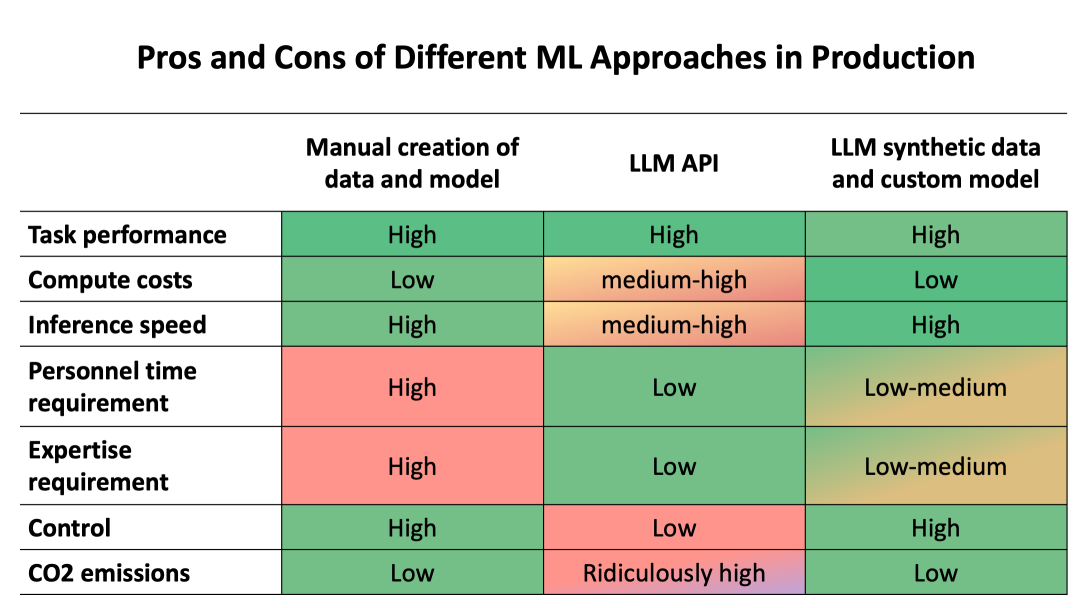
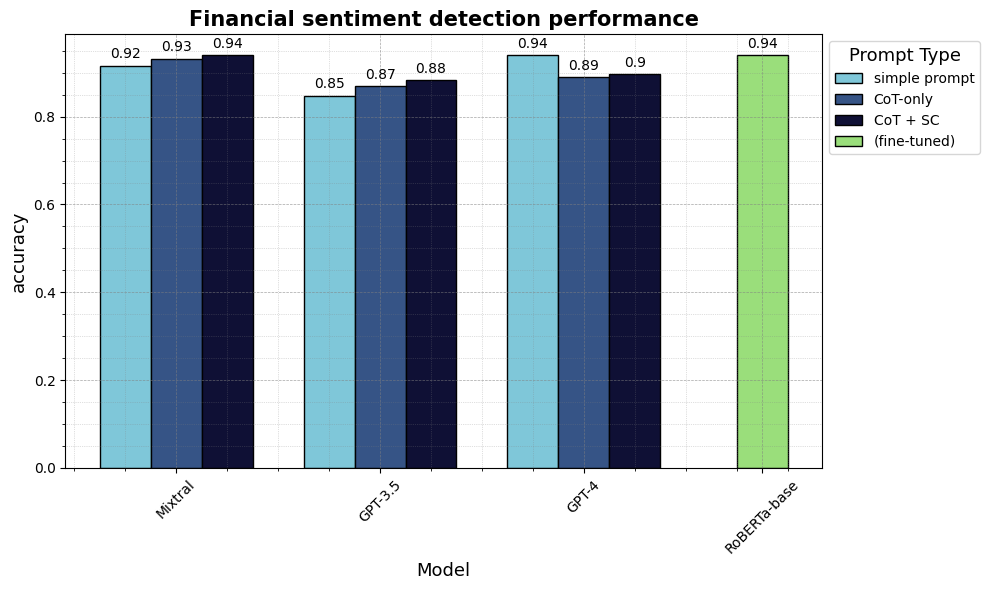
由于对特定领域的数据集和模型的缺失,许多人尝试用更加通用的 LLM。这些模型都非常大和通用,以至于它们可以开箱即用,并实现令人印象深刻的准确度。它们的易于使用的 API 消除了对微调和对部署的专业知识的需求。但他们最主要的缺点是大小和可控性: 大小超过十亿到万亿的参数运行在计算集群中,控制权只在少数的几家公司手中。
2. 解决方案: 合成数据来高效蒸馏学生模型
在 2023 年,一个东西根本的改变了机器学习的蓝图,LLM 开始达到和人类数据标注者相同的水平。现在有大量的证据表明,最好的 LLM 比众包工人更胜一筹,并且在创建高质量 (合成的) 数据中部分达到了专家水平 (例如 Zheng et al. 2023, Gilardi et al. 2023, He et al. 2023)。这一进展的重要性怎么强调都不为过。创建定制模型的关键瓶颈在于招募和协调人工工作者以创造定制训练数据的资金、时间和专业知识需求。随着大型语言模型 (LLMs) 开始达到人类水平,高质量的数据标注现在可以通过 API 获得; 可复制的注释指令可以作为提示 prompt 发送; 合成数据几乎可以立即返回,唯一的瓶颈就剩计算能力了。
!pip install datasets # for loading the example dataset
!pip install huggingface_hub # for secure token handling
!pip install requests # for making API requests
!pip install scikit-learn # for evaluation metrics
!pip install pandas # for post-processing some data
!pip install tqdm # for progress bars
# create a new column with the numeric label verbalised as label_text (e.g. "positive" instead of "0") label_map = { i: label_text for i, label_text in enumerate(dataset.features["label"].names) }
defadd_label_text(example): example["label_text"] = label_map[example["label"]] return example
prompt_financial_sentiment = """\
You are a highly qualified expert trained to annotate machine learning training data.

Your task is to analyze the sentiment in the TEXT below from an investor perspective and label it with only one the three labels:
positive, negative, or neutral.

Base your label decision only on the TEXT and do not speculate e.g. based on prior knowledge about a company.

Do not provide any explanations and only respond with one of the labels as one word: negative, positive, or neutral

Examples:
Text: Operating profit increased, from EUR 7m to 9m compared to the previous reporting period.
Label: positive
Text: The company generated net sales of 11.3 million euro this year.
Label: neutral
Text: Profit before taxes decreased to EUR 14m, compared to EUR 19m in the previous period.
Label: negative

Your TEXT to analyse:
TEXT: {text}
Label: """
这个标注指令现在可以被传递给 LLM API。对于这个例子,我们使用免费 Hugging Face 无服务的推理 API。这个 API 是测试流行模型的理想选择。请注意,如果你发送次数过多,尤其是分享给过多用户,你可能会遇到速率限制。对于更大的工作流,我们推荐创建一个 专用推理端点。专用推理端点对于你自己的付费 API 尤为重要,特别是你可以灵活的控制开和关。
我们登录 huggingface_hub 库,简单安全的填入我们的 API token。或者,你也可以定义你自己的 token 作为环境变量。(详情可以参考 文档)。
# you need a huggingface account and create a token here: https://huggingface.co/settings/tokens
# we can then safely call on the token with huggingface_hub.get_token()
import huggingface_hub
huggingface_hub.login()
# Choose your LLM annotator # to find available LLMs see: https://huggingface.co/docs/huggingface_hub/main/en/package_reference/inference_client#huggingface_hub.InferenceClient.list_deployed_models API_URL = "https://api-inference.huggingface.co/models/mistralai/Mixtral-8x7B-Instruct-v0.1"
# docs on different parameters: https://huggingface.co/docs/api-inference/detailed_parameters#text-generation-task generation_params = dict( top_p=0.90, temperature=0.8, max_new_tokens=128, return_full_text=False, use_cache=False )
defclean_output(string, random_choice=True): for category in labels: if category.lower() in string.lower(): return category # if the output string cannot be mapped to one of the categories, we either return "FAIL" or choose a random label if random_choice: return random.choice(labels) else: return"FAIL"
我们现在可以将我们的文本发送给 LLM 进行标注。下面的代码将每一段文本发送到 LLM API,并将文本输出映射到我们的三个清晰类别。注意: 在实际操作中,逐个文本迭代并将它们分别发送到 API 是非常低效的。API 可以同时处理多个文本,你可以异步地批量向 API 发送文本来显著加快 API 调用速度。你可以在本博客的 复现仓库 中找到优化后的代码。
output_simple = []
for text in dataset["sentence"]:
    # add text into the prompt template
    prompt_formatted = prompt_financial_sentiment.format(text=text)
    # send text to API
    output = generate_text(
        prompt=prompt_formatted, generation_params=generation_params
    )
    # clean output
    output_cl = clean_output(output, random_choice=True)
    output_simple.append(output_cl)
基于这个输出,我么可以计算指标来查看模型在不对其进行训练的情况下是否准确地完成了任务。
from sklearn.metrics import classification_report
defcompute_metrics(label_experts, label_pred): # classification report gives us both aggregate and per-class metrics metrics_report = classification_report( label_experts, label_pred, digits=2, output_dict=True, zero_division='warn' ) return metrics_report
prompt_financial_sentiment_cot = """\
You are a highly qualified expert trained to annotate machine learning training data.

Your task is to briefly analyze the sentiment in the TEXT below from an investor perspective and then label it with only one the three labels:
positive, negative, neutral.

Base your label decision only on the TEXT and do not speculate e.g. based on prior knowledge about a company.

You first reason step by step about the correct label and then return your label.

You ALWAYS respond only in the following JSON format: {{"reason": "...", "label": "..."}}
You only respond with one single JSON response.

Examples:
Text: Operating profit increased, from EUR 7m to 9m compared to the previous reporting period.
JSON response: {{"reason": "An increase in operating profit is positive for investors", "label": "positive"}}
Text: The company generated net sales of 11.3 million euro this year.
JSON response: {{"reason": "The text only mentions financials without indication if they are better or worse than before", "label": "neutral"}}
Text: Profit before taxes decreased to EUR 14m, compared to EUR 19m in the previous period.
JSON response: {{"reason": "A decrease in profit is negative for investors", "label": "negative"}}

Your TEXT to analyse:
TEXT: {text}
JSON response: """
import pandas as pd from collections import Counter
deffind_majority(row): # Count occurrences count = Counter(row) # Find majority majority = count.most_common(1)[0] # Check if it's a real majority or if all labels are equally frequent if majority[1] > 1: return majority[0] else: # in case all labels appear with equal frequency return random.choice(labels)
Nacos /nɑ:kəʊs/ 是 Dynamic Naming and Configuration Service 的首字母简称,一个易于构建 AI Agent 应用的动态服务发现、配置管理和AI智能体管理平台。Nacos 致力于帮助您发现、配置和管理微服务及AI智能体应用。Nacos 提供了一组简单易用的特性集,帮助您快速实现动态服务发现、服务配置、服务元数据、流量管理。Nacos 帮助您更敏捷和容易地构建、交付和管理微服务平台。