Docker运行人gitlab-runner 无法 scp到远程服务器的问题
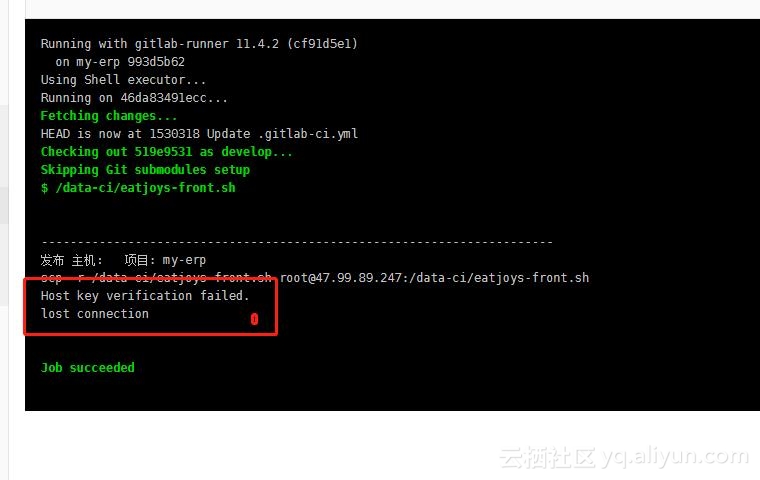
[root@sannian data-ci]# docker search gitlab-runner [root@sannian data-ci]# docker pull gitlab/gitlab-runner [root@sannian data-ci]# docker run -d -v /data-ci/:/data-ci/ --restart=always --name gitlab-runner gitlab/gitlab-runner 然后注册: [root@sannian data-ci]# docker exec -it 80ac801e633b gitlab-runner register Runtime platform arch=amd64 os=linux pid=16 revision=cf91d5e1 version=11.4.2 Running in system-mode. Please enter the gitlab-ci coordinator URL (e.g. https://gitlab.com/): http://47.99.145.156:9999/ Please enter the gitlab-ci token for this runner: Ah-B41xF53-R4M6bamrE Please enter the gitlab-ci description for this runner: [80ac801e633b]: Please enter the gitlab-ci tags for this runner (comma separated): my-erp Registering runner... succeeded runner=Ah-B41xF Please enter the executor: docker, docker-ssh, parallels, virtualbox, docker-ssh+machine, shell, ssh, docker+machine, kubernetes: shell Runner registered successfully. Feel free to start it, but if it's running already the config should be automatically reloaded! 这后就是gitlab报错然后就是发现用户是--user=gitlab-runner [root@sannian data-ci]# ps -ef | grep gitlab-runner root 31028 30984 0 10:30 ? 00:00:00 /usr/bin/dumb-init /entrypoint run --user=gitlab-runner --working-directory=/home/gitlab-runner root 31091 31028 0 10:30 ? 00:00:00 gitlab-runner run --user=gitlab-runner --working-directory=/home/gitlab-runner root 31155 31017 0 10:30 pts/2 00:00:00 grep --color=auto gitlab-runner 为了解决这个问题进入容器 [root@sannian data-ci]# docker exec -it 80ac801e633b /bin/bash root@80ac801e633b:/# su gitlab-runner gitlab-runner@80ac801e633b:/$ ssh-keygen Generating public/private rsa key pair. Enter file in which to save the key (/home/gitlab-runner/.ssh/id_rsa): Enter passphrase (empty for no passphrase): Enter same passphrase again: Your identification has been saved in /home/gitlab-runner/.ssh/id_rsa. Your public key has been saved in /home/gitlab-runner/.ssh/id_rsa.pub. The key fingerprint is: SHA256:SzbhlkF6U+eHCSqToSnHzrivfbLEl+zJLk0G3KUsI3M gitlab-runner@80ac801e633b The key's randomart image is: +---[RSA 2048]----+ | . . o . | | . o =.o + o | | ..=o=o* + . | | o*E += = . | | .+o+ S | | o .o= o | | . o++ . | | +o+o. | | ..+*= | +----[SHA256]-----+ gitlab-runner@80ac801e633b:/$ vim /home/gitlab-runner/.ssh/id_rsa.pub 把密复制到远程主机上。光这个还不行,还要在容器里测试一下 gitlab-runner@80ac801e633b:/$ scp -r /data-ci/eatjoys-front.sh root@47.99.89.247://data-ci/eatjoys-front.sh The authenticity of host '47.99.89.247 (47.99.89.247)' can't be established. ECDSA key fingerprint is SHA256:a6E2UXjP1qIZLmHAS6LAfyeUjsidFhTCZxefKC4cDGk. Are you sure you want to continue connecting (yes/no)? yes Warning: Permanently added '47.99.89.247' (ECDSA) to the list of known hosts. eatjoys-front.sh 第一次,一定要输入一下yes 才会通过, 然后看gitlab上 通过了,这样就可以继续下一步 写脚本咯~!