Android上传文件到Web服务器,PHP接收文件
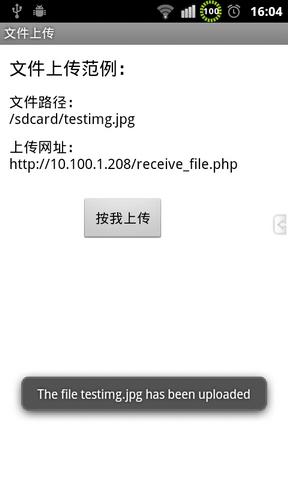
Android上传文件到服务器,通常采用构造http协议的方法,模拟网页POST方法传输文件,服务器端可以采用JavaServlet或者PHP来接收要传输的文件。使用JavaServlet来接收文件的方法比较常见,在这里给大家介绍一个简单的服务器端使用PHP语言来接收文件的例子。 服务器端代码比较简单,接收传输过来的文件: [php] view plain copy <?php $target_path="./upload/";//接收文件目录 $target_path=$target_path.basename($_FILES['uploadedfile']['name']); if(move_uploaded_file($_FILES['uploadedfile']['tmp_name'],$target_path)){ echo"Thefile".basename($_FILES['uploadedfile']['name'])."hasbeenuploaded"; }else{ echo"Therewasanerroruploadingthefile,pleasetryagain!".$_FILES['uploadedfile']['error']; } ?> 手机客户端代码: [java] view plain copy packagecom.figo.uploadfile; importjava.io.BufferedReader; importjava.io.DataOutputStream; importjava.io.FileInputStream; importjava.io.InputStream; importjava.io.InputStreamReader; importjava.net.HttpURLConnection; importjava.net.URL; importandroid.app.Activity; importandroid.os.Bundle; importandroid.view.View; importandroid.widget.Button; importandroid.widget.TextView; importandroid.widget.Toast; publicclassUploadfileActivityextendsActivity { //要上传的文件路径,理论上可以传输任何文件,实际使用时根据需要处理 privateStringuploadFile="/sdcard/testimg.jpg"; privateStringsrcPath="/sdcard/testimg.jpg"; //服务器上接收文件的处理页面,这里根据需要换成自己的 privateStringactionUrl="http://10.100.1.208/receive_file.php"; privateTextViewmText1; privateTextViewmText2; privateButtonmButton; @Override publicvoidonCreate(BundlesavedInstanceState) { super.onCreate(savedInstanceState); setContentView(R.layout.main); mText1=(TextView)findViewById(R.id.myText2); mText1.setText("文件路径:\n"+uploadFile); mText2=(TextView)findViewById(R.id.myText3); mText2.setText("上传网址:\n"+actionUrl); /*设置mButton的onClick事件处理*/ mButton=(Button)findViewById(R.id.myButton); mButton.setOnClickListener(newView.OnClickListener() { @Override publicvoidonClick(Viewv) { uploadFile(actionUrl); } }); } /*上传文件至Server,uploadUrl:接收文件的处理页面*/ privatevoiduploadFile(StringuploadUrl) { Stringend="\r\n"; StringtwoHyphens="--"; Stringboundary="******"; try { URLurl=newURL(uploadUrl); HttpURLConnectionhttpURLConnection=(HttpURLConnection)url .openConnection(); //设置每次传输的流大小,可以有效防止手机因为内存不足崩溃 //此方法用于在预先不知道内容长度时启用没有进行内部缓冲的HTTP请求正文的流。 httpURLConnection.setChunkedStreamingMode(128*1024);//128K //允许输入输出流 httpURLConnection.setDoInput(true); httpURLConnection.setDoOutput(true); httpURLConnection.setUseCaches(false); //使用POST方法 httpURLConnection.setRequestMethod("POST"); httpURLConnection.setRequestProperty("Connection","Keep-Alive"); httpURLConnection.setRequestProperty("Charset","UTF-8"); httpURLConnection.setRequestProperty("Content-Type", "multipart/form-data;boundary="+boundary); DataOutputStreamdos=newDataOutputStream( httpURLConnection.getOutputStream()); dos.writeBytes(twoHyphens+boundary+end); dos.writeBytes("Content-Disposition:form-data;name=\"uploadedfile\";filename=\"" +srcPath.substring(srcPath.lastIndexOf("/")+1) +"\"" +end); dos.writeBytes(end); FileInputStreamfis=newFileInputStream(srcPath); byte[]buffer=newbyte[8192];//8k intcount=0; //读取文件 while((count=fis.read(buffer))!=-1) { dos.write(buffer,0,count); } fis.close(); dos.writeBytes(end); dos.writeBytes(twoHyphens+boundary+twoHyphens+end); dos.flush(); InputStreamis=httpURLConnection.getInputStream(); InputStreamReaderisr=newInputStreamReader(is,"utf-8"); BufferedReaderbr=newBufferedReader(isr); Stringresult=br.readLine(); Toast.makeText(this,result,Toast.LENGTH_LONG).show(); dos.close(); is.close(); }catch(Exceptione) { e.printStackTrace(); setTitle(e.getMessage()); } } } 在AndroidManifest.xml文件里添加网络访问权限: [plain] view plain copy <uses-permissionandroid:name="android.permission.INTERNET"/> 运行结果: