首页 文章 精选 留言 我的

精选列表

搜索[混合专家架构],共10008篇文章
优秀的个人博客,低调大师

Phonegap 原生控件(Android)与html混合

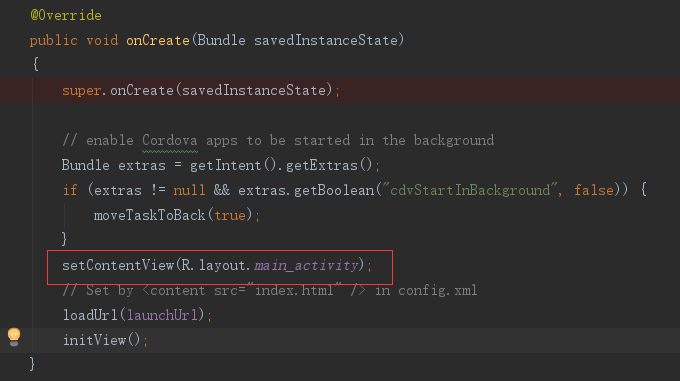
1. 用命令创建cordova项目 cordova coreate hello com.example.hello hello 2.打开MainActivity 在onCreate方法中加入 setContentView(R.layout.main_activity); 3. main_activity文件如下: 1 2 3 4 5 6 7 8 9 10 11 12 13 14 15 16 17 18 19 20 21 22 23 24 25 26 27 28 29 30 31 32 33 34 35 36 37 38 39 40 41 42 43 44 45 46 47 48 <? xml version="1.0" encoding="utf-8"?> < LinearLayout xmlns:android="http://schemas.android.com/apk/res/android" android:layout_width="match_parent" android:layout_height="match_parent" android:orientation="vertical" > < RelativeLayout android:layout_width="fill_parent" android:layout_height="45dip" android:background="#25C28B" > < ImageButton android:id="@+id/cordova_back" android:layout_width="wrap_content" android:layout_height="match_parent" android:background="#00FFFFFF" android:paddingLeft="10dp" android:paddingRight="20dp" android:src="@drawable/back_all" /> < TextView android:id="@+id/cordova_title" android:layout_width="wrap_content" android:layout_height="wrap_content" android:layout_centerInParent="true" android:text="原生头部" android:textColor="#FFFFFF" android:textSize="20sp" /> < Button android:id="@+id/btn_report" android:layout_width="wrap_content" android:layout_height="match_parent" android:layout_alignParentRight="true" android:background="#00FFFFFF" android:paddingLeft="10dp" android:paddingRight="20dp" android:text="报告" android:textColor="#FFFFFF" android:textSize="20sp" /> </ RelativeLayout > < org.apache.cordova.engine.SystemWebView android:id="@+id/cordovaWebView" android:layout_width="match_parent" android:layout_height="match_parent" /> </ LinearLayout > SystemWebView是一个扩展的webview 4. 重新makeWebView方法和createViews方法 1 2 3 4 5 6 @Override protected CordovaWebView makeWebView() { SystemWebView webView = (SystemWebView) findViewById(R.id.cordovaWebView); CordovaWebView cordovaWebView = new CordovaWebViewImpl( new SystemWebViewEngine(webView)); return cordovaWebView; } cordovaWebView对于xml里的SystemWebView 控件 1 2 3 4 5 6 7 8 9 10 @Override protected void createViews() { if (preferences.contains( "BackgroundColor" )) { int backgroundColor = preferences.getInteger( "BackgroundColor" , Color.BLACK); // Background of activity: appView.getView().setBackgroundColor(backgroundColor); } appView.getView().requestFocusFromTouch(); } 5. 效果图 本文转自Work Hard Work Smart博客园博客,原文链接:http://www.cnblogs.com/linlf03/p/7088821.html,如需转载请自行联系原作者

资源下载

更多资源
腾讯云软件源

腾讯云软件源

为解决软件依赖安装时官方源访问速度慢的问题,腾讯云为一些软件搭建了缓存服务。您可以通过使用腾讯云软件源站来提升依赖包的安装速度。为了方便用户自由搭建服务架构,目前腾讯云软件源站支持公网访问和内网访问。

Nacos

Nacos

Nacos /nɑ:kəʊs/ 是 Dynamic Naming and Configuration Service 的首字母简称,一个易于构建 AI Agent 应用的动态服务发现、配置管理和AI智能体管理平台。Nacos 致力于帮助您发现、配置和管理微服务及AI智能体应用。Nacos 提供了一组简单易用的特性集,帮助您快速实现动态服务发现、服务配置、服务元数据、流量管理。Nacos 帮助您更敏捷和容易地构建、交付和管理微服务平台。

Rocky Linux

Rocky Linux

Rocky Linux(中文名:洛基)是由Gregory Kurtzer于2020年12月发起的企业级Linux发行版,作为CentOS稳定版停止维护后与RHEL(Red Hat Enterprise Linux)完全兼容的开源替代方案,由社区拥有并管理,支持x86_64、aarch64等架构。其通过重新编译RHEL源代码提供长期稳定性,采用模块化包装和SELinux安全架构,默认包含GNOME桌面环境及XFS文件系统,支持十年生命周期更新。

WebStorm

WebStorm

WebStorm 是jetbrains公司旗下一款JavaScript 开发工具。目前已经被广大中国JS开发者誉为“Web前端开发神器”、“最强大的HTML5编辑器”、“最智能的JavaScript IDE”等。与IntelliJ IDEA同源,继承了IntelliJ IDEA强大的JS部分的功能。


用户登录
用户注册