首页 文章 精选 留言 我的

精选列表

搜索[文档处理],共10000篇文章
优秀的个人博客,低调大师

Dubbo监控中心的介绍与简易监控中心的安装( 补充文档 )

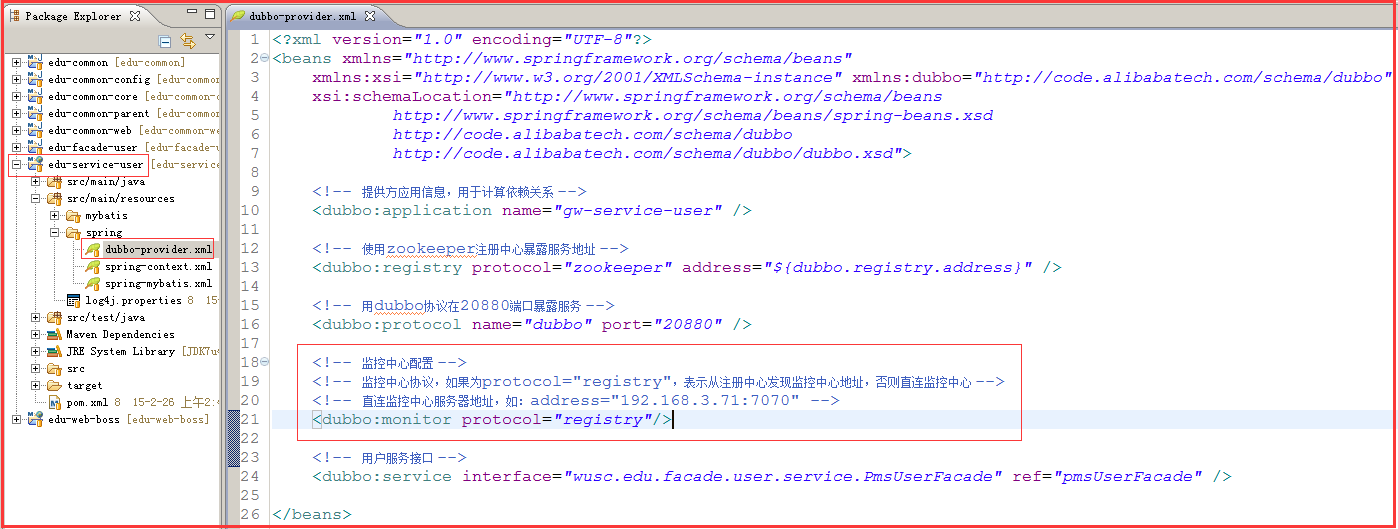
样例视频参考:http://www.roncoo.com/course/view/f614343765bc4aac8597c6d8b38f06fd 一、监控中心服务接口调用统计报表的显示配置 1、 Dubbo服务提供者和服务消费者中的spring配置文件中增加以下配置: <!-- 监控中心配置 --> <!-- 监控中心协议,如果为protocol="registry",表示从注册中心发现监控中心地址,否则直连监控中心 --> <!-- 直连监控中心服务器地址,如:address="192.168.3.71:7070" --> <dubbo:monitor protocol="registry"/> 配置截图如下: 添加完以上配置后,重新构建部署Dubbo服务和服务消费者应用。 2、 Dubbo简易监控中心的配置解释(不需要修改,使用默认配置) 操作系统用户为wusc,系统用户目录为/home/wusc dubbo-monitor的安装目录为:/home/wusc/dubbo-monitor dubbo-monitor的配置文件为:/home/wusc/dubbo-monitor/conf/dubbo.properties dubbo-monitor的配置文件内容如下: dubbo.container=log4j,spring,registry,jetty dubbo.application.name=simple-monitor dubbo.application.owner= dubbo.registry.address=zookeeper://192.168.3.71:2181 dubbo.protocol.port=7070 dubbo.jetty.port=8090 dubbo.jetty.directory=${user.home}/monitor dubbo.charts.directory=${dubbo.jetty.directory}/charts dubbo.statistics.directory=${user.home}/monitor/statistics dubbo.log4j.file=logs/dubbo-monitor-simple.log dubbo.log4j.level=WARN 看上面配置文件中标红的的3行内容,理解${user.home}这个变量的意思则可,${user.home}指的就是启动dubbo-monitor程序的操作系统用户目录。我们这里用的是wusc用户,那么就是/home/wusc目录(如果是root用户启动,那就是/root)。 此时,配置中3个目录的绝对路径为: dubbo.jetty.directory=/home/wusc/monitor dubbo.charts.directory=/home/wusc/monitor/charts dubbo.statistics.directory=/home/wusc/monitor/statistics 3、 重新启动dubbo-monitor简易监控中心,此时就会看到以上3个目录会被创新,并在目录里面有相应的服务接口调用的报表数据。 4、 此时再进入Dubbo简易监控中心就能查看到对应的报表数据 关注公众号:

优秀的个人博客,低调大师

基于springcloud + vue的分布式服务paascloud项目部署文档

这里特别感谢 QQ 金宝宝 1771717896 提供的服务器 准备环境 安装虚拟机 安装项目运行环境 配置host文件 windows 目录 C:\Windows\System32\drivers\etc\hosts mac/linux 地址 /etc/hosts 下面的ip注意修改为自己虚拟机对应的ip地址 127.0.0.1 dev-login.paascloud.net 127.0.0.1 dev-admin.paascloud.net 127.0.0.1 dev-api.paascloud.net 127.0.0.1 dev-mall.paascloud.net 127.0.0.1 paascloud-discovery 127.0.0.1 paascloud-eureka 127.0.0.1 paascloud-gateway 127.0.0.1 paascloud-monitor 127.0.0.1 paascloud-zipkin 127.0.0.1 paascloud-provider-uac 127.0.0.1 paascloud-provider-mdc 127.0.0.1 paascloud-provider-omc 127.0.0.1 paascloud-provider-opc 192.168.241.21 paascloud-db-mysql 192.168.241.21 paascloud-db-redis 192.168.241.21 paascloud-mq-rabbit 192.168.241.21 paascloud-mq-rocket 192.168.241.21 paascloud-provider-zk 192.168.241.101 paascloud-zk-01 192.168.241.102 paascloud-zk-02 192.168.241.103 paascloud-zk-03 配置私服 http://blog.paascloud.net/2018/03/29/springcloud/nexus/maven-nexus-use/ 编译elastic-job-lite-starter-master https://github.com/paascloud/elastic-job-lite-starter-master 配置 spring cloud 配置中心 http://blog.paascloud.net/2018/03/26/springcloud/config/springcloud-config-encrypt/ fork 项目 paascloud-config-repo 修改配置中心git地址, 如果使用私有地址请配置用户名密码 修改第一步fork来的项目的application-dev.yml 配置文件配置文件 paascloud: mail: username: 'your email address' password: 'your email password' aliyun: key: accessKeyId: 'your aliyun accessKeyId' accessKeySecret: 'your aliyun accessKeySecret' sms: product: 'your sms product' qiniu: key: accessKey: 'your qiniu accessKey' secretKey: 'your qiniu secretKey' oss: privateHost: 'your qiniu oss private host' publicHost: 'your qiniu oss public host' 微服务启动顺序 1. paascloud-eureka 2. paascloud-discovery 3. paascloud-provider-uac 4. paascloud-gateway 5. 剩下微服务无启动数序要求 我的开源项目 github: https://github.com/paascloud/paascloud-master 码云:https://gitee.com/paascloud/paascloud-master 如果觉得本文对您有帮助, 空闲的时候点帮忙加个星星, 您的支持将鼓励我继续创作的动力!

优秀的个人博客,低调大师

Redisson官方文档 - 8. 分布式锁和同步器

8.1. 可重入锁(Reentrant Lock) 基于Redis的Redisson分布式可重入锁RLock Java对象实现了java.util.concurrent.locks.Lock接口。 RLock lock = redisson.getLock("anyLock"); // 最常见的使用方法 lock.lock(); 大家都知道,如果负责储存这个分布式锁的Redis节点宕机以后,而且这个锁正好处于锁住的状态时,这个锁会出现锁死的状态。为了避免这种情况的发生,Redisson内部提供了一个监控锁的看门狗,它的作用是在Redisson实例被关闭前,不断的延长锁的有效期。默认情况下,看门狗的检查锁的超时时间是30秒钟,也可以通过修改Config.lockWatchdogTimeout来另行指定。 另外Redisson还通过加锁的方法提供了leaseTime的参数来指定加锁的时间。超过这个时间后锁便自动解开了。 // 加锁以后10秒钟自动解锁 // 无需调用unlock方法手动解锁 lock.lock(10, TimeUnit.SECONDS); // 尝试加锁,最多等待100秒,上锁以后10秒自动解锁 boolean res = lock.tryLock(100, 10, TimeUnit.SECONDS); ... lock.unlock(); Redisson同时还为分布式锁提供了异步执行的相关方法: RLock lock = redisson.getLock("anyLock"); lock.lockAsync(); lock.lockAsync(10, TimeUnit.SECONDS); Future<Boolean> res = lock.tryLockAsync(100, 10, TimeUnit.SECONDS); RLock对象完全符合Java的Lock规范。也就是说只有拥有锁的进程才能解锁,其他进程解锁则会抛出IllegalMonitorStateException错误。但是如果遇到需要其他进程也能解锁的情况,请使用分布式信号量Semaphore 对象. 8.2. 公平锁(Fair Lock) 基于Redis的Redisson分布式可重入公平锁也是实现了java.util.concurrent.locks.Lock接口的一种RLock对象。它保证了当多个Redisson客户端线程同时请求加锁时,优先分配给先发出请求的线程。 RLock fairLock = redisson.getFairLock("anyLock"); // 最常见的使用方法 fairLock.lock(); 大家都知道,如果负责储存这个分布式锁的Redis节点宕机以后,而且这个锁正好处于锁住的状态时,这个锁会出现锁死的状态。为了避免这种情况的发生,Redisson内部提供了一个监控锁的看门狗,它的作用是在Redisson实例被关闭前,不断的延长锁的有效期。默认情况下,看门狗的检查锁的超时时间是30秒钟,也可以通过修改Config.lockWatchdogTimeout来另行指定。 另外Redisson还通过加锁的方法提供了leaseTime的参数来指定加锁的时间。超过这个时间后锁便自动解开了。 // 10秒钟以后自动解锁 // 无需调用unlock方法手动解锁 fairLock.lock(10, TimeUnit.SECONDS); // 尝试加锁,最多等待100秒,上锁以后10秒自动解锁 boolean res = fairLock.tryLock(100, 10, TimeUnit.SECONDS); ... fairLock.unlock(); Redisson同时还为分布式可重入公平锁提供了异步执行的相关方法: RLock fairLock = redisson.getFairLock("anyLock"); fairLock.lockAsync(); fairLock.lockAsync(10, TimeUnit.SECONDS); Future<Boolean> res = fairLock.tryLockAsync(100, 10, TimeUnit.SECONDS); 8.3. 联锁(MultiLock) 基于Redis的Redisson分布式联锁RedissonMultiLock对象可以将多个RLock对象关联为一个联锁,每个RLock对象实例可以来自于不同的Redisson实例。 RLock lock1 = redissonInstance1.getLock("lock1"); RLock lock2 = redissonInstance2.getLock("lock2"); RLock lock3 = redissonInstance3.getLock("lock3"); RedissonMultiLock lock = new RedissonMultiLock(lock1, lock2, lock3); // 同时加锁:lock1 lock2 lock3 // 所有的锁都上锁成功才算成功。 lock.lock(); ... lock.unlock(); 大家都知道,如果负责储存某些分布式锁的某些Redis节点宕机以后,而且这些锁正好处于锁住的状态时,这些锁会出现锁死的状态。为了避免这种情况的发生,Redisson内部提供了一个监控锁的看门狗,它的作用是在Redisson实例被关闭前,不断的延长锁的有效期。默认情况下,看门狗的检查锁的超时时间是30秒钟,也可以通过修改Config.lockWatchdogTimeout来另行指定。 另外Redisson还通过加锁的方法提供了leaseTime的参数来指定加锁的时间。超过这个时间后锁便自动解开了。 RedissonMultiLock lock = new RedissonMultiLock(lock1, lock2, lock3); // 给lock1,lock2,lock3加锁,如果没有手动解开的话,10秒钟后将会自动解开 lock.lock(10, TimeUnit.SECONDS); // 为加锁等待100秒时间,并在加锁成功10秒钟后自动解开 boolean res = lock.tryLock(100, 10, TimeUnit.SECONDS); ... lock.unlock(); 8.4. 红锁(RedLock) 基于Redis的Redisson红锁RedissonRedLock对象实现了Redlock介绍的加锁算法。该对象也可以用来将多个RLock对象关联为一个红锁,每个RLock对象实例可以来自于不同的Redisson实例。 RLock lock1 = redissonInstance1.getLock("lock1"); RLock lock2 = redissonInstance2.getLock("lock2"); RLock lock3 = redissonInstance3.getLock("lock3"); RedissonRedLock lock = new RedissonRedLock(lock1, lock2, lock3); // 同时加锁:lock1 lock2 lock3 // 红锁在大部分节点上加锁成功就算成功。 lock.lock(); ... lock.unlock(); 大家都知道,如果负责储存某些分布式锁的某些Redis节点宕机以后,而且这些锁正好处于锁住的状态时,这些锁会出现锁死的状态。为了避免这种情况的发生,Redisson内部提供了一个监控锁的看门狗,它的作用是在Redisson实例被关闭前,不断的延长锁的有效期。默认情况下,看门狗的检查锁的超时时间是30秒钟,也可以通过修改Config.lockWatchdogTimeout来另行指定。 另外Redisson还通过加锁的方法提供了leaseTime的参数来指定加锁的时间。超过这个时间后锁便自动解开了。 RedissonRedLock lock = new RedissonRedLock(lock1, lock2, lock3); // 给lock1,lock2,lock3加锁,如果没有手动解开的话,10秒钟后将会自动解开 lock.lock(10, TimeUnit.SECONDS); // 为加锁等待100秒时间,并在加锁成功10秒钟后自动解开 boolean res = lock.tryLock(100, 10, TimeUnit.SECONDS); ... lock.unlock(); 8.5. 读写锁(ReadWriteLock) 基于Redis的Redisson分布式可重入读写锁RReadWriteLock Java对象实现了java.util.concurrent.locks.ReadWriteLock接口。同时还支持自动过期解锁。该对象允许同时有多个读取锁,但是最多只能有一个写入锁。 RReadWriteLock rwlock = redisson.getLock("anyRWLock"); // 最常见的使用方法 rwlock.readLock().lock(); // 或 rwlock.writeLock().lock(); 大家都知道,如果负责储存这个分布式锁的Redis节点宕机以后,而且这个锁正好处于锁住的状态时,这个锁会出现锁死的状态。为了避免这种情况的发生,Redisson内部提供了一个监控锁的看门狗,它的作用是在Redisson实例被关闭前,不断的延长锁的有效期。默认情况下,看门狗的检查锁的超时时间是30秒钟,也可以通过修改Config.lockWatchdogTimeout来另行指定。 另外Redisson还通过加锁的方法提供了leaseTime的参数来指定加锁的时间。超过这个时间后锁便自动解开了。 // 10秒钟以后自动解锁 // 无需调用unlock方法手动解锁 rwlock.readLock().lock(10, TimeUnit.SECONDS); // 或 rwlock.writeLock().lock(10, TimeUnit.SECONDS); // 尝试加锁,最多等待100秒,上锁以后10秒自动解锁 boolean res = rwlock.readLock().tryLock(100, 10, TimeUnit.SECONDS); // 或 boolean res = rwlock.writeLock().tryLock(100, 10, TimeUnit.SECONDS); ... lock.unlock(); 8.6. 信号量(Semaphore) 基于Redis的Redisson的分布式信号量(Semaphore)Java对象RSemaphore采用了与java.util.concurrent.Semaphore相似的接口和用法。 RSemaphore semaphore = redisson.getSemaphore("semaphore"); semaphore.acquire(); //或 semaphore.acquireAsync(); semaphore.acquire(23); semaphore.tryAcquire(); //或 semaphore.tryAcquireAsync(); semaphore.tryAcquire(23, TimeUnit.SECONDS); //或 semaphore.tryAcquireAsync(23, TimeUnit.SECONDS); semaphore.release(10); semaphore.release(); //或 semaphore.releaseAsync(); 8.7. 可过期性信号量(PermitExpirableSemaphore) 基于Redis的Redisson可过期性信号量(PermitExpirableSemaphore)是在RSemaphore对象的基础上,为每个信号增加了一个过期时间。每个信号可以通过独立的ID来辨识,释放时只能通过提交这个ID才能释放。 RPermitExpirableSemaphore semaphore = redisson.getPermitExpirableSemaphore("mySemaphore"); String permitId = semaphore.acquire(); // 获取一个信号,有效期只有2秒钟。 String permitId = semaphore.acquire(2, TimeUnit.SECONDS); // ... semaphore.release(permitId); 8.8. 闭锁(CountDownLatch) 基于Redisson的Redisson分布式闭锁(CountDownLatch)Java对象RCountDownLatch采用了与java.util.concurrent.CountDownLatch相似的接口和用法。 RCountDownLatch latch = redisson.getCountDownLatch("anyCountDownLatch"); latch.trySetCount(1); latch.await(); // 在其他线程或其他JVM里 RCountDownLatch latch = redisson.getCountDownLatch("anyCountDownLatch"); latch.countDown();

优秀的个人博客,低调大师

Android2.2 r1 API 中文文档系列(10) —— CheckBox

正文 一、类结构 public class CheckBox extends CompoundButton java.lang.Object android.view.View android.widget.TextView android.widget.Button android.widget.CompoundButton android.widget.CheckBox 二、 概述 复选框是一种有双状态按钮的特殊类型,可以选中或者不选中。如下是一个在activity中使用复选框的例子: 本文转自over140 51CTO博客,原文链接:http://blog.51cto.com/over140/582697,如需转载请自行联系原作者

优秀的个人博客,低调大师

关于安卓图像显示比iOS差的原因(英文文档

There are so many comparations between Android phone and iPhone. We cannot make the conclusion about which one is better, but we all knows that the image quality of Android phone is much worse than iPhone. No matter you are using Facebook, Twitter or even Instagram, after taking the photo, adding a filter, then sharing to the social network, the images produced by Android phone are always coarse. Why? Our team had been working on this issue in the last year. After very deep research, we found that this was a "TINY" mistake made by Google. Although tiny, but the influence was very huge (all Android Apps related to image), and lasted till today. The problem is : libjpeg. We all know that libjpeg is widely used open source JPEG library. Android also uses libjpeg to compress images. After digging into the source code of Android, we can find that instead of using libjpeg directly, Android is based on an open source image engine called Skia. The Skia is a wonderful engine maintained by Google himself, all image functions are implemented in it, and it is widely used by Google and other companies' products (e.g.: Chrome, Firefox, Android......). The Skia has a good encapsulation of libjpeg, you can easily develop image utilites base on this engine. When using libjpeg to compress images, optimize_coding is a very important parameter. In libjpeg.doc, we can find following introductions about this parameter: boolean optimize_coding TRUE causes the compressor to compute optimal Huffman coding tables for the image. This requires an extra pass over the data and therefore costs a good deal of space and time. The default is FALSE, which tells the compressor to use the supplied or default Huffman tables. In most cases optimal tables save only a few percent of file size compared to the default tables. Note that when this is TRUE, you need not supply Huffman tables at all, and any you do supply will be overwritten. As the libjpeg.doc, we now know that because setting the optimize_coding to TRUE may cost a good deal of space and time, the default in libjpeg is FALSE. Everything seems fine about the doc, and libjpeg is very stable. But many people ignored that this document was writen for more than 10 years. At that time, space and computing abilities are very limited. With today's modern computers or even mobile phones, this is not an issue. On the contrary, we should pay more attention to the image quality (retina screens) and image size (cloud services). Google's engineers of skia project did not set this parameter, so the optimize_coding in Skia was remained to FALSE as the default value, and Skia concealed this setting, you could not change the setting outside of Skia. This became to a big problem, we had to endure worse image and bigger file size. Our team had tested optimize_coding for many different images. If you want the same quality of image compressing, the file size are 5-10 times bigger when setting the optimze_coding to FALSE than to TRUE. The difference is quite significant. We also compared the jpeg compressing between iOS and Android (they both concealed the optimize_coding parameter). With the same original images, if you want same quality level, you need 5-10 times file size on Android. The result is clear, Apple does know the importance of optimize_coding and Huffman tables and Google does not. (Apple uses their own Huffman table algorithm, not like libjpeg or libjpeg-turbo. It seems that Apple has done more tuning works on image compressing.) Finally, we decided not to use JPEG compress functions provided by Android, and we compiled our own native library based on libjpeg-turbo (libjpeg-turbo also has performance improvements). Now we can save 5-10 times of image space and enjoy the same or even better image quality. This work is totally worth to do. Thanks for reading, :) Our project on github: https://github.com/bither

优秀的个人博客,低调大师

android XMl 解析神奇xstream 六: 把集合list 转化为 XML文档

前言:对xstream不理解的请看: android XMl 解析神奇xstream 一: 解析android项目中 asset 文件夹 下的 aa.xml 文件 android XMl 解析神奇xstream 二: 把对象转换成xml android XMl 解析神奇xstream 三: 把复杂对象转换成 xml android XMl 解析神奇xstream 四: 将复杂的xml文件解析为对象 android XMl 解析神奇xstream 五: 把复杂对象转换成 xml ,并写入SD卡中的xml文件 1、创建JavaBeen package com.android10; public class Person { String pName ; String pAge ; public String getpName() { return pName; } public void setpName(String pName) { this.pName = pName; } public String getpAge() { return pAge; } public void setpAge(String pAge) { this.pAge = pAge; } } package com.android10; public class Product { private String name ; private String age ; private Person person ; public String getName() { return name; } public void setName(String name) { this.name = name; } public String getAge() { return age; } public void setAge(String age) { this.age = age; } public Person getPerson() { return person; } public void setPerson(Person person) { this.person = person; } } package com.android10; import java.util.List; public class ListBean { private List<Product> root ; public List<Product> getRoot() { return root; } public void setRoot(List<Product> root) { this.root = root; } } 2、主要方法 package com.android10; import java.io.ByteArrayInputStream; import java.io.ByteArrayOutputStream; import java.util.ArrayList; import java.util.List; import javax.xml.transform.OutputKeys; import javax.xml.transform.Source; import javax.xml.transform.Transformer; import javax.xml.transform.sax.SAXSource; import javax.xml.transform.sax.SAXTransformerFactory; import javax.xml.transform.stream.StreamResult; import org.xml.sax.InputSource; import android.app.Activity; import android.os.Bundle; import com.thoughtworks.xstream.XStream; public class MainActivity extends Activity { @Override public void onCreate(Bundle savedInstanceState) { super.onCreate(savedInstanceState); setContentView( R.layout.activity_main ); XStream xstream = new XStream() ; List<Product> root = getList() ; //将ListBean中的集合设置空元素,即不显示集合元素标签 xstream.addImplicitCollection( ListBean.class, "root"); xstream.autodetectAnnotations(true); //设置别名 xstream.alias( "product", Product.class ); //将name设置为父类(Student)的元素的属性 xstream.useAttributeFor( Product.class, "name" ); //把list集合转换成Xml字符串 String xmlString = xstream.toXML( root ) ; //把Xml字符串写入SD卡Xml文件 XstreamUtil xstreamUtil = new XstreamUtil() ; xstreamUtil.writeToXml( this , xmlString ) ; //把Xml字符串转化成list集合 List<Product> list = new ArrayList<Product>() ; list = (List<Product>) xstream.fromXML( xmlString ) ; System.out.println("sss"+ formatXml( xmlString ) ); } /** * 得到数据 * @return */ private List<Product> getList(){ Person person1 = new Person() ; person1.setpName( "saliy" ) ; person1.setpAge( "36" ); Product product1 = new Product() ; product1.setName( "jhon" ) ; product1.setAge( "30" ); product1.setPerson( person1 ); Person person2 = new Person() ; person2.setpName( "saliy02" ) ; person2.setpAge( "3602" ); Product product2 = new Product() ; product2.setName( "jhon02" ) ; product2.setAge( "3002" ); product2.setPerson( person2 ); List<Product> root = new ArrayList<Product>() ; root.add( product1 ) ; root.add( product2 ) ; return root ; } /** * 格式化XML字符串 * @param xml * @return */ public static String formatXml(String xml){ try{ Transformer serializer= SAXTransformerFactory.newInstance().newTransformer(); serializer.setOutputProperty(OutputKeys.INDENT, "yes"); serializer.setOutputProperty("{http://xml.apache.org/xslt}indent-amount", "2"); Source xmlSource=new SAXSource(new InputSource(new ByteArrayInputStream(xml.getBytes()))); StreamResult res = new StreamResult(new ByteArrayOutputStream()); serializer.transform(xmlSource, res); return new String(((ByteArrayOutputStream)res.getOutputStream()).toByteArray()); }catch(Exception e){ return xml; } } } package com.android10; import java.io.File; import java.io.FileNotFoundException; import java.io.FileOutputStream; import java.io.IOException; import java.io.OutputStreamWriter; import android.content.Context; import android.os.Environment; public class XstreamUtil { XcallBack xcallBack ; /** * 把xml字符串写入SD卡文件 * @param context * @param str xml字符串 */ public void writeToXml(Context context, String str ){ //获取文件路径 String SDPATH = Environment.getExternalStorageDirectory() + "/myfile1.xml/" ; //创建文件 File file = new File( SDPATH ) ; if( !file.exists() ){ try { file.createNewFile() ; } catch (IOException e) { e.printStackTrace(); } } //写入数据 try { FileOutputStream out = new FileOutputStream( file ) ; OutputStreamWriter outw = new OutputStreamWriter(out); try { outw.write(str); outw.close(); out.close(); if( xcallBack != null ){ xcallBack.success(); } } catch (IOException e) { if( xcallBack != null ){ xcallBack.fail(); } } } catch (FileNotFoundException e1) { e1.printStackTrace(); if( xcallBack != null ){ xcallBack.fail(); } } } //设置监听器 void setXStreamLister( XcallBack xcallBack ){ this.xcallBack = xcallBack ; } } interface XcallBack{ /** * 写入成功 */ void success() ; /** * 写入失败 */ void fail() ; } 3、运行结果 <list> <product name="jhon"> <age>30</age> <person> <pAge>36</pAge> <pName>saliy</pName> </person> </product> <product name="jhon02"> <age>3002</age> <person> <pAge>3602</pAge> <pName>saliy02</pName> </person> </product></list>

资源下载

更多资源
腾讯云软件源

腾讯云软件源

为解决软件依赖安装时官方源访问速度慢的问题,腾讯云为一些软件搭建了缓存服务。您可以通过使用腾讯云软件源站来提升依赖包的安装速度。为了方便用户自由搭建服务架构,目前腾讯云软件源站支持公网访问和内网访问。

Nacos

Nacos

Nacos /nɑ:kəʊs/ 是 Dynamic Naming and Configuration Service 的首字母简称,一个易于构建 AI Agent 应用的动态服务发现、配置管理和AI智能体管理平台。Nacos 致力于帮助您发现、配置和管理微服务及AI智能体应用。Nacos 提供了一组简单易用的特性集,帮助您快速实现动态服务发现、服务配置、服务元数据、流量管理。Nacos 帮助您更敏捷和容易地构建、交付和管理微服务平台。

Rocky Linux

Rocky Linux

Rocky Linux(中文名:洛基)是由Gregory Kurtzer于2020年12月发起的企业级Linux发行版,作为CentOS稳定版停止维护后与RHEL(Red Hat Enterprise Linux)完全兼容的开源替代方案,由社区拥有并管理,支持x86_64、aarch64等架构。其通过重新编译RHEL源代码提供长期稳定性,采用模块化包装和SELinux安全架构,默认包含GNOME桌面环境及XFS文件系统,支持十年生命周期更新。

Sublime Text

Sublime Text

Sublime Text具有漂亮的用户界面和强大的功能,例如代码缩略图,Python的插件,代码段等。还可自定义键绑定,菜单和工具栏。Sublime Text 的主要功能包括:拼写检查,书签,完整的 Python API , Goto 功能,即时项目切换,多选择,多窗口等等。Sublime Text 是一个跨平台的编辑器,同时支持Windows、Linux、Mac OS X等操作系统。

用户登录
用户注册