首页 文章 精选 留言 我的

精选列表

搜索[默认启用],共10019篇文章
优秀的个人博客,低调大师

EFK教程(5) - ES集群开启用户认证

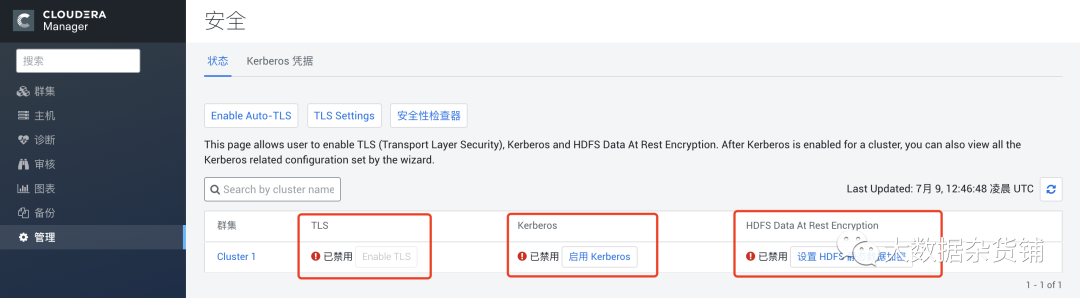
基于ES内置及自定义用户实现kibana和filebeat的认证 作者:“发颠的小狼”,欢迎转载 目录 ▪ 用途▪ 关闭服务▪ elasticsearch-修改elasticsearch.yml配置▪ elasticsearch-开启服务▪ elasticsearch-建立本地内置用户▪ kibana-创建私钥库▪ kibana-WEB界面确认用户▪ filebeat-在WEB界面创建角色及用户▪ filebeat-服务器上创建密钥库▪ filebeat-配置filebeat.yml▪ 测试▪ 附录 用途 前情提要: ▷ 在第一篇《EFK教程 - 快速入门指南》中,阐述了EFK的安装部署,其中ES的架构为三节点,即master、ingest、data角色同时部署在三台服务器上。▷ 在第二篇《EFK教程 - ElasticSearch高性能高可用架构》中,阐述了EFK的data/ingest/master角色的用途及分别部署三节点,在实现性能最大化的同时保障高可用。▷ 在第三篇《EFK教程(3) - ElasticSearch冷热数据分离》中,阐述了ES多实例部署,将不同热度的数据存在不同的磁盘上,实现了数据冷热分离、资源合理分配。▷ 在第四篇《EFK教程(4) - ElasticSearch集群TLS加密通讯》中,阐述了ES集群创建CA、CERT证书,实现ElasticSearch集群之间数据通过TLS进行双向加密交互。 本文: ▷ ES集群开启内置用户和自定义用户▷ kibana通过ES内置kibana用户连接ES集群▷ filebeat通过ES自定义test-filebeat用户连接ES集群 关闭服务 在进行下面实验前,请先关闭所有ElasticSearch、kibana、filebeat进程 elasticsearch-修改elasticsearch.yml配置 按以上表格对应的实例新增conf目录下elasticsearch.yml配置参数 # 在所有实例上加上以下配置 # 开启本地用户 xpack.security.enabled: true # xpack的版本 xpack.license.self_generated.type: basic elasticsearch-开启服务 开启所有ES服务 sudo -u elasticsearch ./bin/elasticsearch elasticsearch-建立本地内置用户 本地内置elastic、apm_system、kibana、logstash_system、beats_system、remote_monitoring_user用户 # 在其中一台master节点操作 # interactive 自定密码 auto自动生密码 sudo -u elasticsearch ./bin/elasticsearch-setup-passwords interactive # 输入elastic密码 # 输入apm_system密码 # 输入kibana密码 # 输入logstash_system密码 # 输入beats_system密码 # 输入remote_monitoring_user密码 测试内部用户 通过base64将elastic用户进行加密,格式为“elastic:elastic的密码“ # 例如以下格式 curl -H "Authorization: Basic ZWxhc3RpYzplbGFzdGkxMjM0NTY3OA==" "http://192.168.1.31:9200/_cat/nodes?v" 如果不通过Basic访问或base64加密错误会报以下错误 kibana-创建私钥库 在192.168.1.21创建私钥库 cd /opt/kibana/ # 创建密钥库 sudo -u kibana ./bin/kibana-keystore create # 连接ES用户名,这里输入kibana sudo -u kibana ./bin/kibana-keystore add elasticsearch.username # 连接ES密码,这里输入刚刚设置kibana的密码 sudo -u kibana ./bin/kibana-keystore add elasticsearch.password 在192.168.1.21确认私钥库 sudo -u kibana ./bin/kibana-keystore list 启动服务 sudo -u kibana /opt/kibana/bin/kibana -c /opt/kibana/config/kibana.yml kibana-WEB界面确认用户 登入kibana 在浏览器输入192.168.1.21:5601,用户名:elastic 密码:之前输入elastic的密码 filebeat-在WEB界面创建角色及用户 创建自定义的filebeat角色 关于角色权限的说明请自行查阅附录链接 创建自定义的filebeat用户 filebeat-服务器上创建密钥库 在192.168.1.11创建filebeat密钥库 cd /opt/filebeat/ #创建密钥库 ./filebeat keystore create #创建test-filebeat用户私钥 ./filebeat keystore add test-filebeat 确认filebeat密钥库 ./filebeat keystore list filebeat-配置filebeat.yml 配置filebeat.yml # 文件输入 filebeat.inputs: # 文件输入类型 - type: log # 开启加载 enabled: true # 文件位置 paths: - /var/log/nginx/access.log # 自定义参数 fields: type: nginx_access # 类型是nginx_access,和上面fields.type是一致的 # 输出至elasticsearch output.elasticsearch: # 连接ES集群的用户名 username: test-filebeat # 连接ES集群的密码 password: "${test-filebeat密码}" # elasticsearch集群 hosts: ["http://192.168.1.31:9200", "http://192.168.1.32:9200", "http://192.168.1.33:9200"] # 索引配置 indices: # 索引名 - index: "nginx_access_%{+yyy.MM}" # 当类型是nginx_access时使用此索引 when.equals: fields.type: "nginx_access" # 关闭自带模板 setup.template.enabled: false # 开启日志记录 logging.to_files: true # 日志等级 logging.level: info # 日志文件 logging.files: # 日志位置 path: /opt/logs/filebeat/ # 日志名字 name: filebeat # 日志轮转期限,必须要2~1024 keepfiles: 7 # 日志轮转权限 permissions: 0600 启动filebeat /opt/filebeat/filebeat -e -c /opt/filebeat/filebeat.yml -d "publish" 测试 写入一条数据 curl -I "http://192.168.1.11" 在kibana中查看 附录 kibana角色权限相关文档链接 https://www.elastic.co/guide/en/elasticsearch/reference/7.3/security-privileges.html#privileges-list-cluster

优秀的个人博客,低调大师

米兰冬奥宣布启用阿里“千问”官方大模型

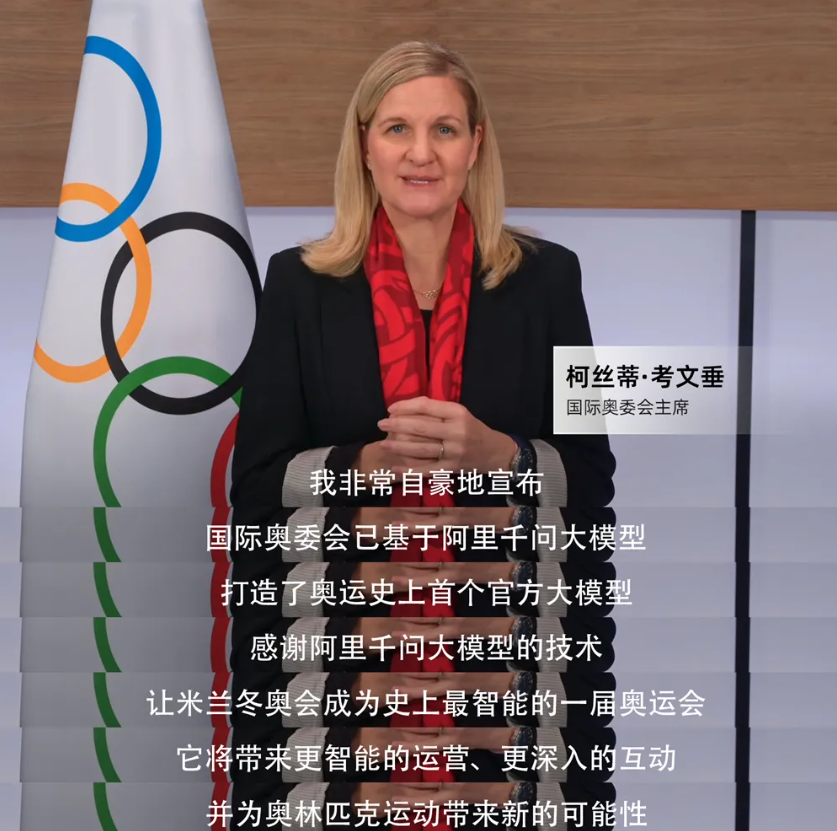
2026米兰冬奥会开幕前夕。在米兰国际转播中心,国际奥委会(IOC)主席柯丝蒂·考文垂宣布:国际奥委会已基于阿里千问大模型打造了奥运史上首个官方大模型。这意味着,大模型技术首次进入奥运会最核心的业务流。 考文垂称,“得益于阿里千问的技术支撑,2026米兰冬奥会展现了奥林匹克运动的智能化未来,将成为史上‘最智能’的一届奥运会。” 根据介绍,此次引入将系统性地解决困扰奥运百年的运营难题。首先解决的是“沟通与效率”的全球性难题。 奥运会是全球最复杂的活动之一,涉及数百万字的规则手册和繁杂的后勤调度。对此,奥运史上首个“国家奥委会AI助手”已正式上岗。 基于阿里千问3强大的多语言理解与长文本处理能力,它“通读”并吃透了所有官方手册,支持全球119种语言。这意味着,不管是来自南美的巴西代表团,还是北欧的瑞典代表团,只需用母语提问,AI就能精准解答从参赛资格审核、住宿分配到赛时车辆调度的所有问题。这一创新应用大幅消除了语言和地域带来的“数字鸿沟”,让技术真正实现了普惠。 其次,奥运会积累了海量的视频档案,但这些“死数据”往往难以被快速调用。本届冬奥会,国际奥委会基于阿里千问打造了媒资智能管理系统,彻底重构了人与数据的交互方式。 工作人员只需对AI说:“帮我找一段滑雪运动员空翻落地的慢动作”,AI即可在毫秒级时间内,从浩瀚的视频库中定位精准片段。更令人惊叹的是,该系统首次实现了对新产生赛事视频内容的100%全量AI自动打标。每一分钟的比赛画面在生成的瞬间,就被AI赋予了结构化的标签,将原本沉睡的数据瞬间激活为可随时调用的“活知识”。 在直播生产环节, 基于阿里千问视觉大模型(Qwen-VL)开发的自动媒体描述系统正式投入运行,它能像人类专业解说员一样,实时识别进球、犯规等关键事件并生成准确描述。与此同时,米兰冬奥组委会还利用阿里通义万相图片生成大模型,高效创作了多部短片及数十张主题海报。 冬奥会转播还一直面临一个物理瓶颈:雪地纹理单一、反光强烈、缺乏特征点,导致机器视觉极易失效,形成“雪地盲区”。为此,阿里云研发了多模型融合算法,成功攻克了这一瓶颈。实现了“子弹时间”和“时间切片”特效,全球数十亿观众将不再受限于单一镜头,而是能身临其境地看清运动员在空中极速翻转的每一帧轨迹。

优秀的个人博客,低调大师

HDwiki+discuz在启用https下的整合问题

这几天在折腾HDwiki+discuz,系统环境是FreeBSD 10.4, PHP 5.6(HDwiki要求),PHP-PDO_MYSQL,PHP-GD,PHP-XML等,MYSQL 5.7 HDwiki 5.1(6.0安装成功后打开前台,提示http 500错误,找不到原因) discuz X3.4 因为宽带运营商关闭了80端口,443端口有开,所以就直接用上https,结果问题一大堆。 首先,discuz和ucenter在https下通信失败,后来找到修改方法: DISCUZ 开启https后ucenter通信失败解决方法,一般是做完301重定向https后通信失败的,下面是具体解决方法: 打开目录 uc_server/model/misc.php 文件;找到69行,插入下面代码: ...... $port = !empty($matches['port']) ? $matches['port'] : ($matches['scheme'] == 'https' ? 443 : 80); //以下为插入代码 if(substr($url,0,5)=='https'){ $ch = curl_init($url); curl_setopt($ch, CURLOPT_RETURNTRANSFER, 1); if($post){ curl_setopt($ch, CURLOPT_POST, 1); curl_setopt($ch, CURLOPT_POSTFIELDS, $post); } if($cookie){ curl_setopt($ch, CURLOPT_COOKIE, $cookie); } curl_setopt($ch, CURLOPT_SSL_VERIFYPEER, FALSE); return curl_exec($ch); } //插入代码结束 if($post) { $out = "POST $path HTTP/1.0\r\n"; ...... 接下来设置HDwiki和ucenter,问题比较多了。 一开始,只要设置https,就提示“您输入的URL地址不正确!” 网上也没有任何资料,经过调试,发现要修改HDwiki目录下的control/admin_setting.php的659行 原来长这样: if(empty($ucapi) || !preg_match("/^(http:\/\/)/i", $ucapi)) { 修改成这样: if(empty($ucapi) || !preg_match("/^((http:|https:)\/\/)/i", $ucapi)) { 这个问题解决后,出现的是“uc_url_unreachable”错误。走了不少弯路后,发现还是https的问题。 admin_setting.php调用了api/uc_client/client.php里的uc_fopen(),而这个函数使用fsockopen模拟浏览器进行访问。 并且只有拼接了http协议的情况。对这个接口文件的分析,见这篇文章http://blog.csdn.net/yanhui_wei/article/details/17919645 综合这些分析,比较一下discuz的uc_server/model/misc.php和HDwiki下的api/uc_client/client.php,会发现: discuz的uc_server/model/misc.php里的function dfopen2()和 function dfopen()与HDwiki下的api/uc_client/client.php的uc_fopen2()和uc_fopen()基本上是类似的。 所以解决方法如下: 1、拷贝discuz下的uc_client目录,替换HDwiki下的api/uc_client目录 2、修改api/uc_client/client.php文件,重点在于用function dfopen2()和 function dfopen()的内容替换uc_fopen2()和uc_fopen(),修改完成的结果如下: function uc_fopen2($url, $limit = 0, $post = '', $cookie = '', $bysocket = FALSE, $ip = '', $timeout = 15, $block = TRUE, $encodetype = 'URLENCODE') { $__times__ = isset($_GET['__times__']) ? intval($_GET['__times__']) + 1 : 1; if($__times__ > 2) { return ''; } $url .= (strpos($url, '?') === FALSE ? '?' : '&')."__times__=$__times__"; return uc_fopen($url, $limit, $post, $cookie, $bysocket, $ip, $timeout, $block, $encodetype); } function uc_fopen($url, $limit = 0, $post = '', $cookie = '', $bysocket = FALSE , $ip = '', $timeout = 15, $block = TRUE, $encodetype = 'URLENCODE') { $return = ''; $matches = parse_url($url); $scheme = $matches['scheme']; $host = $matches['host']; $path = $matches['path'] ? $matches['path'].($matches['query'] ? '?'.$matches['query'] : '') : '/'; $port = !empty($matches['port']) ? $matches['port'] : ($matches['scheme'] == 'https' ? 443 : 80); /* //以下内容可以不需要 if($scheme=='https'){ $curl = curl_init(); curl_setopt($curl, CURLOPT_URL, $url); curl_setopt($curl, CURLOPT_USERAGENT, $_SERVER['HTTP_USER_AGENT']); if($post) { curl_setopt($curl, CURLOPT_POST, 1); curl_setopt($curl, CURLOPT_POSTFIELDS, $post); } if($cookie) { curl_setopt($curl, CURLOPT_COOKIE, $cookie); } curl_setopt($curl, CURLOPT_TIMEOUT, $timeout); curl_setopt($curl, CURLOPT_HEADER, 0); curl_setopt($curl, CURLOPT_RETURNTRANSFER, 1); $return = curl_exec($curl); if (curl_errno($curl)) { echo '<pre><b>错误:</b><br />'.curl_error($curl); } curl_close($curl); return $return; } // 结束 */ if($post) { $out = "POST $path HTTP/1.0\r\n"; $header = "Accept: */*\r\n"; $header .= "Accept-Language: zh-cn\r\n"; $boundary = $encodetype == 'URLENCODE' ? '' : ';'.substr($post, 0, trim(strpos($post, "\n"))); $header .= $encodetype == 'URLENCODE' ? "Content-Type: application/x-www-form-urlencoded\r\n" : "Content-Type: multipart/form-data$boundary\r\n"; $header .= "User-Agent: $_SERVER[HTTP_USER_AGENT]\r\n"; $header .= "Host: $host:$port\r\n"; $header .= 'Content-Length: '.strlen($post)."\r\n"; $header .= "Connection: Close\r\n"; $header .= "Cache-Control: no-cache\r\n"; $header .= "Cookie: $cookie\r\n\r\n"; $out .= $header.$post; } else { $out = "GET $path HTTP/1.0\r\n"; $header = "Accept: */*\r\n"; $header .= "Accept-Language: zh-cn\r\n"; $header .= "User-Agent: $_SERVER[HTTP_USER_AGENT]\r\n"; $header .= "Host: $host:$port\r\n"; $header .= "Connection: Close\r\n"; $header .= "Cookie: $cookie\r\n\r\n"; $out .= $header; } $fpflag = 0; if(!$fp = @fsocketopen(($scheme == 'https' ? 'ssl' : $scheme).'://'.($scheme == 'https' ? $host : ($ip ? $ip : $host)), $port, $errno, $errstr, $timeout)) { $context = array( 'http' => array( 'method' => $post ? 'POST' : 'GET', 'header' => $header, 'content' => $post, 'timeout' => $timeout, ), ); $context = stream_context_create($context); $fp = @fopen($scheme.'://'.($scheme == 'https' ? $host : ($ip ? $ip : $host)).':'.$port.$path, 'b', false, $context); $fpflag = 1; } if(!$fp) { return ''; } else { stream_set_blocking($fp, $block); stream_set_timeout($fp, $timeout); @fwrite($fp, $out); $status = stream_get_meta_data($fp); if(!$status['timed_out']) { while (!feof($fp) && !$fpflag) { if(($header = @fgets($fp)) && ($header == "\r\n" || $header == "\n")) { break; } } $stop = false; while(!feof($fp) && !$stop) { $data = fread($fp, ($limit == 0 || $limit > 8192 ? 8192 : $limit)); $return .= $data; if($limit) { $limit -= strlen($data); $stop = $limit <= 0; } } } @fclose($fp); return $return; } } .... //找到同步登录登出代码,修改成以下内容 /** * 进入同步登录代码 * * @param int $uid 用户ID * @return string HTML代码 */ function uc_user_synlogin($uid) { $uid = intval($uid); $return = uc_api_post('user', 'synlogin', array('uid'=>$uid)); return $return; } /** * 进入同步登出代码 * * @return string HTML代码 */ function uc_user_synlogout() { $return = uc_api_post('user', 'synlogout', array()); return $return; } .... 然后就可以看到一切都正常了。 另外需要注意的是,必须保证ssl证书在有效期内,因为这个,浪费了2天的时间。


优秀的个人博客,低调大师

为iPhone,iPad,Android和其他移动设备启用Lync

Lync Cumulative Update 4 is now available for public download. While combining a number of fixes, it also includes some new PowerShell cmdlets to manage upcoming mobility functionality (actually a couple were slipped into CU3 but had no help files in CU3). Full details of the mobility service have not yet been released, so I would assume you should not be using these cmdlets yet. So what are the new cmdlets? Glad you asked. CsAutodiscoverConfiguration Get-CsAutodiscoverConfiguration New-CsAutodiscoverConfiguration Remove-CsAutodiscoverConfiguration Set-CsAutodiscoverConfiguration Modifies an existing collection of Autodiscover configuration settings. The Autodiscover service provides a way for client applications such as Lync Web Access or Microsoft Lync Mobile to locate key resources such as a user’s home pool or the URL for joining a dial-in conference. New-CsWebLink Creates a new web link that points to the Autodiscover service. The Autodiscover service provides a way for client applications such as Lync Web Access or Microsoft Lync Mobile to locate key resources such as a user’s home pool or the URL for joining a dial-in conference. Test-CsMcxPushNotification Verifies that the push notification service is working. The push notification service (Apple Push Notification Service and Microsoft Lync Server 2010 Push Notification Service) provides a way to send notifications about event s such as new instant messages or new voice mail to mobile devices like iPhones and Windows Phones, even if the Microsoft Lync 2010 application on those devices is currently suspended or running in the background. CsMobilityPolicy Get-CsMobilityPolicy Grant-CsMobilityPolicy New-CsMobilityPolicy Remove-CsMobilityPolicy Set-CsMobilityPolicy Modifies an existing mobility policy. Mobility policies determine whether o r not a user can use Microsoft Lync 2010 Mobile. These policies also manage a user’s ability to employ Call via Work, a feature that enables users to make and receive phone calls on their mobile phone by using their work phone number instead of their mobile phone number. CsMcxConfiguration Get-CsMcxConfiguration New-CsMcxConfiguration Remove-CsMcxConfiguration Set-CsMcxConfiguration Modifies an existing collection of Microsoft Lync Server 2010 Mobility Service configuration settings. The Mobility Service enables users of mobile phones such as iPhones and Windows Phones to do such things as exchange instant messages and presence information; store and retrieve voice mail internally instead of with their wireless provider; and take advantage of Microsoft Lync Server 2010 capabilities such as Call via Work and dial-out conferencing. CsPushNotificationConfiguration (Get,New,Remove,Set) Get-CsPushNotificationConfiguration New-CsPushNotificationConfiguration Remove-CsPushNotificationConfiguration Set-CsPushNotificationConfiguration Modifies an existing collection of push notification configuration settings . The push notification service (Apple Push Notification Service and Micros oft Lync Server 2010 Push Notification Service) provides a way to send notifications about events such as new instant messages or new voice mail to mobile devices such as iPhones and Windows Phones, even if the Microsoft Lync 2010 application on those devices is currently suspended or running in the background. Info gathered from the Lync CU4 PowerShell help files. Full Descriptions: CsAutodiscoverConfiguration DESCRIPTION Get-CsAutodiscoverConfiguration New-CsAutodiscoverConfiguration Remove-CsAutodiscoverConfiguration Set-CsAutodiscoverConfiguration DESCRIPTION For client applications to make the most effective use of Microsoft Lync Server 2010 those applications need to know the location of key Lync Server 2010 components. For example, authenticated users must be able to locate their home pool; after all, they can only be authenticated by that home pool. Likewise, unauthenticated users must be able to do such things as locate the URL used for joining a conference. If all your users logged on from behind the organization’s firewall discovering these locations would be a relatively simple task. However, this relatively simple task gets more and more complicated as users access the system from external locations using Microsoft Lync Mobile or Lync Web Access. This is especially true in split-domain scenarios, scenarios in which some of an organization’s users have accounts on the on-premises version of Lync Server while other users have accounts on Microsoft Office 365. In cases such as this, user accounts might be located in different Active Directory forests. That can pose a problem: for example, if a US-based user logs on from Europe the system must be able to recognize his or her forest and then refer the logon request to the proper pool. The Autodiscover service was introduced in the November 2011 release of Lync Server in order to address these issues. When a client application attempts to access Lync Server, the Autodiscover service parses the client SIP address and then redirects that request to the appropriate pool. Client applications connect to the Autodiscover service by sending an HTTP request to a n Autodiscover URL; these URLs must be configured by administrators in order for the Autodiscover service to work. (Note that, in addition to configuring URLs, administrators must also create DNS records that correspond to these URLs.) Autodiscover URLs are assigned to Autodiscover configuration settings; in turn, these settings can be applied to the global scope or to the site scope . When you install Lync Server a global collection of settings will be created for you. (However, no Autodiscover URLs will be assigned to that collection.) If a single collection of Autodiscover settings will not fill your needs, then you can use the New-CsAutoDiscoverConfiguration cmdlet to create additional configuration settings at the site scope. From there, you can u se the Set-CsAutoDiscoverConfiguration cmdlet to add or remove Autodiscover URLs from the global collection or from any site-scoped collection. New-CsWebLinkDESCRIPTION <info same as above cut> Managing Autodiscover configuration settings typically means adding Autodiscover URLs. These URLs must be created using the New-CsWebLink cmdlet, with the resulting URL stored in a variable and then added to a collection of Autodiscover configuration settings. Autodiscover URLs are based on the SIP domains used in your organization; administrators will typically create one URL for use by users outside the organization’s firewall (for example,http://LyncDiscover.litwareinc.com) and a second URL (for example,http://LyncDiscoverInternal.litwareinc.com) for use by users inside the firewall. CsMcxPushNotification DESCRIPTION Test-CsMcxPushNotification The Apple Push Notification Service and the Microsoft Lync Server 2010 Push Notification Service enable users running Lync 2010 on their Apple iPhone or Windows Phone to receive notifications about Lync 2010 events even when Lync 2010 is suspended or running in the background. For example, users can receive notice for events such as these: Invitations to a new instant messaging session or conference New instant messages New voice mail Without the push notification service, users would receive these notices on ly when Lync 2010 was in the foreground and serving as the active application. The Test-CsMcxPushNotification cmdlet provides a way for administrators to verify that the push notification service is working. CsMobilityPolicy DESCRIPTION Get-CsMobilityPolicy Grant-CsMobilityPolicy New-CsMobilityPolicy Remove-CsMobilityPolicy Set-CsMobilityPolicy Lync 2010 Mobile is a client application that enables users to run Microsoft Lync 2010 on their mobile phones. Call via Work provides a way for users to make calls on their mobile phone and yet have it appear as though the call originated from their work phone number instead of their mobile phone number. Users who have been enabled for Call via Work can achieve this either by dialing directly from their mobile phone or by using the dial-out conferencing option. With dial-out conferencing, a user effectively asks the Microsoft Lync Server 2010 Mobility Service server to make a call for them. The server will set up the call, and then call the user back on their mobile phone. After the user has answered, the server will then dial the party being called. Both of these capabilities – the ability to run Lync 2010 Mobile and the ability to use Call via Work – are managed using mobility policies. These policies can be modified at any time by using the Set-CsMobilityPolicy cmdlet. Other than a description of the policy, mobility policies have only two properties. The first, EnableOutsideVoice, determines whether or not Call via Work is enabled; the second, EnableMobility, determines whether or not user s are allowed to use Lync Mobile. Both of these properties must be set to t rue before a user can take advantage of Call via Work. If EnableMobility is set to True and EnableOutsideVoice is set to False, the user can run Micro soft Lync Mobile but will not be able to use Call via Work. If EnableMobility is set to False and EnableOutsideVoice is set to True the user will not be able to run Microsoft Lync Mobile. In turn, that means that the user will not be able to use Call via Work, regardless of the value of the EnableOutsideVoice property. Note that users must also be enabled for Enterprise Voice before they can use Lync 2010 Mobile. To use Call via Work, users must be managed by a voice policy that allows simultaneous ringing. CsMcxConfiguration DESCRIPTION Get-CsMcxConfiguration New-CsMcxConfiguration Remove-CsMcxConfiguration Set-CsMcxConfiguration Microsoft Lync Server 2010 Mobility Service extends many of the capabilities of Microsoft Lync 2010 to mobile devices such as Apple iPhones, Windows P hone, Android phones, and Nokia phones. Among other things, users can use these phones to exchange instant message and presence information, and to receive notifications of new voice mails. Thanks to the push notification service (Apple Push Notification Service and Microsoft Lync Server 2010 Push Notification Service), users with iPhones or Windows Phones can receive these notifications even if Lync 2010 is running in the background. The Mobility Service also provides the opportunity for organizations to enable Call vi a Work. With Call via Work, users can make a call from their mobile phone and make it appear as though the call originated from their work phone; for example, Caller ID systems will display the user’s work number instead of h is or her mobile phone number. The Mobility Service itself is managed by using Mobility Service configuration settings that can be applied to the global scope, the site scope, or the service scope (for the Web server service only). These settings control such things as the maximum length of time for a Mobility Service session; whether or not the Microsoft Lync Server 2010 Autodiscovery Service (which directs Mobility Service users to the appropriate Registrar pool) is available to users who log on outside the organization’s firewall); and the location of the push notification service provider. The Set-CsMcxConfiguration cmdlet provides a way for administrators to modify any of their existing Mobility Service configuration settings. CsPushNotificationConfiguration DESCRIPTION Get-CsPushNotificationConfiguration New-CsPushNotificationConfiguration Remove-CsPushNotificationConfiguration Set-CsPushNotificationConfiguration The Apple Push Notification Service and the Microsoft Lync Server 2010 Push Notification Service enable users running Lync 2010 on their Apple iPhone or Windows Phone to receive notifications about Lync 2010 events even when Lync 2010 is suspended or running in the background. For example, users can receive notice for events such as these: Invitations to a new instant messaging session or conference New instant messages New voice mail Without the push notification service users would receive these notices only when Lync 2010 was in the foreground and serving as the active application. Administrators have the ability to enable or disable push notifications for iPhone users and/or Windows Phone users. (By default, push notifications a re disabled for both iPhone users and Windows Phone users.) Administrators can enable or disable push notifications at the global scope by using the S et-CsPushNotificationConfiguration cmdlet. They can also create custom push notification settings at the site scope by using the New-CsPushNotificationConfiguration cmdlet. These custom settings can also be modified by using the Set-CsPushNotificationConfiguration cmdlet. With the push notification configuration settings there are only two property values for Administrators to manage: EnableApplePushNotificationService, which determines whether push notifications are sent to iPhone users; and EnableMicrosoftPushNotificationService, which determines whether push notifications are sent to Windows Phone users. Note that these property values d o not have to be set to the same value. For example, you could enable push notifications to Windows Phone users (by setting EnableMicrosoftPushNotificationService to True) yet, at the same, disable notifications to iPhone users by setting EnableApplePushNotificationService to False. 本文转自legendfu51CTO博客,原文链接:http://blog.51cto.com/legendfu/1072256,如需转载请自行联系原作者

优秀的个人博客,低调大师

应用驱动网络(ADN)开启用户体验新时代

未来网络的核心挑战是如何解决网络架构制约商业模型创新的问题。 运营商的收益依赖于用户规模,用户增长面临瓶颈。互联网最初架构的思想就是为了流量而建网,并不考虑不同应用的各异需求。这样的架构至今没有变化,因此运营商收益严重依赖于用户和流量规模。在UIUC大学Srikant教授的代表性论文<>中,说明了运营商的收益主要来自于用户数量和流量的规模增长。从互联网的计价方式看,无论是以前的按用量计费和包月模式,还是近年来的新模式,如限量模型(Flat rate with cap),分时计费(Smart Data Pricing),补贴用量计划(Sponsored data plan)等,均服务于以流量为中心的商业模型,始终依赖用户规模的增长。近年来,随着用户数量规模增长触及天花板以及运营成本的大幅提高,运营商面临着增量不增收的巨大压力。网络中立规则制约服务差异化。网络中立原则的初衷是保护新型企业和应用,消除因内容供应商的资本差异带来的歧视,防止出现内容提供商的垄断。在现有架构下,运营商不可以因业务来源而作区分化服务。网络无法满足低延迟、高带宽要求的高附加值业务(如高清视频)的服务质量,导致内容提供商开始自建网络,使运营商收益受损。美国加州大学教授John Musacchio等在论文《A Two-Sided Market Analysisof Provider Investment Incentives With an Application to the Net-NeutralityIssue》中建立了双边市场(Two-sided market)模型,并指出在一定条件下网络中立不利于公众利益,造成公地悲剧(castles on the Rhine effect)。哥伦比亚大学VishalMisra教授与其合作者提出Public Option ISP方法,可以市场化方式消除对内容提供商的选择性歧视,节约监管开销。在现有架构下保持网络中立性是不是可以达到原有初衷?值得商榷。 不同应用需要不同架构,网络架构决定用户体验 在语音通信时代,消费的主体是单一的人,人与人的语音通信是对电信网络的基本需求,网络提供的服务也是单一的语音为主(辅助少量电报等数据通信),网络发展所面临的主要挑战是提高用户数的覆盖,降低通信的成本。研究发现,在语音通信网络中,用户的呼叫到达过程符合泊松分布,即大部分时间内活跃用户数在统计的角度都稳定在一个均值,统计复用成为可能。这使得分层汇聚成为电信网络的基本架构,从接入到城域然后到骨干层层汇聚的架构,能够在充分满足整体用户需求的情况下,降低网络的建设和管理成本,成为电信网多年建设的基本指导原则。 进入互联网时代后,用户对网络消费的模式发身了巨大变化,电信网分层汇聚的网络架构面临了很大的挑战。对于互联网用户,他们除了原有的人与人的通信外,更大量的是人与物(机器及数据中心)的通信,而且通信的时间长度、带宽需求也变得更大和更不确定。1999年,美国科学家Barabasi和Albert在《科学》杂志上发表了著名论文 《Emergence of Scaling in Random Networks 》,指出了互联网的应用符合无标度网络(scale-free networks)的特征。无标度网络又称为幂律分布网络。在这个网络中,存在与大部分用户相连的超级节点(如Google、Facebook等)以及大部分节点都与几个超级节点相连的特点,与符合泊松分布的电话网络有本质的不同。加拿大Calgary大学教授Zongpeng Li等发表的著名论文《The flattening internettopology: natural evolution, unsightly barnacles or contrived collapse?》指出了在互联网时代网络扁平化是必然趋势。对于符合幂律分布的网络,扁平化的网络架构更为适合,资源效率更高。扁平化成为互联网时代网络建设的指导原则。 随着车联网、物联网、虚拟现实等新业务的出现,势必会对未来网络架构产生影响。华为未来网络理论实验室和香港中文大学John Lui教授、香港城市大学Guanrong Chen教授等联合提出了一种全新的马尔科夫过程模型,发现未来网络业务特征与语音网络的泊松分布和互联网的幂律分布有明显的不同,未来网络业务符合马尔科夫过程模型分布。这个分布的核心特征是应用随时间呈现多样化的动态转换特性。举例来说,高清视频、物联网等各行各业的应用需求差异化更大。在车联网中,车与车之间的通信要求低延时,资源效率最优的集中到中心节点的处理方式并不合适,需要具备局部自治的能力;而对于远程视频医疗这种大带宽、低延时、高可靠的业务,现有网络架构很难满足要求。因此,在网络架构的设计上,需要引入新的架构,才能够确保对客户体验的有效支撑,需要一个由应用驱动的网络架构。 应用驱动网络开启差异化服务新范式 应用驱动网络(Application Driven Network,ADN)是为应用提供差异化服务的新范式。ADN提出为应用建网,为每个应用提供一个逻辑独立的网络,以满足每个应用自有的、对网络的各项需求。ADN从理念上直接解决了差异化服务和网络中立的矛盾。 电信行业的定势思维只强调“资源效率优先”,一味提高网络设备的资源利用率,只能降低成本,不能增收。ADN第一次提出了“应用效率与资源效率并重”的理念,通过提高应用的效率,方便用户使用应用,改善用户体验,达到增收目的。 ADN主张为应用建网,为每个应用提供一个逻辑独立的网络,以满足每个应用自有的、对网络的各项需求,构建“面向应用的网络重构、面向应用的资源虚化、面向应用的分层控制”的能力。 1、面向应用的网络重构能力:应用对网络需求的抽象。ADN剖析应用对网络的需求、使用特点等,构建应用的多维抽象模型,为应用编排网络资源,以满足应用的需求。例如,满足泊松分布的人与人通信业务、满足幂率分布的人与机器通信业务、以及满足马尔科夫过程分布的机器与机器通信,都可通过范式模型映射到不同网络资源,从而提供高满意度的网络服务。 2、面向应用的资源虚化能力:网络资源的隔离与复用。NFV、网络切片技术等,已将原先统一的、唯一的网络资源,例如无线空口、链路带宽、计算能力、存储空间,抽象为多个逻辑管道。ADN在此基础之上,需进一步对网络资源进行统计复用,以符合应用对网络的需求模型。 3、面向应用的分层控制能力:快神经/慢神经的控制。ADN从为应用提供差异化服务出发,结合网络资源全局优化的需求。加州理工学院的John C. Doyle教授等提出快/慢神经控制理论。基于该理论,ADN从时间、空间、价值等多个维度对网络资源进行快/慢控制。慢控制器将拓扑结构、应用业务模型特征等网络慢变信息作为输入,找到网络资源切片划分方法以及网络最优控制点。快控制器通过对网络快变状态如交换机内队列和链路状态等进行实时观测,利用卡尔曼滤波算法,在不同的分片上将网络以最小的代价驱动到最优点控制点。慢控制与快控制协同工作,可使得全网络工作在最优控制点附近,以实现面向应用的服务优化。 ADN的框架可分为三个平面: 1、S平面:实现对应用的抽象建模,提炼应用对于网络的需求,例如带宽、时延等,并根据应用的需求,为其分配合理的网络资源,优化应用的网络传输效率。应用对于信息交互的需求,具有不确定性,从而造成网络流量具有动态性和不可预知性。S平面能够根据网络的运行状态,动态调整各个应用的网络资源,从而达到全局的资源优化。 2、C平面:对部分网络节点或资源进行局部控制。全局控制需要采集、汇总全局信息,导致控制环路过长,控制效果不佳。C平面的引入,可以缩短控制环路,加快响应速度,从而提升控制效果。 3、D平面:承载数据通道。为不同应用提供独立的网络资源,实现独立的网络调度策略、拥塞控制策略、排队机制等,从而为应用提供差异化的服务。 ADN架构支撑“基于用户体验的运营模式”落地 按照应用纵向分配资源是ADN 与标准通信网络最大的变革。标准的通信网络架构,是横向按照资源分层的,从资源层到控制层,最高到应用层。ADN的核心概念,则在于按照不同的应用纵向拉通,由应用层自上而下到控制层,最后到资源层,构成针对不同应用的多个纵向层。 通过“横”“纵”变化,ADN可以提供更好的用户体验。 在传统网络中,网络资源的管理一般是按照网络层次分组,例如,接入网、城域网、骨干网的概念,按照网络层次分组,有利于资源实用率最大化,但对应用并不是体验最佳:一个典型应用,可能跨多个网络功能单元,使得应用的开通和调整都变得非常复杂。通常的情况下,应用需要针对网络做相应的调整以达到好的用户体验。 ADN 主张通过应用业务特征的识别,分配与之相匹配的资源和执行针对应用的业务管理,让网络主动适配应用。在多个应用场景下,资源如何分配,依据什么原则分配,如何均衡现有资源分配以及对将来可能的新应用的平衡等问题,都是ADN架构能否成功应用的关键。不同的业务流量模型,其系统性能(例如延迟、吞吐等)表现,受调度与资源分配策略影响极大。MIT大学 Mihalis G. Markakis博士在其博士学位论文《Scheduling in Switched Queueing Networks with Heavy-Tailed Traffic》中的研究显示,与符合泊松到达特性的业务不同,对具有重尾分布特性的业务类型,采用多队列负载均衡的调度策略可以取得显著的性能提升;在实现系统规模扩张时,应采用scale-out而非scale-up策略。对于应用业务特征的识别,我们已经分析明确了针对话音的泊松分布模型,针对互联网的幂律分布模型、针对下一代网络的马尔可夫过程分布等特征,这些特征是ADN分配资源的理论依据。 ADN 架构中引入了面向应用的资源分配机制。专门的资源分配层:对于话音的应用,按照泊松分布的规律,分配层次化网络连接资源;对于到数据中心的互联网应用,按照幂律分布的规律,分配扁平化的网络资源满足要求;对于车联网应用,依据马尔可夫过程分布的规律,分配区域自治的网络资源以满足低延时的要求,分配集中资源满足大并发类的应用;同时,根据对业务发展的预测,适当预留关键资源,以适应未来应用变化的需求。 在ADN 的架构下,云化技术可以作为支撑ADN 资源分配层的支撑技术,而SDN和NFV技术,则为在一张网络上支撑多种应用提供了技术能力保障,超宽带互联使得资源的分配和调度更为灵活和便捷。在ADN框架下,现有的技术投入得以有效的集成共同支撑用户体验的提升。对于未来的5G网络需求分析表明,业务多样化和用户体验也是其典型特征,ADN架构也能够很好的支持未来5G的网络需求。 “应用效率与资源效率并重”成就“基于用户体验的运营模式” 现有通信网络主要是面向单一业务的“资源效率优先”模式。早期的通信网络以话音为主,互联网的前身ARPANet也是面向单一业务的网络。早期互联网的需求主要集中在大流量低成本的数据服务上。剑桥大学的Frank Kelly 教授在其论文《Charging and rate controlfor elastic traffic》中证明了ARPANet的基础通信协议TCP是资源效率最优的,也因此沿用至今。通信需求和协议最优使得网络建设和发展一直以来的主要目标是提供更高效率的更大带宽,可以称之为面向单一业务的“资源效率优先”模式。 当今互联网应用种类快速增多,多样化增强,现有网络无法支撑。对于早期的通信网络和互联网,最大的成本在于网络的铺设,光纤、交换机等物理资源,“资源效率优先”是必然的结果。与话音网和互联网相比,未来网络最大的特征在于应用多样化。应用的多样化会表现为对网络资源需求的多样化,如高清视频、物联网为代表的应用对资源需求差异巨大。虽然随着技术的不断进步,网络的带宽不断提升,成本不断降低,然而现有网络仍然面临体验差、应用满足率不高的困境。因此大型内容提供商开始自建网络,根据自身业务和应用进行优化设计以提升网络效能。2011年,明尼苏达大学的Zhi-Li Zhang在论文《Characterizing Roles of Front-end Servers in End-to-End Performanceof Dynamic Content Distribution》明确指出Google拥有为自身应用而自建的骨干网是其搜索体验佳的一大优势。这说明一味聚焦“资源效率优先”已经成为满足多样化的用户体验要求的障碍,而为应用建网是未来网络发展的必然趋势。 ADN可以支撑应用建网,提升用户体验。ADN可以在资源总量不变的情况下根据各种应用的特点优化配置,满足各应用不同的需求,提升应用的体验。例如,加州大学伯克利分校的Shenker教授在其论文《pFabric: Minimal Near-OptimalDatacenter Transport》中指出如何在已知业务应用的情况下对不同应用的不同时延需求做优化,以低复杂度算法提高用户体验。在现实中,因应用需求迥异而无法得到现行网络支撑的例子大量存在。例如,利用网络对水表、电表自动抄表的物联网应用,用户终端数量巨大,对带宽的要求不大,但对控制信道的需求很多,且对成本约束非常苛刻,现有的移动通信网络无法在低成本约束下满足应用需求。又如即时通讯应用(如微信)的信令风暴问题:此类应用对带宽消耗不大,但需不断保持网络连接的刷新,现有网络难以支撑。前一个案例可以通过网络切片进行解决,后一个问题也可以通过预留一定的信令资源进行解决,而ADN可以作为上述方法的架构支撑。 ADN在满足应用效率的基础上还可以支持资源效率。ADN可以满足应用效率的需求,提高用户的体验。但这不意味着ADN要以牺牲资源效率为前提。ADN通过思想理念的转变,以SDN、NFV等各种技术为基础,为应用效率服务。同时,ADN还要通过网络效用最大化(NUM)理论使得应用效率和资源效率有机解耦,共同提升,有效降低建网成本,提高运营效率,促进应用增收。应用效率和资源效率相辅相成的必然性也可以从计算机行业的发展历史看出。计算机最早出现的时候,是作为专业的计算工具使用的,容量和性能有限,如何发挥CPU的效率是其发展的焦点,计算机编程的汇编语言,也是精确控制到CPU的每一个具体的物理资源;随着技术的不断进步,CPU的能力不断提升,编程语言也发展到更高级的C语言,以牺牲部分资源效率,降低了使用的复杂度,提升了应用效率;随着摩尔定律驱动的硬件的不断进步,操作系统的出现使得计算机的应用有了本质的突破,应用效率的提升带来市场空间的上万倍扩展,最终造就了21世纪最大的产业,从“资源效率优先”向“应用效率与资源效率并重”转变带来市场空间的增长,反过来为提升“资源效率优先”提供动力,二者构成良性循环。 为应用建网正处于关键的历史时刻。目前多数运营商都意识到了网络应为应用而建这个趋势。利用“网络切片”对网络进行配置就是在这方面的早期尝试。ADN概念提出的最大意义,在于帮助运营商在网络架构理论上真正具备对于应用多样化的支持和服务能力,突破原有“资源效率优先”时代单一的以流量、带宽为标准的服务模式,进入关注应用体验的多业务应用时代。正如当年PARC实验室提出的计算机图形化概念,使得计算机具备了满足消费者应用需求的能力,造就了后来苹果、微软等一大批公司的辉煌和整个产业的兴起;我们相信,ADN概念和架构也将使得运营商网络对未来物联网时代的丰富的业务能够提供更有效的支持,最终形成“应用效率”与“资源效率”的良性循环,开创“基于用户体验的运营模式”的新时代。 “基于客户体验的运营模式”是一个具有普遍意义的理念,不但使用于指导未来电信网络的发展,也可以用来指导存储、计算以致于整个ICT行业发现新的业务增长机会;同样的,应用驱动的网络架构(ADN),也可以扩展到应用驱动的存储(ADS)、应用驱动的计算(ADC)和应用驱动的ICT(ADICT);这里的A可以是常规意义上的应用,也可以是行业应用,甚至可以是未来待创造出来的新应用,想像空间巨大,增长空间同样巨大。 本文转自d1net(转载)

资源下载

更多资源
Mario

Mario

马里奥是站在游戏界顶峰的超人气多面角色。马里奥靠吃蘑菇成长,特征是大鼻子、头戴帽子、身穿背带裤,还留着胡子。与他的双胞胎兄弟路易基一起,长年担任任天堂的招牌角色。

腾讯云软件源

腾讯云软件源

为解决软件依赖安装时官方源访问速度慢的问题,腾讯云为一些软件搭建了缓存服务。您可以通过使用腾讯云软件源站来提升依赖包的安装速度。为了方便用户自由搭建服务架构,目前腾讯云软件源站支持公网访问和内网访问。

Nacos

Nacos

Nacos /nɑ:kəʊs/ 是 Dynamic Naming and Configuration Service 的首字母简称,一个易于构建 AI Agent 应用的动态服务发现、配置管理和AI智能体管理平台。Nacos 致力于帮助您发现、配置和管理微服务及AI智能体应用。Nacos 提供了一组简单易用的特性集,帮助您快速实现动态服务发现、服务配置、服务元数据、流量管理。Nacos 帮助您更敏捷和容易地构建、交付和管理微服务平台。

WebStorm

WebStorm

WebStorm 是jetbrains公司旗下一款JavaScript 开发工具。目前已经被广大中国JS开发者誉为“Web前端开发神器”、“最强大的HTML5编辑器”、“最智能的JavaScript IDE”等。与IntelliJ IDEA同源,继承了IntelliJ IDEA强大的JS部分的功能。

用户登录
用户注册