Android 5中不同效果的Toast
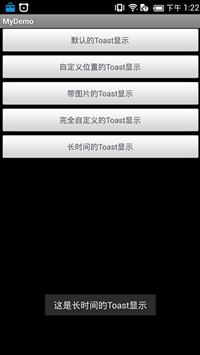
一、运行的结果 二、主要的代码 package com.otn.android.toast; import java.util.Timer; import java.util.TimerTask; import android.app.Activity; import android.app.AlertDialog; import android.os.Bundle; import android.view.Gravity; import android.view.LayoutInflater; import android.view.View; import android.view.ViewGroup; import android.view.View.OnClickListener; import android.widget.Button; import android.widget.ImageView; import android.widget.LinearLayout; import android.widget.TextView; import android.widget.Toast; public class MyToast extends Activity implements OnClickListener { private static final String TOASTBTN_1 = "这是默认的Toast显示"; private static final String TOASTBTN_2 = "这是自定义位置的Toast显示"; private static final String TOASTBTN_3 = "这是带图片的Toast显示"; private static final String TOASTBTN_4 = "这是完全自定义的Toast显示"; private static final String TOASTBTN_5 = "这是长时间的Toast显示"; private Button toastBtn_1, toastBtn_2, toastBtn_3, toastBtn_4, toastBtn_5; private Toast toast = null; @Override protected void onCreate(Bundle savedInstanceState) { // TODO Auto-generated method stub super.onCreate(savedInstanceState); setContentView(R.layout.main); toastBtn_1 = (Button) findViewById(R.id.button_1); toastBtn_2 = (Button) findViewById(R.id.button_2); toastBtn_3 = (Button) findViewById(R.id.button_3); toastBtn_4 = (Button) findViewById(R.id.button_4); toastBtn_5 = (Button) findViewById(R.id.button_5); toastBtn_1.setOnClickListener(this); toastBtn_2.setOnClickListener(this); toastBtn_3.setOnClickListener(this); toastBtn_4.setOnClickListener(this); toastBtn_5.setOnClickListener(this); } @Override public void onClick(View v) { AlertDialog.Builder builder; AlertDialog dialog; switch (v.getId()) { case R.id.button_1: toast.makeText(getApplicationContext(), TOASTBTN_1, Toast.LENGTH_LONG).show(); break; case R.id.button_2: toast = Toast.makeText(getApplicationContext(), TOASTBTN_2, Toast.LENGTH_LONG); toast.setGravity(Gravity.CENTER, 0, 0); toast.show(); break; case R.id.button_3: toast = Toast.makeText(getApplicationContext(), TOASTBTN_3, Toast.LENGTH_LONG); toast.setGravity(Gravity.CENTER, 50, -100); LinearLayout layout = (LinearLayout) toast.getView(); ImageView image = new ImageView(getApplicationContext()); image.setImageResource(R.drawable.wallpaper_tree_small); layout.addView(image, 0); toast.show(); break; case R.id.button_4: LayoutInflater inflater = getLayoutInflater(); View view = inflater.inflate(R.layout.userdefinedtoast, (ViewGroup) findViewById(R.id.toast_layout)); TextView txtView_Title = (TextView) view .findViewById(R.id.txt_Title); TextView txtView_Context = (TextView) view .findViewById(R.id.txt_context); ImageView imageView = (ImageView) view .findViewById(R.id.image_toast); toast = new Toast(getApplicationContext()); toast.setGravity(Gravity.CENTER, 0, 0); toast.setDuration(Toast.LENGTH_LONG); toast.setView(view); toast.show(); break; case R.id.button_5: LayoutInflater inflater1 = getLayoutInflater(); View view1 = inflater1.inflate(R.layout.userdefinedtoast, (ViewGroup) findViewById(R.id.toast_layout)); TextView txtView_Title1 = (TextView) view1 .findViewById(R.id.txt_Title); TextView txtView_Context1 = (TextView) view1 .findViewById(R.id.txt_context); ImageView imageView1 = (ImageView) view1 .findViewById(R.id.image_toast); builder = new AlertDialog.Builder(this); builder.setView(view1); dialog = builder.create(); dialog.show(); toast.makeText(this, TOASTBTN_5, Toast.LENGTH_LONG).show(); break; default: break; } } }