首页 文章 精选 留言 我的

精选列表

搜索[换脸甄别],共4863篇文章
优秀的个人博客,低调大师

马云CeBIT现场"刷脸" 展示人脸识别移动支付

如果这两天你在德国汉诺威,或许可以遇见马云,他受邀参加当地时间3月15日下午举行的CeBIT开幕演讲。在演讲结束后,马云表演的通过“人脸识别”购物受到关注,该技术展示了新的移动支付方式和购物体验。 “一直以来在线支付是一个头疼的问题,你可能会忘记了支付密码、可能会担心支付安全性”,马云在表演人脸识别技术前这样表示,然后他现场选择了一枚邮票,再将手机对准自己面部进行确认,购买即完成。 这不是阿里巴巴第一次展示人脸识别技术。2014年10月15日,蚂蚁金服分享日那天,作为支付宝人脸支付战略合作伙伴,Face++的人脸识别技术在现场大放异彩。蚂蚁金服安全产品技术部负责人曹恺说:“在实验室里人脸识别技术准确率超过97%,超过人对人的识别。” Face++对外宣称的梦想是成为“机器之眼”、让机器读懂世界,而马云在CeBIT演讲时也提到:“未来机器不只是生产,机器还需要思考,需要说话。” 此外,马云在演讲中还提到了这些年一直反复提及的C2B,“未来的世界,我们将不再由石油驱动,而是由数据驱动;商业将变成C2B,因为顾客负责定义需要什么产品,通过数据驱动,未来互联网将改变商业模式。” CeBIT展会开幕式上的企业家主旨演讲传统上邀请西方企业领袖,此前嘉宾包括大众汽车公司CEO文德恩、空中客车集团CEO恩德斯、谷歌公司董事长施密特。今年,这个位置留给了马云。 马云德国汉诺威展会开幕式部分演讲实录: 尊敬的默克尔总理,马凯副总理,女士们先生们,大家晚上好,非常荣幸能够在CeBIT上进行演讲。 记得14年以前,我第一次来到汉诺威时,我们试着租了一个小小的展位来出售中国产品到西方,到欧洲。当时花了很长时间找展位,而汉诺威也远不如现在这么繁荣。 整个过程(找展位)很难,最后我们终于找到一个很小的位置,但是很少人光顾。 8年前,我们又回来了。我们希望帮助所有的参展者,把他们迁移到网上,帮助他们在阿里巴巴上卖东西——但这也没有成功。因为当时人们觉得在线交易和贸易展会是互相冲突的。 今天我又回来了。我回来的原因,是要找到互联网经济缺失的那重要一部分。过去20年,互联网非常成功,但是我发现一个非常奇怪的事情,很少有互联网公司能健康的、平静的活过3年。 这意味着大部分互联网公司只有“蜜日”,“蜜周”,他们甚至没有蜜月。问题在哪里?缺了什么?我坚定的相信,缺的那部分,能够在欧洲找到。 无论你是否喜欢,过去20年,互联网对人类社会产生了巨大的影响,每个人都相信互联网为世界做出了伟大的贡献。而许多传统企业讨厌互联网,因为互联网毁掉了他们的生意。 但是为什么互联网公司担忧?你看到谷歌(微博),facebook,亚马逊,eBay和阿里巴巴,我们所有的人天天担心。我们觉得这里面一定有问题。我们必须找到一个解决方案,让我们的公司能够像奔驰,西门子一样,活得长久而健康。 如果一个行业不能活的超过3年,如果不是所有的公司能够快乐的生存超过3年,那这个行业永远无法成为主流,这个行业永远不可能深深根植于经济——所以,我们要做什么才能找到解决方案? 世界正在快速改变,我们今天的科技发展非常非常迅速,大部分人不知道IT是什么,互联网是什么。 IT科技和数字科技,这不仅仅是不同的技术,而是人们思考方式的不同,人们对待这个世界方式的不同。 我们不知道世界30年后会变成什么样,我们不知道数据在30年后会长成什么样——但是我们相信,整个世界在30年后会大大改变。 如果第一次和第二次技术革命释放了人的体力,那这次技术革命释放了人的脑力,脑力在革新。 未来的世界,我们将不再由石油驱动,而是由数据驱动;未来的世界,生意将是C2B而不是B2C,用户改变企业,而不是企业向用户出售——因为我们将有大量的数据。制造商必须个性化,否则他们将非常困难。 未来的世界,所有的制造商他们生产的机器,这些机器不仅会生产产品,它们必须说话,它们必须思考。机器不会再由石油和电力驱动,机器由数据来支撑。 未来的世界,企业将不再会关注于规模,企业不再会关注于标准化和权力,他们会关注于灵活性,敏捷性,个性化和用户友好。 而且我强烈相信,在未来的世界,我们会有很多女性领袖——因为在未来人们将不会只关注在肌肉力量,而会更加重视智慧,重视关怀和责任。 我认为,互联网必须找到那个缺失的部分。这个缺失的部分就是鼠标和水泥携手合作,找到一个方法让互联网经济和实体经济能够结合。只有当鼠标和水泥结合时,互联网公司才能活下来,才能开心的活30年。 如果这个结合实现,不仅仅是数字经济,也是数据经济,所有的东西都会被改变。 并且我相信这个世界将会因此变得非常美丽,同时也非常富有挑战性。 像苹果这样的公司告诉我们未来的样子是什么样的。有一种东西将会在机器中流动,那就是数据。 我们在一个创新,雄心,发明和创意的伟大时代,我相信每个人都在非常努力的工作,实现他们的梦想。今天我们看到了真实世界的工人,卡车司机和游戏玩家……所有这些人在过去,是不可能利用科技实现他们的梦想的。但今天,数据让一切成真。 但我强烈的相信,不是科技改变了世界,是科技背后的梦想改变了世界。如果是科技改变了世界,我不会在这儿,我没有被训练成一个科技专家,我对电脑一无所知,我对互联网也了解的不多。但是我有一个强大的梦想,我要帮助中小企业。 所以14年前我来这里想向欧洲出售中国产品,没有成功。14年后我想帮助欧洲企业向中国向世界,通过互联网出售产品。是梦想在驱动这个世界,不仅仅是科技。 女士们先生们,让我们共同努力,这是一个精彩的世界,这是一个属于年轻人的世界,这是一个属于未来的世界。 非常感谢各位的聆听。 原文出处:科技行者 转载请与作者联系,同时请务必标明文章原始出处和原文链接及本声明。

优秀的个人博客,低调大师

一脸懵逼学习Nginx及其安装,Tomcat的安装

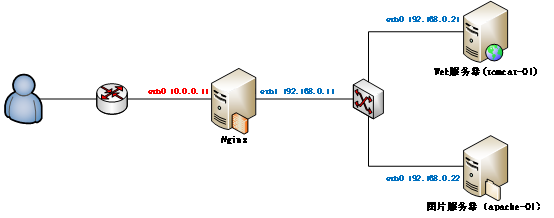
1:Nginx的相关概念知识: 1.1:反向代理: 反向代理(Reverse Proxy)方式是指以代理服务器来接受internet上的连接请求,然后将请求转发给内部网络上的服务器,并将从服务器上得到的结果返回给internet上请求连接的客户端,此时代理服务器对外就表现为一个服务器。 1.2:负载均衡: 负载均衡,英文名称为Load Balance,是指建立在现有网络结构之上,并提供了一种廉价有效透明的方法扩展网络设备和服务器的带宽、增加吞吐量、加强网络数据处理能力、提高网络的灵活性和可用性。其原理就是数据流量分摊到多个服务器上执行,减轻每台服务器的压力,多台服务器共同完成工作任务,从而提高了数据的吞吐量。 2:Nginx的安装操作: Nginx的官网:http://nginx.org/ 2.1:将下载好的Nginx上传到虚拟机上面,然后进行解压缩操作,上传过程省略,请自行脑补: [root@master package]# tar -zxvf nginx-1.8.1.tar.gz -C /home/hadoop/ 2.2:编译Ngnix源码目录: 进入Ngnix源码目录:[root@master hadoop]# cd /home/hadoop/nginx-1.8.1/ 检查安装环境,并指定将来要安装的路径: #缺包报错 checking for OS+ Linux 2.6.32-696.10.1.el6.i686 i686checking for C compiler ... found+ using GNU C compiler+ gcc version: 4.4.7 20120313 (Red Hat 4.4.7-18) (GCC) checking for gcc -pipe switch ... foundchecking for gcc builtin atomic operations ... foundchecking for C99 variadic macros ... foundchecking for gcc variadic macros ... foundchecking for unistd.h ... foundchecking for inttypes.h ... foundchecking for limits.h ... foundchecking for sys/filio.h ... not foundchecking for sys/param.h ... foundchecking for sys/mount.h ... foundchecking for sys/statvfs.h ... foundchecking for crypt.h ... foundchecking for Linux specific featureschecking for epoll ... foundchecking for EPOLLRDHUP ... foundchecking for O_PATH ... not foundchecking for sendfile() ... foundchecking for sendfile64() ... foundchecking for sys/prctl.h ... foundchecking for prctl(PR_SET_DUMPABLE) ... foundchecking for sched_setaffinity() ... foundchecking for crypt_r() ... foundchecking for sys/vfs.h ... foundchecking for nobody group ... foundchecking for poll() ... foundchecking for /dev/poll ... not foundchecking for kqueue ... not foundchecking for crypt() ... not foundchecking for crypt() in libcrypt ... foundchecking for F_READAHEAD ... not foundchecking for posix_fadvise() ... foundchecking for O_DIRECT ... foundchecking for F_NOCACHE ... not foundchecking for directio() ... not foundchecking for statfs() ... foundchecking for statvfs() ... foundchecking for dlopen() ... not foundchecking for dlopen() in libdl ... foundchecking for sched_yield() ... foundchecking for SO_SETFIB ... not foundchecking for SO_ACCEPTFILTER ... not foundchecking for TCP_DEFER_ACCEPT ... foundchecking for TCP_KEEPIDLE ... foundchecking for TCP_FASTOPEN ... not foundchecking for TCP_INFO ... foundchecking for accept4() ... foundchecking for eventfd() ... foundchecking for int size ... 4 byteschecking for long size ... 4 byteschecking for long long size ... 8 byteschecking for void * size ... 4 byteschecking for uint64_t ... foundchecking for sig_atomic_t ... foundchecking for sig_atomic_t size ... 4 byteschecking for socklen_t ... foundchecking for in_addr_t ... foundchecking for in_port_t ... foundchecking for rlim_t ... foundchecking for uintptr_t ... uintptr_t foundchecking for system byte ordering ... little endianchecking for size_t size ... 4 byteschecking for off_t size ... 8 byteschecking for time_t size ... 4 byteschecking for setproctitle() ... not foundchecking for pread() ... foundchecking for pwrite() ... foundchecking for sys_nerr ... foundchecking for localtime_r() ... foundchecking for posix_memalign() ... foundchecking for memalign() ... foundchecking for mmap(MAP_ANON|MAP_SHARED) ... foundchecking for mmap("/dev/zero", MAP_SHARED) ... foundchecking for System V shared memory ... foundchecking for POSIX semaphores ... not foundchecking for POSIX semaphores in libpthread ... foundchecking for struct msghdr.msg_control ... foundchecking for ioctl(FIONBIO) ... foundchecking for struct tm.tm_gmtoff ... foundchecking for struct dirent.d_namlen ... not foundchecking for struct dirent.d_type ... foundchecking for sysconf(_SC_NPROCESSORS_ONLN) ... foundchecking for openat(), fstatat() ... foundchecking for getaddrinfo() ... foundchecking for PCRE library ... not foundchecking for PCRE library in /usr/local/ ... not foundchecking for PCRE library in /usr/include/pcre/ ... not foundchecking for PCRE library in /usr/pkg/ ... not foundchecking for PCRE library in /opt/local/ ... not found./configure: error: the HTTP rewrite module requires the PCRE library.You can either disable the module by using --without-http_rewrite_moduleoption, or install the PCRE library into the system, or build the PCRE librarystatically from the source with nginx by using --with-pcre=<path> option. 然后安装一下缺少的包: [root@master nginx-1.8.1]# yum -y install gcc pcre-devel openssl openssl-devel 解决完错误以后再次执行,检查安装环境,并指定将来要安装的路径: [root@master nginx-1.8.1]# ./configure --prefix=/home/hadoop/nginx [root@master nginx-1.8.1]# ./configure --prefix=/home/hadoop/nginxchecking for OS+ Linux 2.6.32-696.10.1.el6.i686 i686checking for C compiler ... found+ using GNU C compiler+ gcc version: 4.4.7 20120313 (Red Hat 4.4.7-18) (GCC) checking for gcc -pipe switch ... foundchecking for gcc builtin atomic operations ... foundchecking for C99 variadic macros ... foundchecking for gcc variadic macros ... foundchecking for unistd.h ... foundchecking for inttypes.h ... foundchecking for limits.h ... foundchecking for sys/filio.h ... not foundchecking for sys/param.h ... foundchecking for sys/mount.h ... foundchecking for sys/statvfs.h ... foundchecking for crypt.h ... foundchecking for Linux specific featureschecking for epoll ... foundchecking for EPOLLRDHUP ... foundchecking for O_PATH ... not foundchecking for sendfile() ... foundchecking for sendfile64() ... foundchecking for sys/prctl.h ... foundchecking for prctl(PR_SET_DUMPABLE) ... foundchecking for sched_setaffinity() ... foundchecking for crypt_r() ... foundchecking for sys/vfs.h ... foundchecking for nobody group ... foundchecking for poll() ... foundchecking for /dev/poll ... not foundchecking for kqueue ... not foundchecking for crypt() ... not foundchecking for crypt() in libcrypt ... foundchecking for F_READAHEAD ... not foundchecking for posix_fadvise() ... foundchecking for O_DIRECT ... foundchecking for F_NOCACHE ... not foundchecking for directio() ... not foundchecking for statfs() ... foundchecking for statvfs() ... foundchecking for dlopen() ... not foundchecking for dlopen() in libdl ... foundchecking for sched_yield() ... foundchecking for SO_SETFIB ... not foundchecking for SO_ACCEPTFILTER ... not foundchecking for TCP_DEFER_ACCEPT ... foundchecking for TCP_KEEPIDLE ... foundchecking for TCP_FASTOPEN ... not foundchecking for TCP_INFO ... foundchecking for accept4() ... foundchecking for eventfd() ... foundchecking for int size ... 4 byteschecking for long size ... 4 byteschecking for long long size ... 8 byteschecking for void * size ... 4 byteschecking for uint64_t ... foundchecking for sig_atomic_t ... foundchecking for sig_atomic_t size ... 4 byteschecking for socklen_t ... foundchecking for in_addr_t ... foundchecking for in_port_t ... foundchecking for rlim_t ... foundchecking for uintptr_t ... uintptr_t foundchecking for system byte ordering ... little endianchecking for size_t size ... 4 byteschecking for off_t size ... 8 byteschecking for time_t size ... 4 byteschecking for setproctitle() ... not foundchecking for pread() ... foundchecking for pwrite() ... foundchecking for sys_nerr ... foundchecking for localtime_r() ... foundchecking for posix_memalign() ... foundchecking for memalign() ... foundchecking for mmap(MAP_ANON|MAP_SHARED) ... foundchecking for mmap("/dev/zero", MAP_SHARED) ... foundchecking for System V shared memory ... foundchecking for POSIX semaphores ... not foundchecking for POSIX semaphores in libpthread ... foundchecking for struct msghdr.msg_control ... foundchecking for ioctl(FIONBIO) ... foundchecking for struct tm.tm_gmtoff ... foundchecking for struct dirent.d_namlen ... not foundchecking for struct dirent.d_type ... foundchecking for sysconf(_SC_NPROCESSORS_ONLN) ... foundchecking for openat(), fstatat() ... foundchecking for getaddrinfo() ... foundchecking for PCRE library ... foundchecking for PCRE JIT support ... not foundchecking for md5 in system md library ... not foundchecking for md5 in system md5 library ... not foundchecking for md5 in system OpenSSL crypto library ... foundchecking for sha1 in system md library ... not foundchecking for sha1 in system OpenSSL crypto library ... foundchecking for zlib library ... foundcreating objs/MakefileConfiguration summary + using system PCRE library + OpenSSL library is not used + md5: using system crypto library + sha1: using system crypto library + using system zlib library nginx path prefix: "/home/hadoop/nginx" nginx binary file: "/home/hadoop/nginx/sbin/nginx" nginx configuration prefix: "/home/hadoop/nginx/conf" nginx configuration file: "/home/hadoop/nginx/conf/nginx.conf" nginx pid file: "/home/hadoop/nginx/logs/nginx.pid" nginx error log file: "/home/hadoop/nginx/logs/error.log" nginx http access log file: "/home/hadoop/nginx/logs/access.log" nginx http client request body temporary files: "client_body_temp" nginx http proxy temporary files: "proxy_temp" nginx http fastcgi temporary files: "fastcgi_temp" nginx http uwsgi temporary files: "uwsgi_temp" nginx http scgi temporary files: "scgi_temp" 2.3:编译安装(make是编译,make install是安装): [root@master hadoop]# make && make install安装不是一帆风顺的,开始将make && make install写成了make && made install,肯定没有安装成功了,然后我再执行make && make install就出现下面的情况了,然后我重新./configure --prefix=/usr/local/nginx检查安装环境,并指定将来要安装的路径,最后再make && made install,貌似正常编译,安装了,虽然我也不是很清楚,这里贴一下吧先,安装好以后可以测试是否正常: [root@master hadoop]# make && make installmake: *** No targets specified and no makefile found. Stop.[root@master hadoop]# make installmake: *** No rule to make target `install'. Stop.[root@master hadoop]# make && make installmake: *** No targets specified and no makefile found. Stop.[root@master hadoop]# ./configure --prefix=/home/hadoop/nginxbash: ./configure: No such file or directory[root@master hadoop]# cd /home/hadoop/nginx-1.8.1/[root@master nginx-1.8.1]# lsauto CHANGES CHANGES.ru conf configure contrib html LICENSE Makefile man objs README src[root@master nginx-1.8.1]# ./configure --prefix=/home/hadoop/nginx 2.4:安装好以后测试是否正常: 安装好以后指定的目录会生成一些文件,如我的/home/hadoop/nginx目录下面: 启动Nginx的命令:[root@master sbin]# ./nginx 查看端口是否有ngnix进程监听:[root@master sbin]# netstat -ntlp | grep 80 3:配置Nginx: 3.1:配置反向代理: 修改Nginx配置文件: [root@master conf]# cd /home/hadoop/nginx/conf/ [root@master conf]# vim nginx.conf server { listen 80; server_name master; #nginx所在服务器的主机名称 #charset koi8-r; #access_log logs/host.access.log main; #反向代理的配置 location / { #拦截所有请求 root html; #index index.html index.htm; #这里是代理走向的目标服务器:tomcat proxy_pass http://192.168.199.130:8080; } 具体配置如下所示: 下面贴图这句话后面proxy_pass http://192.168.199.130:8080; 少了一个分号导致后面启动nginx的时候出现错误: 自己都操点心就可以了: [root@master sbin]# ./nginx nginx: [emerg] unexpected "}" in /home/hadoop/nginx/conf/nginx.conf:48 4:安装Tomcat,将下载好的tomcat安装包上传到虚拟机,过程省略,然后解压缩操作: [root@slaver1 package]# tar -zxvf apache-tomcat-7.0.68.tar.gz -C /home/hadoop/ 解压缩好以后启动Tomcat: 然后没启动起来,貌似说我的jdk没有配置啥的,现在配置一下,配置过程省略,大概如上传压缩包,解压缩,然后配置环境变量: vim /etc/profile配置好以后使其立即生效:source /etc/profile,最后检查一下是否安装成功:java/javac/java -version 然后启动tomcat,如下所示: 启动好,可以检查一下是否启动成功: 浏览器输入自己的http://192.168.199.131:8080/ 如果无法访问,可能是防火墙的原因:service iptables stop关闭防火墙;service iptables status查看防火墙是否关闭成功; 5:现在体现Nginx的功能了,我在master节点安装的Nginx,然后在slaver1节点安装的tomcat: 然后访问master节点,会跳转到slaver1的tomcat页面: http://192.168.199.130/自己的master节点的名称; 6:Nginx的动静分离: 动态资源 index.jsp location ~ .*\.(jsp|do|action)$ { proxy_pass http://ip地址:8080; } 静态资源: location ~ .*\.(html|js|css|gif|jpg|jpeg|png)$ { expires 3d; } 负载均衡: 在http这个节下面配置一个叫upstream的,后面的名字可以随意取,但是要和location下的proxy_pass http://后的保持一致。 http { 是在http里面的, 已有http, 不是在server里,在server外面 upstream tomcats{ server 192.168.199.130:8080 weight=1;#weight表示多少个 server 192.168.199.131:8080 weight=1; server 192.168.199.132:8080 weight=1; } #卸载server里 #~代表是大小写敏感,.代表是任何非回车字符,*代表多个。 location ~ .*\.(jsp|do|action) { proxy_pass http://tomcats;#tomcats是后面的tomcat服务器组的逻辑组号 } } 待续......

优秀的个人博客,低调大师

一脸懵逼学习keepalived(对Nginx进行热备)

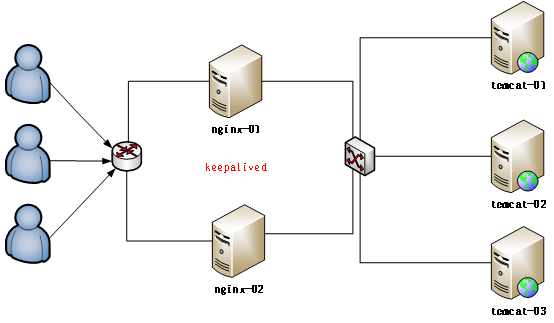
1:Keepalived的官方网址:http://www.keepalived.org/ 2:Keepalived:可以实现高可靠; 高可靠的概念: HA(High Available), 高可用性集群,是保证业务连续性的有效解决方案,一般有两个或两个以上的节点,且分为活动节点及备用节点。 3:高可靠软件:keepalived: keepalive是一款可以实现高可靠的软件,通常部署在2台服务器上,分为一主一备。Keepalived可以对本机上的进程进行检测,一旦Master检测出某个进程出现问题,将自己切换成Backup状态,然后通知另外一个节点切换成Master状态。 4:keepalived的安装操作: 4.1:下载keepalived官网:http://keepalived.org 首先在两台机器上面部署两个Nginx,具体操作见上篇部署一台,另一台的部署过程省略: 将keepalived上传到虚拟机以后进行解压缩操作: [root@master package]# tar -zxvf keepalived-1.2.19.tar.gz -C /home/hadoop/ 解压缩以后进入到解压缩的目录里面: [root@master package]# cd /home/hadoop/keepalived-1.2.19/ 检查安装环境,并指定将来要安装的路径: [root@master keepalived-1.2.19]# ./configure --prefix=/home/hadoop/keepalived最后编译和安装: [root@master keepalived-1.2.19]# make && make install 5:将Keepalived添加到系统服务中: 拷贝执行文件: [root@master keepalived-1.2.19]# cp /home/hadoop/keepalived/sbin/keepalived /usr/sbin/ 将init.d文件拷贝到etc下,加入开机启动项: [root@master keepalived-1.2.19]# cp /home/hadoop/keepalived/etc/rc.d/init.d/keepalived /etc/init.d/keepalived 将keepalived文件拷贝到etc下: [root@master keepalived-1.2.19]# cp /home/hadoop/keepalived/etc/sysconfig/keepalived /etc/sysconfig/ 创建keepalived文件夹: [root@master hadoop]# mkdir -p /etc/keepalived 将keepalived配置文件拷贝到etc下: [root@master hadoop]# cp /home/hadoop/keepalived/etc/keepalived/keepalived.conf /etc/keepalived/keepalived.conf 添加可执行权限: [root@master hadoop]# chmod +x /etc/init.d/keepalived 添加keepalived到开机启动: [root@master hadoop]# chkconfig --add keepalived [root@master hadoop]# chkconfig keepalived on 6:配置keepalived虚拟IP:修改配置文件: [root@master hadoop]# vim /etc/keepalived/keepalived.conf 这里配置虚拟Ip就开始分keepalived的master节点和keepalived的backup节点: #master节点 vrrp_instance VI_1 { state MASTER #指定A节点为主节点 备用节点上设置为BACKUP即可 interface eth0 #绑定虚拟IP的网络接口 virtual_router_id 51 #VRRP组名,两个节点的设置必须一样,以指明各个节点属于同一VRRP组 priority 100 #主节点的优先级(1-254之间),备用节点必须比主节点优先级低 advert_int 1 #组播信息发送间隔,两个节点设置必须一样 authentication { #设置验证信息,两个节点必须一致 auth_type PASS auth_pass 1111 } virtual_ipaddress { #指定虚拟IP, 两个节点设置必须一样, #如果两个nginx的ip分别是192.168.199.130,,...131,则此处的虚拟ip跟它俩同一个网段即可 192.168.199.141/24 }} 配置好master节点以后,可以配置BACKUP节点: vrrp_instance VI_1 { state BACKUP interface eth0 virtual_router_id 51 priority 99 advert_int 1 authentication { auth_type PASS auth_pass 1111 } virtual_ipaddress { 192.168.199.141/24 }} 7:分别启动两台机器上面的keepalived: 给一个虚拟机设置两个ip地址方法: ip addr add 192.168.199.150 dev eth0 [root@master hadoop]# service keepalived start 最后测试一下: 如果杀掉master上的keepalived 进程,你会发现,在slaver即另外一台配置keepalived的机器上的eth0网卡多了一个ip地址 查看ip地址的命令:ip addr 这里测试的时候出现问题了,因为我的电脑安装的虚拟机都是同一个,所以第一台机器的ip配置在eth0,而其他的竟然配置在了eth1,而这里需要修改一下,ip所在的位置: 解决方法: 1:编辑/etc/udev/rules.d/70-persistent-net.rules,找到与ifconfig -a得出的MAC相同的一行(NAME='eth1'这一行),把它改为"NAME=eth0 ",然后把上面一行(NAME='eth0')删除掉。 vim /etc/udev/rules.d/70-persistent-net.rules SUBSYSTEM=="net", ACTION=="add", DRIVERS=="?*", ATTR{address}=="00:0c:29:bb:41:2b", ATTR{type}=="1", KERNEL=="eth*", NAME="eth0" 2:编辑/etc/sysconfig/network-script/ifcfg-eth0,把MAC改为正确的,把UUID删掉。 3:编辑/etc/sysconf/network,把hostname也改一下。 4:重启生效! 8:配置keepalived心跳检查: 原理: Keepalived并不跟nginx耦合,它俩完全不是一家人 但是keepalived提供一个机制:让用户自定义一个shell脚本去检测用户自己的程序,返回状态给keepalived就可以了; master节点: vrrp_instance VI_1 { state MASTER #指定A节点为主节点 备用节点上设置为BACKUP即可 interface eth0 #绑定虚拟IP的网络接口 virtual_router_id 51 #VRRP组名,两个节点的设置必须一样,以指明各个节点属于同一VRRP组 priority 100 #主节点的优先级(1-254之间),备用节点必须比主节点优先级低 advert_int 1 #组播信息发送间隔,两个节点设置必须一样 authentication { #设置验证信息,两个节点必须一致 auth_type PASS auth_pass 1111 } track_script { #跟踪用户程序脚本 chk_health } virtual_ipaddress { #指定虚拟IP, 两个节点设置必须一样, #如果两个nginx的ip分别是192.168.199.130,,...131,则此处的虚拟ip跟它俩同一个网段即可 192.168.199.141/24 } notify_master "/home/hadoop/keepalived/sbin/notify.sh master" notify_backup "/home/hadoop/keepalived/sbin/notify.sh backup" notify_fault "/home/hadoop/keepalived/sbin/notify.sh fault"} 添加切换通知脚本: [root@master keepalived]# vim /home/hadoop/keepalived/sbin/notify.sh #!/bin/bashcase "$1" in master) /home/hadoop/nginx/sbin/nginx exit 0 ;;backup) /home/hadoop/nginx/sbin/nginx -s stop /home/hadoop/nginx/sbin/nginx exit 0 ;; fault) /home/hadoop/nginx/sbin/nginx -s stop exit 0 ;; *) echo 'Usage: notify.sh {master|backup|fault}' exit 1 ;;esac 添加执行权限: [root@master keepalived]# chmod +x /home/hadoop/keepalived/sbin/notify.sh 然后配置一下slaver即另一台keepalived: global_defs { } vrrp_script chk_health { script "[[ `ps -ef | grep nginx | grep -v grep | wc -l` -ge 2 ]] && exit 0 || exit 1" interval 1 weight -2} vrrp_instance VI_1 { state BACKUP interface eth0 virtual_router_id 1 priority 99 advert_int 1 authentication { auth_type PASS auth_pass 1111 } track_script { chk_health } virtual_ipaddress { 192.168.199.141/24 } notify_master "/home/hadoop/keepalived/sbin/notify.sh master" notify_backup "/home/hadoop/keepalived/sbin/notify.sh backup" notify_fault "/home/hadoop/keepalived/sbin/notify.sh fault" } 最后: 在第二台机器上添加notify.sh脚本 #分别在两台机器上启动keepalived service keepalived start chkconfig keepalived on

优秀的个人博客,低调大师

一脸懵逼学习Hive(数据仓库基础构架)

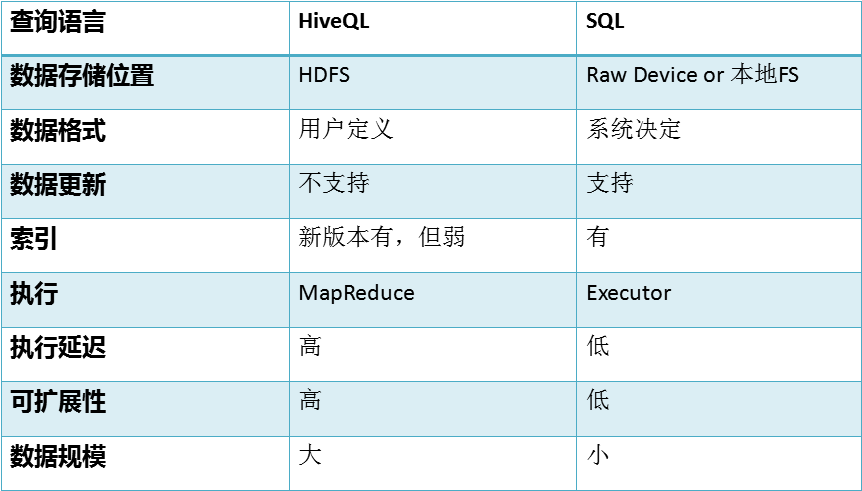
Hive是什么?其体系结构简介*Hive的安装与管理*HiveQL数据类型,表以及表的操作*HiveQL查询数据***Hive的Java客户端** Hive的自定义函数UDF* 1:什么是Hive(一): (1)Hive 是建立在 Hadoop 上的数据仓库基础构架。它提供了一系列的工具,可以用来进行数据提取转化加载(ETL ),这是一种可以存储、查询和分析存储在 Hadoop 中的大规模数据的机制。Hive 定义了简单的类 SQL 查询语言,称为 QL ,它允许熟悉 SQL 的用户查询数据。同时,这个语言也允许熟悉 MapReduce 开发者的开发自定义的 mapper 和 reducer 来处理内建的 mapper 和 reducer 无法完成的复杂的分析工作。 (2)Hive是SQL解析引擎,它将SQL语句转译成M/R Job然后在Hadoop执行。 (3)Hive的表其实就是HDFS的目录/文件,按表名把文件夹分开。如果是分区表,则分区值是子文件夹,可以直接在M/R Job里使用这些数据。2:Hive的系统架构: (1)用户接口,包括 CLI,JDBC/ODBC,WebUI(用户接口主要有三个:CLI,JDBC/ODBC和 WebUI:); CLI,即Shell命令行; JDBC/ODBC 是 Hive 的Java,与使用传统数据库JDBC的方式类似; WebGUI是通过浏览器访问 Hive; (2)元数据存储,通常是存储在关系数据库如 mysql, derby 中; Hive 将元数据存储在数据库中(metastore),目前只支持 mysql、derby。Hive 中的元数据包括表的名字,表的列和分区及其属性,表的属性(是否为外部表等),表的数据所在目录等; (3)解释器、编译器、优化器、执行器; 解释器、编译器、优化器完成 HQL 查询语句从词法分析、语法分析、编译、优化以及查询计划(plan)的生成。生成的查询计划存储在 HDFS 中,并在随后有 MapReduce 调用执行; (4)Hadoop:用 HDFS 进行存储,利用 MapReduce 进行计算; Hive 的数据存储在 HDFS 中,大部分的查询由 MapReduce 完成(包含 * 的查询,比如 select * from table 不会生成 MapRedcue 任务)3:Hive的安装: (1)把hive-0.9.0.tar.gz复制到/usr/local (2)解压hive-0.9.0.tar.gz与重命名 #cd /usr/local #tar -zxvf hive-0.9.0.tar.gz #mv hive-0.9.0 hive (3)修改/etc/profile文件。 #vi /etc/profile 增加 export HIVE_HOME=/usr/local/hive 修改 export PATH=$JAVA_HOME/bin:$PATH:$HADOOP_HOME/bin:$HIVE_HOME/bin 保存退出 #source /etc/profile (4)cd $HIVE_HOME mv hive-env.sh.template hive-env.sh mv hive-default.xml.template hive-site.xml 修改hadoop的hadoop-env.sh(否则启动hive汇报找不到类的错误) export HADOOP_CLASSPATH=.:$CLASSPATH:$HADOOP_CLASSPATH: $HADOOP_HOME/bin 修改$HIVE_HOME/bin的hive-config.sh,增加以下三行 export JAVA_HOME=/usr/local/jdk export HIVE_HOME=/usr/local/hive export HADOOP_HOME=/usr/local/hadoop (5)启动 #hive hive>show tables; hive>create table test(id int,name string); hive>quit; 观察:#hadoop fs -ls /user/hive 参数:hive.metastore.warehouse.dir4:Hive的metastore: (1)metastore是hive元数据的集中存放地。metastore默认使用内嵌的derby数据库作为存储引擎; (2)Derby引擎的缺点:一次只能打开一个会话; (3)使用Mysql作为外置存储引擎,多用户同时访问; 5:Hive的安装: 配置MySQL的metastore (1)上传mysql-connector-java-5.1.10.jar到$HIVE_HOME/lib (2)登录MYSQL,创建数据库hive #mysql -uroot -padmin mysql>create database hive; mysql>GRANT all ON hive.* TO root@'%' IDENTIFIED BY 'admin'; mysql>flush privileges; mysql>set global binlog_format='MIXED'; (3)把mysql的数据库字符类型改为latin1 (4)修改$HIVE_HOME/conf/hive-site.xml <property> <name>javax.jdo.option.ConnectionURL</name> <value>jdbc:mysql://hadoop0:3306/hive?createDatabaseIfNotExist=true</value> </property> <property> <name>javax.jdo.option.ConnectionDriverName</name> <value>com.mysql.jdbc.Driver</value> </property> <property> <name>javax.jdo.option.ConnectionUserName</name> <value>root</value> </property> <property> <name>javax.jdo.option.ConnectionPassword</name> <value>admin</value> </property> 6:Hive运行模式 : (1)Hive的运行模式即任务的执行环境 (2)分为本地与集群两种 我们可以通过mapred.job.tracker 来指明 设置方式: hive > SET mapred.job.tracker=local7:Hive的启动方式: (1)、hive 命令行模式,直接输入#/hive/bin/hive的执行程序,或者输入 #hive --service cli (2)、 hive web界面的 (端口号9999) 启动方式 #hive --service hwi & 用于通过浏览器来访问hive http://hadoop0:9999/hwi/ (3)、 hive 远程服务 (端口号10000) 启动方式 #hive --service hiveserver &8:Hive与传统数据库: 9:Hive的数据类型: (1)基本数据类型: tinyint/smallint/int/bigint float/double boolean string (2)复杂数据类型: Array/Map/Struct (3)没有date/datetime10:Hive的数据存储: (1)Hive的数据存储基于Hadoop HDFS; (2)Hive没有专门的数据存储格式; (3)存储结构主要包括:数据库、文件、表、视图; (4)Hive默认可以直接加载文本文件(TextFile),还支持sequence file 、RC file; (5)创建表时,指定Hive数据的列分隔符与行分隔符,Hive即可解析数据;11:Hive的数据模型-数据库: (1)类似传统数据库的DataBase (2)默认数据库"default" 使用#hive命令后,不使用hive>use <数据库名>,系统默认的数据库。可以显式使用hive> use default; 创建一个新库 hive > create database test_dw;12:Hive的数据模型-表: Table 内部表 Partition 分区表 External Table 外部表 Bucket Table 桶表 13:Hive的数据模型-内部表: (1)与数据库中的 Table 在概念上是类似 (2)每一个 Table 在 Hive 中都有一个相应的目录存储数据。例如,一个表 test,它在 HDFS 中的路径为:/ warehouse/test。 warehouse是在 hive-site.xml 中由 ${hive.metastore.warehouse.dir} 指定的数据仓库的目录 (3)所有的 Table 数据(不包括 External Table)都保存在这个目录中。 (4)删除表时,元数据与数据都会被删除 (5)创建数据文件inner_table.dat (6)创建表: hive>create table inner_table (key string); (7)加载数据: hive>load data local inpath '/root/inner_table.dat' into table inner_table; (8)查看数据: select * from inner_table select count(*) from inner_table (9)删除表 drop table inner_table14:Hive的数据模型-分区表: (1)Partition 对应于数据库的 Partition 列的密集索引 (2)在 Hive 中,表中的一个 Partition 对应于表下的一个目录,所有的 Partition 的数据都存储在对应的目录中 例如:test表中包含 date 和 city 两个 Partition, 则对应于date=20130201, city = bj 的 HDFS 子目录为: /warehouse/test/date=20130201/city=bj 对应于date=20130202, city=sh 的HDFS 子目录为; /warehouse/test/date=20130202/city=sh 一些相关命令 SHOW TABLES; # 查看所有的表 SHOW TABLES '*TMP*'; #支持模糊查询 SHOW PARTITIONS TMP_TABLE; #查看表有哪些分区 DESCRIBE TMP_TABLE; #查看表结构 (3)创建数据文件partition_table.dat (4)创建表 create table partition_table(rectime string,msisdn string) partitioned by(daytime string,city string) row format delimited fields terminated by '\t' stored as TEXTFILE; (5)加载数据到分区 load data local inpath '/home/partition_table.dat' into table partition_table partition (daytime='2013-02-01',city='bj'); (6)查看数据 select * from partition_table select count(*) from partition_table (7)删除表 drop table partition_table (8)alter table partition_table add partition (daytime='2013-02-04',city='bj'); 通过load data 加载数据 (9)alter table partition_table drop partition (daytime='2013-02-04',city='bj') 元数据,数据文件删除,但目录daytime=2013-02-04还在15:Hive的数据模型—桶表: (1)桶表是对数据进行哈希取值,然后放到不同文件中存储。 (2)创建表 create table bucket_table(id string) clustered by(id) into 4 buckets; (3)加载数据 set hive.enforce.bucketing = true; insert into table bucket_table select name from stu; insert overwrite table bucket_table select name from stu; (4)数据加载到桶表时,会对字段取hash值,然后与桶的数量取模。把数据放到对应的文件中。 (5)抽样查询 select * from bucket_table tablesample(bucket 1 out of 4 on id);16:Hive的数据模型-外部表: (1)指向已经在 HDFS 中存在的数据,可以创建 Partition; (2)它和 内部表 在元数据的组织上是相同的,而实际数据的存储则有较大的差异; (3)内部表 的创建过程和数据加载过程(这两个过程可以在同一个语句中完成),在加载数据的过程中,实际数据会被移动到数据仓库目录中;之后对数据对访问将会直接在数据仓库目录中完成。删除表时,表中的数据和元数据将会被同时删除; (4)外部表 只有一个过程,加载数据和创建表同时完成,并不会移动到数据仓库目录中,只是与外部数据建立一个链接。当删除一个 外部表 时,仅删除该链接; CREATE EXTERNAL TABLE page_view ( viewTime INT, userid BIGINT, page_url STRING, referrer_url STRING, ip STRING COMMENT 'IP Address of the User', country STRING COMMENT 'country of origination‘ ) COMMENT 'This is the staging page view table' ROW FORMAT DELIMITED FIELDS TERMINATED BY '44' LINES TERMINATED BY '12' STORED AS TEXTFILE LOCATION 'hdfs://centos:9000/user/data/staging/page_view'; (5)创建数据文件external_table.dat (6)创建表 hive>create external table external_table1 (key string) ROW FORMAT DELIMITED FIELDS TERMINATED BY '\t' location '/home/external'; (7)在HDFS创建目录/home/external #hadoop fs -put /home/external_table.dat /home/external (8)加载数据 LOAD DATA INPATH '/home/external_table1.dat' INTO TABLE external_table1; (9)查看数据 select * from external_table select count(*) from external_table (10)删除表 drop table external_table17:视图操作: 视图的创建 CREATE VIEW v1 AS select * from t1;18:表的操作: (1)表的修改 alter table target_tab add columns (cols,string) (2)表的删除 drop table19:为什么选择Hive? (1)基于Hadoop的大数据的计算/扩展能力; (2)支持SQL like查询语言; (3)统一的元数据管理; (4)简单编程;20:导入数据 (1)当数据被加载至表中时,不会对数据进行任何转换。Load 操作只是将数据复制/移动至 Hive 表对应的位置。 LOAD DATA [LOCAL] INPATH 'filepath' [OVERWRITE]

优秀的个人博客,低调大师

高通:Android手机用户明年将用上刷脸功能

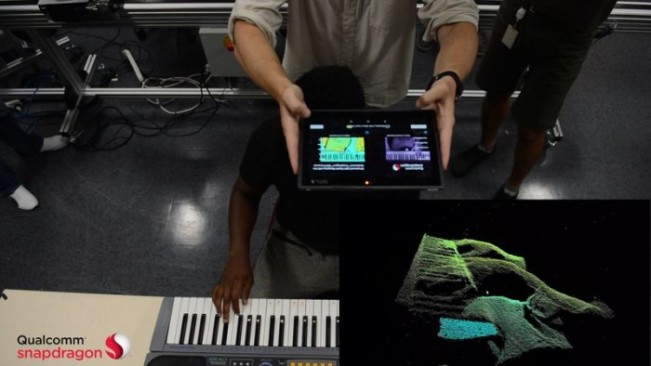
据 9To5Mac 北京时间 8 月 15 日报道,人脸识别取代 Touch ID 指纹传感器,成为 iPhone 8 生物解锁和 Apple Pay 身份验证方法的可能性越来越高,苹果可能把人脸识别作为新一代 iPhone 的一个主要卖点大加宣传。 但高通指出,苹果人脸识别系统针对 Android 手机的技术优势将是暂时的,承诺其新一代芯片将提供与iPhone8 相当,甚至更强大的功能。 CNET 刊文称,高通最新的骁龙处理器——被应用在许多旗舰机型 Android 手机中——明年将提供红外 3D 感知技术,“高通承诺,下一代骁龙芯片将提供比 iPhone 8 更多的功能,至少提供相同的功能,但完成速度更快、精度更高。例如,新一代高通芯片能利用红外光测量深度,绘制用于人脸识别、物体三维重构和制作地图的高分辨率深度地图。红外光将由相机模块处理。” 其实高通芯片已经支持人脸识别技术。2015 年,高通首次在骁龙 820 芯片中提供深度感知能力,骁龙 835 对深度感知技术进行了改进,并被应用在三星 GalaxyS8、HTC U11 和一加 5 中。早期版本的高通深度感知技术还被应用在支持谷歌 Tango 增强现实技术的智能手机中。 只是令人遗憾的是,GalaxyS8 中骁龙 835 的表现无助于证明高通的说法:高通的人脸识别系统能被照片骗过。 不过,仍然有传言称苹果在开发屏下指纹技术。还有一种不太靠谱的传言,称苹果可能把 Touch ID 指纹传感器移到机身背部。 本文作者:佚名 来源:51CTO

优秀的个人博客,低调大师

模型更迭这么快,为什么很多开发者却不敢换?

最近我在几个开发者社区看到不少人在聊模型切换的问题。逻辑上说,DeepSeek降价了或者Claude更新了,作为开发者应该第一时间切过去省钱或者提效。但实际情况是,大多数正在跑业务的小团队对此非常谨慎。一位做SaaS的朋友跟我吐槽,他们在测试环境跑几百个Prompt看起来表现完美,可一旦上线,用户的输入远比测试用例要凌乱,延迟波动和幻觉问题接踵而至。这种“实验室与工地的落差”,让模型升级变成了一场冒险。

优秀的个人博客,低调大师

不止换 LED!AI 算法如何重构低压直流照明的运行逻辑

很多人对直流照明的认知停留在 “把灯具换成 LED”,认为只是灯具品类的简单替换。实际上直流照明是一套包含供电、配电、控制、采集、运维的完整建筑照明体系。随着国内零碳建筑、近零能耗建筑政策持续落地,再加上 AI 边缘算法、物联网感知技术快速普及,过去多用于隧道、轨道交通、数据中心的直流照明方案,正在向写字楼、科创产业园、大型公建等更多民用及商用建筑拓展。

优秀的个人博客,低调大师

Flutter 让你的Dialog脱胎换骨吧!(Attach,Dialog,Loading,Toast)

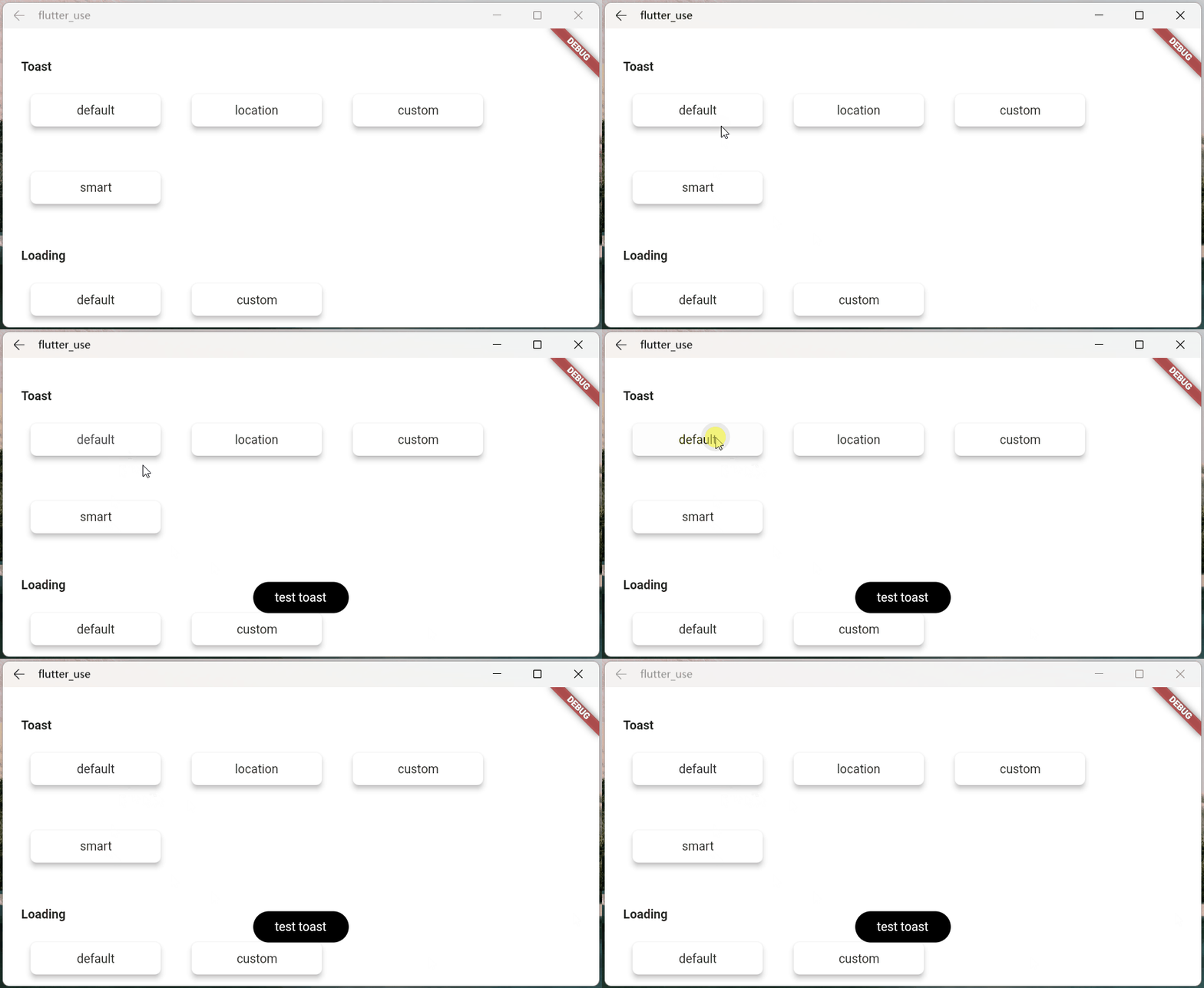
前言 Q:你一生中闻过最臭的东西,是什么? A:我那早已腐烂的梦。 兄弟萌!!!我又来了! 这次,我能自信的对大家说:我终于给大家带了一个,能真正帮助大家解决诸多坑比场景的pub包! 将之前的flutter_smart_dialog,在保持api稳定的基础上,进行了各种抓头重构,解决了一系列问题 现在,我终于可以说:它现在是一个简洁,强大,侵入性极低的pub包! 关于侵入性问题 之前为了解决返回关闭弹窗,使用了一个很不优雅的解决方法,导致侵入性有点高 这真是让我如坐针毡,如芒刺背,如鲠在喉,这个问题终于搞定了! 同时,我在pub包内部设计了一个弹窗栈,能自动移除栈顶弹窗,也可以定点移除栈内标记的弹窗。 存在的问题 使用系统弹窗存在一系列坑,来和各位探讨探讨 必须传BuildContext 在一些场景必须多做一些传参工作,蛋痛但不难的问题 loading弹窗 使用系统弹窗做loading弹窗,肯定遇到过这个坑比问题 loading封装在网络库里面:请求网络时加载loading,手贱按了返回按钮,关闭了loading 然后请求结束后发现:特么我的页面怎么被关了!!! 系统弹窗就是一个路由页面,关闭系统就是用pop方法,这很容易误关正常页面 当然肯定有解决办法,路由监听的地方处理,此处就不细表了 某页面弹出了多个系统Dialog,很难定点关闭某个非栈顶弹窗 蛋蛋,这是路由入栈出栈机制导致的,理解的同时也一样要吐槽 系统Dialog,点击事件无法穿透暗色背景 这个坑比问题,我是真没辙 相关思考 上面列举了一些比较常见的问题,最严重的问题,应该就是loading的问题 loading是个超高频使用的弹窗,关闭loading弹窗的方法,同时也能关闭正常使用的页面,本身就是一个隐患 穿透dialog遮罩是个非常重要的功能,基于该功能,能够在实际业务中,实现很多骚操作 既然在系统dialog难以解决各种痛点,加上系统dialog也是基于overlay去实现的,这样的话,我们也可以去高度定制overlay! 这次,我要一次性帮各位解决:toast消息,loading弹窗,以及更强大的自定义dialog! 快速上手 初始化 引入(最新版本请点击pub查看):pub,github,web effect dependencies: flutter_smart_dialog: ^3.2.0 接入方式更加简洁😊 void main() => runApp(MyApp()); class MyApp extends StatelessWidget { @override Widget build(BuildContext context) { return MaterialApp( home: HomePage, // here navigatorObservers: [FlutterSmartDialog.observer], // here builder: FlutterSmartDialog.init(), ); } } 极简使用 toast使用💬 SmartDialog.showToast('test toast'); loading使用⏳ SmartDialog.showLoading(); await Future.delayed(Duration(seconds: 2)); SmartDialog.dismiss(); dialog使用🎨 var custom = Container( height: 80, width: 180, decoration: BoxDecoration( color: Colors.black, borderRadius: BorderRadius.circular(20), ), alignment: Alignment.center, child: Text('easy custom dialog', style: TextStyle(color: Colors.white)), ); // here SmartDialog.show(widget: custom, isLoadingTemp: false); OK,上面展示了,只需要极少的代码,就可以调用相应的功能 当然,内部还有不少地方做了特殊优化,接下来,我会详细的向大家描述下 你可能会有的疑问 初始化框架的时候,相比以前,居然让大家多写了一个参数,内心十分愧疚😩 关闭页面本质上是一个比较复杂的情况,涉及到 物理返回按键 AppBar的back按钮 手动pop 为了监控这些情况,不得已增加了一个路由监控参数 实体返回键 对返回按钮的监控,是非常重要的,基本能覆盖大多数情况 pop路由 虽然对返回按钮的监控能覆盖大多数场景,但是一些手动pop的场景就需要新增参数监控 不加FlutterSmartDialog.observer 如果打开了穿透参数(就可以和弹窗后的页面交互),然后手动关闭页面 就会出现这种很尴尬的情况 加了FlutterSmartDialog.observer,就能比较合理的处理了 当然,这里的过渡动画,也提供了参数控制是否开启 😉 关于 FlutterSmartDialog.init() 本方法不会占用你的builder参数,init内部回调出来了builder,你可以大胆放心的继续套 例如:继续套Bloc全局实例😄 class MyApp extends StatelessWidget { @override Widget build(BuildContext context) { return MaterialApp( home: HomePage, navigatorObservers: [FlutterSmartDialog.observer], builder: FlutterSmartDialog.init(builder: _builder), ); } } Widget _builder(BuildContext context, Widget? child) { return MultiBlocProvider( providers: [ BlocProvider.value(value: BlocSpanOneCubit()), ], child: child!, ); } 超实用的参数:backDismiss 这个参数是默认设置为true,返回的时候会默认关闭弹窗;如果设置为false,将不会关闭页面 这样就可以十分轻松的做一个紧急弹窗,禁止用户的下一步操作 我们来看一个场景:假定某开源作者决定弃坑软件,不允许用户再使用该软件的弹窗 SmartDialog.show( // here backDismiss: false, clickBgDismissTemp: false, isLoadingTemp: false, widget: Container( height: 480, width: 500, padding: EdgeInsets.all(20), decoration: BoxDecoration( borderRadius: BorderRadius.circular(20), color: Colors.white, ), alignment: Alignment.topCenter, child: SingleChildScrollView( child: Wrap( direction: Axis.vertical, crossAxisAlignment: WrapCrossAlignment.center, spacing: 10, children: [ // title Text( '特大公告', style: TextStyle(fontSize: 30, fontWeight: FontWeight.bold), ), // content Text('鄙人日夜钻研下面秘籍,终于成功钓到富婆'), Image.network( 'https://cdn.jsdelivr.net/gh/xdd666t/MyData@master/pic/flutter/blog/20211102213746.jpeg', height: 200, width: 400, ), Text('鄙人思考了三秒钟,怀着\'沉重\'的心情,决定弃坑本开源软件'), Text('本人今后的生活是富婆和远方,已无\'精力\' 再维护本开源软件了'), Text('各位叼毛,有缘江湖再见!'), // button (only method of close the dialog) ElevatedButton( onPressed: () => SmartDialog.dismiss(), child: Text('再会!'), ) ], ), ), ), ); 从上面的效果图可以看出来 点击遮罩,无法关闭弹窗 点击返回按钮无法关闭弹窗 只能点我们自己的按钮,才能关闭弹窗,点击按钮的逻辑可以直接写成关闭app之类 只需要俩个简单的参数设置,就能实现这样一个很棒的应急弹窗 设置全局参数 SmartDialog的全局参数都有着一个比较合理的默认值 为了应付多变的场景,你可以修改符合你自己要求的全局参数 设置符合你的要求的数据,放在app入口就行初始化就行 注:如果没有特殊要求,可以不用初始化全局参数(内部皆有默认值) SmartDialog.config ..alignment = Alignment.center ..isPenetrate = false ..clickBgDismiss = true ..maskColor = Colors.black.withOpacity(0.35) ..maskWidget = null ..animationDuration = Duration(milliseconds: 260) ..isUseAnimation = true ..isLoading = true ..antiShake = false ..antiShakeTime = Duration(milliseconds: 300); 代码的注释写的很完善,某个参数不明白的,点进去看看就行了 Attach篇 这是一个很重要的功能,本来早就想加进去了,但是比较忙,一直搁置了;元旦(2022.1.1)开了头,就花了一些时间,完成了这个功能和相关demo 定位 定位目标widget的坐标,这个做起来并不难;但是必须要拿到我们传入的自定义widget大小,这样才能将自定义widget叠放到一个比较合适的位置(通过一些计算,获取中心点) 实际上Flutter提供一个非常合适的组件CustomSingleChildLayout,这个组件还提供偏移坐标功能,按理来说非常合适 但是,CustomSingleChildLayout 和 SizeTransition 动画控件,存在占位面积冲突,只能使用AnimatedOpacity渐隐动画 位移动画不能用,这我没法忍,抛弃 CustomSingleChildLayout;使用了各种骚操作,终于拿到自定义widget的大小,比较完美实现了效果 定位dialog,使用showAttach方法,参数注释写的相当详细,不明白用法的看看注释就行了 强大的定位功能 必须传目标widget的BuildContext,需要通过它计算出目标widget的坐标和大小 var attach = (BuildContext context, AlignmentGeometry alignment) async { SmartDialog.showAttach( targetContext: context, isPenetrateTemp: true, alignmentTemp: alignment, clickBgDismissTemp: false, widget: Container(width: 100, height: 100, color: randomColor()), ); await Future.delayed(Duration(milliseconds: 350)); }; //target widget List<BuildContext> contextList = []; List<Future Function()> funList = [ () async => await attach(contextList[0], Alignment.topLeft), () async => await attach(contextList[1], Alignment.topCenter), () async => await attach(contextList[2], Alignment.topRight), () async => await attach(contextList[3], Alignment.centerLeft), () async => await attach(contextList[4], Alignment.center), () async => await attach(contextList[5], Alignment.centerRight), () async => await attach(contextList[6], Alignment.bottomLeft), () async => await attach(contextList[7], Alignment.bottomCenter), () async => await attach(contextList[8], Alignment.bottomRight), ]; var btn = ({ required String title, required Function(BuildContext context) onTap, }) { return Builder(builder: (context) { Color? color = title.contains('all') ? randomColor() : null; contextList.add(context); return Container( width: 130, child: ElevatedButton( style: ButtonStyle( backgroundColor: ButtonStyleButton.allOrNull<Color>(color), ), onPressed: () => onTap(context), child: Text('$title'), ), ); }); }; SmartDialog.show( isLoadingTemp: false, widget: Container( width: 700, padding: EdgeInsets.all(70), decoration: BoxDecoration( borderRadius: BorderRadius.circular(20), color: Colors.white, ), child: Wrap( spacing: 50, runSpacing: 50, alignment: WrapAlignment.spaceEvenly, children: [ btn(title: 'topLeft', onTap: (context) => funList[0]()), btn(title: 'topCenter', onTap: (context) => funList[1]()), btn(title: 'topRight', onTap: (context) => funList[2]()), btn(title: 'centerLeft', onTap: (context) => funList[3]()), btn(title: 'center', onTap: (context) => funList[4]()), btn(title: 'centerRight', onTap: (context) => funList[5]()), btn(title: 'bottomLeft', onTap: (context) => funList[6]()), btn(title: 'bottomCenter', onTap: (context) => funList[7]()), btn(title: 'bottomRight', onTap: (context) => funList[8]()), btn( title: 'allOpen', onTap: (_) async { for (var item in funList) { await item(); } }, ), btn( title: 'allClose', onTap: (_) => SmartDialog.dismiss(status: SmartStatus.allAttach), ), ], ), ), ); 动画效果和show方法几乎是一致的,为了这个一致的体验,内部做了相当多的针对性优化 自定义坐标点 大多数情况基本都是使用targetContext SmartDialog.showAttach( targetContext: context, widget: Container(width: 100, height: 100, color: Colors.red), ); 当然还有少数情况,需要使用自定义坐标,此处也提供target参数:设置了target参数,targetContext将自动失效 targetContext 是十分常见到场景,所以,这边设置为必传参数,但是你可以给它设置为null SmartDialog.showAttach( targetContext: null, target: Offset(100, 100);, widget: Container(width: 100, height: 100, color: Colors.red), ); 看来下自定义坐标点效果 var attach = (Offset offset) { var random = Random().nextInt(100) % 5; var alignment = Alignment.topCenter; if (random == 0) alignment = Alignment.topCenter; if (random == 1) alignment = Alignment.centerLeft; if (random == 2) alignment = Alignment.center; if (random == 3) alignment = Alignment.centerRight; if (random == 4) alignment = Alignment.bottomCenter; SmartDialog.showAttach( targetContext: null, target: offset, isPenetrateTemp: true, clickBgDismissTemp: false, alignmentTemp: alignment, keepSingle: true, widget: ClipRRect( borderRadius: BorderRadius.circular(10), child: Container(width: 100, height: 100, color: randomColor()), ), ); }; SmartDialog.show( isLoadingTemp: false, widget: Container( width: 600, height: 400, alignment: Alignment.center, decoration: BoxDecoration( borderRadius: BorderRadius.circular(20), color: Colors.white, ), child: GestureDetector( onTapDown: (detail) => attach(detail.globalPosition), child: Container( width: 500, height: 300, color: Colors.grey, alignment: Alignment.center, child: Text('click me', style: TextStyle(color: Colors.white)), ), ), ), ); 模仿DropdownButton 实际上模仿DropdownButton挺不容易的 首先要计算DropdownButton控件的位置,在其位置上显示点击后的折叠控件 需要处理DropdownButton之外区域的点击事件(点击区域外关闭DropdownButton) 还需要监听返回事件,手动pop路由事件;是这类事件的,需要关闭DropdownButton 这玩意要自定义,挺让人头大的;但是,现在你可以使用SmartDialog.showAttach 轻松模仿一个,上述需要注意的事项都帮你处理好了 //模仿DropdownButton var imitate = (BuildContext context) { var list = ['小呆呆', '小菲菲', '小猪猪']; SmartDialog.showAttach( targetContext: context, isPenetrateTemp: true, widget: Container( margin: EdgeInsets.all(10), decoration: BoxDecoration( boxShadow: [ BoxShadow(color: Colors.black12, blurRadius: 8, spreadRadius: 0.2) ], ), child: Column( children: List.generate(list.length, (index) { return Material( color: Colors.white, child: InkWell( onTap: () => SmartDialog.dismiss(), child: Container( height: 50, width: 100, alignment: Alignment.center, child: Text('${list[index]}'), ), ), ); }), ), ), ); }; //imitate widget var dropdownButton = ({String title = 'Dropdown'}) { return DropdownButton<String>( value: '1', items: [ DropdownMenuItem(value: '1', child: Text('$title:小呆呆')), DropdownMenuItem(value: '2', child: Text('小菲菲')), DropdownMenuItem(value: '3', child: Text('小猪猪')) ], onChanged: (value) {}, ); }; var imitateDropdownButton = () { return Builder(builder: (context) { return Stack(children: [ dropdownButton(title: 'Attach'), GestureDetector( onTap: () => imitate(context), child: Container(height: 50, width: 140, color: Colors.transparent), ) ]); }); }; SmartDialog.show( isLoadingTemp: false, widget: Container( width: 600, height: 400, alignment: Alignment.center, padding: EdgeInsets.symmetric(horizontal: 100), decoration: BoxDecoration( borderRadius: BorderRadius.circular(20), color: Colors.white, ), child: MaterialApp( debugShowCheckedModeBanner: false, home: Row( mainAxisAlignment: MainAxisAlignment.spaceBetween, children: [dropdownButton(), imitateDropdownButton()], ), ), ), ); 高亮 这次把遮罩特定区域高亮的功能加上了,这是一个非常实用的功能! 你只需要设置highlight参数即可 定义高亮的区域,他必须是个不通透的Widget,例如是Contaienr,必须设置一个颜色(色值无要求) 使用各种奇形怪状的图片也行,这样就能显示各种复杂图形的高亮区域 highlight类型是Positioned,你可以在屏幕上定位任何需要高亮的区域 SmartDialog.showAttach( targetContext: context, alignmentTemp: Alignment.bottomCenter, highlight: Positioned( right: 190, bottom: 190, child: Container( height: 120, width: 120, decoration: BoxDecoration( borderRadius: BorderRadius.circular(10), color: Colors.white, ), ), ), widget: Container(width: 100, height: 100, color: Colors.red), ); 实际的业务场景 这边举俩个常见的例子,代码有一点点多,就不贴了,感兴趣的请查看:flutter_use 上面俩个业务场景非常常见,有时候,我们需要目标widget上面或下面或特定的区域,不被遮罩覆盖 自己去做的话,可以做出来,但是会很麻烦;现在你可以使用showAttach中的highlight参数轻松实现这个需求 引导操作 引导操作在app上还是非常常见的,需要指定区域高亮,然后介绍其功能 使用showAttach中的highlight参数,也可以轻松实现这个需求,来看下效果 代码同样有一点点多,感兴趣的请查看:flutter_use Dialog篇 花里胡哨 弹窗从不同位置弹出,动画是有区别的 alignmentTemp:该参数设置不同,动画效果会有所区别 var location = ({ double width = double.infinity, double height = double.infinity, }) { return Container(width: width, height: height, color: randomColor()); }; //left SmartDialog.show( widget: location(width: 70), alignmentTemp: Alignment.centerLeft, ); await Future.delayed(Duration(milliseconds: 500)); //top SmartDialog.show( widget: location(height: 70), alignmentTemp: Alignment.topCenter, ); await Future.delayed(Duration(milliseconds: 500)); //right SmartDialog.show( widget: location(width: 70), alignmentTemp: Alignment.centerRight, ); await Future.delayed(Duration(milliseconds: 500)); //bottom SmartDialog.show( widget: location(height: 70), alignmentTemp: Alignment.bottomCenter, ); await Future.delayed(Duration(milliseconds: 500)); //center SmartDialog.show( widget: location(height: 100, width: 100), alignmentTemp: Alignment.center, isLoadingTemp: false, ); isPenetrateTemp:交互事件穿透遮罩 SmartDialog.show( alignmentTemp: Alignment.centerRight, isPenetrateTemp: true, clickBgDismissTemp: false, widget: Container( width: 80, height: double.infinity, color: randomColor(), ), ); dialog栈 这是一个强大且实用的功能! 可以很轻松的定点关闭某个弹窗 var stack = ({ double width = double.infinity, double height = double.infinity, String? msg, }) { return Container( width: width, height: height, color: randomColor(), alignment: Alignment.center, child: Text('dialog $msg', style: TextStyle(color: Colors.white)), ); }; //left SmartDialog.show( tag: 'A', widget: stack(msg: 'A', width: 70), alignmentTemp: Alignment.centerLeft, ); await Future.delayed(Duration(milliseconds: 500)); //top SmartDialog.show( tag: 'B', widget: stack(msg: 'B', height: 70), alignmentTemp: Alignment.topCenter, ); await Future.delayed(Duration(milliseconds: 500)); //right SmartDialog.show( tag: 'C', widget: stack(msg: 'C', width: 70), alignmentTemp: Alignment.centerRight, ); await Future.delayed(Duration(milliseconds: 500)); //bottom SmartDialog.show( tag: 'D', widget: stack(msg: 'D', height: 70), alignmentTemp: Alignment.bottomCenter, ); await Future.delayed(Duration(milliseconds: 500)); //center:the stack handler SmartDialog.show( alignmentTemp: Alignment.center, isLoadingTemp: false, widget: Container( decoration: BoxDecoration( color: Colors.white, borderRadius: BorderRadius.circular(15)), padding: EdgeInsets.symmetric(horizontal: 30, vertical: 20), child: Wrap(spacing: 20, children: [ ElevatedButton( child: Text('close dialog A'), onPressed: () => SmartDialog.dismiss(tag: 'A'), ), ElevatedButton( child: Text('close dialog B'), onPressed: () => SmartDialog.dismiss(tag: 'B'), ), ElevatedButton( child: Text('close dialog C'), onPressed: () => SmartDialog.dismiss(tag: 'C'), ), ElevatedButton( child: Text('close dialog D'), onPressed: () => SmartDialog.dismiss(tag: 'D'), ), ]), ), ); Loading篇 避坑指南 开启loading后,可以使用以下方式关闭 SmartDialog.dismiss():可以关闭loading和dialog status设置为SmartStatus.loading:仅仅关闭loading // easy close SmartDialog.dismiss(); // exact close SmartDialog.dismiss(status: SmartStatus.loading); 一般来说,loading弹窗是封装在网络库里面的,随着请求状态的自动开启和关闭 基于这种场景,我建议:使用dismiss时,加上status参数,将其设置为:SmartStatus.loading 坑比场景 网络请求加载的时候,loading也随之打开,这时很容易误触返回按钮,关闭loading 当网络请求结束时,会自动调用dismiss方法 因为loading已被关闭,假设此时页面又有SmartDialog的弹窗,未设置status的dismiss就会关闭SmartDialog的弹窗 当然,这种情况很容易解决,封装进网络库的loading,使用:SmartDialog.dismiss(status: SmartStatus.loading); 关闭就行了 status参数,是为了精确关闭对应类型弹窗而设计的参数,在一些特殊场景能起到巨大的作用 如果大家理解这个参数的含义,那对于何时添加status参数,必能胸有成竹 参数说明 参数在注释里面写的十分详细,就不赘述了,来看看效果 maskWidgetTemp:强大的遮罩自定义功能😆,发挥你的脑洞吧。。。 var maskWidget = Container( width: double.infinity, height: double.infinity, child: Opacity( opacity: 0.6, child: Image.network( 'https://cdn.jsdelivr.net/gh/xdd666t/MyData@master/pic/flutter/blog/20211101103911.jpeg', fit: BoxFit.fill, ), ), ); SmartDialog.showLoading(maskWidgetTemp: maskWidget); maskColorTemp:支持快捷自定义遮罩颜色 SmartDialog.showLoading(maskColorTemp: randomColor().withOpacity(0.3)); /// random color Color randomColor() => Color.fromRGBO( Random().nextInt(256), Random().nextInt(256), Random().nextInt(256), 1); background:支持加载背景自定义 SmartDialog.showLoading(background: randomColor()); /// random color Color randomColor() => Color.fromRGBO( Random().nextInt(256), Random().nextInt(256), Random().nextInt(256), 1); isLoadingTemp:动画效果切换 SmartDialog.showLoading(isLoadingTemp: false); isPenetrateTemp:交互事件可以穿透遮罩,这是个十分有用的功能,对于一些特殊的需求场景十分关键 SmartDialog.showLoading(isPenetrateTemp: true); 自定义Loading 使用showLoading可以轻松的自定义出强大的loading弹窗;鄙人脑洞有限,就简单演示下 自定义一个loading布局 class CustomLoading extends StatefulWidget { const CustomLoading({Key? key, this.type = 0}) : super(key: key); final int type; @override _CustomLoadingState createState() => _CustomLoadingState(); } class _CustomLoadingState extends State<CustomLoading> with TickerProviderStateMixin { late AnimationController _controller; @override void initState() { _controller = AnimationController( duration: const Duration(milliseconds: 800), vsync: this, ); _controller.forward(); _controller.addStatusListener((status) { if (status == AnimationStatus.completed) { _controller.reset(); _controller.forward(); } }); super.initState(); } @override Widget build(BuildContext context) { return Stack(children: [ // smile Visibility(visible: widget.type == 0, child: _buildLoadingOne()), // icon Visibility(visible: widget.type == 1, child: _buildLoadingTwo()), // normal Visibility(visible: widget.type == 2, child: _buildLoadingThree()), ]); } Widget _buildLoadingOne() { return Stack(alignment: Alignment.center, children: [ RotationTransition( alignment: Alignment.center, turns: _controller, child: Image.network( 'https://cdn.jsdelivr.net/gh/xdd666t/MyData@master/pic/flutter/blog/20211101174606.png', height: 110, width: 110, ), ), Image.network( 'https://cdn.jsdelivr.net/gh/xdd666t/MyData@master/pic/flutter/blog/20211101181404.png', height: 60, width: 60, ), ]); } Widget _buildLoadingTwo() { return Stack(alignment: Alignment.center, children: [ Image.network( 'https://cdn.jsdelivr.net/gh/xdd666t/MyData@master/pic/flutter/blog/20211101162946.png', height: 50, width: 50, ), RotationTransition( alignment: Alignment.center, turns: _controller, child: Image.network( 'https://cdn.jsdelivr.net/gh/xdd666t/MyData@master/pic/flutter/blog/20211101173708.png', height: 80, width: 80, ), ), ]); } Widget _buildLoadingThree() { return Center( child: Container( height: 120, width: 180, decoration: BoxDecoration( color: Colors.white, borderRadius: BorderRadius.circular(15), ), alignment: Alignment.center, child: Column(mainAxisSize: MainAxisSize.min, children: [ RotationTransition( alignment: Alignment.center, turns: _controller, child: Image.network( 'https://cdn.jsdelivr.net/gh/xdd666t/MyData@master/pic/flutter/blog/20211101163010.png', height: 50, width: 50, ), ), Container( margin: EdgeInsets.only(top: 20), child: Text('loading...'), ), ]), ), ); } @override void dispose() { _controller.dispose(); super.dispose(); } } 来看看效果 效果一 SmartDialog.showLoading(isLoadingTemp: false, widget: CustomLoading()); await Future.delayed(Duration(seconds: 2)); SmartDialog.dismiss(); 效果二 SmartDialog.showLoading( isLoadingTemp: false, widget: CustomLoading(type: 1), ); await Future.delayed(Duration(seconds: 2)); SmartDialog.dismiss(); 效果三 SmartDialog.showLoading(widget: CustomLoading(type: 2)); await Future.delayed(Duration(seconds: 2)); SmartDialog.dismiss(); Toast篇 toast的特殊性 严格来说,toast是一个非常特殊的弹窗,我觉得理应具备下述的特征 toast消息理应一个个展示,后续消息不应该顶掉前面的toast 这是一个坑点,如果框架内部不做处理,很容易出现后面toast会直接顶掉前面toast的情况 当然,内部提供了type参数,你可以选择你想要的显示逻辑 展示在页面最上层,不应该被一些弹窗之类遮挡 可以发现loading和dialog的遮罩等布局,均未遮挡toast信息 对键盘遮挡情况做处理 键盘这玩意有点坑,会直接遮挡所有布局,只能曲线救国 在这里做了一个特殊处理,当唤起键盘的时候,toast自己会动态的调整自己和屏幕底部的距离 这样就能起到一个,键盘不会遮挡toast的效果 自定义Toast 参数说明 toast的一些参数并未向外暴露,仅仅暴露了msg和alignment 例如:toast字体大小,字体颜色,toast的背景色等等之类,都没提供参数 一是觉得提供了这些参数,会让整体参数输入变的非常多,乱花渐入迷人眼 二是觉得就算我提供了很多参数,也不一定会满足那些奇奇怪怪的审美和需求 基于上述的考虑,我直接提供了大量的底层参数 你可以随心所欲的定制toast 注意喔,不仅仅可以定制toast,例如:成功提示,失败提示,警告提示等等 Toast做了很多的优化,type参数,让你能拥有多种显示逻辑,发挥你的想象力吧 注意:使用了widget参数,msg和alignment参数会失效 调整toast显示的位置 SmartDialog.showToast('the toast at the bottom'); SmartDialog.showToast('the toast at the center', alignment: Alignment.center); SmartDialog.showToast('the toast at the top', alignment: Alignment.topCenter); 更强大的自定义toast 首先,整一个自定义toast class CustomToast extends StatelessWidget { const CustomToast(this.msg, {Key? key}) : super(key: key); final String msg; @override Widget build(BuildContext context) { return Align( alignment: Alignment.bottomCenter, child: Container( margin: EdgeInsets.only(bottom: 30), padding: EdgeInsets.symmetric(horizontal: 20, vertical: 7), decoration: BoxDecoration( color: _randomColor(), borderRadius: BorderRadius.circular(100), ), child: Row(mainAxisSize: MainAxisSize.min, children: [ //icon Container( margin: EdgeInsets.only(right: 15), child: Icon(Icons.add_moderator, color: _randomColor()), ), //msg Text('$msg', style: TextStyle(color: Colors.white)), ]), ), ); } Color _randomColor() { return Color.fromRGBO( Random().nextInt(256), Random().nextInt(256), Random().nextInt(256), 1, ); } } 使用 SmartDialog.showToast('', widget: CustomToast('custom toast')); 效果 骚气的小技巧 有一种场景比较蛋筒 我们使用StatefulWidget封装了一个小组件 在某个特殊的情况,我们需要在这个组件外部,去触发这个组件内部的一个方法 对于这种场景,有不少实现方法,但是弄起来可能有点麻烦 这里提供一个简单的小思路,可以非常轻松的触发,组件内部的某个方法 建立一个小组件 class OtherTrick extends StatefulWidget { const OtherTrick({Key? key, this.onUpdate}) : super(key: key); final Function(VoidCallback onInvoke)? onUpdate; @override _OtherTrickState createState() => _OtherTrickState(); } class _OtherTrickState extends State<OtherTrick> { int _count = 0; @override void initState() { // here widget.onUpdate?.call(() { _count++; setState(() {}); }); super.initState(); } @override Widget build(BuildContext context) { return Center( child: Container( padding: EdgeInsets.symmetric(horizontal: 50, vertical: 20), decoration: BoxDecoration( color: Colors.white, borderRadius: BorderRadius.circular(10), ), child: Text('Counter: $_count ', style: TextStyle(fontSize: 30.0)), ), ); } } 展示这个组件,然后外部触发它 VoidCallback? callback; // display SmartDialog.show( alignmentTemp: Alignment.center, widget: OtherTrick( onUpdate: (VoidCallback onInvoke) => callback = onInvoke, ), ); await Future.delayed(Duration(milliseconds: 500)); // handler SmartDialog.show( alignmentTemp: Alignment.centerRight, maskColorTemp: Colors.transparent, widget: Container( height: double.infinity, width: 150, color: Colors.white, alignment: Alignment.center, child: ElevatedButton( child: Text('add'), onPressed: () => callback?.call(), ), ), ); 来看下效果 最后 相关地址 github:flutter_smart_dialog 文中demo地址:flutter_use demo演示效果:在线体验 哎,人总是在不断的迷茫中前行。。。


优秀的个人博客,低调大师

狸猫换太子:假冒Android版赛博朋克2077暗含勒索软件

前一段时间《赛博朋克2077》火爆了朋友圈,绚烂的霓虹灯闪烁下的各色汽车,好像正在上演着新一轮的速度与激情。 赛博朋克非常吸引人的一个特质是,在赛博朋克小说里,通常流露出一种悲观主义的反乌托邦色彩。 被讨论最多的,自然还有朱迪(这名字,确定不是疯狂动物城的兔子?) 赛博朋克的世界里:庞大的跨国公司取代政府成为权力中心,通过无所不在的电脑网络对个体生活实施管控,腐败横行,社会疏离,人们沉迷于虚拟实境所提供的廉价娱乐,以及等效于毒品的强力神经刺激,牛仔般的反英雄等等。 不得不承认的是,赛博朋克2077的登录很强势,但近期赛博朋克2077电子游戏一些运行问题似乎没有解决。又来一刀的是:假冒的Android应用程序正在通过模仿Google Play商店的假冒网站感染Android设备。 这是前几天的关于索尼将赛博朋克2077下架的新闻 卡巴斯基实验室的Tatyana Shishkova在Google Play商店的伪造市场中,在伪造的Cyberpunk 2077视频游戏中发现了一种具有勒索软件功能的新型Android恶意软件。 在这个市场上,该游戏被列为Cyberpunk Mobile(Beta)。 值得注意的是,该游戏仅在Windows,Stadia,PlayStation和Xbox上才可正常使用-尚无Android版本,但要在Android设备上下载Cyberpunk 2077,则需要订阅Stadia或可以以固定价格购买游戏。 这意味着威胁者仍将利用赛博朋克2077的炒热进行恶意攻击。该恶意软件在本周初被发现。Shishkova发推文说,这是Black Kingdom家族特有的一种CoderWare勒索软件。 Shishkova在Twitter上发布了该游戏的屏幕截图,恶意软件的细节做的很到位,该假冒应用程序的用户评论都很真实。 该恶意软件的工作方式如下:当用户下载并执行文件时,将显示一条消息,通知他们其设备已感染CoderWare勒索软件。 伪造的赛博朋克2077 Android应用程序(屏幕截图:Tatyana Shishkova) 然后,向用户显示赎金记录,以获取包含解密信息的消息的屏幕截图。如下面的屏幕快照所示,受害者被要求支付500美元的比特币来解密解密的文件。 但是Shishkova指出,威胁行为者使用硬编码作为勒索软件的密钥,因此可能不需要支付赎金即可解密文件。(好在是虚惊一场,为游戏用户捏了一把汗。) “这意味着,如果您不幸使用这一款游戏,里面包含此类文件加密勒索软件,则无需支付勒索就可以解密它们,” Shishkova解释说。 赛博朋克2077的粉丝提出了该游戏对安全以及稳定运维方面的需求,索尼由于其不断出现新BUG、不断修复等关于性能方面的问题,将其从PlayStation商店中撤出。 不过,受恶意软件感染的游戏应用对于Android用户而言并不是第一次了。 2020年5月,网上甚至发现了一款伪造的Valorant游戏移动版本,传播了恶意软件。这甚至发生在游戏甚至向公众发布的一个月之前。 2018年,网络犯罪分子被发现通过传播Android版本的游戏Fortnite(颇受好评的游戏《堡垒之夜》),并在其中装有恶意软件。该恶意软件是为了窃取用户的个人数据而开发的。 如果您使用的是Android设备,请确保您有可靠的防病毒应用程序,该应用程序会定期扫描威胁。 您还应该避免未知来源的下载,比方说,第三方商店上的可用应用程序,并保持操作系统更新。 【责任编辑: 赵宁宁 TEL:(010)68476606】

资源下载

更多资源
Mario

Mario

马里奥是站在游戏界顶峰的超人气多面角色。马里奥靠吃蘑菇成长,特征是大鼻子、头戴帽子、身穿背带裤,还留着胡子。与他的双胞胎兄弟路易基一起,长年担任任天堂的招牌角色。

腾讯云软件源

腾讯云软件源

为解决软件依赖安装时官方源访问速度慢的问题,腾讯云为一些软件搭建了缓存服务。您可以通过使用腾讯云软件源站来提升依赖包的安装速度。为了方便用户自由搭建服务架构,目前腾讯云软件源站支持公网访问和内网访问。

Sublime Text

Sublime Text

Sublime Text具有漂亮的用户界面和强大的功能,例如代码缩略图,Python的插件,代码段等。还可自定义键绑定,菜单和工具栏。Sublime Text 的主要功能包括:拼写检查,书签,完整的 Python API , Goto 功能,即时项目切换,多选择,多窗口等等。Sublime Text 是一个跨平台的编辑器,同时支持Windows、Linux、Mac OS X等操作系统。

WebStorm

WebStorm

WebStorm 是jetbrains公司旗下一款JavaScript 开发工具。目前已经被广大中国JS开发者誉为“Web前端开发神器”、“最强大的HTML5编辑器”、“最智能的JavaScript IDE”等。与IntelliJ IDEA同源,继承了IntelliJ IDEA强大的JS部分的功能。

用户登录
用户注册