首页 文章 精选 留言 我的

精选列表

搜索[API速率],共10000篇文章
优秀的个人博客,低调大师

16.源码阅读(View的绘制-android api-26)

今天带着一个问题来看Android View的绘制流程 View的绘制入口在哪? 很多时候,在进入到一个页面的时候,会需要动态的获取到布局中某一个view的宽度或者高度,但是我们发现如果直接在onCreate方法或者onResume方法中通过这种方式去取高度值得到的是0 int measuredHeight = mTextView.getMeasuredHeight(); 而调用post方法才可以得到正确的值 mTextView.post(new Runnable() { @Override public void run() { int measuredHeight1 = mTextView.getMeasuredHeight(); System.out.println("post measuredHeight:"+measuredHeight1); } }); 所以回到我们的第一个问题,view的绘制入口在哪里,只有view绘制完成经过测量才能得到宽高值,是否在onCreate和onResume方法中,view还没有完成绘制测量呢? 在Activity的启动流程中已经了解到,最终要启动Activity并且开始执行Activity生命周期的位置是在ActivityThread的handleLaunchActivity中,我们直接来到这里看,对Activity启动流程不熟悉可以看另一篇https://www.jianshu.com/p/bd5208574430 handleLaunchActivity private void handleLaunchActivity(ActivityClientRecord r, Intent customIntent, String reason) { ...... //这里会回调onCreate方法 Activity a = performLaunchActivity(r, customIntent); if (a != null) { r.createdConfig = new Configuration(mConfiguration); reportSizeConfigurations(r); Bundle oldState = r.state; //这里会回调onResume方法 handleResumeActivity(r.token, false, r.isForward, !r.activity.mFinished && !r.startsNotResumed, r.lastProcessedSeq, reason); if (!r.activity.mFinished && r.startsNotResumed) { // The activity manager actually wants this one to start out paused, because it // needs to be visible but isn't in the foreground. We accomplish this by going // through the normal startup (because activities expect to go through onResume() // the first time they run, before their window is displayed), and then pausing it. // However, in this case we do -not- need to do the full pause cycle (of freezing // and such) because the activity manager assumes it can just retain the current // state it has. performPauseActivityIfNeeded(r, reason); // We need to keep around the original state, in case we need to be created again. // But we only do this for pre-Honeycomb apps, which always save their state when // pausing, so we can not have them save their state when restarting from a paused // state. For HC and later, we want to (and can) let the state be saved as the // normal part of stopping the activity. if (r.isPreHoneycomb()) { r.state = oldState; } } } else { //如果启动Activity失败,交给ActivityManager处理 // If there was an error, for any reason, tell the activity manager to stop us. try { ActivityManager.getService() .finishActivity(r.token, Activity.RESULT_CANCELED, null, Activity.DONT_FINISH_TASK_WITH_ACTIVITY); } catch (RemoteException ex) { throw ex.rethrowFromSystemServer(); } } } performLaunchActivity ClassLoader加载出Activity后执行了callActivityOnCreate,会回调onCreate方法 private Activity performLaunchActivity(ActivityClientRecord r, Intent customIntent) { ...... Activity activity = null; try { java.lang.ClassLoader cl = appContext.getClassLoader(); activity = mInstrumentation.newActivity( cl, component.getClassName(), r.intent); ...... activity.mCalled = false; if (r.isPersistable()) { mInstrumentation.callActivityOnCreate(activity, r.state, r.persistentState); } else { mInstrumentation.callActivityOnCreate(activity, r.state); } return activity; } public void callActivityOnCreate(Activity activity, Bundle icicle) { prePerformCreate(activity); //调用activity中的performCreate,onCreate方法就在里面 activity.performCreate(icicle); postPerformCreate(activity); } 可以看到,activity创建出来后就开始回调onCreate,而onCreate中做了什么呢,调用了setContentView方法加载我们的布局文件,setContentView源码分析https://www.jianshu.com/p/2f87ebe77f4e 从源码中可以看到,setContentView做了以下的操作: 1.new了一个DecorView 2.加载了一个id为android.R.id.content的布局并把它加入DecorView 3.我们设置的布局文件被加载到id为android.R.id.content的ViewGroup中 也就是说,setContentView后只是加载了布局,但是还没有进行测量绘制,那么在onResum方法调用时是否完成了测量绘制呢? performLaunchActivity之后系统开始执行handleResumeActivity final void handleResumeActivity(IBinder token, boolean clearHide, boolean isForward, boolean reallyResume, int seq, String reason) { .... //回调onResum方法 r = performResumeActivity(token, clearHide, reason); if (r != null) { ...... //获取到WindowManager,将包含了我们我们自己的布局的 //DecorView加入到WindowManager中(ViewManager是一个 //接口,WindowManager实现了它) if (r.window == null && !a.mFinished && willBeVisible) { r.window = r.activity.getWindow(); View decor = r.window.getDecorView(); decor.setVisibility(View.INVISIBLE); ViewManager wm = a.getWindowManager(); WindowManager.LayoutParams l = r.window.getAttributes(); a.mDecor = decor; l.type = WindowManager.LayoutParams.TYPE_BASE_APPLICATION; l.softInputMode |= forwardBit; if (r.mPreserveWindow) { a.mWindowAdded = true; r.mPreserveWindow = false; // Normally the ViewRoot sets up callbacks with the Activity // in addView->ViewRootImpl#setView. If we are instead reusing // the decor view we have to notify the view root that the // callbacks may have changed. ViewRootImpl impl = decor.getViewRootImpl(); if (impl != null) { impl.notifyChildRebuilt(); } } //如果Activity已经可见了,就将DecorView加入Window if (a.mVisibleFromClient) { if (!a.mWindowAdded) { a.mWindowAdded = true; wm.addView(decor, l); } } ...... // The window is now visible if it has been added, we are not // simply finishing, and we are not starting another activity. if (!r.activity.mFinished && willBeVisible ...... WindowManager.LayoutParams l = r.window.getAttributes(); if ((l.softInputMode & WindowManager.LayoutParams.SOFT_INPUT_IS_FORWARD_NAVIGATION) != forwardBit) { l.softInputMode = (l.softInputMode & (~WindowManager.LayoutParams.SOFT_INPUT_IS_FORWARD_NAVIGATION)) | forwardBit; if (r.activity.mVisibleFromClient) { ViewManager wm = a.getWindowManager(); View decor = r.window.getDecorView(); //window可见之后,开始真正的绘制view了,这个方法很关键 wm.updateViewLayout(decor, l); } } ...... r.onlyLocalRequest = false; // Tell the activity manager we have resumed. if (reallyResume) { try { ActivityManager.getService().activityResumed(token); } catch (RemoteException ex) { throw ex.rethrowFromSystemServer(); } } } } 也就是说在onCreate和onResume方法之心的时候,还没有完成View的测量,所以在这两个方法中无法得到实际的高度,具体绘制的代码先不看,我们看看为什么post方法中可以得到高度 public boolean post(Runnable action) { final AttachInfo attachInfo = mAttachInfo; if (attachInfo != null) { return attachInfo.mHandler.post(action); } // Postpone the runnable until we know on which thread it needs to run. // Assume that the runnable will be successfully placed after attach. //把Runnable加入了队列 getRunQueue().post(action); return true; } public void post(Runnable action) { postDelayed(action, 0); } public void postDelayed(Runnable action, long delayMillis) { final HandlerAction handlerAction = new HandlerAction(action, delayMillis); //看得出这是一个数组实现的队列,加入队列后也没有执行 //那么是什么时候执行的 synchronized (this) { if (mActions == null) { mActions = new HandlerAction[4]; } mActions = GrowingArrayUtils.append(mActions, mCount, handlerAction); mCount++; } } public static <T> T[] append(T[] array, int currentSize, T element) { assert currentSize <= array.length; if (currentSize + 1 > array.length) { T[] newArray = (T[]) Array.newInstance(array.getClass().getComponentType(), growSize(currentSize)); System.arraycopy(array, 0, newArray, 0, currentSize); array = newArray; } array[currentSize] = element; return array; } dispatchAttachToWindow,这个队列是在这个方法中执行的,后边我们会找到这个方法执行的时机,然后就会知道为什么这个方法中执行就可以得到高度了 void dispatchAttachedToWindow(AttachInfo info, int visibility) { ...... if (mRunQueue != null) { mRunQueue.executeActions(info.mHandler); mRunQueue = null; } performCollectViewAttributes(mAttachInfo, visibility); onAttachedToWindow(); ...... } 我们再回到上边ViewManager的addView和updateViewLayout方法,ViewManager和WindowManager都是接口,找到它的实现类WindowManagerImpl(可以通过PhoneWindow找到WindowManager的实现类是他) @Override public void addView(@NonNull View view, @NonNull ViewGroup.LayoutParams params) { applyDefaultToken(params); mGlobal.addView(view, params, mContext.getDisplay(), mParentWindow); } @Override public void updateViewLayout(@NonNull View view, @NonNull ViewGroup.LayoutParams params) { applyDefaultToken(params); mGlobal.updateViewLayout(view, params); } 看一下WindowManagerGlobal这个类中做了什么,这里创建了一个ViewRootImpl,并把DecorView加入了这个View中 public void addView(View view, ViewGroup.LayoutParams params, Display display, Window parentWindow) { ...... ViewRootImpl root; View panelParentView = null; ...... root = new ViewRootImpl(view.getContext(), display); ...... // do this last because it fires off messages to start doing things try { root.setView(view, wparams, panelParentView); } catch (RuntimeException e) { } } } //这个方法是给view设置参数的,所以关键还是在addView方法 public void updateViewLayout(View view, ViewGroup.LayoutParams params) { if (view == null) { throw new IllegalArgumentException("view must not be null"); } if (!(params instanceof WindowManager.LayoutParams)) { throw new IllegalArgumentException("Params must be WindowManager.LayoutParams"); } final WindowManager.LayoutParams wparams = (WindowManager.LayoutParams)params; view.setLayoutParams(wparams); synchronized (mLock) { int index = findViewLocked(view, true); ViewRootImpl root = mRoots.get(index); mParams.remove(index); mParams.add(index, wparams); root.setLayoutParams(wparams, false); } } setView public void setView(View view, WindowManager.LayoutParams attrs, View panelParentView) { synchronized (this) { ...... requestLayout(); } } 这里又来到了曾经在invalidate方法中看到的源码,刷新view @Override public void requestLayout() { if (!mHandlingLayoutInLayoutRequest) { checkThread(); mLayoutRequested = true; scheduleTraversals(); } } void scheduleTraversals() { if (!mTraversalScheduled) { mTraversalScheduled = true; mTraversalBarrier = mHandler.getLooper().getQueue().postSyncBarrier(); mChoreographer.postCallback( //执行这个Runnable Choreographer.CALLBACK_TRAVERSAL, mTraversalRunnable, null); if (!mUnbufferedInputDispatch) { scheduleConsumeBatchedInput(); } notifyRendererOfFramePending(); pokeDrawLockIfNeeded(); } } final class TraversalRunnable implements Runnable { @Override public void run() { doTraversal(); } } void doTraversal() { if (mTraversalScheduled) { mTraversalScheduled = false; mHandler.getLooper().getQueue().removeSyncBarrier(mTraversalBarrier); if (mProfile) { Debug.startMethodTracing("ViewAncestor"); } performTraversals(); if (mProfile) { Debug.stopMethodTracing(); mProfile = false; } } } private void performTraversals() { ....省略大量代码 // Ask host how big it wants to be 回调到measure了 performMeasure(childWidthMeasureSpec, childHeightMeasureSpec); .... //回调到layout了 if (didLayout) { performLayout(lp, mWidth, mHeight); } ...... //回调draw了 performDraw(); } 总结一下: 1.onCreate和onResume方法调用时还没有进行view的测量 2.onResume方法调用之后将包含着当前布局文件的DecorView交给了WindowManager(实现类WindowManagerImpl)处理 3.WindowManager中将DecorView设置到ViewRootImpl中,在ViewRootImpl中调用requestLayout开始刷新View,执行measure layout 和 draw方法 4.post方法中能得到高度是因为post将runnable加入队列,在view attachToWindow时后才去获取高度,此时view已经完成了测量

优秀的个人博客,低调大师

Java高并发秒杀业务Api-Service层构建过程

章节目录 秒杀Service 接口开发工作 秒杀业务逻辑编写 spring-IOC 管理 service 组件 context:component-scan Spring 声明式事务 junit测试 创建基本的代码包层 1.创建DTO - 数据传输层对象 网络数据到达Controller 层后会使用框架自带的数据绑定 以及反序列化为dto对 象,并作为参数传递至service层进行处理。 2.业务接口实现 注意:业务接口的实现需要站在使用者的角度去设计接口 方法定义粒度-非常明确,参数简练,直接,不要一个大map对象去传递,return 还可以抛出异常。 代码如下:业务逻辑接口声明类 SecKillService.java package org.seckill.service; import org.seckill.domain.SecKill; import org.seckill.dto.Exposer; import org.seckill.dto.SecKillExcution; import org.seckill.exception.RepeatKillException; import org.seckill.exception.SecKillCloseException; import org.seckill.exception.SecKillException; import java.util.List; /** * 业务接口的实现需要站在使用者的角度去设计接口 * 三个方面:方法定义粒度、参数、返回类型 dto就可以 */ public interface SecKillService { /** * 返回秒杀商品列表 * * @return */ List<SecKill> getSecKillList(); /** * 查询秒杀商品单条记录 * * @param secKillId * @return */ SecKill getSecKillById(long secKillId); /** * 秒杀开启时,输出秒杀接口的地址,否则输出系统时间,和秒杀时间 * * @param secKillId * @return */ Exposer exportSecKillUrl(long secKillId); /** * 执行秒杀操作 * 验证当前的excuteSecKill id 与 传递过来的md5是否相同 * * @param secKillId * @param userPhone * @param md5 */ SecKillExcution excuteSecKill(long secKillId, String userPhone, String md5) throws SecKillException, RepeatKillException, SecKillCloseException; } 业务逻辑接口实现类-SecKillServiceImpl package org.seckill.service.impl; import org.seckill.dao.SecKillDao; import org.seckill.dao.SuccessKilledDao; import org.seckill.domain.SecKill; import org.seckill.domain.SuccessKilled; import org.seckill.dto.Exposer; import org.seckill.dto.SecKillExcution; import org.seckill.enums.SecKillStateEnum; import org.seckill.exception.RepeatKillException; import org.seckill.exception.SecKillCloseException; import org.seckill.exception.SecKillException; import org.seckill.service.SecKillService; import org.slf4j.Logger; import org.slf4j.LoggerFactory; import org.springframework.util.DigestUtils; import java.util.Date; import java.util.List; @Service public class SecKillServiceImpl implements SecKillService { //在业务逻辑层打日志 private Logger logger = LoggerFactory.getLogger(this.getClass()); @Autowire private SecKillDao secKillDao; @Autowire private SuccessKilledDao successKilledDao; //md5加盐,混淆加密 private final String salt = "asdasd8Zy*&ZCY87ywer7t678tzt67wer"; public List<SecKill> getSecKillList() { return secKillDao.queryAll(0, 4); } public SecKill getSecKillById(long secKillId) { return secKillDao.queryById(secKillId); } public Exposer exportSecKillUrl(long secKillId) { SecKill secKill = secKillDao.queryById(secKillId); if (secKill == null) { return new Exposer(false, secKillId);//没有相关产品的秒杀活动 } Date startTime = secKill.getStartTime(); Date endTime = secKill.getEndTime(); Date nowTime = new Date(); if (nowTime.getTime() < startTime.getTime() || nowTime.getTime() > endTime.getTime()) { return new Exposer(false, secKillId, nowTime.getTime(), startTime.getTime(), endTime.getTime());//没有相关产品的秒杀活动 } //转化特定字符串的过程,不可逆 String md5 = null; return new Exposer(secKillId, md5, true); } /** * 生成对应秒杀商品的md5值,做参数校验 * 保证可重用 * * @param secKillId * @return */ private String getMD5(long secKillId) { String base = secKillId + "/" + salt;//用户不知道salt String md5 = DigestUtils.md5DigestAsHex(base.getBytes()); return md5; } /** * 执行秒杀 * * @param secKillId * @param userPhone * @param md5 * @return * @throws SecKillException * @throws RepeatKillException * @throws SecKillCloseException */ public SecKillExcution excuteSecKill(long secKillId, String userPhone, String md5) throws SecKillException, RepeatKillException, SecKillCloseException { try { //1.用户输入的md5值验证 if (md5 == null || !md5.equals(getMD5(secKillId))) { throw new SecKillException("seckill data rewrite"); } //2.减库存、执行秒杀逻辑+记录购买行为,执行秒杀时间 Date nowTime = new Date(); int updateCount = secKillDao.reduceStock(secKillId, nowTime); if (updateCount <= 0) { //没有更新到记录,秒杀结束 throw new SecKillCloseException("seckill is closed"); } else { //3.记录购买行为 insertSuccessKilled 可能出现数据库连接超时等问题,所以需要外层try int insertCount = successKilledDao.insertSuccessKilled(secKillId, userPhone); //唯一验证,secKillId + userPhone if (insertCount <= 0) {//数据库联合主键冲突 throw new RepeatKillException("seckill repeated"); } else {//秒杀成功,返回秒杀成功的实体 SuccessKilled successKilled = successKilledDao.queryByIdWithSecKill(secKillId, userPhone); //不优雅的实现方式,在多处需要用到提示信息时,我们可以采用统一的常量去返回,这样待客户端提示语改变时,我们可以统一进行更改。 // return new SecKillExcution(secKillId, 1, "秒杀成功", successKilled); return new SecKillExcution(secKillId, SecKillStateEnum.SUCCESS, successKilled); } } } catch (SecKillCloseException e1) { throw e1;//还是要回滚 } catch (RepeatKillException e2) { throw e2;//还是要回滚 } catch (Exception e) { logger.error(e.getMessage()); //所有异常最终会转化为 运行时异常,spring 的声明式事务会帮我们做rollback。 throw new SecKillException("seckill inner error" + e.getMessage()); } } } 数据传输层类- Exposer package org.seckill.dto; /** * 暴露秒杀接口 */ public class Exposer { private boolean exposed;//秒杀是否开启标志位 private String md5; //加密措施,暴露地址包括一个md5值 private long now; //系统当前时间(毫秒),方便浏览器计算距离服务器秒杀开启时间 private long secKillId; //秒杀商品的id private long start; private long end; //秒杀正在进行 public Exposer(long secKillId, String md5, boolean exposed) { this.secKillId = secKillId; this.md5 = md5; this.exposed = exposed; } //秒杀结束或还没开启 public Exposer(boolean exposed, long secKillId, long now, long start, long end) { this.exposed = exposed; this.secKillId = secKillId; this.now = now; this.start = start; this.end = end; } //没有相关商品秒杀活动 public Exposer(boolean exposed, long secKillId) { this.exposed = exposed; this.secKillId = secKillId; } public boolean isExposed() { return exposed; } public void setExposed(boolean exposed) { this.exposed = exposed; } public String getMd5() { return md5; } public void setMd5(String md5) { this.md5 = md5; } public long getNow() { return now; } public void setNow(long now) { this.now = now; } public long getStart() { return start; } public void setStart(long start) { this.start = start; } public long getEnd() { return end; } public void setEnd(long end) { this.end = end; } public long getSecKillId() { return secKillId; } public void setSecKillId(long secKillId) { this.secKillId = secKillId; } @Override public String toString() { return "Exposer{" + "exposed=" + exposed + ", md5='" + md5 + '\'' + ", now=" + now + ", secKillId=" + secKillId + ", start=" + start + ", end=" + end + '}'; } } 数据传输层-SecKillExcution package org.seckill.dto; import org.seckill.domain.SuccessKilled; import org.seckill.enums.SecKillStateEnum; /** * 执行秒杀之后的结果 */ public class SecKillExcution { private long secKillId; private int state;//状态的标识 private String stateInfo;//状态表示 private SuccessKilled successSecKilled;//秒杀成功对象 //成功 jakson 在转化枚举的时候会出现问题,不支持枚举序列化 public SecKillExcution(long secKillId, SecKillStateEnum secKillStateEnum, SuccessKilled successSecKilled) { this.secKillId = secKillId; this.state = secKillStateEnum.getState(); this.stateInfo = secKillStateEnum.getStateInfo(); this.successSecKilled = successSecKilled; } //失败,使用到枚举 public SecKillExcution(long secKillId, SecKillStateEnum secKillStateEnum) { this.secKillId = secKillId; this.state = secKillStateEnum.getState(); this.stateInfo = secKillStateEnum.getStateInfo(); } public long getSecKillId() { return secKillId; } public void setSecKillId(long secKillId) { this.secKillId = secKillId; } public int getState() { return state; } public void setState(int state) { this.state = state; } public String getStateInfo() { return stateInfo; } public void setStateInfo(String stateInfo) { this.stateInfo = stateInfo; } public SuccessKilled getSuccessSecKilled() { return successSecKilled; } public void setSuccessSecKilled(SuccessKilled successSecKilled) { this.successSecKilled = successSecKilled; } @Override public String toString() { return "SecKillExcution{" + "secKillId=" + secKillId + ", state=" + state + ", stateInfo='" + stateInfo + '\'' + ", successSecKilled=" + successSecKilled + '}'; } } 业务运行时异常类-SecKillException、RepeatKillException、SecKillCloseException package org.seckill.exception; /** * 秒杀相关业务异常 */ public class SecKillException extends RuntimeException { public SecKillException(String message) { super(message); } public SecKillException(String message, Throwable cause) { super(message, cause); } } package org.seckill.exception; /** * 重复秒杀的异常(运行时异常) * 声明式事务,只接收运行时异常 */ public class RepeatKillException extends SecKillException { public RepeatKillException(String message) { super(message); } public RepeatKillException(String message, Throwable cause) { super(message, cause); } } package org.seckill.exception; /** * 秒杀关闭异常-友好响应给用户 */ public class SecKillCloseException extends SecKillException { public SecKillCloseException(String message) { super(message); } public SecKillCloseException(String message, Throwable cause) { super(message, cause); } } 2.spring-IOC管理 service 组件 spring-service.xml 配置 <?xml version="1.0" encoding="UTF-8"?> <beans xmlns="http://www.springframework.org/schema/beans" xmlns:xsi="http://www.w3.org/2001/XMLSchema-instance" xmlns:context="http://www.springframework.org/schema/context" xmlns:tx="http://www.springframework.org/schema/tx" xsi:schemaLocation="http://www.springframework.org/schema/beans http://www.springframework.org/schema/beans/spring-beans.xsd http://www.springframework.org/schema/context http://www.springframework.org/schema/context/spring-context.xsd http://www.springframework.org/schema/tx http://www.springframework.org/schema/tx/spring-tx.xsd"> <!-- 扫描service包下所有使用注解的类型--> <context:component-scan base-package="org.seckill.service" /> <!-- 配置事务管理器--> <bean id="transactionManager" class="org.springframework.jdbc.datasource.DataSourceTransactionManager"> <!-- 注入数据库连接池--> <property name="dataSource" ref="dataSource" /> </bean> <!-- 配置基于注解的声明式事务 默认使用注解来管理事务行为 --> <tx:annotation-driven transaction-manager="transactionManager" /> </beans> Spring 声明式事务 什么是声明式事务 声明式事务 底层原理:采用动态代理的方式为我们的事务核心逻辑添加开启事务、回滚提交事务的控制操作 声明式事务使用方式 声明式事务 推荐使用@Transactional 声明式事务的传播行为 定义:即事务方法的嵌套 一个业务需要调用多个声明了事务控制的方法,那么最新组合的事务是重新启动一个事务,还是说沿用老的事务呢? 默认的事务传播行为: propagation_required 浅析如下: ServiceA { void methodA() { ServiceB.methodB(); } } ServiceB { void methodB() { } } 比如说ServiceB.methodB 事务传播行为定义为PROPAGATION_REQUIRED, 那么当ServiceA.methodA 调用 ServiceB.methodB 时,methodA起了新的事 务,那么ServiceB.methodB看到自己已经运行在ServiceA.methodA的事务内 部,就不再起新的事务。 而假如ServiceA.methodA运行的时候发现自己没有在事务中,他就会为自己 分配一个事务。这样,在ServiceA.methodA或者在ServiceB.methodB内的任何 地方出现异常,事务都会被回滚。即使ServiceB.methodB的事务已经被提交, 但是ServiceA.methodA在接下来fail要回滚,ServiceB.methodB也要回滚 相当于 methodB 通过自己的事务传播行为告诉methodA 自己使用事务的原 则,告诉methodA 你要有事务我methodB就用你的,如果methodA没有事务, 那你methodA就需要创建一个事务。 什么时候回滚事务 当业务方法抛出运行时异常(RuntimeException)的时候spring 事务管理器会进行commit 配置事务管理器 <bean id="transactionManager" class="org.springframework.jdbc.datasource.DataSourceTransactionManager"> <property name="dataSource" ref="dataSource"> </bean> 配置基于注解的声明式事务 <tx:annotation-driven transaction-manager="transactionManager"/> 使用注解控制事务方法的优点 开发团队达成一致约定,约定明确标注事务方法的编程风格 保证事务方法的执行时间尽可能的短,不要穿插其他的网络操作,RPC/HTTP请求,如果必须需要的话,那么将这些请求剥离出来,形成一个干净的方法调用。不要混合编写和外部系统进行网络通信的代码。 不是所有的方法都需要事务,select、insert操作,单条语句的insert、update都不需要事务操作、不需要并发控制&多个操作联合形成一个事务时,不需要设置事务,因为mysql有autocommit=1的设置。 上述是性能杀手啊 ,注意再注意。 单元测试 package org.seckill.service; import org.junit.Test; import org.junit.runner.RunWith; import org.seckill.domain.SecKill; import org.seckill.dto.Exposer; import org.seckill.dto.SecKillExcution; import org.slf4j.Logger; import org.slf4j.LoggerFactory; import org.springframework.beans.factory.annotation.Autowired; import org.springframework.test.context.ContextConfiguration; import org.springframework.test.context.junit4.SpringJUnit4ClassRunner; import java.util.List; @RunWith(SpringJUnit4ClassRunner.class) @ContextConfiguration({"classpath:spring/spring-dao.xml", "classpath:spring/spring-service.xml"}) public class SecKillServiceTest { private final Logger logger = LoggerFactory.getLogger(this.getClass()); @Autowired private SecKillService secKillService; @Test public void getSecKillList() throws Exception { List<SecKill> secKillList = secKillService.getSecKillList(); logger.info("list{}", secKillList); } @Test public void getSecKillById() throws Exception { long secKillId = 1000L; SecKill secKill = secKillService.getSecKillById(secKillId); logger.info("seckill{}", secKill); } @Test public void exportSecKillUrl() throws Exception { long secKillId = 1000L; Exposer exposer = secKillService.exportSecKillUrl(secKillId); logger.info("exposer{}", exposer); } @Test public void excuteSecKill() throws Exception { long secKillId = 1000L; String userPhone = "15300815981"; String md5 = "6e3cc65f3b42e656bdbc55a6a381f5d0"; SecKillExcution secKillExcution = secKillService.excuteSecKill(secKillId, userPhone, md5); logger.info("secKillExcution{}", secKillExcution); } } intellj idea 下单元测试快捷键:ctrl+shift+t

优秀的个人博客,低调大师

Hadoop MapReduce编程 API入门系列之wordcount版本4(八)

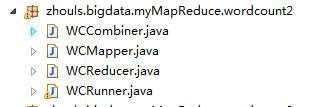
是将map、combiner、shuffle、reduce等分开放一个.java里。则需要实现Tool。 代码 1 package zhouls.bigdata.myMapReduce.wordcount2; 2 3 import java.io.IOException; 4 5 import org.apache.commons.lang.StringUtils; 6 import org.apache.hadoop.io.LongWritable; 7 import org.apache.hadoop.io.Text; 8 import org.apache.hadoop.mapreduce.Mapper; 9 10 //4个泛型中,前两个是指定mapper输入数据的类型,KEYIN是输入的key的类型,VALUEIN是输入的value的类型 11 //map 和 reduce 的数据输入输出都是以 key-value对的形式封装的 12 //默认情况下,框架传递给我们的mapper的输入数据中,key是要处理的文本中一行的起始偏移量,这一行的内容作为value 13 public class WCMapper extends Mapper<LongWritable, Text, Text, LongWritable>{ 14 15 //mapreduce框架每读一行数据就调用一次该方法 16 @Override 17 protected void map(LongWritable key, Text value,Context context)throws IOException, InterruptedException{ 18 //具体业务逻辑就写在这个方法体中,而且我们业务要处理的数据已经被框架传递进来,在方法的参数中 key-value 19 //key 是这一行数据的起始偏移量 value 是这一行的文本内容 20 21 //将这一行的内容转换成string类型 22 String line = value.toString(); 23 24 //对这一行的文本按特定分隔符切分 25 //hadoop helloworld 26 String[] words = StringUtils.split(line, " "); 27 28 //遍历这个单词数组输出为kv形式 k:单词 v : 1 29 for(String word : words){//word是k2 30 context.write(new Text(word), new LongWritable(1));//写入word是k2,1是v2 31 // context.write(word,1);等价 32 33 } 34 35 36 } 37 38 39 40 } 1 package zhouls.bigdata.myMapReduce.wordcount2; 2 3 import java.io.IOException; 4 5 import org.apache.hadoop.io.LongWritable; 6 import org.apache.hadoop.io.Text; 7 import org.apache.hadoop.mapreduce.Reducer; 8 9 public class WCReducer extends Reducer<Text, LongWritable, Text, LongWritable>{ 10 11 12 13 //框架在map处理完成之后,将所有kv对缓存起来,进行分组,然后传递一个组<key,valus{}>,调用一次reduce方法 14 //<hello,{1,1,1,1,1,1.....}> 15 @Override 16 protected void reduce(Text key, Iterable<LongWritable> values,Context context)throws IOException, InterruptedException { 17 long count = 0; 18 //遍历value的list,进行累加求和 19 for(LongWritable value:values){//value是v2 20 count += value.get(); 21 } 22 23 //输出这一个单词的统计结果 24 25 context.write(key,new LongWritable(count));//key是k3,count是v3 26 // context.write(key,count); 27 } 28 29 30 31 } 1 package zhouls.bigdata.myMapReduce.wordcount2; 2 3 import org.apache.hadoop.io.LongWritable; 4 import org.apache.hadoop.io.Text; 5 import org.apache.hadoop.mapreduce.Reducer; 6 7 8 /** 9 * combiner必须遵循reducer的规范 10 * 可以把它看成一种在map任务本地运行的reducer 11 * 使用combiner的时候要注意两点 12 * 1、combiner的输入输出数据泛型类型要能跟mapper和reducer匹配 13 * 2、combiner加入之后不能影响最终的业务逻辑运算结果 14 * 15 * 16 */ 17 public class WCCombiner extends Reducer<Text, LongWritable, Text, LongWritable>{ 18 19 } 1 package zhouls.bigdata.myMapReduce.wordcount2; 2 3 import java.io.IOException; 4 5 import org.apache.hadoop.conf.Configuration; 6 import org.apache.hadoop.fs.Path; 7 import org.apache.hadoop.io.LongWritable; 8 import org.apache.hadoop.io.Text; 9 import org.apache.hadoop.mapreduce.Job; 10 import org.apache.hadoop.mapreduce.lib.input.FileInputFormat; 11 import org.apache.hadoop.mapreduce.lib.output.FileOutputFormat; 12 13 /** 14 * 用来描述一个特定的作业 15 * 比如,该作业使用哪个类作为逻辑处理中的map,哪个作为reduce 16 * 还可以指定该作业要处理的数据所在的路径 17 * 还可以指定改作业输出的结果放到哪个路径 18 * .... 19 * @author duanhaitao@itcast.cn 20 * 21 */ 22 public class WCRunner { 23 24 public static void main(String[] args) throws Exception { 25 26 Configuration conf = new Configuration(); 27 28 Job wcjob = Job.getInstance(conf); 29 30 //设置整个job所用的那些类在哪个jar包 31 wcjob.setJarByClass(WCRunner.class); 32 33 34 //本job使用的mapper和reducer的类 35 wcjob.setMapperClass(WCMapper.class); 36 wcjob.setReducerClass(WCReducer.class); 37 38 39 //指定本job使用combiner组件,组件所用的类为 40 wcjob.setCombinerClass(WCReducer.class); 41 42 43 //指定reduce的输出数据kv类型 44 wcjob.setOutputKeyClass(Text.class); 45 wcjob.setOutputValueClass(LongWritable.class); 46 47 //指定mapper的输出数据kv类型 48 wcjob.setMapOutputKeyClass(Text.class); 49 wcjob.setMapOutputValueClass(LongWritable.class); 50 51 52 // //指定要处理的输入数据存放路径 53 // FileInputFormat.setInputPaths(wcjob, new Path("hdfs://HadoopMaster:9000/wordcount/wc.txt/")); 54 // 55 // //指定处理结果的输出数据存放路径 56 // FileOutputFormat.setOutputPath(wcjob, new Path("hdfs://HadoopMaster:9000/out/wordcount/wc/")); 57 58 //指定要处理的输入数据存放路径 59 FileInputFormat.setInputPaths(wcjob, new Path("./data/wordcount/wc.txt")); 60 61 //指定处理结果的输出数据存放路径 62 FileOutputFormat.setOutputPath(wcjob, new Path("./out/wordcount/wc/")); 63 64 65 //将job提交给集群运行 66 wcjob.waitForCompletion(true); 67 68 69 } 70 71 72 73 74 } 本文转自大数据躺过的坑博客园博客,原文链接:http://www.cnblogs.com/zlslch/p/6163687.html,如需转载请自行联系原作者

优秀的个人博客,低调大师

Android 3.0 r1 API中文文档(107) —— AsyncPlayer

正文 一、结构 public classAsyncPlayer extendsObject java.lang.Object android.media.AsyncPlayer 二、概述 播放一个连续 ( 多个 ) 的音频 URLs ,但那些任务较重的工作在另外的线程中完成,所以任何预处理或加载的延迟都不阻碍线程调用。 三、构造函数 publicAsyncPlayer(String tag) 构造一个AsyncPlayer对象。 参数 tag用于调试的字符串 四、公共方法 public voidplay(Context context, Uri uri, boolean looping, int stream) 开始播放声音。可在某个点上开始播放。这里不保证可能有延迟。在另一个音频文件播放时调用这个方法将导致当前音频停止播放并开始播放新的音频。 参数 context 应用程序上下文 uri 播放的URI (参见setDataSource(Context, Uri)) looping是否无限循环播放声音。(参见setLooping(boolean)) stream音频流(AudioStream)类型(参见setAudioStreamType(int))(译者注:例如AudioManager.STREAM_MUSIC) public voidstop() 停止之前播放的声音。不能在某点上暂停然后接着播放。多次调用没有不良影响。 本文转自over140 51CTO博客,原文链接:http://blog.51cto.com/over140/582378,如需转载请自行联系原作者

优秀的个人博客,低调大师

Hadoop HDFS编程 API入门系列之RPC版本2(九)

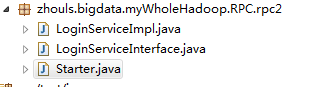
代码 1 package zhouls.bigdata.myWholeHadoop.RPC.rpc2; 2 3 public class LoginServiceImpl implements LoginServiceInterface { 4 5 @Override 6 public String login(String username, String password) { 7 8 return username + " logged in successfully!"; 9 } 10 11 } 1 package zhouls.bigdata.myWholeHadoop.RPC.rpc2; 2 3 public class LoginServiceImpl implements LoginServiceInterface { 4 5 @Override 6 public String login(String username, String password) { 7 8 return username + " logged in successfully!"; 9 } 10 11 } 1 package zhouls.bigdata.myWholeHadoop.RPC.rpc2; 2 3 import java.io.IOException; 4 5 import org.apache.hadoop.HadoopIllegalArgumentException; 6 import org.apache.hadoop.conf.Configuration; 7 import org.apache.hadoop.ipc.RPC; 8 import org.apache.hadoop.ipc.RPC.Builder; 9 import org.apache.hadoop.ipc.RPC.Server; 10 11 public class Starter { 12 13 public static void main(String[] args) throws HadoopIllegalArgumentException, IOException { 14 15 16 Builder builder = new RPC.Builder(new Configuration()); 17 18 builder.setBindAddress("HadoopMaster").setPort(10000).setProtocol(LoginServiceInterface.class).setInstance(new LoginServiceImpl()); 19 20 Server server = builder.build(); 21 22 server.start(); 23 24 25 26 } 27 28 29 } 本文转自大数据躺过的坑博客园博客,原文链接:http://www.cnblogs.com/zlslch/p/6175652.html,如需转载请自行联系原作者

优秀的个人博客,低调大师

Hadoop HDFS编程 API入门系列之HdfsUtil版本2(七)

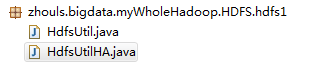
代码 1 import org.junit.Before; 2 import org.junit.Test; 3 4 package zhouls.bigdata.myWholeHadoop.HDFS.hdfs1; 5 6 import java.io.FileInputStream; 7 import java.io.FileNotFoundException; 8 import java.io.FileOutputStream; 9 import java.io.IOException; 10 import java.net.URI; 11 12 import org.apache.commons.io.IOUtils; 13 import org.apache.hadoop.conf.Configuration; 14 import org.apache.hadoop.fs.FSDataInputStream; 15 import org.apache.hadoop.fs.FSDataOutputStream; 16 import org.apache.hadoop.fs.FileStatus; 17 import org.apache.hadoop.fs.FileSystem; 18 import org.apache.hadoop.fs.LocatedFileStatus; 19 import org.apache.hadoop.fs.Path; 20 import org.apache.hadoop.fs.RemoteIterator; 21 import org.junit.Before; 22 import org.junit.Test; 23 24 public class HdfsUtil { 25 26 FileSystem fs = null; 27 28 29 @Before//@Before是在所拦截单元测试方法执行之前执行一段逻辑,读艾特Before 30 public void init() throws Exception{ 31 32 //读取classpath下的xxx-site.xml 配置文件,并解析其内容,封装到conf对象中 33 Configuration conf = new Configuration(); 34 35 //也可以在代码中对conf中的配置信息进行手动设置,会覆盖掉配置文件中的读取的值 36 conf.set("fs.defaultFS", "hdfs://HadoopMaster:9000/"); 37 38 //根据配置信息,去获取一个具体文件系统的客户端操作实例对象 39 fs = FileSystem.get(new URI("hdfs://HadoopMaster:9000/"),conf,"hadoop"); 40 41 42 } 43 44 45 46 /** 47 * 上传文件,比较底层的写法 48 * 49 * @throws Exception 50 */ 51 @Test//@Test是测试方法提示符,一般与@Before组合使用 52 public void upload() throws Exception { 53 54 Configuration conf = new Configuration(); 55 conf.set("fs.defaultFS", "hdfs://HadoopMaster:9000/"); 56 57 FileSystem fs = FileSystem.get(conf); 58 59 Path dst = new Path("hdfs://HadoopMaster:9000/aa/qingshu.txt"); 60 61 FSDataOutputStream os = fs.create(dst); 62 63 FileInputStream is = new FileInputStream("c:/qingshu.txt"); 64 65 IOUtils.copy(is, os); 66 67 68 } 69 70 /** 71 * 上传文件,封装好的写法 72 * @throws Exception 73 * @throws IOException 74 */ 75 @Test//@Test是测试方法提示符,一般与@Before组合使用 76 public void upload2() throws Exception, IOException{ 77 78 fs.copyFromLocalFile(new Path("c:/qingshu.txt"), new Path("hdfs://HadoopMaster:9000/aaa/bbb/ccc/qingshu2.txt")); 79 80 } 81 82 83 /** 84 * 下载文件 85 * @throws Exception 86 * @throws IllegalArgumentException 87 */ 88 @Test//@Test是测试方法提示符,一般与@Before组合使用 89 public void download() throws Exception { 90 91 fs.copyToLocalFile(new Path("hdfs://HadoopMaster:9000/aa/qingshu2.txt"), new Path("c:/qingshu2.txt")); 92 93 } 94 95 /** 96 * 查看文件信息 97 * @throws IOException 98 * @throws IllegalArgumentException 99 * @throws FileNotFoundException 100 * 101 */ 102 @Test//@Test是测试方法提示符,一般与@Before组合使用 103 public void listFiles() throws FileNotFoundException, IllegalArgumentException, IOException { 104 105 // listFiles列出的是文件信息,而且提供递归遍历 106 RemoteIterator<LocatedFileStatus> files = fs.listFiles(new Path("/"), true); 107 108 while(files.hasNext()){ 109 110 LocatedFileStatus file = files.next(); 111 Path filePath = file.getPath(); 112 String fileName = filePath.getName(); 113 System.out.println(fileName); 114 115 } 116 117 System.out.println("---------------------------------"); 118 119 //listStatus 可以列出文件和文件夹的信息,但是不提供自带的递归遍历 120 FileStatus[] listStatus = fs.listStatus(new Path("/")); 121 for(FileStatus status: listStatus){ 122 123 String name = status.getPath().getName(); 124 System.out.println(name + (status.isDirectory()?" is dir":" is file")); 125 126 } 127 128 } 129 130 /** 131 * 创建文件夹 132 * @throws Exception 133 * @throws IllegalArgumentException 134 */ 135 @Test//@Test是测试方法提示符,一般与@Before组合使用 136 public void mkdir() throws IllegalArgumentException, Exception { 137 138 fs.mkdirs(new Path("/aaa/bbb/ccc")); 139 140 141 } 142 143 /** 144 * 删除文件或文件夹 145 * @throws IOException 146 * @throws IllegalArgumentException 147 */ 148 @Test//@Test是测试方法提示符,一般与@Before组合使用 149 public void rm() throws IllegalArgumentException, IOException { 150 151 fs.delete(new Path("/aa"), true); 152 153 } 154 155 156 public static void main(String[] args) throws Exception { 157 158 Configuration conf = new Configuration(); 159 conf.set("fs.defaultFS", "hdfs://HadoopMaster:9000/"); 160 161 FileSystem fs = FileSystem.get(conf); 162 163 FSDataInputStream is = fs.open(new Path("/jdk-7u65-linux-i586.tar.gz")); 164 165 FileOutputStream os = new FileOutputStream("c:/jdk7.tgz"); 166 167 IOUtils.copy(is, os); 168 } 169 170 171 172 } 1 package zhouls.bigdata.myWholeHadoop.HDFS.hdfs1; 2 3 import java.io.IOException; 4 import java.net.URI; 5 6 7 import org.apache.hadoop.conf.Configuration; 8 import org.apache.hadoop.fs.FileSystem; 9 import org.apache.hadoop.fs.Path; 10 11 public class HdfsUtilHA { 12 public static void main(String[] args) throws Exception{ 13 Configuration conf = new Configuration(); 14 FileSystem fs = FileSystem.get(new URI("hdfs://HadoopMaster/9000"), conf, "hadoop"); 15 fs.copyFromLocalFile(new Path("C:/test.txt"), new Path("hdfs://HadoopMaster/9000")); 16 } 17 } 本文转自大数据躺过的坑博客园博客,原文链接:http://www.cnblogs.com/zlslch/p/6175628.html,如需转载请自行联系原作者

优秀的个人博客,低调大师

Hadoop HDFS编程 API入门系列之RPC版本1(八)

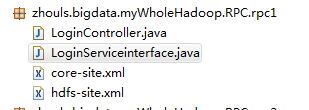
代码 1 package zhouls.bigdata.myWholeHadoop.RPC.rpc1; 2 3 import java.io.IOException; 4 import java.net.InetSocketAddress; 5 6 import org.apache.hadoop.conf.Configuration; 7 import org.apache.hadoop.ipc.RPC; 8 9 public class LoginController { 10 public static void main(String[] args) throws IOException { 11 LoginServiceinterface proxy = RPC.getProxy(LoginServiceinterface.class, 1L, new InetSocketAddress("HadoopMaster", 10000), new Configuration()); 12 String result = proxy.login("angelababy","123456"); 13 System.out.println(result); 14 } 15 } 1 package zhouls.bigdata.myWholeHadoop.RPC.rpc1; 2 3 public interface LoginServiceinterface { 4 public static final long versionID=1L; 5 public String login(String username,String password); 6 } <?xml version="1.0" encoding="UTF-8"?> <?xml-stylesheet type="text/xsl" href="configuration.xsl"?> <!-- Licensed under the Apache License, Version 2.0 (the "License"); you may not use this file except in compliance with the License. You may obtain a copy of the License at http://www.apache.org/licenses/LICENSE-2.0 Unless required by applicable law or agreed to in writing, software distributed under the License is distributed on an "AS IS" BASIS, WITHOUT WARRANTIES OR CONDITIONS OF ANY KIND, either express or implied. See the License for the specific language governing permissions and limitations under the License. See accompanying LICENSE file. --> <!-- Put site-specific property overrides in this file. --> <configuration> <property> <name>fs.default.name</name> <value>hdfs://HadoopMaster:9000</value> <description>The name of the default file system, using 9000 port.</description> </property> <property> <name>hadoop.tmp.dir</name> <value>/tmp</value> <description>A base for other temporary directories.</description> </property> </configuration> <?xml version="1.0" encoding="UTF-8"?> <?xml-stylesheet type="text/xsl" href="configuration.xsl"?> <!-- Licensed under the Apache License, Version 2.0 (the "License"); you may not use this file except in compliance with the License. You may obtain a copy of the License at http://www.apache.org/licenses/LICENSE-2.0 Unless required by applicable law or agreed to in writing, software distributed under the License is distributed on an "AS IS" BASIS, WITHOUT WARRANTIES OR CONDITIONS OF ANY KIND, either express or implied. See the License for the specific language governing permissions and limitations under the License. See accompanying LICENSE file. --> <!-- Put site-specific property overrides in this file. --> <configuration> <property> <name>dfs.namenode.rpc-address</name> <value>HadoopMaster:9000</value> </property> <property> <name>dfs.replication</name> <value>2</value> <description>Set to 1 for pseudo-distributed mode,Set to 2 for distributed mode,Set to 3 for distributed mode.</description> </property> <property> <name>dfs.namenode.http-address</name> <value>HadoopMaster:50070</value> </property> </configuration> 本文转自大数据躺过的坑博客园博客,原文链接:http://www.cnblogs.com/zlslch/p/6175638.html,如需转载请自行联系原作者

优秀的个人博客,低调大师

Hadoop HDFS编程 API入门系列之HdfsUtil版本1(六)

代码 1 package zhouls.bigdata.myWholeHadoop.HDFS.hdfs2; 2 3 import java.io.FileOutputStream; 4 import java.io.IOException; 5 6 import org.apache.commons.io.IOUtils; 7 import org.apache.hadoop.conf.Configuration; 8 import org.apache.hadoop.fs.FSDataInputStream; 9 import org.apache.hadoop.fs.FileSystem; 10 import org.apache.hadoop.fs.Path; 11 12 public class HdfsUtil { 13 14 15 public static void main(String[] args) throws IOException { 16 17 // to upload a file to hdfs 18 19 Configuration conf = new Configuration(); 20 21 FileSystem fs = FileSystem.get(conf); 22 23 Path src = new Path("hdfs://HadoopMaster:9000/jdk-7u65-linux-i586.tar.gz"); 24 25 FSDataInputStream in = fs.open(src); 26 27 FileOutputStream os = new FileOutputStream("/home/hadoop/download/jdk.tgz"); 28 29 IOUtils.copy(in, os); 30 } 31 } 本文转自大数据躺过的坑博客园博客,原文链接:http://www.cnblogs.com/zlslch/p/6175616.html,如需转载请自行联系原作者

优秀的个人博客,低调大师

Hadoop MapReduce编程 API入门系列之wordcount版本2(六)

代码 1 package zhouls.bigdata.myMapReduce.wordcount4; 2 3 import java.io.IOException; 4 5 import org.apache.hadoop.io.IntWritable; 6 import org.apache.hadoop.io.LongWritable; 7 import org.apache.hadoop.io.Text; 8 import org.apache.hadoop.mapreduce.Mapper; 9 import org.apache.hadoop.util.StringUtils; 10 11 public class WordCountMapper extends Mapper<LongWritable, Text, Text, IntWritable>{ 12 13 //该方法循环调用,从文件的split中读取每行调用一次,把该行所在的下标为key,该行的内容为value 14 protected void map(LongWritable key, Text value, 15 Context context) 16 throws IOException, InterruptedException { 17 String[] words = StringUtils.split(value.toString(), ' '); 18 for(String w :words){ 19 context.write(new Text(w), new IntWritable(1)); 20 } 21 } 22 } 1 package zhouls.bigdata.myMapReduce.wordcount4; 2 3 import java.io.IOException; 4 5 import org.apache.hadoop.io.IntWritable; 6 import org.apache.hadoop.io.Text; 7 import org.apache.hadoop.mapreduce.Reducer; 8 9 public class WordCountReducer extends Reducer<Text, IntWritable, Text, IntWritable>{ 10 11 //每组调用一次,这一组数据特点:key相同,value可能有多个。 12 protected void reduce(Text arg0, Iterable<IntWritable> arg1, 13 Context arg2) 14 throws IOException, InterruptedException { 15 int sum =0; 16 for(IntWritable i: arg1){ 17 sum=sum+i.get(); 18 } 19 arg2.write(arg0, new IntWritable(sum)); 20 } 21 } //System.setProperty("HADOOP_USER_NAME", "root"); // //1、MR执行环境有两种:本地测试环境,服务器环境 // //本地测试环境(windows):(便于调试) // 在windows的hadoop目录bin目录有一个winutils.exe // 1、在windows下配置hadoop的环境变量 // 2、拷贝debug工具(winutils.exe)到HADOOP_HOME/bin // 3、修改hadoop的源码 ,注意:确保项目的lib需要真实安装的jdk的lib // // 4、MR调用的代码需要改变: // a、src不能有服务器的hadoop配置文件(因为,本地是调试,去服务器环境集群那边的) // b、再调用是使用: // Configuration config = new Configuration(); // config.set("fs.defaultFS", "hdfs://HadoopMaster:9000"); // config.set("yarn.resourcemanager.hostname", "HadoopMaster"); //服务器环境:(不便于调试),有两种方式。 //首先需要在src下放置服务器上的hadoop配置文件(都要这一步) //1、在本地直接调用,执行过程在服务器上(真正企业运行环境) // a、把MR程序打包(jar),直接放到本地 // b、修改hadoop的源码 ,注意:确保项目的lib需要真实安装的jdk的lib // c、增加一个属性: // config.set("mapred.jar", "C:\\Users\\Administrator\\Desktop\\wc.jar"); // d、本地执行main方法,servlet调用MR。 // // //2、直接在服务器上,使用命令的方式调用,执行过程也在服务器上 // a、把MR程序打包(jar),传送到服务器上 // b、通过: hadoop jar jar路径 类的全限定名 // // // // //a,1 b,1 //a,3 c,3 //a,2 d,2 // // //a,3 c,3 //a,2 d,2 //a,1 b,1 // 1 package zhouls.bigdata.myMapReduce.wordcount4; 2 3 4 import org.apache.hadoop.conf.Configuration; 5 import org.apache.hadoop.fs.FileSystem; 6 import org.apache.hadoop.fs.Path; 7 import org.apache.hadoop.io.IntWritable; 8 import org.apache.hadoop.io.Text; 9 import org.apache.hadoop.mapreduce.Job; 10 import org.apache.hadoop.mapreduce.lib.input.FileInputFormat; 11 import org.apache.hadoop.mapreduce.lib.output.FileOutputFormat; 12 13 public class RunJob { 14 15 public static void main(String[] args) { 16 Configuration config =new Configuration(); 17 config.set("fs.defaultFS", "hdfs://HadoopMaster:9000"); 18 config.set("yarn.resourcemanager.hostname", "HadoopMaster"); 19 // config.set("mapred.jar", "C:\\Users\\Administrator\\Desktop\\wc.jar");//先打包好wc.jar 20 try { 21 FileSystem fs =FileSystem.get(config); 22 23 Job job =Job.getInstance(config); 24 job.setJarByClass(RunJob.class); 25 26 job.setJobName("wc"); 27 28 job.setMapperClass(WordCountMapper.class); 29 job.setReducerClass(WordCountReducer.class); 30 31 job.setMapOutputKeyClass(Text.class); 32 job.setMapOutputValueClass(IntWritable.class); 33 34 FileInputFormat.addInputPath(job, new Path("/usr/input/wc/wc.txt"));//新建好输入路径,且数据源 35 36 Path outpath =new Path("/usr/output/wc"); 37 if(fs.exists(outpath)){ 38 fs.delete(outpath, true); 39 } 40 FileOutputFormat.setOutputPath(job, outpath); 41 42 boolean f= job.waitForCompletion(true); 43 if(f){ 44 System.out.println("job任务执行成功"); 45 } 46 } catch (Exception e) { 47 e.printStackTrace(); 48 } 49 } 50 } 本文转自大数据躺过的坑博客园博客,原文链接:http://www.cnblogs.com/zlslch/p/6163585.html,如需转载请自行联系原作者

资源下载

更多资源
腾讯云软件源

腾讯云软件源

为解决软件依赖安装时官方源访问速度慢的问题,腾讯云为一些软件搭建了缓存服务。您可以通过使用腾讯云软件源站来提升依赖包的安装速度。为了方便用户自由搭建服务架构,目前腾讯云软件源站支持公网访问和内网访问。

Nacos

Nacos

Nacos /nɑ:kəʊs/ 是 Dynamic Naming and Configuration Service 的首字母简称,一个易于构建 AI Agent 应用的动态服务发现、配置管理和AI智能体管理平台。Nacos 致力于帮助您发现、配置和管理微服务及AI智能体应用。Nacos 提供了一组简单易用的特性集,帮助您快速实现动态服务发现、服务配置、服务元数据、流量管理。Nacos 帮助您更敏捷和容易地构建、交付和管理微服务平台。

Sublime Text

Sublime Text

Sublime Text具有漂亮的用户界面和强大的功能,例如代码缩略图,Python的插件,代码段等。还可自定义键绑定,菜单和工具栏。Sublime Text 的主要功能包括:拼写检查,书签,完整的 Python API , Goto 功能,即时项目切换,多选择,多窗口等等。Sublime Text 是一个跨平台的编辑器,同时支持Windows、Linux、Mac OS X等操作系统。

WebStorm

WebStorm

WebStorm 是jetbrains公司旗下一款JavaScript 开发工具。目前已经被广大中国JS开发者誉为“Web前端开发神器”、“最强大的HTML5编辑器”、“最智能的JavaScript IDE”等。与IntelliJ IDEA同源,继承了IntelliJ IDEA强大的JS部分的功能。

用户登录
用户注册