首页 文章 精选 留言 我的

精选列表

搜索[android studio],共10000篇文章
优秀的个人博客,低调大师

Android -- AudioPlayer

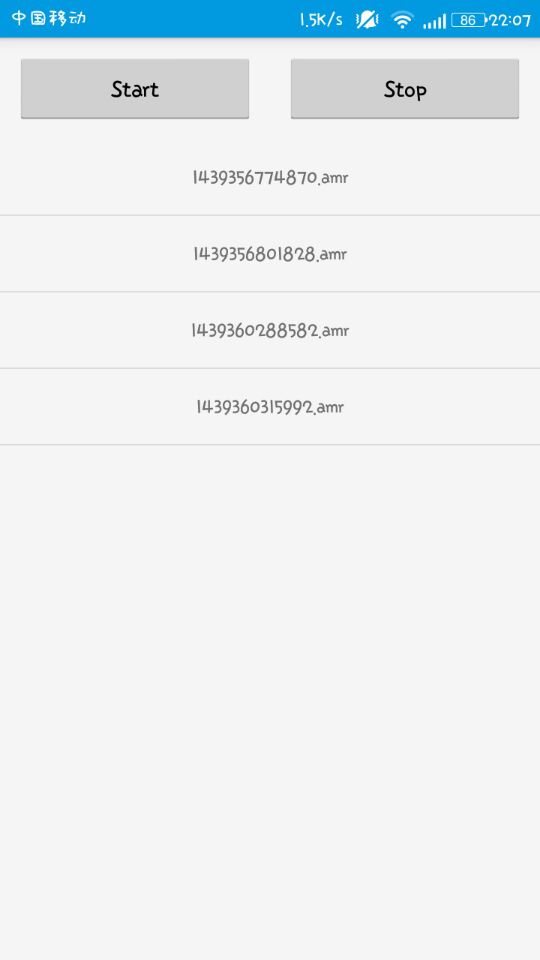
AudioPlayer 主要是实现边录边播(AudioRecord+AudioTrack)以及对音频的实时处理(如会说话的汤姆猫、语音) 优点:语音的实时处理,可以用代码实现各种音频的封装 缺点:输出是PCM语音数据,如果保存成音频文件,是不能够被播放器播放的,所以必须先写代码实现数据编码以及压缩 示例: 使用AudioRecord类录音,并实现WAV格式封装。录音20s,输出的音频文件大概为3.5M左右(已写测试代码) Demo public class SoundActivity extends Activity implements AdapterView.OnItemClickListener , MediaPlayer.OnCompletionListener { public static final String DIR = Environment.getExternalStorageDirectory().getAbsolutePath() + File.separator + "1122" + File.separator; private ListView mListView; private SoundAdapter mAdapter; private MediaPlayer mMediaPlayer; @Override protected void onCreate(Bundle savedInstanceState) { super.onCreate(savedInstanceState); setContentView(R.layout.activity_sound); mListView = (ListView) findViewById(R.id.lv_sound); mListView.setOnItemClickListener(this); initListView(); initMediaPlayer(); } private void initMediaPlayer() { mMediaPlayer = new MediaPlayer(); mMediaPlayer.setOnCompletionListener(this); } private void initListView() { mAdapter = new SoundAdapter(SoundActivity.this, DIR); mListView.setAdapter(mAdapter); } @Override public void onItemClick(AdapterView<?> parent, View view, int position, long id) { String fileName = (String) mAdapter.getItem(position); String file = DIR + fileName; try { if (mMediaPlayer.isPlaying()) { mMediaPlayer.stop(); } try { Thread.sleep(500); } catch (InterruptedException e) { e.printStackTrace(); } mMediaPlayer.reset(); mMediaPlayer.setDataSource(file); mMediaPlayer.prepare(); mMediaPlayer.start(); } catch (IOException e) { e.printStackTrace(); } } @Override public void onCompletion(MediaPlayer mp) { mMediaPlayer.reset(); } @Override protected void onDestroy() { super.onDestroy(); mMediaPlayer.release(); } public class SoundAdapter extends BaseAdapter { private Context mContext; private File mDir; private int mTotalNumber = 0; private List<String> mFileNameList; public SoundAdapter(Context context, String dirPath) { mContext = context; mDir = new File(dirPath); mTotalNumber = mDir.list().length; mFileNameList = Arrays.asList(mDir.list()); } @Override public int getCount() { return mTotalNumber; } @Override public Object getItem(int position) { return mFileNameList.get(position); } @Override public long getItemId(int position) { return position; } @Override public View getView(int position, View convertView, ViewGroup parent) { ViewHolder vh; if (convertView == null) { vh = new ViewHolder(); convertView = LayoutInflater.from(mContext).inflate(R.layout.item, null); vh.textView = (TextView) convertView.findViewById(R.id.text_view); convertView.setTag(vh); } else { vh = (ViewHolder) convertView.getTag(); } vh.textView.setText(mFileNameList.get(position)); return convertView; } class ViewHolder { TextView textView; } @Override public void notifyDataSetChanged() { mTotalNumber = mDir.list().length; mFileNameList = Arrays.asList(mDir.list()); super.notifyDataSetChanged(); } } 截图 本文转自我爱物联网博客园博客,原文链接:http://www.cnblogs.com/yydcdut/p/4725728.html,如需转载请自行联系原作者

优秀的个人博客,低调大师

Android -- Annotation

Override Annotation @Override public void onCreate(Bundle savedInstanceState){}; 概念 An annotation is a form of metadata, that can be added to Java source code. Classes, methods, variables, parameters and packages may be annotated. Annotations have no direct effect on the operation of the code they annotate. 分类 标准 Annotation Override, Deprecated, SuppressWarnings 元 Annotation @Retention, @Target, @Inherited, @Documented 自定义 Annotation 自定义 Annotation 表示自己根据需要定义的 Annotation,定义时需要用到上面的元 Annotation。 自定义 调用 @DBTableY(name = "YYD__DB") public class DB { @DBColumnY(name = "column11xx") public String column1; @DBColumnY(name = "column22xx") public String column2; } 定义 @Retention(RetentionPolicy.RUNTIME) @Target(ElementType.TYPE) public @interface DBTableY { String name() default "YUYIDONG11"; } @Retention(RetentionPolicy.RUNTIME) @Target({ElementType.FIELD}) public @interface DBColumnY { String name() default "YUYIDONG"; } 通过 @interface 定义,注解名即为自定义注解名 注解配置参数名为注解类的方法名,且: a. 所有方法没有方法体,没有参数没有修饰符,实际只允许 public & abstract 修饰符,默认为 public ,不允许抛异常 b. 方法返回值只能是基本类型,String, Class, annotation, enumeration 或者是他们的一维数组 c. 若只有一个默认属性,可直接用 value() 函数。一个属性都没有表示该 Annotation 为 Mark Annotation 可以加 default 表示默认值 元 Annotation @Documented 是否会保存到 Javadoc 文档中 @Retention 保留时间,可选值 SOURCE(源码时),CLASS(编译时),RUNTIME(运行时),默认为 CLASS,SOURCE 大都为 Mark Annotation,这类 Annotation 大都用来校验,比如 Override, SuppressWarnings 作用:表示需要在什么级别保存该注释信息,用于描述注解的生命周期(即:被描述的注解在什么范围内有效) 取值(RetentionPoicy)有: 1.SOURCE:在源文件中有效(即源文件保留) 2.CLASS:在class文件中有效(即class保留) 3.RUNTIME:在运行时有效(即运行时保留) ​ @Target 可以用来修饰哪些程序元素,如 TYPE, METHOD, CONSTRUCTOR, FIELD, PARAMETER 等,未标注则表示可修饰所有。 作用:用于描述注解的使用范围(即:被描述的注解可以用在什么地方) 取值(ElementType)有: 1.CONSTRUCTOR:用于描述构造器 2.FIELD:用于描述域 3.LOCAL_VARIABLE:用于描述局部变量 4.METHOD:用于描述方法 5.PACKAGE:用于描述包 6.PARAMETER:用于描述参数 7.TYPE:用于描述类、接口(包括注解类型) 或enum声明 ​ @Inherited 是否可以被继承,默认为 false 当 @Inherited annotation类型标注的annotation的Retention是RetentionPolicy.RUNTIME,则反射API增强了这种继承性。如果我们使用java.lang.reflect去查询一个 @Inherited annotation类型的annotation时,反射代码检查将展开工作:检查class和其父类,直到发现指定的annotation类型被发现,或者到达类继承结构的顶层。 注解 使用 @interface自定义注解时,自动继承了java.lang.annotation.Annotation接口,由编译程序自动完成其他细节。在定义注解时,不能继承其他的注解或接口。 @interface用来声明一个注解,其中的每一个方法实际上是声明了一个配置参数。方法的名称就是参数的名称,返回值类型就是参数的类型(返回值类型只能是基本类型、Class、String、enum)。可以通过default来声明参数的默认值。 public @interface 注解名 {定义体} 注解参数的可支持数据类型: 1.所有基本数据类型(int,float,boolean,byte,double,char,long,short) 2.String类型 3.Class类型 4.enum类型 5.Annotation类型 6.以上所有类型的数组 解析 运行时 Annotation 解析 运行时 Annotation 指 @Retention 为 RUNTIME 的 Annotation method.getAnnotation(AnnotationName.class); method.getAnnotations(); method.isAnnotationPresent(AnnotationName.class); getAnnotation(AnnotationName.class) 表示得到该 Target 某个 Annotation 的信息,因为一个 Target 可以被多个 Annotation 修饰 getAnnotations() 则表示得到该 Target 所有 Annotation isAnnotationPresent(AnnotationName.class) 表示该 Target 是否被某个 Annotation 修饰 Class clazz = DB.class; if (clazz.isAnnotationPresent(DBTableY.class)) { DBTableY dbTableY = (DBTableY) clazz.getAnnotation(DBTableY.class); Log.i("yyd", "dbTableY.name()--->" + dbTableY.name()); Field[] fields = clazz.getFields(); for (Field field : fields) { DBColumnY dbColumnY = field.getAnnotation(DBColumnY.class); Log.i("yyd", "dbColumnY.name()--->" + dbColumnY.name()); Log.i("yyd", "field.getName()--->" + field.getName()); } } 编译时 Annotation 解析 编译时 Annotation 指 @Retention 为 CLASS 的 Annotation,甴编译器自动解析。需要做的 自定义类集成自 AbstractProcessor 重写其中的 process 函数 编译器在编译时自动查找所有继承自 AbstractProcessor 的类,然后调用他们的 process 方法去处理。 SupportedAnnotationTypes({ "com.yydcdut.test.annotation.DBColumnY" }) public class DBColumnProcessor extends AbstractProcessor { @Override public boolean process(Set<? extends TypeElement> annotations, RoundEnvironment env) { for (TypeElement te : annotations) { for (Element element : env.getElementsAnnotatedWith(te)) { DBColumnY dbColumnY = element.getAnnotation(DBColumnY.class); Log.i("yyd",element.getEnclosingElement().toString()); } } return false; } } SupportedAnnotationTypes 表示这个 Processor 要处理的 Annotation 名字。 process 函数中参数 annotations 表示待处理的 Annotations,参数 env 表示当前或是之前的运行环境。 process 函数返回值表示这组 annotations 是否被这个 Processor 接受,如果接受后续子的 rocessor 不会再对这个 Annotations 进行处理。 我是天王盖地虎的分割线 本文转自我爱物联网博客园博客,原文链接:http://www.cnblogs.com/yydcdut/p/4646454.html如需转载请自行联系原作者


优秀的个人博客,低调大师

Android -- onAttachedToWindow()

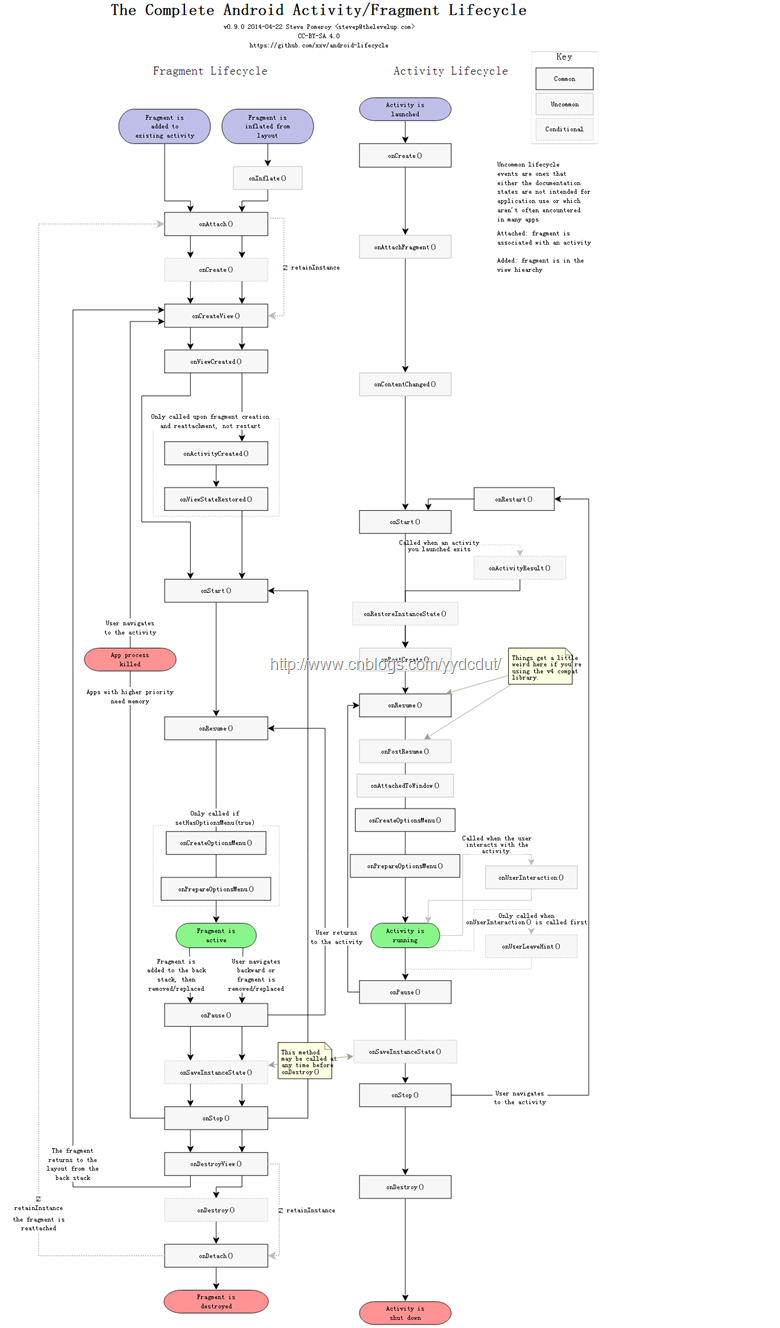
onAttachedToWindow在Activity生命周期中的位置 放大招: onAttachedToWindow不能在onCreate中哟~ View view = getWindow().getDecorView(); WindowManager.LayoutParams lp = (WindowManager.LayoutParams)view.getLayoutParams(); lp.gravity = Gravity.CENTER; lp.width = (dm.widthPixels * 4) / 5; lp.height = (dm.widthPixels * 4) / 5; getWindowManager().updateViewLayout(view,lp); 放到onCreate中进行测试,结果在lp.gravity = Gravity.CENTER;这行报了空指针异常,所以view.getLayoutParams()获取的LayoutParams是空。 public final class ActivityThread { ...... final void handleResumeActivity(IBinder token, boolean clearHide, boolean isForward) { ...... ActivityClientRecord r = performResumeActivity(token, clearHide); if (r != null) { final Activity a = r.activity; ...... // If the window hasn't yet been added to the window manager, // and this guy didn't finish itself or start another activity, // then go ahead and add the window. boolean willBeVisible = !a.mStartedActivity; if (!willBeVisible) { try { willBeVisible = ActivityManagerNative.getDefault().willActivityBeVisible( a.getActivityToken()); } catch (RemoteException e) { } } if (r.window == null && !a.mFinished && willBeVisible) { r.window = r.activity.getWindow(); View decor = r.window.getDecorView(); decor.setVisibility(View.INVISIBLE); ViewManager wm = a.getWindowManager(); WindowManager.LayoutParams l = r.window.getAttributes(); a.mDecor = decor; l.type = WindowManager.LayoutParams.TYPE_BASE_APPLICATION; ...... if (a.mVisibleFromClient) { a.mWindowAdded = true; wm.addView(decor, l); } } ...... } ...... } ...... } 原来在ActivityThread执行handleResumeActivity时就会为PhoneWindow(r.activity.getWindow)中的DecorView设置LayoutParam,并且通过源码发现handleResumeActivity函数首先会执行performResumeActivity,此时会调用Activity的onResume()生命周期函数,这时问题就比较清晰了,看来只要在Activity的onResume生命周期后就能获取DecorView的LayoutParam,进而可以设置高度和宽度了。根据上面贴出的生命周期图,onResume()后面是onAttachedToWindow(),并且onAttachedToWindow只会调用一次,不会受用户操作行为影响。所以在onAttachedToWindow中进行窗口尺寸的修改再合适不过了。 干货 onAttachedToWindow运行在onResume之后; DecorView的LayoutParams是在ActivityThread的handleResumeActivity中设置的,并且该函数会调用Activity的onResume生命周期,所以在onResume之后可以设置窗体尺寸; 我是天王盖地虎的分割线 本文转自我爱物联网博客园博客,原文链接:http://www.cnblogs.com/yydcdut/p/4471984.html,如需转载请自行联系原作者

优秀的个人博客,低调大师

Android -- isInEditMode

解释 Indicates whether this View is currently in edit mode. A View is usually in edit mode when displayed within a developer tool. For instance, if this View is being drawn by a visual user interface builder, this method should return true. Subclasses should check the return value of this method to provide different behaviors if their normal behavior might interfere with the host environment. For instance: the class spawns a thread in its constructor, the drawing code relies on device-specific features, etc. This method is usually checked in the drawing code of custom widgets. 如果在自定义控件的构造函数或者其他绘制相关地方使用系统依赖的代码,会导致可视化编辑器无法报错并提示:Use View.isInEditMode() in your custom views to skip code when shown inEclipse code public class LockRelativeLayout extends RelativeLayout { private Handler mainHandler = null; //与主Activity通信的Handler对象 public LockRelativeLayout(Context context, AttributeSet attrs) { super(context, attrs, 0); mContext = context; if (isInEditMode()) { return; } mainHandler = ((MainActivity)mContext).getMHandler(); } } 如果不加上if (isInEditMode()) { return; },标红处代码会导致可视化编辑报错 我是天王盖地虎的分割线 本文转自我爱物联网博客园博客,原文链接:http://www.cnblogs.com/yydcdut/p/4456722.html,如需转载请自行联系原作者

优秀的个人博客,低调大师

Android -- VelocityTracker

VelocityTracker 主要应用于touch event, VelocityTracker通过跟踪一连串事件实时计算出当前的速度。 方法 //获取一个VelocityTracker对象, 用完后记得回收 //回收后代表你不需要使用了,系统将此对象在此分配到其他请求者 static public VelocityTracker obtain(); public void recycle(); //计算当前速度, 其中units是单位表示, 1代表px/毫秒, 1000代表px/秒, .. //maxVelocity此次计算速度你想要的最大值 public void computeCurrentVelocity(int units, float maxVelocity); //经过一次computeCurrentVelocity后你就可以用一下几个方法获取此次计算的值 //id是touch event触摸点的ID, 来为多点触控标识,有这个标识在计算时可以忽略 //其他触点干扰,当然干扰肯定是有的 public float getXVelocity(); public float getYVelocity(); public float getXVelocity(int id); public float getYVelocity(int id); Code public class VelocityTrackerTest extends Activity { private TextView mInfo; private VelocityTracker mVelocityTracker; private int mMaxVelocity; private int mPointerId; @Override protected void onCreate(Bundle savedInstanceState) { super.onCreate(savedInstanceState); mInfo = new TextView(this); mInfo.setLines(4); mInfo.setLayoutParams(new LayoutParams(LayoutParams.FILL_PARENT, LayoutParams.FILL_PARENT)); mInfo.setTextColor(Color.WHITE); setContentView(mInfo); mMaxVelocity = ViewConfiguration.get(this).getMaximumFlingVelocity(); } @Override public boolean onTouchEvent(MotionEvent event) { if(null == mVelocityTracker) { mVelocityTracker = VelocityTracker.obtain(); } mVelocityTracker.addMovement(event); final VelocityTracker verTracker = mVelocityTracker; switch (event.getAction()) { case MotionEvent.ACTION_DOWN: //求第一个触点的id, 此时可能有多个触点,但至少一个 mPointerId = event.getPointerId(0); break; case MotionEvent.ACTION_MOVE: //求伪瞬时速度 verTracker.computeCurrentVelocity(1000, mMaxVelocity); float velocityX = verTracker.getXVelocity(mPointerId); float velocityY = verTracker.getYVelocity(mPointerId); recodeInfo(velocityX, velocityY); break; case MotionEvent.ACTION_UP: case MotionEvent.ACTION_CANCEL: if(null != mVelocityTracker) { mVelocityTracker.clear(); mVelocityTracker.recycle(); mVelocityTracker = null; } break; default: break; } return super.onTouchEvent(event); } private static final String sFormatStr = "velocityX=%f\nvelocityY=%f"; /** * 记录当前速度 * * @param velocityX x轴速度 * @param velocityY y轴速度 */ private void recodeInfo(final float velocityX, final float velocityY) { final String info = String.format(sFormatStr, velocityX, velocityY); mInfo.setText(info); } } 我是天王盖地虎的分割线 本文转自我爱物联网博客园博客,原文链接:http://www.cnblogs.com/yydcdut/p/4082579.html,如需转载请自行联系原作者

资源下载

更多资源
Mario

Mario

马里奥是站在游戏界顶峰的超人气多面角色。马里奥靠吃蘑菇成长,特征是大鼻子、头戴帽子、身穿背带裤,还留着胡子。与他的双胞胎兄弟路易基一起,长年担任任天堂的招牌角色。

Nacos

Nacos

Nacos /nɑ:kəʊs/ 是 Dynamic Naming and Configuration Service 的首字母简称,一个易于构建 AI Agent 应用的动态服务发现、配置管理和AI智能体管理平台。Nacos 致力于帮助您发现、配置和管理微服务及AI智能体应用。Nacos 提供了一组简单易用的特性集,帮助您快速实现动态服务发现、服务配置、服务元数据、流量管理。Nacos 帮助您更敏捷和容易地构建、交付和管理微服务平台。

Spring

Spring

Spring框架(Spring Framework)是由Rod Johnson于2002年提出的开源Java企业级应用框架,旨在通过使用JavaBean替代传统EJB实现方式降低企业级编程开发的复杂性。该框架基于简单性、可测试性和松耦合性设计理念,提供核心容器、应用上下文、数据访问集成等模块,支持整合Hibernate、Struts等第三方框架,其适用范围不仅限于服务器端开发,绝大多数Java应用均可从中受益。

Rocky Linux

Rocky Linux

Rocky Linux(中文名:洛基)是由Gregory Kurtzer于2020年12月发起的企业级Linux发行版,作为CentOS稳定版停止维护后与RHEL(Red Hat Enterprise Linux)完全兼容的开源替代方案,由社区拥有并管理,支持x86_64、aarch64等架构。其通过重新编译RHEL源代码提供长期稳定性,采用模块化包装和SELinux安全架构,默认包含GNOME桌面环境及XFS文件系统,支持十年生命周期更新。

用户登录
用户注册