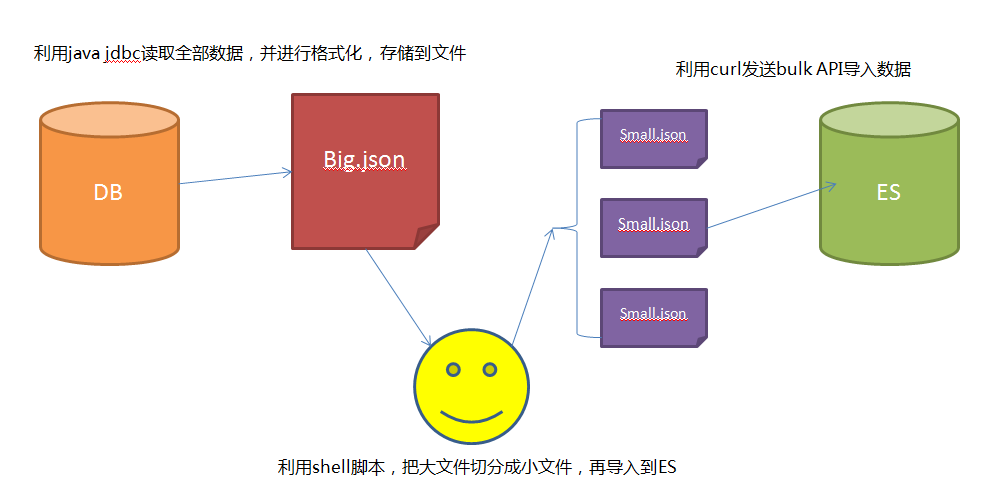
随机生成50个字段的elasticsearch的测试程序输入
词典位置:https://raw.githubusercontent.com/jonbcard/scrabble-bot/master/src/dictionary.txt import json from random import sample, randint from uuid import uuid4 def gen_random_words(): with open("D:\\exp\\test_data\\dictionary.txt") as f: words = [word.strip() for word in f] f.close() # print "OK. words length:", len(words) return sample(words, 3000) return [] total_words = 0 def sample_words(search_words, random_words): global total_words sample_cnt = 1000 for word in random_words: total_words += 1 if len(search_words) < sample_cnt: search_words.append(word) else: if randint(1, total_words) <= sample_cnt: kick_off = randint(0, sample_cnt-1) search_words[kick_off] = word def gen_an_event(words, search_words): event_data = {} for i in range(50): query_words = sample(words, randint(1, 10)) sample_words(search_words,query_words) event_data["field-"+str(i)] = " ".join(query_words) return {"event": event_data, "sourcetype": "hec_test2"} if __name__ == "__main__": search_words = [] for i in range(500): words = gen_random_words() index_head = json.dumps({"index" : { "_index" : "hec_test2", "_type" : "hec_type2" } }) es_out_put = "" splunk_out_put = "" for i in range(500): if i == 0: es_out_put += index_head + "\n" else: es_out_put += "\n" + index_head + "\n" event = gen_an_event(words, search_words) splunk_out_put += json.dumps(event) es_out_put += json.dumps(event["event"]) # print es_out_put # print splunk_out_put out_puts = [es_out_put, splunk_out_put] file_name = str(uuid4()) + ".json" for i,dir_name in enumerate(["ES", "Splunk"]): outfile = "D:\\test_data\\%s\\%s" % (dir_name, file_name) f = open(outfile, "w") f.write(out_puts[i]) f.close() print outfile outfile = "D:\\test_data\\search_words.txt" f = open(outfile, "w") f.write(json.dumps(search_words)) f.close() ' 本文转自张昺华-sky博客园博客,原文链接:http://www.cnblogs.com/bonelee/p/6599974.html,如需转载请自行联系原作者