Android项目实战(三十一):异步下载apk文件并安装(非静默安装)
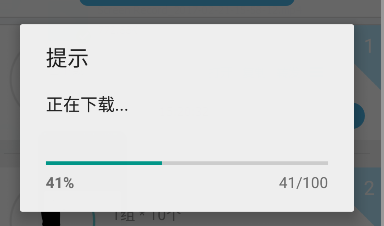
前言: 实现异步下载apk文件 并 安装。(进度条对话框显示下载进度的展现方式) 涉及技术点: 1、ProgressDialog 进度条对话框 用于显示下载进度 2、AsyncTask 异步任务的使用 耗时操作不能再主线程中进行 安卓开发_浅谈AsyncTask 3、File 文件相关操作 将文件的字节数据生成文件 4、自动打开安装应用操作 下载网络apk数据并生成文件之后需要我们去执行这个apk的安装操作(非静默安装) 实现前提: 1、我们下载的apk的url地址 2、文件权限,网络权限 <uses-permission android:name="android.permission.WRITE_EXTERNAL_STORAGE" /> //文件操作权限 <uses-permission android:name="android.permission.INTERNET" /> //网络权限 ---------------------------------------------------------------------------------------------------------------------------------------- 实现: 1、创建ProgressDialog对象,初始化操作,开启下载的异步任务 private void showDownloadProgressDialog(Context context) { ProgressDialog progressDialog = new ProgressDialog(context); progressDialog.setTitle("提示"); progressDialog.setMessage("正在下载..."); progressDialog.setIndeterminate(false); progressDialog.setMax(100); progressDialog.setCancelable(false); //设置不可点击界面之外的区域让对话框小时 progressDialog.setProgressStyle(ProgressDialog.STYLE_HORIZONTAL); //进度条类型 progressDialog.show(); String downloadUrl = "http://ac-edNxPKqQ.clouddn.com/800exxxxxxx68ebcefda.apk"; //这里写你的apk url地址 new DownloadAPK(progressDialog).execute(downloadUrl); } 2、下载apk的异步任务 首先看一下整个异步任务的结构 private class DownloadAPK extends AsyncTask<String, Integer, String> { ProgressDialog progressDialog; File file; public DownloadAPK(ProgressDialog progressDialog) { this.progressDialog = progressDialog; } @Override protected String doInBackground(String... params) { //根据url获取网络数据生成apk文件 return null; } @Override protected void onProgressUpdate(Integer... progress) { super.onProgressUpdate(progress); // 这里 改变ProgressDialog的进度值 } @Override protected void onPostExecute(String s) { super.onPostExecute(s); //到这里说明下载完成,判断文件是否存在,如果存在,执行安装apk的操作 } } (1)、 局部变量 ProgressDialog 用于显示下载进度 File 根据网络数据生成的apk文件 ProgressDialog progressDialog; File file; (2)、构造方法,将外部的ProgressDialog对象传到异步任务里 public DownloadAPK(ProgressDialog progressDialog) { this.progressDialog = progressDialog; } (3)、进度更新方法,将下载进度现在在对话框中 @Override protected void onProgressUpdate(Integer... progress) { super.onProgressUpdate(progress); progressDialog.setProgress(progress[0]); } (4)、下载网络数据生成apk文件的操作 @Override protected String doInBackground(String... params) { URL url; HttpURLConnection conn; BufferedInputStream bis = null; FileOutputStream fos = null; try { url = new URL(params[0]); conn = (HttpURLConnection) url.openConnection(); conn.setRequestMethod("GET"); conn.setConnectTimeout(5000); int fileLength = conn.getContentLength(); bis = new BufferedInputStream(conn.getInputStream()); String fileName = Environment.getExternalStorageDirectory().getPath() + "/magkare/action.apk"; file = new File(fileName); if (!file.exists()) { if (!file.getParentFile().exists()) { file.getParentFile().mkdirs(); } file.createNewFile(); } fos = new FileOutputStream(file); byte data[] = new byte[4 * 1024]; long total = 0; int count; while ((count = bis.read(data)) != -1) { total += count; publishProgress((int) (total * 100 / fileLength)); fos.write(data, 0, count); fos.flush(); } fos.flush(); } catch (IOException e) { e.printStackTrace(); } finally { try { if (fos != null) { fos.close(); } } catch (IOException e) { e.printStackTrace(); } try { if (bis != null) { bis.close(); } } catch (IOException e) { e.printStackTrace(); } } return null; } (5)、文件下载完成后 判断文件是否存在,存在的话要打开安装apk的操作,并关闭进度对话框 不存在的话说明文件下载失败,进行相关提示即可 @Override protected void onPostExecute(String s) { super.onPostExecute(s); openFile(file); //打开安装apk文件操作 progressDialog.dismiss(); //关闭对话框 } (6)、打开apk文件安装apk的操作 private void openFile(File file) { if (file!=null){ Intent intent = new Intent(Intent.ACTION_VIEW); intent.setDataAndType(Uri.fromFile(file), "application/vnd.android.package-archive"); TaskListActivity.this.startActivity(intent); } } 效果图: 完整代码: private void showDownloadProgressDialog(Context context) { ProgressDialog progressDialog = new ProgressDialog(context); progressDialog.setTitle("提示"); progressDialog.setMessage("正在下载..."); progressDialog.setIndeterminate(false); progressDialog.setMax(100); progressDialog.setCancelable(false); progressDialog.setProgressStyle(ProgressDialog.STYLE_HORIZONTAL); progressDialog.show(); String downloadUrl = "http://ac-edNxPKqQ.clouddn.com/80xxxxxxxebcefda.apk"; new DownloadAPK(progressDialog).execute(downloadUrl); } /** * 下载APK的异步任务 */ private class DownloadAPK extends AsyncTask<String, Integer, String> { ProgressDialog progressDialog; File file; public DownloadAPK(ProgressDialog progressDialog) { this.progressDialog = progressDialog; } @Override protected String doInBackground(String... params) { URL url; HttpURLConnection conn; BufferedInputStream bis = null; FileOutputStream fos = null; try { url = new URL(params[0]); conn = (HttpURLConnection) url.openConnection(); conn.setRequestMethod("GET"); conn.setConnectTimeout(5000); int fileLength = conn.getContentLength(); bis = new BufferedInputStream(conn.getInputStream()); String fileName = Environment.getExternalStorageDirectory().getPath() + "/magkare/action.apk"; file = new File(fileName); if (!file.exists()) { if (!file.getParentFile().exists()) { file.getParentFile().mkdirs(); } file.createNewFile(); } fos = new FileOutputStream(file); byte data[] = new byte[4 * 1024]; long total = 0; int count; while ((count = bis.read(data)) != -1) { total += count; publishProgress((int) (total * 100 / fileLength)); fos.write(data, 0, count); fos.flush(); } fos.flush(); } catch (IOException e) { e.printStackTrace(); } finally { try { if (fos != null) { fos.close(); } } catch (IOException e) { e.printStackTrace(); } try { if (bis != null) { bis.close(); } } catch (IOException e) { e.printStackTrace(); } } return null; } @Override protected void onProgressUpdate(Integer... progress) { super.onProgressUpdate(progress); progressDialog.setProgress(progress[0]); } @Override protected void onPostExecute(String s) { super.onPostExecute(s); openFile(file); progressDialog.dismiss(); } private void openFile(File file) { if (file!=null){ Intent intent = new Intent(Intent.ACTION_VIEW); intent.setDataAndType(Uri.fromFile(file), "application/vnd.android.package-archive"); TaskListActivity.this.startActivity(intent); } } } 异步下载apk文件并安装 ------------------------------------------------------------------------------------------------------------------------------------------ 注意: 如果是一次性全部获取到网络文件的字节数据,当文件过大的时候会出现OOM的问题。 此方法 实现边下载获取网络文件的字节数据边生成文件的操作。 不用担心OOM 的问题。 其他文件下载操作都可以参考此方法。 学习自 :http://www.cnblogs.com/laujiangtao/ 同学