hive执行流程(3)-Driver类分析1Driver类整体流程
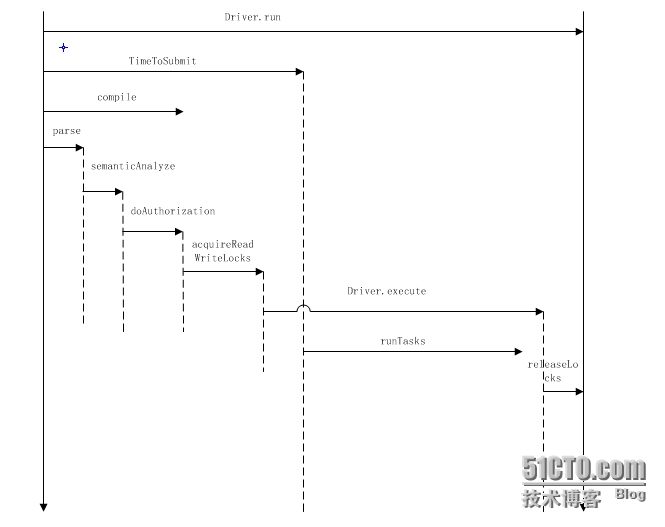
Driver类是对 1 org.apache.hadoop.hive.ql.processors.CommandProcessor.java 接口的实现,重写了run方法,定义了常见sql的执行方式. 1 public class Driver implements CommandProcessor 具体的方法调用顺序: 1 2 run--->runInternal--->(createTxnManager+recordValidTxns)----->compileInternal---> compile--analyzer(BaseSemanticAnalyzer)--->execute 其中compile和execute是两个比较重要的方法: compile用来完成语法和语义的分析,生成执行计划 execute执行物理计划,即提交相应的mapredjob 通过打印perflog可以看到Driver类的简单地时序图: 下面来看下Driver类的几个常用的方法实现: 1)createTxnManager 用来获取目前设置的用于实现lock的类,比如: 1 org.apache.hadoop.hive.ql.lockmgr.DummyTxnManager 2)checkConcurrency 用来判断当前hive设置是否支持并发控制: 1 boolean supportConcurrency=conf.getBoolVar(HiveConf.ConfVars.HIVE_SUPPORT_CONCURRENCY); 主要是通过判断hive.support.concurrency参数,默认是false 3)getClusterStatus 调用JobClient类的getClusterStatus方法来获取集群的状态: 1 2 3 4 5 6 7 8 9 10 11 12 13 public ClusterStatusgetClusterStatus() throws Exception{ ClusterStatuscs; try { JobConfjob= new JobConf(conf,ExecDriver. class ); JobClientjc= new JobClient(job); cs=jc.getClusterStatus(); } catch (Exceptione){ e.printStackTrace(); throw e; } LOG.info( "Returningclusterstatus:" +cs.toString()); return cs; } 4)getSchema //返回表的schema信息 5) 1 doAuthorization/doAuthorizationV2/getHivePrivObjects 用来在开启权限验证情况下对sql的权限检测操作 6) 1 getLockObjects/acquireReadWriteLocks/releaseLocks 都是和锁相关的方法 ,其中getLockObjects用来获取锁的对象(锁的路径,锁的模式等),最终返回一个包含所有锁的list,acquireReadWriteLocks用来控制获取锁,releaseLocks用来释放锁: 1 2 3 4 5 6 7 8 9 10 11 12 13 14 15 16 17 18 19 20 21 22 23 24 25 26 27 28 29 30 31 32 33 34 35 36 37 38 39 40 41 42 43 44 45 46 47 48 49 50 51 52 53 54 55 56 57 58 getLockObjects: private List<HiveLockObj>getLockObjects(Databased,Tablet,Partitionp,HiveLockModemode) throws SemanticException{ List<HiveLockObj>locks= new LinkedList<HiveLockObj>(); HiveLockObjectDatalockData= new HiveLockObjectData(plan.getQueryId(), String.valueOf(System.currentTimeMillis()), "IMPLICIT" , plan.getQueryStr()); if (d!= null ){ locks.add( new HiveLockObj( new HiveLockObject(d.getName(),lockData),mode)); //数据库层面的锁 return locks; } if (t!= null ){ //表层面的锁 locks.add( new HiveLockObj( new HiveLockObject(t.getDbName(),lockData),mode)); locks.add( new HiveLockObj( new HiveLockObject(t,lockData),mode)); mode=HiveLockMode.SHARED; locks.add( new HiveLockObj( new HiveLockObject(t.getDbName(),lockData),mode)); return locks; } if (p!= null ){ //分区层面的锁 locks.add( new HiveLockObj( new HiveLockObject(p.getTable().getDbName(),lockData),mode)); if (!(p instanceof DummyPartition)){ locks.add( new HiveLockObj( new HiveLockObject(p,lockData),mode)); } //Alltheparentsarelockedinsharedmode mode=HiveLockMode.SHARED; //Fordummypartitions,onlypartitionnameisneeded Stringname=p.getName(); if (p instanceof DummyPartition){ name=p.getName().split( "@" )[ 2 ]; } StringpartialName= "" ; String[]partns=name.split( "/" ); int len=p instanceof DummyPartition?partns.length:partns.length- 1 ; Map<String,String>partialSpec= new LinkedHashMap<String,String>(); for ( int idx= 0 ;idx<len;idx++){ Stringpartn=partns[idx]; partialName+=partn; String[]nameValue=partn.split( "=" ); assert (nameValue.length== 2 ); partialSpec.put(nameValue[ 0 ],nameValue[ 1 ]); try { locks.add( new HiveLockObj( new HiveLockObject( new DummyPartition(p.getTable(),p.getTable().getDbName() + "/" +p.getTable().getTableName() + "/" +partialName, partialSpec),lockData),mode)); partialName+= "/" ; } catch (HiveExceptione){ throw new SemanticException(e.getMessage()); } } locks.add( new HiveLockObj( new HiveLockObject(p.getTable(),lockData),mode)); locks.add( new HiveLockObj( new HiveLockObject(p.getTable().getDbName(),lockData),mode)); } return locks; } acquireReadWriteLocks调用了锁具体实现类的acquireLocks方法 releaseLocks调用了锁具体实现类的releaseLocks方法 7) run方法是Driver类的入口方法,调用了runInternal方法,我们主要来看runInternal的方法,大体步骤: 1 2 3 4 5 运行hive.exec.driver.run.hooks中设置的hook, 运行HiveDriverRunHook相关类的的preDriverRun方法---->检测是否支持并发,并获取并发实现的类 --->compileInternal---->运行锁相关的操作(判断是否只对mapredjob进行锁,获取锁等) ---->调用execute---->释放锁--->运行HiveDriverRunHook相关类的的postDriverRun方法 ---->返回CommandProcessorResponse对象 相关代码: 1 2 3 4 5 6 7 8 9 10 11 12 13 14 15 16 17 18 19 20 21 22 23 24 25 26 27 28 29 30 31 32 33 34 35 36 37 38 39 40 41 42 43 44 45 46 47 48 49 50 51 52 53 54 55 56 57 58 59 60 61 62 63 64 65 66 67 68 69 70 71 72 73 74 75 76 77 78 79 80 81 82 83 84 85 86 87 88 89 90 91 92 93 94 95 96 97 98 99 100 101 102 103 104 105 106 107 108 109 110 111 112 113 114 115 116 117 118 119 120 121 122 123 124 125 126 127 128 129 private CommandProcessorResponserunInternal(Stringcommand, boolean alreadyCompiled) throws CommandNeedRetryException{ errorMessage= null ; SQLState= null ; downstreamError= null ; if (!validateConfVariables()){ return new CommandProcessorResponse( 12 ,errorMessage,SQLState); } HiveDriverRunHookContexthookContext= new HiveDriverRunHookContextImpl(conf,command); //Getallthedriverrunhooksandpre-executethem. List<HiveDriverRunHook>driverRunHooks; try { //运行hive.exec.driver.run.hooks中设置的hook driverRunHooks=getHooks(HiveConf.ConfVars.HIVE_DRIVER_RUN_HOOKS, HiveDriverRunHook. class ); for (HiveDriverRunHookdriverRunHook:driverRunHooks){ driverRunHook.preDriverRun(hookContext); //运行HiveDriverRunHook相关类的的preDriverRun方法 } } catch (Exceptione){ errorMessage= "FAILED:HiveInternalError:" +Utilities.getNameMessage(e); SQLState=ErrorMsg.findSQLState(e.getMessage()); downstreamError=e; console.printError(errorMessage+ "\n" +org.apache.hadoop.util.StringUtils.stringifyException(e)); return new CommandProcessorResponse( 12 ,errorMessage,SQLState); } //Resettheperflogger PerfLoggerperfLogger=PerfLogger.getPerfLogger( true ); perfLogger.PerfLogBegin(CLASS_NAME,PerfLogger.DRIVER_RUN); perfLogger.PerfLogBegin(CLASS_NAME,PerfLogger.TIME_TO_SUBMIT); int ret; boolean requireLock= false ; boolean ckLock= false ; try { ckLock=checkConcurrency(); //检测是否支持并发,并获取并发实现的类,比如常用的org.apache.hadoop.hive.ql.lockmgr.DummyTxnManager createTxnManager(); } catch (SemanticExceptione){ errorMessage= "FAILED:Errorinsemanticanalysis:" +e.getMessage(); SQLState=ErrorMsg.findSQLState(e.getMessage()); downstreamError=e; console.printError(errorMessage, "\n" +org.apache.hadoop.util.StringUtils.stringifyException(e)); ret= 10 ; return new CommandProcessorResponse(ret,errorMessage,SQLState); } ret=recordValidTxns(); if (ret!= 0 ) return new CommandProcessorResponse(ret,errorMessage,SQLState); if (!alreadyCompiled){ ret=compileInternal(command); //调用compileInternal方法 if (ret!= 0 ){ return new CommandProcessorResponse(ret,errorMessage,SQLState); } } //thereasonthatwesetthetxnmanagerforthecxthereisbecauseeach //queryhasitsownctxobject.Thetxnmgrissharedacrossthe //sameinstanceofDriver,whichcanrunmultiplequeries. ctx.setHiveTxnManager(txnMgr); if (ckLock){ //断是否只对mapredjob进行锁,参数hive.lock.mapred.only.operation,默认为false boolean lockOnlyMapred=HiveConf.getBoolVar(conf,HiveConf.ConfVars.HIVE_LOCK_MAPRED_ONLY); if (lockOnlyMapred){ Queue<Task<? extends Serializable>>taskQueue= new LinkedList<Task<? extends Serializable>>(); taskQueue.addAll(plan.getRootTasks()); while (taskQueue.peek()!= null ){ Task<? extends Serializable>tsk=taskQueue.remove(); requireLock=requireLock||tsk.requireLock(); if (requireLock){ break ; } if (tsk instanceof ConditionalTask){ taskQueue.addAll(((ConditionalTask)tsk).getListTasks()); } if (tsk.getChildTasks()!= null ){ taskQueue.addAll(tsk.getChildTasks()); } //doesnotaddbackuptaskhere,becausebackuptaskshouldbethesame //typeoftheoriginaltask. } } else { requireLock= true ; } } if (requireLock){ //获取锁 ret=acquireReadWriteLocks(); if (ret!= 0 ){ try { releaseLocks(ctx.getHiveLocks()); } catch (LockExceptione){ //Notmuchtodohere } return new CommandProcessorResponse(ret,errorMessage,SQLState); } } ret=execute(); //job运行 if (ret!= 0 ){ //ifneedRequireLockisfalse,thereleaseherewilldonothingbecausethereisnolock try { releaseLocks(ctx.getHiveLocks()); } catch (LockExceptione){ //Nothingtodohere } return new CommandProcessorResponse(ret,errorMessage,SQLState); } //ifneedRequireLockisfalse,thereleaseherewilldonothingbecausethereisnolock try { releaseLocks(ctx.getHiveLocks()); } catch (LockExceptione){ errorMessage= "FAILED:HiveInternalError:" +Utilities.getNameMessage(e); SQLState=ErrorMsg.findSQLState(e.getMessage()); downstreamError=e; console.printError(errorMessage+ "\n" +org.apache.hadoop.util.StringUtils.stringifyException(e)); return new CommandProcessorResponse( 12 ,errorMessage,SQLState); } perfLogger.PerfLogEnd(CLASS_NAME,PerfLogger.DRIVER_RUN); perfLogger.close(LOG,plan); //Takeallthedriverrunhooksandpost-executethem. try { for (HiveDriverRunHookdriverRunHook:driverRunHooks){ //运行HiveDriverRunHook相关类的的postDriverRun方法 driverRunHook.postDriverRun(hookContext); } } catch (Exceptione){ errorMessage= "FAILED:HiveInternalError:" +Utilities.getNameMessage(e); SQLState=ErrorMsg.findSQLState(e.getMessage()); downstreamError=e; console.printError(errorMessage+ "\n" +org.apache.hadoop.util.StringUtils.stringifyException(e)); return new CommandProcessorResponse( 12 ,errorMessage,SQLState); } return new CommandProcessorResponse(ret); } 8) 1 2 3 4 5 6 7 8 9 10 11 12 13 14 15 16 17 再来看下compileInternal方法 private static final ObjectcompileMonitor= new Object(); private int compileInternal(Stringcommand){ int ret; synchronized (compileMonitor){ ret=compile(command); //调用compile方法 } if (ret!= 0 ){ try { releaseLocks(ctx.getHiveLocks()); } catch (LockExceptione){ LOG.warn( "Exceptioninreleasinglocks." +org.apache.hadoop.util.StringUtils.stringifyException(e)); } } return ret; } 调用了compile方法,compile方法分析命令,生成Task,关于compile的具体实现后面详细讲解 9.execute方法,提交task并等待task运行完毕,并打印task运行的信息,比如消耗的时间等 (这里信息也比较多,后面单独讲解 本文转自菜菜光 51CTO博客,原文链接:http://blog.51cto.com/caiguangguang/1571890,如需转载请自行联系原作者