首页 文章 精选 留言 我的

精选列表

搜索[AI编程],共10000篇文章
优秀的个人博客,低调大师

符合语言习惯的 Python 优雅编程技巧

Python最大的优点之一就是语法简洁,好的代码就像伪代码一样,干净、整洁、一目了然。要写出 Pythonic(优雅的、地道的、整洁的)代码,需要多看多学大牛们写的代码,github 上有很多非常优秀的源代码值得阅读,比如:requests、flask、tornado,下面列举一些常见的Pythonic写法。 0. 程序必须先让人读懂,然后才能让计算机执行。 “Programs must be written for people to read, and only incidentally for machines to execute.” 1. 交换赋值 ##不推荐 temp = a a = b b = a ##推荐 a, b = b, a # 先生成一个元组(tuple)对象,然后unpack 2. Unpacking ##不推荐 l = ['David', 'Pythonista', '+1-514-555-1234'] first_name = l[0] last_name = l[1] phone_number = l[2] ##推荐 l = ['David', 'Pythonista', '+1-514-555-1234'] first_name, last_name, phone_number = l# Python 3 Only first, *middle, last = another_list 3. 使用操作符in ##不推荐if fruit == "apple" or fruit == "orange" or fruit == "berry":# 多次判断 ##推荐if fruit in ["apple", "orange", "berry"]:# 使用 in 更加简洁 4. 字符串操作 ##不推荐 colors = ['red', 'blue', 'green', 'yellow'] result = ''for s in colors: result += s # 每次赋值都丢弃以前的字符串对象, 生成一个新对象 ##推荐 colors = ['red', 'blue', 'green', 'yellow'] result = ''.join(colors) # 没有额外的内存分配 5. 字典键值列表 ##不推荐for key in my_dict.keys():# my_dict[key] ... ##推荐for key in my_dict:# my_dict[key] ...# 只有当循环中需要更改key值的情况下,我们需要使用 my_dict.keys()# 生成静态的键值列表。 6. 字典键值判断 ##不推荐if my_dict.has_key(key):# ...do something with d[key] ##推荐if key in my_dict:# ...do something with d[key] 7. 字典 get 和 setdefault 方法 ##不推荐 navs = {}for (portfolio, equity, position) in data:if portfolio not in navs: navs[portfolio] = 0 navs[portfolio] += position * prices[equity]##推荐 navs = {}for (portfolio, equity, position) in data:# 使用 get 方法 navs[portfolio] = navs.get(portfolio, 0) + position * prices[equity]# 或者使用 setdefault 方法 navs.setdefault(portfolio, 0) navs[portfolio] += position * prices[equity] 8. 判断真伪 ##不推荐if x == True:# ....if len(items) != 0:# ...if items != []:# ... ##推荐if x:# ....if items:# ... 9. 遍历列表以及索引 ##不推荐 items = 'zero one two three'.split()# method 1 i = 0for item in items:print i, item i += 1# method 2for i in range(len(items)):print i, items[i]##推荐 items = 'zero one two three'.split()for i, item in enumerate(items):print i, item 10. 列表推导 ##不推荐 new_list = []for item in a_list:if condition(item): new_list.append(fn(item)) ##推荐 new_list = [fn(item) for item in a_list if condition(item)] 11. 列表推导-嵌套 ##不推荐for sub_list in nested_list:if list_condition(sub_list):for item in sub_list:if item_condition(item):# do something... ##推荐 gen = (item for sl in nested_list if list_condition(sl) \for item in sl if item_condition(item))for item in gen:# do something... 12. 循环嵌套 ##不推荐for x in x_list:for y in y_list:for z in z_list:# do something for x & y ##推荐from itertools import productfor x, y, z in product(x_list, y_list, z_list):# do something for x, y, z 13. 尽量使用生成器代替列表 ##不推荐def my_range(n): i = 0 result = []while i < n: result.append(fn(i)) i += 1return result # 返回列表##推荐def my_range(n): i = 0 result = []while i < n:yield fn(i) # 使用生成器代替列表 i += 1 *尽量用生成器代替列表,除非必须用到列表特有的函数。 14. 中间结果尽量使用imap/ifilter代替map/filter ##不推荐 reduce(rf, filter(ff, map(mf, a_list)))##推荐from itertools import ifilter, imap reduce(rf, ifilter(ff, imap(mf, a_list))) *lazy evaluation 会带来更高的内存使用效率,特别是当处理大数据操作的时候。 15. 使用any/all函数 ##不推荐 found = Falsefor item in a_list:if condition(item): found = Truebreakif found:# do something if found... ##推荐if any(condition(item) for item in a_list):# do something if found... 16. 属性(property) ##不推荐class Clock(object):def __init__(self): self.__hour = 1def setHour(self, hour):if 25 > hour > 0: self.__hour = hourelse: raise BadHourExceptiondef getHour(self):return self.__hour##推荐class Clock(object):def __init__(self): self.__hour = 1def __setHour(self, hour):if 25 > hour > 0: self.__hour = hourelse: raise BadHourExceptiondef __getHour(self):return self.__hour hour = property(__getHour, __setHour) 17. 使用 with 处理文件打开 ##不推荐 f = open("some_file.txt")try: data = f.read()# 其他文件操作..finally: f.close()##推荐with open("some_file.txt") as f: data = f.read()# 其他文件操作... 18. 使用 with 忽视异常(仅限Python 3) ##不推荐try: os.remove("somefile.txt")except OSError:pass##推荐from contextlib import ignored # Python 3 onlywith ignored(OSError): os.remove("somefile.txt") 19. 使用 with 处理加锁 ##不推荐import threading lock = threading.Lock() lock.acquire()try:# 互斥操作...finally: lock.release()##推荐import threading lock = threading.Lock()with lock:# 互斥操作... 20. 参考 1) Idiomatic Python: http://python.net/~goodger/projects/pycon/2007/idiomatic/handout.html 2) PEP 8: Style Guide for Python Code: http://www.python.org/dev/peps/pep-0008/ 原文发布时间为:2018-11-15 本文作者:安生 本文来自云栖社区合作伙伴“ 数据与算法之美”,了解相关信息可以关注“ 数据与算法之美”。

优秀的个人博客,低调大师

Java并发编程之线程安全、线程通信

Java多线程开发中最重要的一点就是线程安全的实现了。所谓Java线程安全,可以简单理解为当多个线程访问同一个共享资源时产生的数据不一致问题。为此,Java提供了一系列方法来解决线程安全问题。 synchronized synchronized用于同步多线程对共享资源的访问,在实现中分为同步代码块和同步方法两种。 同步代码块 1 public class DrawThread extends Thread { 2 3 private Account account; 4 private double drawAmount; 5 public DrawThread(String name, Account account, double drawAmount) { 6 super(name); 7 this.account = account; 8 this.drawAmount = drawAmount; 9 } 10 @Override 11 public void run() { 12 //使用account作为同步代码块的锁对象 13 synchronized(account) { 14 if (account.getBalance() >= drawAmount) { 15 System.out.println(getName() + "取款成功, 取出:" + drawAmount); 16 try { 17 TimeUnit.MILLISECONDS.sleep(1); 18 } catch (InterruptedException e) { 19 e.printStackTrace(); 20 } 21 account.setBalance(account.getBalance() - drawAmount); 22 System.out.println("余额为: " + account.getBalance()); 23 } else { 24 System.out.println(getName() + "取款失败!余额不足!"); 25 } 26 } 27 } 28 } 同步方法 使用同步方法,即使用synchronized关键字修饰类的实例方法或类方法,可以实现线程安全类,即该类在多线程访问中,可以保证可变成员的数据一致性。 同步方法中,隐式的锁对象由锁的是实例方法还是类方法确定,分别为该类对象或类的Class对象。 1 public class SyncAccount { 2 private String accountNo; 3 private double balance; 4 //省略构造器、getter setter方法 5 //在一个简单的账户取款例子中, 通过添加synchronized的draw方法, 把Account类变为一个线程安全类 6 public synchronized void draw(double drawAmount) { 7 if (balance >= drawAmount) { 8 System.out.println(Thread.currentThread().getName() + "取款成功, 取出:" + drawAmount); 9 try { 10 TimeUnit.MILLISECONDS.sleep(1); 11 } catch (InterruptedException e) { 12 e.printStackTrace(); 13 } 14 balance -= drawAmount; 15 System.out.println("余额为: " + balance); 16 } else { 17 System.out.println(Thread.currentThread().getName() + "取款失败!余额不足!"); 18 } 19 } 20 //省略HashCode和equals方法 21 } 同步锁(Lock、ReentrantLock) Java5新增了两个用于线程同步的接口Lock和ReadWriteLock,并且分别提供了两个实现类ReentrantLock(可重入锁)和ReentrantReadWriteLock(可重入读写锁)。 相比较synchronized,ReentrantLock的一些优势功能: 1. 等待可中断:指持有锁的线程长期不释放锁的时候,正在等待的线程可以选择放弃等待。 2. 公平锁:多个线程等待同一个锁时,必须按照申请锁的时间顺序依次获取。synchronized是非公平锁,ReentrantLock可以通过参数设置为公平锁 3. 多条件锁:ReentrantLock可通过Condition类获取多个条件关联 Java 1.6以后,synchronized性能提升较大,因此一般的开发中依然建议使用语法层面上的synchronized加锁。 Java8新增了更为强大的可重入读写锁StampedLock类。 比较常用的是ReentrantLock类,可以显示地加锁、释放锁。下面使用ReentrantLock重构上面的SyncAccount类。 1 public class RLAccount { 2 //定义锁对象 3 private final ReentrantLock lock = new ReentrantLock(); 4 private String accountNo; 5 private double balance; 6 //省略构造方法和getter setter 7 public void draw(double drawAmount) { 8 //加锁 9 lock.lock(); 10 try { 11 if (balance >= drawAmount) { 12 System.out.println(Thread.currentThread().getName() + "取款成功, 取出:" + drawAmount); 13 try { 14 TimeUnit.MILLISECONDS.sleep(1); 15 } catch (InterruptedException e) { 16 e.printStackTrace(); 17 } 18 balance -= drawAmount; 19 System.out.println("余额为: " + balance); 20 } else { 21 System.out.println(Thread.currentThread().getName() + "取款失败!余额不足!"); 22 } 23 } finally { 24 //通过finally块保证释放锁 25 lock.unlock(); 26 } 27 } 28 } 死锁 当两个线程相互等待地方释放锁的时候,就会产生死锁。关于死锁和线程安全的深入分析,将另文介绍。 线程通信方式之wait、notify、notifyAll Object类提供了三个用于线程通信的方法,分别是wait、notify和notifyAll。这三个方法必须由同步锁对象来调用,具体来说: 1. 同步方法:因为同步方法默认使用所在类的实例作为锁,即this,可以在方法中直接调用。 2. 同步代码块:必须由锁来调用。 wait():导致当前线程等待,直到其它线程调用锁的notify方法或notifyAll方法来唤醒该线程。调用wait的线程会释放锁。 notify():唤醒任意一个在等待的线程 notifyAll():唤醒所有在等待的线程 1 /* 2 * 通过一个生产者-消费者队列来说明线程通信的基本使用方法 3 * 注意: 假如这里的判断条件为if语句,唤醒方法为notify, 那么如果分别有多个线程操作入队\出队, 会导致线程不安全. 4 */ 5 public class EventQueue { 6 7 private final int max; 8 9 static class Event{ 10 11 } 12 //定义一个不可改的链表集合, 作为队列载体 13 private final LinkedList<Event> eventQueue = new LinkedList<>(); 14 15 private final static int DEFAULT_MAX_EVENT = 10; 16 17 public EventQueue(int max) { 18 this.max = max; 19 } 20 21 public EventQueue() { 22 this(DEFAULT_MAX_EVENT); 23 } 24 25 private void console(String message) { 26 System.out.printf("%s:%s\n",Thread.currentThread().getName(), message); 27 } 28 //定义入队方法 29 public void offer(Event event) { 30 //使用链表对象作为锁 31 synchronized(eventQueue) { 32 //在循环中判断如果队列已满, 则调用锁的wait方法, 使线程阻塞 33 while(eventQueue.size() >= max) { 34 try { 35 console(" the queue is full"); 36 eventQueue.wait(); 37 } catch (InterruptedException e) { 38 e.printStackTrace(); 39 } 40 } 41 console(" the new event is submitted"); 42 eventQueue.addLast(event); 43 this.eventQueue.notifyAll(); 44 } 45 } 46 //定义出队方法 47 public Event take() { 48 //使用链表对象作为锁 49 synchronized(eventQueue) { 50 //在循环中判断如果队列已空, 则调用锁的wait方法, 使线程阻塞 51 while(eventQueue.isEmpty()) { 52 try { 53 console(" the queue is empty."); 54 eventQueue.wait(); 55 } catch (InterruptedException e) { 56 e.printStackTrace(); 57 } 58 } 59 Event event = eventQueue.removeFirst(); 60 this.eventQueue.notifyAll(); 61 console(" the event " + event + " is handled/taked."); 62 return event; 63 } 64 } 65 } 线程通信方式之Condition 如果使用的是Lock接口实现类来同步线程,就需要使用Condition类的三个方法实现通信,分别是await、signal和signalAll,使用上与Object类的通信方法基本一致。 1 /* 2 * 使用Lock接口和Condition来实现生产者-消费者队列的通信 3 */ 4 public class ConditionEventQueue { 5 //显示定义Lock对象 6 private final Lock lock = new ReentrantLock(); 7 //通过newCondition方法获取指定Lock对象的Condition实例 8 private final Condition cond = lock.newCondition(); 9 private final int max; 10 static class Event{ } 11 //定义一个不可改的链表集合, 作为队列载体 12 private final LinkedList<Event> eventQueue = new LinkedList<>(); 13 private final static int DEFAULT_MAX_EVENT = 10; 14 public ConditionEventQueue(int max) { 15 this.max = max; 16 } 17 18 public ConditionEventQueue() { 19 this(DEFAULT_MAX_EVENT); 20 } 21 22 private void console(String message) { 23 System.out.printf("%s:%s\n",Thread.currentThread().getName(), message); 24 } 25 //定义入队方法 26 public void offer(Event event) { 27 lock.lock(); 28 try { 29 //在循环中判断如果队列已满, 则调用cond的wait方法, 使线程阻塞 30 while (eventQueue.size() >= max) { 31 try { 32 console(" the queue is full"); 33 cond.await(); 34 } catch (InterruptedException e) { 35 e.printStackTrace(); 36 } 37 } 38 console(" the new event is submitted"); 39 eventQueue.addLast(event); 40 cond.signalAll();; 41 } finally { 42 lock.unlock(); 43 } 44 45 } 46 //定义出队方法 47 public Event take() { 48 lock.lock(); 49 try { 50 //在循环中判断如果队列已空, 则调用cond的wait方法, 使线程阻塞 51 while (eventQueue.isEmpty()) { 52 try { 53 console(" the queue is empty."); 54 cond.wait(); 55 } catch (InterruptedException e) { 56 e.printStackTrace(); 57 } 58 } 59 Event event = eventQueue.removeFirst(); 60 cond.signalAll(); 61 console(" the event " + event + " is handled/taked."); 62 return event; 63 } finally { 64 lock.unlock(); 65 } 66 } 67 } Java 1.5开始就提供了BlockingQueue接口,来实现如上所述的生产者-消费者线程同步工具。具体介绍将另文说明。

优秀的个人博客,低调大师

开启Golang编程第一章

Go is an open source programming language that makes it easy to build simple,reliable, and effcient software. Try Go package main import "fmt" func main() { fmt.Println("Hello, 世界") } https://tour.golang.org/welcome/1 体会:和C/C++、C#、java类似的语言,好基友推荐学习的语言,emmm第一步还是蛮简单的。 好吧第一个花括号不能换行,哈哈哈哈。网名:浩秦; 邮箱:root#landv.pw; 只要我能控制一個國家的貨幣發行,我不在乎誰制定法律。金錢一旦作響,壞話隨之戛然而止。

优秀的个人博客,低调大师

.Net并行编程(一)-TPL之数据并行

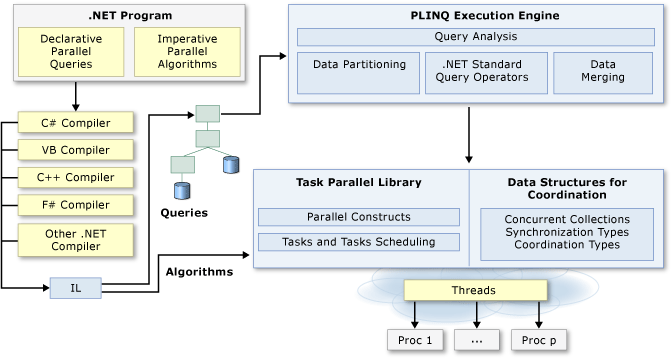
前言 许多个人计算机和工作站都有多个CPU核心,可以同时执行多个线程。利用硬件的特性,使用并行化代码以在多个处理器之间分配工作。 应用场景 文件批量上传 并行上传单个文件。也可以把一个文件拆成几段分开上传,加快上传速度。 数据分批计算 如几百万数据可以拆成许多无关联的部分,并行计算处理。最后聚合。 数据推送 也是需要将数据拆解后,并行推送。 任务并行库-数据并行 如果在一个循环内在每次迭代只执行少量工作或者它没有运行多次迭代,那么并行化的开销可能会导致代码运行的更慢。使用并行之前,应该对线程(锁,死锁,竞争条件)应该有基本的了解。 Parallel.For /// <summary> /// 正常循环 /// </summary> public void FormalDirRun() { long totalSize = 0; var dir = @"E:\LearnWall\orleans";//args[1]; String[] files = Directory.GetFiles(dir); stopwatch.Restart(); for (var i = 0; i < files.Length; i++) { FileInfo fi = new FileInfo(files[i]); long size = fi.Length; Interlocked.Add(ref totalSize, size); } stopwatch.Stop(); Console.WriteLine($"FormalDirRun------{files.Length} files, {totalSize} bytes,time:{stopwatch.ElapsedMilliseconds},Dir:{dir}"); } /// <summary> /// 并行循环 /// </summary> public void ParallelForDirRun() { long totalSize = 0; var dir = @"E:\LearnWall\orleans";//args[1]; String[] files = Directory.GetFiles(dir); stopwatch.Restart(); Parallel.For(0, files.Length, index => { FileInfo fi = new FileInfo(files[index]); long size = fi.Length; Interlocked.Add(ref totalSize, size); }); stopwatch.Stop(); Console.WriteLine($"ParallelForDirRun-{files.Length} files, {totalSize} bytes,time:{stopwatch.ElapsedMilliseconds},Dir:{dir}"); } 从下图对比接口可以看出当循环体内方法执行时间很短时,并行时间反而更长。这块会有更细致的补充。 FormalDirRun------20 files, 255618 bytes,time:0,Dir:E:\LearnWall\orleans ParallelForDirRun-20 files, 255618 bytes,time:6,Dir:E:\LearnWall\orleans 我们追加一些延时操作如Thread.Sleep,但这应该不是好好例子...但我只想演示效果就行了。 Thread.Sleep(1000); 查看结果得到,当方法内有阻塞延时一秒后,两者速度错了七倍。 FormalDirRun------20 files, 255618 bytes,time:20011,Dir:E:\LearnWall\orleans ParallelForDirRun-20 files, 255618 bytes,time:3007,Dir:E:\LearnWall\orleans 矩阵和秒表示例 Parallel.ForEach 为了并行速度的最大化,我们应该尽量减少在并行内对共享资源的访问,如Console.Write,文件日志等...但这里为了显示效果,就用了。 public void ParallelForEachDirRun() { long totalSize = 0; var dir = @"E:\LearnWall\orleans";//args[1]; String[] files = Directory.GetFiles(dir); stopwatch.Restart(); Parallel.ForEach(files, (current) => { FileInfo fi = new FileInfo(current); long size = fi.Length; Interlocked.Add(ref totalSize, size); Console.WriteLine($"name:{fi.Name}"); }); stopwatch.Stop(); Console.WriteLine($"ParallelForEachDirRun-{files.Length} files, {totalSize} bytes,Time:{stopwatch.ElapsedMilliseconds}"); } name:.gitignore name:build.sh . . . name:TestAll.cmd ParallelForEachDirRun-20 files, 255618 bytes,Time:17 Parallel.For 线程局部变量 public void ParallelForForThreadLocalVariables() { int[] nums = Enumerable.Range(0, 1000000).ToArray(); long total = 0; // Use type parameter to make subtotal a long, not an int Parallel.For<long>(0, nums.Length, () => 0, (j,loop, subtotal) => { subtotal += nums[j]; return subtotal; }, (x) => Interlocked.Add(ref total, x) ); Console.WriteLine("The total is {0:N0}", total); Console.WriteLine("Press any key to exit"); Console.ReadKey(); } 结果如下: The total is 499,999,509,000 每个For方法的前两个参数指定开始和结束迭代值。在此方法的重载中,第三个参数是初始化本地状态的位置。在此上下文中,本地状态表示一个变量,其生命周期从当前线程上的循环的第一次迭代之前延伸到最后一次迭代之后。 第三个参数的类型是Func ,其中TResult是将存储线程本地状态的变量的类型。它的类型由调用泛型For (Int32,Int32,Func ,Func ,Action )方法时提供的泛型类型参数定义,在这种情况下是Int64。type参数告诉编译器将用于存储线程局部状态的临时变量的类型。在此示例中,表达式() => 0(或Function() 0在Visual Basic中)将线程局部变量初始化为零。如果泛型类型参数是引用类型或用户定义的值类型,则表达式如下所示: () => new MyClass() 这块内容比较繁琐,一句话来说:前两个参数是开始和结束值,第三个是根据For泛型而初始化的值。我其实也没看太懂这块。.net Framework源码如下,.netcore的不知道: public static ParallelLoopResult For<TLocal>( int fromInclusive, int toExclusive, Func<TLocal> localInit, Func<int, ParallelLoopState, TLocal, TLocal> body, Action<TLocal> localFinally) { if (body == null) { throw new ArgumentNullException("body"); } if (localInit == null) { throw new ArgumentNullException("localInit"); } if (localFinally == null) { throw new ArgumentNullException("localFinally"); } return ForWorker( fromInclusive, toExclusive, s_defaultParallelOptions, null, null, body, localInit, localFinally); } /// </summary> /// <typeparam name="TLocal">本地数据的类型.</typeparam> /// <param name="fromInclusive">循环开始数</param> /// <param name="toExclusive">循环结束数</param> /// <param name="parallelOptions">选项</param> /// <param name="body">循环执行体</param> /// <param name="bodyWithState">ParallelState的循环体重载。</param> /// <param name="bodyWithLocal">线程局部状态的循环体重载。</param> /// <param name="localInit">一个返回新线程本地状态的选择器函数。</param> /// <param name="localFinally">清理线程本地状态的清理函数。</param> /// <remarks>只能提供一个身体参数(即它们是独占的)。</remarks> /// <returns>A <see cref="T:System.Threading.Tasks.ParallelLoopResult"/> structure.</returns> private static ParallelLoopResult ForWorker<TLocal>( int fromInclusive, int toExclusive, ParallelOptions parallelOptions, Action<int> body, Action<int, ParallelLoopState> bodyWithState, Func<int, ParallelLoopState, TLocal, TLocal> bodyWithLocal, Func<TLocal> localInit, Action<TLocal> localFinally) { . . . } Parallel.ForEach线程局部变量 /// <summary> /// /// </summary> public void ParallelForEachThreadLocalVariables() { int[] nums = Enumerable.Range(0, 1000000).ToArray(); long total = 0; // First type parameter is the type of the source elements // Second type parameter is the type of the thread-local variable (partition subtotal) Parallel.ForEach<int, long>(nums, // source collection () => 0, // method to initialize the local variable (j, loop, subtotal) => // method invoked by the loop on each iteration { subtotal += j; //modify local variable return subtotal; // value to be passed to next iteration }, // Method to be executed when each partition has completed. // finalResult is the final value of subtotal for a particular partition. (finalResult) => Interlocked.Add(ref total, finalResult) ); Console.WriteLine("The total from Parallel.ForEach is {0:N0}", total); } ForEach的源码如下 /// <summary> /// Executes a for each operation on an <see cref="T:System.Collections.IEnumerable{TSource}"/> /// in which iterations may run in parallel. /// </summary> /// <typeparam name="TSource">The type of the data in the source.</typeparam> /// <param name="source">An enumerable data source.</param> /// <param name="body">The delegate that is invoked once per iteration.</param> /// <exception cref="T:System.ArgumentNullException">The exception that is thrown when the <paramref name="source"/> /// argument is null.</exception> /// <exception cref="T:System.ArgumentNullException">The exception that is thrown when the <paramref name="body"/> /// argument is null.</exception> /// <exception cref="T:System.AggregateException">The exception that is thrown to contain an exception /// thrown from one of the specified delegates.</exception> /// <returns>A <see cref="T:System.Threading.Tasks.ParallelLoopResult">ParallelLoopResult</see> structure /// that contains information on what portion of the loop completed.</returns> /// <remarks> /// The <paramref name="body"/> delegate is invoked once for each element in the <paramref name="source"/> /// enumerable. It is provided with the current element as a parameter. /// </remarks> public static ParallelLoopResult ForEach<TSource>(IEnumerable<TSource> source, Action<TSource> body) { if (source == null) { throw new ArgumentNullException("source"); } if (body == null) { throw new ArgumentNullException("body"); } return ForEachWorker<TSource, object>( source, s_defaultParallelOptions, body, null, null, null, null, null, null); } 取消 Parallel.ForEach或Parallel.For 通过CancellationTokenSource来获取token CancellationTokenSource cts = new CancellationTokenSource(); 通过ParallelOptions.CancellationToken属性来控制取消状态。 ParallelOptions po = new ParallelOptions(); po.CancellationToken = cts.Token; 通过Parallel.For或Foreach的ParallelOptions值来控制并行内方法的取消。 代码如下: int[] nums = Enumerable.Range(0, 10000000).ToArray(); CancellationTokenSource cts = new CancellationTokenSource(); // Use ParallelOptions instance to store the CancellationToken ParallelOptions po = new ParallelOptions(); po.CancellationToken = cts.Token; po.MaxDegreeOfParallelism = System.Environment.ProcessorCount; Console.WriteLine("Press any key to start. Press 'c' to cancel."); Console.ReadKey(); // Run a task so that we can cancel from another thread. Task.Factory.StartNew(() => { var s = Console.ReadKey().KeyChar; if (s == 'c') cts.Cancel(); Console.WriteLine("press any key to exit111"); }); try { Parallel.ForEach(nums, po, (num) => { double d = Math.Sqrt(num); Console.WriteLine("{0} on {1}", d, Thread.CurrentThread.ManagedThreadId); po.CancellationToken.ThrowIfCancellationRequested(); }); } catch (OperationCanceledException e) { Console.WriteLine(e.Message); } finally { cts.Dispose(); } Console.ReadKey(); 运行结果如下,键盘输入c时,并行取消。 1937.41838537782 on 7 2739.95711645274 on 8 2501.40660429287 on 9 2958.47798707376 on 10 . . . press any key to exit111 The operation was canceled. 捕获并行体内的异常 示例方法采用ConcurrentQueue来接收异常集合,最后抛出一个聚合异常AggregateException。 var exceptions = new ConcurrentQueue(); exceptions.Enqueue(e); 外部调用AggregateException.Flatten方法获取异常信息。 这为我以后捕获异常提供了一个好思路。 /// <summary> /// 捕获并行体内的异常 /// </summary> public void HandleExceptionParallelLoop() { // Create some random data to process in parallel. // There is a good probability this data will cause some exceptions to be thrown. byte[] data = new byte[5000]; Random r = new Random(); r.NextBytes(data); try { ProcessDataInParallel(data); } catch (AggregateException ae) { var ignoredExceptions = new List<Exception>(); // This is where you can choose which exceptions to handle. foreach (var ex in ae.Flatten().InnerExceptions) { if (ex is ArgumentException) Console.WriteLine(ex.Message); else ignoredExceptions.Add(ex); } if (ignoredExceptions.Count > 0) throw new AggregateException(ignoredExceptions); } Console.WriteLine("Press any key to exit."); Console.ReadKey(); } private void ProcessDataInParallel(byte[] data) { // Use ConcurrentQueue to enable safe enqueueing from multiple threads. var exceptions = new ConcurrentQueue<Exception>(); // Execute the complete loop and capture all exceptions. Parallel.ForEach(data, d => { try { // Cause a few exceptions, but not too many. if (d < 3) throw new ArgumentException($"Value is {d}. Value must be greater than or equal to 3."); else Console.Write(d + " "); } // Store the exception and continue with the loop. catch (Exception e) { exceptions.Enqueue(e); } }); Console.WriteLine(); // Throw the exceptions here after the loop completes. if (exceptions.Count > 0) throw new AggregateException(exceptions); } 对微小执行体提速 当Parallel.For循环有一个很快的执行体,它可能比同等顺序循环执行更慢。较慢的性能是由分区数据所涉及的开销和每次循环迭代调用委托的成本引起的。为了解决这种情况,Partitioner类提供了Partitioner.Create方法,该方法使您能够为委托主体提供顺序循环,以便每个分区仅调用一次委托,而不是每次迭代调用一次。 var rangePartitioner = Partitioner.Create(0, source.Length); /// <summary> /// 提速 /// </summary> public void SpeedUpMicroParallelBody() { // Source must be array or IList. var source = Enumerable.Range(0, 100000).ToArray(); // Partition the entire source array. var rangePartitioner = Partitioner.Create(0, source.Length); double[] results = new double[source.Length]; // Loop over the partitions in parallel. Parallel.ForEach(rangePartitioner, (range, loopState) => { // Loop over each range element without a delegate invocation. for (int i = range.Item1; i < range.Item2; i++) { results[i] = source[i] * Math.PI; } }); Console.WriteLine("Operation complete. Print results? y/n"); char input = Console.ReadKey().KeyChar; if (input == 'y' || input == 'Y') { foreach (double d in results) { Console.Write("{0} ", d); } } } 源码地址 CsharpFanDemo 总结 本篇文章沿着微软官方文档步骤熟悉了第一部分数据并行的用法。 Parallel.For和Parallel.ForEach实现并行。 Parallel.For和Parallel.ForEach线程局部变量。 取消并行ParallelOptions.CancellationToken 捕捉异常ConcurrentQueue累加并行体内的异常,外部接收。 加速Partitioner.Create 感谢观看!

优秀的个人博客,低调大师

python-并发编程之多进程

一、操作系统基础: 进程的概念起源于操作系统,操作系统其它所有概念都是围绕进程来的,所以我们了解进程之前先来了解一下操作系统 操作系统位于计算机硬件与应用软件之间,本质也是一个软件。操作系统由操作系统的内核(运行于内核态,管理硬件资源)以及系统调用(运行于用户态,为应用程序员写的应用程序提供系统调用接口)两部分组成 两大功能: 1.将复杂的硬件操作封装成简单的接口给应用程序或者用户去使用 2.将多个进程对硬件的竞争变得有序 操作系统处理进程的发展简略: 1.串行:一个任务完整的运行完毕才运行下一个任务 2.并发:多个任务看起来是同时运行的 3.多道技术(复用-->共享) (1)空间上的复用:多个任务复用内存空间 (2)时间上的复用:多个任务复用cpu的时间 时间上的复用又分为两种: 一个任务占用时间过长会被操作系统剥夺走cpu的执行权限:比起串行执行反而降低效率 一个任务遇到IO操作也会被操作系统剥夺走cpu的执行权限:比起串行执行可以提升效率 二、进程 程序仅仅是一堆代码而已,而进程指的是程序运行的过程 (一)、进程的创建 开启进程的方式1:(直接使用Process) from multiprocessing import Process import time def task(name): print('%s is running'%name) time.sleep(3) print('%s is done'%name) #在windows系统上,开启子进程的操作必须放到 if __name__ == '__main__':中,避免递归 if __name__ == '__main__': p = Process(target=task,args=('egon',)) # Process(target=task,kwargs={'name':'egon'}) p.start()#只是向操作系统发送了一个开启子进程的信号 print('主') View Code 开启进程的方式2:(继承Process来自定义类,重写run方法) from multiprocessing import Process import time class Myprocess(Process): def __init__(self,name): super().__init__() self.name = name def run(self): print('%s is running' % self.name) time.sleep(3) print('%s is done' % self.name) if __name__ == '__main__': p = Myprocess('egon') p.start() print('主') View Code 结果都为: 主 egon is running egon is done 注:run:如果在创建Process对象的时候不指定target,那么就会默认执行Process的run方法: (二)、join方法 join阻塞当前进程,直到调用join方法的那个进程执行完,再继续执行当前进程 from multiprocessing import Process import time def task(name,n): print('%s is running'%name) time.sleep(n) print('%s is done'%name) if __name__ == '__main__': start = time.time() p_j =[] for i in range(1,4): p = Process(target=task,args=('egon',i)) p.start() p_j.append(p) for i in p_j: i.join() print(time.time() - start) print('主') View Code 当不加join方法时,主进程先运行完毕,加了join就会等子进程运行完毕后才运行主进程,先依次调用start启动进程,再依次调用join要求主进程等待子进程的结束。 为什么要先依次调用start再调用join,而不是start完了就调用join from multiprocessing import Process import time def task(name,n): print('%s is running'%name) time.sleep(n) print('%s is done'%name) if __name__ == '__main__': p1 = Process(target=task,args=('egon',1)) p2 = Process(target=task,args=('alex',2)) start = time.time() p1.start() p1.join() p2.start() p2.join() print(time.time() - start) print('主') View Code 程序变成了串行执行,并不是并发了。 (三)进程直接的内存空间互相隔离 from multiprocessing import Process import time n=100 def task(): global n n=0 if __name__ == '__main__': p = Process(target=task) p.start() p.join() print(n)#100 View Code 主进程与子进程之间互不干扰,子进程是对主进程的拷贝。 (四)、进程对象其他相关属性或方法 进程pid(每一个进程在操作系统内都有一个唯一的id号) 使用multiprocessing内的current_process from multiprocessing import Process,current_process import time def task(): print('%s is running'%current_process().pid) time.sleep(3) print('%s is done'%current_process().pid) if __name__ == '__main__': p = Process(target=task) p.start() print('主 %s'%current_process().pid) View Code 使用os模块下的getpid方法 from multiprocessing import Process,current_process import time,os def task(): print('%s is running'%os.getpid()) time.sleep(3) print('%s is done'%os.getpid()) if __name__ == '__main__': p = Process(target=task) p.start() print('主 %s'%os.getpid()) View Code getppid()获取进程的主进程id号 from multiprocessing import Process,current_process import time,os def task(): print('%s is running 爹是:%s' %(os.getpid(),os.getppid())) time.sleep(30) print('%s is done 爹是:%s' %(os.getpid(),os.getppid())) if __name__ == '__main__': p=Process(target=task) p.start() print('主:%s 主他爹:%s' %(os.getpid(),os.getppid())) View Code from multiprocessing import Process,current_process import time,os def task(): print('%s is running'%os.getpid()) time.sleep(3) print('%s is done'%os.getpid()) if __name__ == '__main__': p = Process(target=task,name='子进程1') p.start() print(p.name)#查看进程名 # p.terminate()杀死子进程 print(p.is_alive())#查看子进程是否存活 print('主 %s'%os.getpid()) (五)、僵尸进程与孤儿进程 僵尸进程:子进程的结束和父进程的运行是一个异步过程,即父进程永远无法预测子进程 到底什么时候结束。在 unix 或 linux 的系统中,当一个子进程退出后,它就会变成一个僵尸进程,如果父进程没有通过wait或者waitpid()系统调用来读取这个子进程的退出状态的话,这个子进程就会一直维持僵尸进程状态。 僵尸进程的危害:如果进程不调用wait / waitpid的话,那么保留的那段信息就不会释放,其进程号就会一直被占用,但是系统所能使用的进程号是有限的,如果大量的产生僵死进程,将因为没有可用的进程号而导致系统不能产生新的进程. 此即为僵尸进程的危害,应当避免。 孤儿进程:如果一个子进程的父进程先于子进程结束,则该子进程将变成孤儿进程。它将由init进程收养,称为init进程的子进程。init就是孤儿院 清除僵尸进程:方法1,结束父进程(主进程),当父进程退出的时候,僵尸进程也会被清除 方法2,在处理程序中调用wait系统调用来清除僵尸进程 (六)、守护进程 守护进程本质就是一个“子进程”,该“子进程”的什么周期小于等于被守护进程的生命周期 p.daemon = True#放在start前面 from multiprocessing import Process import time def task(name): print('太监 %s活着。。。'%name) time.sleep(3) print('太监 %s死了。。。'%name) if __name__ == '__main__': p = Process(target=task,args=('lxx',)) p.daemon = True#放在start前面 p.start() print('egon 正在死...') View Code (七)、互斥锁 每个进程互相独立,相互之间没有任何关系,某个进程要更改共享数据时,先将其锁定,此时资源的状态为“锁定”,其他线程不能更改;直到该线程释放资源,将资源的状态变成“非锁定”,其他的线程才能再次锁定该资源。互斥锁保证了每次只有一个线程进行写入操作,从而保证了多线程情况下数据的正确性。 import json import time,random from multiprocessing import Process,Lock def search(name): with open('db.json','rt',encoding='utf-8') as f: dic=json.load(f) time.sleep(1) print('%s 查看到余票为 %s' %(name,dic['count'])) def get(name): with open('db.json','rt',encoding='utf-8') as f: dic=json.load(f) if dic['count'] > 0: dic['count'] -= 1 time.sleep(random.randint(1,3)) with open('db.json','wt',encoding='utf-8') as f: json.dump(dic,f) print('%s 购票成功' %name) else: print('%s 查看到没有票了' %name) def task(name,mutex): search(name) #并发 mutex.acquire() get(name) #串行 mutex.release() # with mutex: # get(name) if __name__ == '__main__': mutex = Lock() for i in range(10): p=Process(target=task,args=('路人%s' %i,mutex)) p.start() # p.join() # join只能将进程的任务整体变成串行 View Code 焚膏油以继晷,恒兀兀以穷年。

优秀的个人博客,低调大师

java编程学习笔记——mybatis SQL注入问题

SQL 注入攻击 首先了解下概念,什么叫SQL 注入: SQL注入攻击,简称SQL攻击或注入攻击,是发生于应用程序之数据库层的安全漏洞。简而言之,是在输入的字符串之中注入SQL指令,在设计不良的程序当中忽略了检查,那么这些注入进去的指令就会被数据库服务器误认为是正常的SQL指令而运行,因此遭到破坏或是入侵。 最常见的就是我们在应用程序中使用字符串联结方式组合 SQL 指令,有心之人就会写一些特殊的符号,恶意篡改原本的 SQL 语法的作用,达到注入攻击的目的。 举个栗子: 比如验证用户登录需要 username 和 password,编写的 SQL 语句如下: select * from user where (name = '"+ username +"') and (pw = '"+ password +"'); username 和 password 字段被恶意填入 username = "1' OR '1'='1"; 与 password = "1' OR '1'='1"; 将导致原本的 SQL 字符串被填为: select * from user where (name = '1' or '1'='1') and (pw = '1' or '1'='1'); 实际上运行的 SQL 语句将变成: select * from user; 也就是不再需要 username 和 password 账密即达到登录的目的,结果不言而喻。 mybatis 解决 SQL 注入问题 我们使用 mybatis 编写 SQL 语句时,难免会使用模糊查询的方法,mybatis 提供了两种方式#{}和${}。 #{value}在预处理时,会把参数部分用一个占位符 ? 替代,其中 value 表示接受输入参数的名称。能有效解决 SQL 注入问题 ${}表示使用拼接字符串,将接受到参数的内容不加任何修饰符拼接在 SQL 中,使用${}拼接 sql,将引起 SQL 注入问题。 举个栗子: 1 查询数据库 sample 表 user 中的记录,我们故意使用特殊符号,看能否引起 SQL 注入。使用 mybatis 在 mapper.xml 配置文件中编写 SQL 语句,我们先采用拼接字符串形式,看看结果如何: <select id="findUserByName" parameterType="java.lang.String" resultType="cn.itcast.mybatis.po.User"> <!-- 拼接 MySQL,引起 SQL 注入 --> SELECT * FROM user WHERE username LIKE '%${value}%' </select> 注意在配置文件中编写 SQL 语句时,后边不需要加分号。 调用配置文件,编写测试文件,查询数据库内容,采用特殊符号,引起 SQL 注入: @Test public void testFindUserByName() throws Exception{ SqlSession sqlSession=sqlSessionFactory.openSession(); //创建UserMapper代理对象 UserMapper userMapper=sqlSession.getMapper(UserMapper.class); //调用userMapper的方法 List<User> list=userMapper.findUserByName("' or '1'='1"); sqlSession.close(); System.out.println(list); } } 运行结果如下图所示: 可以看到执行语句其实变为了 select * from user 将user 表中的全部记录打印出来了。发生了 SQL 注入。 2 如果将配置文件中的 SQL 语句改成#{}形式,可避免 SQL 注入。 <select id="findUserByName" parameterType="java.lang.String" resultType="cn.itcast.mybatis.po.User"> <!-- 使用 SQL concat 语句,拼接字符串,防止 SQL 注入 --> SELECT * FROM USER WHERE username LIKE CONCAT('%',#{value},'%' ) </select> 再次运行测试程序,控制台输出如下: 可以看到程序中参数部分用 ? 替代了,很好地解决了 SQL 语句的问题,防止了 SQL 注入。查询结果将为空。 如果对自己未来有想法,想提升自己,你现在在JAVA这条路上挣扎,也想在IT行业拿高薪,可以参加我们免费的公开课试听学习 干货满满的,选择最适合自己的课程学习,技术大牛亲授,课程内容有:Java工程化、高性能及分布式、高性能、深入浅出。高架构。性能调优、Spring,MyBatis,Netty源码分析和大数据等多个知识点。如果你想拿高薪的,想学习的,想就业前景好的,想跟别人竞争能取得优势的,想进阿里面试但担心面试不过的,你都可以来。 群号:468947140 进群修改群备注:开发年限-地区-经验 点击链接加入群聊【Java-BATJ企业级资深架构】:https://jq.qq.com/?_wv=1027&k=52j2FVO

优秀的个人博客,低调大师

python函数颠覆我多年的编程思维

10年前接触python,今天开始重新捡起来,感觉python变化的确大。习惯c的思维方式,一看下面的代码问题一堆。 X,Y作为局部变量,明显一个BUG:是无法输出的 哪个写的函数可以返回多个变量,这必须包装成一个对象。 def load_dataset(): X = [] y = [] for i in "23456789ABVDEFGHKMNPRSTUVWXYZ": # 此处读数据... X.append(pix.reshape(25 * 30)) y.append(target_path.split('/')[-1]) X = np.asarray(X) y = np.asarray(y) return X, y

优秀的个人博客,低调大师

Java编程笔记,spring boot常用属性汇总

这些属性是否生效取决于对应的组件是否声明为 Spring 应用程序上下文里的 Bean(基本是自动配置的),为一个不生效的组件设置属性是没有用的。 multipart multipart.enabled 开启上传支持(默认:true) multipart.file-size-threshold : 大于该值的文件会被写到磁盘上 multipart.location 上传文件存放位置 multipart.max-file-size 最大文件大小 multipart.max-request-size 最大请求大小 server server.address 服务器地址 server.port 服务器端口 server.context-parameters.[param name] 设置 servlet 上下文参数 server.context-path 应用上下文路径 Jsp-servelt server.jsp-servelt.class-name 针对 jsp 使用的 Servlet 类名(默认:org.apache.jasper.servlet.JspServlet) server.jsp-servlet.registered JspServelt 是否要注册到内嵌的 Servlet 容器里(默认 true) server.jsp-servlet.init-parameters[param name] 设置 Jsp Servlet 初始化参数 server.servlet-path 主分发器 Servlet 的路径(默认:/) Session server.session.cookie.domain 回话 Cookie 的域 server.session.cookie.comment Cookie 注释 server.session.cookie.max-age Cookie 最大保存时间(单位 s) server.session.cookie.name Cookie 名称 server.session.cookie.timeout 超时时间 tomcat server.tomcat.accesslog.directory 创建日志文件的目录 server.tomcat.accesslog.enabled 是否开启访问日志(默认:false) server.tomcat.accesslog.pattern 访问日志的格式(默认:common) server.tomcat.accesslog.prefix 日志名前缀(默认:access_log) server.tomcat.accesslog.suffix 日志名后缀(默认:.log) server.tomcat.max-http-header-size Http 消息头最大字节数(默认:0) server.tomcat.uri-encoding 用来解码 URI 的字符编码 Cache spring.cache.cache-names 如果底层缓存管理器支持缓存名的话,可以在这里指定要创建的缓存名列表,用逗号分 隔。通常这会禁用运行时创建其他额外缓存的能力。 spring.cache.config 用来初始化 EhCache 的配置文件位置 spring.cache.guava.spec 用来创建缓存 Spec spring.cache.hazelcast.config 用来初始化 Hazeleast 的配置文件位置 spring.cache.infinispan.config 用来初始化 Infinispan 配置文件位置 spring.cache.jcache.config 用来初始化缓存管理器的配置文件的位置,配置文件依赖于底层的缓存实现 spring.cache.jcache.provider CachingProvider 实现的全限定类名,用来获取 JSR-107 兼容的缓存管理器,仅在 Classpath 里有不只一个 JSR-107 实现时才需要这个属性。 spring.cache.type 缓存类型,默认根据环境自动检测 Data spring.data.jpa.repositories.enabled 开启 JPA 仓库(默认:true) spring.data.mongodb.authentication-database 身份认证数据库名 spring.data.mongodb.database 数据库名 spring.data.mongodb.field-naming-strategy 要使用的 FieldNamingStrategy 的全限定名。 spring.data.mongodb.grid.fs.database GridFS 数据库名称 spring.data.mongodb.host MongoDB 服务器地址 spring.data.mongodb.username MongoDB 账号 spring.data.mongodb.password MongoDB 密码 spring.data.mongodb.port 端口号 spring.data.mongodb.repositories.enabled 开启 Mongo 仓库(默认值:true) spring.data.mongodb.uri Mongo 数据库 URI。设置了该属性后就主机和端口号会被忽略。(默认值: mongodb:// localhost/test) spring.data.rest.base-path 用于发布仓库资源的基本路径 spring.data.rest.default-page-size 分页数据的默认页大小(默认:20) spring.data.rest.limit-param-name 用于标识一次返回多少记录的 URL 查询字符串参数名。(默认值: size ) spring.data.rest.max-page-sieze : 最大分页大小(默认:1000) spring.data.rest.page-param-name URL 查询字符串参数的名称,用来标识返回哪一页。(默认值: page ) spring.data.rest.return-body-on-create 在创建实体后是否返回一个响应体(默认:false) spring.data.rest.return-body-on-update 在更新实体后是否返回一个响应体(默认:false) spring.data.rest.sort-param-name URL 查询字符串参数的名称,用来表示结果排序的方向(默认:name) spring.data.solr.host Solr 的主机地址。如果设置了 zk-host 则忽略该属性。(默认值: http://127.0.0.1: 8983/solr ) spring.data.solr.repositories.enabled 开启 solr 仓库(默认:true) spring.data.solr.zk-host zk 主机地址,格式为 "主机 - 端口" spring.datasource.allow-pool-suspension 是否允许池暂停(pool suspension)。在开启池暂停后会有性能会受到一定影响,除非你 真的需要这个功能(例如在冗余的系统下),否则不要开启它。该属性只在使用 Hikari 数 据库连接池时有用。(默认值: false 。) 欢迎加入Java高级架构学习交流群:468947140,获取Java工程化管理、高性能、分布式、高可用架构、zookeeper、Spring cloud,MyBatis,Netty源码分析和大数据等资料。 点击链接加入群聊【Java-BATJ企业级资深架构】:https://jq.qq.com/?_wv=1027&k=52j2FVO DataSource spring.datasource.name 数据源的名称。 spring.datasource.username 数据库的登录用户名。 spring.datasource.password 数据库的登录密码。 spring.datasource.url 数据库的 JDBC URL。 spring.datasource.jdbc-url 用来创建连接的 JDBC URL。 spring.datasource.driver-class-name JDBC 驱动的全限定类名。默认根据 URL 自动检测。 spring.datasource.pool-name 连接池名称。 spring.datasource.max-active 连接池中的最大活跃连接数。 spring.datasource.connection-timeout 连接超时(单位毫秒) spring.datasource.max-age 连接池中连接的最长寿命。 spring.datasource.max-idle 连接池中的最大空闲连接数。 spring.datasource.max-lifetime 连接池中连接的最长寿命(单位为毫秒)。 spring.datasource.max-open-prepared-statements 开启状态的 PreparedStatement 的数量上限。 spring.datasource.max-wait 连接池在等待返回连接时,最长等待多少毫秒再抛出异常。 spring.datasource.maximum-pool-size 连接池能达到的最大规模,包含空闲连接的数量和使用中的连接数量。 spring.datasource.min-evictable-idle-time-millis 一个空闲连接被空闲连接释放器(如果存在的话)优雅地释放前,最短会在连接池里停 留多少时间。 spring.datasource.min-idle 连接池里始终应该保持的最小连接数。(用于 DBCP 和 Tomcat 连接池。) spring.datasource.minimum-idle : HikariCP 试图在连接池里维持的最小空闲连接数。 spring.datasource.alternate-username-allowed 是否允许其它用户名 spring.datasource.auto-commit 更新操作是否自动提交 spring.datasource.abandon-when-percentage-full 一个百分比形势的阈值,超过该阈值则关闭并报告被弃用的连接 spring.datasource.catalog 默认的 Catalog 名称 spring.datasource.commit-on-return 在连接归还时,连接池是否要提交挂起的事务 spring.datasource.connection-init-sql 在所有新连接创建时都会执行的 SQL 语句,该语句会在连接加入连接池前执行。 spring.datasource.connection-init-sqls 在物理连接第一次创建时执行的 SQL 语句列表。(用于 DBCP 连接池。) spring.datasource.connection-properties.[key] 设置创建连接时使用的属性。(用于 DBCP 连接池。) spring.datasource.continue-on-error 初始化数据库时发生错误不要终止。(默认值: false) spring.datasource.data 指向数据(数据库操纵语言,Data Manipulation Language,DML)脚本资源的引用。 spring.datasource.data-source-class-name 用于获取连接的数据源的全限定类名。 spring.datasource.data-source-jndi 用于获取连接的数据源的 JNDI 位置。 spring.datasource.data-source-properties.[key] 设置创建数据源时使用的属性。(用于 Hikari 连接池。) spring.datasource.db-properties 设置创建数据源时使用的属性。(用于 Tomcat 连接池。) spring.datasource.default-auto-commit 连接上的操作是否自动提交。 spring.datasource.default-catalog 连接的默认 Catalog。 spring.datasource.default-read-only 连接的默认只读状态。 spring.datasource.default-transaction-isolation 连接的默认事务隔离级别。 spring.datasource.fair-queue 是否以 FIFO 方式返回连接。 spring.datasource.health-check-properties.[key] 设置要纳入健康检查的属性。(用于 Hikari 连接池。) spring.datasource.idle-timeout 连接池中的连接能保持闲置状态的最长时间,单位为毫秒。(默认值: 10 。) spring.datasource.ignore-exception-on-pre-load 初始化数据库连接池时是否要忽略连接。 spring.datasource.init-sql 在连接第一次创建时运行的自定义查询。 spring.datasource.initial-size 在连接池启动时要建立的连接数。 spring.datasource.initialization-fail-fast 在连接池创建时,如果达不到最小连接数是否要抛出异常。(默认值: true 。) spring.datasource.initialize 使用 data.sql 初始化数据库。(默认值: true 。) spring.datasource.isolate-internal-queries 是否要隔离内部请求。(默认值: false 。) spring.datasource.jdbc-interceptors 一个分号分隔的类名列表,这些类都扩展了 JdbcInterceptor 类。这些拦截器会插入 java.sql.Connection 对象的操作链里。(用于 Tomcat 连接池。) spring.datasource.jmx-enabled 开启 JMX 支持(如果底层连接池提供该功能的话)。(默认值: false 。) spring.datasource.jndi-name 数据源的 JNDI 位置。设置了该属性则忽略类、URL、用户名和密码属性。 spring.datasource.leak-detection-threshold 用来检测 Hikari 连接池连接泄露的阈值,单位为毫秒。 spring.datasource.log-abandoned 是否针对弃用语句或连接的应用程序代码记录下跟踪栈。用于 DBCP 连接池。(默认值: false 。) spring.datasource.log-validation-errors 在使用 Tomcat 连接池时是否要记录验证错误。 spring.datasource.login-timeout 连接数据库的超时时间(单位为秒)。 spring.datasource.num-tests-per-eviction-run 空闲对象释放器线程(如果存在的话)每次运行时要检查的对象数。 spring.datasource.platform 在 Schema 资源(schema-${platform}.sql)里要使用的平台。(默认值: all 。) spring.datasource.pool-prepared-statements 是否要将 Statement 放在池里。 spring.datasource.propagate-interrupt-state 对于等待连接的中断线程,是否要传播中断状态。 spring.datasource.read-only 在使用 Hikari 连接池时将数据源设置为只读。 spring.datasource.register-mbeans Hikari 连接池是否要注册 JMX MBean。 spring.datasource.remove-abandoned 被弃用的连接在到达弃用超时后是否应该被移除。 spring.datasource.remove-abandoned-timeout 连接在多少秒后应该考虑弃用。 spring.datasource.rollback-on-return 在连接归还连接池时,是否要回滚挂起的事务。 spring.datasource.schema Schema(数据定义语言,Data Definition Language,DDL)脚本资源的引用。 spring.datasource.separator SQL 初始化脚本里的语句分割符。(默认值: ; 。) spring.datasource.sql-script-encoding SQL 脚本的编码。 spring.datasource.suspect-timeout 在记录一个疑似弃用连接前要等待多少秒。 spring.datasource.test-on-borrow 从连接池中借用连接时是否要进行测试。 spring.datasource.test-on-connect 在建立连接时是否要进行测试。 spring.datasource.test-on-return 在将连接归还到连接池时是否要进行测试。 spring.datasource.test-while-idle 在连接空闲时是否要进行测试。 spring.datasource.time-between-eviction-runs-millis 在两次空闲连接验证、弃用连接清理和空闲池大小调整之间睡眠的毫秒数。 spring.datasource.transaction-isolation 在使用 Hikari 连接池时设置默认事务隔离级别。 spring.datasource.use-disposable-connection-facade 连接是否要用一个门面(facade)封装起来,在调用了 Connection.close() 后就不能 再使用这个连接了。 spring.datasource.use-equals 在比较方法名时是否使用 String.equals() 来代替 == 。 spring.datasource.use-lock 在操作连接对象时是否要加锁。 spring.datasource.validation-interval 执行连接验证的间隔时间,单位为毫秒。 spring.datasource.validation-query 在连接池里的连接返回给调用者或连接池时,要执行的验证 SQL 查询。 spring.datasource.validation-query-timeout 在连接验证查询执行失败前等待的超时时间,单位为秒。 spring.datasource.validation-timeout 在连接验证失败前等待的超时时间,单位为秒。(用于 Hikari 连接池。) spring.datasource.validator-class-name 可选验证器类的全限定类名,用于执行测试查询。 spring.datasource.xa.data-source-class-name XA 数据源的全限定类名。 spring.datasource.xa.properties 要传递给 XA 数据源的属性。 FreeMarker spring.freemarker.allow-request-override HttpServletRequest 的属性是否允许覆盖(隐藏)控制器生成的同名模型属性。 spring.freemarker.allow-session-override HttpSession 的属性是否允许覆盖(隐藏)控制器生成的同名模型属性。 spring.freemarker.cache 开启模板缓存。 spring.freemarker.charset 模板编码。 spring.freemarker.check-template-location 检查模板位置是否存在。 spring.freemarker.content-type Content-Type 的值。 spring.freemarker.enabled 开启 FreeMarker 的 MVC 视图解析。 spring.freemarker.expose-request-attributes 在模型合并到模板前,是否要把所有的请求属性添加到模型里。 spring.freemarker.expose-session-attributes 在模型合并到模板前,是否要把所有的 HttpSession 属性添加到模型里。 spring.freemarker.expose-spring-macro-helpers 是否发布供 Spring 宏程序库使用的 RequestContext ,并将命其名为 springMacro- RequestContext spring.freemarker.prefer-file-system-access 加载模板时优先通过文件系统访问。文件系统访问能够实时检测到模板变更。(默认值: true 。) spring.freemarker.prefix 在构建 URL 时添加到视图名称前的前缀。 spring.freemarker.request-context-attribute 在所有视图里使用的 RequestContext 属性的名称。 spring.freemarker.settings 要传递给 FreeMarker 配置的各种键。 spring.freemarker.suffix 在构建 URL 时添加到视图名称后的后缀。 spring.freemarker.template-loader-path 模板路径列表,用逗号分隔。(默认值: ["classpath:/templates/"] 。) spring.freemarker.view-names 可解析的视图名称的白名单。 Groovy spring.groovy.template.allow-request-override HttpServletRequest 的属性是否允许覆盖(隐藏)控制器生成的同名模型属性。 spring.groovy.template.allow-session-override HttpSession 的属性是否允许覆盖(隐藏)控制器生成的同名模型属性。 spring.groovy.template.cache 开启模板缓存。 spring.groovy.template.charset 模板编码。 spring.groovy.template.check-template-location 检查模板位置是否存在。 spring.groovy.template.configuration.auto-escape 模型变量在模板里呈现时是否要做转义。(默认值: false 。) spring.groovy.template.configuration.auto-indent 模板是否要自动呈现缩进。(默认值: false 。) spring.groovy.template.configuration.auto-indent-string 开启自动缩进时用于缩进的字符串,可以是 SPACES ,也可以是 TAB 。(默认值: SPACES 。) spring.groovy.template.configuration.auto-new-line 模板里是否要呈现新的空行。(默认值: false 。) spring.groovy.template.configuration.base-template-class 模板基类。 spring.groovy.template.configuration.cache-templates 模板是否应该缓存。(默认值: true 。) spring.groovy.template.configuration.declaration-encoding 用来写声明头的编码。 spring.groovy.template.configuration.expand-empty-elements 没有正文的元素该用短形式(例如, )还是扩展形式(例如, )来书 写。(默认值: false) spring.groovy.template.configuration.locale 设置模板地域。 spring.groovy.template.configuration.new-line-string 在自动空行开启后用来呈现空行的字符串。(默认为系统的 line.separator 属性值。) spring.groovy.template.configuration.resource-loader-path Groovy 模板的路径。(默认值: classpath:/templates/ 。) spring.groovy.template.configuration.use-double-quotes 属性是该用双引号还是单引号。(默认值: false 。) spring.groovy.template.content-type Content-Type 的值。 spring.groovy.template.enabled 开启 Groovy 模板的 MVC 视图解析。 spring.groovy.template.expose-request-attributes 在模型合并到模板前,是否要把所有的请求属性添加到模型里。 spring.groovy.template.expose-session-attributes 在模型合并到模板前,是否要把所有的 HttpSession 属性添加到模型里。 spring.groovy.template.expose-spring-macro-helpers 是否发布供 Spring 宏程序库使用的 RequestContext ,并将其命名为 springMacro- RequestContext spring.groovy.template.prefix 在构建 URL 时,添加到视图名称前的前缀。 spring.groovy.template.request-context-attribute 所有视图里使用的 RequestContext 属性的名称。 spring.groovy.template.resource-loader-path 模板路径(默认值: classpath:/ templates/ 。) spring.groovy.template.suffix 在构建 URL 时,添加到视图名称后的后缀。 spring.groovy.template.view-names 可解析的视图名称白名单。 H2 spring.h2.console.enabled 开启控制台。(默认值: false 。) spring.h2.console.path 可以找到控制台的路径。(默认值: /h2-console 。) Hornetq spring.hornetq.embedded.cluster-password 集群密码。默认在启动时随机生成。 spring.hornetq.embedded.data-directory 日志文件目录。如果关闭了持久化功能则不需要该属性。 spring.hornetq.embedded.enabled 如果有 HornetQ 服务器 API,则开启嵌入模式。(默认值: true 。) spring.hornetq.embedded.persistent 开启持久化存储。(默认值: false 。) spring.hornetq.embedded.queues 启动时要创建的队列列表,用逗号分隔。(默认值: [] 。) spring.hornetq.embedded.server-id 服务器 ID。默认使用自增长计数器。(默认值: 0 。) spring.hornetq.embedded.topics 启动时要创建的主题列表,用逗号分隔。(默认值: [] 。) spring.hornetq.host HornetQ 的主机。(默认值: localhost 。) spring.hornetq.mode HornetQ 的部署模式,默认为自动检测。可以显式地设置为 native 或 embedded 。 spring.hornetq.port HornetQ 的端口。(默认值: 5445 。) Http spring.http.converters.preferred-json-mapper HTTP 消息转换时优先使用 JSON 映射器。 spring.http.encoding.charset HTTP 请求和响应的字符集。如果没有显式地指定 Content-Type 头,则将该属性值作为 这个头的值。(默认值: UTF-8 。) spring.http.encoding.enabled 开启 HTTP 编码支持。(默认值: true 。) spring.http.encoding.force 强制将 HTTP 请求和响应编码为所配置的字符集。(默认值: true 。) Jackson spring.jackson.date-format 日期格式字符串(yyyy-MM-dd HH:mm:ss)或日期格式类的全限定类名。 spring.jackson.deserialization 影响 Java 对象反序列化的 Jackson on/off 特性。 spring.jackson.generator 用于生成器的 Jackson on/off 特性。 spring.jackson.joda-date-time-format Joda 日期时间格式字符串(yyyy-MM-dd HH:mm:ss)。如果没有配置,而 date-format 又配置了一个格式字符串的话,会将它作为降级配置。 spring.jackson.local e 用于格式化的地域值。 spring.jackson.mapper Jackson 的通用 on/off 特性。 spring.jackson.parser 用于解析器的 Jackson on/off 特性。 spring.jackson.property-naming-strategy Jackson 的 PropertyNamingStrategy 中的一个常量( CAMEL_CASE_TO_LOWERCASE WITH_UNDERSCORES )。也可以设置 PropertyNamingStrategy 的子类的全限定类名。 spring.jackson.serialization 影响 Java 对象序列化的 Jackson on/off 特性。 spring.jackson.serialization-inclusion 控制序列化时要包含哪些属性。可选择 Jackson 的 JsonInclude.Include 枚举里的某个值。 spring.jackson.time-zone 格式化日期时使用的时区。可以配置各种可识别的时区标识符,比如 America/Los_ Angeles 或者 GMT+10 。 Jersey spring.jersey.filter.order Jersey 过滤器链的顺序。(默认值: 0 。) spring.jersey.init 通过 Servlet 或过滤器传递给 Jersey 的初始化参数。 spring.jersey.type Jersey 集成类型。可以是 servlet 或者 filter 。 Jms spring.jms.jndi-name 连接工厂的 JNDI 名字。设置了该属性,则优先于其他自动配置的连接工厂。 spring.jms.listener.acknowledge-mode 容器的应答模式(acknowledgment mode)。默认情况下,监听器使用自动应答。 spring.jms.listener.auto-startup 启动时自动启动容器。(默认值: true 。) spring.jms.listener.concurrency 并发消费者的数量下限。 spring.jms.listener.max-concurrency 并发消费者的数量上限。 spring.jms.pub-sub-domain 如果是主题而非队列,指明默认的目的地类型是否支持 Pub/Sub。(默认值: false 。) Jmx spring.jmx.default-domain JMX 域名。 spring.jmx.enabled 将管理 Bean 发布到 JMX 域里。(默认值: true 。) spring.jmx.server MBeanServer 的 Bean 名称。(默认值: mbeanServer 。) Jpa spring.jpa.database 要操作的目标数据库,默认自动检测。也可以通过 databasePlatform 属性进行设置。 spring.jpa.database-platform 要操作的目标数据库,默认自动检测。也可以通过 Database 枚举来设置。 spring.jpa.generate-ddl 启动时要初始化 Schema。(默认值: false 。) spring.jpa.hibernate.ddl-auto DDL 模式( none 、 validate 、 update 、 create 和 create-drop )。这是 hibernate. hbm2ddl.auto 属性的一个快捷方式。在使用嵌入式数据库时,默认为 create-drop , 其他情况下默认为 none 。 spring.jpa.hibernate.naming-strategy Hibernate 命名策略的全限定类名。 spring.jpa.open-in-view 注册 OpenEntityManagerInViewInterceptor ,在请求的整个处理过程中,将一个 JPA EntityManager 绑定到线程上。(默认值: true) spring.jpa.properties JPA 提供方要设置的额外原生属性。 spring.jpa.show-sql 在使用 Bitronix Transaction Manager 时打开 SQL 语句日志。(默认值: false 。) Jta spring.jta.allow-multiple-lrc 在使用 Bitronix Transaction Manager 时,事务管理器是否应该允许一个事务涉及多个 LRC 资源。(默认值: false) spring.jta.asynchronous2-pc 在使用 Bitronix Transaction Manager 时,是否异步执行两阶段提交。(默认值: false 。) spring.jta.background-recovery-interval 在使用 Bitronix Transaction Manager 时,多久运行一次恢复过程,单位为分钟。(默认值: 1 ) spring.jta.background-recovery-interval-seconds 在使用 Bitronix Transaction Manager 时,多久运行一次恢复过程,单位为秒。(默认值: 60 ) spring.jta.current-node-only-recovery 在使用 Bitronix Transaction Manager 时,恢复是否要滤除不包含本 JVM 唯一 ID 的 XID。(默认值: true ) spring.jta.debug-zero-resource-transaction 在使用 Bitronix Transaction Manager 时,对于没有涉及任何资源的事务,是否要跟踪并记 录它们的创建和提交调用栈。(默认值: false) spring.jta.default-transaction-timeout 在使用 Bitronix Transaction Manager 时,默认的事务超时时间,单位为秒。(默认值: 60 。) spring.jta.disable-jmx 在使用 Bitronix Transaction Manager 时,是否要禁止注册 JMX MBean。(默认值: false 。) spring.jta.enabled 开启 JTA 支持。(默认值: true 。) spring.jta.exception-analyzer 在使用 Bitronix Transaction Manager 时用到的异常分析器。设置为 null 时使用默认异常分析器,也可以设置自定义异常分析器的全限定类名。 spring.jta.filter-log-status 在使用 Bitronix Transaction Manager 时,是否只记录必要的日志。开启该参数时能减少分 段(fragment)空间用量,但调试更复杂了。(默认值: false) spring.jta.force-batching-enabled 在使用 Bitronix Transaction Manager 时,是否批量输出至磁盘。禁用批处理会严重降低事 务管理器的吞吐量。(默认值: true 。) spring.jta.forced-write-enabled 在使用 Bitronix Transaction Manager 时,日志是否强制写到磁盘上。在生产环境里不要设 置为 false ,因为不强制写到磁盘上无法保证完整性。(默认值: true) spring.jta.graceful-shutdown-interval 在使用 Bitronix Transaction Manager 时,要关闭的话,事务管理器在放弃事务前最多等它 多少秒。(默认值: 60) spring.jta.jndi-transaction-synchronization-registry-name 在使用 Bitronix Transaction Manager 时,事务同步注册表应该绑定到哪个 JNDI 下。(默认 值: java:comp/TransactionSynchronizationRegistry) spring.jta.jndi-user-transaction-name 在使用 Bitronix Transaction Manager 时,用户事务应该绑定到哪个 JNDI 下。(默认值: java:comp/UserTransaction 。) spring.jta.journal 在使用 Bitronix Transaction Manager 时,要用的日志名。可以是 disk 、 null 或者全限定类 名。(默认值: disk 。) spring.jta.log-dir 事务日志目录。 spring.jta.log-part1-filename 日志分段文件 1 的名称。(默认值: btm1.tlog 。) spring.jta.log-part2-filename 日志分段文件 2 的名称。(默认值: btm2.tlog 。) spring.jta.max-log-size-in-mb 在使用 Bitronix Transaction Manager 时,日志分段文件的最大兆数。日志越大,事务就被 允许在未终结状态停留越长时间。但是,如果文件大小限制得太小,事务管理器在分段 满了的时候就会暂停更长时间。(默认值: 2 。) spring.jta.resource-configuration-filename Bitronix Transaction Manager 的配置文件名。 spring.jta.server-id 唯一标识 Bitronix Transaction Manager 实例的 ID。 spring.jta.skip-corrupted-logs 是否跳过损坏的日志文件。(默认值: false 。) spring.jta.transaction-manager-id 事务管理器的唯一标识符。 spring.jta.warn-about-zero-resource-transaction 在使用 Bitronix Transaction Manager 时,是否要对执行时没有涉及任何资源的事务作出告 警。(默认值: true 。) Mail spring.mail.default-encoding 默认的 MimeMessage 编码。(默认值: UTF-8 。) spring.mail.host SMTP 服务器主机地址。 spring.mail.jndi-name 会话的 JNDI 名称。设置之后,该属性的优先级要高于其他邮件设置。 spring.mail.password SMTP 服务器的登录密码。 spring.mail.port SMTP 服务器的端口号。 spring.mail.properties 附加的 JavaMail 会话属性。 spring.mail.protocol SMTP 服务器用到的协议。(默认值: smtp 。) spring.mail.test-connection 在启动时测试邮件服务器是否可用。(默认值: false 。) spring.mail.username SMTP 服务器的登录用户名。 Messages spring.messages.basename 逗号分隔的基本名称列表,都遵循 ResourceBundle 的惯例。本质上这就是一个全限定 的 Classpath 位置,如果不包含包限定符(比如 org.mypackage ),就会从 Classpath 的根部开始解析。(默认值: messages 。) spring.messages.cache-seconds 加载的资源包文件的缓存失效时间,单位为秒。在设置为 -1 时,包会永远缓存。(默认值: -1 。) spring.messages.encoding 消息包的编码。(默认值: UTF-8 。) Mobile spring.mobile.devicedelegatingviewresolver.enable-fallback 开启降级解析支持。(默认值: false 。) spring.mobile.devicedelegatingviewresolver.enabled 开启设备视图解析器。(默认值: false 。) spring.mobile.devicedelegatingviewresolver.mobile-prefix 添加到移动设备视图名前的前缀。(默认值: mobile/ 。) spring.mobile.devicedelegatingviewresolver.mobile-suffix 添加到移动设备视图名后的后缀。 spring.mobile.devicedelegatingviewresolver.normal-prefix 添加到普通设备视图名前的前缀。 spring.mobile.devicedelegatingviewresolver.normal-suffix 添加到普通设备视图名后的后缀。 spring.mobile.devicedelegatingviewresolver.tablet-prefix 添加到平板设备视图名前的前缀。(默认值: tablet/ 。) spring.mobile.devicedelegatingviewresolver.tablet-suffix 添加到平板设备视图名后的后缀。 spring.mobile.sitepreference.enabled 开启 SitePreferenceHandler 。(默认值: true 。) Mongodb spring.mongodb.embedded.features 要开启的特性列表,用逗号分隔。 spring.mongodb.embedded.version 要使用的 Mongo 版本。(默认值: 2.6.10 。) Mustache spring.mustache.cache 开启模板缓存。 spring.mustache.charset 模板编码。 spring.mustache.check-template-location 检查模板位置是否存在。 spring.mustache.content-type Content-Type 的值。 spring.mustache.enabled 开启 Mustache 的 MVC 视图解析。 spring.mustache.prefix 添加到模板名前的前缀。(默认值: classpath:/ templates/ 。) spring.mustache.suffix 添加到模板名后的后缀。(默认值: .html 。) spring.mustache.view-names 可解析的视图名称的白名单。 Mvc spring.mvc.async.request-timeout 异步请求处理超时前的等待时间(单位为毫秒)。如果没有设置该属性,则使用底层实现 的默认超时时间,比如,Tomcat 上使用 Servlet 3 时超时时间为 10 秒。 spring.mvc.date-format 要使用的日期格式(比如 dd/MM/yyyy )。 spring.mvc.favicon.enabled 开启 favicon.ico 的解析。(默认值: true 。) spring.mvc.ignore-default-model-on-redirect 在重定向的场景下,是否要忽略“默认”模型对象的内容。(默认值: true 。) spring.mvc.locale 要使用的地域配置。 spring.mvc.message-codes-resolver-format 消息代码格式( PREFIX_ERROR_CODE 、 POSTFIX_ERROR_CODE )。 spring.mvc.view.prefix Spring MVC 视图前缀。 spring.mvc.view.suffix Spring MVC 视图后缀。 Mybatis mybatis.mapper-locations mybatis 映射文件位置。mybatis.type-aliases-package 别名包位置。 Rabbitmq spring.rabbitmq.addresses 客户端应该连接的地址列表,用逗号分隔。 spring.rabbitmq.dynamic 创建一个 AmqpAdmin Bean。(默认值: true 。) spring.rabbitmq.host RabbitMQ 主机地址。(默认值: localhost 。) spring.rabbitmq.listener.acknowledge-mode 容器的应答模式。 spring.rabbitmq.listener.auto-startup 启动时自动开启容器。(默认值: true 。) spring.rabbitmq.listener.concurrency 消费者的数量下限。 spring.rabbitmq.listener.max-concurrency 消费者的数量上限。 spring.rabbitmq.listener.prefetch 单个请求里要处理的消息数。该数值不应小于事务数(如果用到的话)。 spring.rabbitmq.listener.transaction-size 一个事务里要处理的消息数。为了保证效果,应该不大于预先获取的数量。 spring.rabbitmq.password 进行身份验证的密码。 spring.rabbitmq.port RabbitMQ 端口。(默认值: 5672 。) spring.rabbitmq.requested-heartbeat 请求心跳超时,单位为秒; 0 表示不启用心跳。 spring.rabbitmq.ssl.enabled 开启 SSL 支持。(默认值: false 。) spring.rabbitmq.ssl.key-store 持有 SSL 证书的 KeyStore 路径。 spring.rabbitmq.ssl.key-store-password 访问 KeyStore 的密码。 spring.rabbitmq.ssl.trust-store 持有 SSL 证书的 TrustStore。 spring.rabbitmq.ssl.trust-store-password 访问 TrustStore 的密码。 spring.rabbitmq.username 进行身份验证的用户名。 spring.rabbitmq.virtual-host 在连接 RabbitMQ 时的虚拟主机。 Redis spring.redis.database 连接工厂使用的数据库索引。(默认值: 0 。) spring.redis.host Redis 服务器主机地址。(默认值: localhost 。) spring.redis.password Redis 服务器的登录密码。 spring.redis.pool.max-active 连接池在指定时间里能分配的最大连接数。负数表示无限制。(默认值: 8 。) spring.redis.pool.max-idle 连接池里的最大空闲连接数。负数表示空闲连接数可以是无限大。(默认值: 8 。) spring.redis.pool.max-wait 当连接池被耗尽时,分配连接的请求应该在抛出异常前被阻塞多长时间(单位为秒)。负 数表示一直阻塞。(默认值: -1 。) spring.redis.pool.min-idle 连接池里要维持的最小空闲连接数。该属性只有在设置为正数时才有效。(默认值: 0 。) spring.redis.port Redis 服务器端口。(默认值: 6379 。) spring.redis.sentinel.master Redis 服务器的名字。 spring.redis.sentinel.nodes 形如“主机: 端口”配对的列表,用逗号分隔。 spring.redis.timeout 连接超时时间,单位为秒。(默认值: 0 。) Resources spring.resources.add-mappings 开启默认资源处理。(默认值: true 。) spring.resources.cache-period 资源处理器对资源的缓存周期,单位为秒。 spring.resources.chain.cache 对资源链开启缓存。(默认值: true 。) spring.resources.chain.enabled 开启 Spring 资源处理链。(默认关闭的,除非至少开启了一个策略。) spring.resources.chain.html-application-cache 开启 HTML5 应用程序缓存证明重写。(默认值: false 。) spring.resources.chain.strategy.content.enabled 开启内容版本策略。(默认值: false 。) spring.resources.chain.strategy.content.paths 要运用于版本策略的模式列表,用逗号分隔。(默认值: [/**] 。) spring.resources.chain.strategy.fixed.enabled 开启固定版本策略。(默认值: false 。) spring.resources.chain.strategy.fixed.paths 要运用于固定版本策略的模式列表,用逗号分隔。 spring.resources.chain.strategy.fixed.version 用于固定版本策略的版本字符串。 spring.resources.static-locations 静态资源位置。默认为 classpath: [/META-INF/resources/, /resources/, /static/, /public/] 加上 context:/(Servlet 上下文的根目录)。 SendGrid spring.sendgrid.password SendGrid 密码。 spring.sendgrid.proxy.host SendGrid 代理主机地址。 spring.sendgrid.proxy.port SendGrid 代理端口。 spring.sendgrid.username SendGrid 用户名。 Social spring.social.auto-connection-views 针对所支持的提供方开启连接状态视图。(默认值: false 。) spring.social.facebook.app-id 应用程序 ID。 spring.social.facebook.app-secret 应用程序的密钥。 spring.social.linkedin.app-id 应用程序 ID。 spring.social.linkedin.app-secret 应用程序的密钥。 spring.social.twitter.app-id 应用程序 ID。 spring.social.twitter.app-secret 应用程序的密钥。 Thymeleaf spring.thymeleaf.cache 开启模板缓存。(默认值: true 。) spring.thymeleaf.check-template-location 检查模板位置是否存在。(默认值: true 。) spring.thymeleaf.content-type Content-Type 的值。(默认值: text/html 。) spring.thymeleaf.enabled 开启 MVC Thymeleaf 视图解析。(默认值: true 。) spring.thymeleaf.encoding 模板编码。(默认值: UTF-8 。) spring.thymeleaf.excluded-view-names 要被排除在解析之外的视图名称列表,用逗号分隔。 spring.thymeleaf.mode 要运用于模板之上的模板模式。另见 StandardTemplate- ModeHandlers 。(默认值: HTML5 。) spring.thymeleaf.prefix 在构建 URL 时添加到视图名称前的前缀。(默认值: classpath:/templates/ 。) spring.thymeleaf.suffix 在构建 URL 时添加到视图名称后的后缀。(默认值: .html 。) spring.thymeleaf.template-resolver-order Thymeleaf 模板解析器在解析器链中的顺序。默认情况下,它排在第一位。顺序从 1 开始只有在定义了额外的 TemplateResolver Bean 时才需要设置这个属性。 spring.thymeleaf.view-names 可解析的视图名称列表,用逗号分隔。 Velocity spring.velocity.allow-request-override HttpServletRequest 的属性是否允许覆盖(隐藏)控制器生成的同名模型属性。 spring.velocity.allow-session-override HttpSession` 的属性是否允许覆盖(隐藏)控制器生成的同名模型属性。 spring.velocity.cache 开启模板缓存。 spring.velocity.charset 模板编码。 spring.velocity.check-template-location 检查模板位置是否存在。 spring.velocity.content-type Content-Type 的值。 spring.velocity.date-tool-attribute DateTool 辅助对象在视图的 Velocity 上下文里呈现的名字。 spring.velocity.enabled 开启 Velocity 的 MVC 视图解析。 spring.velocity.expose-request-attributes 在模型合并到模板前,是否要把所有的请求属性添加到模型里。 spring.velocity.expose-session-attributes 在模型合并到模板前,是否要把所有的 HttpSession 属性添加到模型里。 spring.velocity.expose-spring-macro-helpers 是否发布供 Spring 宏程序库使用的 RequestContext ,并将其名命为 springMacro- RequestContext 。 spring.velocity.number-tool-attribute NumberTool 辅助对象在视图的 Velocity 上下文里呈现的名字。 spring.velocity.prefer-file-system-access 加载模板时优先通过文件系统访问。文件系统访问能够实时检测到模板变更。(默认值: true 。) spring.velocity.prefix 在构建 URL 时添加到视图名称前的前缀。 spring.velocity.properties 额外的 Velocity 属性。 spring.velocity.request-context-attribute 所有视图里使用的 Request- Context 属性的名称。 spring.velocity.resource-loader-path 模板路径。(默认值: classpath:/ templates/ 。) spring.velocity.suffix 在构建 URL 时添加到视图名称后的后缀。 spring.velocity.toolbox-config-location Velocity Toolbox 的配置位置,比如 /WEB-INF/toolbox.xml。自动加载 Velocity Tools 工具定 义文件,将所定义的全部工具发布到指定的作用域内。 spring.velocity.view-names 可解析的视图名称白名单。 View spring.view.prefix Spring MVC 视图前缀。 spring.view.suffix Spring MVC 视图后缀。 其它 spring.aop.auto 添加 @EnableAspectJAutoProxy(默认:true) spring.application.admin.enabled 开启应用程序的管理功能 (默认:false) spring.artemis.embedded.cluster-password 集群密码。默认在启东市随机生成 spring.artemis.embedded.persistent 开启持久化存储 (默认:false) spring.autoconfigure.exclude 要排除的自动配置类 欢迎加入Java高级架构学习交流群:468947140,获取Java工程化管理、高性能、分布式、高可用架构、zookeeper、Spring cloud,MyBatis,Netty源码分析和大数据等资料。 点击链接加入群聊【Java-BATJ企业级资深架构】:https://jq.qq.com/?_wv=1027&k=52j2FVO

资源下载

更多资源
Mario

Mario

马里奥是站在游戏界顶峰的超人气多面角色。马里奥靠吃蘑菇成长,特征是大鼻子、头戴帽子、身穿背带裤,还留着胡子。与他的双胞胎兄弟路易基一起,长年担任任天堂的招牌角色。

Nacos

Nacos

Nacos /nɑ:kəʊs/ 是 Dynamic Naming and Configuration Service 的首字母简称,一个易于构建 AI Agent 应用的动态服务发现、配置管理和AI智能体管理平台。Nacos 致力于帮助您发现、配置和管理微服务及AI智能体应用。Nacos 提供了一组简单易用的特性集,帮助您快速实现动态服务发现、服务配置、服务元数据、流量管理。Nacos 帮助您更敏捷和容易地构建、交付和管理微服务平台。

Spring

Spring

Spring框架(Spring Framework)是由Rod Johnson于2002年提出的开源Java企业级应用框架,旨在通过使用JavaBean替代传统EJB实现方式降低企业级编程开发的复杂性。该框架基于简单性、可测试性和松耦合性设计理念,提供核心容器、应用上下文、数据访问集成等模块,支持整合Hibernate、Struts等第三方框架,其适用范围不仅限于服务器端开发,绝大多数Java应用均可从中受益。

Sublime Text

Sublime Text

Sublime Text具有漂亮的用户界面和强大的功能,例如代码缩略图,Python的插件,代码段等。还可自定义键绑定,菜单和工具栏。Sublime Text 的主要功能包括:拼写检查,书签,完整的 Python API , Goto 功能,即时项目切换,多选择,多窗口等等。Sublime Text 是一个跨平台的编辑器,同时支持Windows、Linux、Mac OS X等操作系统。

用户登录
用户注册