首页 文章 精选 留言 我的

精选列表

搜索[Java实现],共10000篇文章
优秀的个人博客,低调大师

一致性哈希算法的php实现与分析-算法

<?php/**一致性哈希算法*过程:*1,抽象一个圆,然后把服务器节点按一定算法得到整数有序顺时针放到圆上,圆环用2^32个点来进行均匀切割。*hash函数的结果应该均匀分布在[0,2^32-1]区间*2,由于服务器少,在圆上分布不均匀会造成数据倾斜,所以我们使用虚拟节点代替服务器的节点,一个服务器生成32个虚拟节点,或者更多。*3,数据要存到服务器上,通过同样的算法得到整数,在圆上顺时针跟节点对比,如果刚好大于或者等于,那么就保存在这台服务器上,*如果走完一圈也没找到,就落入第一个节点。 *参数是:服务器IP,数据。*需要的操作是:添加服务器,删除服务器,添加数据(服务器在这) classA{public$server;public$node; /我们需要得到的散列值是一个正整数,所以我们可以使用times33或者crc32来获得/publicfunctionhashing($str){returnsprintf('%u',crc32($str));} /添加服务器/publicfunctionaddServer($server){if(!isset($this->server[$server])){$this->addNode($server);}} /添加虚拟节点/publicfunctionaddNode($server){/每个添加32个虚拟节点,服务器少你可以添加更多,分布相对均匀以防数据倾斜/for($i=0;$i<32;$i++){$key_node=$this->hashing($server.$i);$this->server[$server][]=$key_node;$this->node[$key_node]=$server;}/变成有序的整数数组/ksort($this->node,SORT_NUMERIC);} /删除服务器/publicfunctiondropServer($server){foreach($this->server[$server]as$v){unset($this->node[$v]);}unset($this->server[$server]);} /调度服务器/publicfunctiongetServer($str){$key_str=$this->hashing($str);/第一个节点/$server=current($this->node);foreach($this->nodeas$k=>$v){if($k>=$key_str){$server=$v;break;}}reset($this->node);return$server;} } $s=newA();$s->addServer('192.168.1.2:12341');$s->addServer('192.168.1.3:12342');$s->addServer('192.168.1.4:12343');$s->addServer('192.168.1.5:12344');$s->addServer('192.168.1.6:12345'); echo$s->getServer('我存在哪里呢');/结果192.168.1.3:12342/ /删除这台服务器/$s->dropServer('192.168.1.3:12342'); echo$s->getServer('我存在哪里呢');/结果192.168.1.3:12344/

优秀的个人博客,低调大师

SpringCloud实现分库分表模式下,数据库实时扩容方案

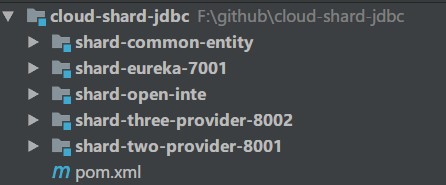
一、项目结构 1、工程结构 2、模块命名 shard-common-entity: 公共代码块shard-open-inte: 开放接口管理shard-eureka-7001: 注册中心shard-two-provider-8001: 8001 基于两台库的服务shard-three-provider-8002:8002 基于三台库的服务 3、代码依赖结构 4、项目启动顺序 (1)shard-eureka-7001: 注册中心(2)shard-two-provider-8001: 8001 基于两台库的服务(3)shard-three-provider-8002:8002 基于三台库的服务 按照顺序启动,且等一个服务完全启动后,在启动下一个服务,不然可能遇到一些坑。 二、核心代码块 1、8001 服务提供一个对外服务 基于Feign的调用方式 作用:基于两台分库分表的数据查询接口。 import org.springframework.cloud.netflix.feign.FeignClient;import org.springframework.web.bind.annotation.PathVariable;import org.springframework.web.bind.annotation.RequestMapping;import shard.jdbc.common.entity.TableOne;/** * shard-two-provider-8001 * 对外开放接口 */@FeignClient(value = "shard-provider-8001")public interface TwoOpenService { @RequestMapping("/selectOneByPhone/{phone}") TableOne selectOneByPhone(@PathVariable("phone") String phone) ;} 2、8002 服务提供一个对外服务 基于Feign的调用方式 作用:基于三台分库分表的数据存储接口。 import org.springframework.cloud.netflix.feign.FeignClient;import org.springframework.web.bind.annotation.RequestBody;import org.springframework.web.bind.annotation.RequestMapping;import shard.jdbc.common.entity.TableOne;/** * 数据迁移服务接口 */@FeignClient(value = "shard-provider-8002")public interface MoveDataService { @RequestMapping("/moveData") Integer moveData (@RequestBody TableOne tableOne) ;} 3、基于8002服务数据查询接口 查询流程图 代码块 /** * 8001 端口 :基于两台分库分表策略的数据查询接口 */@Resourceprivate TwoOpenService twoOpenService ;@Overridepublic TableOne selectOneByPhone(String phone) { TableOne tableOne = tableOneMapper.selectOneByPhone(phone); if (tableOne != null){ LOG.info("8002 === >> tableOne :"+tableOne); } // 8002 服务没有查到数据 if (tableOne == null){ // 调用 8001 开放的查询接口 tableOne = twoOpenService.selectOneByPhone(phone) ; LOG.info("8001 === >> tableOne :"+tableOne); } return tableOne ;} 4、基于 8001 数据扫描迁移代码 迁移流程图 代码块 /** * 8002 端口开放的数据入库接口 */@Resourceprivate MoveDataService moveDataService ;/** * 扫描,并迁移数据 * 以 库 db_2 的 table_one_1 表为例 */@Overridepublic void scanDataRun() { String sql = "SELECT id,phone,back_one backOne,back_two backTwo,back_three backThree FROM table_one_1" ; // dataTwoTemplate 对应的数据库:ds_2 List<TableOne> tableOneList = dataTwoTemplate.query(sql,new Object[]{},new BeanPropertyRowMapper<>(TableOne.class)) ; if (tableOneList != null && tableOneList.size()>0){ int i = 0 ; for (TableOne tableOne : tableOneList) { String db_num = HashUtil.moveDb(tableOne.getPhone()) ; String tb_num = HashUtil.moveTable(tableOne.getPhone()) ; // 只演示向数据新加库 ds_4 迁移的数据 if (db_num.equals("ds_4")){ i += 1 ; LOG.info("迁移总数数=>" + i + "=>库位置=>"+db_num+"=>表位置=>"+tb_num+"=>数据:【"+tableOne+"】"); // 扫描完成:执行新库迁移和旧库清理过程 moveDataService.moveData(tableOne) ; // dataTwoTemplate.update("DELETE FROM table_one_1 WHERE id=? AND phone=?",tableOne.getId(),tableOne.getPhone()); } } }} 三、演示执行流程 1、项目流程图 2、测试执行流程 (1)、访问8002 数据查询端口 http://127.0.0.1:8002/selectOneByPhone/phone20日志输出:8001 服务查询到数据8001 === >> tableOne :+{tableOne} (2)、执行8001 数据扫描迁移 http://127.0.0.1:8001/scanData (3)、再次访问8002 数据查询端口 http://127.0.0.1:8002/selectOneByPhone/phone20日志输出:8002 服务查询到数据8002 === >> tableOne :+{tableOne} 四、源代码地址 GitHub·地址: https://github.com/cicadasmile/spring-cloud-base GitEE·地址: https://gitee.com/cicadasmile/spring-cloud-base


优秀的个人博客,低调大师

SpringCloud微服务(06):Config组件,实现配置统一管理

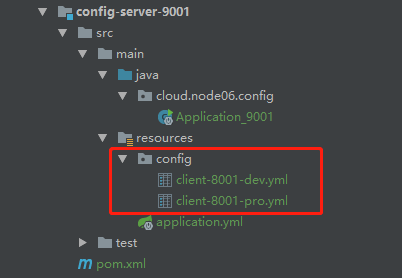
本文源码:GitHub·点这里 || GitEE·点这里 一、Config简介 在微服务系统中,服务较多,相同的配置:如数据库信息、缓存、参数等,会出现在不同的服务上,如果一个配置发生变化,需要修改很多的服务配置。spring cloud提供配置中心,来解决这个场景问题。 系统中的通用配置存储在相同的地址:GitHub,Gitee,本地配置服务等,然后配置中心读取配置以restful发布出来,其它服务可以调用接口获取配置信息。 二、配置服务端 1、项目结构 核心注解:@EnableConfigServer 2、核心依赖 <dependency> <groupId>org.springframework.cloud</groupId> <artifactId>spring-cloud-config-server</artifactId> </dependency> 3、核心配置文件 这里注意读取文件的配置 active :native,读取本地配置; active :git,读网络仓库配置; server: port: 9001 spring: application: name: config-server-9001 profiles: # 读取本地 # active: native # 读取Git active: git cloud: config: server: native: search-locations: classpath:/config git: # 读取的仓库地址 uri: https://gitee.com/cicadasmile/spring-cloud-config.git # 读取仓库指定文件夹下 search-paths: /cloudbaseconfig # 非公开需要的登录账号 username: password: label: master 4、读取配置内容 不同的环境读取的结果不同。 info: date: 20190814 author: cicada sign: develop version: V1.0 三、配置客户端 1、核心依赖 <dependency> <groupId>org.springframework.cloud</groupId> <artifactId>spring-cloud-starter-config</artifactId> </dependency> 2、核心配置文件 在上面的配置中心,配置读取Git资源,所以这里的配置也就是读取Git资源。 server: port: 8001 spring: application: name: config-client-8001 profiles: active: dev cloud: config: # 读取本地配置 --------------------------- #uri: http://localhost:9001 ## 读取策略:快速失败 #fail-fast: true ## 读取的文件名:无后缀 #name: client-8001 ## 读取的配置环境 #profile: dev # client-8001-dev.yml # ---------------------------------------- # github上的资源名称 ----------------------- name: client-8001 # 读取的配置环境 profile: dev label: master # 本微服务启动后,通过配置中心6001服务,获取GitHub的配置文件 uri: http://localhost:9001 # ---------------------------------------- 3、测试接口 @RestController public class ClientController { @Value("${info.date}") private String date ; @Value("${info.author}") private String author ; @Value("${info.sign}") private String sign ; @Value("${info.version}") private String version ; /** * 获取配置信息 */ @RequestMapping("/getConfigInfo") public String getConfigInfo (){ return date+"-"+author+"-"+sign+"-"+version ; } } 四、基于Eureka配置 上面的模式,通过服务中心,直接获取配置。下面把注册中心Eureka加进来。 1、项目结构 启动顺序也是如下: node06-eureka-7001 config-server-9001 config-client-8001 2、修改配置项 将config-server-9001添加到注册中心; 配置config-client-8001读取注册中心; 完成后Eureka注册中心效果图,启动顺序如下: 3、修改客户端配置 通过注册中心获取服务,避免使用URI地址。 经过测试后,正确无误。 提醒:国内如果读取git的配置,可能经常出去无法加载的问题,该案例使用的是Gitee的地址。 五、源代码地址 GitHub地址:知了一笑 https://github.com/cicadasmile/spring-cloud-base 码云地址:知了一笑 https://gitee.com/cicadasmile/spring-cloud-base

资源下载

更多资源
Mario

Mario

马里奥是站在游戏界顶峰的超人气多面角色。马里奥靠吃蘑菇成长,特征是大鼻子、头戴帽子、身穿背带裤,还留着胡子。与他的双胞胎兄弟路易基一起,长年担任任天堂的招牌角色。

Nacos

Nacos

Nacos /nɑ:kəʊs/ 是 Dynamic Naming and Configuration Service 的首字母简称,一个易于构建 AI Agent 应用的动态服务发现、配置管理和AI智能体管理平台。Nacos 致力于帮助您发现、配置和管理微服务及AI智能体应用。Nacos 提供了一组简单易用的特性集,帮助您快速实现动态服务发现、服务配置、服务元数据、流量管理。Nacos 帮助您更敏捷和容易地构建、交付和管理微服务平台。

Rocky Linux

Rocky Linux

Rocky Linux(中文名:洛基)是由Gregory Kurtzer于2020年12月发起的企业级Linux发行版,作为CentOS稳定版停止维护后与RHEL(Red Hat Enterprise Linux)完全兼容的开源替代方案,由社区拥有并管理,支持x86_64、aarch64等架构。其通过重新编译RHEL源代码提供长期稳定性,采用模块化包装和SELinux安全架构,默认包含GNOME桌面环境及XFS文件系统,支持十年生命周期更新。

Sublime Text

Sublime Text

Sublime Text具有漂亮的用户界面和强大的功能,例如代码缩略图,Python的插件,代码段等。还可自定义键绑定,菜单和工具栏。Sublime Text 的主要功能包括:拼写检查,书签,完整的 Python API , Goto 功能,即时项目切换,多选择,多窗口等等。Sublime Text 是一个跨平台的编辑器,同时支持Windows、Linux、Mac OS X等操作系统。

用户登录
用户注册
修改密码
忘记密码