首页 文章 精选 留言 我的

精选列表

搜索[快速模式],共10000篇文章
优秀的个人博客,低调大师

Android快速换肤之App内部换肤

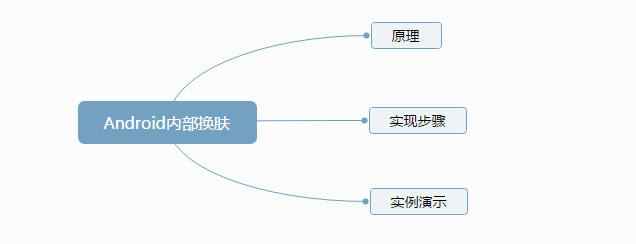
目录 原理 添加多套values和drawable文件,通过 Android-skin-support框架动态的替换来实现切换主题的效果。 实现步骤 添加依赖 implementation 'skin.support:skin-support:3.1.0-beta1' // skin-support 基础控件支持 implementation 'skin.support:skin-support-design:3.1.0-beta1' // skin-support-design material design 控件支持[可选] implementation 'skin.support:skin-support-cardview:3.1.0-beta1' // skin-support-cardview CardView 控件支持[可选] implementation 'skin.support:skin-support-constraint-layout:3.1.0-beta1' // skin-support-constraint-layout ConstraintLayout 控件支持[可选] 创建MyApplication类在onCreate方法中进行初始化 public class MyApplication extends Application { @Override public void onCreate() { super.onCreate(); SkinCompatManager.withoutActivity(this) // 基础控件换肤初始化 .addInflater(new SkinMaterialViewInflater()) // material design 控件换肤初始化[可选] .addInflater(new SkinCardViewInflater()) // CardView v7 控件换肤初始化[可选] .setSkinStatusBarColorEnable(true) //切换状态栏颜色 // .setSkinStatusBarColorEnable(false) // 关闭状态栏换肤,默认打开[可选] // .setSkinWindowBackgroundEnable(false) // 关闭windowBackground换肤,默认打开[可选] .loadSkin(); } } 添加皮肤(例如皮肤名为night则需要创建res-night文件夹来存放对应的资源文件,然后需要在app的gradle文件中添加如下代码) sourceSets {main {res.srcDirs = ['src/main/res', 'src/main/res-night']}} 同时需要将对应的资源文件加上_night后缀 然后将控件的属性设置为引用资源的方式 然后在代码中只需要执行一行代码即可实现换肤 SkinCompatManager.getInstance().restoreDefaultTheme();//恢复默认皮肤 SkinCompatManager.getInstance().loadSkin("night", null, SkinCompatManager.SKIN_LOADER_STRATEGY_BUILD_IN);//切换皮肤名为night的皮肤 实例演示 这是我在学习换皮肤时做的一个案例,在这将它分享出来https://github.com/myml666/AndroidSkinDemo。 个人技术博客:https://myml666.github.io

优秀的个人博客,低调大师

Spring Boot项目Docker化快速上手

开篇 服务部署是应用上线前的必需环节。大道至简,如何做到项目简单化、自动化甚至傻瓜式部署是考验DevOps的一大难题。从docker面世到k8s的脱颖而出,有越来越多的开源工具也在帮助开发和运维人员解决这些问题。 对于开发人员,了解和学习Docker可谓是迫在眉睫。网上有很多优秀的学习资源,当然了,本文的主角不全是docker,但也不无关系。 现在是CI时代。用过Jenkins,但对于个人或小型项目来说太笨重了,不过还有例如像Travis这样的轻量级CI可供我们选择。本文要介绍的不涉及CI工具,只需要借助Maven插件,就可以轻松打包SpringBoot项目到远程服务器,启动镜像即可部署上线。如果这描述适合你最近在捣腾的一些项目,可以继续往下看! 环境说明 Docker v18.06.1-ce Spring Boot v2.0.4.RELEASE 配置准备 通过Maven将本地打包好的SpringBoot Jar包推送到远程Docker服务中,关键步骤就在于为Docker服务配置这个暴露端口。这步操作也简单,直接命令编辑vim /lib/systemd/system/docker.service( 左侧为Ubuntu的路径; CentOS 的路径参考:/usr/lib/systemd/system/docker.service),找到ExecStart=/usr/bin/dockerd -H fd://这行,修改为ExecStart=/usr/bin/dockerd -H tcp://0.0.0.0:22375 -H unix:///var/run/docker.sock(表示让Docker服务监听22375这个TCP端口),重启让配置生效:systemctl daemon-reload && systemctl restart docker 下面测试一下: curl localhost:22375/info,如果有一堆信息出来就可以继续往下走: curl localhost:22375/info 插件添加 没有Spring Boot项目可以自行新建,然后在pom.xml中添加如下配置: <build> <!-- 最终Maven本地打包出来的jar包名称 --> <finalName>example</finalName> <defaultGoal>package</defaultGoal> <plugins> <plugin> <groupId>org.springframework.boot</groupId> <artifactId>spring-boot-maven-plugin</artifactId> </plugin> <plugin> <!-- GitHub: https://github.com/spotify/docker-maven-plugin --> <groupId>com.spotify</groupId> <artifactId>docker-maven-plugin</artifactId> <version>1.1.1</version> <configuration> <!-- 远程镜像名称 --> <imageName>example</imageName> <forceTags>true</forceTags> <imageTags> <imageTag>${project.version}</imageTag> <imageTag>latest</imageTag> </imageTags> <dockerHost>http://服务器IP:22375</dockerHost> <dockerDirectory>src/main/docker</dockerDirectory> <resources> <resource> <targetPath>/</targetPath> <directory>${project.build.directory}</directory> <include>${project.build.finalName}.jar</include> </resource> </resources> </configuration> </plugin> </plugins> </build> 参考上述配置,还需要新建docker文件夹,然后创建Dockerfile文件,并添加如下内容: # 指定基础镜像(必需且为第一条指令,scratch是空白镜像) FROM openjdk:8-jre-alpine # MAINTAINER已经过期,具体参考:https://docs.docker.com/engine/reference/builder/#label LABEL author-name="author-email" # 为了防止运行时用户忘记将动态文件所保存目录挂载为卷,在 Dockerfile 中,我们可以事先指定某些目录挂载为匿名卷, # 这样在运行时如果用户不指定挂载,其应用也可以正常运行,不会向容器存储层写入大量数据。 VOLUME /opt/tmp # 在 COPY 和 ADD 指令中选择的时候,可以遵循这样的原则, # 所有文件复制使用 COPY 指令,仅在需要自动解压缩的场合使用 ADD 指令 COPY example.jar example.jar # JVM参数可选 CMD ["java","-jar","-Xms64m","-Xmx64m","example.jar"] # EXPOSE 指令仅仅是声明的是运行时容器提供服务的端口 # 用于帮助镜像使用者理解这个镜像服务的守护端口,以方便配置映射; EXPOSE 8080 构建运行 用maven命令构建远程镜像:mvn clean package docker:build -Dmaven.test.skip=true 在远程服务器上运行服务:docker run --name example -d -p 8080:8080 example 可以查看服务启动情况:docker logs -f example 学习资源 Docker學習筆記Docker — 从入门到实践 参考链接 SpringBoot | 第十四章:基于Docker的简单部署docker-socket设置Docker开发部署Node小结

优秀的个人博客,低调大师

KingShard MySQL中间件快速入门

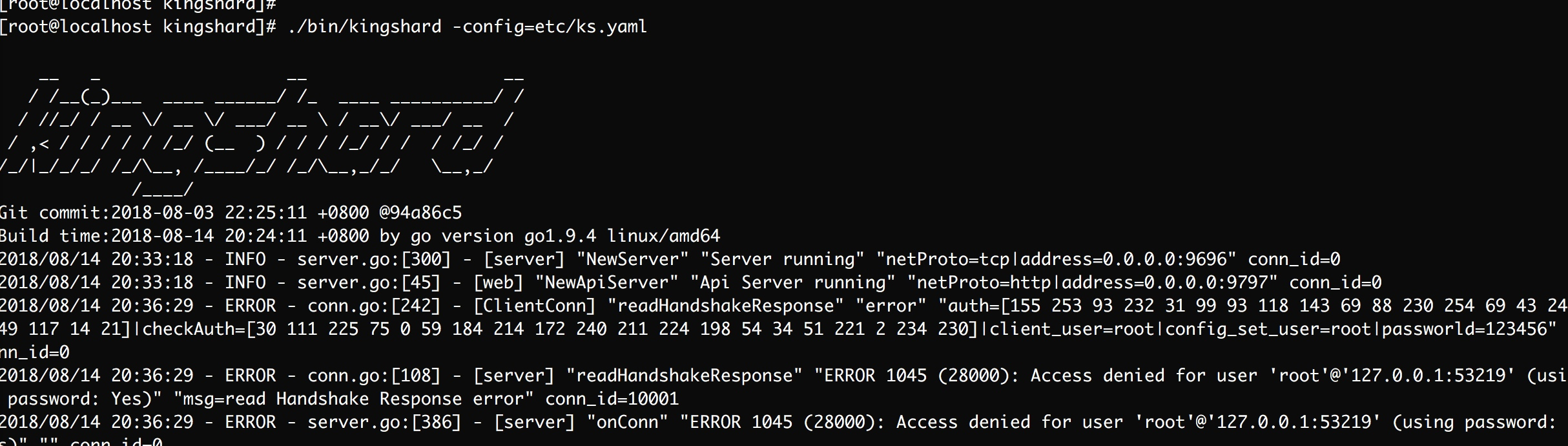
kingshard 是一个由Go开发高性能MySQL Proxy项目. 功能简介: 读写分离 分库分表 数据库扩容 具体功能查看官方文档,这次主要是自己动手搭建基于Kingshard的MySQL集群。 环境 Docker Go CentOS 7 过程 安装Go语言 yum install golang -y 安装Kingshard git clone https://github.com/flike/kingshard.git src/github.com/flike/kingshard cd src/github.com/flike/kingshard source ./dev.sh make 至此已经算安装了Kingshard,其配置文件等会再做修改 拉取MysqL镜像,并启动两台MySQL实例 docker pull mysql:5.6 docker run --name mysql1 -d -p3307:3306 -e MYSQL_ROOT_PASSWORD=123456 mysql:5.6 docker run --name mysql2 -d -p3308:3306 -e MYSQL_ROOT_PASSWORD=123456 mysql:5.6 初始化两台MySQL数据库,创建测试所需的表 这个语句比较枯燥,粘贴就好了 create database kingshard; use kingshard; CREATE TABLE `test_shard_hash_0000` ( `id` bigint(64) unsigned NOT NULL, `str` varchar(256) DEFAULT NULL, `f` double DEFAULT NULL, `e` enum('test1','test2') DEFAULT NULL, `u` tinyint(3) unsigned DEFAULT NULL, `i` tinyint(4) DEFAULT NULL, PRIMARY KEY (`id`) ) ENGINE=InnoDB DEFAULT CHARSET=utf8; CREATE TABLE `test_shard_hash_0001` ( `id` bigint(64) unsigned NOT NULL, `str` varchar(256) DEFAULT NULL, `f` double DEFAULT NULL, `e` enum('test1','test2') DEFAULT NULL, `u` tinyint(3) unsigned DEFAULT NULL, `i` tinyint(4) DEFAULT NULL, PRIMARY KEY (`id`) ) ENGINE=InnoDB DEFAULT CHARSET=utf8; CREATE TABLE `test_shard_hash_0002` ( `id` bigint(64) unsigned NOT NULL, `str` varchar(256) DEFAULT NULL, `f` double DEFAULT NULL, `e` enum('test1','test2') DEFAULT NULL, `u` tinyint(3) unsigned DEFAULT NULL, `i` tinyint(4) DEFAULT NULL, PRIMARY KEY (`id`) ) ENGINE=InnoDB DEFAULT CHARSET=utf8; CREATE TABLE `test_shard_hash_0003` ( `id` bigint(64) unsigned NOT NULL, `str` varchar(256) DEFAULT NULL, `f` double DEFAULT NULL, `e` enum('test1','test2') DEFAULT NULL, `u` tinyint(3) unsigned DEFAULT NULL, `i` tinyint(4) DEFAULT NULL, PRIMARY KEY (`id`) ) ENGINE=InnoDB DEFAULT CHARSET=utf8; CREATE TABLE `test_shard_hash_0004` ( `id` bigint(64) unsigned NOT NULL, `str` varchar(256) DEFAULT NULL, `f` double DEFAULT NULL, `e` enum('test1','test2') DEFAULT NULL, `u` tinyint(3) unsigned DEFAULT NULL, `i` tinyint(4) DEFAULT NULL, PRIMARY KEY (`id`) ) ENGINE=InnoDB DEFAULT CHARSET=utf8; CREATE TABLE `test_shard_hash_0005` ( `id` bigint(64) unsigned NOT NULL, `str` varchar(256) DEFAULT NULL, `f` double DEFAULT NULL, `e` enum('test1','test2') DEFAULT NULL, `u` tinyint(3) unsigned DEFAULT NULL, `i` tinyint(4) DEFAULT NULL, PRIMARY KEY (`id`) ) ENGINE=InnoDB DEFAULT CHARSET=utf8; CREATE TABLE `test_shard_hash_0006` ( `id` bigint(64) unsigned NOT NULL, `str` varchar(256) DEFAULT NULL, `f` double DEFAULT NULL, `e` enum('test1','test2') DEFAULT NULL, `u` tinyint(3) unsigned DEFAULT NULL, `i` tinyint(4) DEFAULT NULL, PRIMARY KEY (`id`) ) ENGINE=InnoDB DEFAULT CHARSET=utf8; CREATE TABLE `test_shard_hash_0007` ( `id` bigint(64) unsigned NOT NULL, `str` varchar(256) DEFAULT NULL, `f` double DEFAULT NULL, `e` enum('test1','test2') DEFAULT NULL, `u` tinyint(3) unsigned DEFAULT NULL, `i` tinyint(4) DEFAULT NULL, PRIMARY KEY (`id`) ) ENGINE=InnoDB DEFAULT CHARSET=utf8; 配置Kingshard的配置文件,这次只配置Kingshard的hash shard功能 # server listen addr addr : 0.0.0.0:9696 user_list: - user : root password : 123456 web_addr : 0.0.0.0:9797 web_user : admin web_password : admin # log level[debug|info|warn|error],default error log_level : debug # if set log_sql(on|off) off,the sql log will not output log_sql: on nodes : - name : node1 max_conns_limit : 32 user : root password : 123456 master : 127.0.0.1:3307 down_after_noalive : 32 - name : node2 max_conns_limit : 32 user : root password : 123456 master : 127.0.0.1:3308 down_after_noalive: 32 # schema defines sharding rules, the db is the sharding table database. schema_list : - user: root nodes: [node1,node2] default: node1 shard: - db : kingshard table: test_shard_hash key: id nodes: [node1, node2] type: hash locations: [4,4] 启动Kingshard ./bin/kingshard -config=etc/ks.yaml image.png 连接Kingshard,测试操作 mysql -h127.0.0.1 -P9696 -p -c 执行相关的SQL语句 insert into test_shard_hash(id,str,f,e,u,i) values(15,"flike",3.14,'test2',2,3); insert into test_shard_hash(id,str,f,e,u,i) values(7,"chen",2.1,'test1',32,3); insert into test_shard_hash(id,str,f,e,u,i) values(17,"github",2.5,'test1',32,3); insert into test_shard_hash(id,str,f,e,u,i) values(18,"kingshard",7.3,'test1',32,3); select * from test_shard_hash where id < 18; select * from test_shard_hash where id = 18; /*node2*/show tables; image.png 在控制台我们都可以看到对应的输出信息 问题 ks.yml文件中配置的userList都要被使用才行 如果想让非本机访问,ks.yml需要开启一些白名单 mysql命令行中的-c功能启用注释 最后 绝知此事要躬行,学东西不能光看,亲自动手才知道问题所在。有助于自己更好的理解 参考 Kingshard文档


优秀的个人博客,低调大师

【原】jQuery easyUI 快速搭建前端框架

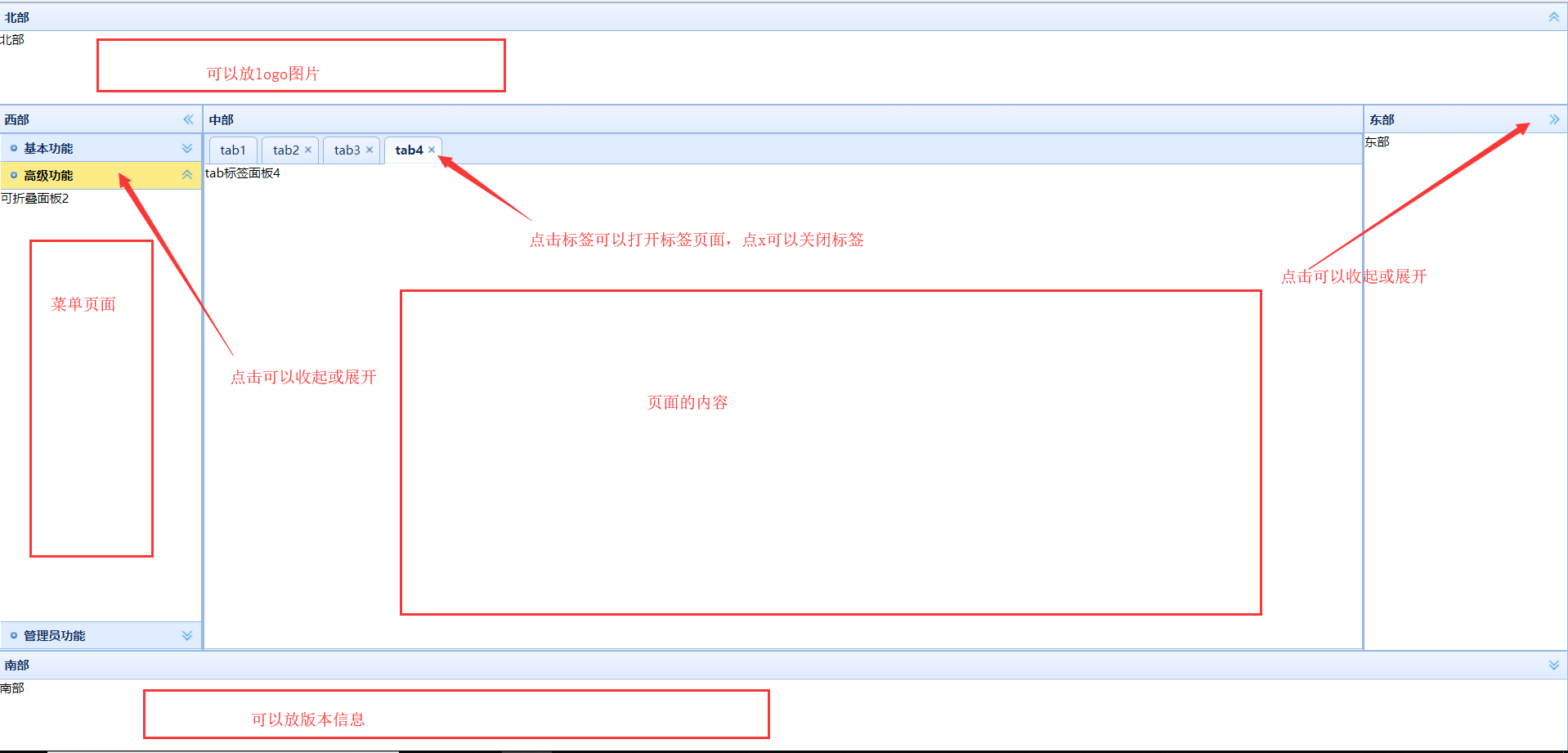
jQueryEasyUI jQuery EasyUI是一组基于jQuery的UI插件集合体,而jQuery EasyUI的目标就是帮助web开发者更轻松的打造出功能丰富并且美观的UI界面。开发者不需要编写复杂的javascript,也不需要对css样式有深入的了解,开发者需要了解的只有一些简单的html标签。 这里我们使用easyUI搭建一个简单的页面框架,非常简单! 效果如此: 需要引入的最少的文件 3个js文件是必须的 文件下载链接:http://www.jeasyui.net/download/ 注意:easyui从1.2.3版本之后开始收费了 创建一个html: 引入js以及要用到的样式 注意,由于ezUI是依赖jQuery的,所以引用的顺序一定是jQuery的js在easyUI的js之前!!! demo1_layout.html: <!DOCTYPE HTML> <html> <head> <title>demo layout</title> <script type="text/javascript" src="jquery-1.8.0.min.js"></script> <script type="text/javascript" src="jquery.easyui.min.js"></script> <script type="text/javascript" src="easyui-lang-zh_CN.js"></script> <link rel="stylesheet" type="text/css" href="themes/icon.css"></link> <link rel="stylesheet" type="text/css" href="themes/default/easyui.css"></link> </head> <body> </body> </html> (从我的路径可以看出,我的html文件和jQuery的js是平级关系) 完整代码: <!DOCTYPE HTML> <html> <head> <title>demo layout</title> <!-- 引入jQuery的js --> <script type="text/javascript" src="jquery-1.8.0.min.js"></script> <!-- 引入jQuery easyUI的js --> <script type="text/javascript" src="jquery.easyui.min.js"></script> <!-- 引入 国际化的js --> <script type="text/javascript" src="easyui-lang-zh_CN.js"></script> <!-- 引入图片样式 --> <link rel="stylesheet" type="text/css" href="themes/icon.css"></link> <!-- 引入默认样式 --> <link rel="stylesheet" type="text/css" href="themes/default/easyui.css"></link> </head> <body> <!-- 使用easyui的layout布局 --> <div class="easyui-layout" data-options="fit:true"> <!-- easyui在data-options配置配置 --> <!-- 只有center区域是必须的 --> <div data-options="region:'east',title:'东部'" style="width:200px;">东部</div> <div data-options="region:'west',title:'西部'" style="width:200px;"> <!-- 可折叠面板accordion --> <!-- fit 属性,使得当前div大小占满 父容器 --> <div class="easyui-accordion" data-options="fit:true"> <!-- 每一个div就是一个面板 --> <!-- 通过iconCls设置图标,找icon.css中定义的类 --> <div data-options="title:'基本功能',iconCls:'icon-mini-add'">可折叠面板1</div> <div data-options="title:'高级功能',iconCls:'icon-mini-add'">可折叠面板2</div> <div data-options="title:'管理员功能',iconCls:'icon-mini-add'">可折叠面板3</div> </div> </div> <div data-options="region:'south',title:'南部'" style="height:100px;">南部</div> <div data-options="region:'north',title:'北部'" style="height:100px;">北部</div> <div data-options="region:'center',title:'中部'"> <!-- 选项卡tab 面板 --> <div class="easyui-tabs" data-options="fit:true"> <!-- 这里的每一个div就是一个选项卡 --> <div data-options="title:'tab1'">tab标签面板1</div> <!-- closable 可关闭 --> <div data-options="title:'tab2',closable:true">tab标签面板2</div> <div data-options="title:'tab3',closable:true">tab标签面板3</div> <div data-options="title:'tab4',closable:true">tab标签面板4</div> </div> </div> </div> </body> </html> 转载请注明:https://www.cnblogs.com/1906859953Lucas/p/9212852.html

优秀的个人博客,低调大师

[转]区块链代码快速学习实践

如何使用Python编写一个简单且安全的区块链数据库API? GitHub项目链接:https://github.com/adamchinkc/blockchain_database 当我们讨论区块链时,我们总是把它与p2p网络联系起来,认为数据必须分散在网络上。这也会使人们担心区块链将会破坏数据的机密性。 事实上,区块链本身的数据架构已经为保护数据免受未经授权操作提供了一个好的解决方案,并且考虑到服务器受到足够的控制(如访问控制、网络和系统安全控制)的保护,最好是在内部网络。 因此,我尝试通过使用Python, Sqlite和RESTful API框架基于区块链的数据架构创建一个数据库。 区块链的数据架构及其完整性 摘自于中本聪发表的比特币白皮书《比特币:一种点对点电子现金系统》https://bitcoin.org/bitcoin.pd

优秀的个人博客,低调大师

xml与java对象的快速互转

做流程图的项目时,新的流程定义为xml的,需要对xml与java对象进行互转 查了一下activiti的转换xml方式,发现转换太麻烦了,需要一步步的解析xml 后面发现直接用jaxb就可以很快实现互转,而且现在这个jaxb在jdk内,不需要引入外部的解析xml的包 具体如下: 一.根据XML构建java对象 @XmlRootElement(name = "mxGraphModel") public class MxGraphModel { private MxRoot root; @XmlElement(name = "root") public MxRoot getRoot() { return root; } public void setRoot(MxRoot root) { this.root = root; } } 该java对象直接使用注解就可以声明,其他相关注解如下: 1.@XmlRootElement,用于类级别的注解,对应xml的跟元素。通过name属性定义这个根节点的名称。 2.@XmlAccessorType,定义映射这个类中的何种类型都需要映射到xml。(如果不存在@XmlAccessorType,默认使用XmlAccessType.PUBLIC_MEMBER注解) 参数:XmlAccessType.FIELD: java对象中的所有成员变量。 XmlAccessType.PROPERTY:java对象中所有通过getter/setter方式访问的成员变量。 XmlAccessType.PUBLIC_MEMBER:java对象中所有的public访问权限的成员变量和通过getter/setter方式访问的成员变量。 XmlAccessType.NONE: java对象的所有属性都不映射为xml的元素。 3.@XmlAttribute,用于把java对象的属性映射为xml的属性,并可通过name属性为生成的xml属性指定别名。 4.@XmlElement,指定一个字段或get/set方法映射到xml的节点。通过name属性定义这个根节点的名称。 5.@XmlElementWrapper,为数组或集合定义一个父节点。通过name属性定义这个父节点的名称。 二。执行java及xml的互转 /** * xml转对象 * * @param xml * @return * @throws JAXBException */ public MxGraphModel convertToGraphModel(String xml) throws JAXBException { StringReader reader = new StringReader(xml); JAXBContext jaxbContext = JAXBContext.newInstance(MxGraphModel.class); Unmarshaller jaxbUnmarshaller = jaxbContext.createUnmarshaller(); MxGraphModel graphModel = (MxGraphModel) jaxbUnmarshaller.unmarshal(reader); return graphModel; } /** * 将对象转为流程XML * * @param graphModel * @return * @throws JAXBException */ public String convertToXML(MxGraphModel graphModel) throws JAXBException { JAXBContext jaxbContext = JAXBContext.newInstance(MxGraphModel.class); StringWriter writer = new StringWriter(); Marshaller marshaller = jaxbContext.createMarshaller(); marshaller.marshal(graphModel, writer); String xmlStr = writer.toString(); xmlStr = StringUtils.replace(xmlStr, "&quot;", "'"); return xmlStr; } 上述该方法转换简单,易明白,但唯一不足时,对XML的解析依赖整个对象,不能动态增加XML的解析,不过现阶段来说,这个办法已经足够了!

优秀的个人博客,低调大师

openstack快速更改虚拟机配置

在使用nova resize去修改虚拟机的配置的时候,实际调用的是migrate的代码。 在默认情况下,执行resize的时候,首先会进行磁盘disk镜像和后端镜像进行一个合并成raw,然后转换成qcow2的过程。而且会进行迁移的动作。整个过程会相当的消耗时间,而且我们一般只需要修改cpu和mem的大小,并不需要去合并镜像,更不需要去做迁移。 总之,在单台宿主机上去进行nova resize是一件很让人蛋碎的事情。 事实上,在reboot一个instance的时候,这个instance的libvirt.xml(只考虑kvm环境)会重新从数据库中生成。所以只需要修改数据库就行了。 附上pyhon修改数据库脚本: 1 2 3 4 5 6 7 8 9 10 11 12 13 14 15 16 17 18 19 20 21 22 23 24 25 26 27 28 29 30 31 32 33 34 35 36 37 38 39 40 41 42 43 44 45 46 import MySQLdb,sys ip = sys.argv[ 1 ] size = sys.argv[ 2 ] size_info = { '1' : '55800df7-5579-45c3-b4b3-584454aa2b77' , '2' : '6fe54364-e066-460b-89a2-ffe19cb26ae7' , '4' : '7a457be6-b1a0-48cd-88e1-c4e21d0518c1' , '6' : '7105ad91-3e49-43ed-9575-1a0535694578' , '8' : '61fc938c-234a-406b-b102-d535264e914d' , '12' : 'dc5ffd92-eedf-4851-a40a-90e657f799a2' , '16' : '5c7af872-2089-4ece-bba7-4099d2a3ef24' , } to_size = size_info[size] get_flavor_info_sql = "select id ,memory_mb,vcpus from instance_types \ where flavorid = '%s' ;" % \ to_size class mysqlEng(): def __init__( self ,host = '127.0.0.1' ,user = 'root' ,passwd = ' ',db=' None ',port=' 3306 '): self .conn = MySQLdb.connect(host = host,user = user,passwd = passwd,db = db,port = 3306 ) self .cur = self .conn.cursor() def select( self ,sql = 'show tables;' ): self .cur.execute(sql) ret = self .cur.fetchall() return ret def update( self ,sql = ''): self .cur.execute(sql) self .conn.commit() def __del__( self ): self .cur.close() self .conn.close() mysql_object = mysqlEng(host = '127.0.0.1' ,user = 'root' ,passwd = '123456' ,db = 'nova' ) flavor_info = mysql_object.select(get_flavor_info_sql) flavor_id = flavor_info[ 0 ][ 0 ] mem = flavor_info[ 0 ][ 1 ] vcpus = flavor_info[ 0 ][ 2 ] update_flavor_info_sql = "update instances set instance_type_id = '%d' ,vcpus = '%d' ,memory_mb = '%d' \ where hostname = '%s' AND vm_state ! = 'deleted' AND vm_state ! = 'error' ;" % \ (flavor_id,vcpus,mem,ip) mysql_object.update(update_flavor_info_sql) after_update_info_sql = "select vcpus,memory_mb from instances \ where hostname = '%s' AND vm_state ! = 'deleted' AND vm_state ! = 'error' ;" % \ ip after_update_info = mysql_object.select(after_update_info_sql) print '+' * 80 + '\n' print "This server %s now flavor : cpu=%s , mem=%s\n" % \ (ip,after_update_info[ 0 ][ 0 ],after_update_info[ 0 ][ 1 ]) print '+' * 80 + '\n' 修改脚本中size_info里的对应openstack中flavor的id号,还有mysql_obejcet对象中的mysql相关信息 使用方式:python update_size.py instance_name flavor 修改完成后必须使用nova reboot --hard instance_id 去重启,必须带上--hard去强制重启实例,不然不会生效。 本文转自lustlost 51CTO博客,原文链接:http://blog.51cto.com/lustlost/1367575,如需转载请自行联系原作者

优秀的个人博客,低调大师

快速提取 ipa 包的图片资源

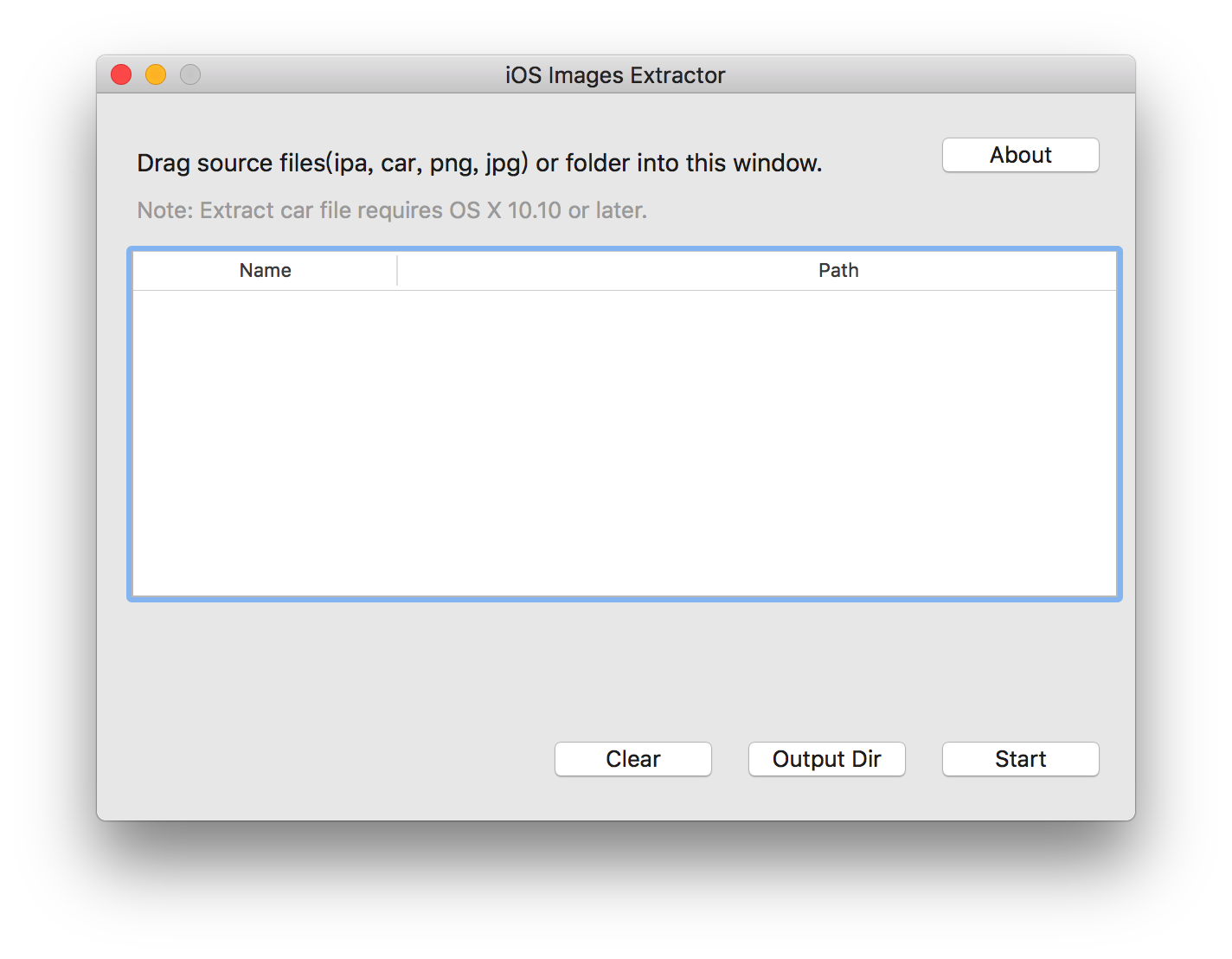
干货 从 iTunes 下载所要提取素材的 App 将下载好的 App 拖拽到桌面 下载 iOS Images Extractor iOS Images Extractor 把 App (xx.ipa) 拖拽到 iOS Images Extractor 里(指的是白色区域) 点击 Star 按钮即可开始提取图片资源文件。 当 iOS Images Extractor 左下角灰色区域显示《 Jobs done, have fun.》以后,点击 Output Dir 就能看到提取出来的图片资源文件。 补充: iOS Images Extractor 支持的文件类型: png、jpg ipa car(Assets.car) 系统要求: 软件最低支持OS X 10.8 解压Assets.car文件需要OS X 10.10或以上版本的系统 图片默认输出路径 /User/用户名/Downloads/iOSImagesExtractor

资源下载

更多资源
Mario

Mario

马里奥是站在游戏界顶峰的超人气多面角色。马里奥靠吃蘑菇成长,特征是大鼻子、头戴帽子、身穿背带裤,还留着胡子。与他的双胞胎兄弟路易基一起,长年担任任天堂的招牌角色。

腾讯云软件源

腾讯云软件源

为解决软件依赖安装时官方源访问速度慢的问题,腾讯云为一些软件搭建了缓存服务。您可以通过使用腾讯云软件源站来提升依赖包的安装速度。为了方便用户自由搭建服务架构,目前腾讯云软件源站支持公网访问和内网访问。

Spring

Spring

Spring框架(Spring Framework)是由Rod Johnson于2002年提出的开源Java企业级应用框架,旨在通过使用JavaBean替代传统EJB实现方式降低企业级编程开发的复杂性。该框架基于简单性、可测试性和松耦合性设计理念,提供核心容器、应用上下文、数据访问集成等模块,支持整合Hibernate、Struts等第三方框架,其适用范围不仅限于服务器端开发,绝大多数Java应用均可从中受益。

Rocky Linux

Rocky Linux

Rocky Linux(中文名:洛基)是由Gregory Kurtzer于2020年12月发起的企业级Linux发行版,作为CentOS稳定版停止维护后与RHEL(Red Hat Enterprise Linux)完全兼容的开源替代方案,由社区拥有并管理,支持x86_64、aarch64等架构。其通过重新编译RHEL源代码提供长期稳定性,采用模块化包装和SELinux安全架构,默认包含GNOME桌面环境及XFS文件系统,支持十年生命周期更新。

用户登录
用户注册