运维自动化之ansible playbook安装mysql tpcc测试OLTP能力
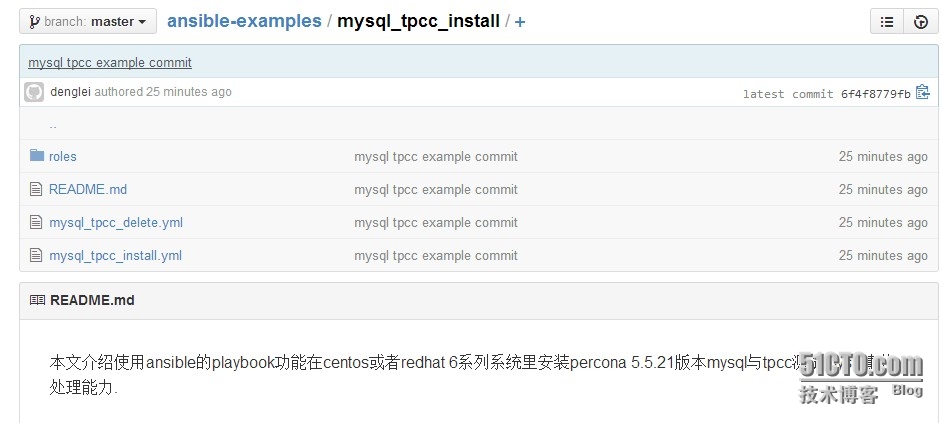
上周介绍了zabbix监控cdn带宽,这次在介绍一下ansible结合docker来一键化安装与测试mysql tpcc,然后通过tpcc测试OLTP系统性能。 写这个的原因就是重复性的安装太麻烦,浪费时间,而且我这里新业务不断上线,上线前使用tpcc进行OLTP测试对整体系统性能上也有了解。 一、Myql Tpcc介绍(网上找的内容) Tpcc-mysql是percona基于tpcc衍生出来的产品,用来测试OLTP(在线事务处理)系统性能的软件, TPCC-MYSQL是开源的TPC-C测试软件其源码放在bazaar(Bazaar是一个分布式的版本控制系统,采用GPL许可协议,可运行于Windows、GNU/Linux、UNIX 以及 Mac OS 系统之上。Bazaar 由Canonical公司(Ubuntu母公司)赞助商,因此还需要先安装bazaar客户端。 二、测试环境 平台:cloudsbox 虚拟化:kvm 系统:centos6.5 Docker版本:0.11.1 Docker容器系统版本:centos 6.3 Ansible版本:1.6 三、测试步骤 1、使用docker生成一个新的容器mysql-tpcc; 2、使用ansible在新生成的容器mysql-tpcc里进行安装mysql-tpcc并进行测试; 3、测试完成后,从容器里把测试结果拉回本地。 下面开始是测试过程 四、docker里操作 1、查看当然容器 1 2 3 4 5 6 7 17:49:46 #dockerps-a CONTAINERIDIMAGECOMMANDCREATEDSTATUSPORTSNAMES dfec766fbaa7centos6:3.0 /usr/sbin/sshd -D12daysagoUp12days0.0.0.0:49159->22 /tcp redis-slave 06762530db8ccentos6:3.0 /usr/sbin/sshd -D12daysagoUp12days0.0.0.0:49158->22 /tcp redis-master 846efb9e4d7aubuntu:3.0 /usr/sbin/sshd -D3weeksagoUp2weeks0.0.0.0:49167->22 /tcp ubuntu-test1 b9a9e6f2caedcentos6:3.0 /usr/sbin/sshd -D5weeksagoUp2weeks0.0.0.0:49166->22 /tcp zabbix-server 978fff134b18centos6:3.0 /usr/sbin/sshd -D6weeksagoUp2weeks0.0.0.0:49165->22 /tcp centos6-test5 2、生成新容器 1 2 3 4 5 6 17:49:53 #timedockerinspect$(dockerrun-d-p22--name="mysql-tpcc"centos6:3.0/usr/sbin/sshd-D)|grep-iaddress|awk-F'"''{print$4}' 172.17.0.7 real 0m9.415s user 0m0.028s sys 0m0.140s 3、查看当前已有容器 1 2 3 4 5 6 7 8 17:50:07 #dockerps-a CONTAINERIDIMAGECOMMANDCREATEDSTATUSPORTSNAMES 6331fb9bf19bcentos6:3.0 /usr/sbin/sshd -D21secondsagoUp12seconds0.0.0.0:49160->22 /tcp mysql-tpcc dfec766fbaa7centos6:3.0 /usr/sbin/sshd -D12daysagoUp12days0.0.0.0:49159->22 /tcp redis-slave 06762530db8ccentos6:3.0 /usr/sbin/sshd -D12daysagoUp12days0.0.0.0:49158->22 /tcp redis-master 846efb9e4d7aubuntu:3.0 /usr/sbin/sshd -D3weeksagoUp2weeks0.0.0.0:49167->22 /tcp ubuntu-test1 b9a9e6f2caedcentos6:3.0 /usr/sbin/sshd -D5weeksagoUp2weeks0.0.0.0:49166->22 /tcp zabbix-server 978fff134b18centos6:3.0 /usr/sbin/sshd -D6weeksagoUp2weeks0.0.0.0:49165->22 /tcp centos6-test5 4、新容器ip加入到ansible的访问主机列表里 1 2 17:52:47 #echo"172.17.0.7">>hosts root@ip-10-10-10-10: /etc/ansible 五、ansible里操作 其中命令为ansible-playbookmysql_tpcc_install.yml --extra-vars "host=172.17.0.17 user=rootwarehouse=50 w=50 c=50 r=120 l=600”,extra-vars后面都是变量,都是可以自行修改变量,满足个性化测试需求 下面是运行情况 1 2 3 4 5 6 7 8 9 10 11 12 13 14 15 16 17 18 19 20 21 22 23 24 25 26 27 28 29 30 31 32 33 34 35 36 37 38 39 40 41 42 43 44 45 46 47 48 49 50 51 52 53 54 55 56 57 58 59 60 61 62 63 64 65 66 67 68 69 70 71 72 73 74 75 76 77 78 79 80 81 82 83 84 85 86 87 88 89 90 time ansible-playbookmysql_tpcc_install.yml--extra-vars "host=172.17.0.7user=rootwarehouse=50w=50c=50r=120l=600" -k SSHpassword: PLAY[172.17.0.7]************************************************************* GATHERINGFACTS*************************************************************** ok:[172.17.0.7] TASK:[common|Installinitializtionrequiresoftware]*********************** changed:[172.17.0.7] TASK:[mysql_install|CopyMysqlSoftwareToRedhatClient]****************** changed:[172.17.0.7] TASK:[mysql_install|CreateMysqlUserInRedhatClient]******************** changed:[172.17.0.7] TASK:[mysql_install|CopyMysqlStartScriptToRedhatClient]************** changed:[172.17.0.7] TASK:[mysql_install|CopyInstallMysqlScriptToRedhatClient]*********** changed:[172.17.0.7] TASK:[mysql_install|CopyMysqlConfigToRedhatClient]******************** changed:[172.17.0.7] TASK:[mysql_install|CopyMysqlSecurityScriptToRedhatClient]*********** changed:[172.17.0.7] TASK:[mysql_install|CreateMysqlInstallDir]****************************** ok:[172.17.0.7] TASK:[mysql_install|UncompressionMysqlSoftwareToRedhatClient]********* changed:[172.17.0.7] TASK:[mysql_install|ModifyMysqlDirPermissionInRedhatClient]********** ok:[172.17.0.7]=>(item= /data/mysql/datadir ) ok:[172.17.0.7]=>(item= /data/mysql/basedir ) TASK:[mysql_install|InstallMysqlScriptInRedhatClient]***************** changed:[172.17.0.7] TASK:[mysql_install|StartMyqlSecurityScriptInRedhatClient]*********** changed:[172.17.0.7] TASK:[mysql_install|AddBootStartMysqlServiceInRedhatClient]********* changed:[172.17.0.7] TASK:[mysql_install|DeleteMysqlcompressionSoftwareInRedhatClient]**** changed:[172.17.0.7] TASK:[mysql_tpcc_install|InstallBaseRequireSoftwareInRedhatClient]*** changed:[172.17.0.7] TASK:[mysql_tpcc_install|CopyTpccSoftwareToRedhatClient]************* changed:[172.17.0.7]=>(item=tpcc-mysql. tar .gz) TASK:[mysql_tpcc_install|DownloadTpccSoftwareToRedhatClient]********** changed:[172.17.0.7] TASK:[mysql_tpcc_install|CompileTpccSoftwareToRedhatClient]*********** changed:[172.17.0.7] TASK:[mysql_tpcc_install|CreateMysqlTpccDatabaseInRedhatClient]****** changed:[172.17.0.7]=>(item=createdatabasetpcc100;) TASK:[mysql_tpcc_install|LoadMysqlTpccDataTableInRedhatClient]***** changed:[172.17.0.7]=>(item=create_table.sql) changed:[172.17.0.7]=>(item=add_fkey_idx.sql) TASK:[mysql_tpcc_install|CreateTpccMysqlTestDataToRedhatClient]***** changed:[172.17.0.7] TASK:[mysql_tpcc_install|StartMysqlTpccTestInRedhatClient]********** changed:[172.17.0.7] TASK:[mysql_tpcc_install|CopyMysqlTpccResultfromRedhatClient]******** changed:[172.17.0.7] TASK:[mysql_tpcc_install|DeleteZabbixcompressionSoftwareInRedhatClient]*** changed:[172.17.0.7]=>(item=tpcc-mysql. tar .gz) changed:[172.17.0.7]=>(item=tpcc100.sql) PLAYRECAP******************************************************************** 172.17.0.7:ok=25changed=22unreachable=0failed=0 real 89m21.833s user 0m27.365s sys 0m2.680s 可以看到89分钟就安装完成,可能有的人疑问为什么这么长时间,注意是在tpcc_load里加载测试数据差不多就话费3分之二时间,本来我想做好一个测试库后,使用mysqldump导出,但即使导出后在算上传输时间、导入时间跟现在时间差不多,所以就没有使用这个方法。 2、查看mysql-tpcc的结果 1 2 3 4 5 6 7 8 9 10 11 12 13 14 15 16 17 18 19 20 21 22 23 24 25 26 27 28 29 30 31 32 33 34 35 36 37 38 39 40 41 42 43 44 45 46 47 48 49 50 51 52 53 54 55 56 57 58 59 60 61 62 63 64 65 66 67 68 69 70 71 72 73 74 75 76 77 78 79 80 81 82 83 84 85 86 87 88 89 90 91 92 93 94 95 96 97 98 99 100 101 102 103 104 105 106 107 108 109 110 111 112 113 114 115 116 117 118 119 120 121 122 123 124 125 20:21:31 #ll/tmp/mysql-tpcc-172.17.0.7.log -rw-r--r--1rootroot8215Aug2520:21 /tmp/mysql-tpcc-172 .17.0.7.log root@ip-10-10-10-10: /mnt/ansible 20:21:44 #cat/tmp/mysql-tpcc-172.17.0.7.log *************************************** *** ###easy###TPC-CLoadGenerator*** *************************************** optionhwithvalue '172.17.0.7' optionuwithvalue 'root' optionpwithvalue 'E4yR3WnoluSFTCBAI' optiondwithvalue 'tpcc100' optionwwithvalue '50' optioncwithvalue '50' optionrwithvalue '120' optionlwithvalue '600' optionfwithvalue 'tpcc-mysql-result' <Parameters> [server]:172.17.0.7 [port]:3306 [DBname]:tpcc100 [user]:root [pass]:E4yR3WnoluSFTCBAI [warehouse]:50 [connection]:50 [rampup]:120(sec.) [measure]:600(sec.) RAMP-UPTIME.(120sec.) MEASURINGSTART. 10,2491(110):4.671|6.975,2494(0):1.001|1.625,250(0):0.510|0.939,251(0):6.439|7.783,246(0):13.922|17.389 20,1649(305):6.303|7.654,1649(0):1.337|1.521,164(0):0.718|0.737,164(0):7.859|8.443,173(0):17.100|18.067 30,1701(294):6.378|7.320,1694(0):1.338|1.685,171(0):0.701|0.787,170(0):7.824|8.124,164(0):17.122|18.446 40,1857(310):6.198|6.755,1861(0):1.301|1.528,184(0):0.716|0.857,187(0):7.595|7.996,190(0):16.457|17.335 50,1543(352):6.504|7.504,1543(0):1.460|1.977,157(0):0.727|0.947,154(0):8.237|8.365,150(0):17.165|17.904 60,1728(385):6.425|7.139,1732(0):1.393|1.873,172(0):0.728|0.845,174(0):7.782|8.069,175(0):16.524|16.731 70,1824(321):6.199|6.856,1826(0):1.306|1.639,181(0):0.751|0.859,182(0):7.650|7.921,183(0):16.011|16.740 80,1598(399):6.367|7.330,1595(0):1.371|1.649,162(0):0.761|0.962,159(0):7.532|7.632,158(0):17.059|17.390 90,1740(371):6.347|6.910,1740(0):1.357|1.872,172(0):0.751|0.821,174(0):7.828|8.164,172(0):17.291|17.397 100,1758(399):6.350|6.993,1757(0):1.343|1.625,176(0):0.726|0.744,176(0):8.042|8.247,179(0):17.284|17.362 110,1791(359):6.364|6.983,1792(0):1.352|1.595,180(0):0.770|0.852,180(0):7.597|7.962,181(0):16.908|17.897 120,1762(367):6.397|7.016,1760(0):1.332|1.580,175(0):0.690|0.873,174(0):8.184|8.551,173(0):17.208|17.613 130,1935(267):6.118|6.846,1938(0):1.290|1.535,194(0):0.735|0.800,194(0):7.329|7.667,193(0):16.368|16.718 140,1602(371):6.391|7.331,1598(0):1.377|1.551,161(0):0.875|0.986,161(0):8.105|8.791,164(0):17.402|18.088 150,1814(275):6.329|6.780,1816(0):1.321|1.614,181(0):0.671|0.869,182(0):8.143|8.568,179(0):16.673|17.081 160,1908(284):6.041|7.137,1911(0):1.366|1.742,190(0):0.720|0.794,190(0):7.571|8.524,192(0):15.846|16.471 170,1740(46):5.313|6.052,1743(0):1.199|1.636,175(0):0.699|0.805,175(0):6.750|6.918,174(0):15.899|16.343 180,3700(10):4.368|5.826,3692(0):1.036|1.361,367(0):0.574|0.751,368(0):5.685|6.103,372(0):13.234|13.676 190,5243(0):2.843|4.661,5249(0):0.704|1.119,528(0):0.391|0.655,525(0):4.449|5.307,525(0):8.626|11.532 200,4634(9):3.744|6.482,4630(0):0.904|1.317,462(0):0.450|0.678,463(0):5.635|7.451,462(0):11.847|12.898 210,1567(161):6.223|6.673,1567(0):1.312|1.540,156(0):0.701|0.757,155(0):7.851|8.040,157(0):17.377|17.517 220,3125(78):5.695|7.167,3126(0):1.142|1.361,312(0):0.610|0.691,315(0):7.122|7.630,310(0):15.943|16.664 230,1913(75):5.546|6.814,1911(0):1.225|1.521,194(0):0.592|0.732,190(0):7.236|7.631,190(0):14.452|15.462 240,2825(39):5.187|6.421,2831(0):1.152|1.677,284(0):0.674|0.809,283(0):6.705|7.467,287(0):14.756|15.847 250,2795(80):5.612|6.583,2790(0):1.147|1.582,277(0):0.629|0.744,280(0):6.924|7.108,277(0):14.721|15.484 260,3200(39):5.114|6.319,3204(0):1.161|1.717,321(0):0.642|0.760,321(0):7.173|8.076,321(0):14.395|14.923 270,2124(136):5.903|6.660,2123(0):1.233|1.612,210(0):0.633|0.835,211(0):7.194|7.598,211(0):15.481|16.417 280,1785(142):5.773|6.158,1781(0):1.269|1.564,181(0):0.755|0.933,180(0):7.181|7.396,177(0):14.987|16.114 290,1649(254):6.228|7.476,1653(0):1.334|1.666,163(0):0.682|0.715,164(0):7.552|7.958,167(0):16.458|18.312 300,1683(181):6.048|6.788,1676(0):1.376|1.725,169(0):0.655|0.721,169(0):7.266|7.550,165(0):15.377|16.599 310,1782(191):6.072|7.079,1785(0):1.342|1.662,179(0):0.708|0.995,178(0):7.479|7.790,182(0):15.789|16.220 320,2122(58):5.375|6.219,2122(0):1.184|1.492,211(0):0.577|0.708,211(0):6.726|7.536,213(0):15.324|16.262 330,2088(9):4.735|5.830,2082(0):1.226|1.573,210(0):0.657|0.808,208(0):5.856|5.963,208(0):13.431|15.987 340,1514(201):5.871|6.529,1524(0):1.292|1.560,151(0):0.742|0.782,151(0):7.418|7.639,154(0):16.177|16.801 350,1897(89):5.645|6.443,1889(0):1.242|1.555,187(0):0.777|0.898,188(0):7.183|7.971,188(0):14.419|14.601 360,2340(18):4.835|6.052,2349(0):1.212|1.869,238(0):0.598|0.685,238(0):6.727|7.723,234(0):13.155|15.648 370,1817(264):6.349|6.903,1807(0):1.371|1.607,180(0):0.785|0.890,181(0):8.153|8.362,182(0):16.410|16.923 380,1592(433):6.465|7.550,1588(0):1.379|1.660,158(0):0.773|0.804,160(0):7.763|7.853,152(0):17.126|17.280 390,1666(420):6.401|7.250,1676(0):1.390|1.560,168(0):0.734|0.764,167(0):7.988|8.532,167(0):16.822|17.297 400,1718(439):6.390|6.753,1704(0):1.359|1.732,172(0):0.748|0.804,169(0):7.749|7.784,178(0):17.143|18.053 410,1576(389):6.431|7.726,1586(0):1.371|1.962,158(0):0.717|0.816,160(0):7.860|8.113,150(0):17.143|17.348 420,1639(404):6.420|6.884,1639(0):1.345|2.205,161(0):0.718|0.981,162(0):7.725|8.204,169(0):16.941|17.532 430,1828(391):6.333|6.998,1828(0):1.363|1.712,185(0):0.712|0.831,184(0):7.781|8.109,183(0):16.935|17.534 440,1693(365):6.427|7.375,1696(0):1.380|1.689,168(0):0.830|0.848,169(0):8.020|8.507,172(0):16.618|16.924 450,1743(403):6.424|7.377,1743(0):1.376|1.610,176(0):0.706|0.857,176(0):7.915|8.236,172(0):16.736|17.716 460,1854(334):6.202|6.753,1853(0):1.341|1.501,185(0):0.724|0.812,183(0):7.673|7.825,185(0):16.963|17.401 470,1944(259):6.271|7.049,1946(0):1.284|1.709,195(0):0.685|0.697,195(0):7.756|8.023,198(0):16.338|18.186 480,1708(407):6.317|7.343,1706(0):1.380|1.881,170(0):0.784|0.855,171(0):7.952|8.688,168(0):17.000|17.313 490,1849(380):6.371|7.301,1851(0):1.344|1.589,185(0):0.741|1.008,186(0):7.992|8.086,185(0):16.715|16.806 500,1518(414):6.470|7.747,1514(0):1.363|1.780,153(0):0.790|0.800,152(0):8.059|8.249,147(0):17.433|17.965 510,1617(397):6.295|7.219,1619(0):1.360|1.852,162(0):0.737|0.882,161(0):7.860|11.366,165(0):16.747|18.100 520,1729(391):6.380|7.159,1726(0):1.436|1.731,171(0):0.707|0.792,173(0):7.879|8.168,172(0):17.220|17.623 530,1628(393):6.353|7.159,1631(0):1.360|1.567,163(0):0.743|0.837,164(0):7.953|8.167,161(0):17.195|18.550 540,1745(382):6.377|6.962,1747(0):1.396|1.697,174(0):0.709|0.951,172(0):7.558|7.684,179(0):17.103|18.918 550,1129(319):6.680|7.058,1117(0):1.452|1.727,115(0):0.755|0.913,117(0):8.050|8.419,116(0):17.458|19.481 560,1062(285):6.842|7.845,1067(0):1.451|1.785,104(0):0.707|0.759,104(0):8.291|8.489,100(0):18.638|19.465 570,980(254):6.661|7.531,959(0):1.532|1.765,99(0):0.892|1.034,100(0):8.231|9.792,105(0):18.520|19.243 580,923(161):7.483|8.429,900(0):2.066|2.429,92(0):0.847|0.861,94(0):13.631|15.379,99(2):19.999|22.666 590,89(24):10.320|10.529,90(0):2.331|2.606,9(0):1.077|1.084,10(0):10.935|12.559,9(1):17.615|22.311 600,1732(264):6.335|6.926,1784(0):1.363|2.580,174(0):0.765|0.967,166(0):7.857|8.124,166(0):17.084|17.509 STOPPINGTHREADS.................................................. <RawResults> [0]sc:100049lt:15157rt:0fl:0 [1]sc:115210lt:0rt:0fl:0 [2]sc:11522lt:0rt:0fl:0 [3]sc:11521lt:0rt:0fl:0 [4]sc:11523lt:3rt:0fl:0 in 600sec. <RawResults2( sum ver.)> [0]sc:100049lt:15157rt:0fl:0 [1]sc:115214lt:0rt:0fl:0 [2]sc:11522lt:0rt:0fl:0 [3]sc:11521lt:0rt:0fl:0 [4]sc:11523lt:3rt:0fl:0 <ConstraintCheck>(allmustbe[OK]) [transactionpercentage] Payment:43.48%(>=43.0%)[OK] Order-Status:4.35%(>=4.0%)[OK] Delivery:4.35%(>=4.0%)[OK] Stock-Level:4.35%(>=4.0%)[OK] [response time (atleast90%passed)] New-Order:86.84%[NG]* Payment:100.00%[OK] Order-Status:100.00%[OK] Delivery:100.00%[OK] Stock-Level:99.97%[OK] <TpmC> 11520.600TpmC 其实测试结果最关键的就是最后一行11520.600 TpmC,下面是介绍一下TpmC是做什么用的 1 流量指标(Throughput,简称tpmC):按照TPC组织的定义,流量指标描述了系统在执行支付操作、订单状态查询、发货和库存状态查询这4种交易的同时,每分钟可以处理多少个新订单交易。所有交易的响应时间必须满足TPC-C测试规范的要求,且各种交易数量所占的比例也应该满足TPC-C测试规范的要求。在这种情况下,流量指标值越大说明系统的联机事务处理能力越高。 具体关于Tpcc介绍可以参考http://baike.baidu.com/view/2776305.htm 3、删除tpcc 1 2 3 4 5 6 7 8 9 10 11 12 13 14 15 16 17 18 19 20 21 22 23 24 25 26 27 28 29 30 31 32 33 34 35 36 09:35:47 #timeansible-playbookmysql_tpcc_delete.yml--extra-vars"host=172.17.0.7user=rootwarehouse=50w=50c=50r=120l=600"-k SSHpassword: PLAY[172.17.0.7]************************************************************* GATHERINGFACTS*************************************************************** ok:[172.17.0.7] TASK:[mysql_tpcc_delete|DeleteMysqlTpccDatabase]************************ changed:[172.17.0.7] TASK:[mysql_tpcc_delete|DeleteMysqlTpccDir]***************************** changed:[172.17.0.7] TASK:[mysql_delete|StopMysqlService]************************************* changed:[172.17.0.7] TASK:[mysql_delete|DeleteMysqlBootStartScript]************************* changed:[172.17.0.7] TASK:[mysql_delete|DeleteMysqlDirAndSocket]**************************** changed:[172.17.0.7] TASK:[mysql_delete|DeleteMysqlUser]************************************** changed:[172.17.0.7] TASK:[mysql_delete|DeleteMysqlServiceStartScript]********************** changed:[172.17.0.7] PLAYRECAP******************************************************************** 172.17.0.7:ok=8changed=7unreachable=0failed=0 real 0m25.780s user 0m2.446s sys 0m0.408s 如果大家想使用我的例子,可以从github里下载(地址是https://github.com/dl528888/ansible-examples/tree/master/mysql_tpcc_install),然后放到/etc/ansible目录里,下面是内容 本文转自 reinxu 51CTO博客,原文链接:http://blog.51cto.com/dl528888/1545032,如需转载请自行联系原作者