首页 文章 精选 留言 我的

精选列表

搜索[es],共3893篇文章
优秀的个人博客,低调大师

ES设置查询的相似度算法

similarity Elasticsearch allows you to configure a scoring algorithm orsimilarityper field. Thesimilaritysetting provides a simple way of choosing a similarity algorithm other than the defaultBM25, such asTF/IDF. Similarities are mostly useful fortextfields, but can also apply to other field types. Custom similarities can be configured by tuning the parameters of the built-in similarities. For more details about this expert options, see thesimilarity module. The only similarities which can be used out of the box, without any further configuration are: BM25 The Okapi BM25 algorithm. The algorithm used by default in Elasticsearch and Lucene. See Pluggable Similarity Algorithmsfor more information. classic The TF/IDF algorithm which used to be the default in Elasticsearch and Lucene. See Lucene’s Practical Scoring Functionfor more information. boolean A simple boolean similarity, which is used when full-text ranking is not needed and the score should only be based on whether the query terms match or not. Boolean similarity gives terms a score equal to their query boost. Thesimilaritycan be set on the field level when a field is first created, as follows: PUT my_index { "mappings": { "my_type": { "properties": { "default_field": { "type": "text" }, "classic_field": { "type": "text", "similarity": "classic" }, "boolean_sim_field": { "type": "text", "similarity": "boolean" } } } } } COPY AS CURL VIEW IN CONSOLE Thedefault_fielduses theBM25similarity. Theclassic_fielduses theclassicsimilarity (ie TF/IDF). Theboolean_sim_fielduses thebooleansimilarity. Default and Base Similarities By default, Elasticsearch will use whatever similarity is configured asdefault. However, the similarity functionsqueryNorm()andcoord()are not per-field. Consequently, for expert users wanting to change the implementation used for these two methods, while not changing thedefault, it is possible to configure a similarity with the namebase. This similarity will then be used for the two methods. You can change the default similarity for all fields in an index when it iscreated: PUT /my_index { "settings": { "index": { "similarity": { "default": { "type": "classic" } } } } } If you want to change the default similarity after creating the index you mustcloseyour index, send the follwing request andopenit again afterwards: PUT /my_index/_settings { "settings": { "index": { "similarity": { "default": { "type": "classic" } } } } } from:https://www.elastic.co/guide/en/elasticsearch/reference/5.4/index-modules-similarity.html 本文转自张昺华-sky博客园博客,原文链接:http://www.cnblogs.com/bonelee/p/7451929.html,如需转载请自行联系原作者


优秀的个人博客,低调大师

Lucene默认的打分算法——ES默认

改变Lucene的打分模型 随着Apache Lucene 4.0版本在2012年的发布,这款伟大的全文检索工具包终于允许用户修改默认的基于TF/IDF原理的打分算法。Lucene API变得更加容易修改和扩展打分公式。但是,对于文档的打分计算,Lucene并只是允许用户在打分公式上修修补补,Lucene 4.0推出了更多的打分模型,从根本上改变了文档的打分公式,允许用户使用不同的打分公式来计算文档的得分。在本节,我们将深入了解Lucene 4.0的新特性,以及这些特性如何融入ElasticSearch。 可用的相似度模型 前面已经提到,除了Apache Lucene 4.0以前版本中原来支持的默认相似度模型,TF/IDF模型同样支持。该模型在第2章 强大的用户查询语言DSL的Lucene 默认打分算法一节中已经详细论述了。 新引入了三种相似度模型: Okapi BM25:这是一种基于概率模型的相似度模型,对于给定的查询语句,该模型会估计每个文档与查询语句匹配的概率。为了在ElasticSearch中使用 该相似度模型,用户需要使用模型的名称,BM25。据说,Okapi BM25相似度模型最适合处理短文本,即关键词的重复次数对整个文档得分影响比较大的文本。 Divergence from randomness:这是一种基于同名概率模型的相似度模型。想要在ElasticSearch使用该模型,就要用到名称,DFR。据说该相似度模型适用于自然语言类的文本。 Information based:这是最后一个新引入的相似度模型,它与Diveragence from randomness模型非常相似。想要在ElasticSearch使用该模型,就要用到名称,IB。与DFR相似度模型类似,据说该模型也适用于自然 语言类的文本。 Lucene默认的打分算法 当谈论到查询的相关性,很重要的一件事就是对于给定的查询语句,如何计算文档得分。首先要弄清楚的是文档得分是什么。文档得分是一个用来描述查询语句和文档之间匹配程度的变量。在本节,我们将学习Lucene默认的打分机制:TF/IDF(term frequency/inverse document frequecy)算法,以及它是如何对相关文档进行打分排序。理解默认的打分算法对设计复杂查询语句来说至关重要,特别是在决定各个查询子句权重的时候。 匹配文档的打分因子 当一个文档出现在了搜索结果中,这就意味着该文档与用户给定的查询语句是相匹配的。Lucene会对匹配成功的文档给定一个分数。至少从 Lucene这个层面,从打分公式的结果来看,分数值越高,代表文档相关性越高。 自然而然,我们可以得出:两个不同的查询语句对同一个文档的打分将会有所不同,但是比较这两个得分是没有意义的。用户需要记住的是:我们不仅要避免去比较 不同查询语句对同一个文档的打分结果,还要避免比较不同查询语句对文档打分结果的最大值。这是因为文档的得分是多个因素共同影响的结果,不仅有权重 (boosts)和查询语句的结构起作用,还有匹配关键词的个数,关键词所在的域,查询归一化因子中用到的匹配类型……。在极端情况下,只是因为我们用了 自定义打分的查询对象或者由于倒排索引中词的动态变化,相似的查询表达式对于同一个文档都会产生截然不同的打分。 暂时还是先回来继续探讨打分机制。为了计算出一个文档的得分,我们必须考虑如下的因素: 文档权重(Document boost):在索引时给某个文档设置的权重值。 域权重(Field boost):在查询的时候给某个域设置的权重值。 调整因子(Coord):基于文档中包含查询关键词个数计算出来的调整因子。一般而言,如果一个文档中相比其它的文档出现了更多的查询关键词,那么其值越大。 逆文档频率(Inerse document frequency):基于Term的一个因子,存在的意义是告诉打分公式一个词的稀有程度。其值越低,词越稀有(这里的值是指单纯的频率,即多少个文档中出现了该词;而非指Lucene中idf的计算公式)。打分公式利用这个因子提升包含稀有词文档的权重。 长度归一化(Length norm):基于域的一个归一化因子。其值由给定域中Term的个数决定(在索引文档的时候已经计算出来了,并且存储到了索引中)。域越的文本越长,因子的权重越低。这表明Lucene打分公式偏向于域包含Term少的文档。 词频(Term frequency):基于Term的一个因子。用来描述给定Term在一个文档中出现的次数,词频越大,文档的得分越大。 查询归一化因子(Query norm):基于查询语句的归一化因子。其值为查询语句中每一个查询词权重的平方和。查询归一化因子使得比较不同查询语句的得分变得可行,当然比较不同查询语句得分并不总是那么易于实现和可行的。 TF/IDF打分公式 接下来看看打分公式的庐山真面目。如果只是为了调整查询语句之间的关联关系,用户不必去理解它的原理。但是至少要知道它是如何工作的。 Lucene概念上的打分公式 TF/IDF公式的概念版是下面这个样子的: 上面的公式展示了布尔信息检索模型和向量空间信息检索模型的组合。我们暂时不去讨论它,直接见识实际应用的公式,它是在Lucene实现并且正在使用的公式。 本文转自张昺华-sky博客园博客,原文链接:http://www.cnblogs.com/bonelee/p/6472922.html,如需转载请自行联系原作者

优秀的个人博客,低调大师

centos 7安装es 及异常处理

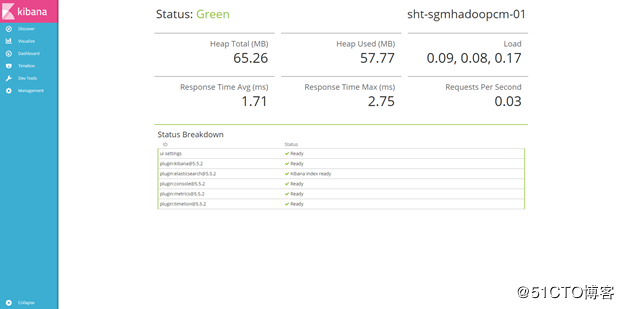
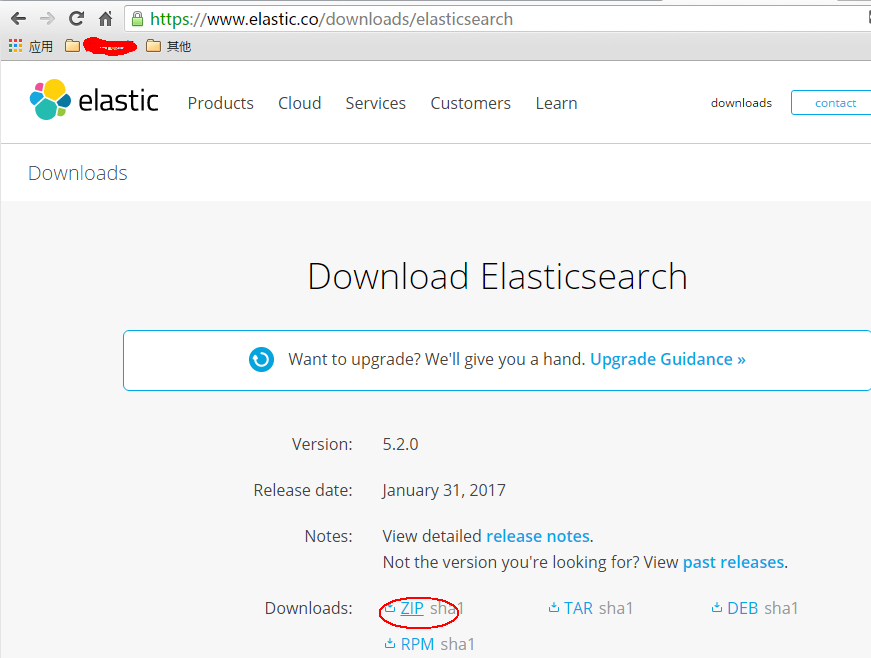
首先,我们从官网下载zip包:(官网:https://www.elastic.co/downloads/elasticsearch) 直接使用浏览器下载可能会很慢,我一般会copy下载链接,然后wget下来: wget https://artifacts.elastic.co/downloads/elasticsearch/elasticsearch-5.2.0.zip 如无意外应该可以安装成功。 接下来就是运行了,这是关键所在,首先我们前往安装目录elasticsearch的安装目录,一般会在:cd /usr/bin/elasticsearch-5.2.0 这个时候如果你直接运行elasticsearch会报以下错误:执行:bin/elasticsearch错误信息: Exception in thread "main" org.elasticsearch.bootstrap.BootstrapException: java.nio.file.NoSuchFileException: /usr/share/elasticsearch/config Likely root cause: java.nio.file.NoSuchFileException: /usr/share/elasticsearch/config ... 见图: elasticsearch github上有这个错误的issue(https://github.com/elastic/ansible-elasticsearch/issues/58)感兴趣的可以看看这个错误的具体原因,我这里主要提供解决方法。 这个错误我觉得主要是因为找不到配置文件,但是如果你直接在安装目录里去启动elasticsearch的话,elasticsearch只会在当前目录找config文件夹,如果安装成service的形式应该是可以找到配置文件,但我没去尝试,后面试试。 问题知道了,我们可以直接把/etc目录下的elasticsearch配置文件copy过来: cp -r /etc/elasticsearch /usr/share/elasticsearch/config 这个时候我们再启动就不会报刚才的错误了,我们再试一遍:bin/elasticsearch 意料之中,这时候会提示以下错误: [2017-01-17T21:54:48,798][WARN ][o.e.b.ElasticsearchUncaughtExceptionHandler] [] uncaught exception in thread [main] org.elasticsearch.bootstrap.StartupException: java.lang.RuntimeException: can not run elasticsearch as root at org.elasticsearch.bootstrap.Elasticsearch.init(Elasticsearch.java:125) ~[elasticsearch-5.1.2.jar:5.1.2] at org.elasticsearch.bootstrap.Elasticsearch.execute(Elasticsearch.java:112) ~[elasticsearch-5.1.2.jar:5.1.2] at org.elasticsearch.cli.SettingCommand.execute(SettingCommand.java:54) ~[elasticsearch-5.1.2.jar:5.1.2] at org.elasticsearch.cli.Command.mainWithoutErrorHandling(Command.java:122) ~[elasticsearch-5.1.2.jar:5.1.2] at org.elasticsearch.cli.Command.main(Command.java:88) ~[elasticsearch-5.1.2.jar:5.1.2] at org.elasticsearch.bootstrap.Elasticsearch.main(Elasticsearch.java:89) ~[elasticsearch-5.1.2.jar:5.1.2] at org.elasticsearch.bootstrap.Elasticsearch.main(Elasticsearch.java:82) ~[elasticsearch-5.1.2.jar:5.1.2] Caused by: java.lang.RuntimeException: can not run elasticsearch as root at org.elasticsearch.bootstrap.Bootstrap.initializeNatives(Bootstrap.java:100) ~[elasticsearch-5.1.2.jar:5.1.2] at org.elasticsearch.bootstrap.Bootstrap.setup(Bootstrap.java:176) ~[elasticsearch-5.1.2.jar:5.1.2] at org.elasticsearch.bootstrap.Bootstrap.init(Bootstrap.java:306) ~[elasticsearch-5.1.2.jar:5.1.2] at org.elasticsearch.bootstrap.Elasticsearch.init(Elasticsearch.java:121) ~[elasticsearch-5.1.2.jar:5.1.2] ... 6 more 这个错误的原因是elasticsearch不允许使用root启动,因此我们要解决这个问题需要新建一个用户来启动elasticsearch(参考:https://my.oschina.net/topeagle/blog/591451?fromerr=mzOr2qzZ) 具体操作如下: ~ groupadd elsearch ~ useradd elsearch -g elsearch -p elsearch ~ cd /usr/share chown -R elsearch:elsearch elasticsearch su elsearch 这个时候在这个用户去启动elasticsearch,一般情况下这个时候就能成功起来了,可能还会出现一些错误,如: hcw-X450VC% ./elasticsearch 2017-01-17 21:03:31,158 main ERROR Could not register mbeans java.security.AccessControlException: access denied ("javax.management.MBeanTrustPermission" "register") at java.security.AccessControlContext.checkPermission(AccessControlContext.java:472) at java.lang.SecurityManager.checkPermission(SecurityManager.java:585) at com.sun.jmx.interceptor.DefaultMBeanServerInterceptor.checkMBeanTrustPermission(DefaultMBeanServerInterceptor.java:1848) at com.sun.jmx.interceptor.DefaultMBeanServerInterceptor.registerMBean(DefaultMBeanServerInterceptor.java:322) at com.sun.jmx.mbeanserver.JmxMBeanServer.registerMBean(JmxMBeanServer.java:522) at org.apache.logging.log4j.core.jmx.Server.register(Server.java:389) at org.apache.logging.log4j.core.jmx.Server.reregisterMBeansAfterReconfigure(Server.java:167) at org.apache.logging.log4j.core.jmx.Server.reregisterMBeansAfterReconfigure(Server.java:140) at org.apache.logging.log4j.core.LoggerContext.setConfiguration(LoggerContext.java:541) at org.apache.logging.log4j.core.LoggerContext.start(LoggerContext.java:258) at org.apache.logging.log4j.core.impl.Log4jContextFactory.getContext(Log4jContextFactory.java:206) at org.apache.logging.log4j.core.config.Configurator.initialize(Configurator.java:220) at org.apache.logging.log4j.core.config.Configurator.initialize(Configurator.java:197) at org.elasticsearch.common.logging.LogConfigurator.configureStatusLogger(LogConfigurator.java:125) at org.elasticsearch.common.logging.LogConfigurator.configureWithoutConfig(LogConfigurator.java:67) at org.elasticsearch.cli.Command.main(Command.java:85) at org.elasticsearch.bootstrap.Elasticsearch.main(Elasticsearch.java:89) at org.elasticsearch.bootstrap.Elasticsearch.main(Elasticsearch.java:82) 这是因为elasticsearch需要读写配置文件,我们需要给予config文件夹权限,上面新建了elsearch用户,elsearch用户不具备读写权限,因此还是会报错,解决方法是切换到管理员账户,赋予权限即可: sudo -i chmod -R 775 config 这个时候就可以起来了,来看看效果: 在浏览器查看: 到这里为止,centos 7安装elasticsearch就完成了 转载请标明本文来源:http://www.cnblogs.com/yswenli/p/6397351.html更多内容欢迎我的的github:https://github.com/yswenli如果发现本文有什么问题和任何建议,也随时欢迎交流~ 感谢您的阅读,如果您对我的博客所讲述的内容有兴趣,请继续关注我的后续博客,我是yswenli 。

资源下载

更多资源
Mario

Mario

马里奥是站在游戏界顶峰的超人气多面角色。马里奥靠吃蘑菇成长,特征是大鼻子、头戴帽子、身穿背带裤,还留着胡子。与他的双胞胎兄弟路易基一起,长年担任任天堂的招牌角色。

腾讯云软件源

腾讯云软件源

为解决软件依赖安装时官方源访问速度慢的问题,腾讯云为一些软件搭建了缓存服务。您可以通过使用腾讯云软件源站来提升依赖包的安装速度。为了方便用户自由搭建服务架构,目前腾讯云软件源站支持公网访问和内网访问。

Nacos

Nacos

Nacos /nɑ:kəʊs/ 是 Dynamic Naming and Configuration Service 的首字母简称,一个易于构建 AI Agent 应用的动态服务发现、配置管理和AI智能体管理平台。Nacos 致力于帮助您发现、配置和管理微服务及AI智能体应用。Nacos 提供了一组简单易用的特性集,帮助您快速实现动态服务发现、服务配置、服务元数据、流量管理。Nacos 帮助您更敏捷和容易地构建、交付和管理微服务平台。

Sublime Text

Sublime Text

Sublime Text具有漂亮的用户界面和强大的功能,例如代码缩略图,Python的插件,代码段等。还可自定义键绑定,菜单和工具栏。Sublime Text 的主要功能包括:拼写检查,书签,完整的 Python API , Goto 功能,即时项目切换,多选择,多窗口等等。Sublime Text 是一个跨平台的编辑器,同时支持Windows、Linux、Mac OS X等操作系统。

用户登录
用户注册