嵌入式Linux:文件属主和属组
**目录** 1、修改文件所有者和组 2、chown函数 3、fchown函数 4、lchown函数 --- 在Linux系统中,每个文件都有一个属主(owner)和一个属组(group)。文件权限系统根据这些信息来决定哪些用户和组可以访问和操作文件。 **文件属主(Owner)** 文件属主是创建文件的用户。属主具有完全控制权,可以读取、修改、执行文件,或者更改文件的权限。 **文件属组(Group)** 文件属组是与文件相关联的一个用户组。组内的所有用户都可以根据文件的组权限来访问文件。 在 Linux 系统中,系统并不是通过用户名或用户组名来识别用户和用户组,而是通过用户 ID (UID) 和组 ID (GID) 来识别的。每个用户和用户组都会被分配一个唯一的 ID,系统将用户名和用户组名与相应的 ID 关联起来。因此,系统通过 UID 和 GID 就可以识别不同的用户和用户组。 可以使用 `ls` 命令或 `stat` 命令查看文件的所有者和所属组。例如: 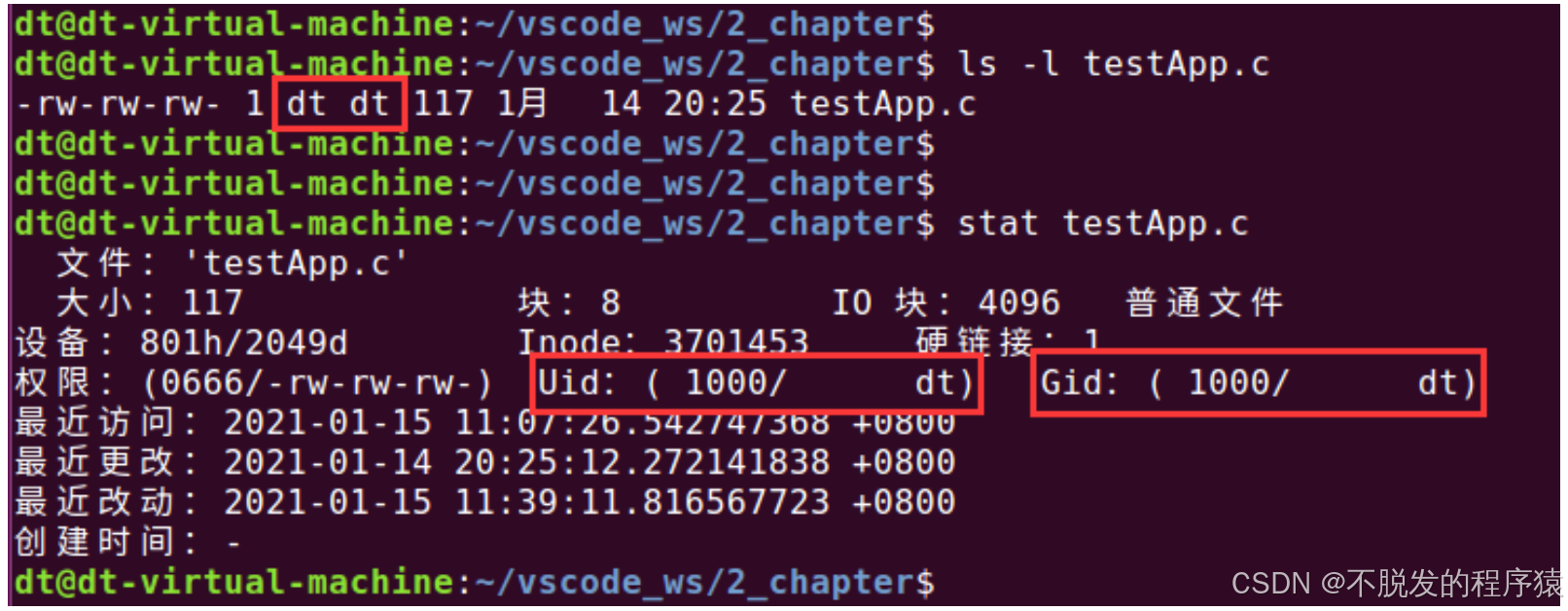 由上图可知,testApp.c 文件的用户 ID 是 1000,用户组 ID 也是 1000。 ## 1、修改文件所有者和组 使用 `chown` 和 `chgrp` 命令可以更改文件的所有者和组。 `chown` 命令示例如下: ```bash # 将文件的所有者改为 user $ sudo chown user example.txt # 将文件的所有者和组改为 user 和 group $ sudo chown user:group example.txt ``` `chgrp` 命令示例如下: ```bash # 将文件的组改为 group $ sudo chgrp group example.txt ``` `chown`、`fchown` 和 `lchown` 函数都用于更改文件的所有者和组,但它们的作用对象和使用场景有所不同。 ## 2、`chown`函数 `chown` 函数用于更改指定路径文件的所有者和组。 函数原型如下: ```c #include int chown(const char *pathname, uid_t owner, gid_t group); ``` 参数说明 - `pathname`:文件或目录的路径。 - `owner`:新的用户 ID。如果设置为 `-1`,则不更改文件的所有者。 - `group`:新的组 ID。如果设置为 `-1`,则不更改文件的所属组。 返回值 - 成功时返回 `0`。 - 失败时返回 `-1`,并设置 `errno` 来指示错误原因。 示例如下: ```c #include #include int main() { const char *path = "example.txt"; uid_t new_owner = 1000; // 新的用户 ID gid_t new_group = 1000; // 新的组 ID if (chown(path, new_owner, new_group) == -1) { perror("chown"); return 1; } printf("Successfully changed owner and group of %s to %d:%d\\n", path, new_owner, new_group); return 0; } ``` ## 3、`fchown`函数 `fchown` 函数用于更改已打开文件的所有者和组。 函数原型如下: ```c #include int fchown(int fd, uid_t owner, gid_t group); ``` 参数说明 - `fd`:文件描述符。 - `owner`:新的用户 ID。如果设置为 `-1`,则不更改文件的所有者。 - `group`:新的组 ID。如果设置为 `-1`,则不更改文件的所属组。 返回值 - 成功时返回 `0`。 - 失败时返回 `-1`,并设置 `errno` 来指示错误原因。 示例如下: ```c #include #include #include int main() { int fd = open("example.txt", O_RDWR); if (fd == -1) { perror("open"); return 1; } uid_t new_owner = 1000; // 新的用户 ID gid_t new_group = 1000; // 新的组 ID if (fchown(fd, new_owner, new_group) == -1) { perror("fchown"); close(fd); return 1; } printf("Successfully changed owner and group of the file descriptor %d to %d:%d\\n", fd, new_owner, new_group); close(fd); return 0; } ``` ## 4、`lchown`函数 `lchown` 函数用于更改符号链接本身的所有者和组,而不是符号链接指向的文件。 函数原型如下: ```c #include int lchown(const char *pathname, uid_t owner, gid_t group); ``` 参数说明 - `pathname`:符号链接的路径。 - `owner`:新的用户 ID。如果设置为 `-1`,则不更改符号链接的所有者。 - `group`:新的组 ID。如果设置为 `-1`,则不更改符号链接的所属组。 返回值 - 成功时返回 `0`。 - 失败时返回 `-1`,并设置 `errno` 来指示错误原因。 示例如下: ```c #include #include int main() { const char *path = "example_symlink"; uid_t new_owner = 1000; // 新的用户 ID gid_t new_group = 1000; // 新的组 ID if (lchown(path, new_owner, new_group) == -1) { perror("lchown"); return 1; } printf("Successfully changed owner and group of %s to %d:%d\\n", path, new_owner, new_group); return 0; } ``` 通过这些函数,可以灵活地管理文件和目录的所有者和组,进而控制访问权限。