ELK日志分析平台
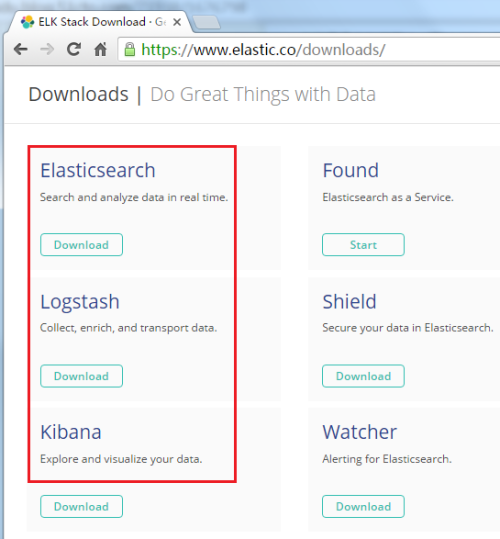
1 2 3 4 5 6 7 8 9 10 11 12 13 14 15 16 17 18 19 20 21 22 23 24 25 26 27 28 29 30 31 32 33 34 35 36 37 38 39 40 41 42 43 44 45 46 47 48 49 50 51 52 53 54 55 56 57 58 59 60 61 62 63 64 65 66 67 68 69 70 71 72 73 74 75 76 77 78 79 80 81 82 83 84 85 86 87 88 89 90 91 92 93 94 95 96 97 98 99 100 101 102 103 104 105 106 107 108 109 110 111 112 113 114 115 116 117 118 119 120 121 122 123 124 125 126 127 128 129 130 131 132 133 134 135 136 137 138 139 140 141 142 143 144 145 146 147 148 149 150 151 152 153 154 155 156 157 158 159 160 161 162 163 164 165 166 167 168 169 170 171 172 173 174 175 176 177 178 179 180 181 182 183 184 185 186 187 188 189 190 191 192 193 194 195 196 197 198 199 200 我的博客已迁移到xdoujiang.com请去那边和我交流 ELKstack是Elasticsearch、Logstash、Kibana三个开源软件的组合。目前都在Elastic.co公司名下。 ELK是一套常用的开源日志监控和分析系统,包括一个分布式索引与搜索服务Elasticsearch, 一个管理日志和事件的工具logstash,和一个数据可视化服务Kibana logstash_1.5.3负责日志的收集,处理和储存 elasticsearch-1.7.2负责日志检索和分析 kibana-4.1.2-linux-x64. tar .gz负责日志的可视化 jdk-1.7.0_03java环境 redis-2.4.14DB 一、基础环境 1、角色、ip、版本、内核 serverA10.1.10.1853.2.0-4-amd647.8javaelasticsearchrediskibanalogstash(agentindexer) clientB10.1.10.1173.2.0-4-amd647.8javalogstash(agent) 2、安装基础包 apt-get-y install curlwgetlrzszaxel 二、安装redisserver 1、安装包 apt-get-y install redis-server 2、创建redis存储目录 mkdir /opt/redis -p 3、权限 chown redis /opt/redis/ -R 4、配置 1)备份配置 cp /etc/redis/redis .conf /etc/redis/redis .conf.bak 2)修改配置 sed -i 's!^bind.*!bind10.1.10.185!g' /etc/redis/redis .conf sed -i 's!^dir.*!dir/opt/redis!g' /etc/redis/redis .conf 5、重启服务 /etc/init .d /redis-server restart 6、查看进程和端口 1)查看进程 ps -ef| grep redis redis231931016:41?00:00:00 /usr/bin/redis-server /etc/redis/redis .conf 2)查看端口 netstat -tupnl| grep redis tcp0010.1.10.185:63790.0.0.0:*LISTEN25188 /redis-server 7、检查开机启动(默认设置开机启动了) ll /etc/rc2 .d/| grep redis lrwxrwxrwx1rootroot22Sep2016:41S02redis-server->.. /init .d /redis-server 三、安装java环境 1、安装包 apt-get-y install openjdk-7-jdk 2、查看版本 java-version javaversion "1.7.0_03" OpenJDKRuntimeEnvironment(IcedTea72.1.7)(7u3-2.1.7-1) OpenJDK64-BitServerVM(build22.0-b10,mixedmode) 四、安装elasticsearch 1、下载elasticsearch wgethttps: //download .elastic.co /elasticsearch/elasticsearch/elasticsearch-1 .7.2.deb 2、安装elasticsearch dpkg-ielasticsearch-1.7.2.deb Selectingpreviouslyunselectedpackageelasticsearch. (Readingdatabase...30240filesanddirectoriescurrentlyinstalled.) Unpackingelasticsearch(fromelasticsearch-1.7.2.deb)... Creatingelasticsearchgroup...OK Creatingelasticsearchuser...OK Settingupelasticsearch(1.7.2)... 3、配置 1)备份配置 cp /etc/elasticsearch/elasticsearch .yml /etc/elasticsearch/elasticsearch .yml.bak 2)修改配置 echo "network.bind_host:10.1.10.185" >> /etc/elasticsearch/elasticsearch .yml 4、启动elasticsearch服务 /etc/init .d /elasticsearch start 5、查看进程和端口 1)查看进程 ps -ef| grep java 1062283516315:14?00:00:03 /usr/lib/jvm/java-7-openjdk-amd64//bin/java -Xms256m-Xmx1g-Djava.awt.headless= true -XX:+UseParNewGC-XX:+UseConcMarkSweepGC-XX:CMSInitiatingOccupancyFraction=75-XX:+UseCMSInitiatingOccupancyOnly-XX:+HeapDumpOnOutOfMemoryError-XX:+DisableExplicitGC-Dfile.encoding=UTF-8-Delasticsearch-Des.pidfile= /var/run/elasticsearch/elasticsearch .pid-Des.path.home= /usr/share/elasticsearch - cp : /usr/share/elasticsearch/lib/elasticsearch-1 .7.2.jar: /usr/share/elasticsearch/lib/ *: /usr/share/elasticsearch/lib/sigar/ *-Des.default.config= /etc/elasticsearch/elasticsearch .yml-Des.default.path.home= /usr/share/elasticsearch -Des.default.path.logs= /var/log/elasticsearch -Des.default.path.data= /var/lib/elasticsearch -Des.default.path.work= /tmp/elasticsearch -Des.default.path.conf= /etc/elasticsearch org.elasticsearch.bootstrap.Elasticsearch 2)查看端口 netstat -tupnl| grep java tcp60010.1.10.185:9200:::*LISTEN22835 /java tcp60010.1.10.185:9300:::*LISTEN22835 /java udp600:::54328:::*22835 /java 6、测试 curl-XGEThttp: //10 .1.10.185:9200 { "status" :200, "name" : "NedLeeds" , "cluster_name" : "elasticsearch" , "version" :{ "number" : "1.7.2" , "build_hash" : "e43676b1385b8125d647f593f7202acbd816e8ec" , "build_timestamp" : "2015-09-14T09:49:53Z" , "build_snapshot" : false , "lucene_version" : "4.10.4" }, "tagline" : "YouKnow,forSearch" } 7、添加到开机启动 update-rc.delasticsearchdefaults update-rc.d:usingdependencybasedbootsequencing 五、安装logstash 1、下载logstash wgethttps: //download .elastic.co /logstash/logstash/packages/debian/logstash_1 .5.3-1_all.deb 2、安装logstash dpkg-ilogstash_1.5.3-1_all.deb (Readingdatabase...30338filesanddirectoriescurrentlyinstalled.) Unpackinglogstash(fromlogstash_1.5.3-1_all.deb)... Settinguplogstash(1:1.5.3-1)... 3、配置(默认没有这个配置文件) 1)配置logstash_agent cat /etc/logstash/conf .d /logstash_agent .conf input{ file { type => "messages" path=>[ "/var/log/messages" ] } file { type => "elasticsearch" path=>[ '/var/log/elasticsearch/elasticsearch.log*' ] } } output{ redis{ host=> "10.1.10.185" data_type=> "list" key=> "logstash:redis" } } 2)配置logstash_indexer cat /etc/logstash/conf .d /logstash_indexer .conf input{ redis{ host=> "10.1.10.185" data_type=> "list" key=> "logstash:redis" type => "redis-input" port=> "6379" } } output{ elasticsearch{ host=> "10.1.10.185" } } 4、启动服务 /etc/init .d /logstash start logstashstarted. 5、使用jps-mlv或 ps -ef来查看下进程 ps -ef| grep logst logstash2293211615:19pts /0 00:00:01 /usr/bin/java -XX:+UseParNewGC-XX:+UseConcMarkSweepGC-Djava.awt.headless= true -XX:CMSInitiatingOccupancyFraction=75-XX:+UseCMSInitiatingOccupancyOnly-Djava.io.tmpdir= /var/lib/logstash -Xmx500m-Xss2048k-Djffi.boot.library.path= /opt/logstash/vendor/jruby/lib/jni -XX:+UseParNewGC-XX:+UseConcMarkSweepGC-Djava.awt.headless= true -XX:CMSInitiatingOccupancyFraction=75-XX:+UseCMSInitiatingOccupancyOnly-Djava.io.tmpdir= /var/lib/logstash -Xbootclasspath /a : /opt/logstash/vendor/jruby/lib/jruby .jar-classpath:-Djruby.home= /opt/logstash/vendor/jruby -Djruby.lib= /opt/logstash/vendor/jruby/lib -Djruby.script=jruby-Djruby.shell= /bin/sh org.jruby.Main--1.9 /opt/logstash/lib/bootstrap/environment .rblogstash /runner .rbagent-f /etc/logstash/conf .d-l /var/log/logstash/logstash .log 6、设置开机启动 update-rc.dlogstashdefaults update-rc.d:usingdependencybasedbootsequencing 六、安装kibana(前端web) 1、下载 axel-n10https: //download .elastic.co /kibana/kibana/kibana-4 .1.2-linux-x64. tar .gz 2、解压到指定目录 tar zxvfkibana-4.1.2-linux-x64. tar .gz-C /opt 3、创建日志目录 mkdir -p /opt/kibanalog 4、配置 1)备份配置 cp /opt/kibana-4 .1.2-linux-x64 /config/kibana .yml /opt/kibana-4 .1.2-linux-x64 /config/kibana .yml.bak 2)修改配置 sed -i 's!^elasticsearch_url:.*!elasticsearch_url:"http://10.1.10.185:9200"!g' /opt/kibana-4 .1.2-linux-x64 /config/kibana .yml sed -i 's!^host:.*!host:"10.1.10.185"!g' /opt/kibana-4 .1.2-linux-x64 /config/kibana .yml 5、启动服务 cd /opt/kibanalog && nohup /opt/kibana-4 .1.2-linux-x64 /bin/kibana & 6、查看进程和端口 1)查看进程 ps aux| grep kibana root229825.420.161257647716pts /0 Sl15:220:01 /opt/kibana-4 .1.2-linux-x64 /bin/ .. /node/bin/node /opt/kibana-4 .1.2-linux-x64 /bin/ .. /src/bin/kibana .js 2)查看端口 netstat -tupnl| grep 5601 tcp0010.1.10.185:56010.0.0.0:*LISTEN22982 /node 7、在windows上访问http: //10 .1.10.185:5601 1 2 3 4 5 6 7 8 9 10 11 12 13 14 15 16 17 18 19 20 21 22 23 24 25 26 27 28 29 30 31 32 33 34 35 36 37 38 39 40 41 42 43 44 45 46 47 48 49 50 51 52 53 54 55 56 57 58 59 60 61 62 63 64 65 66 67 68 69 70 71 72 73 74 75 76 77 78 79 80 81 82 83 84 85 86 87 88 89 90 91 92 93 94 95 96 97 98 99 100 101 102 103 104 105 106 107 108 109 110 111 112 113 114 115 116 117 118 119 120 121 122 123 124 125 126 127 128 129 130 131 132 133 134 135 136 137 138 139 140 141 142 143 144 145 146 147 148 149 150 151 152 153 154 155 156 157 158 159 160 161 162 163 164 165 166 167 168 169 170 171 172 173 174 8、设置开机启动 echo "cd/opt/kibanalog&&nohup/opt/kibana-4.1.2-linux-x64/bin/kibana&" >> /etc/rc . local 七、查看全部服务日志 1、查看redis日志 cat /var/log/redis/redis-server .log [5903]22Sep09:53:47*Serverstarted,Redisversion2.4.14 [5903]22Sep09:53:47 #WARNINGovercommit_memoryissetto0!Backgroundsavemayfailunderlowmemorycondition.Tofixthisissueadd'vm.overcommit_memory=1'to/etc/sysctl.confandthenrebootorrunthecommand'sysctlvm.overcommit_memory=1'forthistotakeeffect. [5903]22Sep09:53:47*Theserverisnowreadytoacceptconnectionsonport6379 [5903]22Sep10:08:42 #ReceivedSIGTERM,schedulingshutdown... [5903]22Sep10:08:42 #Userrequestedshutdown... [5903]22Sep10:08:42*SavingthefinalRDBsnapshotbeforeexiting. [5903]22Sep10:08:42*DBsavedondisk [5903]22Sep10:08:42*Removingthepid file . [5903]22Sep10:08:42 #Redisisnowreadytoexit,byebye... [22674]22Sep10:08:43*Serverstarted,Redisversion2.4.14 [22674]22Sep10:08:43 #WARNINGovercommit_memoryissetto0!Backgroundsavemayfailunderlowmemorycondition.Tofixthisissueadd'vm.overcommit_memory=1'to/etc/sysctl.confandthenrebootorrunthecommand'sysctlvm.overcommit_memory=1'forthistotakeeffect. [22674]22Sep10:08:43*Theserverisnowreadytoacceptconnectionsonport6379 [22674]22Sep10:49:56*1changes in 900seconds.Saving... [22674]22Sep10:49:56*Backgroundsavingstartedbypid23186 [23186]22Sep10:49:56*DBsavedondisk [22674]22Sep10:49:57*Backgroundsavingterminatedwithsuccess [22674]22Sep10:50:58*10000changes in 60seconds.Saving... [22674]22Sep10:50:58*Backgroundsavingstartedbypid23205 [23205]22Sep10:50:58*DBsavedondisk [22674]22Sep10:50:58*Backgroundsavingterminatedwithsuccess [22674]22Sep10:51:59*10000changes in 60seconds.Saving... [22674]22Sep10:51:59*Backgroundsavingstartedbypid23214 [23214]22Sep10:51:59*DBsavedondisk [22674]22Sep10:51:59*Backgroundsavingterminatedwithsuccess 2、查看elasticsearch日志 cat /var/log/elasticsearch/elasticsearch .log [2015-09-2210:09:42,361][INFO][node][Karma]version[1.7.2],pid[22751],build[e43676b /2015-09-14T09 :49:53Z] [2015-09-2210:09:42,362][INFO][node][Karma]initializing... [2015-09-2210:09:42,536][INFO][plugins][Karma]loaded[],sites[] [2015-09-2210:09:42,595][INFO][ env ][Karma]using[1]datapaths,mounts[[/(rootfs)]],netusable_space[7.3gb],nettotal_space[9.1gb],types[rootfs] [2015-09-2210:09:45,669][INFO][node][Karma]initialized [2015-09-2210:09:45,669][INFO][node][Karma]starting... [2015-09-2210:09:45,776][INFO][transport][Karma]bound_address{inet[ /10 .1.10.185:9300]},publish_address{inet[ /10 .1.10.185:9300]} [2015-09-2210:09:45,794][INFO][discovery][Karma]elasticsearch /mB1_wQprTAWGam7X1LzCxQ [2015-09-2210:09:49,582][INFO][cluster.service][Karma]new_master[Karma][mB1_wQprTAWGam7X1LzCxQ][debian][inet[ /10 .1.10.185:9300]],reason:zen-disco- join (elected_as_master) [2015-09-2210:09:49,620][INFO][http][Karma]bound_address{inet[ /10 .1.10.185:9200]},publish_address{inet[ /10 .1.10.185:9200]} [2015-09-2210:09:49,620][INFO][node][Karma]started [2015-09-2210:09:49,642][INFO][gateway][Karma]recovered[0]indicesintocluster_state [2015-09-2210:49:56,101][INFO][cluster.service][Karma]added{[logstash-debian-23118-13460][Bt8LxnD9R4amhOypJbgxww][debian][inet[ /10 .1.10.185:9301]]{client= true ,data= false },},reason:zen-disco-receive( join fromnode[[logstash-debian-23118-13460][Bt8LxnD9R4amhOypJbgxww][debian][inet[ /10 .1.10.185:9301]]{client= true ,data= false }]) [2015-09-2210:49:58,511][INFO][cluster.metadata][Karma][logstash-2015.09.22]creatingindex,cause[auto(bulkapi)],templates[logstash],shards[5]/[1],mappings[_default_,elasticsearch] [2015-09-2210:49:59,645][INFO][cluster.metadata][Karma][logstash-2015.09.22]update_mapping[elasticsearch](dynamic) [2015-09-2210:53:28,474][DEBUG][action.admin.cluster.health][Karma]observer:timeoutnotificationfromclusterservice.timeoutsetting[5s], time sincestart[5s] [2015-09-2210:53:51,251][INFO][cluster.metadata][Karma][.kibana]creatingindex,cause[api],templates[],shards[1]/[1],mappings[] [2015-09-2210:53:52,902][INFO][cluster.metadata][Karma][.kibana]update_mapping[config](dynamic) 3、查看logstash日志 cat /var/log/logstash/logstash .err !!!Pleaseupgradeyourjavaversion,thecurrentversion '1.7.0_03-b21' maycauseproblems.Werecommendaminimumversionof1.7.0_51 '[DEPRECATED]use`requireconcurrent`insteadof`requireconcurrent_ruby' [2015-09-2210:49:48.459]WARN--Concurrent:[DEPRECATED]Java7isdeprecated,pleaseuseJava8. Java7supportisonlybesteffort,itmaynotwork.Itwillberemoved in nextrelease(1.0). Sep22,201510:49:49AMorg.elasticsearch.node.internal.InternalNode<init> INFO:[logstash-debian-23118-13460]version[1.7.0],pid[23118],build[929b973 /2015-07-16T14 :31:07Z] Sep22,201510:49:49AMorg.elasticsearch.node.internal.InternalNode<init> INFO:[logstash-debian-23118-13460]initializing... Sep22,201510:49:49AMorg.elasticsearch.plugins.PluginsService<init> INFO:[logstash-debian-23118-13460]loaded[],sites[] Sep22,201510:49:51AMorg.elasticsearch.bootstrap.Natives<clinit> WARNING:JNAnotfound.nativemethodswillbedisabled. Sep22,201510:49:52AMorg.elasticsearch.node.internal.InternalNode<init> INFO:[logstash-debian-23118-13460]initialized Sep22,201510:49:52AMorg.elasticsearch.node.internal.InternalNodestart INFO:[logstash-debian-23118-13460]starting... Sep22,201510:49:52AMorg.elasticsearch.transport.TransportServicedoStart INFO:[logstash-debian-23118-13460]bound_address{inet[ /0 :0:0:0:0:0:0:0:9301]},publish_address{inet[ /10 .1.10.185:9301]} Sep22,201510:49:53AMorg.elasticsearch.discovery.DiscoveryServicedoStart INFO:[logstash-debian-23118-13460]elasticsearch /Bt8LxnD9R4amhOypJbgxww Sep22,201510:49:56AMorg.elasticsearch.cluster.service.InternalClusterService$UpdateTaskrun INFO:[logstash-debian-23118-13460]detected_master[Karma][mB1_wQprTAWGam7X1LzCxQ][debian][inet[ /10 .1.10.185:9300]],added{[Karma][mB1_wQprTAWGam7X1LzCxQ][debian][inet[ /10 .1.10.185:9300]],},reason:zen-disco-receive(frommaster[[Karma][mB1_wQprTAWGam7X1LzCxQ][debian][inet[ /10 .1.10.185:9300]]]) Sep22,201510:49:56AMorg.elasticsearch.node.internal.InternalNodestart INFO:[logstash-debian-23118-13460]started Sep22,201510:55:23AMorg.elasticsearch.monitor.jvm.JvmMonitorService$JvmMonitormonitorLongGc WARNING:[logstash-debian-23118-13460][gc][young][325][5441]duration[1s],collections[1]/[1.2s],total[1s]/[31.5s],memory[156.5mb]->[157.1mb]/[491.6mb],all_pools{[young][3.8mb]->[2.4mb]/[66.5mb]}{[survivor][365.5kb]->[512kb]/[8.3mb]}{[old][152.3mb]->[154.2mb]/[416.8mb]} Sep22,201510:56:08AMorg.elasticsearch.monitor.jvm.JvmMonitorService$JvmMonitormonitorLongGc INFO:[logstash-debian-23118-13460][gc][young][369][6284]duration[1.8s],collections[2]/[2.3s],total[1.8s]/[37.9s],memory[113.8mb]->[116.2mb]/[491.6mb],all_pools{[young][3.6mb]->[2.1mb]/[66.5mb]}{[survivor][361.1kb]->[508kb]/[8.3mb]}{[old][109.8mb]->[113.6mb]/[416.8mb]} Sep22,201510:57:39AMorg.elasticsearch.monitor.jvm.JvmMonitorService$JvmMonitormonitorLongGc INFO:[logstash-debian-23118-13460][gc][young][457][7938]duration[941ms],collections[1]/[1s],total[941ms]/[48.7s],memory[110.9mb]->[114.2mb]/[491.6mb],all_pools{[young][894.6kb]->[4.1mb]/[66.5mb]}{[survivor][512kb]->[512kb]/[8.3mb]}{[old][109.5mb]->[109.5mb]/[416.8mb]} Sep22,201511:00:42AMorg.elasticsearch.monitor.jvm.JvmMonitorService$JvmMonitormonitorLongGc INFO:[logstash-debian-23118-13460][gc][young][635][11214]duration[703ms],collections[1]/[2.7s],total[703ms]/[1.1m],memory[158.2mb]->[160.1mb]/[491.6mb],all_pools{[young][3.7mb]->[2mb]/[66.5mb]}{[survivor][512kb]->[509.4kb]/[8.3mb]}{[old][153.9mb]->[157.5mb]/[416.8mb]} Sep22,201511:01:33AMorg.elasticsearch.monitor.jvm.JvmMonitorService$JvmMonitormonitorLongGc WARNING:[logstash-debian-23118-13460][gc][young][684][12144]duration[1s],collections[1]/[2.4s],total[1s]/[1.2m],memory[201.6mb]->[200mb]/[491.6mb],all_pools{[young][4.1mb]->[50.1kb]/[66.5mb]}{[survivor][512kb]->[512kb]/[8.3mb]}{[old][197mb]->[199.5mb]/[416.8mb]} Sep22,201511:02:17AMorg.elasticsearch.monitor.jvm.JvmMonitorService$JvmMonitormonitorLongGc WARNING:[logstash-debian-23118-13460][gc][young][727][12972]duration[1.3s],collections[1]/[1s],total[1.3s]/[1.3m],memory[186.5mb]->[188mb]/[491.6mb],all_pools{[young][2.2mb]->[4.1mb]/[66.5mb]}{[survivor][512kb]->[512kb]/[8.3mb]}{[old][183.7mb]->[183.4mb]/[416.8mb]} Sep22,201511:04:40AMorg.elasticsearch.monitor.jvm.JvmMonitorService$JvmMonitormonitorLongGc WARNING:[logstash-debian-23118-13460][gc][young][864][15273]duration[1.3s],collections[1]/[2.9s],total[1.3s]/[1.6m],memory[122.9mb]->[125.8mb]/[491.6mb],all_pools{[young][2.6mb]->[1.9mb]/[66.5mb]}{[survivor][512kb]->[511.9kb]/[8.3mb]}{[old][119.7mb]->[123.3mb]/[416.8mb]} Sep22,201511:05:30AMorg.elasticsearch.monitor.jvm.JvmMonitorService$JvmMonitormonitorLongGc WARNING:[logstash-debian-23118-13460][gc][young][912][16079]duration[1.3s],collections[1]/[2.5s],total[1.3s]/[1.7m],memory[183.9mb]->[181.4mb]/[491.6mb],all_pools{[young][4.1mb]->[101.1kb]/[66.5mb]}{[survivor][510.1kb]->[499.7kb]/[8.3mb]}{[old][179.3mb]->[180.8mb]/[416.8mb]} Sep22,201511:06:16AMorg.elasticsearch.monitor.jvm.JvmMonitorService$JvmMonitormonitorLongGc INFO:[logstash-debian-23118-13460][gc][young][956][16816]duration[915ms],collections[1]/[2s],total[915ms]/[1.8m],memory[175.2mb]->[144.9mb]/[491.6mb],all_pools{[young][3.7mb]->[12.5kb]/[66.5mb]}{[survivor][357.1kb]->[259.6kb]/[8.3mb]}{[old][171.2mb]->[144.6mb]/[416.8mb]} 4、查看kibana日志 cat /opt/kibanalog/nohup .out { "name" : "Kibana" , "hostname" : "debian" , "pid" :23238, "level" :30, "msg" : "Noexistingkibanaindexfound" , "time" : "2015-09-22T02:53:28.503Z" , "v" :0} { "name" : "Kibana" , "hostname" : "debian" , "pid" :23238, "level" :30, "msg" : "Listeningon10.1.10.185:5601" , "time" : "2015-09-22T02:53:28.538Z" , "v" :0} { "name" : "Kibana" , "hostname" : "debian" , "pid" :23238, "level" :30, "req" :{ "method" : "GET" , "url" : "/" , "headers" :{ "host" : "10.1.10.185:5601" , "user-agent" : "Mozilla/5.0(WindowsNT6.1;WOW64;rv:40.0)Gecko/20100101Firefox/40.0" , "accept" : "text/html,application/xhtml+xml,application/xml;q=0.9,*/*;q=0.8" , "accept-language" : "zh-CN,zh;q=0.8,en-US;q=0.5,en;q=0.3" , "accept-encoding" : "gzip,deflate" , "connection" : "keep-alive" , "if-modified-since" : "Tue,08Sep201520:12:29GMT" , "if-none-match" : "W/\"6f9-3043805189\"" }, "remoteAddress" : "10.1.10.131" , "remotePort" :57468}, "res" :{ "statusCode" :304, "responseTime" :6, "contentLength" :0}, "msg" : "GET/304-6ms" , "time" : "2015-09-22T02:53:49.894Z" , "v" :0} { "name" : "Kibana" , "hostname" : "debian" , "pid" :23238, "level" :30, "req" :{ "method" : "GET" , "url" : "/styles/main.css?_b=7562" , "headers" :{ "host" : "10.1.10.185:5601" , "user-agent" : "Mozilla/5.0(WindowsNT6.1;WOW64;rv:40.0)Gecko/20100101Firefox/40.0" , "accept" : "text/css,*/*;q=0.1" , "accept-language" : "zh-CN,zh;q=0.8,en-US;q=0.5,en;q=0.3" , "accept-encoding" : "gzip,deflate" , "referer" : "http://10.1.10.185:5601/" , "connection" : "keep-alive" , "if-modified-since" : "Tue,08Sep201520:12:30GMT" , "if-none-match" : "W/\"335dc-873763449\"" }, "remoteAddress" : "10.1.10.131" , "remotePort" :57468}, "res" :{ "statusCode" :304, "responseTime" :18, "contentLength" :0}, "msg" : "GET/styles/main.css?_b=7562304-18ms" , "time" : "2015-09-22T02:53:49.964Z" , "v" :0} { "name" : "Kibana" , "hostname" : "debian" , "pid" :23238, "level" :30, "req" :{ "method" : "GET" , "url" : "/images/initial_load.gif" , "headers" :{ "host" : "10.1.10.185:5601" , "user-agent" : "Mozilla/5.0(WindowsNT6.1;WOW64;rv:40.0)Gecko/20100101Firefox/40.0" , "accept" : "image/png,image/*;q=0.8,*/*;q=0.5" , "accept-language" : "zh-CN,zh;q=0.8,en-US;q=0.5,en;q=0.3" , "accept-encoding" : "gzip,deflate" , "referer" : "http://10.1.10.185:5601/" , "connection" : "keep-alive" , "if-modified-since" : "Tue,08Sep201520:12:29GMT" , "if-none-match" : "W/\"2e9e-3043805189\"" }, "remoteAddress" : "10.1.10.131" , "remotePort" :57468}, "res" :{ "statusCode" :304, "responseTime" :2, "contentLength" :0}, "msg" : "GET/images/initial_load.gif304-2ms" , "time" : "2015-09-22T02:53:49.968Z" , "v" :0} { "name" : "Kibana" , "hostname" : "debian" , "pid" :23238, "level" :30, "req" :{ "method" : "GET" , "url" : "/bower_components/requirejs/require.js?_b=7562" , "headers" :{ "host" : "10.1.10.185:5601" , "user-agent" : "Mozilla/5.0(WindowsNT6.1;WOW64;rv:40.0)Gecko/20100101Firefox/40.0" , "accept" : "*/*" , "accept-language" : "zh-CN,zh;q=0.8,en-US;q=0.5,en;q=0.3" , "accept-encoding" : "gzip,deflate" , "referer" : "http://10.1.10.185:5601/" , "connection" : "keep-alive" , "if-modified-since" : "Tue,08Sep201520:12:29GMT" , "if-none-match" : "W/\"14703-3043805189\"" }, "remoteAddress" : "10.1.10.131" , "remotePort" :57469}, "res" :{ "statusCode" :304, "responseTime" :1, "contentLength" :0}, "msg" : "GET/bower_components/requirejs/require.js?_b=7562304-1ms" , "time" : "2015-09-22T02:53:49.969Z" , "v" :0} { "name" : "Kibana" , "hostname" : "debian" , "pid" :23238, "level" :30, "req" :{ "method" : "GET" , "url" : "/require.config.js?_b=7562" , "headers" :{ "host" : "10.1.10.185:5601" , "user-agent" : "Mozilla/5.0(WindowsNT6.1;WOW64;rv:40.0)Gecko/20100101Firefox/40.0" , "accept" : "*/*" , "accept-language" : "zh-CN,zh;q=0.8,en-US;q=0.5,en;q=0.3" , "accept-encoding" : "gzip,deflate" , "referer" : "http://10.1.10.185:5601/" , "connection" : "keep-alive" , "if-modified-since" : "Tue,08Sep201520:12:29GMT" , "if-none-match" : "W/\"a66-3043805189\"" }, "remoteAddress" : "10.1.10.131" , "remotePort" :57470}, "res" :{ "statusCode" :304, "responseTime" :2, "contentLength" :0}, "msg" : "GET/require.config.js?_b=7562304-2ms" , "time" : "2015-09-22T02:53:49.970Z" , "v" :0} { "name" : "Kibana" , "hostname" : "debian" , "pid" :23238, "level" :30, "req" :{ "method" : "GET" , "url" : "/styles/theme/elk.ico" , "headers" :{ "host" : "10.1.10.185:5601" , "user-agent" : "Mozilla/5.0(WindowsNT6.1;WOW64;rv:40.0)Gecko/20100101Firefox/40.0" , "accept" : "text/html,application/xhtml+xml,application/xml;q=0.9,*/*;q=0.8" , "accept-language" : "zh-CN,zh;q=0.8,en-US;q=0.5,en;q=0.3" , "accept-encoding" : "gzip,deflate" , "connection" : "keep-alive" , "if-modified-since" : "Tue,08Sep201520:12:30GMT" , "if-none-match" : "W/\"47e-873763449\"" }, "remoteAddress" : "10.1.10.131" , "remotePort" :57471}, "res" :{ "statusCode" :304, "responseTime" :3, "contentLength" :0}, "msg" : "GET/styles/theme/elk.ico304-3ms" , "time" : "2015-09-22T02:53:49.970Z" , "v" :0} { "name" : "Kibana" , "hostname" : "debian" , "pid" :23238, "level" :30, "req" :{ "method" : "GET" , "url" : "/index.js?_b=7562" , "headers" :{ "host" : "10.1.10.185:5601" , "user-agent" : "Mozilla/5.0(WindowsNT6.1;WOW64;rv:40.0)Gecko/20100101Firefox/40.0" , "accept" : "*/*" , "accept-language" : "zh-CN,zh;q=0.8,en-US;q=0.5,en;q=0.3" , "accept-encoding" : "gzip,deflate" , "referer" : "http://10.1.10.185:5601/" , "connection" : "keep-alive" , "if-modified-since" : "Tue,08Sep201520:12:29GMT" , "if-none-match" : "W/\"5489a7-3043805189\"" }, "remoteAddress" : "10.1.10.131" , "remotePort" :57472}, "res" :{ "statusCode" :304, "responseTime" :1, "contentLength" :0}, "msg" : "GET/index.js?_b=7562304-1ms" , "time" : "2015-09-22T02:53:50.037Z" , "v" :0} { "name" : "Kibana" , "hostname" : "debian" , "pid" :23238, "level" :30, "req" :{ "method" : "GET" , "url" : "/styles/theme/elk.ico" , "headers" :{ "host" : "10.1.10.185:5601" , "user-agent" : "Mozilla/5.0(WindowsNT6.1;WOW64;rv:40.0)Gecko/20100101Firefox/40.0" , "accept" : "text/html,application/xhtml+xml,application/xml;q=0.9,*/*;q=0.8" , "accept-language" : "zh-CN,zh;q=0.8,en-US;q=0.5,en;q=0.3" , "accept-encoding" : "gzip,deflate" , "connection" : "keep-alive" , "if-modified-since" : "Tue,08Sep201520:12:30GMT" , "if-none-match" : "W/\"47e-873763449\"" }, "remoteAddress" : "10.1.10.131" , "remotePort" :57468}, "res" :{ "statusCode" :304, "responseTime" :0, "contentLength" :0}, "msg" : "GET/styles/theme/elk.ico304-0ms" , "time" : "2015-09-22T02:53:50.203Z" , "v" :0} { "name" : "Kibana" , "hostname" : "debian" , "pid" :23238, "level" :30, "req" :{ "method" : "GET" , "url" : "/config?_b=7562" , "headers" :{ "host" : "10.1.10.185:5601" , "user-agent" : "Mozilla/5.0(WindowsNT6.1;WOW64;rv:40.0)Gecko/20100101Firefox/40.0" , "accept" : "text/html,application/xhtml+xml,application/xml;q=0.9,*/*;q=0.8" , "accept-language" : "zh-CN,zh;q=0.8,en-US;q=0.5,en;q=0.3" , "accept-encoding" : "gzip,deflate" , "referer" : "http://10.1.10.185:5601/" , "connection" : "keep-alive" , "if-none-match" : "W/\"151-5c053bf3\"" }, "remoteAddress" : "10.1.10.131" , "remotePort" :57469}, "res" :{ "statusCode" :304, "responseTime" :3, "contentLength" :0}, "msg" : "GET/config?_b=7562304-3ms" , "time" : "2015-09-22T02:53:50.492Z" , "v" :0} { "name" : "Kibana" , "hostname" : "debian" , "pid" :23238, "level" :30, "req" :{ "method" : "GET" , "url" : "/elasticsearch/?_=1442890430562" , "headers" :{ "host" : "10.1.10.185:5601" , "user-agent" : "Mozilla/5.0(WindowsNT6.1;WOW64;rv:40.0)Gecko/20100101Firefox/40.0" , "accept" : "application/json,text/plain,*/*" , "accept-language" : "zh-CN,zh;q=0.8,en-US;q=0.5,en;q=0.3" , "accept-encoding" : "gzip,deflate" , "referer" : "http://10.1.10.185:5601/" , "connection" : "keep-alive" }, "remoteAddress" : "10.1.10.131" , "remotePort" :57470}, "res" :{ "statusCode" :200, "responseTime" :12, "contentLength" :333}, "msg" : "GET/?_=1442890430562200-12ms" , "time" : "2015-09-22T02:53:50.883Z" , "v" :0} { "name" : "Kibana" , "hostname" : "debian" , "pid" :23238, "level" :30, "req" :{ "method" : "GET" , "url" : "/styles/theme/elk.ico" , "headers" :{ "host" : "10.1.10.185:5601" , "user-agent" : "Mozilla/5.0(WindowsNT6.1;WOW64;rv:40.0)Gecko/20100101Firefox/40.0" , "accept" : "text/html,application/xhtml+xml,application/xml;q=0.9,*/*;q=0.8" , "accept-language" : "zh-CN,zh;q=0.8,en-US;q=0.5,en;q=0.3" , "accept-encoding" : "gzip,deflate" , "connection" : "keep-alive" , "if-modified-since" : "Tue,08Sep201520:12:30GMT" , "if-none-match" : "W/\"47e-873763449\"" }, "remoteAddress" : "10.1.10.131" , "remotePort" :57471}, "res" :{ "statusCode" :304, "responseTime" :0, "contentLength" :0}, "msg" : "GET/styles/theme/elk.ico304-0ms" , "time" : "2015-09-22T02:53:50.923Z" , "v" :0} { "name" : "Kibana" , "hostname" : "debian" , "pid" :23238, "level" :30, "req" :{ "method" : "GET" , "url" : "/styles/theme/elk.ico" , "headers" :{ "host" : "10.1.10.185:5601" , "user-agent" : "Mozilla/5.0(WindowsNT6.1;WOW64;rv:40.0)Gecko/20100101Firefox/40.0" , "accept" : "text/html,application/xhtml+xml,application/xml;q=0.9,*/*;q=0.8" , "accept-language" : "zh-CN,zh;q=0.8,en-US;q=0.5,en;q=0.3" , "accept-encoding" : "gzip,deflate" , "connection" : "keep-alive" , "if-modified-since" : "Tue,08Sep201520:12:30GMT" , "if-none-match" : "W/\"47e-873763449\"" }, "remoteAddress" : "10.1.10.131" , "remotePort" :57472}, "res" :{ "statusCode" :304, "responseTime" :0, "contentLength" :0}, "msg" : "GET/styles/theme/elk.ico304-0ms" , "time" : "2015-09-22T02:53:50.926Z" , "v" :0} { "name" : "Kibana" , "hostname" : "debian" , "pid" :23238, "level" :30, "req" :{ "method" : "GET" , "url" : "/styles/theme/elk.ico" , "headers" :{ "host" : "10.1.10.185:5601" , "user-agent" : "Mozilla/5.0(WindowsNT6.1;WOW64;rv:40.0)Gecko/20100101Firefox/40.0" , "accept" : "text/html,application/xhtml+xml,application/xml;q=0.9,*/*;q=0.8" , "accept-language" : "zh-CN,zh;q=0.8,en-US;q=0.5,en;q=0.3" , "accept-encoding" : "gzip,deflate" , "connection" : "keep-alive" , "if-modified-since" : "Tue,08Sep201520:12:30GMT" , "if-none-match" : "W/\"47e-873763449\"" }, "remoteAddress" : "10.1.10.131" , "remotePort" :57468}, "res" :{ "statusCode" :304, "responseTime" :1, "contentLength" :0}, "msg" : "GET/styles/theme/elk.ico304-1ms" , "time" : "2015-09-22T02:53:50.929Z" , "v" :0} { "name" : "Kibana" , "hostname" : "debian" , "pid" :23238, "level" :30, "req" :{ "method" : "GET" , "url" : "/elasticsearch/_nodes?_=1442890430791" , "headers" :{ "host" : "10.1.10.185:5601" , "user-agent" : "Mozilla/5.0(WindowsNT6.1;WOW64;rv:40.0)Gecko/20100101Firefox/40.0" , "accept" : "application/json,text/plain,*/*" , "accept-language" : "zh-CN,zh;q=0.8,en-US;q=0.5,en;q=0.3" , "accept-encoding" : "gzip,deflate" , "referer" : "http://10.1.10.185:5601/" , "connection" : "keep-alive" }, "remoteAddress" : "10.1.10.131" , "remotePort" :57470}, "res" :{ "statusCode" :200, "responseTime" :63, "contentLength" :5943}, "msg" : "GET/_nodes?_=1442890430791200-63ms" , "time" : "2015-09-22T02:53:51.153Z" , "v" :0} { "name" : "Kibana" , "hostname" : "debian" , "pid" :23238, "level" :30, "req" :{ "method" : "HEAD" , "url" : "/elasticsearch/.kibana" , "headers" :{ "host" : "10.1.10.185:5601" , "user-agent" : "Mozilla/5.0(WindowsNT6.1;WOW64;rv:40.0)Gecko/20100101Firefox/40.0" , "accept" : "application/json,text/plain,*/*" , "accept-language" : "zh-CN,zh;q=0.8,en-US;q=0.5,en;q=0.3" , "accept-encoding" : "gzip,deflate" , "referer" : "http://10.1.10.185:5601/" , "connection" : "keep-alive" }, "remoteAddress" : "10.1.10.131" , "remotePort" :57470}, "res" :{ "statusCode" :404, "responseTime" :6, "contentLength" :0}, "msg" : "HEAD/.kibana404-6ms" , "time" : "2015-09-22T02:53:51.171Z" , "v" :0} { "name" : "Kibana" , "hostname" : "debian" , "pid" :23238, "level" :30, "req" :{ "method" : "POST" , "url" : "/elasticsearch/.kibana" , "headers" :{ "host" : "10.1.10.185:5601" , "user-agent" : "Mozilla/5.0(WindowsNT6.1;WOW64;rv:40.0)Gecko/20100101Firefox/40.0" , "accept" : "application/json,text/plain,*/*" , "accept-language" : "zh-CN,zh;q=0.8,en-US;q=0.5,en;q=0.3" , "accept-encoding" : "gzip,deflate" , "content-type" : "application/json;charset=utf-8" , "referer" : "http://10.1.10.185:5601/" , "content-length" : "35" , "connection" : "keep-alive" , "pragma" : "no-cache" , "cache-control" : "no-cache" }, "remoteAddress" : "10.1.10.131" , "remotePort" :57470}, "res" :{ "statusCode" :200, "responseTime" :546, "contentLength" :21}, "msg" : "POST/.kibana200-546ms" , "time" : "2015-09-22T02:53:51.726Z" , "v" :0} { "name" : "Kibana" , "hostname" : "debian" , "pid" :23238, "level" :30, "req" :{ "method" : "GET" , "url" : "/elasticsearch/_cluster/health/.kibana?wait_for_status=yellow&_=1442890431632" , "headers" :{ "host" : "10.1.10.185:5601" , "user-agent" : "Mozilla/5.0(WindowsNT6.1;WOW64;rv:40.0)Gecko/20100101Firefox/40.0" , "accept" : "application/json,text/plain,*/*" , "accept-language" : "zh-CN,zh;q=0.8,en-US;q=0.5,en;q=0.3" , "accept-encoding" : "gzip,deflate" , "referer" : "http://10.1.10.185:5601/" , "connection" : "keep-alive" }, "remoteAddress" : "10.1.10.131" , "remotePort" :57470}, "res" :{ "statusCode" :200, "responseTime" :467, "contentLength" :313}, "msg" : "GET/_cluster/health/.kibana?wait_for_status=yellow&_=1442890431632200-467ms" , "time" : "2015-09-22T02:53:52.398Z" , "v" :0} { "name" : "Kibana" , "hostname" : "debian" , "pid" :23238, "level" :30, "req" :{ "method" : "POST" , "url" : "/elasticsearch/_mget?timeout=0&ignore_unavailable=true&preference=1442890430199" , "headers" :{ "host" : "10.1.10.185:5601" , "user-agent" : "Mozilla/5.0(WindowsNT6.1;WOW64;rv:40.0)Gecko/20100101Firefox/40.0" , "accept" : "application/json,text/plain,*/*" , "accept-language" : "zh-CN,zh;q=0.8,en-US;q=0.5,en;q=0.3" , "accept-encoding" : "gzip,deflate" , "content-type" : "application/json;charset=utf-8" , "referer" : "http://10.1.10.185:5601/" , "content-length" : "62" , "connection" : "keep-alive" , "pragma" : "no-cache" , "cache-control" : "no-cache" }, "remoteAddress" : "10.1.10.131" , "remotePort" :57470}, "res" :{ "statusCode" :200, "responseTime" :60, "contentLength" :76}, "msg" : "POST/_mget?timeout=0&ignore_unavailable=true&preference=1442890430199200-60ms" , "time" : "2015-09-22T02:53:52.665Z" , "v" :0} { "name" : "Kibana" , "hostname" : "debian" , "pid" :23238, "level" :30, "req" :{ "method" : "POST" , "url" : "/elasticsearch/.kibana/config/4.1.2" , "headers" :{ "host" : "10.1.10.185:5601" , "user-agent" : "Mozilla/5.0(WindowsNT6.1;WOW64;rv:40.0)Gecko/20100101Firefox/40.0" , "accept" : "application/json,text/plain,*/*" , "accept-language" : "zh-CN,zh;q=0.8,en-US;q=0.5,en;q=0.3" , "accept-encoding" : "gzip,deflate" , "content-type" : "application/json;charset=utf-8" , "referer" : "http://10.1.10.185:5601/" , "content-length" : "17" , "connection" : "keep-alive" , "pragma" : "no-cache" , "cache-control" : "no-cache" }, "remoteAddress" : "10.1.10.131" , "remotePort" :57470}, "res" :{ "statusCode" :201, "responseTime" :33, "contentLength" :79}, "msg" : "POST/.kibana/config/4.1.2201-33ms" , "time" : "2015-09-22T02:53:52.908Z" , "v" :0} { "name" : "Kibana" , "hostname" : "debian" , "pid" :23238, "level" :30, "req" :{ "method" : "POST" , "url" : "/elasticsearch/_mget?timeout=0&ignore_unavailable=true&preference=1442890430199" , "headers" :{ "host" : "10.1.10.185:5601" , "user-agent" : "Mozilla/5.0(WindowsNT6.1;WOW64;rv:40.0)Gecko/20100101Firefox/40.0" , "accept" : "application/json,text/plain,*/*" , "accept-language" : "zh-CN,zh;q=0.8,en-US;q=0.5,en;q=0.3" , "accept-encoding" : "gzip,deflate" , "content-type" : "application/json;charset=utf-8" , "referer" : "http://10.1.10.185:5601/" , "content-length" : "62" , "connection" : "keep-alive" , "pragma" : "no-cache" , "cache-control" : "no-cache" }, "remoteAddress" : "10.1.10.131" , "remotePort" :57470}, "res" :{ "statusCode" :200, "responseTime" :6, "contentLength" :116}, "msg" : "POST/_mget?timeout=0&ignore_unavailable=true&preference=1442890430199200-6ms" , "time" : "2015-09-22T02:53:53.126Z" , "v" :0} { "name" : "Kibana" , "hostname" : "debian" , "pid" :23238, "level" :30, "req" :{ "method" : "POST" , "url" : "/elasticsearch/.kibana/index-pattern/_search?fields=" , "headers" :{ "host" : "10.1.10.185:5601" , "user-agent" : "Mozilla/5.0(WindowsNT6.1;WOW64;rv:40.0)Gecko/20100101Firefox/40.0" , "accept" : "application/json,text/plain,*/*" , "accept-language" : "zh-CN,zh;q=0.8,en-US;q=0.5,en;q=0.3" , "accept-encoding" : "gzip,deflate" , "content-type" : "application/json;charset=utf-8" , "referer" : "http://10.1.10.185:5601/" , "content-length" : "44" , "connection" : "keep-alive" , "pragma" : "no-cache" , "cache-control" : "no-cache" }, "remoteAddress" : "10.1.10.131" , "remotePort" :57470}, "res" :{ "statusCode" :200, "responseTime" :152, "contentLength" :124}, "msg" : "POST/.kibana/index-pattern/_search?fields=200-152ms" , "time" : "2015-09-22T02:53:53.529Z" , "v" :0} { "name" : "Kibana" , "hostname" : "debian" , "pid" :23238, "level" :30, "req" :{ "method" : "GET" , "url" : "/styles/theme/elk.ico" , "headers" :{ "host" : "10.1.10.185:5601" , "user-agent" : "Mozilla/5.0(WindowsNT6.1;WOW64;rv:40.0)Gecko/20100101Firefox/40.0" , "accept" : "text/html,application/xhtml+xml,application/xml;q=0.9,*/*;q=0.8" , "accept-language" : "zh-CN,zh;q=0.8,en-US;q=0.5,en;q=0.3" , "accept-encoding" : "gzip,deflate" , "connection" : "keep-alive" , "if-modified-since" : "Tue,08Sep201520:12:30GMT" , "if-none-match" : "W/\"47e-873763449\"" }, "remoteAddress" : "10.1.10.131" , "remotePort" :57469}, "res" :{ "statusCode" :304, "responseTime" :1, "contentLength" :0}, "msg" : "GET/styles/theme/elk.ico304-1ms" , "time" : "2015-09-22T02:53:54.035Z" , "v" :0} { "name" : "Kibana" , "hostname" : "debian" , "pid" :23238, "level" :30, "req" :{ "method" : "GET" , "url" : "/styles/theme/elk.ico" , "headers" :{ "host" : "10.1.10.185:5601" , "user-agent" : "Mozilla/5.0(WindowsNT6.1;WOW64;rv:40.0)Gecko/20100101Firefox/40.0" , "accept" : "text/html,application/xhtml+xml,application/xml;q=0.9,*/*;q=0.8" , "accept-language" : "zh-CN,zh;q=0.8,en-US;q=0.5,en;q=0.3" , "accept-encoding" : "gzip,deflate" , "connection" : "keep-alive" , "if-modified-since" : "Tue,08Sep201520:12:30GMT" , "if-none-match" : "W/\"47e-873763449\"" }, "remoteAddress" : "10.1.10.131" , "remotePort" :57471}, "res" :{ "statusCode" :304, "responseTime" :0, "contentLength" :0}, "msg" : "GET/styles/theme/elk.ico304-0ms" , "time" : "2015-09-22T02:53:54.036Z" , "v" :0} { "name" : "Kibana" , "hostname" : "debian" , "pid" :23238, "level" :30, "req" :{ "method" : "GET" , "url" : "/styles/theme/elk.ico" , "headers" :{ "host" : "10.1.10.185:5601" , "user-agent" : "Mozilla/5.0(WindowsNT6.1;WOW64;rv:40.0)Gecko/20100101Firefox/40.0" , "accept" : "text/html,application/xhtml+xml,application/xml;q=0.9,*/*;q=0.8" , "accept-language" : "zh-CN,zh;q=0.8,en-US;q=0.5,en;q=0.3" , "accept-encoding" : "gzip,deflate" , "connection" : "keep-alive" , "if-modified-since" : "Tue,08Sep201520:12:30GMT" , "if-none-match" : "W/\"47e-873763449\"" }, "remoteAddress" : "10.1.10.131" , "remotePort" :57472}, "res" :{ "statusCode" :304, "responseTime" :9, "contentLength" :0}, "msg" : "GET/styles/theme/elk.ico304-9ms" , "time" : "2015-09-22T02:53:54.051Z" , "v" :0} { "name" : "Kibana" , "hostname" : "debian" , "pid" :23238, "level" :30, "req" :{ "method" : "GET" , "url" : "/elasticsearch/logstash-*/_mapping/field/*?ignore_unavailable=false&allow_no_indices=false&include_defaults=true&_=1442890433545" , "headers" :{ "host" : "10.1.10.185:5601" , "user-agent" : "Mozilla/5.0(WindowsNT6.1;WOW64;rv:40.0)Gecko/20100101Firefox/40.0" , "accept" : "application/json,text/plain,*/*" , "accept-language" : "zh-CN,zh;q=0.8,en-US;q=0.5,en;q=0.3" , "accept-encoding" : "gzip,deflate" , "referer" : "http://10.1.10.185:5601/" , "connection" : "keep-alive" }, "remoteAddress" : "10.1.10.131" , "remotePort" :57470}, "res" :{ "statusCode" :200, "responseTime" :235, "contentLength" :11412}, "msg" : "GET/logstash-*/_mapping/field/*?ignore_unavailable=false&allow_no_indices=false&include_defaults=true&_=1442890433545200-235ms" , "time" : "2015-09-22T02:53:54.096Z" , "v" :0} { "name" : "Kibana" , "hostname" : "debian" , "pid" :23238, "level" :30, "req" :{ "method" : "GET" , "url" : "/images/no_border.png" , "headers" :{ "host" : "10.1.10.185:5601" , "user-agent" : "Mozilla/5.0(WindowsNT6.1;WOW64;rv:40.0)Gecko/20100101Firefox/40.0" , "accept" : "image/png,image/*;q=0.8,*/*;q=0.5" , "accept-language" : "zh-CN,zh;q=0.8,en-US;q=0.5,en;q=0.3" , "accept-encoding" : "gzip,deflate" , "referer" : "http://10.1.10.185:5601/styles/main.css?_b=7562" , "connection" : "keep-alive" , "if-modified-since" : "Tue,08Sep201520:12:29GMT" , "if-none-match" : "W/\"10ab-3043805189\"" }, "remoteAddress" : "10.1.10.131" , "remotePort" :57470}, "res" :{ "statusCode" :304, "responseTime" :2, "contentLength" :0}, "msg" : "GET/images/no_border.png304-2ms" , "time" : "2015-09-22T02:53:54.377Z" , "v" :0} { "name" : "Kibana" , "hostname" : "debian" , "pid" :23238, "level" :30, "req" :{ "method" : "GET" , "url" : "/bower_components/font-awesome/fonts/fontawesome-webfont.woff?v=4.2.0" , "headers" :{ "host" : "10.1.10.185:5601" , "user-agent" : "Mozilla/5.0(WindowsNT6.1;WOW64;rv:40.0)Gecko/20100101Firefox/40.0" , "accept" : "application/font-woff2;q=1.0,application/font-woff;q=0.9,*/*;q=0.8" , "accept-language" : "zh-CN,zh;q=0.8,en-US;q=0.5,en;q=0.3" , "accept-encoding" : "identity" , "referer" : "http://10.1.10.185:5601/styles/main.css?_b=7562" , "connection" : "keep-alive" , "if-modified-since" : "Tue,08Sep201520:12:29GMT" , "if-none-match" : "W/\"ffac-3043805189\"" }, "remoteAddress" : "10.1.10.131" , "remotePort" :57468}, "res" :{ "statusCode" :304, "responseTime" :1, "contentLength" :0}, "msg" : "GET/bower_components/font-awesome/fonts/fontawesome-webfont.woff?v=4.2.0304-1ms" , "time" : "2015-09-22T02:53:54.378Z" , "v" :0} 八、clientB安装配置logstash(agent) 1、安装java环境 apt-get-y install openjdk-7-jdk 2、下载logstash wgethttps: //download .elastic.co /logstash/logstash/packages/debian/logstash_1 .5.3-1_all.deb 3、安装logstash dpkg-ilogstash_1.5.3-1_all.deb (Readingdatabase...30338filesanddirectoriescurrentlyinstalled.) Unpackinglogstash(fromlogstash_1.5.3-1_all.deb)... Settinguplogstash(1:1.5.3-1)... 4、配置(默认没有这个配置文件) 1)配置logstash_agent cat /etc/logstash/conf .d /logstash_agent .conf input{ file { type => "message" path=>[ "/var/log/message'" ] } } output{