首页 文章 精选 留言 我的

精选列表

搜索[指标分析],共10000篇文章
优秀的个人博客,低调大师

Android动画深入分析

动画分类 Android动画可以分3种:View动画,帧动画和属性动画;属性动画为API11的新特性,在低版本是无法直接使用属性动画的,但可以用nineoldAndroids来实现(但是本质还是viiew动画)。学习本篇内容主要掌握以下知识: 1,View动画以及自定义View动画。2,View动画的一些特殊使用场景。3,对属性动画做了一个全面的介绍。4,使用动画的一些注意事项。 view动画 View动画的四种变换效果对应着Animation的四个子类:TranslateAnimation(平移动画)、ScaleAnimation(缩放动画)、RotateAnimation(旋转动画)和AlphaAnimation(透明度动画),他们即可以用代码来动态创建也可以用XML来定义,推荐使用可读性更好的XML来定义。 <set>标签表示动画集合,对应AnimationSet类,它可以包含若干个动画,并且他的内部也可以嵌套其他动画集合。android:interpolator 表示动画集合所采用的插值器,插值器影响动画速度,比如非匀速动画就需要通过插值器来控制动画的播放过程。 android:shareInterpolator表示集合中的动画是否和集合共享同一个插值器,如果集合不指定插值器,那么子动画就需要单独指定所需的插值器或默认值。 Animation通过setAnimationListener方法可以给View动画添加过程监听。 自定义View动画只需要继承Animation这个抽象类,并重写initialize和applyTransformation方法,在initialize方法中做一些初始化工作,在applyTransformation中进行相应的矩形变换,很多时候需要采用Camera来简化矩形变换过程。 帧动画是顺序播放一组预先定义好的图片,类似电影播放;使用简单但容易引发OOM,尽量避免使用过多尺寸较大的图片。 view动画应用场景 LayoutAnimation作用于ViewGroup,为ViewGroup指定一个动画,当他的子元素出场的时候都会具有这种动画,ListView上用的多,LayoutAnimation也是一个View动画。 代码实现: <?xml version="1.0" encoding="utf-8"?> <layoutAnimation xmlns:android="http://schemas.android.com/apk/res/android" android:animationOrder="normal" android:delay="0.3" android:animation="@anim/anim_item"/> //--- animationOrder 表示子元素的动画的顺序,有三种选项: //normal(顺序显示)、reverse(逆序显示)和random(随机显示)。 <?xml version="1.0" encoding="utf-8"?> <set xmlns:android="http://schemas.android.com/apk/res/android" android:duration="300" android:shareInterpolator="true"> <alpha android:fromAlpha="0.0" android:toAlpha="1.0" /> <translate android:fromXDelta="300" android:toXDelta="0" /> </set>第一种,在布局中引用LayoutAnimation <ListView android:id="@+id/lv" android:layout_width="match_parent" android:layout_height="0dp" android:layout_weight="1" android:layoutAnimation="@anim/anim_layout"/>第二种,代码种使用 Animation animation = AnimationUtils.loadAnimation(this, R.anim.anim_item); LayoutAnimationController controller = new LayoutAnimationController(animation); controller.setDelay(0.5f); controller.setOrder(LayoutAnimationController.ORDER_NORMAL); listview.setLayoutAnimation(controller); 帧动画 逐帧动画(Frame-by-frame Animations)从字面上理解就是一帧挨着一帧的播放图片,类似于播放电影的效果。不同于View动画,Android系统提供了一个类AnimationDrawable来实现帧动画,帧动画比较简单,我们看一个例子就行了。 <?xml version="1.0" encoding="utf-8"?> <animation-list xmlns:android="http://schemas.android.com/apk/res/android" android:oneshot="false"> <item android:drawable="@mipmap/lottery_1" android:duration="200" /> // ...省略很多 <item android:drawable="@mipmap/lottery_6" android:duration="200" /> </animation-list> 然后 imageView.setImageResource(R.drawable.frame_anim); AnimationDrawable animationDrawable = (AnimationDrawable) imageView.getDrawable(); animationDrawable.start();//启动start,关闭stop 属性动画 属性动画是Android 3.0新加入(api 11)的功能,不同于之前的view动画(看过的都知道,view动画比如实现的位移其实不是真正的位置移动,只是实现了一些简单的视觉效果)。属性动画对之前的动画做了很大的拓展,毫不夸张的说,属性动画可以实现任何动画效果,因为在作用的对象是属性(对象),属性动画中有几个概念需要我们注意下, ValueAnimator、ObjectAnimator、AnimatorSet等。 属性动画作用属性 1,属性动画可以对任意对象的属性进行动画而不仅仅是View,属性动画默认间隔300ms,默认帧率10ms/帧。 2,看一段代码 <set android:ordering=["together" | "sequentially"]> <objectAnimator android:propertyName="string" android:duration="int" android:valueFrom="float | int | color" android:valueTo="float | int | color" android:startOffset="int" android:repeatCount="int" android:repeatMode=["repeat" | "reverse"] android:valueType=["intType" | "floatType"]/> <animator android:duration="int" android:valueFrom="float | int | color" android:valueTo="float | int | color" android:startOffset="int" android:repeatCount="int" android:repeatMode=["repeat" | "reverse"] android:valueType=["intType" | "floatType"]/> <set> ... </set> </set> <set> 它代表的就是一个AnimatorSet对象。里面有一个ordering属性,主要是指定动画的播放顺序。 <objectAnimator> 它表示一个ObjectAnimator对象。它里面有很多属性,我们重点需要了解的也是它。 android:propertyName -------属性名称,例如一个view对象的”alpha”和”backgroundColor”。 android:valueFrom --------变化开始值 android:valueTo ------------变化结束值 android:valueType -------变化值类型 ,它有两种值:intType和floatType,默认值floatType。 android:duration ---------持续时间 android:startOffset ---------动画开始延迟时间 android:repeatCount --------重复次数,-1表示无限重复,默认为-1 android:repeatMode重复模式,前提是android:repeatCount为-1 ,它有两种值:”reverse”和”repeat”,分别表示反向和顺序方向。 <animator> 它对应的就是ValueAnimator对象。它主要有以下属性。 android:valueFrom android:valueTo android:duration android:startOffset android:repeatCount android:repeatMode android:valueType 定义了一组动画之后,我们怎么让它运行起来呢? AnimatorSet set = (AnimatorSet) AnimatorInflater.loadAnimator(myContext, R.anim.property_animator); set.setTarget(myObject);//myObject表示作用的对象 set.start(); 插值器和估值器 时间插值器(TimeInterpolator)的作用是根据时间流逝的百分比来计算出当前属性值改变的百分比,系统预置的有LinearInterpolator(线性插值器:匀速动画),AccelerateDecelerateInterpolator(加速减速插值器:动画两头慢中间快),DecelerateInterpolator(减速插值器:动画越来越慢)。 注:这里的插值器很多,可以翻看我之前关于插值器的讲解。 估值器(TypeEvaluator)的作用是根据当前属性改变的百分比来计算改变后的属性值。系统预置有IntEvaluator 、FloatEvaluator 、ArgbEvaluator。 举个简单的例子吧 public class IntEvaluator implements TypeEvaluator<Integer> { public Integer evaluate(float fraction, Integer startValue, Integer endValue) { int startInt = startValue; return (int)(startInt + fraction * (endValue - startInt)); } }上述代码就是计算当前属性所占总共的百分百。 插值器和估值器除了系统提供之外,我们还可以自定义实现,自定义插值器需要实现Interpolator或者TimeInterpolator;自定义估值器算法需要实现TypeEvaluator。 属性动画监听器 属性动画监听器用于监听动画的播放过程,主要有两个接口:AnimatorUpdateListener和AnimatorListener 。 AnimatorListener public static interface AnimatorListener { void onAnimationStart(Animator animation); //动画开始 void onAnimationEnd(Animator animation); //动画结束 void onAnimationCancel(Animator animation); //动画取消 void onAnimationRepeat(Animator animation); //动画重复播放 }AnimatorUpdateListener public static interface AnimatorUpdateListener { void onAnimationUpdate(ValueAnimator animator); } 应用场景 这里我们先提一个问题:给Button加一个动画,让Button在2秒内将宽带从当前宽度增加到500dp,也行你会说,很简单啊,直接用view动画就可以实现,view动画不是有个缩放动画,但是你可以试试,view动画是不支持对宽度和高度进行改变的。Button继承自TextView,setWidth是对TextView的,所以直接对Button做setWidth是不行的。那么要怎么做呢? 针对上面的问题,官网api给出了如下的方案: 给你的对象加上get和set方法,如果你有权限的话 用一个类来包装原始对象,间接提高get和set方法 采用ValueAnimator,监听动画执行过程,实现属性的改变 有了上面的说明,我们大致明白了,要实现开始说的这个问题的效果,我们需要用一个间接的类来实现get和set方法或者自己实现一个ValueAnimator。 第一种,自己封装一个类实现get和set方法,这也是我们常用的,拓展性强 public class ViewWrapper { private View target; public ViewWrapper(View target) { this.target = target; } public int getWidth() { return target.getLayoutParams().width; } public void setWidth(int width) { target.getLayoutParams().width = width; target.requestLayout(); } } 第二种,采用ValueAnimator,监听动画过程。 private void startValueAnimator(final View target, final int start, final int end) { ValueAnimator valueAnimator = ValueAnimator.ofInt(1, 100); valueAnimator.addUpdateListener(new ValueAnimator.AnimatorUpdateListener() { private IntEvaluator mEvaluation = new IntEvaluator();//新建一个整形估值器作为临时变量 @Override public void onAnimationUpdate(ValueAnimator animation) { //获得当前动画的进度值 1~100之间 int currentValue = (int) animation.getAnimatedValue(); //获得当前进度占整个动画过程的比例,浮点型,0~1之间 float fraction = animation.getAnimatedFraction(); //调用估值器,通过比例计算出宽度 int targetWidth = mEvaluation.evaluate(fraction, start, end); target.getLayoutParams().width = targetWidth; //设置给作用的对象,刷新页面 target.requestLayout(); } }); } 属性动画的工作原理 属性动画的工作原理,主要是对作用的对象不断的调用get/set方法来改变初始值和最终值,然后set到动画属性上即可。然后通过消息机制(Handler(不过这里的Handler不是我们常用的handler,而是AnimationHandler,它其实本质就是一个Runable)和Looper去将动画执行出来),通过代码我们发现它调了JNI的代码,不过这个我们不用关心,我们直接看ObjectAnimator.start() private void start(boolean playBackwards) { if(Looper.myLooper() == null) { throw new AndroidRuntimeException("Animators may only be run on Looper threads"); } else { this.mPlayingBackwards = playBackwards; this.mCurrentIteration = 0; this.mPlayingState = 0; this.mStarted = true; this.mStartedDelay = false; ((ArrayList)sPendingAnimations.get()).add(this); if(this.mStartDelay == 0L) { this.setCurrentPlayTime(this.getCurrentPlayTime()); this.mPlayingState = 0; this.mRunning = true; if(this.mListeners != null) { ArrayList animationHandler = (ArrayList)this.mListeners.clone(); int numListeners = animationHandler.size(); for(int i = 0; i < numListeners; ++i) { ((AnimatorListener)animationHandler.get(i)).onAnimationStart(this); } } } ValueAnimator.AnimationHandler var5 = (ValueAnimator.AnimationHandler)sAnimationHandler.get(); if(var5 == null) { var5 = new ValueAnimator.AnimationHandler(null); sAnimationHandler.set(var5); } var5.sendEmptyMessage(0); } } private static final ThreadLocal<ArrayList<ValueAnimator>> sAnimations = new ThreadLocal() { protected ArrayList<ValueAnimator> initialValue() { return new ArrayList(); } }; private static final ThreadLocal<ArrayList<ValueAnimator>> sPendingAnimations = new ThreadLocal() { protected ArrayList<ValueAnimator> initialValue() { return new ArrayList(); } }; private static final ThreadLocal<ArrayList<ValueAnimator>> sDelayedAnims = new ThreadLocal() { protected ArrayList<ValueAnimator> initialValue() { return new ArrayList(); } }; private static final ThreadLocal<ArrayList<ValueAnimator>> sEndingAnims = new ThreadLocal() { protected ArrayList<ValueAnimator> initialValue() { return new ArrayList(); } }; private static final ThreadLocal<ArrayList<ValueAnimator>> sReadyAnims = new ThreadLocal() { protected ArrayList<ValueAnimator> initialValue() { return new ArrayList(); } }; 这里系统怎么计算每一帧的动画的呢,看看下面的代码 void animateValue(float fraction) { fraction = this.mInterpolator.getInterpolation(fraction); this.mCurrentFraction = fraction; int numValues = this.mValues.length; int numListeners; for(numListeners = 0; numListeners < numValues; ++numListeners) { this.mValues[numListeners].calculateValue(fraction); } if(this.mUpdateListeners != null) { numListeners = this.mUpdateListeners.size(); for(int i = 0; i < numListeners; ++i) { ((ValueAnimator.AnimatorUpdateListener)this.mUpdateListeners.get(i)).onAnimationUpdate(this); } } } 不过我们知道要改变动画,一定调用了get/set方法,那我们重点看下这相关的代码。这段代码在setProperty方法里面 public void setProperty(Property property) { if(this.mValues != null) { PropertyValuesHolder valuesHolder = this.mValues[0]; String oldName = valuesHolder.getPropertyName(); valuesHolder.setProperty(property); this.mValuesMap.remove(oldName); this.mValuesMap.put(this.mPropertyName, valuesHolder); } if(this.mProperty != null) { this.mPropertyName = property.getName(); } this.mProperty = property; this.mInitialized = false; }这里有一个PropertyValuesHolder,顾名思义这是一个操作数据的类,和我们的adapter的Holder差不多,该方法的get方法主要用到了反射。 private void setupValue(Object target, Keyframe kf) { if(this.mProperty != null) { kf.setValue(this.mProperty.get(target)); } try { if(this.mGetter == null) { Class e = target.getClass(); this.setupGetter(e); } kf.setValue(this.mGetter.invoke(target, new Object[0])); } catch (InvocationTargetException var4) { Log.e("PropertyValuesHolder", var4.toString()); } catch (IllegalAccessException var5) { Log.e("PropertyValuesHolder", var5.toString()); } } 代码就看到这,有兴趣的可以去看下源码 使用属性动画需要注意的事项 使用帧动画时,当图片数量较多且图片分辨率较大的时候容易出现 OOM,需注意,尽量避免使用帧动画。 使用无限循环的属性动画时,在Activity退出时即使停止,否则将导致Activity无法释放从而造成 内存泄露。 View动画是对View的影像做动画,并不是真正的改变了View的状态,因此有时候会出现动画完成后View无法隐藏(setVisibility(View.GONE)失效),这时候调用view.clearAnimation()清理View动画即可解决。 不要使用px,使用px会导致不同设备上有不同的效果。 View动画是对View的影像做动画,View的真实位置没有变动,也就导致点击View动画后的位置触摸事件不会响应,属性动画不存在这个问题。 使用动画的过程中,使用硬件加速可以提高动画的流畅度。 动画在3.0以下的系统存在兼容性问题,特殊场景可能无法正常工作,需做好适配工作。
优秀的个人博客,低调大师

Spark 2.0 Structured Streaming 分析

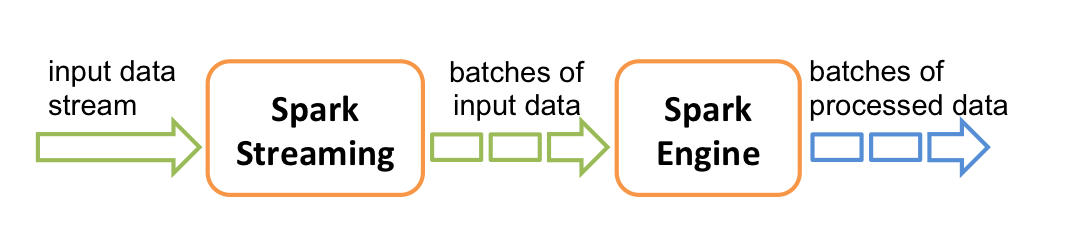
前言 Spark 2.0 将流式计算也统一到DataFrame里去了,提出了Structured Streaming的概念,将数据源映射为一张无线长度的表,同时将流式计算的结果映射为另外一张表,完全以结构化的方式去操作流式数据,复用了其对象的Catalyst引擎。 Spark 2.0 之前 作为Spark平台的流式实现,Spark Streaming 是有单独一套抽象和API的,大体如下 图片来源于Spakr官网 代码的形态如下: val conf = new SparkConf().setMaster("local[2]").setAppName("NetworkWordCount") //构建StreamingContext val ssc = new StreamingContext(conf, Seconds(1)) //获取输入源 val lines = ssc.socketTextStream("localhost", 9999) //逻辑计算 val wordCounts = lines.flatMap(_.split(" ")). map(word => (word, 1)). reduceByKey(_ + _) wordCounts.print() //启动流式计算 ssc.start() ssc.awaitTermination() 上面都是套路,基本都得照着这么写。 Spark 2.0 时代 概念上,所谓流式,无非就是无限大的表,官方给出的图一目了然: 图片来源于官网 在之前的宣传PPT里,有类似的代码,给人焕然一新的感觉。当然,下面的代码你肯定要有上下文的,就这一句肯定跑不起来的。 图片来源于http://litaotao.github.io/images/spark-2.0-7.png 第一个是标准的DataFrame的使用代码。下面第二个则是流式计算的代码,看完这个demo你肯定会纳闷: 没有定时器么,我怎么设置duration? 在哪里设置awaitTermination呢? 如果我要写入到其他引擎,而其他引擎没有适配咋办? 这些疑问其实归结起来就是: Structured Streaming 的完整套路是啥? 我们来看看代码(例子来源于Spark源码,我稍微做了些修改): val spark = SparkSession .builder . master("local[2]") . appName("StructuredNetworkWordCount"). getOrCreate() val schemaExp = StructType( StructField("name", StringType, false) :: StructField("city", StringType, true) :: Nil ) //标准的DataSource API,只不过read变成了readStream val words = spark.readStream.format("json").schema(schemaExp) .load("file:///tmp/dir") // DataFrame 的一些API val wordCounts = words.groupBy("name").count() //标准的DataSource 写入 API,只不过write变成了writeStream val query = wordCounts.writeStream //complete,append,update。目前只 //支持前面两种 .outputMode("complete") //console,parquet,memory,foreach 四种 .format("console") .trigger(ProcessingTime(5.seconds))//这里就是设置定时器了 .start() query.awaitTermination() 这个就是Structured Streaming 的完整套路了。 Structured Streaming 目前Source源只支持File 和 Socket 两种。输出则是四种,前面已经提到。foreach则是可以无限扩展的。我举个例子: val query = wordCounts.writeStream.trigger(ProcessingTime(5.seconds)) .outputMode("complete") .foreach(new ForeachWriter[Row] { var fileWriter: FileWriter = _ override def process(value: Row): Unit = { fileWriter.append(value.toSeq.mkString(",")) } override def close(errorOrNull: Throwable): Unit = { fileWriter.close() } override def open(partitionId: Long, version: Long): Boolean = { FileUtils.forceMkdir(new File(s"/tmp/example/${partitionId}")) fileWriter = new FileWriter(new File(s"/tmp/example/${partitionId}/temp")) true } }).start() 我把数据最后写到各个节点的临时目录里。当然,这只是个例子,不过其他类似于写入Redis的,则是类似的。 Structured Streaming 不仅仅在于API的变化 如果Structured Streaming 仅仅是换个API,或者能够支持DataFrame操作,那么我只能感到遗憾了,因为2.0之前通过某些封装也能够很好的支持DataFrame的操作。那么 Structured Streaming 的意义到底何在? 重新抽象了流式计算 易于实现数据的exactly-once 我们知道,2.0之前的Spark Streaming 只能做到at-least once,框架层次很难帮你做到exactly-once,参考我以前写的文章Spark Streaming Crash 如何保证Exactly Once Semantics。 现在通过重新设计了流式计算框架,使得实现exactly-once 变得容易了。 可能你会注意到,在Structured Streaming 里,多出了outputMode,现在有complete,append,update 三种,现在的版本只实现了前面两种。 complete,每次计算完成后,你都能拿到全量的计算结果。 append,每次计算完成后,你能拿到增量的计算结果。 但是,这里有个但是,使用了聚合类函数才能用complete模式,只是简单的使用了map,filter等才能使用append模式。 不知道大家明白了这里的含义么? complete 就是我们前面提到的mapWithState实现。 append 模式则是标准的对数据做解析处理,不做复杂聚合统计功能。 官方给出了complete 模式的图: 图片来源于官网 append 模式则是返回transform后最新的数据。 前面我们说到,现在的设计很简单,其实就是 无限大的 Source Table 映射到一张无限大的 Result Table上,每个周期完成后,都会更新Result Table。我们看到,Structured Streaming 已经接管了端到端了,可以通过内部机制保证数据的完整性,可靠性。 offset 概念,流式计算一定有offset的概念。 对于无法回溯的数据源则采用了WAL日志 state概念,对result table 的每个分区都进行状态包装,分区的的每个ADD,PUT,UPDATE,DELETE操作,都会写入到HDFS上,方便系统恢复。 其中第三点是只有在2.0才有的概念。不过比较遗憾的是,result table 和ForeachWriter 并没有什么结合,系统只是保证result table的完整性,通过HDFSBackedStateStoreProvider将result table 保存到HDFS。 以前的API就是给你个partition的iterator,你爱怎么玩怎么玩,但是到了现在,以ForeachWriter为例, override def process(value: Row): Unit = { 数据你只能一条一条处理了。理论上如果假设正好在process的过程中,系统挂掉了,那么数据就会丢了,但因为 Structured Streaming 如果是complete模式,因为是全量数据,所以其实做好覆盖就行,也就说是幂等的。 如果是append 模式,则可能只能保证at-least once ,而对于其内部,也就是result table 是可以保证exactly-once 的。对于比如数据库,本身是可以支持事物的,可以在foreachWrite close的时候commit下,有任何失败的时候则在close的时候,rollback 就行。但是对于其他的,比如HBase,Redis 则较为困难。 另外在ForeachWriter提供的初始化函数, override def open(partitionId: Long, version: Long): Boolean = { 返回值是Boolean,通过检测版本号,是否跳过这个分区的数据处理。返回true是为不跳过,否则为跳过。当你打开的时候,可以通过某种手段保存version,再系统恢复的时候,则可以读取该版本号,低于该版本的则返回false,当前的则继续处理。

优秀的个人博客,低调大师

MapReduce源码分析之InputFormat

InputFormat描述了一个Map-Reduce作业中的输入规范。Map-Reduce框架依靠作业的InputFormat实现以下内容: 1、校验作业的输入规范; 2、分割输入文件(可能为多个),生成逻辑输入分片InputSplit(往往为多个),每个输入分片InputSplit接着被分配给单独的Mapper; 3、提供记录读取器RecordReader的实现,RecordReader被用于从逻辑输入分片InputSplit收集输入记录,这些输入记录会被交由Mapper处理。 基于文件的输入格式的默认行为,作为代表性的子类FileInputFormat,基于输入文件的总大小(单位byte)来切分成逻辑输入分片InputSplit。然而,输入文件的文件系统数据块大小,被用作输入分片大小的上界。输入分片大小的下界则可以在mapred-default.xml配置文件中通过参数mapreduce.input.fileinputformat.split.minsize来配置。 无疑,由于记录界限应该被遵守,基于输入大小的逻辑输入分片不满足很多应用。在这种情况下,应用不得不实现一个记录阅读器RecordReader,以便遵守记录边界,并提出一个面向记录的逻辑输入分片视图给单个任务。 InputFormat是一个抽象类,其中,实现分片的是getSplits()方法,其定义如下: public abstract List<InputSplit> getSplits(JobContext context ) throws IOException, InterruptedException; getSplits()方法为作业在逻辑上切分输入文件集合 。每个输入分片将会被分配给单个Mapper进行处理。注意,这个切分只是对输入进行逻辑上的切分,输入文件并不会在物理上被分割成块。比如,一个分片可能是<输入文件路径,起始位置,长度>元组。InputFormat也会创建记录阅读器RecordReader去读取这个输入分片InputSplit。 而提供记录阅读器的是createRecordReader()方法,其定义如下: public abstract RecordReader<K,V> createRecordReader(InputSplit split, TaskAttemptContext context ) throws IOException, InterruptedException; createRecordReader()方法为给定分片创建一个记录阅读器。在分片被使用之前,框架将调用RecordReader的initialize(InputSplit, TaskAttemptContext)方法完成初始化。它需要两个参数: 1、InputSplit split:需要被读入的分片; 2、TaskAttemptContext context:任务上下文,存储了任务的相关信息。

优秀的个人博客,低调大师

MapReudce源码分析之Mapper

Mapper是MapReduce编程模型中一个将输入的key/value对映射成一组中间key/value对的组件。Map是将输入记录转换成中间记录的单个任务。被转换的中间记录不需要与输入记录一样的类型。一个给定的输入对可能被映射成0个货多个输出对。Hadoop的MapReduce框架为作业中输入格式InputFormat产生的每个输入分片InputSplit产生一个Map任务。通过JobContext的getConfiguration()方法,Mapper的实现者可以获得任务的配置信息。MapReduce框架中Map部分首先会调用setup()方法,然后接着为输入分片的每个KeyValue对调用map()方法进行处理,最见后再调用cleanup()方法。所有给定输出key相关的中间值随后会被框架进行分组,继而被传递给Reducer以确定最终的输出。通过指定两个关键的RawComparator类,用户可以控制排序和分组。Mapper输出被每个Reducer分区。通过实现一个定值分区器Partitioner,用户可以控制哪些key和相关记录进入哪个Reducer。 Mapper的执行主流程在其run()方法内,代码如下: /** * Expert users can override this method for more complete control over the * execution of the Mapper. * 熟练或者老练的用户可以覆写该方法,以便更完整的控制Mapper的运行 * @param context * @throws IOException */ public void run(Context context) throws IOException, InterruptedException { // task开始运行时调用setup()方法进行初始化 setup(context); try { // 当context中仍有KeyValye对的话,一直循环 while (context.nextKeyValue()) { // 取出context中当前key、valye,连同context本身,调用map()方法处理 map(context.getCurrentKey(), context.getCurrentValue(), context); } } finally { // task结束运行时调用cleanup()方法进行清理 cleanup(context); } } run()方法执行的流程很简单,大体如下: 1、task开始运行时setup()初始化方法; 2、在try模块中,当context中仍有KeyValye对的话,一直循环: 取出context中当前key、valye,连同context本身,调用map()方法处理; 3、在finally模块中,task结束运行时调用cleanup()方法进行清理 。 是不是很简单,就像一个模板一样,按照setup()--map()--map()--......--map()--cleanup()的执行主线运行。而且,熟练或者老练的用户可以覆写该方法,以便更完整的控制Mapper的运行。 我们接下来再看下进行初始化的setup()方法和进行清理的cleanup()方法,代码如下: /** * Called once at the beginning of the task. * task开始运行时调用一次,做初始化工作 */ protected void setup(Context context ) throws IOException, InterruptedException { // NOTHING } /** * Called once at the end of the task. * task结束运行时调用一次,做清理工作 */ protected void cleanup(Context context ) throws IOException, InterruptedException { // NOTHING } 这两个函数分别在task开始运行或结束运行时调用一次,一遍完成初始化或清理工作,用户可覆写这两个方法,以便实现自己的初始化或清理逻辑,或者,干脆不用管,那么这两个方法是空方法,什么都不会做。 再来看下实现KeyValue对转换的核心功能map()方法,代码如下: /** * Called once for each key/value pair in the input split. Most applications * should override this, but the default is the identity function. * 针对输入分片split的每个key/value对都会调用一次。大多数应用程序应该覆写该方法,而默认实现是一个类似恒等式的功能,原样输出key、value */ @SuppressWarnings("unchecked") protected void map(KEYIN key, VALUEIN value, Context context) throws IOException, InterruptedException { context.write((KEYOUT) key, (VALUEOUT) value); } map()方法针对输入分片split的每个key/value对都会调用一次。大多数应用程序应该覆写该方法,而默认实现是一个类似恒等式的功能,原样输出key、value。 另外,Mapper中还有一个抽象内部类Context,它实现了MapContext接口,代表了Map任务运行时的上下文信息,我们后续再讲。

优秀的个人博客,低调大师

HBase源码分析之KeyValue

HBase内部,单元格Cell的实现为KeyValue,它是HBase某行数据的某个单元格在内存中的组织形式,由Key Length、Value Length、Key、Value四大部分组成。其中,Key又由Row Length、Row、Column Family Length、Column Family、Column Qualifier、Time Stamp、Key Type七部分组成。在HBase1.0.2版本中,它的结构如图: 从左到右,依次为: 1、Key Length:存储Key的长度,占4B; 2、Value Length:存储Value的长度,占4B; 3、Key:由Row Length、Row、Column Family Length、Column Family 3.1、Row Length:存储Row的长度,即rowkey的长度,占2B; 3.2、Row:存储Row实际内容,即Rowkey,其大小为Row Length; 3.3、Column Family Length:存储列簇Column Family的长度,占1B; 3.4、Column Family:存储Column Family实际内容,大小为Column Family Length; 3.5、Column Qualifier:存储Column Qualifier对应的数据,既然key中其他所有字段的大小都知道了,整个key的大小也知道了,那么这个Column Qualifier大小也是明确的了,无需再存储其length; 3.6、Time Stamp:存储时间戳Time Stamp,占8B; 3.7、Key Type:存储Key类型Key Type,占1B,Type分为Put、Delete、DeleteColumn、DeleteFamilyVersion、DeleteFamily等类型,标记这个KeyValue的类型; 4、Value:存储单元格Cell对应的实际的值Value。 下面,我们看下HBase中KeyValue是如何实现的。在KeyValue中,有三个十分重要的变量,如下: // KeyValue core instance fields. // KeyValyeh核心实例存储域 // KeyValue相关的不变byte[]数组,存储KeyValue实际内容 protected byte [] bytes = null; // an immutable byte array that contains the KV // KeyValue在数组bytes的起始位置 protected int offset = 0; // offset into bytes buffer KV starts at // KeyValue在数组bytes自起始位置offset后的长度 protected int length = 0; // length of the KV starting from offset. KeyValue内容是存储在byte[]数组bytes中的,它是一个不变的byte[]数组,而存储的起始位置与长度,则分别由offset和length标识。 下面,我们看下KeyValue中获取Key Length、Value Length、Row Length、Column Family、Value等等相关字段的方法,来验证下我们上面罗列出的KeyValue结构。 1、Key Length /** * @return Length of key portion. */ public int getKeyLength() { // 从KeyValue底层byte[]数组bytes中位置offset开始,获取一个int,也就是4B return Bytes.toInt(this.bytes, this.offset); } getKeyLength()方法用于获取KeyValue中Key长度Key Length,它从KeyValue底层byte[]数组bytes中位置offset开始,获取一个int,也就是4B,这也就验证了我们上面说的,KeyValue中第一个是Key Length,大小为4B。 2、Value Length /** * @return Value length */ @Override public int getValueLength() { // 从KeyValue底层byte[]数组bytes中offset+4开始,获取一个int,也就是4B // 也就是说,key length后紧跟着4B是value length int vlength = Bytes.toInt(this.bytes, this.offset + Bytes.SIZEOF_INT); return vlength; } getValueLength()方法用于获取KeyValue中Value长度Value Length,它从KeyValue底层byte[]数组bytes中offset+4开始,获取一个int,也就是4B,这也就验证了我们上面说的Key Length后紧跟着4B是Value Length。 3、Key起始位置 /** * @return Key offset in backing buffer.. */ public int getKeyOffset() { // ROW_OFFSET为key length、value length之后的位置 return this.offset + ROW_OFFSET; } ROW_OFFSET为Key Length、Value Length之后的位置,定义如下: // How far into the key the row starts at. First thing to read is the short // that says how long the row is. public static final int ROW_OFFSET = Bytes.SIZEOF_INT /*keylength*/ + Bytes.SIZEOF_INT /*valuelength*/; getKeyOffset()方法用于获取KeyValue中Key的起始位置,它的取值为整个KeyValue的起始位置offset加上ROW_OFFSET,而ROW_OFFSET为Key Length和Value Length所占大小,这也就验证了Key Length和Value Length之后就是Key。 4、Value起始位置 /** * @return the value offset */ @Override public int getValueOffset() { // Key的起始位置,再加上Key的长度,就是Value的起始位置 int voffset = getKeyOffset() + getKeyLength(); return voffset; } getValueOffset()方法用于获取KeyValue中Value的起始位置,它的值为通过getKeyOffset()方法获取的Key的起始位置,再加上通过getKeyLength()方法获取的Key的长度,这也就验证了KeyValue中继Key Length、Value Length、Key之后,就是Value。 5、Row Length /** * @return Row length */ @Override public short getRowLength() { // 从KeyValue底层byte[]数组bytes中key起始位置开始,获取一个short,也就是2B // getKeyOffset()起始时获取的key length加value length后的位置 // 也就是说,key length后紧跟着4B是value length,而value length后就是key的开始, // 而key前面的2B是row length return Bytes.toShort(this.bytes, getKeyOffset()); } getRowLength()方法用于获取KeyValue中Row长度Row Length,它从KeyValue底层byte[]数组bytes中key起始位置开始,获取一个short,也就是2B,这也就证明了Row Length是Key中第一个字段。 5、Row起始位置 /** * @return Row offset */ @Override public int getRowOffset() { // key的起始位置再加2B,即row length之后就是row return getKeyOffset() + Bytes.SIZEOF_SHORT; } getRowOffset()方法用于获取KeyValue中Row的起始位置,它的取值为Key的起始位置再加2B,即Row Length之后就是Row,与上面所讲一致! 6、Row /** * Primarily for use client-side. Returns the row of this KeyValue in a new * byte array.<p> * * If server-side, use {@link #getBuffer()} with appropriate offsets and * lengths instead. * @return Row in a new byte array. */ @Deprecated // use CellUtil.getRowArray() public byte [] getRow() { return CellUtil.cloneRow(this); } getRow()方法用于获取Row内容,它通过CellUtil的cloneRow()方法,传入本身KeyValue实例,返回一个byte[],而cloneRow()方法如下: public static byte[] cloneRow(Cell cell){ // output为一个大小为row length的byte[]数组 byte[] output = new byte[cell.getRowLength()]; // 将row从cell中copy至output copyRowTo(cell, output, 0); return output; } 可以看到,先构造一个Row Length大小的byte[]数组output,这也就意味着Row的大小是由之前的Row Length对应的值确定的。然后,调用copyRowTo()方法,将KeyValue中Row存储的内容拷贝至output数组并返回。而copyRowTo()方法,将cell(也就是KeyValue)中byte[]数组bytes,从Row的起始位置Row Offset处开始,拷贝到目标byte[]数组destination(也就是output),从0开始,拷贝数据的长度为Row Length,也就是会填满整个destination(output),代码如下: public static int copyRowTo(Cell cell, byte[] destination, int destinationOffset) { // 将cell中byte[]数组bytes,从row offset处开始,拷贝到目标byte[]数组destination,从0开始,拷贝数据的长度为row length, // 也就是会填满整个destination System.arraycopy(cell.getRowArray(), cell.getRowOffset(), destination, destinationOffset, cell.getRowLength()); // 返回数据拷贝的终止点 return destinationOffset + cell.getRowLength(); } 7、Family起始位置 /** * @return Family offset */ @Override public int getFamilyOffset() { return getFamilyOffset(getRowLength()); } /** * @return Family offset */ private int getFamilyOffset(int rlength) { // 获取family的起始位置:整个KeyValue起始位置offset + ROW_OFFSET(Key Length + Value Length) + 2B(Row Length) + 实际Row大小rlength + 1B(Family Length) return this.offset + ROW_OFFSET + Bytes.SIZEOF_SHORT + rlength + Bytes.SIZEOF_BYTE; } getFamilyOffset()方法用于获取KeyValue中Family的起始位置,它是整个KeyValue起始位置offset,加上ROW_OFFSET,也就是Key Length、Value Length所占大小,然后再加上Row Length所占大小2B,和通过getRowLength()方法获取的实际Row大小rlength,最后加上1B,即Family Length所占大小。这也就说明了,Key中ROw Length、Row之后就是Family Length和Family,而Family Length大小占1B。 8、Family Length /** * @return Family length */ @Override public byte getFamilyLength() { return getFamilyLength(getFamilyOffset()); } /** * @return Family length */ public byte getFamilyLength(int foffset) { // family起始位置减1,这个1B就是family length return this.bytes[foffset-1]; } getFamilyLength()方法用于获取KeyValue中Family长度Family Length,它是通过由getFamilyOffset()方法获取的Family位置减1来获取的,与上面得到的验证一致,Family前面1B就是Family Length。 9、Qualifier起始位置 /** * @return Qualifier offset */ @Override public int getQualifierOffset() { return getQualifierOffset(getFamilyOffset()); } /** * @return Qualifier offset */ private int getQualifierOffset(int foffset) { // Family起始位置加上Family长度Family Length return foffset + getFamilyLength(foffset); } getQualifierOffset()方法用于获取KeyValue中Qualifier的起始位置,它实际上是通过Family的起始位置再加上Family的长度Family Length,这也就说明了Family后就是Qualifier。 10、Qualifier长度 /** * @return Qualifier length */ @Override public int getQualifierLength() { return getQualifierLength(getRowLength(),getFamilyLength()); } /** * @return Qualifier length */ private int getQualifierLength(int rlength, int flength) { // Key长度减去Row长度、Family长度、Row Length长度、Family Length长度、Time Stamp长度、Key Type长度 return getKeyLength() - (int) getKeyDataStructureSize(rlength, flength, 0); } getQualifierLength()方法,用于获取KeyValue中Qualifier长度,KeyValue中并没有直接存储Qualifier长度,而是通过Key的总长度减去Key中除Qualifier外其它各部分长度来得到的,实际上是一个计算的过程,为Key长度减去Row长度、Family长度、Row Length长度、Family Length长度、Time Stamp长度、Key Type长度的和。 11、Timestamp起始位置 /** * @return Timestamp offset */ public int getTimestampOffset() { return getTimestampOffset(getKeyLength()); } /** * @param keylength Pass if you have it to save on a int creation. * @return Timestamp offset */ private int getTimestampOffset(final int keylength) { // Key的起始位置加上Key的长度,再减去Time Stamp和Key Type所占大小 return getKeyOffset() + keylength - TIMESTAMP_TYPE_SIZE; } getTimestampOffset()方法用于获取KeyValue中Time Stamp的起始位置,它是通过Key的起始位置加上Key的长度,再减去Time Stamp和Key Type所占大小来计算得到的。这意味着,在Key中,Time Stamp处于倒数第二个位置,也就是在Qualifier之后,在Key Type之前,而Key Type则居于最后。 12、获取TimeStamp /** * * @return Timestamp */ @Override public long getTimestamp() { return getTimestamp(getKeyLength()); } /** * @param keylength Pass if you have it to save on a int creation. * @return Timestamp */ long getTimestamp(final int keylength) { // 获取TimeStamp起始位置tsOffset int tsOffset = getTimestampOffset(keylength); // 从bytes中tsOffset位置开始读取一个Long,即8B return Bytes.toLong(this.bytes, tsOffset); } getTimestamp()方法是用来获取KeyValue中TimeStamp的,它先获取TimeStamp起始位置tsOffset,然后从bytes中tsOffset位置开始读取一个Long,即8B,这与上面提到的TimeStamp占8B是一致的。 13、获取Key Type /** * @return Type of this KeyValue. */ @Deprecated public byte getType() { return getTypeByte(); } /** * @return KeyValue.TYPE byte representation */ @Override public byte getTypeByte() { // 整个KeyValue的位置offset + Key长度 - 1 + Key Length所占长度和Value Length所占长度和 // 即Key Type位于整个Key的最后一个1B return this.bytes[this.offset + getKeyLength() - 1 + ROW_OFFSET]; } getType()和getTypeByte()方法用来获取KeyValue中Key Type值,它是通过在bytes中,从整个KeyValue的位置offset + Key长度 - 1 + Key Length所占长度和Value Length所占长度和位置处获取的一个Byte来得到的,即Key Type位于整个Key的最后一个1B,这与上面所述也是一致的。 14、获取Value值 /** * Returns value in a new byte array. * Primarily for use client-side. If server-side, use * {@link #getBuffer()} with appropriate offsets and lengths instead to * save on allocations. * @return Value in a new byte array. */ @Deprecated // use CellUtil.getValueArray() public byte [] getValue() { return CellUtil.cloneValue(this); } getValue()方法是用来从KeyValue中获取Value值得,它是整个Cell实际存储的内容,通过CellUtil的cloneValue()方法,传入KeyValue自身实力来获得。我们来看下这个cloneValue()方法: public static byte[] cloneValue(Cell cell){ // 创建Value Length大小的byte[]数组output byte[] output = new byte[cell.getValueLength()]; // 将cell中的value值copy至output copyValueTo(cell, output, 0); return output; } cloneValue()方法首先创建Value Length大小的byte[]数组output,然后调用copyValue()方法,将cell中的value值copy至output。而copyValue()方法很简单,从bytes数组的Value Offset处开始拷贝Value Length大小,至destination,代码如下: public static int copyValueTo(Cell cell, byte[] destination, int destinationOffset) { // 从bytes数组的Value Offset处开始拷贝Value Length大小,至destination System.arraycopy(cell.getValueArray(), cell.getValueOffset(), destination, destinationOffset, cell.getValueLength()); return destinationOffset + cell.getValueLength(); }

优秀的个人博客,低调大师

HBase的Nonce实现分析

一、问题背景 当客户端发送RPC请求给服务端时,基于各种原因,服务器的响应很可能会超时。如果客户端只是在那等待,针对数据的操作,很可能出现服务器端已处理完毕,但是无法通知客户端,此时,客户端只能重新发起请求,可是又可能造成服务端重复处理请求。该如何解决该问题呢? 二、解决方案 实际上,客户端发送RPC请求给服务器后,如果响应超时,那么客户端会重复发送请求,直到达到参数配置的重试次数上限。而且,客户端第一次发送和以后重发请求时,会附带相同的nonce,服务端只要根据nonce进行判断,就能得知是否为同一请求,并根据之前请求处理的结果,决定是等待、拒绝还是直接处理。 三、HBase如何实现的 在HRegionServer中,有一个ServerNonceManager类型的成员变量nonceManager,由它负责管理该RegionServer上的nonce。其定义如下: final ServerNonceManager nonceManager; ServerNonceManager中有一个十分重要的方法,用于当一个操作在服务端执行后未及时反馈响应给客户端,客户端重新发起携带相同nonceGroup和nonce的同一操作的请求时,服务端根据nonceGroup和nonce做相应的判断。定义如下: /** * Starts the operation if operation with such nonce has not already succeeded. If the * operation is in progress, waits for it to end and checks whether it has succeeded. * * 如果操作未执行成功,重新开始一个操作。如果该操作在进行过程中,等待它完成并判断它是否成功。 * @param group Nonce group. * @param nonce Nonce. * @param stoppable Stoppable that terminates waiting (if any) when the server is stopped. * @return true if the operation has not already succeeded and can proceed; false otherwise. */ public boolean startOperation(long group, long nonce, Stoppable stoppable) throws InterruptedException { // 如果传入的nonce为0,则返回true,表明操作可以进行 if (nonce == HConstants.NO_NONCE) return true; // 构造NonceKey实例nk NonceKey nk = new NonceKey(group, nonce); // 构造OperationContext实例ctx,初始状态为WAIT OperationContext ctx = new OperationContext(); while (true) { // 将NonceKey到OperationContext的映射,添加到ConcurrentHashMap类型的nonces中去 OperationContext oldResult = nonces.putIfAbsent(nk, ctx); // 如果之前没有,则说明该操作可以直接执行 if (oldResult == null) return true; // Collision with some operation - should be extremely rare. // 如果之前存在该操作,则取出该操作nonce对应的OperationContext synchronized (oldResult) { // 获得该nonce对应的OperationContext状态 int oldState = oldResult.getState(); LOG.debug("Conflict detected by nonce: " + nk + ", " + oldResult); // 如果之前的状态不是WAIT if (oldState != OperationContext.WAIT) { // 如果之前的状态是PROCEED,说明之前的操作执行完成且以失败告终,此处返回true,表示操作可以再次执行 return oldState == OperationContext.PROCEED; // operation ended } // 等待一段时间后继续循环 oldResult.setHasWait(); oldResult.wait(this.conflictWaitIterationMs); // operation is still active... wait and loop // 判断RegionServer的状态 if (stoppable.isStopped()) { throw new InterruptedException("Server stopped"); } } } } 在RSRpcServices的append()方法中,有如下代码: if (r == null) { long nonce = startNonceOperation(m, nonceGroup); boolean success = false; try { r = region.append(append, nonceGroup, nonce); success = true; } finally { endNonceOperation(m, nonceGroup, success); } if (region.getCoprocessorHost() != null) { region.getCoprocessorHost().postAppend(append, r); } } 其中,startNonceOperation()方法源码如下: /** * Starts the nonce operation for a mutation, if needed. * * 如果需要的话,为mutation开启一个nonce操作 * * @param mutation Mutation. * @param nonceGroup Nonce group from the request. * @returns Nonce used (can be NO_NONCE). */ private long startNonceOperation(final MutationProto mutation, long nonceGroup) throws IOException, OperationConflictException { // 如果RegionServer上的nonceManager为null,或者该mutation不存在nonce,那么直接返回HConstants.NO_NONCE,即0 if (regionServer.nonceManager == null || !mutation.hasNonce()) return HConstants.NO_NONCE; // 标志位,是否可以运行 boolean canProceed = false; try { // 调用RegionServer上nonceManager的startOperation()方法,确定是否可以执行该操作 canProceed = regionServer.nonceManager.startOperation( nonceGroup, mutation.getNonce(), regionServer); } catch (InterruptedException ex) { throw new InterruptedIOException("Nonce start operation interrupted"); } if (!canProceed) {// 如果不能运行,抛出OperationConflictException异常,即操作冲突异常 // TODO: instead, we could convert append/increment to get w/mvcc String message = "The operation with nonce {" + nonceGroup + ", " + mutation.getNonce() + "} on row [" + Bytes.toString(mutation.getRow().toByteArray()) + "] may have already completed"; throw new OperationConflictException(message); } // 最后,返回mutation的nonce return mutation.getNonce(); } 它会调用RegionServer上nonceManager的startOperation()方法,确定是否可以执行该操作。

优秀的个人博客,低调大师

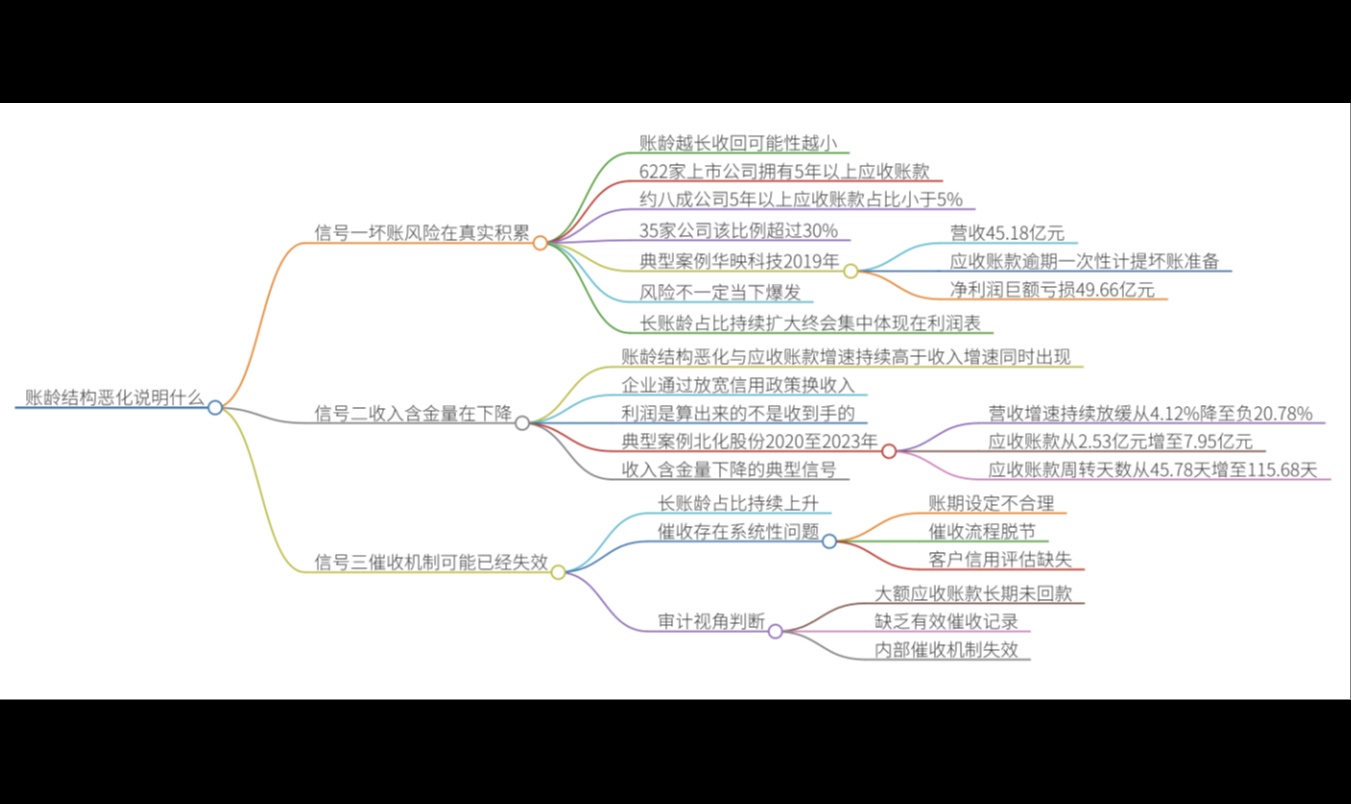
账龄分析表怎么读?账龄分析发现结构恶化,说明什么?

有位财务经理曾经跟我分享过一个经历:两家客户的应收账款周转天数都是43天,看起来差不多,他放心地给两家都批了相同的信用额度。结果半年后,其中一家突然爆雷,欠款收不回来了。回头看账龄表时才发现——这家公司近三分之一的账款已经逾期超过61天,只是被那些按时付款的大单平均成了43天的正常数据。

资源下载

更多资源
Nacos

Nacos

Nacos /nɑ:kəʊs/ 是 Dynamic Naming and Configuration Service 的首字母简称,一个易于构建 AI Agent 应用的动态服务发现、配置管理和AI智能体管理平台。Nacos 致力于帮助您发现、配置和管理微服务及AI智能体应用。Nacos 提供了一组简单易用的特性集,帮助您快速实现动态服务发现、服务配置、服务元数据、流量管理。Nacos 帮助您更敏捷和容易地构建、交付和管理微服务平台。

Spring

Spring

Spring框架(Spring Framework)是由Rod Johnson于2002年提出的开源Java企业级应用框架,旨在通过使用JavaBean替代传统EJB实现方式降低企业级编程开发的复杂性。该框架基于简单性、可测试性和松耦合性设计理念,提供核心容器、应用上下文、数据访问集成等模块,支持整合Hibernate、Struts等第三方框架,其适用范围不仅限于服务器端开发,绝大多数Java应用均可从中受益。

Rocky Linux

Rocky Linux

Rocky Linux(中文名:洛基)是由Gregory Kurtzer于2020年12月发起的企业级Linux发行版,作为CentOS稳定版停止维护后与RHEL(Red Hat Enterprise Linux)完全兼容的开源替代方案,由社区拥有并管理,支持x86_64、aarch64等架构。其通过重新编译RHEL源代码提供长期稳定性,采用模块化包装和SELinux安全架构,默认包含GNOME桌面环境及XFS文件系统,支持十年生命周期更新。

WebStorm

WebStorm

WebStorm 是jetbrains公司旗下一款JavaScript 开发工具。目前已经被广大中国JS开发者誉为“Web前端开发神器”、“最强大的HTML5编辑器”、“最智能的JavaScript IDE”等。与IntelliJ IDEA同源,继承了IntelliJ IDEA强大的JS部分的功能。

用户登录
用户注册