首页 文章 精选 留言 我的

精选列表

搜索[c/c ],共10000篇文章
优秀的个人博客,低调大师

C#使用反射设置属性值

最近在Refix一个支持Excel文件导入导出功能时,发现有用到反射的相关技能。故而在网上查了些资料,通过代码调试加深下理解。 class Program { static void Main(string[] args) { var student = new Student() { Name = "Jack", Address = "Lingbi County", City = "Zhangyuan" }; var studentName = GetModelValue("Name", student); var studentCity = SetModelValue("City", "Wuhan", student); Console.WriteLine($"Hello World! {student.Name}, {student.City}"); } /// <summary> /// 获取类中的属性值 /// </summary> /// <param name="FieldName"></param> /// <param name="obj"></param> /// <returns></returns> public static string GetModelValue(string FieldName, object obj) { try { Type Ts = obj.GetType(); object o = Ts.GetProperty(FieldName).GetValue(obj, null); string Value = Convert.ToString(o); if (string.IsNullOrEmpty(Value)) return null; return Value; } catch { return null; } } /// <summary> /// 设置类中的属性值 /// </summary> /// <param name="FieldName"></param> /// <param name="obj"></param> /// <returns></returns> public static bool SetModelValue(string FieldName, string Value, object obj) { try { Type Ts = obj.GetType(); object v = Convert.ChangeType(Value, Ts.GetProperty(FieldName).PropertyType); Ts.GetProperty(FieldName).SetValue(obj, v, null); return true; } catch { return false; } } public class Student { public string Name { get; set; } public string Address { get; set; } public string City { get; set; } } } 代码中主要使用到GetType(), GetValue(), 以及SetValue(),不过在应用中比较容易出错,尤其是类型转换的时候。 在此做个备忘录,后续持续跟进。 墨匠
优秀的个人博客,低调大师

c# 利用IMap 收取163邮件

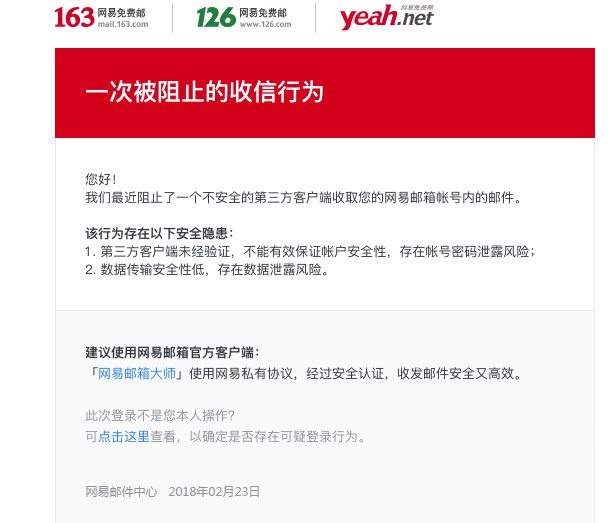
最近我要做一个爬虫。这个爬虫需要如下几个步骤: 1 填写注册内容(需要邮箱注册) 2 过拖拽验证码(geetest) 3 注册成功会给邮箱发一封确认邮箱 4 点击确认邮箱中的链接 完成注册 我这里就采用163邮箱注册。 邮箱协议有 pop3 和 imap 和 smtp 我试了pop3 不能够筛选邮件 例如筛选未读 和 发件人这2个条件 所以放弃用pop3 imap协议是支持的。 我就找了一个开源的第三方lib:S22.Imap 用法很简单: public void Test163() { var imapServer = "imap.163.com"; var port = 993; using (ImapClient client = new ImapClient(imapServer, port, "xxxx@163.com", "pwd", AuthMethod.Login, true)) { // Returns a collection of identifiers of all mails matching the specified search criteria. IEnumerable<uint> uids = client.Search(SearchCondition.Unseen()); // Download mail messages from the default mailbox. IEnumerable<MailMessage> messages = client.GetMessages(uids,FetchOptions.HtmlOnly); Console.WriteLine("We are connected!"); } } 发现 在login的时候 报错了: 提示“NO Select Unsafe Login. Please contact kefu@188.com for help”。 163邮箱也会收到一个告警邮件 经过查证 发现得需要在发送 login 命令之前 得先发送 id 命令 至于为什么要这么做 我的理解是得先伪装成普通的客户端吧(有理解错误请指出谢谢) 我fork了一份SS2.imap的代码 打算兼容163的这个特殊情况改掉源码 然后走Login方法就不会报错了 Github地址:https://github.com/yuzd/S22.Imap 如果您觉得阅读本文对您有帮助,请点一下“推荐”按钮,您的“推荐”将是我最大的写作动力!欢迎各位转载,转载文章之后须在文章页面明显位置给出作者和原文连接,谢谢。

优秀的个人博客,低调大师

C# 如何更改Word语言设置

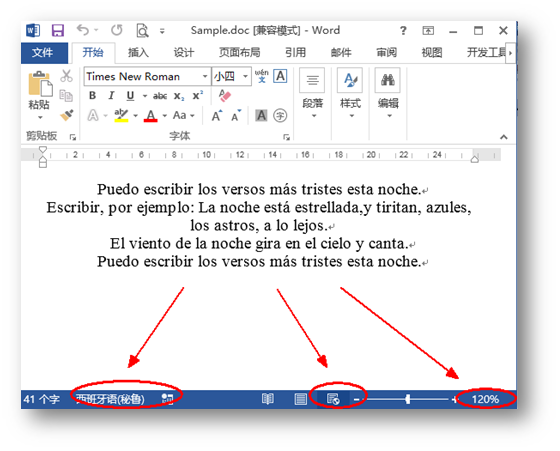
一般在创建或者打开一个Word文档时,如果没有进行过特殊设置的话,系统默认的输入语言的是英语输入,但是为适应不同的办公环境,我们其实是需要对文字嵌入的语言进行切换的,因此,本文将介绍如何使用免费版组件Free Spire.Doc for .NET来实现Word语言输入。另外,针对这款组件的多种Word操作功能,如,设置文档属性、文档视图模式等,本文中也将作进一步演示演示。 代码操作前准备 安装Spire.Doc for .NET之后,添加引用Spire.Doc.dll文件到项目程序集,同时添加相应的using指令到命名空间。 注意:以下代码中,以选取西班牙语(秘鲁)为例,其他语言设置,可参见 Microsoft Locale ID Values 具体步骤如下: 步骤一:添加如下命名空间 using System; using Spire.Doc; using Spire.Doc.Documents; using Spire.Doc.Fields; 步骤二:更改文本输入语言 //创建一个Document类实例,并添加Section和Paragraph到Document Document doc = new Document(); Section sec = doc.AddSection(); Paragraph para = sec.AddParagraph(); //向段落添加西班牙(秘鲁)语文字并设置文本对齐方式 TextRange txtRange = para.AppendText("Puedo escribir los versos más tristes esta noche.\n Escribir, por ejemplo: La noche está estrellada,y tiritan, azules, los astros, a lo lejos.\n El viento de la noche gira en el cielo y canta.\n Puedo escribir los versos más tristes esta noche."); txtRange.CharacterFormat.LocaleIdASCII= 10250; para.Format.HorizontalAlignment = HorizontalAlignment.Center; 步骤三:设置试图模式为Web视图,调整视图缩放比例 doc.ViewSetup.DocumentViewType = DocumentViewType.WebLayout; doc.ViewSetup.ZoomPercent = 120; doc.ViewSetup.ZoomType = ZoomType.None; 步骤四:添加文档属性(可根据需要自行设置文档内置属性或者自定义属性) //添加文档属性(内置属性) doc.BuiltinDocumentProperties.Title = "测试文件"; doc.BuiltinDocumentProperties.Category = "非机密文档"; doc.BuiltinDocumentProperties.Author = "James"; doc.BuiltinDocumentProperties.LastAuthor = "Mia"; doc.BuiltinDocumentProperties.Keywords = "Word文档, 属性, 样本"; doc.BuiltinDocumentProperties.Comments = "此文档仅供测试使用"; doc.BuiltinDocumentProperties.Subject = "Demo"; //添加文档属性(自定义属性) CustomDocumentProperties custom = doc.CustomDocumentProperties; custom.Add("Authorized Date", DateTime.Today); 步骤五:保存并打开文档 doc.SaveToFile("Sample.doc", FileFormat.Doc); System.Diagnostics.Process.Start("Sample.doc"); 完成以上步骤后,运行该项目生成文件(可在该项目文件夹下bin>Debug下查看),如下图所示: 对文档属性的设置如下图所示: 以上全部内容为本次对Word文档进行语言设置方法的讲述,文中对文档的属性设置在文档的保存与日后文档管理上其实也很有帮助。希望本文能提供一定帮助,欢迎转载(转载请注明出处)。感谢浏览!

优秀的个人博客,低调大师

C#运算符小例子

using System;using System.Collections.Generic;using System.Linq;using System.Text;using System.Threading.Tasks; namespace Demo{ class Program { static void Main(string[] args) { Console.WriteLine("输入一个数字:"); int myInt = Convert.ToInt32(Console.ReadLine()); bool isLessThan10 = myInt < 10; bool isBetween0And5 = (0 <= myInt) && (myInt <= 5); Console.WriteLine("数字小于10? {0}",isLessThan10); Console.WriteLine("数字在0和5之间? {0}", isBetween0And5); Console.ReadKey(); } } } 本文转自TBHacker博客园博客,原文链接:http://www.cnblogs.com/jiqing9006/p/6707627.html,如需转载请自行联系原作者

优秀的个人博客,低调大师

C#中结构struct的使用

using System;using System.Collections.Generic;using System.Linq;using System.Text;using System.Threading.Tasks; namespace Demo{ enum orientation:byte { 北 = 1, 南 = 2, 东 = 3, 西 = 4 } struct route { public orientation direction; public double distance; } class Program { static void Main(string[] args) { route myRoute; int myDirection = -1; double myDistance; Console.WriteLine("1)北\n 2)南\n 3)东\n 4)西\n"); do { Console.WriteLine("选择一个方向:"); myDirection = Convert.ToInt16(Console.ReadLine()); } while (myDirection < 1 || myDirection > 4); Console.WriteLine("输入一个距离:"); myDistance = Convert.ToDouble(Console.ReadLine()); myRoute.direction = (orientation)myDirection; myRoute.distance = myDistance; Console.WriteLine("方向是{0},距离是{1}!",myRoute.direction,myRoute.distance); Console.ReadKey(); } } }结构比枚举更复杂,可以保存多种类型的数据! 本文转自TBHacker博客园博客,原文链接:http://www.cnblogs.com/jiqing9006/p/6728565.html,如需转载请自行联系原作者

资源下载

更多资源
Mario

Mario

马里奥是站在游戏界顶峰的超人气多面角色。马里奥靠吃蘑菇成长,特征是大鼻子、头戴帽子、身穿背带裤,还留着胡子。与他的双胞胎兄弟路易基一起,长年担任任天堂的招牌角色。

Nacos

Nacos

Nacos /nɑ:kəʊs/ 是 Dynamic Naming and Configuration Service 的首字母简称,一个易于构建 AI Agent 应用的动态服务发现、配置管理和AI智能体管理平台。Nacos 致力于帮助您发现、配置和管理微服务及AI智能体应用。Nacos 提供了一组简单易用的特性集,帮助您快速实现动态服务发现、服务配置、服务元数据、流量管理。Nacos 帮助您更敏捷和容易地构建、交付和管理微服务平台。

Sublime Text

Sublime Text

Sublime Text具有漂亮的用户界面和强大的功能,例如代码缩略图,Python的插件,代码段等。还可自定义键绑定,菜单和工具栏。Sublime Text 的主要功能包括:拼写检查,书签,完整的 Python API , Goto 功能,即时项目切换,多选择,多窗口等等。Sublime Text 是一个跨平台的编辑器,同时支持Windows、Linux、Mac OS X等操作系统。

WebStorm

WebStorm

WebStorm 是jetbrains公司旗下一款JavaScript 开发工具。目前已经被广大中国JS开发者誉为“Web前端开发神器”、“最强大的HTML5编辑器”、“最智能的JavaScript IDE”等。与IntelliJ IDEA同源,继承了IntelliJ IDEA强大的JS部分的功能。

用户登录
用户注册